# pi-browser-use
Native Pi extension **and Agent Plugins 1.0 / standalone MCP server**, sharing the same
curated browser runtime. See [portable installation and configuration](docs/agent-plugins.md).
Opinionated browser-use for the [Pi coding agent](https://pi.dev), powered by [`chrome-devtools-mcp`](https://github.com/ChromeDevTools/chrome-devtools-mcp) — not Playwright.
## Why this exists
- **Persistent Pi browser by default** — self-launched headless Chrome on `~/.pi/browser-profile` (log in once via `browser_setup`); MCP attaches over an ephemeral loopback port. No window, no focus steal, no consent popups.
- **Fresh clean room on request** — `mode: fresh` for anonymous checks; nothing persists.
- **Existing-Chrome escape hatch** — `mode: existing` brokers background tabs into the collapsed `pi-browser-use` group via the bundled extension (`extension/`).
- **CLI-first policy bundled** — `skills/browser-policy` tells agents to prefer `gh` / `wrangler` / APIs and web fetching before driving the browser.
- **Safer proxying** — `browser_`-prefixed tools, noisy/privileged tools excluded, sensitive network headers redacted, background/focus-safe page defaults.
Not affiliated with `@amaster.ai/pi-browser-use` or `@narumitw/pi-chrome-devtools`.
## Install
```bash
pi install npm:pi-browser-use
```
Requires Node.js `>=24` and Chrome stable or newer.
## Configure
Settings key is `pi-browser-use` in `~/.pi/agent/settings.json` (user) or `.pi/settings.json` (trusted project, wins):
```json
{
"pi-browser-use": {
"mode": "persistent",
"headed": false,
"visionModel": { "provider": "openai", "model": "gpt-4o" }
}
}
```
`persistent` is already the default; the snippet above pins it explicitly. There is no consent popup in this mode — Chrome's per-session "Allow remote debugging?" gate applies to `existing` only.
| `mode` | Behavior |
| ---------------------- | ---------------------------------------------------------------------------- |
| `persistent` (default) | Pi's own browser: saved profile with your logins (`~/.pi/browser-profile`) |
| `fresh` | Isolated clean room, thrown away each session |
| `existing` | Attach to your running Chrome — consent popup each session, avoid by default |
`headed: true` shows the window (both modes default headless); `existing` is always headed. `visionModel` enables `browser_analyze_screenshot`; omit it and the tool stays unregistered.
All browser behavior plus the policy skill in one install; `.pi/settings.json` is purely for overrides.
Per-project identity composes: user settings set the default, trusted project settings win per repo. Example — separate agent profiles per project:
```jsonc
// ~/Developer/work/.pi/settings.json
{ "pi-browser-use": { "mode": "persistent", "userDataDir": "~/.pi/browser-profile-work" } }
```
Advanced: full option reference (upstream parity)
`mode` overrides `sessionMode`/`headless` when present; `headed` overrides `headless`.
### Full option reference (advanced)
| Option | Type | Default | Description |
| ---------------------- | ---------- | ---------- | ------------------------------------------------------------------------------ |
| `sessionMode` | `string` | `isolated` | `persistent`, `isolated`, or `existing` |
| `headless` | `boolean` | `true` | No window at all (the only true hide on macOS) |
| `channel` | `string` | — | `canary`, `dev`, `beta`, `stable` |
| `browserUrl` | `string` | — | Attach to a running debuggable Chrome via HTTP URL |
| `wsEndpoint` | `string` | — | Attach via DevTools WebSocket endpoint |
| `executablePath` | `string` | — | Custom Chrome executable |
| `viewport` | `string` | — | Initial viewport, e.g. `1280x720` |
| `userDataDir` | `string` | — | Custom profile dir (persistent mode defaults to `~/.pi/browser-profile`) |
| `autoConnect` | `boolean` | `false` | Auto-attach to a local running Chrome (implies `existing`) |
| `tabBridgePort` | `number` | `31973` | Loopback port for the Existing-mode tab-broker bridge (`0` disables it) |
| `chromeArgs` | `string[]` | — | First-class Chrome flags, forwarded as `--chrome-arg=` |
| `extraArgs` | `string[]` | — | Raw escape hatch, forwarded verbatim to `chrome-devtools-mcp` |
| `visionModel` | `object` | — | `{ provider, model }` from Pi's registry; enables `browser_analyze_screenshot` |
| `allowedUrlPattern` | `string[]` | — | Cage navigation to matching URL patterns |
| `blockedUrlPattern` | `string[]` | — | Block matching URL patterns (mutually exclusive with allow) |
| `redactNetworkHeaders` | `boolean` | `true` | Strip sensitive headers from network results |
| `acceptInsecureCerts` | `boolean` | `false` | Ignore self-signed/expired certificates |
First-class `chromeArgs` only apply when `chrome-devtools-mcp` launches Chrome itself — never with `autoConnect`/`browserUrl`. On macOS `--start-minimized` is ignored; only `headless: true` truly hides the window.
Hosts where `process.execPath` is not a directly executable Node runtime can set `PI_BROWSER_USE_NODE` to the Node command used for the MCP subprocess.
Persistent mode self-launches Pi-owned Chrome and attaches MCP via `browserUrl`. Set `PI_BROWSER_USE_LEGACY_PERSISTENT=1` to restore the pre-Phase-2 behavior (MCP launches Chrome itself).
## Tools
Upstream `chrome-devtools-mcp` tools are proxied as `browser_*` (navigation, snapshot, click/fill/hover/drag/type, emulation, console, network, screenshots, dialogs, uploads, waits). Noisy, slow, or privileged ones (`lighthouse_audit`, performance traces, screencast, extension management) are excluded. On top, this package adds:
### `browser_save_artifact`
Writes a screenshot or the rendered HTML to disk (default `~/.pi/browser-artifacts/`) and returns the path. Prefer it over inline captures for evidence, visual QA, and artifact sharing.
With `annotate: true`, screenshots get numbered badges over interactive elements plus a coordinate map for coordinate click tools — badges are removed after capture:
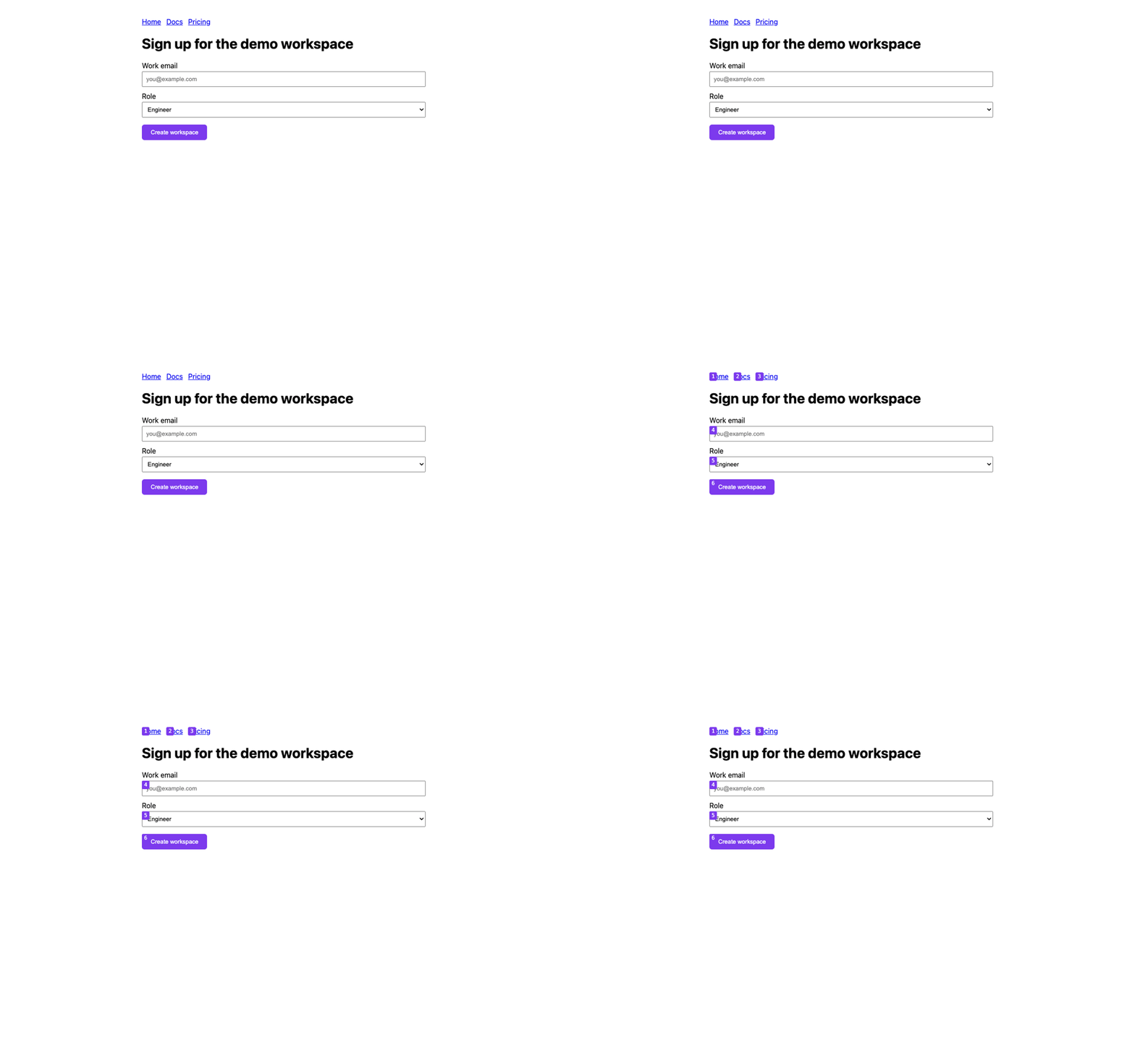
```text
browser_save_artifact({ "pageId": 1, "kind": "screenshot", "annotate": true })
# Saved screenshot to ~/.pi/browser-artifacts/page-....png
# Annotated elements:
# 1: (342, 49) a "Home"
# 2: (394, 49) a "Docs"
# 6: (394, 298) button "Create workspace"
```
### `browser_switch_mode`
Switch backends without restarting: `fresh` (isolated clean room), `persistent` (Pi-owned Chrome on the saved profile with your logins), or `existing` (attach to your running Chrome). Fresh and persistent default to headless — pass `headed: true` to watch. Tabs do not transfer; call `browser_list_pages` after switching. Prefer fresh; escalate to persistent only on login walls. `rememberSite: true` pins the last-visited site's visibility (headless vs headed-background) for next time.
### `browser_setup`
First-run setup for the persistent profile: opens a plain headed Chrome window (no automation attached) for a human to sign in, and completes when the window closes. If the profile is already initialized it says so and points at `browser_reauth` instead.
### `browser_status`
Plain-language status — profile readiness, execution mode, next step — without touching any page. Bootstrap initializes the profile; it never proves a site session.
### `browser_reauth`
Reauthenticate the persistent profile: shuts headless Chrome down cleanly, opens a headed window for the human to verify, then resumes headless. `variant: plain` opens a dependency-free window for providers that reject instrumented browsers.
### `browser_open_background_tab`
Existing mode only: opens a URL as an inactive tab in the collapsed `pi-browser-use` group via the Pi extension (see `extension/`). Fails clearly when the extension bridge is unavailable — never a foreground tab.
### `browser_doctor`
Self-diagnostics: effective mode, backend ownership (Pi-owned vs MCP-launched vs attached), profile health, tab-bridge URL, and upstream tool availability. Run it first when browser tools misbehave — it touches no pages.
### `browser_analyze_screenshot`
Vision analysis for canvas/WebGL scenes and coordinate clicks the accessibility tree cannot describe. Enabled only when `visionModel` is configured (see below); credentials resolve from Pi's model registry automatically.
```json
{
"pi-browser-use": {
"visionModel": { "provider": "openai", "model": "gpt-4o" }
}
}
```
## Page-scoped tools
Call `browser_list_pages` first, then pass its numeric `pageId` to page-scoped tools. Click-family calls blocked by an overlay are retried once automatically after dismissing it with Escape; stale element references get a refresh hint. Hard blocks escalate on their own: login walls in a fresh session suggest the switch call, while login walls and bot challenges in an authenticated session rebuild headed and prompt the human — once per call, never looping. See `skills/browser-policy/SKILL.md` for the full agent policy.
## Browser profile
The persistent browser lives in a Chrome profile directory named `pi-browser-use` inside `~/.pi/browser-profile` (one-time automatic migration from legacy `Default`/`Profile 1` layouts while Chrome is stopped), so Pi's cookies and logins are always distinguishable on disk from anything else.
On startup the default persistent profile is checked for accessibility. A root-owned or unreadable default (typically from running under `sudo`) is moved aside to `~/.pi/browser-profile.inaccessible-` so Chrome starts fresh instead of showing a preferences dialog. An explicit custom `userDataDir` in the same state fails fast with an ownership remediation hint. Never run the agent (or anything launching this browser) via `sudo`.
## Performance
`npm run bench` times the tool stack headless over 5 iterations (fixture setup excluded, matching vercel-labs/agent-browser's scenario set). Baseline on Apple Silicon: navigate ~1ms, snapshot ~3ms, screenshot ~37ms, evaluate ~206ms, full agent-loop cycle ~422ms. Re-run on your hardware before quoting numbers.
`npm run perf:audit` reports cold-import memory/time plus published package and dependency footprint; Code Foundry's dedicated performance job enforces the stable regression budgets with `npm run perf:check`. See [Performance audit and budgets](docs/performance.md) for the M0 measurements, thresholds, and reproducible local/CI commands.
## Bundled skills
- `browser-policy` — CLI-first decision order, session modes, bot-wall and safety rules.
- `gmail-auth` — Gmail inbox verification, challenge handling, headless/headed pinning.
- `auth-bootstrap` — first-run login flow for the persistent profile.
- `playwright-handoff` — when to stop clicking and run a repo Playwright spec instead (npm-first, bun alternatives, no repo changes required).
- `triage-console` — snapshot → console errors → failed network → screenshot.
- `visual-qa` — viewport matrix and canvas/WebGL discipline, including the annotate flow.
- `derive-client` — turn repeated flows into standalone fetch clients; stop driving solved problems.
- `dogfood` — charter-based exploratory bug hunts with severity discipline.
## Troubleshooting
| Symptom | Likely cause | Fix |
| ---------------------------------- | --------------------------------------------------------------------------------------- | ------------------------------------------------------------------------------------ |
| Chrome windows pop and steal focus | Headed mode (`headless: false`, `persistent`, or `existing`) | Switch to fresh headless defaults; on macOS no flag hides a headed window |
| `--chrome-arg` has no effect | Attached session (`autoConnect`/`browserUrl`) — flags only apply to MCP-launched Chrome | Move to `isolated`/`persistent` mode |
| Login wall / Turnstile loop | Bot check needs a human | Solve once in the persistent profile, then continue; never retry-loop a challenge |
| `profile is already in use` | Two sessions sharing one `userDataDir` | Use isolated mode or separate dirs per session |
| Stale uid errors | Page re-rendered after your snapshot | Take a fresh snapshot; ids invalidate on every action |
| Vision tool missing | No `visionModel` configured | Add it; otherwise use tree uids, or the global `vision` skill for vision-less models |
| "Allow remote debugging?" popup | Chrome 144+ consent gate for MCP auto-attach in Existing mode | Click Allow (once per Pi session); persistent mode never triggers it |
| Pi tab closed the wrong tab | Page IDs shift when tabs close — fixed | Existing `close_page` now refuses tabs Pi didn't open unless `force: true` |
## License
MIT