MegaMemory
Persistent project knowledge graph for coding agents.




---
An [MCP](https://modelcontextprotocol.io/) server that lets your coding agent build and query a graph of concepts, architecture, and decisions — so it **remembers across sessions**.
The LLM is the indexer. No AST parsing. No static analysis. Your agent reads code, writes concepts in its own words, and queries them before future tasks. The graph stores **concepts** — features, modules, patterns, decisions — not code symbols.
### The Loop
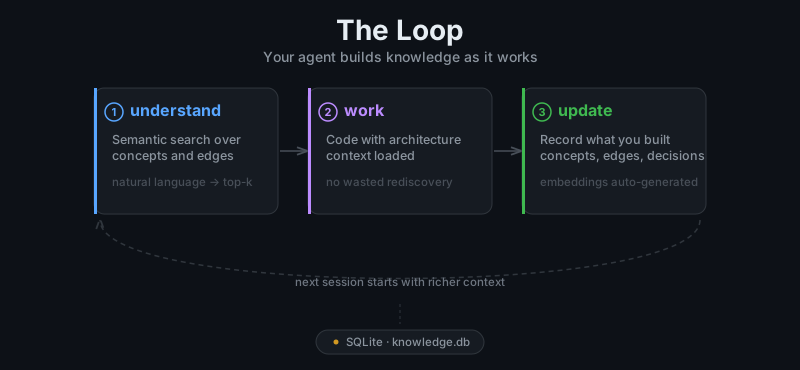
`understand → work → update`
1. **Session start** — agent calls `list_roots` to orient itself
2. **Before a task** — agent calls `understand` with a natural language query (or `get_concept` for exact ID lookup)
3. **After a task** — agent calls `create_concept` or `update_concept` to record what it built
Everything persists in a per-project SQLite database at `.megamemory/knowledge.db`.
---
### Installation
```bash
npm install -g megamemory
```
> [!NOTE]
> Requires Node.js >= 18. The embedding model (~23MB) downloads automatically on first use.
### Quick Start
```bash
megamemory install
```
Run the interactive installer and choose your editor:
> [!NOTE]
> The installer only updates config files after a successful read/merge, and it will not overwrite existing plugin/command files unless they are already marked as MegaMemory-managed.
#### With [opencode](https://opencode.ai)
```bash
megamemory install --target opencode
```
One command configures:
- MCP server in `~/.config/opencode/opencode.json`
- Workflow instructions in `~/.config/opencode/AGENTS.md`
- Skill tool plugin at `~/.config/opencode/tool/megamemory.ts`
- Bootstrap command `/user:bootstrap-memory` for initial graph population
- Save command `/user:save-memory` to persist session knowledge
Restart opencode after running install.
#### With [Claude Code](https://code.claude.com)
```bash
megamemory install --target claudecode
```
Configures:
- MCP server in `~/.claude.json`
- Workflow instructions in `~/.claude/CLAUDE.md`
- Commands in `~/.claude/commands/`
#### With [Antigravity](https://idx.google.com)
```bash
megamemory install --target antigravity
```
Configures:
- MCP server in `./mcp_config.json` (workspace-level)
#### With [Codex](https://openai.com/codex)
```bash
megamemory install --target codex
```
Configures:
- MCP server in `~/.codex/config.toml`
- Workflow instructions in `~/.codex/AGENTS.md`
#### With other MCP clients
Add megamemory as a stdio MCP server. The command is just `megamemory` (no arguments). It reads/writes `.megamemory/knowledge.db` relative to the working directory, or set `MEGAMEMORY_DB_PATH` to override.
```json
{
"megamemory": {
"type": "local",
"command": ["megamemory"],
"enabled": true
}
}
```
---
### MCP Tools
| Tool | Description |
|------|-------------|
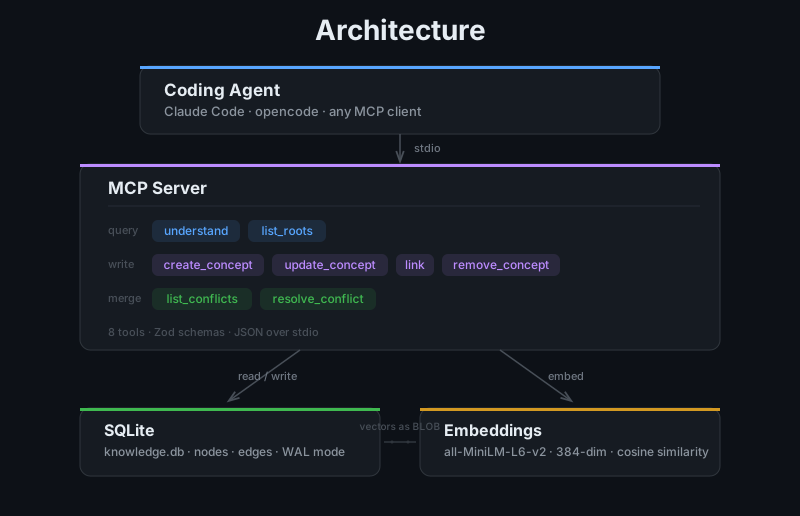
| `understand` | Semantic search over the knowledge graph. Returns matched concepts with children, edges, and parent context. |
| `get_concept` | Look up a concept by its exact ID. Returns full context including children, edges, incoming edges, and parent. |
| `create_concept` | Add a new concept with optional edges and file references. |
| `update_concept` | Update fields on an existing concept. Regenerates embeddings automatically. |
| `link` | Create a typed relationship between two concepts. |
| `remove_concept` | Soft-delete a concept with a reason. History preserved. |
| `list_roots` | List all top-level concepts with direct children. |
| `list_conflicts` | List unresolved merge conflicts grouped by merge group. |
| `resolve_conflict` | Resolve a merge conflict by providing verified, correct content based on the current codebase. |
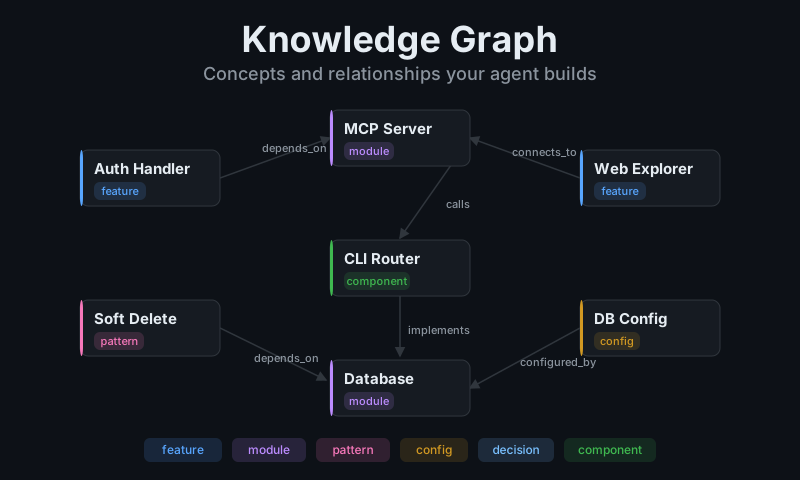
**Concept kinds:** `feature` · `module` · `pattern` · `config` · `decision` · `component`
**Relationship types:** `connects_to` · `depends_on` · `implements` · `calls` · `configured_by`
### Knowledge Graph
---
### Web Explorer
Visualize the knowledge graph in your browser:
```bash
megamemory serve
```
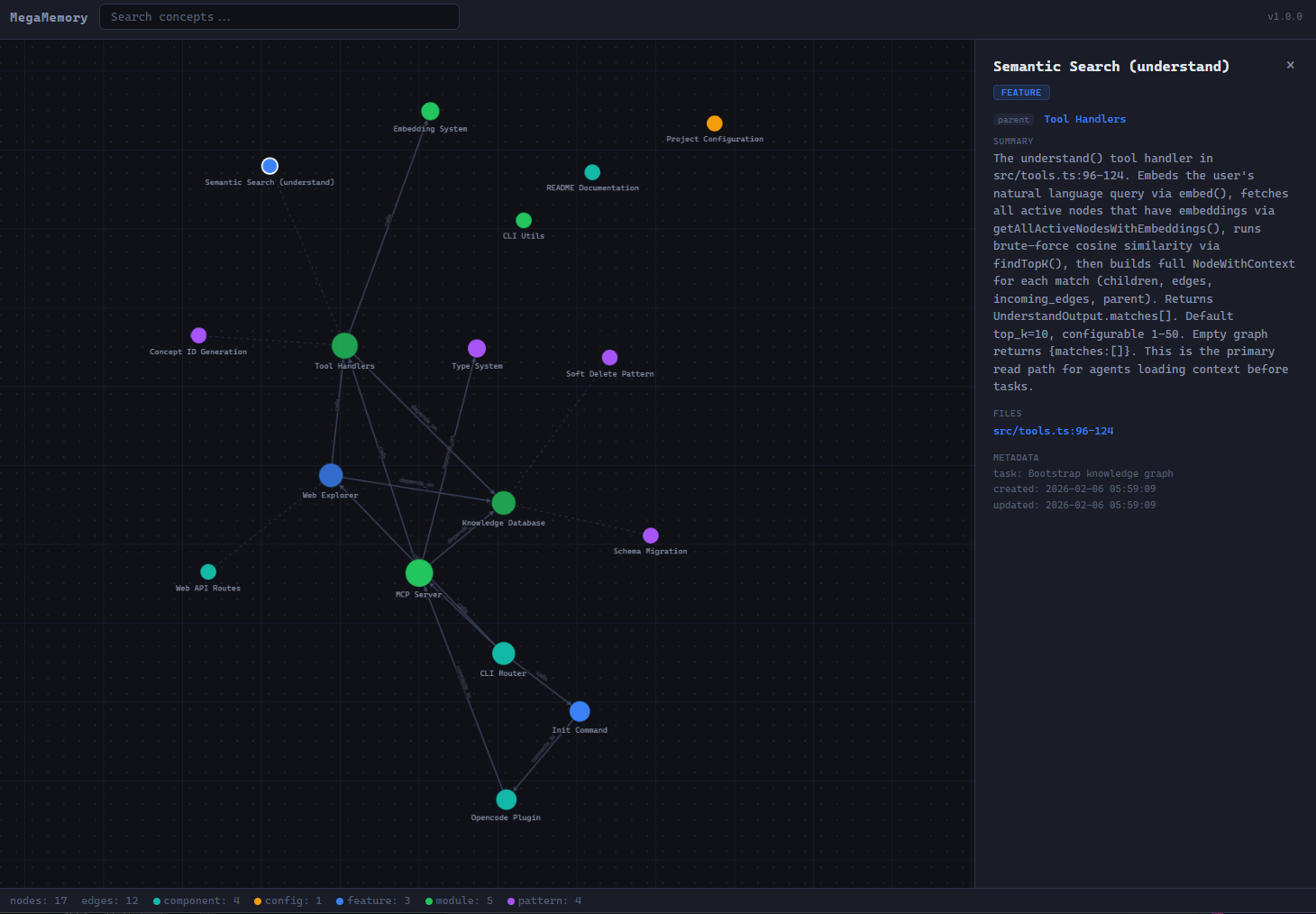
- Nodes are colored by kind and sized by edge count
- Dashed edges show parent-child links; solid edges show relationships
- Click any node to inspect summary, files, and edges
- Search supports highlight/dim filtering
- If port `4321` is taken, you'll be prompted to pick another
```bash
megamemory serve --port 8080 # custom port
```
---
### How It Works
```
src/
index.ts CLI entry + MCP server (9 tools)
tools.ts Tool handlers (understand, get_concept, create, update, link, remove, list_conflicts, resolve_conflict)
db.ts SQLite persistence (libsql, WAL mode, schema v3)
embeddings.ts In-process embeddings (all-MiniLM-L6-v2, 384 dims)
merge.ts Two-way merge engine for knowledge.db files
merge-cli.ts CLI handlers for merge, conflicts, resolve commands
types.ts TypeScript types
cli-utils.ts Colored output + interactive prompts
install.ts multi-target installer (opencode, Claude Code, Antigravity, Codex)
web.ts HTTP server for graph explorer
plugin/
megamemory.ts Opencode skill tool plugin
commands/
bootstrap-memory.md /user command for initial population
save-memory.md /user command to save session knowledge
web/
index.html Single-file graph visualization (d3-force + Canvas)
```
- **Embeddings** — In-process via [Xenova/all-MiniLM-L6-v2](https://huggingface.co/Xenova/all-MiniLM-L6-v2) (ONNX, quantized). No API keys, and no network calls after the first model download.
- **Storage** — SQLite with WAL mode, soft-delete history, and schema migrations (currently v3).
- **Search** — Brute-force cosine similarity over node embeddings; fast enough for graphs with <10k nodes.
- **Merge** — Two-way merge with conflict detection by concept ID, with AI-assisted conflict resolution via MCP tools.
---
### CLI Commands
| Command | Description |
|---------|-------------|
| `megamemory` | Start the MCP stdio server |
| `megamemory install` | Configure editor/agent integration |
| `megamemory serve` | Launch the web graph explorer |
| `megamemory merge` | Merge two knowledge.db files |
| `megamemory conflicts` | List unresolved merge conflicts |
| `megamemory resolve` | Resolve a merge conflict |
| `megamemory --help` | Show help |
| `megamemory --version` | Show version |
---
### Merging Knowledge Graphs
When branches diverge, each may update `.megamemory/knowledge.db` independently. Since SQLite files cannot be auto-merged by git, megamemory provides dedicated merge commands.
#### Merge two databases
```bash
megamemory merge main.db feature.db --into merged.db
```
Concepts are compared by ID: identical nodes are deduplicated, and conflicting nodes are kept as `::left`/`::right` variants under one merge group UUID. Use `--left-label` and `--right-label` to replace default side labels with branch names.
```bash
megamemory merge main.db feature.db --into merged.db --left-label main --right-label feature-xyz
```
#### View conflicts
```bash
megamemory conflicts # human-readable summary
megamemory conflicts --json # machine-readable output
megamemory conflicts --db path # specify database path
```
#### Resolve conflicts manually
```bash
megamemory resolve --keep left # keep the left version
megamemory resolve --keep right # keep the right version
megamemory resolve --keep both # keep both as separate concepts
```
#### AI-assisted resolution
When an AI agent runs `/merge`, it calls `list_conflicts`, verifies both versions against current source files, then calls `resolve_conflict` with `resolved: {summary, why?, file_refs?}` plus a verification `reason`. It does not pick a side blindly; it resolves to what the codebase currently reflects.
---
### License
[MIT](./LICENSE)