# Changelog / 更新日志
All notable changes to OpenChatCut are documented here.
OpenChatCut 的重要变更记录在此。
The format follows [Keep a Changelog](https://keepachangelog.com/en/1.1.0/), and releases use [Semantic Versioning](https://semver.org/).
格式参考 [Keep a Changelog](https://keepachangelog.com/zh-CN/1.1.0/),版本号遵循[语义化版本](https://semver.org/lang/zh-CN/)。
## [0.2.14] - 2026-09-04
### Added / 新增
- **OrcaRouter is now a named LLM provider preset** — configure its Base URL and API key under Settings → Agent model like any other provider and select it as the chat model (contributed in #130).
**OrcaRouter 现在是具名 LLM 厂商预设**——在 设置 → Agent 模型 里像其他厂商一样配置 Base URL 与 API Key,并可作为聊天模型选择(#130 贡献)。
- **The server now knows the interface language** — the language switch is mirrored into the non-secret `UI_LOCALE` setting, and server-authored text the user reads directly (starting with the remedy on a failed media import) follows it instead of being fixed Chinese.
**服务端现在知道界面语言**——语言切换会同步到非敏感设置 `UI_LOCALE`,服务端直接给用户看的文案(先从素材导入失败的补救提示开始)跟随界面语言,不再固定为中文。
### Changed / 变更
- **The desktop app now ships as an asar archive** — startup maps one archive instead of tens of thousands of small files. ffmpeg, ffprobe, the ONNX runtime and the sqlite-vec extension stay unpacked as real files (they are spawned or dlopen'ed by path), and the Remotion compositor is mirrored into the user-data folder on first launch on every platform, as Windows already did, so exports keep working.
**桌面端现在以 asar 归档发布**——启动时只需映射一个归档,而不是成千上万个小文件。ffmpeg、ffprobe、ONNX 运行时和 sqlite-vec 扩展保持解包的真实文件(它们要按路径被拉起或动态加载);Remotion 合成器在首次启动时镜像到用户数据目录(之前只有 Windows 这样做),导出照常工作。
- **A completed agent run tells you which tool calls failed** — a quiet line under the reply and an entry in the run inspector list the failed calls, replacing the failure banner that used to override the model's answer.
**Agent 运行完成后会列出失败的工具调用**——回复下方一行灰色提示和运行检查器里的一条记录列出失败的调用,取代之前覆盖模型回复的失败横幅。
- **Downloads are probed at import time** — `download_media` / `push_asset` rows now carry duration, dimensions, fps, audio/video tracks, codecs and quality risks measured by the bundled ffprobe, so the agent no longer spends a `probe_media` call (and, for a URL, a second download) on a file it just imported. An HTML page or truncated file saved under a media extension fails as `not_media` and never enters the pool.
**下载即探测**——`download_media` / `push_asset` 的结果行现在自带应用内 ffprobe 测得的时长、宽高、fps、音视频轨、编码和质量风险,Agent 不必再对刚导入的文件调一次 `probe_media`(远程地址还省掉一次重复下载)。以媒体扩展名保存下来的 HTML 页面或截断文件会以 `not_media` 失败,不会入池。
- **Media pool: remove every offline asset in one click, and one notice instead of a per-card "models not installed" badge** — the missing-media banner gains "Remove all offline media" (with the usual confirmation), and when the local music-analysis packs are not installed the pool shows a single line pointing at Settings → Local AI rather than repeating the same badge under every audio and video card.
**素材池:一键移除全部失效素材,「模型未安装」只提示一次**——丢失素材横幅新增「移除全部失效素材」(沿用原有确认框);本地音乐分析模型包未安装时,素材池只显示一行指向 设置 → 本地 AI 的提示,不再在每张音视频卡片下重复同一个角标。
- **In auto-apply mode, timeline edits now land as each tool call finishes** — the tracks change while the agent works instead of all at once when the run ends, the agent continues from the live project (including anything you changed meanwhile), and the run's edits share one change-log row for rollback. Manual approval mode still collects edits into a proposal.
**自动应用模式下,时间线编辑现在随每个工具调用实时落地**——轨道在 Agent 工作时就在变化,而不是整轮结束后一次性出现;Agent 从真实工程继续(包括你中途做的改动);整轮编辑共用一条修改记录,可一键回滚。人工审批模式仍然汇总成提案。
- **Downloaded media now appears in the media pool as soon as each download finishes** — pool imports land after every tool call instead of when the whole run ends, and a user edit made while the agent was downloading is neither blocked nor overwritten; one change-log row per run collects all of them for rollback.
**素材下载完立即出现在媒体池**——每个工具调用结束就入池,不再等整轮 Agent 结束;你在它下载期间做的手动编辑既不会被拦住也不会被覆盖;一轮的所有入池记在同一条修改记录里,可一键回滚。
- **The desktop now ships at the density that used to be the "110%" setting** — Settings → Interface → UI scale reads 100% for it. A scale you had saved is converted once at startup so your window keeps its size after updating (110% → 100%, 100% → 90%).
**桌面端默认密度改为原来的「110%」**——设置 → 界面 → 界面缩放 里它现在显示为 100%。你之前保存过的缩放会在启动时换算一次(110% → 100%、100% → 90%),更新后窗口内容大小不变。
### Fixed / 修复
- **Bundled product files now resolve inside the packaged app** — probe, sandbox and export looked for `/voice-samples/...`-style paths under the working directory, which is the user-data folder once packaged; the embedded server registers `resources/dist` as a product-asset root, so those paths resolve exactly as in the dev server.
**打包版现在能找到内置资源文件**——探测、沙箱和导出之前按启动目录去找 `/voice-samples/...` 这类路径,而打包后启动目录是用户数据目录;内嵌服务现在把 `resources/dist` 注册为内置资源根目录,解析结果与开发服务一致。
- **`probe_media` now runs the ffprobe bundled with the app instead of the e2b cloud sandbox** — on a machine without an E2B key the tool used to fail with "e2b sandbox is not configured" even though import, previews and export QA were already probing locally. Uploads and bundled assets are read in place; a public URL is fetched through the SSRF-safe transport into a temp file first.
**`probe_media` 改用应用自带的 ffprobe,不再依赖 e2b 云沙箱**——没有配置 E2B key 的机器上,这个工具之前会报「e2b sandbox is not configured」,而导入、预览、导出质检其实早就在本地跑 ffprobe 了。上传文件和内置素材直接就地读取;公开 URL 先经过防 SSRF 的抓取落到临时文件再探测。
- **A server-side agent run no longer ends with "I couldn't complete the requested operation" under the model's own reply** — when a tool failed and the model then answered, the run was still marked failed and an English template was appended beneath a Chinese answer. The reply is the outcome; the failed call stays visible on its tool card, matching the in-browser runtime. This also lets the documented fallbacks (probe fails → finalize with ingest defaults) complete.
**服务端 Agent 运行不再在模型回复下方追加「I couldn't complete the requested operation」**——工具失败后模型已经作答,整轮却仍被判为失败,并在中文回复下面贴一段英文模板。现在以模型的回复为准,失败的调用仍在其工具卡片上可见,与浏览器端运行时一致;也让文档约定的降级路径(探测失败 → 用导入默认值 finalize)能正常完成。
- **Media-pool ratio badges snap to the ratio people actually name** — a 427×240 trailer read "427:240" because the badge reduced the exact pixel fraction; encoders round to codec-friendly sizes, so a frame within 2% of 16:9, 4:3, 1:1, 3:2, 5:4 or 21:9 (and their portrait forms) now shows that name, a small exact fraction such as 7:5 stays, and anything else shows a proportion like 2.40:1. Canvas sizes are exact and unchanged.
**素材池比例角标按人们常说的比例显示**——427×240 的预告片之前显示「427:240」,因为角标直接约分了像素分数;编码器会把尺寸凑成编码友好的数值,所以现在与 16:9、4:3、1:1、3:2、5:4、21:9(及其竖版)偏差在 2% 内的都显示该名称,7:5 这类小分数保留,其余显示为 2.40:1 这样的比例。画布尺寸精确,不受影响。
- **A blocked or blackholed media host no longer freezes `download_media`, with or without a proxy** — remote imports are bounded at the connect phase (10s, covering a proxy tunnel and the TLS handshake) and until response headers arrive (30s), then fail as `upstream_unreachable` with a remedy that matches whether a proxy is configured; a batch stops starting new URLs after 75s so it stays inside the run's stream watchdog instead of dying with "Chunk timeout exceeded". Retry now rewinds the failed turn out of both the chat and the model history and re-sends it, rather than stacking a second copy of the message under the error.
**被墙或黑洞的素材主机不再让 `download_media` 挂死,有无代理都一样**——远程导入在连接阶段(10s,覆盖代理隧道与 TLS 握手)和收到响应头之前(30s)都有上限,超时以 `upstream_unreachable` 失败并按是否配置了代理给出对应提示;批量下载 75s 后不再开始新地址,避免撞上运行流看门狗而整轮以「Chunk timeout exceeded」失败。「重试」现在会把失败那轮从聊天与模型历史中回卷后原样重发,而不是在错误下面再叠一条同样的消息。
- **Context-window overflows now recover silently instead of failing the turn (#131)** — the server retries an overflowing turn by compacting the history, then shrinks the output reservation, before surfacing anything. The output reservation is request-aware from the start: a huge-output model (e.g. a 500k-output Grok) no longer starves the input budget on short requests, and stale large tool results are mechanically replaced with one-line stubs only when the conversation is actually under pressure — healthy sessions keep their full history. Oversized tool-call inputs in the recent tail are rescued by replacing their input instead of dead-ending in a retry loop, and when every stage still fails, the overflow guidance now follows the UI language instead of always rendering Chinese.
**上下文窗口溢出现在静默自愈,不再直接失败本轮(#131)**——服务端先压缩历史重试,再缩小输出预留,都不行才向用户报错。输出预留从一开始就按请求量计算:超大输出模型(如 500k 输出的 Grok)不会再在短请求上挤占输入预算;陈旧的大型工具结果只在会话真正吃紧时才机械替换为一行 stub——健康会话的历史保持原样。近期窗口里超大的工具调用参数会替换其 input 而不是陷入重试死循环;全部手段用尽后的溢出引导也跟随界面语言,不再永远显示中文。
- **Music analysis failures now carry an actionable next step (#134)** — when the required model packs are missing, the tool result names the missing packs and the settings route, and the failed tool row in chat shows an install button that opens the model-pack page directly; the music skill guides the `detect_beats` fallback (BPM + beat frames only) while the packs stay uninstalled.
**音乐分析失败现在自带可操作的下一步(#134)**——所需模型包缺失时,工具结果会列出缺失包与设置路径,聊天里的失败工具行会出现「去设置安装」按钮,直接打开模型包页面;技能指引在模型包未安装时引导 `detect_beats` 降级方案(仅 BPM 与节拍帧)。
- **Schema validation errors now name the offending field** — a rejected `edit_item` call used to say only "/ must NOT have additional properties" with no hint about which field was extra, so the agent retried the same shape and the edit never landed (#135). The error now reads `/ must NOT have additional properties: "itemId"`, letting the model self-correct on the next attempt.
**Schema 校验错误现在点名违规字段**——被拒的 `edit_item` 调用过去只说「/ must NOT have additional properties」而不提示多出来的是哪个字段,模型只能原样重试,编辑永远落不了轨(#135)。现在错误会显示 `/ must NOT have additional properties: "itemId"`,模型下一次尝试即可自我修正。
- **Large v3 native transcription resolves its models from the shared catalog (#133)** — desktop native ASR for the large-v3 tier now loads through the same catalog path as the other tiers instead of a hardcoded resolution.
**Large v3 本地转写从共享模型目录解析模型(#133)**——桌面端 large-v3 档位的本地 ASR 现在与其他档位一样走共享目录解析,不再使用硬编码路径。
- `load_skill` no longer rejects a recoverable call with "Pass either file or files, not both." before the skill is ever read. Models routinely emit both selectors at once — a blank `file` beside a real `files` array, `files: []` beside a real `file`, or paging numbers with no `file` — and every such call died in argument validation, stalling bundled and custom skills alike. The arguments are now normalized before the shared invocation boundary validates them against the tool schema — the schema's `files.minItems`, `file: string` and `offset: integer` rules would otherwise reject `files: []`, `file: null` or `offset: "0"` before any tool code ran. Blank and null selectors are dropped, empty or all-blank `files` arrays fall back to the initial load, a bare string on `files` becomes a one-file batch, integer-looking strings become integers, and paging numbers are discarded when no `file` remains. When both selectors survive, only a non-zero `offset` keeps the paged file (a continuation worth preserving); `offset: 0` on SKILL.md repeats what the initial load already returned, so the batch wins. The prompts that taught the merged shape are fixed with it — the tool description, the skill-library index, and the result notes now state one selector per call instead of naming both paths in a single sentence — and each remaining rejection carries a concrete corrected call, so the same arguments are never the obvious thing to re-send.
`load_skill` 不再在读取技能之前就以「Pass either file or files, not both.」拒绝一个本可恢复的调用。模型经常同时给出两个选择器——空字符串 `file` 与真实 `files` 数组并存、`files: []` 与真实 `file` 并存,或只有分页参数而没有 `file`——这些调用全部死在参数校验里,内置技能和自定义技能一样中招。现在参数会在共享调用边界按工具 schema 校验**之前**先归一化——否则 schema 的 `files.minItems`、`file: string`、`offset: integer` 会在任何工具代码运行前就拒掉 `files: []`、`file: null` 或 `offset: "0"`。空值与 null 选择器被删除,空数组或全空字符串的 `files` 回退为初次加载,`files` 上的裸字符串视为单文件批量,形如整数的字符串转为整数,没有 `file` 时分页参数被丢弃。两个选择器同时存活时,只有非零 `offset` 才保留分页文件(那是值得保留的续读);`offset: 0` 打在 SKILL.md 上只是重复首轮加载,所以批量胜出。诱发该形状的提示词一并修正——工具描述、技能库索引与返回 note 改为「每次调用只用一个选择器」,不再把两条路径写进同一句话——并且每个仍然失败的请求都会带上明确的修正调用,避免原样重发同一组错误参数。
- Agent failures no longer hide behind "No output generated. Check the stream for errors." The server turn read the model stream but dropped its `error` chunks, so the provider's real `APICallError` — status code, response body, and the proxy's actionable message ("认证失败,请检查 API Key" / "额度不足" / "接口或模型不存在") — was discarded, and the turn died on the AI SDK's generic fallback instead. Retrying could only reproduce it. The real error now reaches the chat. Two failures it was masking are fixed with it: failure classification compared with `instanceof` against a class from a second copy of `@ai-sdk/provider`, so every provider error fell through to UNKNOWN and was never retried; and a genuinely empty model stream is now classified `EMPTY_RESPONSE` and retried instead of surfacing that same opaque sentence.
Agent 报错不再被「No output generated. Check the stream for errors.」挡住。服务端读取模型流时丢弃了其中的 `error` 分片,厂商真正的 `APICallError`——状态码、响应体,以及代理生成的可操作提示(「认证失败,请检查 API Key」/「额度不足」/「接口或模型不存在」)——被一并扔掉,这一轮改为死在 AI SDK 的兜底文案上,重试只能复现同样一句。现在真实报错会直接显示在对话里。同时修掉它掩盖的两个问题:失败分类用 `instanceof` 比对了来自第二份 `@ai-sdk/provider` 的类,导致所有厂商错误落入 UNKNOWN 且从不重试;模型确实返回空流时现在归类为 `EMPTY_RESPONSE` 并自动重试,而不是抛出同一句看不懂的话。
## [0.2.13] - 2026-08-31
### Fixed / 修复
- Closing any window on Windows no longer pops "A JavaScript error occurred in the main process — Object has been destroyed": the renderer-recovery disposer ran inside the window's own `closed` handler and touched the already-destroyed `webContents`. macOS was unaffected only because the recovery is Windows-gated, which is exactly why it escaped testing. The same uncaught exception's modal dialog is what deadlocked the release smoke's teardown.
Windows 关闭任意窗口不再弹出「A JavaScript error occurred in the main process — Object has been destroyed」:渲染器恢复的卸载器在窗口自身的 `closed` 事件里访问了已销毁的 `webContents`。macOS 因恢复逻辑按平台门禁短路而不受影响——这也正是它逃过验证的原因。同一未捕获异常的模态弹窗正是发版冒烟收尾死锁的真身。
## [0.2.12] - 2026-08-31
### Added / 新增
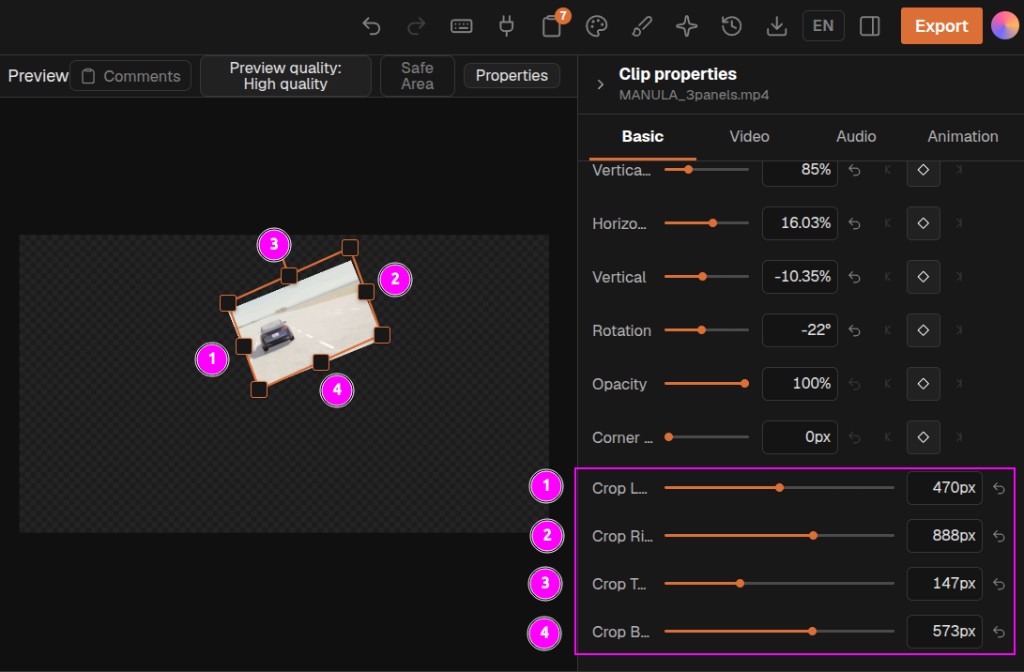
- Inspector **Crop Left / Right / Top / Bottom** under Clip properties → Basic → Transform (below Corner). Values are composition pixels; cropped pixels are fully transparent. Agents call this **flex crop** / **flexcrop** via `edit_item` `transform.crop` or `transform.flexCrop: { left, right, top, bottom }` in pixels (`null` clears). Not a timeline trim. Contributed by @J160KU.
检查器「裁左 / 裁右 / 裁上 / 裁下」位于片段属性 → 基础 → 变换(圆角下方)。数值为画布像素,裁掉的区域完全透明。Agent 术语为 **flex crop** / **flexcrop**:`edit_item` 的 `transform.crop` 或 `transform.flexCrop: { left, right, top, bottom }`(像素;`null` 清除)。不是时间线裁剪。由 @J160KU 贡献。
- Local transcription gains a **Whisper Large v3 Turbo** tier (#127): near large-v2 quality at a fraction of the decode cost. Desktop runs the 574MB GGML build natively; the browser uses the word-timestamp ONNX export (~1.05GB).
本地转写新增 **Whisper Large v3 Turbo** 档(#127):接近 large-v2 的质量、远低于它的解码开销。桌面端本地运行 574MB GGML 模型;浏览器端使用带词级时间戳的 ONNX 导出(约 1.05GB)。
### Fixed / 修复
- **Windows local transcription never actually ran** (#120): packaging moved `whisper-cli.exe` away from its DLLs, so the process died instantly with a bare exit code for every model size. The executable now ships beside its libraries — verified both ways on a real Windows runner. Linux had the same layout fault and is fixed the same way.
**Windows 本地转写此前从未真正运行过**(#120):打包把 `whisper-cli.exe` 和它的 DLL 分开放置,任何模型尺寸都会立刻以裸退出码失败。现在可执行文件与库同目录(在真实 Windows runner 上双向验证);Linux 存在同样的布局问题,一并修复。
- Browser Whisper word timestamps no longer drift from the prefix-alignment bug, and the hallucination-suppression list is active again — transformers.js upgraded to 4.2.0 (#109).
浏览器 Whisper 词级时间戳不再受前缀对齐问题影响,幻听抑制列表重新生效——transformers.js 升级到 4.2.0(#109)。
- Stopping an agent run and immediately sending the next task no longer loses the new answer: late results from the cancelled run settled with the new run's credentials and tore its stream down (#125). Every run now carries an immutable identity, and stale callbacks are fenced.
停止 Agent 任务后立刻发送新任务不再丢失新回答:被取消任务的迟到结果曾借用新任务的凭证结算并连带关闭其事件流(#125)。现在每个任务携带不可变身份,过期回调被栅栏拦下。
- One failed proposal apply no longer silently disables every later apply in the session — the symptom behind "the agent says done but the track is empty" (#129).
一次失败的 proposal 应用不再静默禁用会话内之后的所有应用——即「Agent 说完成了但轨道是空的」的元凶(#129)。
- The floating transcript window no longer opens blank on slow machines: its payload was push-only and the push could beat the page's listener; the window now also pulls on mount.
浮动文字稿窗口在慢机器上不再打开即空白:载荷原先只推送一次、可能早于页面监听器注册;现在窗口挂载后会主动拉取。
- Preview orange outline, clip-path cut, and rotation pivot stay aligned: the preview wrapper uses the stage content box and a single composition scale so Remotion does not letterbox on Y under the overlay.
预览橙框、裁切与旋转轴对齐:预览容器按舞台 content box 与单一画布比例适配,避免 Remotion 在 overlay 下上下加黑边。
- A project this build could not read is no longer overwritten by the next save: reads now report missing and unreadable separately, the editor offers retry instead of silently starting from an empty document, a failed bootstrap merge no longer deletes the local project index, and orphan media cleanup no longer purges everything when the index is momentarily empty.
本版读不懂的工程不会再被下一次保存覆盖:读取区分"不存在"与"读不出",编辑器给出重试而不是静默从空文档开始;引导合并失败不再删除本地工程索引;索引短暂为空时,孤儿素材清理不再清空全部素材。
- Version history, export history, templates and the job registry now preserve records this build cannot parse instead of dropping them on the next write, so opening a project in an older build no longer discards what a newer one wrote.
版本历史、导出历史、模板与任务注册表在写回时保留本版解析不了的记录,不再丢弃——用旧版打开工程不会再抹掉新版写入的内容。
- Multicam and link groups with a slightly out-of-range field are repaired rather than discarded, and per-angle evidence is no longer required for the whole group to survive.
多机位与链接组的轻微越界字段改为修正而非整组丢弃,且不再要求每个角度都带证据才能保留。
- Browser fast export no longer fails on media that is simply slow to open. It inherited Remotion's 30-second per-frame default while the local renderer allowed far more, so the same project could fail on one engine and render on the other; both now share a ten-minute per-frame budget, which bounds a single stuck frame and never the export as a whole.
浏览器快导不再因素材"打开慢"而失败。此前它沿用 Remotion 的 30 秒单帧默认值,而本机渲染器的预算宽得多,导致同一工程在一个引擎失败、在另一个引擎正常;现在两条路径共用 10 分钟单帧预算,该预算只约束单帧卡死,不限制导出总时长。
- Exports started by the Agent no longer report failure for files that had already been written; the download helper reached the browser through `window`, which does not exist in the tool runtime.
Agent 发起的导出不再对已经写出的文件报失败——下载辅助函数经由 `window` 访问,而工具运行时没有 `window`。
- FCPXML export now emits a time map for speed-changed clips, and asset collection no longer decides a clip's video/audio makeup from the first item alone.
FCPXML 导出为变速片段写入 timeMap;素材收集不再仅凭第一个片段判定整体的视频/音频构成。
- An unknown caption template id falls back to the plain style instead of breaking the preview, and bilingual caption translations are marked stale when their timing changes instead of keeping absolute times.
未知字幕模板 id 回退到 plain 样式而不是让预览崩溃;双语字幕在时间轴变化后标记为过期,不再固化绝对时间。
- Agent runs no longer dispatch the same instruction twice on a rapid double send, tool arguments are bounded so an out-of-range motion-graphic size cannot freeze the tab, model-supplied internal `__` fields are stripped before execution, and a tool that fails midway rolls its draft back instead of leaving a forked one.
Agent 运行不再因快速双击发送而重复派发同一指令;工具参数加上界,越界的 MG 尺寸不会再冻结标签页;模型传入的内部 `__` 字段在执行前剥离;工具中途失败会回滚草稿而不是留下分叉。
- Transcript word clicks seek to the right frame under a reordered play order, and local ASR no longer falls back to transcribing the whole video.
在调整播放顺序后,点击文字稿词语可跳转到正确帧;本地 ASR 不再回退成整段视频转写。
- Chat and version writes that fail now surface a toast instead of only a console error.
聊天与版本写入失败会给出提示,而不是只打一条控制台错误。
- Completed the Russian transcription language labels.
补全俄语转写语言标签。
### Performance / 性能
- First load dropped from about 3062 KB (900 KB gzip) to 689 KB (198 KB gzip). React was being pulled into the Remotion chunk, so the project list downloaded a 2 MB video renderer it never used; all four locale dictionaries shipped in the entry chunk, so every user parsed three languages they cannot read; and ten dialogs were imported eagerly although each renders only once opened. Dialogs and the non-active languages now load on demand and warm on idle, so opening them stays instant.
首屏从约 3062 KB(900 KB gzip)降到 689 KB(198 KB gzip)。此前 React 被打进 Remotion 分块,工程列表要下载 2 MB 的视频渲染器却从不使用;四份语言词典全部进入入口分块,每个用户都要解析三种读不懂的语言;十个对话框被静态引入,而它们只有打开时才渲染。现在对话框与非当前语言按需加载并在空闲时预热,打开依然瞬时。
- Moving the pointer across the timeline now updates once per displayed frame instead of once per pointer report: 60 pointer moves went from 890 DOM mutations in 292 ms to 250 in 125 ms.
在时间线上移动指针改为每显示帧更新一次,而不是每个指针事件更新一次:60 次移动从 890 次 DOM 变更 / 292 ms 降到 250 次 / 125 ms。
- Long transcripts skip layout for off-screen speech blocks: a 9000-word transcript went from 34.29 ms of layout to 0.64 ms, with text selection across off-screen blocks unaffected.
长文字稿跳过屏幕外语音块的布局:9000 词文字稿的布局耗时从 34.29 ms 降到 0.64 ms,跨屏幕外块的文本选择不受影响。
- Reduced hot-path overhead in the editor store, sequence-graph validation, transcript rendering and agent stream persistence.
降低编辑器 store、序列图校验、文字稿渲染与 Agent 流式持久化的热路径开销。
### Security / 安全
- Media read paths (`/media/uploads`, upload listing, presigned reads, media preview, and the desktop static file server) now require the same local request shape the write paths already did.
素材读取路径(`/media/uploads`、上传列表、预签名读取、媒体预览与桌面端静态文件服务)现在与写入路径一样要求相同的本机请求形态。
- Server errors returned to the browser no longer carry absolute filesystem paths, and skill execution rejects inline interpreter invocations.
返回浏览器的服务端错误不再携带绝对文件系统路径;技能执行拒绝内联解释器调用。
## [0.2.11] - 2026-08-25
### Added / 新增
- Added an end-to-end Agent livestream clipping workflow that analyzes multimodal evidence, creates multiple named source-linked Sequences, verifies each cut, tracks background rendering in the editor, and automatically saves approved clips to My Media with source provenance.
新增端到端 Agent 直播切片工作流:综合分析多模态证据,批量创建命名且保持源素材引用的独立 Sequence,逐个验证切片,在编辑器中跟踪后台渲染,并将审核通过的成片连同来源信息自动保存到“我的素材”。
## [0.2.10] - 2026-08-24
### Added / 新增
- Added xAI Grok as a built-in Agent provider (grok-4.6 default, OpenAI-compatible API at api.x.ai), with the standard settings page, API key configuration, connection testing, model discovery, and model-capability catalog entries.
新增 xAI Grok 内置 Agent 供应商(默认 grok-4.6,api.x.ai OpenAI 兼容接口),提供标准设置页、API Key 配置、连接测试、模型发现与模型能力目录条目。
- Added xAI subscription sign-in (SuperGrok / X Premium+): login is owned by the official Grok CLI (`grok login`); OpenChatCut imports the session server-side, refreshes it automatically through auth.x.ai, and streams Grok over the subscription token. Session credentials never reach the browser, and the API-key provider remains available as a fallback.
新增 xAI 订阅登录(SuperGrok / X Premium+):登录由官方 Grok CLI 负责(终端运行 grok login),OpenChatCut 在服务端导入会话并经 auth.x.ai 自动续期,以订阅会话令牌运行 Grok。会话凭据不会进入浏览器,API Key 供应商继续作为兜底。
- Added xAI Grok Imagine image and video generation (`grok-imagine` / `grok-imagine-video`): settings pages, connection tests, agent tool schemas, skill references, and the generation job pipeline all carry xAI as a first-class provider. Images are returned as base64 (no CDN download); video runs through the async job model with proxy-aware result downloads. Auth prefers the subscription session and falls back to `LLM_XAI_API_KEY`.
新增 xAI Grok Imagine 生图与生视频(`grok-imagine` / `grok-imagine-video`):设置页、连接测试、Agent 工具 schema、技能参考与生成任务管线均把 xAI 作为一等供应商。生图以 base64 返回(免 CDN 下载);生视频走异步任务模型,结果下载支持代理。鉴权优先订阅会话,回退 `LLM_XAI_API_KEY`。
- Added local Silero VAD (onnx-community silero-vad ONNX via onnxruntime-web) as the silence-removal evidence runner: with `VITE_ENABLE_VAD_SILENCE_REMOVAL` enabled, silence trimming only removes spans the model confirms are non-speech. The flag stays off by default; the model loads lazily on first use.
新增本地 Silero VAD(onnx-community silero-vad ONNX,经 onnxruntime-web 推理)作为静音删除的证据来源:开启 `VITE_ENABLE_VAD_SILENCE_REMOVAL` 后,仅删除模型确认不含语音的静音段。开关默认关闭,模型首次使用时才加载。
### Fixed / 修复
- Export delivery now uses canonical extensions for H.264, VP8, and ProRes, rejects empty artifacts before commit, serializes export-history writes, and coalesces rapid duplicate starts for the same destination.
导出现统一使用 H.264、VP8 与 ProRes 的标准扩展名,在写入目标前拦截空制品,串行化导出历史写入,并合并短时间内指向同一目标的重复导出。
## [0.2.9] - 2026-08-20
### Added / 新增
- Desktop native inference now records CPU/GPU capabilities and selects CoreML/Metal, DirectML, CUDA, WebGPU, or CPU per supported workload; Linux packages now include the native inference workers and ONNX Runtime.
桌面端原生推理现会记录 CPU/GPU 能力,并按工作负载选择 CoreML/Metal、DirectML、CUDA、WebGPU 或 CPU;Linux 安装包同步内置原生推理 worker 与 ONNX Runtime。
### Fixed / 修复
- Desktop imports again create durable managed media copies, keeping preview, normalization, and server-side export reachable after the original file moves or a removable volume is disconnected.
桌面端导入恢复为可持久的受管素材副本,原文件移动或移动磁盘断开后,预览、规范化与服务端导出仍可访问素材。
- Media processing now applies software encoder thread limits to output encoders, keeps CFR compatibility normalization for large VFR sources, routes probes through the shared low-priority launcher, and releases settled multipart metadata queues.
媒体处理现会将软编码线程上限应用到输出编码器,为大型 VFR 素材保留 CFR 兼容性转换,通过共享低优先级启动器执行探测,并及时释放已结束的分片元数据队列。
- The Agent run inspector refreshes its sidecar when opened, so the newest run, tool result, and context metrics appear immediately without reloading the editor.
Agent 运行检查器打开时会刷新旁车记录,无需重新加载编辑器即可显示最新运行、工具结果与上下文指标。
## [0.2.8] - 2026-08-20
### Added / 新增
- Atlas Cloud text-to-music and Sonilo video-to-music/video-to-SFX providers are available from settings and native Agent tools, including asynchronous job recovery and license sidecars.
新增 Atlas Cloud 文生音乐与 Sonilo 视频配乐/视频音效,可从设置和 Agent 原生工具调用,并支持异步任务恢复与许可证旁车文件。
- The Agent now surfaces missing creative capabilities with an in-editor settings entry and returns actionable diagnostics for unavailable editing tools.
Agent 现在会提示缺失的创作能力、提供编辑器内设置入口,并在编辑工具不可用时返回可执行的诊断步骤。
### Fixed / 修复
- Windows H.264 export now probes and uses NVIDIA NVENC, Intel Quick Sync, or AMD AMF when available, preserves automatic libx264 fallback, and avoids hardware-frame/CPU-filter conflicts during frame-rate conversion.
Windows H.264 导出会探测并优先使用 NVIDIA NVENC、Intel Quick Sync 或 AMD AMF,保留 libx264 自动回退,并修复帧率转换中的硬件帧与 CPU 滤镜冲突。
- External MCP registration now keeps a stable token and fallback port across desktop restarts, including first-launch race handling and per-profile isolation.
外部 MCP 注册的令牌与备用端口现可跨桌面端重启保持稳定,并处理首次启动竞态与多 profile 隔离。
- Sonilo source matching, streamed uploads, response parsing, and persisted sound jobs were hardened so large inputs and interrupted sessions recover predictably.
加固 Sonilo 素材匹配、流式上传、响应解析和音效任务持久化,使大素材与中断会话可稳定恢复。
## [0.2.7] - 2026-08-17
### Added / 新增
- Marking mode: while playing, the playhead follows the audible media element's own clock (with audio output-latency compensation), so beat markers stay locked to the sound even when the main thread stalls (#90).
打标记模式:播放时播放头跟随音频元素自身时钟(含音频输出延迟补偿),主线程卡顿时节拍标记仍与听到的声音对齐(#90)。
### Fixed / 修复
- Server-run drafts failed with 'could not be persisted' after a tab switch or browser restart — the run capability was stored in sessionStorage (per-tab, wiped on close). It now persists in localStorage, and the draft error message carries the actual reason (403 capability lost / 404 run gone).
切换标签页或重启浏览器后 server-run 草稿报"could not be persisted"——运行凭证原本存在 sessionStorage(按标签页隔离、关闭即清)。现改存 localStorage,且草稿报错附带真实原因(403 凭证丢失 / 404 运行不存在)。
## [0.2.6] - 2026-08-17
### Added / 新增
- Transition badges on the timeline gain a right-click menu: five duration presets (0.2/0.3/0.5/1/2s) and remove-transition, without hunting through clip effect lists (#88).
时间线转场角标新增右键菜单:五档时长预设(0.2/0.3/0.5/1/2 秒)与删除转场,不用再去片段特效列表里翻找(#88)。
- Renderer GL backend now resolves per platform: angle (Metal/D3D) on macOS/Windows, angle-egl on Linux, with CC_RENDER_GL override for diagnosis. GPU compositing benchmarked ~2.2x faster than software.
渲染 GL 后端按平台解析:macOS/Windows 用 angle(Metal/D3D),Linux 用 angle-egl,支持 CC_RENDER_GL 覆盖诊断。实测 GPU 合成比软件渲染快约 2.2 倍。
### Fixed / 修复
- Snapshot model ids (qwen3.7-plus-2026-05-26 style) now resolve to their base catalog entry, and the unknown-model fallback is grounded in the catalog (context 409,600 / output 65,536) with an in-editor estimate hint — no more 'request is too large' for catalog misses.
快照式模型 ID(如 qwen3.7-plus-2026-05-26)现匹配到基座条目;未知模型兜底值按目录统计校准(上下文 409,600 / 输出 65,536)并在编辑器提示估算——目录外模型不再报"request is too large"。
- project-store.verify redirects USERPROFILE on Windows so the check uses its temp root (#89).
project-store.verify 在 Windows 上重定向 USERPROFILE,检查使用临时根目录(#89)。
## [0.2.5] - 2026-08-17
### Added / 新增
- User-adjustable UI scale (80%–150%) in Settings → 界面, with Ctrl/Cmd + Plus/Minus/0 zoom shortcuts persisted to the keystore; composes with the automatic shrink-to-fit window scaling (#85).
设置 → 界面新增 UI 缩放(80%–150%),支持 Ctrl/Cmd + +/-/0 快捷键并持久化;与窗口自动收缩缩放组合生效(#85)。
- End-to-end CI coverage for agent local-path import: whitelist containment, tool schema, browser gate, and a real main-process import chain (fingerprint, copy, probe, dedupe) run on every release (#84).
Agent 本地路径导入的端到端 CI 覆盖:白名单、工具 schema、浏览器降级、真实主进程导入链(指纹/副本/探测/去重),每次发版执行(#84)。
### Fixed / 修复
- Editor bridge heartbeat dropped offline (connected:false) when the desktop window was minimized or covered — Electron background throttling now disabled on both editor windows, verified at runtime in the platform smoke tests (#86).
桌面窗口最小化或被遮挡时编辑桥心跳掉线(connected:false)——两个编辑窗口均关闭 Electron 后台节流,并在三平台 smoke 中做运行时断言(#86)。
- UI consistency pass: off-scale corner radii unified to the 0/2/4/6 scale, stray hardcoded colors (#f77, #e5866a, #a63d38) moved to --cc-* tokens so skins stay consistent.
UI 一致性修复:非标圆角统一到 0/2/4/6 标度,残留硬编码颜色改用 --cc-* token,换肤保持一致。
## [0.2.4] - 2026-08-16
### Added / 新增
- Media-pool transcription: per-card transcribe button with live status badges, batch transcription from the asset menu, and an auto-transcribe-on-ingest policy (off / local engine / all engines) that protects cloud budgets by default.
媒体池级转写:卡片转写按钮与实时状态徽章、右键批量转写、导入后自动转写开关(关/仅本地引擎/全部引擎,默认仅本地,保护云端额度)。
- Transcript reader in the media pool: read the full transcript with timestamped paragraphs, copy full text, and step across every transcribed asset — in-page floating panel on web, independent draggable desktop window in the Electron build.
媒体池文字稿查看:按段落与时间戳通读全部转写稿、一键复制全文、跨素材上/下条切换——网页端为可拖浮层,桌面端为可脱离主窗口的独立浮窗。
- Document attachments: drag md/txt/srt/csv into the composer, lazy-load docx (mammoth) and pdf (pdfjs-dist) parsing (#84).
文档附件:md/txt/srt/csv 直接拖入输入框,docx/pdf 懒加载解析(#84)。
- Local-path media import for the agent: import_asset / import_folder tools gated by the AGENT_IMPORT_ROOTS whitelist (#84).
Agent 本地路径导入:import_asset / import_folder 工具 + AGENT_IMPORT_ROOTS 白名单(#84)。
- hf-cdn.sufy.com as a high-speed model download fallback source.
新增 hf-cdn.sufy.com 高速模型下载源。
- User-selectable project storage location with safe media relocation; isolated development profiles stay isolated, and active SQLite stores are explicitly kept in place until snapshot-based relocation is available.
工程存储位置可自定义并安全迁移素材;隔离开发 profile 保持隔离,已启用的 SQLite 工程库会明确留在原目录,等待后续快照式迁移。
- followup answers and run timing persist across reloads; server-run output flushes every 2s so reloads keep it.
followup 答案与运行计时跨刷新持久化;服务端运行输出每 2 秒落盘,刷新不丢。
### Fixed / 修复
- Rotation-coded portrait footage (iPhone-style) was recognized as 16:9; the probe now honors rotation side-data/tags and reports the displayed aspect.
旋转元数据的竖拍素材(iPhone 风格)被识别为 16:9;探测现按 rotation 元数据报告显示宽高比。
- FCPXML exports now include pathurl with native UTF-8 paths so DaVinci Resolve relinks Chinese-named media (#27).
FCPXML 导出新增原生 UTF-8 路径的 pathurl,达芬奇可自动重连中文名素材(#27)。
- Server-run capability overrides are applied on the agent run path (#81).
服务端运行路径应用能力覆盖(#81)。
- Shared-store fallback degrades safely when remote bootstrap fails; editor leases refresh during long polls (#63/#70/#71).
共享存储降级在远端引导失败时安全回退;编辑器租约在长轮询期间刷新(#63/#70/#71)。
- Pool card control buttons (favorite / menu / transcribe) were swallowed by the card click-capture — clicks now reach them.
媒体池卡片操作按钮(收藏/菜单/转写)被卡片点击捕获吞掉——点击现已正常到达。
## [0.2.3] - 2026-08-14
### Added / 新增
- download_media and push_asset accept unlimited URL batches (the previous 4-URL cap forced the model to split calls; the server handles one URL per request and has no batch limit).
download_media 与 push_asset 不再限制批量 URL 数量(原 4 条上限强制模型拆分调用;服务端按单 URL 处理且无批量限制)。
- Server runs now surface model reasoning in the chat Thinking Process block: native reasoning streams and inline / content forward as thinking-delta events, accumulate into the assistant message, and survive reloads.
服务端执行路径恢复思考过程显示:原生推理流与内联 / 内容以 thinking-delta 事件转发、累积进助手消息,并跨刷新恢复。
- Long tool execution reports live progress on the chat status line (local ASR model load/download, cloud transcription polling status and elapsed wait).
长耗时工具执行在聊天状态行实时显示进度(本地 ASR 模型加载/下载、云端转写轮询状态与已等待时间)。
### Fixed / 修复
- AI SDK chunk/step timers abort with a TimeoutError DOMException that was classified as non-retryable; transient provider stalls now retry automatically instead of failing the whole run after a silent 120s wait.
AI SDK 分块/步骤计时器抛出的 TimeoutError 此前被归为不可重试;瞬时上游断流现在自动重试,不再静默等待 120 秒后整轮失败。
- A model calling a tool it used earlier in the conversation no longer fails with "Tool is not active for this request": canonical-but-inactive tools are admitted at execution time (activation is a token optimization, not a security boundary).
模型调用对话早前用过、但当前请求未激活的工具不再报 "Tool is not active":目录内但未激活的工具在执行时自动补激活(激活只是 token 优化,不是安全边界)。
- Missing-audio-track errors now spell out the exact edit_track create call instead of the ambiguous "call edit_track action=list", which models misread as track tools being unavailable.
缺失音轨错误现在给出明确的 edit_track create 调用方式,替代易被模型误解为"轨道工具不可用"的模糊提示。
- The chat status line showed "writing arguments…" during tool execution (the server never streams argument deltas); it now shows "running…" or the live progress note.
工具执行阶段聊天状态行此前误显示"正在编写参数…"(服务端从不流式推送参数);现在显示"正在执行…"或实时进度。
## [0.2.2] - 2026-08-13
### Added / 新增
- Server-side execution is now the only Agent run path: the browser-side model loop is removed, Codex turns and vision image attachments flow through the server, and chat, runtime sidecar, drafts, settlements and proposals persist server-side through a single-writer ledger that survives refreshes and service restarts.
服务端执行现为 Agent 唯一运行路径:浏览器端模型循环已移除,Codex 回合与视觉图片附件全部经由服务端,聊天、运行时账本、草稿、结算与提案通过单写者账本在服务端持久化,可跨刷新与本地服务重启恢复。
- The Agent loop no longer caps tool turns: the model decides when the task is done. Long runs are protected by transient-LLM-error retries (rate limit, timeout, 5xx, transport), parallel execution of read-only tools behind an exclusive barrier for mutating tools, pressure-driven context compaction with an automatic retry on context-window overflow, recovery closers for interrupted tool calls, and a rolling event window so long runs never die on the event cap.
Agent 循环不再限制工具轮次,由模型自行决定任务完成时机。长运行由以下机制保护:瞬时 LLM 错误重试(限流/超时/5xx/网络)、只读工具并行执行(写工具独占屏障)、按压力触发的上下文压缩(超上下文自动压缩并重试一次)、中断工具调用的恢复闭合事件,以及滚动事件窗口——长运行不再因事件上限而终止。
- External MCP sessions now close durability and security gaps found by full-tool e2e testing: handoff-token upload admission, registry revision adoption after settlement, owner-gone session cleanup, same-window revision rebinding, and strict external session control tools.
外部 MCP 会话补齐全工具端到端实测发现的持久化与安全缺口:handoff 令牌上传准入、结算后注册表版本采纳、主人离开后的会话清理、同窗口版本重绑定,以及严格的外部会话控制工具。
- Desktop native ASR inference auto-enables in the Electron shell (opt-out), browser transcription defaults to the base tier, and cross-origin isolation enables threaded wasm in the browser.
Electron 桌面端默认启用原生 ASR 推理(可关闭),浏览器转写默认使用 base 档位,跨域隔离让浏览器启用多线程 wasm。
- Text-only models now strip image attachments before the request instead of failing, and the output token budget follows the selected model.
纯文本模型在请求前自动剥离图片附件而不是报错,输出 token 预算跟随所选模型。
### Changed / 变更
- Consecutive same-source clips share one decoder instance, reducing video instance count and playback contention on long split runs.
连续同源片段共享同一解码实例,减少视频实例数与长分割序列的播放竞争。
- The run inspector no longer repeats the model reply or the raw server event stream; it surfaces diagnostics only.
运行检查器不再重复展示模型回复与原始服务端事件流,只显示诊断信息。
- The 60-minute music/audio analysis duration cap is removed.
移除音乐/音频分析 60 分钟时长上限。
### Fixed / 修复
- Left-edge trim on source-free clips could clamp at the preceding clip; left extension now works again (issue #75).
无源片段的左边缘裁剪曾被前一片段钳制;左向扩展现已恢复(issue #75)。
- CAS contention, settle races and server-restart recovery paths hardened across project documents and the agent runtime ledger; project-store writes no longer surface transient conflicts.
项目文档与 Agent 运行时账本的 CAS 竞争、结算竞态与服务重启恢复路径全面加固;工程存储写入不再暴露瞬时冲突。
- Full-repo scan findings fixed across persistence, editor, UI, audio and ASR; usage panel metrics, follow-up questions and oversized tool results now work on the server-run path; YOLO approval mode reaches the server draft context.
全仓扫描发现的问题在持久化、编辑器、UI、音频与 ASR 域逐项修复;用量面板指标、追问与超大工具结果在服务端运行路径正常工作;YOLO 审批模式已传入服务端草稿上下文。
- BytePlus ModelArk catalog entries completed and model size labels corrected to real download totals.
补齐字节跳动 ModelArk 能力目录,模型大小标签修正为真实下载总量。
## [0.2.1] - 2026-08-11
### Added / 新增
- Added opt-in server-side execution for the built-in Agent on API models. A capability-bound local server now owns the model loop while the active editor continues to execute tools through the existing `EditorCommands` boundary; runs survive page refreshes and local service restarts, and the existing browser execution path remains the default.
为内置 Agent 的 API 模型新增可选服务端执行模式。本地服务端通过能力令牌接管模型循环,活动编辑器仍经既有 `EditorCommands` 边界执行工具;运行可跨页面刷新和本地服务重启恢复,原有浏览器执行路径继续作为默认模式。
- Added durable server-run events, ordered SSE replay, reconnect recovery, browser tool claim/result handoff, cancellation, proposal continuation, run inspection, and portable recovery metadata without granting the server direct timeline authority.
新增持久化服务端运行事件、有序 SSE 回放、断线恢复、浏览器工具认领/结果回传、取消、提案续接、运行检查器及可移植恢复元数据,同时不向服务端授予时间线直接修改权限。
- Added a one-click `news-rough-cut` workflow that analyzes the selected news footage before editing, chooses duration from the available information, preserves complete speech, and limits the final soundtrack to the selected source footage's original onsite audio.
新增一键式 `news-rough-cut` 新闻智能粗剪工作流:剪辑前完整分析选定新闻素材,根据信息量决定成片时长,保留完整讲话语义,并将最终声音严格限制为选定源素材的原始现场声。
### Security / 安全
- Hardened server-run admission and recovery with loopback/same-origin request checks, per-run capabilities, idempotent request digests, bounded histories and event payloads, credential redaction, retention limits, and fail-closed ownership recovery.
通过回环地址/同源请求校验、逐运行能力令牌、幂等请求摘要、有界历史与事件载荷、凭据脱敏、保留上限及失败即关闭的所有权恢复,加固服务端运行的准入与恢复链路。
## [0.2.0] - 2026-08-11
### Added / 新增
- Added opt-in AI SDK speech routing for OpenAI, Gemini, Mistral Voxtral, and Cartesia, plus cloud transcription through OpenAI, Mistral Voxtral, Deepgram, Groq, ElevenLabs Scribe, and Cartesia. AssemblyAI remains the default transcription route and on-device Whisper remains available; the Agent can discover configured providers and explicitly route to one without exposing credentials.
新增可选的 AI SDK 语音路由:OpenAI、Gemini、Mistral Voxtral 与 Cartesia 配音,以及 OpenAI、Mistral Voxtral、Deepgram、Groq、ElevenLabs Scribe、Cartesia 云端转写。AssemblyAI 仍是默认转写路径,本地 Whisper 继续可用;Agent 可发现已配置的供应商并显式路由,且不会接触密钥。
- Added in-app desktop updates: packaged Windows and Linux builds can check, download, retry, and install the next GitHub Release from the dashboard notice or Settings. Packaged macOS checks send users to the GitHub Releases download page instead because the current v0.2.0 lane is ad-hoc signed and does not support safe direct installation.
新增桌面端应用内更新:Windows 与 Linux 安装包可在首页提示或设置中检查、下载、重试并安装下一版 GitHub Release。macOS 安装包检查更新后会改为引导用户前往 GitHub Releases 下载页,因为当前 v0.2.0 发布通道采用临时签名,暂不支持安全的应用内直接安装。
- Added dashboard header shortcuts for contacting the author and opening the OpenChatCut GitHub repository; the contact disclosure shows a selectable email link without leaving the project list.
首页顶栏新增“联系作者”和 GitHub 仓库快捷入口;联系信息会就地显示可选择的邮箱链接,无需离开工程列表。
- Added opt-in blurred background fill for video and image clips: the Inspector offers exact 0–100% intensity control plus four quick shortcuts, while `edit_item` accepts `backgroundFillStrength`. The sharp foreground remains independently movable, resizable, croppable, and rotatable. Shared preview/export compositing preserves fades, effects, and GLSL transition alpha; FCPXML retains the toggle and percentage as OpenChatCut metadata and explicitly reports that destination editors cannot reconstruct the generated blur layer from those custom fields.
新增视频与图片片段的可选模糊背景填充:检查器支持 0–100% 精确强度调节和四个快捷档位,`edit_item` 接受 `backgroundFillStrength`;清晰前景框仍可独立移动、缩放、裁剪和旋转。预览与导出共用合成链并保留淡化、特效和 GLSL 转场透明度;FCPXML 会把开关与百分比保存在 OpenChatCut 自定义元数据中,并明确提示目标剪辑软件无法从这些字段自动重建生成的模糊图层。
- Added visual geometry understanding: in-browser MediaPipe person segmentation + face detection aggregate into per-segment safe zones (cached per asset+revision). Captions auto-avoid the speaker (`apply_caption_avoidance`), export QA warns when a caption covers the face, `auto_reframe` focal points follow the subject, and overlay graphics place into the safe zone (`place_graphics_in_safe_zone`). Undetected faces fall back to the subject's head band.
新增视觉几何理解:浏览器内 MediaPipe 人像分割 + 人脸检测聚合为分段安全区(按素材+版本缓存)。字幕自动避开说话人(`apply_caption_avoidance`)、导出 QA 在字幕遮挡人脸时预警、`auto_reframe` 焦点跟随主体、叠加图形自动放入安全区(`place_graphics_in_safe_zone`);人脸检测不到时回退到主体头部带。
- Added `edit_item` source windows: `sourceStartMs`/`sourceEndMs` from `search_media` pass through unchanged; explicit `sourceStartSeconds`/`sourceEndSeconds` are also accepted and converted internally.
新增 `edit_item` 源窗口:`search_media` 返回的 `sourceStartMs`/`sourceEndMs` 可原样落轨;也接受显式 `sourceStartSeconds`/`sourceEndSeconds`,统一在工具内部换算。
- Hardened the agent prompt: explicit TIMELINE frames vs SOURCE time coordinate contract, transcript/caption content declared as footage-not-instructions, and lossy-summary warnings on truncated views.
加固 Agent 提示词:显式时间线帧/源时间坐标系契约、转录与字幕内容声明为“素材而非指令”、截断视图附有损摘要警示。
- Added content-addressed media identity: imported masters now carry a streaming SHA-256 through browser, multipart, Agent, and desktop import paths; deterministic relinking/deduplication preserves asset identity and invalidates derived artifacts only when bytes change. The optional metadata remains inside the public v3 project schema, so v0.1.9 can still read newly saved projects without changing media URLs.
新增内容寻址素材身份:浏览器、分片上传、Agent 与桌面导入链路统一流式计算并传递主素材 SHA-256;确定性重链/去重保留素材身份,仅在字节变化时失效派生结果。这些可选元数据继续使用公开的 v3 工程 schema,因此 v0.1.9 仍可读取新保存的工程,素材 URL 语义也保持不变。
- Added stable caption word references and parallel source/translation lanes. Selection, editing, drag grouping, copy/paste, preview, and ASS/WebVTT export now share one cue identity path, including deterministic CJK segmentation.
新增稳定字幕词引用与原文/译文并行车道。选择、编辑、拖动分组、复制粘贴、预览及 ASS/WebVTT 导出统一使用同一条 cue 身份链,并支持确定性的中日韩文本分词。
- Added five deterministic caption motion presets (`none`, fade-up, pop, word-pop, karaoke-pulse). They derive from timeline frames inside the shared Remotion layer, so Player preview and burned export render the same motion; saved caption looks retain the chosen preset.
新增五种确定性字幕动效(无动效、淡入上浮、弹性入场、逐词弹出、卡拉 OK 脉冲)。动效在共享 Remotion 字幕层中按时间线帧计算,Player 预览与烧录导出保持一致,用户字幕预设也会保留所选动效。
- Added server-direct external Agent editing for projects without an open browser: isolated drafts, explicit review/commit gates, dependency-closed tool exposure, and scoped one-time same-origin upload handoffs with expiry and replay rejection.
新增无需浏览器常驻的外部 Agent 服务端直编:隔离草稿、显式审阅/提交门槛、依赖闭合的工具暴露,以及带工程作用域、过期与防重放校验的同源一次性上传交接。
- Added opt-in local music intelligence: downloadable, hash-verified Beat This and CLAP model packs analyze BPM, beats, downbeats, structure, energy, genre, mood, instrumentation, and usage entirely on-device. Media cards expose cached results, automatic analysis is user-controlled, and the Agent can inspect, plan, and atomically apply stale-safe beat-synced cuts through a dedicated skill. Long tracks use bounded windowed rhythm preprocessing and representative semantic sampling.
新增可选的本地音乐智能:可下载并校验哈希的 Beat This 与 CLAP 模型包完全在端侧分析 BPM、节拍、强拍、段落、能量、流派、情绪、乐器与用途。素材卡可查看缓存结果,导入后自动分析由用户控制;Agent 通过专项技能检查分析、生成方案,并以单次可撤销操作安全执行带分析版本校验的卡点切分。长音频采用有界窗口节奏预处理与代表性语义采样。
- Added opt-in desktop native inference acceleration for Windows and macOS: Windows prefers DirectML, while macOS uses CoreML for Beat This and native Apple-silicon CPU execution for Whisper, Chinese-CLIP, and CLAP. After explicit opt-in, the already-downloaded selected transcription model preloads when an editor opens; other downloaded models load on first use. Unsupported hardware, admission limits, and native failures transparently return the same request to the existing browser WebGPU/WASM engines.
新增 Windows 与 macOS 可选桌面原生推理加速:Windows 优先使用 DirectML;macOS 的 Beat This 使用 CoreML,Whisper、Chinese-CLIP 与 CLAP 使用 Apple 芯片原生 CPU 执行。用户显式启用后,已下载且当前选中的转写模型会在编辑器打开时预热,其他已下载模型首次使用时按需加载;硬件不支持、资源准入受限或原生推理失败时,同一次请求会透明回退既有浏览器 WebGPU/WASM 引擎。
- Added a durable Agent harness shared by in-app, Codex, and external MCP runs: persisted run/event/approval/checkpoint/artifact records, safe reload and server-restart recovery, lease-fenced browser/offline editing, resumable proposals, portable project transfer, and a read-only run inspector.
新增由应用内 Agent、Codex 与外部 MCP 共用的持久化运行框架:保存运行、事件、审批、上下文检查点与结果归档;支持页面刷新和服务重启后的安全恢复;用租约隔离浏览器与离线编辑;提案可继续处理,工程包可携带恢复状态,并提供只读运行检查器。
- Added an opt-in SQLite project-store backend with a user-initiated migration flow: the dashboard banner invites migration, the dialog moves projects, chats, versions, exports, and settings into SQLite with an idempotent, resumable import and an HTTP-layer migration endpoint, then switches the runtime atomically. JSON-file paths stay untouched in SQLite mode.
新增可选的 SQLite 工程库后端与用户主动迁移流程:首页横幅邀请迁移,迁移对话框将工程、聊天、版本、导出与设置迁入 SQLite,导入幂等可续跑,并提供 HTTP 层迁移端点后原子切换运行时;SQLite 模式下 JSON 文件路径保持不变。
- Added self-healing editor session credentials: after a reload the editor re-establishes a valid project-store session without manual sign-in, cross-port deletion stays consistent, and sessionless startups remain read-only.
新增编辑器会话凭据自愈:页面刷新后自动恢复有效的工程库会话,无需重新登录;跨端口删除保持一致;无会话启动保持只读。
- Added platform-aware native inference routing on desktop: DirectML / CoreML / Apple-silicon workers are chosen per platform and transparently fall back to the browser engines.
新增桌面端平台感知的原生推理路由:按平台选择 DirectML / CoreML / Apple 芯片 worker,并透明回退到浏览器引擎。
- Added desktop development state isolation and watchable media folders.
新增桌面开发状态隔离与可监控的媒体文件夹。
### Changed / 变更
- Reduced Agent token use with request-scoped tool schemas, one-shot `ToolSearch` expansion, bounded tool-result/history compaction, provider prompt-cache hints, and an in-chat system/tool/history/cache usage breakdown.
降低 Agent 令牌消耗:按请求暴露工具 schema、每轮最多一次 `ToolSearch` 扩展、对模型可见的工具结果与旧历史做有界压缩、启用供应商提示词缓存提示,并在聊天框展示系统/工具/历史/缓存用量拆分。
- Upgraded the on-device Base transcription tier to the timestamp-capable Whisper export and gave transcription tools a dedicated five-minute execution window while preserving the 30-second default for unrelated Agent tools.
本地 Base 转写档升级为支持时间戳的 Whisper 导出;转写工具获得独立的五分钟执行窗口,其他 Agent 工具仍保持默认 30 秒超时。
- Self-hosted Geist + Geist Mono as the UI typeface, removing the network font dependency.
UI 字体改为自托管 Geist + Geist Mono,不再依赖网络字体。
- Made semantic-index sampling configurable per media import.
语义索引采样率改为可按素材导入配置。
### Fixed / 修复
- Preserved follow-up message order in agent chats and reduced generation/persistence latency by cutting agent-chat hydration network round-trips.
修复 Agent 聊天中跟进消息的顺序问题,并通过削减聊天水合的网络往返降低生成与持久化延迟。
- Kept newly saved projects on the public v3 schema for v0.1.9 compatibility, stopped read-only opens from rewriting projects or version snapshots, and made opt-in SQLite migration single-owner, transactional, resumable, and profile-aware.
新保存的工程继续使用公开的 v3 schema,兼容 v0.1.9;只读打开不再改写工程或版本快照;可选 SQLite 迁移改为单执行者、事务化、可续跑并正确隔离开发 profile。
- Hardened Agent cost and upload boundaries: an explicit cloud transcription provider always uses the paid-operation approval gate, upload receipts remain retryable until the asset edit commits, and upload finalization no longer starts transcription implicitly.
加固 Agent 费用与上传边界:显式选择云端转写时始终进入付费操作审批;上传回执在素材编辑真正提交前可安全重试;上传完成后不再隐式启动转写。
- Made watched-folder import ownership durable across renderer loss, isolated stale watcher generations, and made native ASR cancellation terminate the active worker immediately so media is not deleted or background inference left running.
监控文件夹导入在渲染进程丢失时也能保持素材所有权;旧 watcher 代际会被隔离;取消原生 ASR 时立即终止活跃 worker,避免误删素材或残留后台推理。
- Preserved authored clip slots during relink, blocked any partially materialized blob export before job creation, and retained completed browser exports when a destination handle must be reselected.
重链素材时保留已编排的片段时段;任何 Blob 素材未完全就绪都会在创建导出任务前阻止提交;浏览器导出目标需重新选择时会保留已完成的渲染结果。
- Made isolated development startup reuse only the exact Remotion-compatible cached headless-shell binary, avoiding browser downloads without accepting stale or mismatched executables.
隔离开发启动现在只复用与当前 Remotion 精确兼容的本地 headless-shell 缓存,避免重复下载,同时拒绝过期或版本不匹配的可执行文件。
## [0.1.9] - 2026-08-06
### Added / 新增
- Added a Skills tab to the library panel: creative workflows + installed custom skills with search, compact cards, edit (name/summary/body) and two-step delete for custom skills.
资源库面板新增「技能」标签:创作工作流与已安装的自定义技能,支持搜索、紧凑卡片、编辑(名称/说明/正文)与两步删除。
- Added `install_skill`: the Agent can install a complete GitHub skill repo (SKILL.md + references/scripts/assets/examples) into `~/.openchatcut/skills//`, with GitHub API rate-limit fallback to a shallow git clone and `GITHUB_TOKEN` support.
新增 `install_skill`:Agent 可把完整 GitHub 技能仓库(SKILL.md + references/scripts/assets/examples)安装到 `~/.openchatcut/skills//`,GitHub API 限流时自动回退浅克隆,并支持 `GITHUB_TOKEN`。
- Skills now load in FULL on use: `load_skill` returns every file under the skill directory (no truncation), and custom skills get an auto-detected dependency check — foreign services (Codex image gen, ElevenLabs, …) are mapped onto configured local capabilities; missing ones are surfaced to the user with Settings guidance.
技能改为使用即全量加载:`load_skill` 一次返回技能目录内全部文件(不截断);外部技能自动做依赖检查——其声明的外部服务(Codex 生图、ElevenLabs 等)映射到本机已配置能力,缺失项会提示用户并引导去设置配置。
- Added local skill script execution (`run_skill_script`): whitelisted binaries (bash/node/python/ffmpeg/…) run inside the installed skill directory on the local machine — the equivalent of omp's skill-directory terminal, narrowed for safety.
新增本机技能脚本执行(`run_skill_script`):白名单可执行文件(bash/node/python/ffmpeg 等)在已安装技能目录内于本机运行——对应 omp 的“技能目录终端”,并按安全收窄。
- Added vision bypass: when the main model is not multimodal, images are described by a separate configured vision model before being passed to the agent; full vision model catalog and file-part vision input.
新增视觉旁路:主模型非多模态时,图片先由独立配置的视觉模型描述再交给 Agent;补齐完整视觉模型目录与 file-part 视觉输入。
- Added system-proxy support for server-side fetch (undici global ProxyAgent) plus an HTTPS CONNECT tunnel for the LLM proxy — external APIs honor the user's local proxy (Clash, etc.).
服务端 fetch 支持系统代理(undici 全局 ProxyAgent),并为 LLM 代理增加 HTTPS CONNECT 隧道——外部 API 统一走用户本地代理(Clash 等)。
- Added preview-source control: preview proxies are no longer auto-generated by default; the preview source switches between original / proxy / auto.
新增预览源控制:默认不再自动生成预览代理,预览源可在「原始 / 代理 / 自动」间切换。
- Added official vendor icons (Xiaomi MiMo, Mureka, Fish Audio, StepFun) and MCP workflow prompts, approvalMode auto sessions, YOLO fully-automatic mode (paid tools skip confirmation), and the full internal tool surface exposed to external MCP agents (confirm-gated).
新增官方厂商图标(小米 MiMo、Mureka、Fish Audio、StepFun)、MCP 工作流提示、approvalMode auto 会话、YOLO 全自动模式(付费工具跳过确认),以及对外部 MCP Agent 暴露的完整内部工具面(带确认门槛)。
### Fixed / 修复
- Preview no longer flashes the UNFILTERED source frame when seeking clips with WebGL effects (黑白胶片 etc.) — the effect canvas stays visible across seeks.
修复:点击时间线跳转时,带 WebGL 效果(黑白胶片等)的片段不再闪现未加滤镜的源画面——跳转期间效果画布保持显示。
- Fixed text clips not showing / half-screen video display with transform keyframes (non-uniform scale axes resolve correctly in preview overlay and render).
修复:带变换关键帧时文字不显示、视频半屏显示的问题(预览画框与渲染统一支持非均匀缩放轴)。
- Preview playback stops at the end instead of looping; out-of-memory export failures (MCP-driven, e.g. hermes) are humanized with a raised render heap.
预览播放到结尾自动停止(不再循环);导出内存溢出(MCP 驱动,如 hermes)给出友好提示并提升渲染堆上限。
- Browser cookies are never forwarded to upstream providers (agent chat 431/400 errors on accumulated localhost cookies).
浏览器 Cookie 不再透传给上游供应商(修复 localhost Cookie 累积导致的 Agent 对话 431/400 报错)。
- Clips without an audio track no longer fail transcription; find_highlights reports friendly errors; export preflight names the failing media sources.
无音轨片段不再导致转写失败;高光查找给出友好错误;导出预检报错会点名失败的素材源。
### Performance / 性能
- Hardware-accelerated decoding on every video path; constant-quality proxy encoding; semantic model warm-up.
全视频路径硬件加速解码;代理转码改为常量质量编码;语义模型预热。
- Local Whisper models now warm in the background after opening a project on both web and desktop, and immediately after a model download or provider switch; only the selected downloaded model is loaded, so warm-up never triggers an implicit download.
本地 Whisper 模型在网页端与桌面端打开工程后后台预热,模型下载完成或切换转写 Provider 时也会立即安排预热;仅加载当前已下载的选中模型,预热不会偷偷触发下载。
## [0.1.8] - 2026-08-06
### Added / 新增
- Added a user-visible custom-skill directory mirroring `~/.codex/skills` / `~/.claude/skills`: `~/.openchatcut/skills//SKILL.md` (Windows `%USERPROFILE%\.openchatcut\skills\...`). `manage_skill create` installs there, hand-dropped SKILL.md files are discovered automatically, and the bundled *skill-creator* workflow guides skill authoring.
新增用户可见的自定义技能目录,与 `~/.codex/skills` / `~/.claude/skills` 布局一致:`~/.openchatcut/skills//SKILL.md`(Windows 为 `%USERPROFILE%\.openchatcut\skills\...`)。`manage_skill create` 安装到此目录,手动放入的 SKILL.md 会被自动发现,内置“技能创作器”工作流可引导技能编写。
- Added slash-command skill selection in the agent chat: `/skill:` or `/` opens a filtering picker, Tab/Enter activates the creative mode without touching the composer text, and the active workflow shows as a dismissible chip above the input.
在 Agent 聊天中新增斜杠命令选择技能:输入 `/skill:` 或 `/` 弹出过滤选择器,Tab/Enter 激活创作模式且不改动输入框文字,当前工作流以可关闭的标签显示在输入框上方。
- Added Agent redo (`redo_last_change`), named version history (`manage_versions` list/save/restore/delete), media-pool operations (favorite, delete with reference confirmation, relink), auto-grade analyze/apply, and track reorder — closing long-standing editor command gaps.
新增 Agent 重做(`redo_last_change`)、命名版本历史(`manage_versions` 列表/保存/恢复/删除)、素材池操作(收藏、带引用确认的删除、重链接)、自动调色分析与应用,以及轨道重排——补齐了长期缺失的编辑器命令面。
- Routed OpenAI text-to-image through the AI SDK `generateImage` (plain generation path), with gpt options mapped to provider metadata; the edits path keeps its multipart implementation.
OpenAI 文生图主路径改走 AI SDK `generateImage`(gpt 专属参数映射到 provider metadata);图生图/编辑路径保留原 multipart 实现。
- Added StepFun and BytePlus ModelArk Agent LLM providers (BytePlus fronts DeepSeek, GLM, and Doubao-Seed models behind one Ark-compatible endpoint with a swappable model id), plus WaveSpeed and BytePlus Seedream image generation, BytePlus Seedance video generation (sharing the seedance2/Volcengine task API and reference limits), and Inworld, Fish Audio, and Speechify text-to-speech providers — each with settings-panel configuration and connection testing.
新增 StepFun 与 BytePlus ModelArk Agent 大脑厂商(BytePlus 通过同一个 Ark 兼容端点承载 DeepSeek、GLM、豆包 Seed 等模型,可切换模型 ID),以及 WaveSpeed 与 BytePlus Seedream 生图、BytePlus Seedance 生视频(复用 seedance2/火山引擎的任务接口与引用素材限制),以及 Inworld、Fish Audio、Speechify 配音厂商,均支持设置面板配置与连接测试。
- Added first-class ChatGPT subscription sign-in for the built-in Agent through the official Codex CLI, including isolated credential storage, browser/device-code OAuth, account and model discovery, model-specific reasoning-effort selection, model switching, and dynamic OpenChatCut tool calling. Claude Code subscriptions remain available through the existing local MCP connection without exposing Claude OAuth credentials.
新增基于官方 Codex CLI 的内置 Agent ChatGPT 订阅登录:支持隔离凭据存储、浏览器/设备代码 OAuth、账号与模型发现、按模型选择推理强度、模型切换及 OpenChatCut 动态工具调用。Claude Code 订阅继续通过既有本机 MCP 连接使用,无需向 OpenChatCut 暴露 Claude OAuth 凭据。
- Added first-class Ollama and LM Studio Agent providers with configurable local endpoints, optional API keys, model discovery, and explicit model activation.
新增 Ollama 与 LM Studio Agent 厂商:支持配置本地端点、可选 API Key、模型发现,并仅在明确保存模型后激活。
- Added validated 4K video export across browser and server render paths, producing a 2160-pixel short edge (`3840×2160` for 16:9 projects) with matching bitrate and quality-check expectations.
新增经校验的 4K 成片导出,覆盖浏览器与服务端渲染链路;短边输出 2160 像素(16:9 工程为 `3840×2160`),并同步适配码率与质量检查预期。
- Added professional timeline workflows: slip and rate-stretch modes, insert/overwrite placement, atomic multi-clip Inspector edits, nested sequences, source timecode, sync-lock groups, and persistent multicam range switching.
新增专业时间线工作流:滑移与比率拉伸模式、插入/覆盖落轨、多片段属性原子编辑、嵌套序列、源时间码、同步锁定组,以及可持久化的多机位区间切换。
- Added durable generation and export jobs with refresh recovery, exact-first reruns, provider/reference preflight, editor-level background export state, cancellation, and structured terminal failures.
新增可恢复的生成与导出任务:支持刷新续跑、精确优先重跑、厂商/引用预检、编辑器级后台导出状态、取消及结构化终态错误。
- Added scene-aware visual and spoken media search, source-versioned semantic artifacts, cached VAD evidence, immutable voice-isolation artifacts, and resumable AssemblyAI jobs.
新增镜头感知的视觉/口语素材搜索、按源版本管理的语义产物、VAD 证据缓存、不可变人声分离产物,以及可恢复的 AssemblyAI 任务。
- Added a model-aware Agent context meter and automatic semantic conversation compaction: older complete turns are reduced through bounded factual checkpoints near each model's reserve, recent turns and Codex tool evidence stay available, model switches keep the conversation, custom/local context limits are configurable, and API/Codex usage replaces estimates when providers report it.
新增感知模型上限的 Agent 上下文计量与自动语义压缩:接近各模型预留边界时,通过有界的事实检查点压缩较早完整轮次,近期轮次与 Codex 工具证据保持可用;切换模型继续沿用当前对话,自定义/本地模型可配置上下文上限,并在 API/Codex 返回用量后以实测值替换估算值。
- Added a versioned Agent model-capability catalog sourced from `models.dev`, exact per-model overrides, and settings visibility for context/input/output limits, tool calling, image input, and reasoning support across API and Codex backends; resolved values stay visible, and provider maximum-input ceilings are enforced for both main and summary requests.
新增来源于 `models.dev` 的版本化 Agent 模型能力目录、精确到模型的覆盖配置,以及 API/Codex 后端统一的上下文/输入/输出上限、工具调用、图片输入与推理能力展示;当前解析值保持可见,并在主请求与摘要请求中强制执行厂商最大输入上限。
### Changed / 变更
- Upgraded the AI SDK to 7.0.52: Anthropic prompt-cache TTL extended to 1h via provider options, SDK-native timeouts on every LLM call site (30s first chunk / 2min step / 30s tool, 60–90s caps on generateText), and the build chain now passes `tsc -b` strict checks.
AI SDK 升级到 7.0.52:Anthropic 提示词缓存 TTL 通过 provider options 延长到 1 小时,所有 LLM 调用点接入 SDK 原生超时(首块 30 秒/单步 2 分钟/工具 30 秒,问答与压缩 60–90 秒总上限),构建链通过 `tsc -b` 严格检查。
- Selecting a creative workflow (slash command or picker) now only activates it — the composer text is never overwritten, and the active skill is shown as a chip; media asset cards are draggable from anywhere, not just the thumbnail.
选择创作工作流(斜杠命令或选择器)现在只做激活——不再改写输入框文字,当前技能以标签显示;素材卡片整体可拖拽(不再局限于缩略图)。
- Unified selectable creative workflows and bundled Agent skills around `SKILL.md` + `load_skill` progressive disclosure. External MCP clients can now load guidance without an edit session, and selected workflow bodies no longer occupy the cached system prompt.
统一可选创作工作流与内置 Agent Skill,改用 `SKILL.md` + `load_skill` 渐进披露;外部 MCP 客户端无需编辑会话即可加载指引,选中工作流的正文也不再占用系统提示缓存。
- Unified timeline geometry around playback-rate-aware source-time/source-window helpers, with one transition-reconciliation pass shared by move, retime, split, trim, ripple, and overwrite operations.
统一采用感知播放速度的源时间/源窗口计算,并让移动、重定时、切分、裁剪、波纹和覆盖操作共用同一转场校正流程。
- Made selected effect and transition previews use the same deterministic GL frame, progress, uniform, aspect, and color pipeline as export, with explicit fallback states when full parity is unavailable.
选中特效与转场的预览现在与导出共用确定性的 GL 帧、进度、uniform、画幅和色彩管线;无法完整对齐时会明确显示回退状态。
- Virtualized large resource, media-pool, and timeline surfaces; thumbnails and media previews now activate only near the viewport or on hover, while timeline pointer work is frame-coalesced and magnetic snap points are cached for each gesture.
对大型资源库、素材池与时间线实施窗口化;缩略图和媒体预览仅在接近视口或悬停时激活,时间线指针更新按帧合并,磁吸点也按单次手势缓存。
- Moved semantic duplicate detection into the existing worker with transferable typed vectors, and deferred Agent providers, tool executors, Google fonts, and the template compiler until their feature is used.
将语义重复检测移入现有 Worker 并使用可转移类型化向量;Agent 厂商、工具执行器、Google 字体与模板编译器也改为功能实际使用时才加载。
- Bounded rebuildable browser/server caches and multipart sessions, added source-versioned preview derivatives and a cancellable preview-proxy queue, and kept user source media outside automatic eviction.
为可重建的浏览器/服务端缓存与分片上传会话增加边界,加入按源版本失效的预览派生文件及可取消的预览代理队列,并确保用户源媒体不参与自动淘汰。
- Made editor panel geometry viewport-relative so browser zoom and window resizing preserve user-adjusted proportions, with compact container-driven layouts for dense controls.
将编辑器面板改为视口比例布局,使浏览器缩放和窗口尺寸变化时仍保留用户调整的区域比例,并为密集控件加入基于容器宽度的紧凑布局。
- Reorganized the inspector into contextual Basic, Video, Audio, and Animation tabs; moved secondary media and timeline actions into compact menus, and made the asset action menu available from right-click.
将属性面板重组为按上下文启用的基础、视频、音频和动画标签;把次级素材与时间线操作收纳进紧凑菜单,并支持右键打开素材操作菜单。
- Added deduplicated, retention-bounded automatic project versions after idle edits, at five-minute intervals, and before Agent-applied changes; manual named versions remain unbounded by automatic retention.
新增去重且有保留上限的自动工程版本:编辑空闲后、每五分钟以及 Agent 应用改动前自动留档;手动命名版本不受自动保留上限影响。
- Added Auto, smaller-file, recommended, high-quality, and bounded custom video-bitrate controls across browser and server export paths.
为浏览器与服务端导出链路新增自动、小文件、推荐、高质量及带边界校验的自定义视频码率控制。
- Clarified that inspector controls affect the selected timeline clip rather than its source media, and improved property hierarchy, numeric-field affordances, and keyframe-control states.
明确属性面板编辑的是当前时间线片段而非源素材,并优化属性层级、数值输入辨识度与关键帧控件状态。
- Refined the export workbench with aligned parameter rows, restrained selected states, clearer format/codec language, and an output summary covering codec, dimensions, frame rate, bitrate, and filename.
优化导出工作台:统一参数行对齐与选中态,澄清格式/编码语义,并在输出摘要中展示编码、尺寸、帧率、码率与文件名。
- Unified the Library panel tabs and nested-sequence list with compact typography, a restrained selection indicator, flat rows, and tabular duration metadata.
统一资源面板标签与嵌套序列列表的紧凑排版,加入克制的选中指示、扁平列表行及等宽时长信息。
- Capped the Agent change-log dialog height and made its entry list independently scrollable with a fixed header and a scoped, visible scrollbar.
限制 Agent 修改记录弹窗的最大高度,并让记录列表在固定标题栏下独立滚动,同时提供仅作用于该列表的清晰滚动条。
### Fixed / 修复
- Fixed agent skill deletion removing the kv entry but leaving the SKILL.md mirror (id-vs-slug mismatch); the mirror now deletes by slug. Also fixed dragging assets into subfolders (whole card draggable), the slash menu not scrolling with keyboard selection, and a white-screen crash on opening projects caused by a temporal-dead-zone reference.
修复 Agent 删除技能时仅移除 kv 记录而残留 SKILL.md 镜像的问题(id 与 slug 不一致,镜像现按 slug 删除);同时修复拖拽素材进子文件夹(整卡可拖)、斜杠菜单不随键盘选择滚动,以及打开工程白屏(暂时性死区引用导致的崩溃)。
- Corrected new provider defaults and probes against official API docs: Fish Audio's default model is now a valid catalog id (`s2.1-pro` instead of the unrecognized `speech-1.6`, which silently fell back), StepFun's default model is now the documented `step-3.7-flash`, and the Inworld connection probe uses the current Voice API (`/voices/v1/voices`) instead of the retired `/tts/v1/voices` path.
按官方 API 文档修正新增供应商的默认值与连接探测:Fish Audio 默认模型改为有效目录 ID(`s2.1-pro`,原 `speech-1.6` 不被识别会静默回退),StepFun 默认模型改为文档中的 `step-3.7-flash`,Inworld 连接探测改用现行 Voice API(`/voices/v1/voices`)替代已退役的 `/tts/v1/voices`。
- Made server exports feed video effects from frame-accurate decoded media frames before running the WebGL pass, including midpoint-aligned seeks for fractional-rate footage such as 30000/1001, preventing stale, repeated, offset, or black frames after AI-applied color grading and other clip effects.
服务端导出现在会先取得与时间线精确对齐的解码视频帧,并对 30000/1001 等分数帧率素材采用帧中点定位,再执行 WebGL 特效,避免 AI 调色及其他片段特效导致旧帧、重复帧、错位帧或黑帧。
- Prevented off-playhead selected effects and transitions from reporting perpetual shader loading; real transient media waits now appear only after 160 ms, while durable fallback errors remain immediate.
修复播放头之外的已选特效或转场持续误报着色器加载的问题;真实的短暂媒体等待仅在超过 160 毫秒后显示,明确的回退错误仍会立即提示。
- Preserved each clip's WebGL effects through transitions and removed per-frame fallback switching; the effect-aware timeline composition now remains visible while exact transition sources warm up.
转场现在会继续应用前后片段各自的 WebGL 特效,并移除逐帧回退画面切换;精确转场源预热期间会持续显示保留特效的时间线合成画面。
- Prevented API and Codex Agents from claiming an edit succeeded after a tool returned or threw an unresolved failure; failed result envelopes now stay explicit, same-tool retries can recover, and uncorrected completion text is replaced with the real failure.
修复 API 与 Codex Agent 在工具返回或抛出未解决错误后仍声称编辑成功的问题;失败结果现在会保持明确,同一工具可通过正确重试恢复,未纠正的完成话术则会替换为真实错误。
- Exported valid FCPXML 1.10 media representations with immutable original filenames and desktop source paths beside internal working copies, while removing absolute paths from portable project packages.
FCPXML 1.10 现在会输出合规的媒体表示,在内部工作副本旁保留不可变的原始文件名与桌面端源路径;可移植工程包则会移除绝对路径。
- Removed the default 10 GiB application-layer upload cap and stopped automatically optimizing compatible media solely for file size, dimensions, or bitrate; explicit upload limits and opt-in optimization remain available.
移除默认 10 GiB 应用层上传上限,并停止仅因文件大小、分辨率或码率自动优化兼容素材;仍可显式配置上传上限或按需启用优化。
- Routed Electron local-media imports through a native filesystem bridge, so files larger than the HTTP body limit are copied directly into managed storage without buffering the entire source in the renderer.
Electron 本地素材导入现改走原生文件系统桥接,超过 HTTP 请求体限制的大文件会直接复制到托管存储,无需在渲染进程中缓冲完整源文件。
- Fixed the Codex model selector disappearing after reopening Settings by keeping its picker mounted and automatically refreshing the signed-in account's model catalog.
修复重新打开设置后 Codex 模型选择器消失的问题:选择器现在会持续显示,并自动刷新已登录账号的模型目录。
- Blocked Agent submission until the configured model catalog is hydrated, and retried one transient gateway/network failure only before any model output is emitted.
Agent 现在会等待模型目录加载并确认已有可用模型后才允许发送;仅在模型尚未输出任何内容时,对瞬时网关/网络故障安全重试一次。
- Added BOM/CRLF-tolerant SRT import into independent named caption tracks, and streamed local ASR media from the server to AssemblyAI through a same-origin, JSON-only route without browser-side multi-gigabyte `Blob` materialization.
新增兼容 BOM、CRLF 的 SRT 导入并创建独立命名字幕轨;本地 ASR 素材改由仅接受同源 JSON 请求的服务端路由流式上传至 AssemblyAI,避免浏览器构造数 GB `Blob`。
- Made editor panel dividers keyboard-focusable and arrow-key resizable while preserving compact responsive timeline controls without overlap.
编辑器面板分隔条现可键盘聚焦并使用方向键调整大小,同时保持紧凑响应式时间线控件互不遮挡。
- Moved rendered frame files out of Chat Completions tool-result text and into native vision messages across OpenAI and compatible providers, preventing base64 payloads from exhausting the model context window during multi-step Agent edits; compatible models that reject visual input retry once with bounded text-only metadata.
OpenAI 及兼容 Provider 的 Chat Completions 模式下,渲染帧文件不再作为工具结果文本传递,而会转换为原生视觉消息,避免多步 Agent 编辑因 Base64 内容撑爆模型上下文窗口;兼容模型若拒绝视觉输入,会使用有界纯文本元数据安全重试一次。
- Aligned server-export media materialization with the renderer-visible timeline closure, isolated the browser editor bridge behind a process-local credential, and bounded generated-result header and idle-body waits so stalled providers remain recoverable.
服务端导出媒体物化现与渲染器可见时间线闭包一致;浏览器编辑器桥改用进程内独立凭据;生成结果下载也加入响应头与正文空闲截止时间,使厂商卡死时任务仍可恢复。
- Made browser/server export cancellation reach the encoder, renderer, and destination writer while preserving an already committed success; restored jobs now terminalize safely and use registered cleanup policies instead of unlinking untrusted result paths.
让浏览器端与服务端导出取消信号贯穿编码器、渲染器和目标写入器,同时不再用迟到取消覆盖已提交成功;恢复任务会安全进入终态,并只通过已注册清理策略处理结果,不再删除不可信路径。
- Made linked audio/video overwrite and split operations atomic, preserved transitions outside punched holes, validated transitions as unique binary seams, and corrected edited-transcript audio slip coordinates.
将关联音视频的覆盖与切分改为原子操作,保留切洞外侧转场,把转场限制为唯一二元接缝,并修正编辑式转录音频的滑移坐标域。
- Hardened asynchronous voice isolation, multicam sync, generation, and media-derivative commits with live project/item/source revision checks and durable semantic operation IDs.
为异步人声分离、多机位同步、生成和媒体派生提交加入实时工程、片段、源版本复核及持久语义 operation ID,避免重链或并发编辑后迟到结果回写。
- Made project-package publication transactional across browser and server storage, rejected HTML media fallbacks and cross-frame-rate nested sequences before export, and isolated a single MCP call cancellation from unrelated bridge calls.
将工程包发布改为跨浏览器与服务端存储的事务流程;在导出前拒绝 HTML 媒体回退及跨帧率嵌套序列;单个 MCP 调用取消也不再级联终止同一桥上的无关调用。
- Restored cloud-only upload media from R2 before export, serialized concurrent hydrations, rejected HTML/non-media responses, and routed all remote probes through DNS/IP/redirect-pinned public fetches to block SSRF and rebinding.
导出前可从 R2 恢复仅存在云端的上传素材,并串行合并同名并发回源;同时拒绝 HTML/非媒体响应,且所有远程探测都经过 DNS、IP、重定向与地址固定校验,阻断 SSRF 与 DNS 重绑定。
- Made ASR jobs unique by asset/revision/generation, prevented progressive import callbacks from double-submitting paid transcription, and kept stale transcripts reviewable without letting them drive playback, export, search, or edits.
按素材、源版本和 generation 唯一协调 ASR,避免渐进导入回调重复提交付费转录;旧转录仍可审阅,但不再参与播放、导出、搜索或编辑。
- Corrected rational source-timecode conversion, playback-rate-aware multicam sync, and GL transition endpoint sampling; multicam now rejects mixed rates atomically and transition progress deterministically reaches both 0 and 1.
修正有理数源时间码换算、感知播放速度的多机位同步及 GL 转场端点采样;多机位会原子拒绝混合速度,转场进度也确定性覆盖 0 与 1。
- Hardened project-index writes, MCP runtime hydration, durable open-job retention, and multi-result generation checkpoints so metadata cannot be lost, old bridges cannot overwrite new state, resumable work is never evicted, and partial Seedance/Mureka outputs cannot be published as complete.
加固工程索引写入、MCP runtime hydration、未结束任务保留及多结果生成检查点,避免元数据丢失、旧桥覆盖新状态、可恢复任务被淘汰,以及 Seedance/Mureka 部分结果被误判为完成。
- Fixed Chromium export destination selection by using the save-file picker for single-file exports, reserving the directory picker for multi-file bundles, and invalidating stale file handles when the output filename changes.
修复 Chromium 导出位置选择:单文件导出改用文件保存选择器,多文件打包才使用目录选择器,并在输出文件名变化时清除旧文件句柄。
- Serialized project saves through immutable snapshots, added close/switch flush barriers, and blocked destructive navigation after persistence failures.
通过不可变快照串行化工程保存,加入关闭/切换前 flush 屏障,并在持久化失败后阻止破坏性导航。
- Rejected stale derived-media commits after relink, bound semantic/blob/ASR/generation outputs to source revisions, and staged project-package publication so failed imports never expose half-written projects.
重链后拒绝旧派生产物回写,将语义、Blob、ASR 和生成结果绑定到源版本,并通过工程包分阶段发布避免失败导入暴露半成品。
- Bound MCP sessions to project/editor revisions, canceled queued and in-flight calls on timeout or transport close, and pruned expired sessions before request dispatch.
将 MCP 会话绑定到工程/编辑器版本;超时或传输关闭时同时取消排队与执行中的调用,并在请求分发前清理过期会话。
- Preserved the committed revision across deferred React state updates so external MCP clients can observe `applied`, and rejected every cross-transport tool call carrying another client's `editSessionId`.
在 React 延迟提交工程状态时保留真实已提交 revision,使外部 MCP 客户端可正确读到 `applied`;同时拒绝所有携带其他客户端 `editSessionId` 的跨传输工具调用。
- Added browser and server export-media preflight so missing media, invalid blob/local references, and nested-sequence errors fail before queueing or rendering.
新增浏览器端与服务端导出媒体预检,使缺失素材、无效 Blob/本地引用及嵌套序列错误在排队或渲染前失败。
- Fixed preview stalls at transition boundaries by preserving the incoming media element after the transition completes instead of remounting and re-seeking it.
修复预览在转场边界卡顿的问题:转场结束后保留已在播放的入场媒体元素,不再重新挂载并跳转。
- Balanced fixed-size resource-grid columns across the available panel width instead of leaving a large unused strip at the right edge.
将固定尺寸的资源卡片列均匀分布到面板可用宽度,不再在网格右侧留下大块空白。
- Standardized timeline toolbar control spacing on a shared four-pixel rhythm while preserving clear separation between editing-tool groups.
统一时间线工具栏控件的四像素间距节奏,同时保留编辑工具组之间的清晰分隔。
- Replaced duplicate two-line timeline track badges and names with one compact highlighted label: “视频1”/“字幕1” in Chinese and “V1”/“C1” in English.
将时间线轨道头重复的两行徽章与名称合并为单个紧凑高亮标签:中文显示“视频1”“字幕1”,英文显示“V1”“C1”。
- Rounded variable-speed values for display and matched presets with a tolerance, preventing IEEE-754 noise such as `1.0000000000000004×` from leaking into clip context menus.
对变速值进行显示舍入并以容差匹配预设,避免 `1.0000000000000004×` 等 IEEE-754 浮点噪声出现在片段右键菜单中。
- Serialized concurrent version mutations, retried failed automatic captures without dropping newer queued snapshots, and required a successful pre-change snapshot plus revision check before internal Agent edits are applied.
串行化并发版本写入;自动留档失败后保留重试状态且不丢失已排队的新快照;内置 Agent 仅在修改前快照成功且工程版本未变化时才应用改动。
- Preserved requested bitrates during VP8/H.264 FPS retiming, including software-encoder fallback.
在 VP8/H.264 帧率转换及软件编码回退中保留用户请求的码率。
- Kept compact media menus inside the viewport at narrow panel widths and completed keyboard focus, dismissal, and inspector-tab semantics for the reorganized controls.
在窄面板下将紧凑素材菜单限制在视口内,并补全重组控件的键盘焦点、关闭行为与属性标签语义。
## [0.1.7] - 2026-07-29
### Added / 新增
- Added community resource packages with category-specific previews, creator and license metadata, review-ready exports, and install URLs shared by the website and editor.
新增社区资源包:支持按分类生成预览、记录作者与许可证、导出可审核资源,并由官网与编辑器共用安装 URL。
- Added Extension Center discovery synced with the public resource catalog, plus URL/file installation and local enable, disable, and uninstall management.
新增与官网资源目录同步的扩展中心发现页,并支持通过 URL 或文件安装,以及本地启用、停用和卸载管理。
- Added reusable resource export from the media pool so locally imported or Agent-generated assets can be packaged for contribution.
新增从素材池导出可复用资源包,支持将本地导入或 Agent 生成的素材整理后投稿。
- Added first-run configuration guidance, direct media placement onto a chosen video track, contextual clip review comments, and expanded Agent review workflows.
新增首次配置引导、将素材直接放入指定视频轨道、片段上下文评论,以及更完整的 Agent 审阅工作流。
### Changed / 变更
- Streamlined the resource library and Extension Center layouts, removed duplicate sample content, and documented the contribution and installation workflow in both READMEs.
精简资源库与扩展中心布局,清理重复示例内容,并在中英文 README 中补充投稿与安装流程。
- Added Ko-fi and Afdian sponsorship links to the project documentation.
在项目文档中新增 Ko-fi 与爱发电赞助入口。
### Fixed / 修复
- Installed URL packages now appear immediately in the Installed tab and remain manageable after reload.
通过 URL 安装的扩展现在会立即出现在“已安装”页,并在重新加载后继续可管理。
- Fixed timeline drag feedback so the playhead guide remains visible while moving captions, video clips, and other timeline items.
修复时间线拖动反馈,移动字幕、视频及其他片段时播放头参考线会保持可见。
## [0.1.6] - 2026-07-27
### Added / 新增
- Added an `undo_last_change` agent tool, so "undo that" works in chat. It restores the project state from before the last applied change as a normal proposed edit, meaning the user still confirms it and the revert itself stays undoable.
新增 `undo_last_change` Agent 工具,在对话里说「撤销刚才那个」即可。它把上一步的工程状态作为一次普通提案编辑恢复,因此仍由用户确认,且这次回滚本身也可以再被撤销。
- Added per-track gap reporting to `read_project`, allowing the agent to find empty ranges without reconstructing them from every clip.
`read_project` 新增逐轨空隙报告,Agent 无需遍历全部片段即可定位空白区间。
- Added precise Inspector controls with direct numeric entry, drag scrubbing, keyboard adjustment, and one-click resets while preserving keyframe-aware editing.
检查器新增精确数值输入、拖拽微调、键盘调节与一键复位,同时保持关键帧感知的编辑行为。
### Changed / 变更
- Editing tools now report what actually changed on the timeline instead of a bare success, so the agent no longer has to re-read the whole project after every edit. Ripple moves collapse into rules (`track / fromFrame / by / count`) rather than listing every displaced clip, with created tracks, removed ids, and a re-read hint when a change is too large to enumerate.
编辑类工具现在会回报时间线上实际发生的变化,而不只是「成功」,Agent 不必在每次编辑后重读整个工程。波纹位移压缩成规则(`track / fromFrame / by / count`)而不是逐条列出被推动的片段,另附新建轨道、被删片段 id,以及变更过多时的重读提示。
- Frame contact sheets now prefer moments where the picture actually changes, filling the rest with even sampling, so a locked-off shot no longer returns a grid of near-identical frames.
帧联系表现在优先取画面真正发生变化的时刻,其余用均匀取样补齐;固定机位素材不会再返回一整版几乎相同的画面。
- Unified editor panel spacing, controls, typography, and state styling across the shell, library, media pool, preview, chat, timeline, and Inspector.
统一编辑器壳层、资源库、素材池、预览、聊天、时间线与检查器的间距、控件、字体和状态样式。
- Kept the volatile timeline snapshot out of the cached Agent prompt prefix, improving prompt-cache reuse without changing project context.
将频繁变化的时间线快照移出 Agent 提示词缓存前缀,在不丢失工程上下文的前提下提高缓存复用率。
### Fixed / 修复
- Fixed FCPXML export writing unusable media paths: `/media/uploads/` was emitted verbatim as `file:///media/uploads/`, pointing at the filesystem root, so every clip imported into DaVinci Resolve or Final Cut was offline. Assets now resolve against the real media directory (honoring `MEDIA_DIR`) with per-segment URL encoding, so non-ASCII and spaced filenames relink correctly.
修复 FCPXML 导出的素材路径不可用:`/media/uploads/<名字>` 被原样写成 `file:///media/uploads/<名字>`(指向文件系统根目录),导入达芬奇或 Final Cut 后每条素材都是离线的。现按真实素材目录(遵循 `MEDIA_DIR`)换算为绝对路径并逐段 URL 编码,中文与含空格的文件名也能正确重链。
- Fixed FCPXML export flattening transcript-edited audio into one contiguous clip: deleted words came back in the NLE and the material after them was lost. Audio clips now export one clip per kept segment, sharing the same `keptSegments` source of truth as playback. Video clips keep playing continuously through word deletions, so they stay a single clip.
修复 FCPXML 导出把文字稿编辑过的音频压成单段连续片段:被删掉的词会在 NLE 中重现,其后的内容整段丢失。音频片段现按保留段逐段导出,与播放层共用同一个 `keptSegments` 真源;视频片段的删词不改画面,仍保持单段。
- Fixed Agent generation, progress, aborted-turn history, and media inspection paths so partial replies survive cancellation, image references retain their real MIME type, and frame extraction failures are surfaced and recovered consistently.
修复 Agent 生成、进度、停止后的历史记录与媒体检查链路:取消时保留已有回复,图片引用保持真实 MIME 类型,抽帧失败能够一致地报告并恢复。
- Fixed generated-result downloads by retrying transient failures and retaining the remote URL when local persistence still fails.
修复生成结果下载:短暂失败会自动重试,本地持久化仍失败时保留远端 URL。
- Fixed editor persistence and media lifecycle edge cases: pending autosaves now flush when leaving, and cleanup no longer deletes uploads still referenced by a project.
修复编辑器持久化与素材生命周期边界:离开编辑器时写入待处理自动保存,清理任务也不再删除工程仍在引用的上传素材。
- Fixed invalid timeline state by healing out-of-range fades and keyframes on load, and by keeping edits within clip duration, source media, and cut boundaries.
修复非法时间线状态:载入时修正越界淡入淡出与关键帧,编辑时保证片段不超出自身时长、源素材和切割边界。
- Fixed slider drags creating excessive undo steps and exposed keyframe controls only where the selected item supports them.
修复滑杆拖动生成过多撤销步骤的问题,并仅在选中项支持时显示关键帧控件。
- Fixed semantic media search returning duplicate or weak matches by deduplicating results per asset and applying a relevance floor.
修复语义素材搜索返回重复或低相关结果的问题,现按素材去重并过滤弱匹配。
## [0.1.5] - 2026-07-27
### Fixed / 修复
- Fixed Gemini rejecting agent tool calls with 400 "missing a thought_signature in functionCall parts": thought signatures captured from responses were stored under one provider key but replayed from another, so multi-step tool loops always failed on the second request. Signatures now round-trip end to end (verified against the live Gemini API).
修复 Gemini 在多步工具调用中报 400 "missing a thought_signature in functionCall parts":响应里捕获的思维签名与重放读取的键不一致,循环第二跳必失败。现签名全程往返(已用真实 Gemini API 验证)。
- Fixed tool schemas using numeric enums (sample rate, bitrate, channels, fps) being rejected by the native Gemini API; the allowed values now live in field descriptions with unchanged integer typing for every provider.
修复工具 schema 的数字枚举(采样率/码率/声道/帧率)被 Gemini 原生 API 拒收;允许值改写入字段描述,整数类型对所有厂商保持不变。
- Fixed the legacy single-provider config migration grafting the old generic Base URL onto whichever provider is currently selected: providers with any of their own configuration are no longer touched, so switching providers can no longer silently reroute requests to an old relay.
修复遗留单厂商配置迁移会把旧的通用 Base URL 盖给当前选中厂商的问题:已有任一专属配置的厂商不再被迁移,切换厂商不会再被静默改道到旧中转。
### Changed / 变更
- Switched Gemini, Kimi, Qwen, DeepSeek, and Mistral to their official AI SDK provider packages (`@ai-sdk/google`, `@ai-sdk/moonshotai`, `@ai-sdk/alibaba`, `@ai-sdk/deepseek`, `@ai-sdk/mistral`). Gemini now speaks the native API (`x-goog-api-key`, model-scoped paths) with thought signatures handled by the official provider; a custom Gemini Base URL must now point at a native API root (…/v1beta), not an OpenAI-compatible one. Providers without an official package (GLM, MiniMax, Xiaomi, OpenRouter) stay on `@ai-sdk/openai-compatible`.
Gemini、Kimi、Qwen、DeepSeek、Mistral 切换到官方 AI SDK 专属包(`@ai-sdk/google`、`@ai-sdk/moonshotai`、`@ai-sdk/alibaba`、`@ai-sdk/deepseek`、`@ai-sdk/mistral`)。Gemini 改走原生 API(`x-goog-api-key`、按模型出路径),thought signature 由官方 provider 处理;自定义 Gemini Base URL 现在需填原生 API 根(…/v1beta)而非 OpenAI 兼容端点。无官方包的厂商(GLM、MiniMax、小米、OpenRouter)继续走 `@ai-sdk/openai-compatible`。
### Added / 新增
- Added an `apply_layout` agent tool that arranges clips into named layouts — split screen, thirds, grid-4, picture-in-picture, and full-frame reset — computing non-stretching cover crops per slot in one undoable step, backed by a new crop primitive on clip transforms.
新增 `apply_layout` Agent 工具:分屏、三分、四宫格、画中画与整幅复位等命名布局一步摆位(cover 不拉伸),底层为片段变换新增裁切基元,单次可撤销。
- Added a `remove_silence` agent tool that removes dead air on-device — a speech-relative level gate with breathing-room padding that never cuts music beds — ripple-closing gaps per track in one undo step, with a dry-run preview.
新增 `remove_silence` Agent 工具:本机按「相对本段语音电平」检测死气段(留呼吸口,不切音乐床),同轨波纹闭合、一次撤销,支持 dryRun 预览。
- Added an in-app external MCP connection guide on the dashboard and editor top bar, showing the live endpoint with copy-ready setup for Claude Code, Codex, Cursor, and Claude Desktop.
工程首页与编辑器顶栏新增外部 MCP 接入指南,显示实际端点并提供 Claude Code / Codex / Cursor / Claude Desktop 的一键复制配置。
- Added an `inspect_color` agent tool that measures a frame by the numbers — luma black/white points, clipping percentages, warm-cool and green-magenta balance per luma band, saturation, and a 12-bin hue histogram — so the agent grades against measurements instead of eyeballing screenshots.
新增 `inspect_color` Agent 工具:量化单帧的黑白点、溢出比例、分段暖冷/绿品平衡、饱和度与 12 档色相直方图,让 Agent 按数字调色而非目测截图。
- Added a `detect_beats` agent tool with an on-device DSP beat tracker (no model download): bpm, confidence-gated beats and 4/4 downbeats in source seconds, timeline-frame mapping through clip trim and speed, and optional one-step beat/downbeat markers for music-synced cuts.
新增 `detect_beats` Agent 工具:本机 DSP 节拍检测(无需下载模型),输出 BPM、按可信度守门的拍点与 4/4 强拍(源秒),可经片段裁剪与变速映射到时间线帧,并一步落节拍标记用于卡点剪辑。
- Added a colorist-grade GLSL effect suite: three-way color wheels (lift/gamma/gain), levels (per-channel in/out points + gamma), highlights/shadows recovery, clarity (local-contrast unsharp), and an HSL qualifier (hue-ring secondary with hue shift / saturation / luma controls).
新增专业调色 GLSL 套件:三路色轮(lift/gamma/gain)、色阶(分通道黑白场 + gamma)、高光/阴影恢复、清晰度(局部对比)与 HSL 限定器(色相环二级校色,可移色相/调饱和/调亮度)。
- Added volume keyframes for audio and video clips: the pen tool draws a 0–200% volume envelope directly on audio clips (drag points, right-click to delete), the inspector volume slider gains a keyframe rail, and `edit_item` accepts a `volume` keyframe channel — keyframes split, retime, and persist like every other channel.
新增音量关键帧:钢笔工具可直接在音频片段上绘制 0–200% 音量包络(拖点改值、右键删点),检查器音量滑杆带关键帧轨,`edit_item` 支持 `volume` 关键帧通道——与其他通道一样随切割/变速/持久化。
- Added a `change_cam` agent tool for multicam switching: within a time range it keeps the target angle and removes the overlapping segments of the other listed angles (split at the bounds, no ripple, one undoable batch), warning when the target does not cover the whole range.
新增 `change_cam` Agent 多机位切换工具:在指定区间内保留目标机位、移除其他机位的遮挡段(边界切割、无波纹、单次可撤销),目标覆盖不全时给出警告。
## [0.1.4] - 2026-07-26
### Added / 新增
- Added Xiaomi MiMo as a built-in OpenAI-compatible Agent provider.
新增小米 MiMo 内置 OpenAI-compatible Agent 供应商。
- Added a Linux x64 AppImage desktop build to the release pipeline.
发布流水线新增 Linux x64 AppImage 桌面构建。
### Fixed / 修复
- The collapsed thinking block now also recognizes inline `` tags streamed by DeepSeek, MiniMax, GLM, Qwen, MiMo, and relays, in addition to ``, uniformly across all providers.
折叠的思考过程块除 `` 外,现在也识别 DeepSeek、MiniMax、GLM、Qwen、MiMo 及各类中转以内联 `` 标签输出的推理,对所有供应商统一生效。
- The desktop app now falls back to a random port when 5199 is taken instead of failing to launch; external MCP clients should use the origin from the startup log in that case.
5199 端口被占用时,桌面端现在回退到随机端口而不是启动失败;此时外部 MCP 客户端请改用启动日志中的实际地址。
- Dragging a caption cue now clamps against its lane neighbors instead of overlapping them, and a cue dragged into a gap smaller than its own duration snaps back to its original position.
拖动字幕片段现在会贴齐同 lane 邻居而不再重叠;拖进小于自身时长的间隙时会回弹到原位。
## [0.1.3] - 2026-07-23
### Added / 新增
- Added independent caption tracks, multiple caption tracks per sequence, manual caption creation, and track-type selection when creating a track.
新增独立字幕轨道、单序列多字幕轨、新建手动字幕,以及新建轨道时选择轨道类型。
- Added direct caption editing in the preview and timeline, including dragging a caption style onto the preview, moving captions, and trimming both edges.
新增在预览与时间线中直接编辑字幕,支持将字幕样式拖入预览、移动字幕及拖动两端调整时长。
- Added a PR-style Rate Stretch tool that preserves the source range while changing clip duration and playback speed.
新增 PR 风格的比率拉伸工具,在保持源区间的同时改变片段时长与播放速度。
- Added model-aware Agent parameters and provider validation for image, video, music, sound, and voice generation, including expanded MiniMax and Mureka support.
新增面向图片、视频、音乐、音效与语音生成的模型级 Agent 参数及供应商校验,并扩展 MiniMax 与 Mureka 支持。
- Added OpenRouter as a built-in OpenAI-compatible Agent provider.
新增 OpenRouter 内置 OpenAI-compatible Agent 供应商。
### Changed / 变更
- Moved standalone caption styling and manual editing into the dedicated Captions workspace, with a direct “Caption styles” entry from Transcript.
将独立字幕样式与手动编辑集中到“字幕”工作区,并在“文字稿”中新增“字幕样式”快捷入口。
- Improved local transcription source recovery by falling back to IndexedDB media and the original clip when extracted audio is unavailable.
改进本地转写素材恢复:提取音频不可用时会回退到 IndexedDB 素材及原始片段。
- Added Ctrl/Command + mouse-wheel zoom to the motion-tracking target picker.
为运动跟踪目标选择器新增 Ctrl/Command + 鼠标滚轮缩放。
### Fixed / 修复
- Fixed `promptOptimizer` being sent to non-MiniMax image models; it is now emitted only for MiniMax `image-01`.
修复向非 MiniMax 图片模型发送 `promptOptimizer` 的问题;该参数现在仅用于 MiniMax `image-01`。
- Fixed Agent thinking content rendering raw Markdown instead of formatted, collapsible content.
修复 Agent 思考过程直接显示 Markdown 原文而未格式化、折叠的问题。
- Fixed motion-tracking previews opening on a black first frame for affected videos.
修复部分视频打开运动跟踪时预览停在黑色首帧的问题。
- Fixed imprecise floating-point playback-speed labels and clarified exiting Rate Stretch mode.
修复播放速度显示浮点精度异常的问题,并明确比率拉伸模式的退出方式。
## [0.1.2] - 2026-07-21
### Added / 新增
- Added WebCodecs-accelerated browser video export with live progress, cancellation, and automatic fallback to the compatible server renderer.
新增基于 WebCodecs 的浏览器加速视频导出,支持实时进度、取消操作,并在不兼容时自动回退服务端渲染。
- Added multi-provider stock search across Pexels, Pixabay, Unsplash, and Freesound with media type, orientation, category, platform, deduplication, and partial-result handling.
新增覆盖 Pexels、Pixabay、Unsplash 与 Freesound 的多平台素材搜索,支持媒体类型、方向、分类、平台筛选、去重及部分结果返回。
- Added richer Agent editing controls for track-scoped scripts and captions, timeline frame and marker targeting, exact template placement, voice-isolation attachment, and structured follow-up widgets.
新增更丰富的 Agent 剪辑能力,包括轨道级脚本与字幕、时间线帧和标记定位、模板精确放置、人声隔离挂载及结构化追问组件。
- Added reusable Motion Graphic exports as ProRes 4444 MOV files alongside FCPXML references, plus design-style thumbnails and scenario metadata.
新增动态图层 ProRes 4444 MOV 复用导出及配套 FCPXML 引用,并补充设计风格缩略图与适用场景元数据。
- Added real-time export progress with processed/total frame counts and estimated time remaining.
新增实时导出进度,显示已处理/总帧数与预计剩余时间。
- Added hardware-aware local H.264 encoding with VideoToolbox on macOS, NVENC on supported Windows render paths, FFmpeg hardware-encoder probing, and automatic software fallback.
新增硬件感知的本地 H.264 编码:macOS 使用 VideoToolbox,受支持的 Windows 渲染路径使用 NVENC,FFmpeg 会实际探测硬件编码器并自动回退软件编码。
- Added tracked domain-level checks for desktop, server, Agent tools, editor, captions, persistence, shaders, and export behavior.
新增并纳入版本管理的领域级检查,覆盖桌面端、服务端、Agent 工具、编辑器、字幕、持久化、shader 与导出行为。
### Changed / 变更
- Exact template placement now scales playback rate, fades, keyframes, zoom animation, and transitions together so retimed templates preserve their original visual rhythm.
模板精确放置现在会同步缩放播放速率、淡入淡出、关键帧、缩放动画与转场,使变速后的模板保持原有视觉节奏。
- Caption sources now keep a stable explicit order, while repeated Agent proposal operations are compacted only when their arguments truly match.
字幕来源现在保持稳定的显式顺序;重复的 Agent 提案操作仅在参数完全一致时才会合并。
- Made Remotion render concurrency CPU- and memory-aware, and added a configurable global heavy-export queue to avoid resource contention.
Remotion 渲染并发现在会根据 CPU 与内存动态调整,并新增可配置的重型导出全局队列以避免资源争抢。
- Normalized variable-frame-rate media before Remotion playback and preserved H.264 bitrate ceilings across hardware and software normalization paths.
可变帧率素材会在进入 Remotion 播放前完成标准化,同时在硬件与软件归一化路径中保持 H.264 峰值码率约束。
### Fixed / 修复
- Restricted rich-widget media previews to trusted same-origin, blob, and safe data URLs to prevent unintended external or local-network requests.
富交互组件的媒体预览现在仅允许可信同源、Blob 与安全 Data URL,避免意外访问外部或本地网络地址。
- Fixed silence markers being attached to the wrong segment, Motion Graphic render-cache collisions across durations, and FCPXML references diverging from downloaded MOV filenames.
修复静音标记关联到错误片段、不同动态图层时长发生渲染缓存冲突,以及 FCPXML 引用与下载 MOV 文件名不一致的问题。
- Fixed automatic export QA bypassing verification when browser rendering succeeded by routing QA-enabled exports through the verifiable server artifact path.
修复浏览器渲染成功时自动导出质量检查被绕过的问题;开启 QA 后会使用可验证的服务端成片路径。
- Fixed concurrent exports overcommitting local CPU and memory while queued jobs now remain discoverable until they actually start.
修复多个导出任务同时过量占用本机 CPU 与内存的问题,排队任务会在真正开始前持续保持可查询状态。
- Fixed failed or timed-out export, frame-rate conversion, and media-normalization jobs leaving partial temporary files behind.
修复导出、帧率转换或素材归一化失败及超时后遗留不完整临时文件的问题。
## [0.1.1] - 2026-07-21
### Added / 新增
- Added configurable built-in Agent providers for Anthropic, OpenAI, Gemini, Kimi, Qwen, GLM, DeepSeek, MiniMax, Mistral, and custom OpenAI-compatible APIs.
新增 Anthropic、OpenAI、Gemini、Kimi、Qwen、GLM、DeepSeek、MiniMax、Mistral 及自定义 OpenAI-compatible API 的内置 Agent 配置。
- Added provider-specific API key, Base URL, model configuration, connection checks, and model discovery.
新增按供应商隔离的 API Key、Base URL、模型配置、连接检查与模型发现。
- Added multi-provider runtime architecture diagrams and a Discord community link.
新增多模型供应商运行时架构图与 Discord 社区入口。
### Changed / 变更
- Migrated the built-in Agent runtime to the Vercel AI SDK provider abstraction.
将内置 Agent 运行时迁移到 Vercel AI SDK 多供应商抽象。
- Restricted the desktop release workflow to manual execution and reduced its token permissions.
将桌面端发布工作流限制为手动触发,并收紧工作流令牌权限。
## [0.1.0] - 2026-07-20
### Added / 新增
- Initial public release of the local-first, agent-native OpenChatCut video editor.
首次公开发布 local-first、agent-native 的 OpenChatCut 视频编辑器。
- Added editable multitrack projects, media management, transcript-driven editing, preview, effects, transitions, motion graphics, LUTs, and production exports.
提供可编辑多轨工程、素材管理、文字稿剪辑、预览、特效、转场、动态图形、LUT 与成片导出。
- Added built-in Agent tools and MCP access for Codex and Claude Code.
提供内置 Agent 工具及面向 Codex、Claude Code 的 MCP 接入。
- Added Electron desktop packaging for macOS, Windows, and Linux.
提供 macOS、Windows 与 Linux 的 Electron 桌面端打包能力。
[0.2.1]: https://github.com/0xsline/OpenChatCut/compare/v0.2.0...v0.2.1
[0.2.0]: https://github.com/0xsline/OpenChatCut/compare/v0.1.9...v0.2.0
[0.1.9]: https://github.com/0xsline/OpenChatCut/compare/v0.1.8...v0.1.9
[0.1.8]: https://github.com/0xsline/OpenChatCut/compare/v0.1.7...v0.1.8
[0.1.7]: https://github.com/0xsline/OpenChatCut/compare/v0.1.6...v0.1.7
[0.1.6]: https://github.com/0xsline/OpenChatCut/compare/v0.1.5...v0.1.6
[0.1.5]: https://github.com/0xsline/OpenChatCut/compare/v0.1.4...v0.1.5
[0.1.4]: https://github.com/0xsline/OpenChatCut/compare/v0.1.3...v0.1.4
[0.1.3]: https://github.com/0xsline/OpenChatCut/compare/v0.1.2...v0.1.3
[0.1.2]: https://github.com/0xsline/OpenChatCut/compare/v0.1.1...v0.1.2
[0.1.1]: https://github.com/0xsline/OpenChatCut/compare/v0.1.0...v0.1.1
[0.1.0]: https://github.com/0xsline/OpenChatCut/releases/tag/v0.1.0