Topic Watch




Self-hosted news monitor that only notifies on genuinely new info.
Please leave a ⭐ star if Topic Watch is useful - it helps others find it :).
Topic Watch Demo
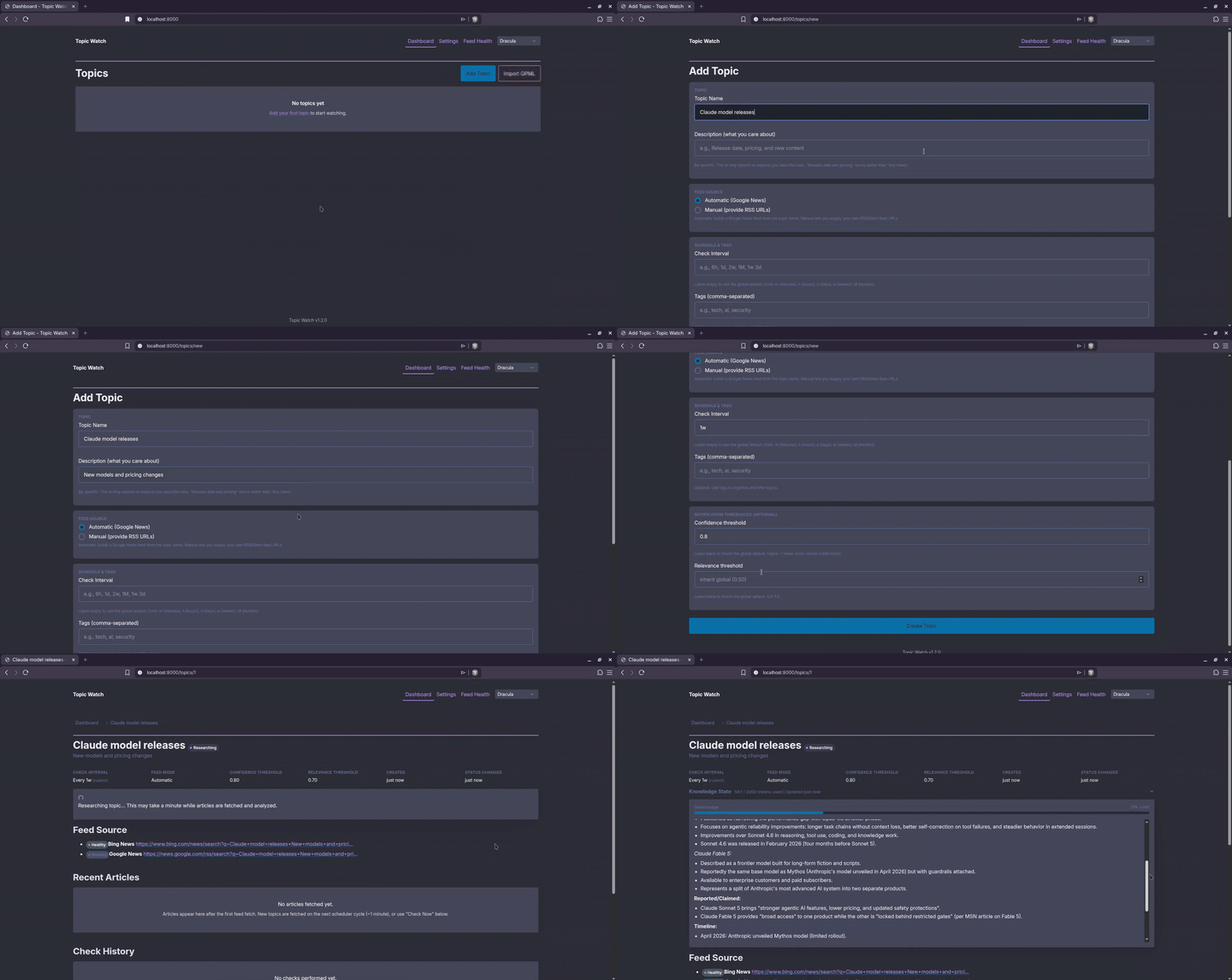
Adding a topic - Topic Watch fetches the latest news and builds a per-topic knowledge baseline.
## Install
### 1. Install Docker
Topic Watch runs in Docker. Get it at [get.docker.com](https://get.docker.com), or install [Docker Desktop](https://www.docker.com/products/docker-desktop/) on macOS/Windows.
### 2. Install Topic Watch
**Linux / macOS:**
```bash
curl -fsSL https://raw.githubusercontent.com/0xzerolight/topic_watch/main/scripts/install.sh | bash
```
**Windows (PowerShell):**
```powershell
irm https://raw.githubusercontent.com/0xzerolight/topic_watch/main/scripts/install.ps1 | iex
```
Manual install (without the script)
**Docker, prebuilt image** - same image the script uses, you just supply the compose file:
```bash
mkdir -p topic-watch/data && cd topic-watch
curl -fsSL https://raw.githubusercontent.com/0xzerolight/topic_watch/main/docker-compose.prod.yml -o docker-compose.yml
(umask 077; printf 'PUID=%s\nPGID=%s\n' "$(id -u)" "$(id -g)" > .env)
docker compose up -d
```
The `.env` line matches the container's user to yours so it can write `data/`, and is
owner-only since secrets go there later.
**Build from source** - no prebuilt image, builds from the Dockerfile:
```bash
git clone https://github.com/0xzerolight/topic_watch.git
cd topic_watch
(umask 077; printf 'PUID=%s\nPGID=%s\n' "$(id -u)" "$(id -g)" > .env)
docker compose up -d
```
Without the `.env` line the container chowns your checkout's `data/` to UID 1000 - a
problem if your UID differs.
**Without Docker** (Python 3.11+):
```bash
git clone https://github.com/0xzerolight/topic_watch.git
cd topic_watch
python -m venv .venv && source .venv/bin/activate
pip install -e .
uvicorn app.main:app --host 127.0.0.1 --port 8000
```
Then open [http://localhost:8000](http://localhost:8000) and set your LLM key in the
setup wizard. The editable install (`-e`) keeps config and the SQLite database in the
project's `data/`. `--host 127.0.0.1` keeps it local - widen only behind an
authenticating reverse proxy (no login screen).
Updating
**If you used the install script or the prebuilt image:**
```bash
cd ~/topic-watch # or your install directory
docker compose pull
docker compose up -d
```
Or run the updater, which reports the version change and points at your backups:
```bash
curl -fsSL https://raw.githubusercontent.com/0xzerolight/topic_watch/main/scripts/update.sh | bash
```
**If you built from source,** there is no image to pull - rebuild instead:
```bash
cd topic_watch # your clone
git pull
docker compose up -d --build
```
The database is automatically backed up before any schema migration.
## Features
- Novelty detection: - ignores the 10th article rehashing the same story
- Support for any LLM via [LiteLLM](https://docs.litellm.ai/docs/providers) - OpenAI, Anthropic, Gemini, Groq, and more. BYOK, or run free and local with Ollama
- Private and self-hosted on SQLite. Outbound traffic: RSS feeds and the pages they link to, your LLM provider, your notifier, and your topic names to Exa if you enable it
- Auto feeds (Bing News, falling back to Google News), manual RSS/Atom URLs, or optional [Exa](https://exa.ai) AI semantic search per topic
- Per-topic check intervals (10 min to 6 months)
- Novelty instruction ("official announcements only, ignore rumors")
- 100+ notification services via [Apprise](https://github.com/caronc/apprise/wiki) - Discord, Slack, Telegram, email, ntfy, etc.
More features
- Importance scoring: every finding is rated 1-5, with an optional per-topic threshold that mutes minor findings without dropping them from the knowledge state
- Knowledge history: recent updates to a topic's knowledge state are kept as revisions, with an inline diff timeline showing what the AI added or removed
- Silence Heartbeat: one "sources failing" alert per topic after consecutive empty checks, and a recovery notice when sources return
- Custom JSON webhooks and a notification retry queue
- Feed health dashboard
- Topic tags and bulk check/delete
- Data export (JSON, CSV) and OPML import/export
- 5 color themes (Nord, Dracula, Solarized Dark, High Contrast, Tokyo Night)
- In-app settings page
How It Works
1. Define a topic with RSS feed URLs, let it auto-generate a news-search feed (Bing News first, Google News as fallback), or point it at Exa AI semantic search.
2. On a schedule, new articles are fetched and compared against a **knowledge state** - a rolling summary of what's already known.
3. An LLM decides if anything is actually new.
4. New info -> notification with summary + sources. Nothing new -> silence.
LLM providers
Uses [LiteLLM](https://docs.litellm.ai/docs/providers). Anything LiteLLM supports works - the model string needs its provider prefix.
| Provider | Model String |
|----------|-------------|
| OpenAI | `openai/gpt-5.4-nano` |
| Anthropic | `anthropic/claude-haiku-4-5` |
| Ollama | `ollama/llama3.3` |
| Google Gemini | `gemini/gemini-2.5-flash` |
| Groq | `groq/llama-3.3-70b-versatile` |
| DeepSeek | `deepseek/deepseek-chat` |
| Azure OpenAI | `azure/your-deployment` |
| Cohere | `cohere_chat/command-a-03-2025` |
| Together AI | `together_ai/meta-llama/Llama-4-Maverick-17B-128E-Instruct-FP8` |
**Get an API key:** [OpenAI](https://platform.openai.com/api-keys) ·
[Anthropic](https://console.anthropic.com/settings/keys) ·
[Gemini](https://aistudio.google.com/apikey) ·
[Groq](https://console.groq.com/keys) ·
[DeepSeek](https://platform.deepseek.com/api_keys). Or run
free + local with [Ollama](https://ollama.com/download).
Ollama and OpenAI-compatible gateways (LM Studio, a LiteLLM proxy, OpenCode Go) need a
`base_url` - see [`config.example.yml`](config.example.yml).
Reaching Ollama on the host from inside the container also needs an override file.
From your install directory (`~/topic-watch` if you used the script):
```bash
curl -fsSL https://raw.githubusercontent.com/0xzerolight/topic_watch/main/docker-compose.override.example.yml -o docker-compose.override.yml
docker compose up -d
```
In a git clone the file is already there: `cp docker-compose.override.example.yml docker-compose.override.yml`.
Notifications and configuration
Notifications are **off by default** - Topic Watch tracks topics silently until you add
at least one [Apprise URL](https://github.com/caronc/apprise/wiki) on the **Settings**
page (`ntfy://your-topic`, `discord://webhook_id/webhook_token`, ...). Multiple URLs are
supported; **Test Notification** verifies them.
Everything else lives in `data/config.yml` (auto-copied from
[`config.example.yml`](config.example.yml) on first run) and most of it is editable on the
Settings page; anything the environment supplies shows there as read-only. Any key can be
overridden with the `TOPIC_WATCH_` env prefix, using `__` for nested
keys (e.g. `TOPIC_WATCH_LLM__API_KEY`). Full key reference:
[`config.example.yml`](config.example.yml) and [ARCHITECTURE.md](ARCHITECTURE.md).
## Security
**No built-in authentication** by design (single-user tool). The port is published on `127.0.0.1` by default.
Reaching it from other devices
To reach it from other devices, set `TOPIC_WATCH_BIND_ADDR=0.0.0.0` in `.env` (the installer offers this as a question) and put it behind a reverse proxy with auth ([Authelia](https://www.authelia.com/), [Authentik](https://goauthentik.io/), Caddy `basicauth`, Nginx basic auth). A host firewall is not a substitute: Docker publishes ports ahead of `ufw` and `firewalld` rules. If the proxy forwards a hostname other than `localhost`, `*.local` or an IP address, list it too: `TOPIC_WATCH_ALLOWED_HOSTS=topic-watch.example.com`. See [SECURITY.md](SECURITY.md).
## Troubleshooting
| Issue | Fix |
|-------|-----|
| **LLM errors / checks failing** | Check your API key and that the model string has its provider prefix (`openai/gpt-5.4-nano`, not `gpt-5.4-nano`). Logs: `docker compose logs -f`. |
| **No notifications** | Add an Apprise URL on the Settings page and press Test Notification. Verify the [URL format](https://github.com/caronc/apprise/wiki). |
| **0 articles found** | Open the RSS URL in a browser and check the Feed Health page. Some sites block bots. |
| **"Sources failing" alert** | Sent after `silence_heartbeat_checks` consecutive checks (default 3) with no usable source - a dead feed, an expired Exa key, or no network. Fix the source, or set `silence_heartbeat_checks: 0` to turn the alert off. |
| **Topic stuck in "Researching"** | Auto-recovers after 15 minutes (set to Error). Retry from the topic page. Usually an LLM connectivity issue. |
| **Docker container exits** | `docker compose logs` for details. Check that `data/` is writable. The installer sets `PUID`/`PGID` automatically; see [SECURITY.md](SECURITY.md). |
| **Can't reach it from another device** | The port is published on `127.0.0.1` by default. Set `TOPIC_WATCH_BIND_ADDR=0.0.0.0` in `.env` and run `docker compose up -d`. Add a reverse proxy with auth first - there is no login screen. |
| **"Invalid host header" (HTTP 400)** | You are reaching it by hostname. Set `TOPIC_WATCH_ALLOWED_HOSTS` to that hostname in `.env` (comma-separated for several) and restart. `localhost` and IP addresses need no setting. |
| **High memory** | Lower `max_articles_per_check` or `content_fetch_concurrency`. Increase check intervals. |
## Contributing
Contributions of any kind are welcome.
- New here? Start with [CONTRIBUTING.md](CONTRIBUTING.md).
- Architecture overview: [ARCHITECTURE.md](ARCHITECTURE.md).
- Security: [SECURITY.md](SECURITY.md).
Bug reports and feature requests -> [Issues](https://github.com/0xzerolight/topic_watch/issues).
Questions and discussion -> [Discussions](https://github.com/0xzerolight/topic_watch/discussions).
## License
GNU General Public License v3.0. See [LICENSE](LICENSE).