# Boardstate
[](https://github.com/100yenadmin/boardstate/actions/workflows/ci.yml) [](https://www.npmjs.com/package/@boardstate/core) [](LICENSE) [](CONTRIBUTING.md)
> **Your dashboard is data. Any AI can build it; any human can edit it.**
**[▶ Live app — plug in your key](https://100yenadmin.github.io/boardstate/app/)** — bring your own provider (GLM, Anthropic, OpenAI, Ollama, or any OpenAI-compatible endpoint) and watch the AI build your dashboard live, in your browser. Prefer no key? The **[component demo](https://100yenadmin.github.io/boardstate/)** presses “Simulate agent” and composes the board with a scripted agent — then drag things around yourself.
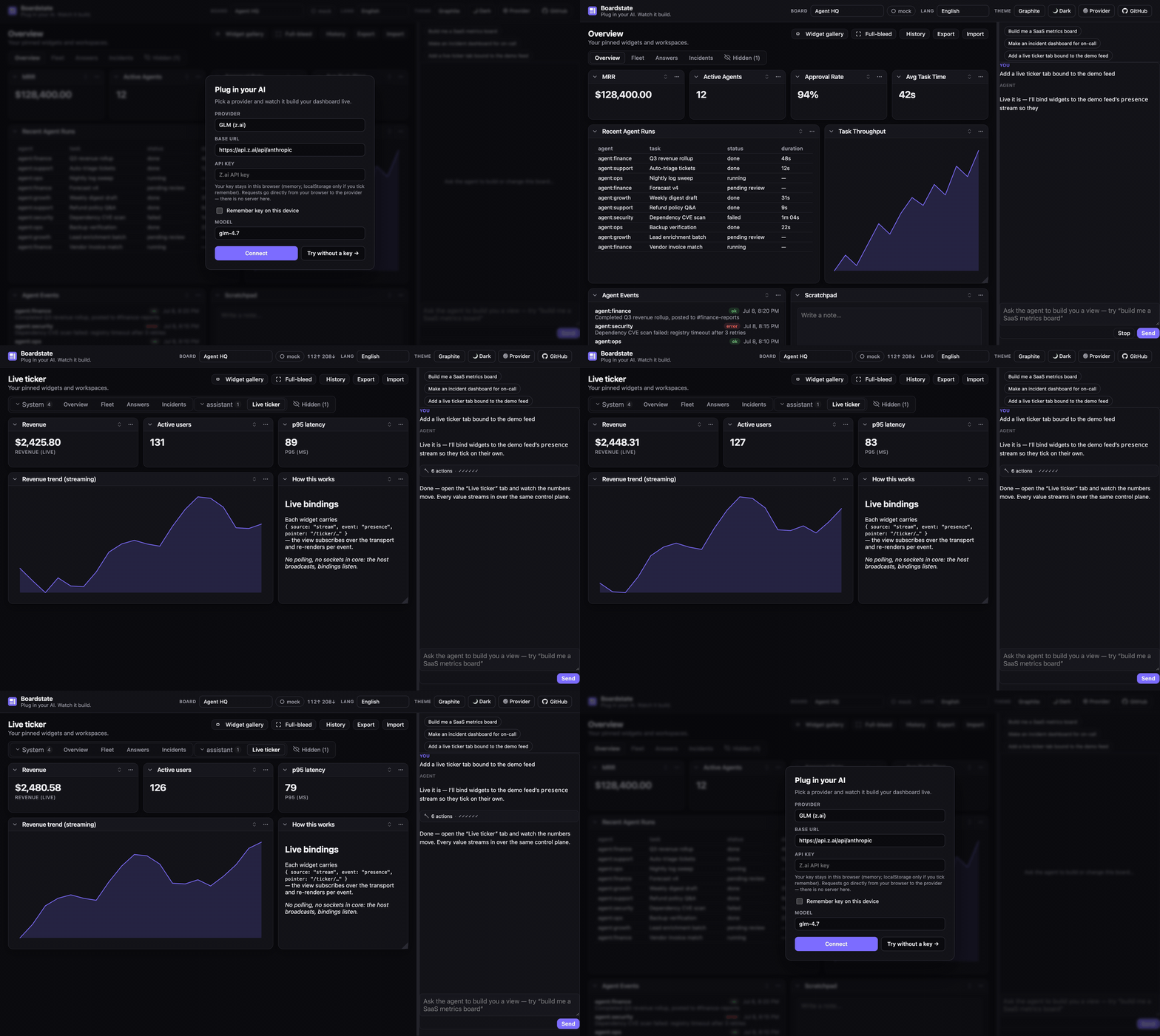
More demos: a real Claude over MCP, and the component demo's scripted agent
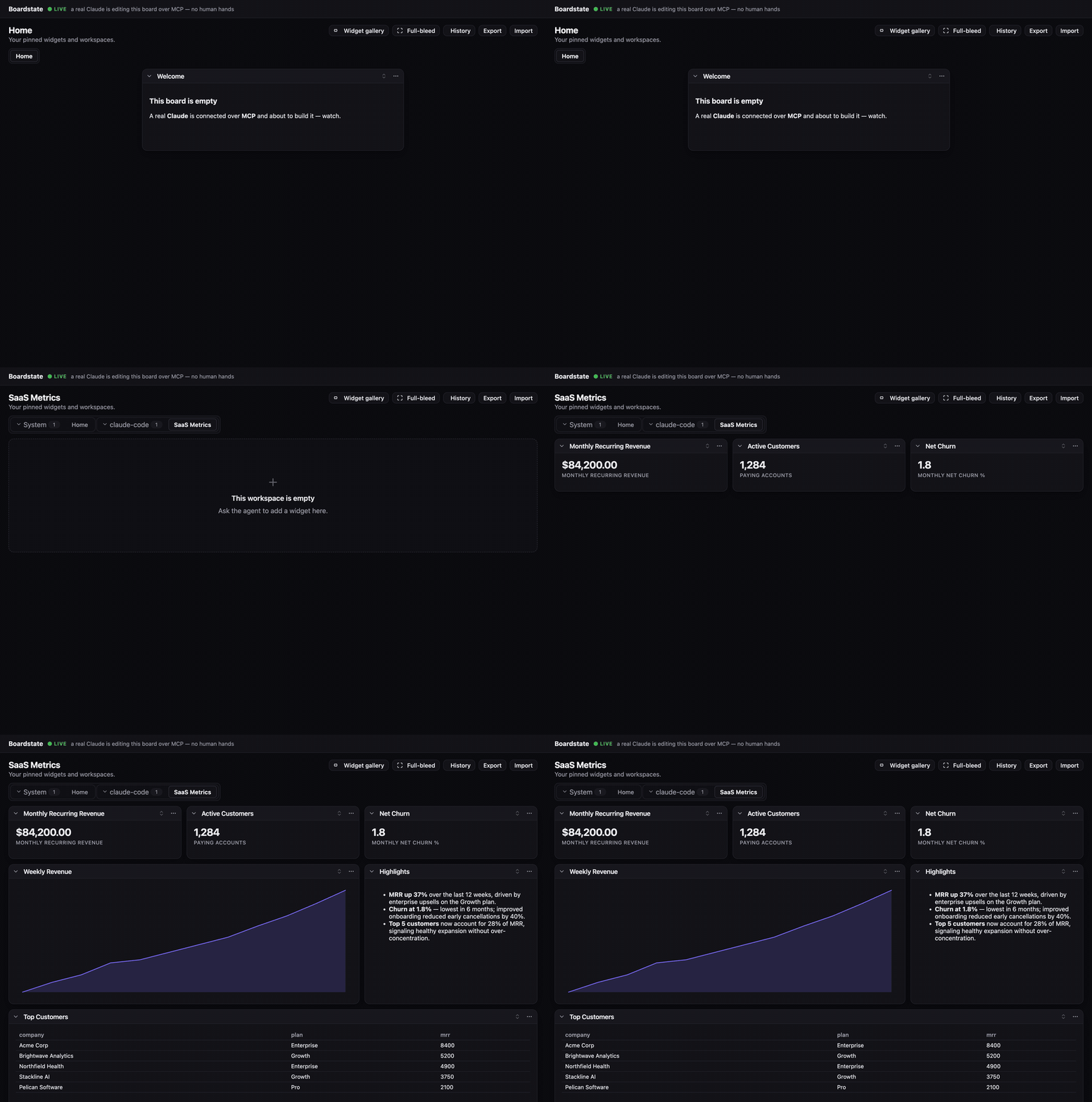
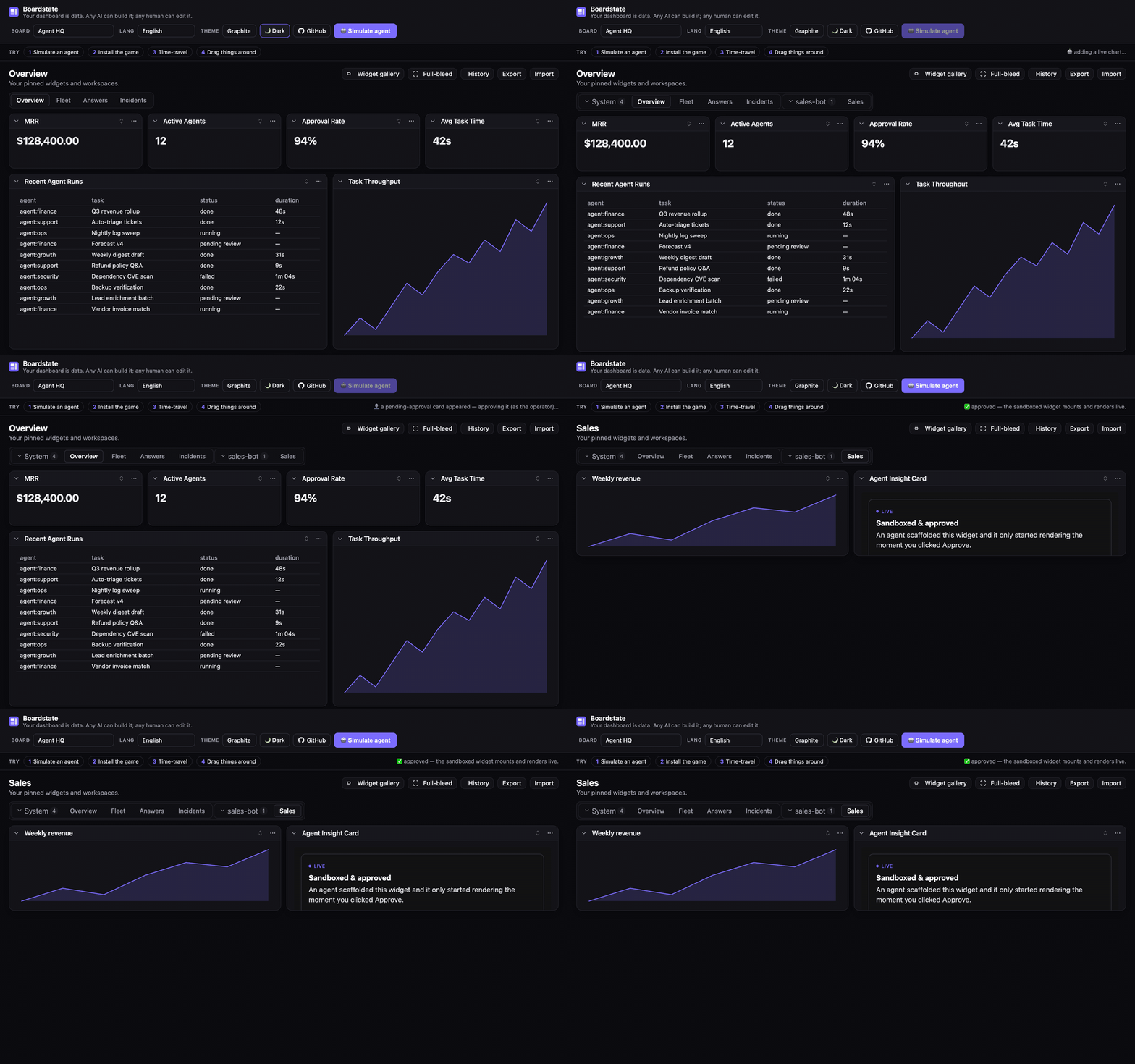
Boardstate is a protocol and runtime for **agent-composable dashboards**. The entire dashboard — tabs, widgets, layout, data bindings, even the registry of agent-authored custom widgets — is one validated JSON document: the _board state_. An AI agent composes it through tools, a human rearranges it with drag & drop, a script edits it over RPC — **all through the same guarded control plane**, with no privileged path. Agent-authored widgets render live inside a sandbox strict enough that foreign code is safe _by construction_, behind an explicit operator approval gate.
- 📄 **The document is the API** — diffable, undoable, exportable, importable, templatable, time-travelable.
- 🤖 **Any AI, zero integration** — `@boardstate/mcp` exposes the full tool set to any MCP client (Claude, or anything else that speaks MCP).
- 🧑🎨 **Human parity is a protocol requirement** — drag/drop, collapse, approve, undo: the same methods the agent uses.
- 🔒 **A security ladder, not a warning label** — trusted builtins vs. sandboxed customs (opaque origin, CSP `connect-src 'none'`, capability manifest, approval-gated mount, server-side 404 for anything unapproved).
- 🔌 **Your dashboard can DO things** — Boardstate is also an MCP _client_: point it at OfficeCLI, Pipedream, Composio, or any MCP server and the board reads their tools as live data and runs their tools as operator-confirmed actions (see below).
## Your dashboard can DO things
Boardstate is an MCP **client**, not just an MCP server. Give it an operator-authored
connector config (`@boardstate/broker`) and it connects outward to an external tool server —
importing that server's read-ish tools as **board data** (`source:"mcp"` bindings) and its
side-effecting tools as **operator-confirmed actions** (action buttons). The whole thing
runs behind the same capability gate as everything else:
1. The agent discovers tools it needs (`boardstate_tool_search`) and **requests** them — it
can never grant them.
2. A card appears in the approvals widget; a **human operator** grants a subset.
3. Read tools flow onto the board live; anything consequential **parks** as a pending action
that a networked client physically cannot confirm — only the local operator can.
4. Grants are revocable, and re-pend the instant a tool's surface changes under them.
```sh
pnpm build
node examples/operational-demo/demo.mjs # keyless — a fake OfficeCLI double; no binary, no keys
```
Open the board and the loopback operator console it prints: approve the grant, watch a table
fill from a live workbook, click "Generate .docx", and confirm the action. OfficeCLI,
Pipedream, and Composio ship as first-party connector presets (`docs/connectors/`). The
broker, its network, and every secret stay node-side — `@boardstate/core` never learns an
external tool exists.
## How it fits together
```mermaid
flowchart TB
subgraph Authors["Who composes a dashboard — one validated control plane"]
A1["🤖 AI agent · tools
(dashboard_tab_create, _widget_scaffold, …)"]
A2["👤 Human · UI
(drag / drop / approve)"]
A3["⌨️ Scripts · CLI / RPC"]
end
A1 --> CP
A2 --> CP
A3 --> CP
CP["Control plane · dashboard.* methods
(allowed-keys whitelists, full validation)"]
CP --> STORE["🔒 Store
serialized writes · atomic persistence
undo ring · size caps"]
STORE --> DOC[["workspace document
the board state"]]
STORE -- "boardstate.changed" --> UI["Host UI · "]
UI --> B["✅ Builtin widgets — trusted tier"]
UI --> C["🧩 Custom widgets — sandboxed tier
opaque origin · no network · approval-gated"]
C -. "postMessage bridge — parent resolves all data" .-> UI
```
Why agent-authored code is safe to run:
```mermaid
sequenceDiagram
participant Agent as 🤖 Agent
participant Store as Store
participant Op as 👤 Operator
participant Frame as Sandboxed iframe
Agent->>Store: widget_scaffold (manifest + index.html)
Store-->>Op: status "pending" — a card, NOT an iframe
Op->>Store: Approve
Store-->>Frame: assets served (unapproved → 404) + CSP connect-src 'none'
Frame->>Store: only the bindings its manifest declared — via the parent
Note over Frame: no origin · no network · no credentials
```
## Where Boardstate runs
The same library, in production agent products:
- **[OpenClaw](https://github.com/openclaw/openclaw)** adopted the stack **in-tree as
"Workspaces"** — our upstream contribution merged directly
([openclaw#101792](https://github.com/openclaw/openclaw/pull/101792)), follow-on work
landed maintainer-wrapped
([openclaw#104139](https://github.com/openclaw/openclaw/pull/104139)); tracker
[openclaw#101136](https://github.com/openclaw/openclaw/issues/101136).
- **[Hermes](https://github.com/NousResearch/hermes-agent)** — the
**[boardstate-hermes-plugin](https://github.com/100yenadmin/boardstate-hermes-plugin)**
puts the board _inside_ Hermes: a Board tab in the web dashboard **and** a page in the
desktop app, with Hermes-native design skins, live Hermes data widgets, sandboxed custom
widgets, and an operator-governed connector layer. Bundling PRs are open upstream —
tracker [hermes-agent#66413](https://github.com/NousResearch/hermes-agent/issues/66413)
· web [#66381](https://github.com/NousResearch/hermes-agent/pull/66381) · desktop
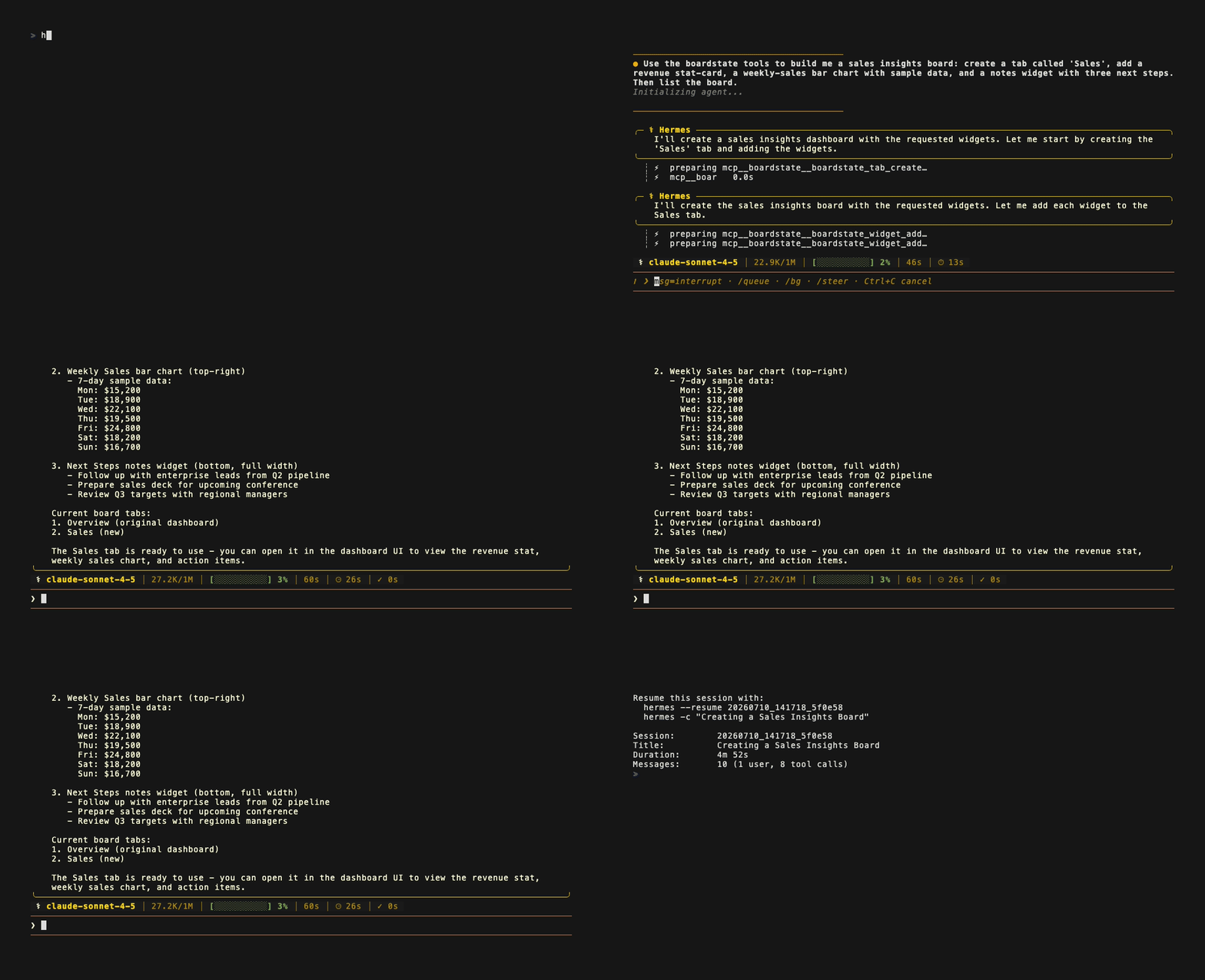
[#66425](https://github.com/NousResearch/hermes-agent/pull/66425). Prefer zero install?
The [no-plugin recipe](docs/integrations/hermes.md) points Hermes' MCP client straight
at `@boardstate/mcp`:
- **Anywhere npm or MCP reaches** — embed ``, run a Node host, or point
any MCP-speaking AI at a board (see [Installation](#installation)).
## Features
### The document is the whole product
Everything below operates on one validated JSON document (≤ 256 KB, schema v1). Because the
board _is_ data, you get for free: **undo** (a 20-entry ring), **export/import** (a board is
a file you can email), **templates** ([`templates/`](templates) — Agent HQ, Showcase,
small-business, OSS-maintainer), **provenance** (every tab and widget records its `createdBy`
actor — human, system, or which agent), and **diffability** (review an agent's board the way
you review a PR). Mutations go through `dashboard.*` methods with per-method allowed-keys
whitelists — unknown keys are rejected at the wire, which catches contract drift before it
ships.
### Widgets: a trusted tier and a sandboxed tier
**17 builtin widgets** cover the common jobs: `stat-card`, `chart`, `table`, `markdown`,
`notes`, `iframe-embed`, `preview`, `activity`, `sessions`, `usage`, `cron`, `instances`,
`agent-status`, `chat` (talk to the agent inside the board), `approvals` (the operator's
grant + pending-action console), `action-form`, and `action-button` (governed actions —
see below). Every builtin has a schema-valid example in the **widget catalog**
(`boardstate_widget_catalog`), honesty-gated in CI so the examples can never rot.
**Custom widgets** are agent- or user-authored HTML that renders live — safely, _by
construction_: opaque-origin iframe, `connect-src 'none'` (no network), a capability
manifest that declares exactly which bindings it may read, an operator approval gate before
first mount, and server-side 404s for unapproved assets. A scaffolded widget lands as a
pending card, not running code.
### Data bindings: six sources, one model
Any widget can bind live data. A binding declares a source; the host resolves and refreshes it:
| Source | What it does |
| ---------- | ---------------------------------------------------------------------------------------------------- |
| `static` | Inline JSON (≤ 8 KB) — fixtures, thresholds, copy |
| `file` | Reads from the host's state dir — reports, scratch data |
| `rpc` | Calls a whitelisted host method — anything your host exposes |
| `stream` | Subscribes to a host event stream — tickers, logs, agent output; updates push live |
| `computed` | Derives from other bindings with a pure expression — totals, deltas, ratios |
| `mcp` | Reads a **granted external MCP tool** through the connector broker (readOnly-only, side-effect-free) |
### The agent layer
- **`@boardstate/mcp`** — the full tool set for any MCP client; `--serve` gives you a live
page of the board being built, and `boardstate_board_view` renders it inside MCP-Apps
clients like Claude Desktop.
- **`@boardstate/agent`** — the embeddable chat agent: streaming tool loop, provider
adapters (Anthropic, or any OpenAI-compatible endpoint — GLM, OpenAI, Ollama, vLLM),
the composition system prompt, and a definition-token budget so big tool catalogs can't
blow the context.
- **`builtin:chat`** — the conversation lives _on the board_, next to what it's building.
- **The self-building loop** — `boardstate_design_review` + `selfReview:"once"`: the agent
screenshots the board it just built, critiques it, and fixes what it finds.
- **The conventions** — [living answers](docs/living-answers.md) (answer visual questions
with widgets, not prose) and [composition patterns](docs/composition-patterns.md) (which
widget for which job). See **[AGENTS.md](AGENTS.md)** for the full agent guide.
### Actions & the operate loop (the trust spine)
Side effects are first-class and _governed_. The capability broker tracks per-connector,
per-tool **grants** (`requested → granted / denied / revoked`): an agent can discover and
**request** tools (`boardstate_tool_search`) but never grant them; the operator approves a
subset in the approvals widget. Granted `readOnly` tools execute directly; **mutations park**
as pending actions that only the local operator can confirm — a networked client is refused
at the transport (`OPERATOR_ONLY`). Grants **re-pend automatically** if the external server
changes a tool's surface underneath them (anti-rug-pull, both directions), and every invoke
is rate-limited and audit-logged. Reads and actions are different verbs: a `source:"mcp"`
binding resolves through a pure-read verb that structurally cannot trigger a side effect.
### Beyond one agent
Grants can carry **per-tool auto-confirm** (an explicit operator opt-in, never a default)
and **TTLs**, and pending actions can complete **asynchronously** — wakes are
operator-caused only. Workspaces are **multi-agent**: actor identity is server-bound and
fail-closed over the wire, widgets carry provenance chips, and each agent gets its own
grant scope and rate budget. **Template recipes** turn boards into installable programs —
install = import, bundled grants arrive `requested`, never pre-approved — and the
**board-as-memory** convention lets an agent use the board itself as durable memory
(capped, framed, human edits are ground truth).
### Connectors
`@boardstate/broker` manages outbound MCP connections from an operator-authored config
(stdio or streamable HTTP; secrets as `${ENV}` refs, resolved node-side only — never in the
document, never in the browser). First-party presets: **OfficeCLI** (native, stdio),
**Pipedream** and **Composio** (remote aggregators — thousands of SaaS tools behind one
connector). `installConnectorWorkspace` wires the whole stack into your host in one call.
Setup guides: [`docs/connectors/`](docs/connectors.md).
### Hosts, transports, conformance
Run it your way: fully in-browser (the live demo persists to IndexedDB-like storage via the
core store), a Node host over the hardened **WebSocket transport**, or in-process. The
**`boardstate` CLI** drives the same control plane from your shell. If you build your own
host, **`@boardstate/conformance`** is the transport test suite that tells you it's actually
conformant — conformant hosts already run in production inside OpenClaw (in-tree as
Workspaces) and Hermes (via the plugin): see
[Where Boardstate runs](#where-boardstate-runs).
### Batteries included
A complete default theme (**Graphite**, light + dark) plus two drop-in alternates and a
fully tokenized `--bs-*` custom-property system ([THEME.md](packages/lit/THEME.md));
**20-language localization** with runtime switching; drag & drop with lift-and-carry
ergonomics; typed React wrappers; and a keyboard-reachable, `prefers-color-scheme`-honoring
reference UI.
## Packages
| Package | What it is |
| ---------------------------------------- | ----------------------------------------------------------------------------------- |
| [`@boardstate/schema`](packages/schema) | The document schema, validators, and **[the spec](packages/schema/SPEC.md)** |
| [`@boardstate/core`](packages/core) | Headless runtime: store, bindings, grid math, export/import, pub/sub, history |
| [`@boardstate/server`](packages/server) | The `dashboard.*` control plane, agent tools, widget serving, CLI |
| [`@boardstate/host`](packages/host) | Framework-free DOM host: sandbox mount, postMessage bridge, client store |
| [`@boardstate/lit`](packages/lit) | The reference view — `` and 16 builtin widgets, as custom elements |
| [`@boardstate/react`](packages/react) | Typed React wrappers over the custom elements |
| [`@boardstate/mcp`](packages/mcp) | MCP server: give any AI the full dashboard tool set |
| [`@boardstate/conformance`](conformance) | The transport conformance suite — run it against _your_ host |
## Installation
Pick the entry point that matches what you're building — each is one install:
| You want… | Install | Start here |
| ------------------------------------------- | --------------------------------------------- | ----------------------------------------------------------------- |
| Any AI building boards (Claude, etc.) | `npx -y @boardstate/mcp` (no install) | [Give an AI the board](#usage) · [AGENTS.md](AGENTS.md) |
| The dashboard UI in your web app | `npm i @boardstate/lit @boardstate/core` | [Embed the view](#usage) |
| …with React | `npm i @boardstate/react` | [React](#usage) |
| A networked Node host (multi-client, WS) | `npm i @boardstate/server` | [Run a host](#usage) |
| An embedded chat agent (bring your own key) | `npm i @boardstate/agent` | [AGENTS.md §2](AGENTS.md) |
| The board acting through external tools | `npm i @boardstate/broker` | [Connect outward](#usage) · [docs/connectors](docs/connectors.md) |
| A shell workflow / scripting | `npx --package @boardstate/server boardstate` | [CLI](#usage) |
| To verify your own host implementation | `npm i -D @boardstate/conformance` | [ARCHITECTURE.md](docs/ARCHITECTURE.md) |
All packages are MIT, ESM, and published with npm provenance (Sigstore-attested).
Requires Node ≥ 20 for the Node-side packages; the browser packages are framework-free
custom elements (Lit under the hood).
## Quick start
Zero-install: open the **[live demo](https://100yenadmin.github.io/boardstate/)**. Locally:
```sh
git clone https://github.com/100yenadmin/boardstate && cd boardstate
pnpm install && pnpm build
pnpm --filter boardstate-example-standalone dev # the 60-second demo
```
Either way, press **“simulate agent”**, and watch: a tab appears, charts bind, a custom widget lands as a pending card, you approve it, the sandboxed iframe mounts and renders live. Then drag things around — you and the agent are editing the same document.
## Usage
**Give an AI the board** — the fastest path; any MCP client gets all 20 tools
(full guide + tool catalog: **[AGENTS.md](AGENTS.md)**):
```sh
claude mcp add boardstate -- npx -y @boardstate/mcp # Claude Code
npx @boardstate/mcp --serve 4400 # + a live page of the board it builds
```

_That's a real Claude session connected to `@boardstate/mcp` — every widget lands via a `boardstate_*` tool call ([video](docs/media/mcp-demo.mp4))._
**Embed the view** — `` is a custom element; hand it a transport:
```js
import "@boardstate/lit/browser";
import "@boardstate/lit/styles.css";
import { createWsTransport } from "@boardstate/core";
const view = document.createElement("boardstate-view");
view.transport = createWsTransport(`ws://${location.host}/ws`);
view.connected = true;
document.getElementById("app").append(view);
```
React: `import { BoardstateView } from "@boardstate/react"` — the same element, typed.
**Run a networked host** — the `dashboard.*` control plane over WebSocket, with the
operator boundary enforced at the transport (see
[`examples/operational-demo/demo.mjs`](examples/operational-demo/demo.mjs) for a complete
~350-line host, and [ARCHITECTURE.md](docs/ARCHITECTURE.md) for the seams):
```js
import {
createInProcessHost,
registerBoardstateRpc,
attachWsTransport,
nodeRpcDeps,
} from "@boardstate/server/node";
```
**Connect outward** (the operate loop — external tools as data + governed actions):
```sh
node examples/operational-demo/demo.mjs # keyless demo: approve → table fills → park → confirm
```
Real connectors are a config file + env refs away — OfficeCLI, Pipedream, Composio guides
in [`docs/connectors/`](docs/connectors.md).
**Script it** — the `boardstate` CLI drives the same control plane from your shell
(state dir: `$BOARDSTATE_STATE_DIR`, default `~/.boardstate` — shared with the MCP server):
```sh
npx --package @boardstate/server boardstate tab add sales
npx --package @boardstate/server boardstate dashboard tabs list
```
## Theming
`@boardstate/lit` ships a complete, world-class default theme — **Graphite** (a
Linear / Vercel / Codex-family palette) — that looks great in **light and dark**
out of the box. Import it once; nothing else to configure.
```ts
import "@boardstate/lit";
import "@boardstate/lit/styles.css"; // the Graphite default — light + dark
```
- **Dark mode, free** — `prefers-color-scheme` is honored automatically; pin it
with `data-theme="dark"` / `"light"` on `` when you want a toggle.
- **Drop-in alternate themes** — layer one after `styles.css` to fully re-skin
(each ships its own light + dark):
```ts
import "@boardstate/lit/themes/aurora.css"; // futuristic — cyan accent + aurora wash
import "@boardstate/lit/themes/vibrancy.css"; // macOS-native frosted glass
```
- **Total control** — every value is a `--bs-*` custom property; override one
token or author a whole theme. See **[THEME.md](packages/lit/THEME.md)** for the
token table and a build-your-own guide.
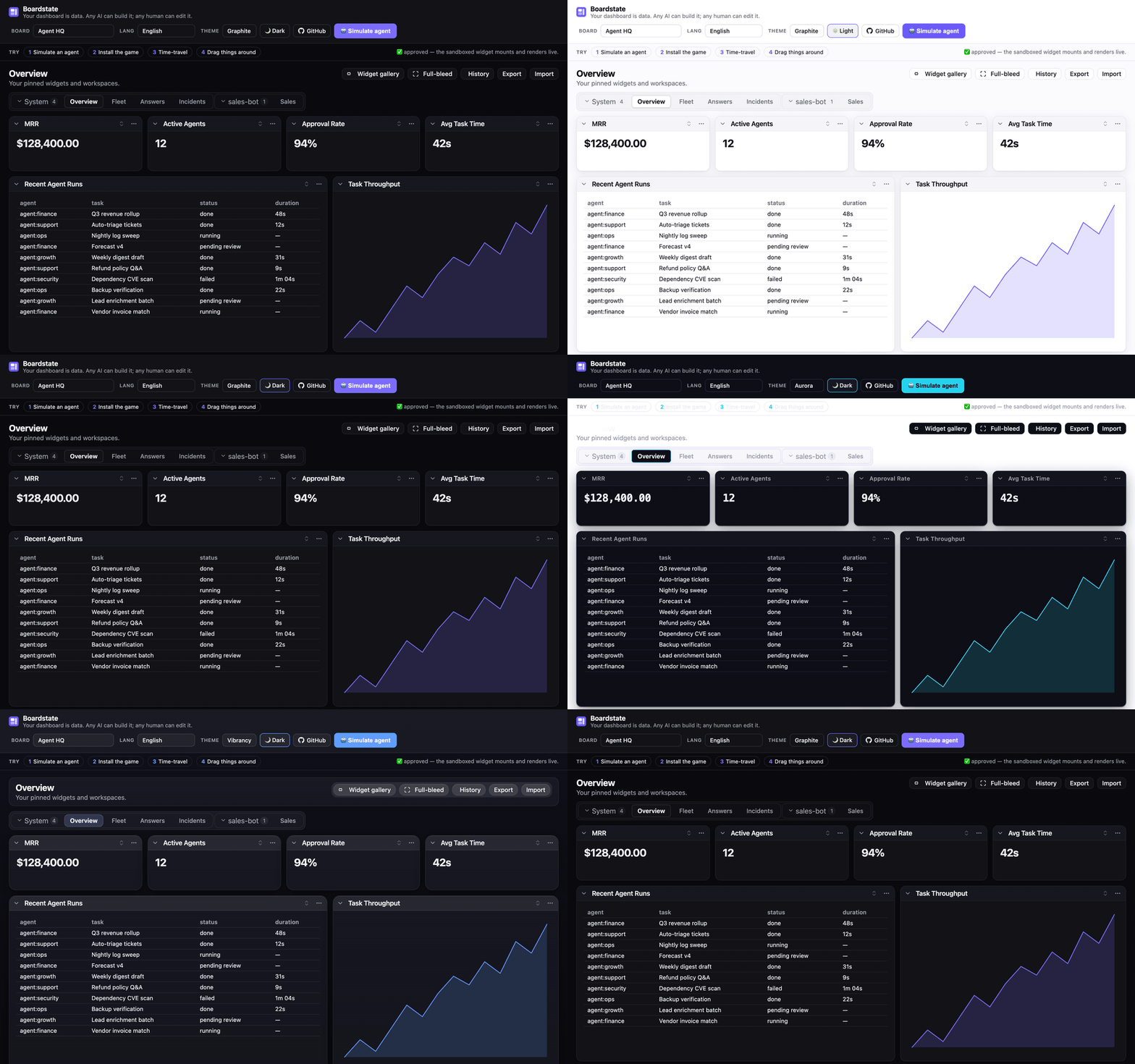
| Graphite (default, light) | Aurora | Vibrancy |
| :-------------------------------------------------------------: | :--------------------------------------------------: | :------------------------------------------------------: |
| 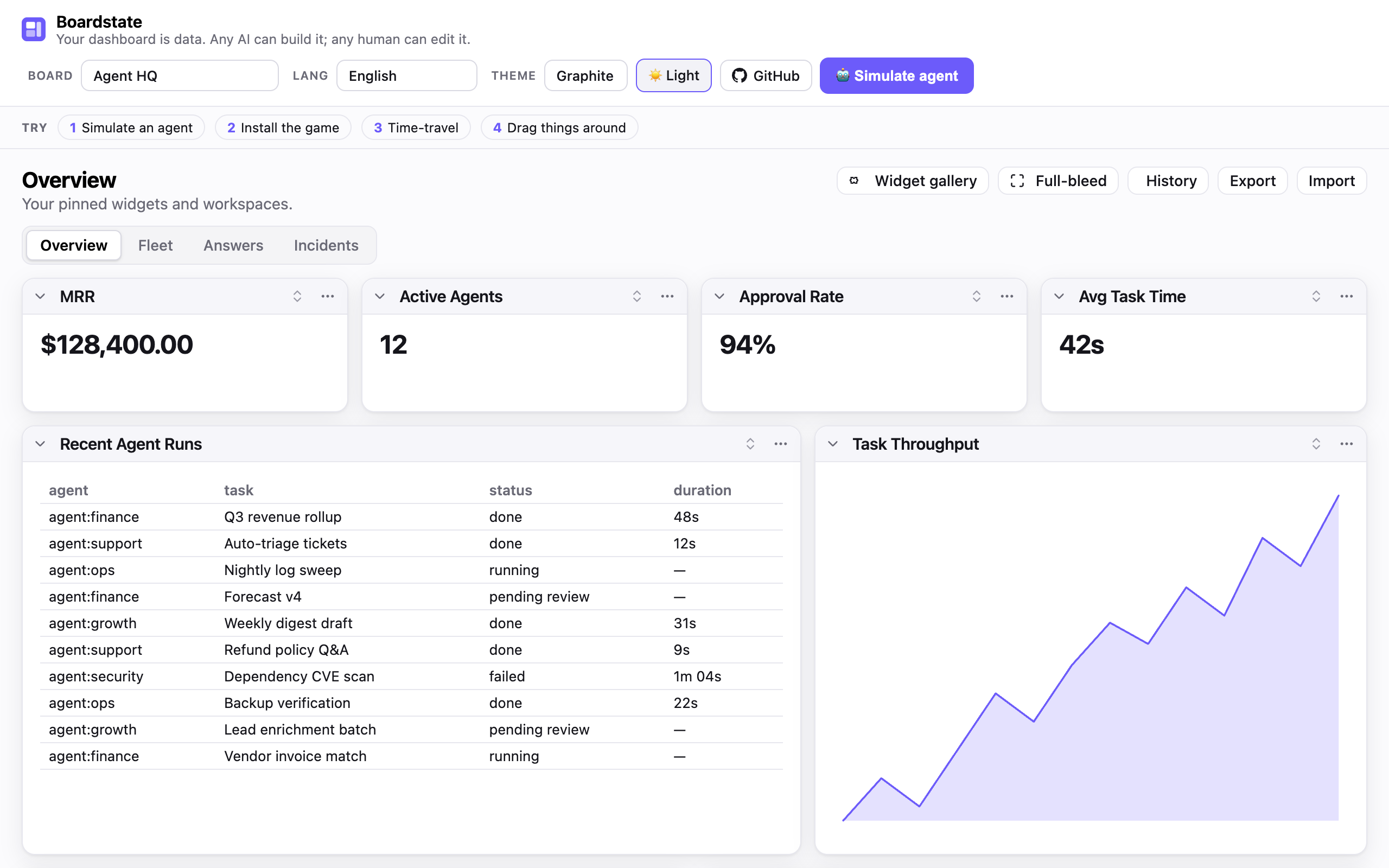 | 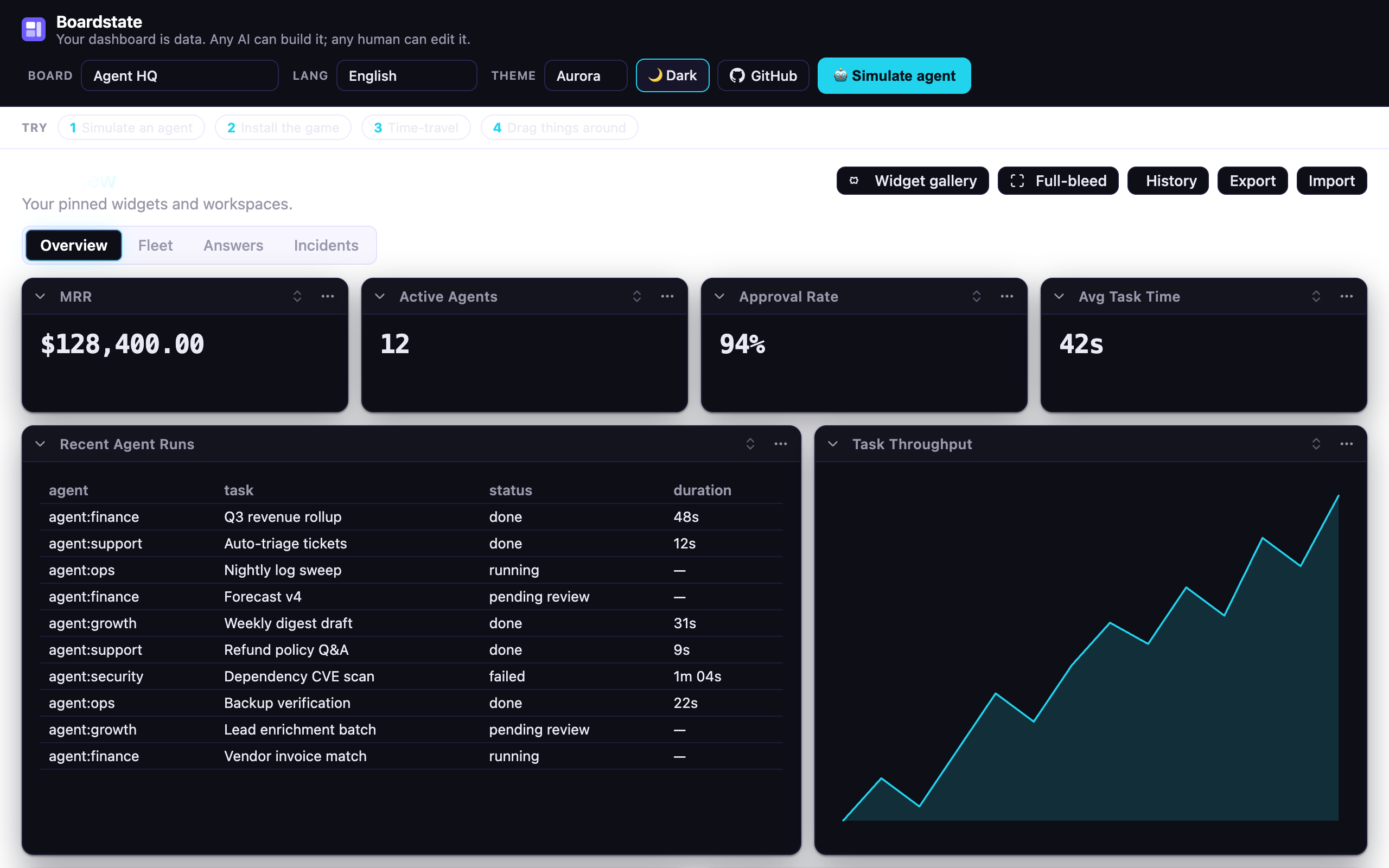 | 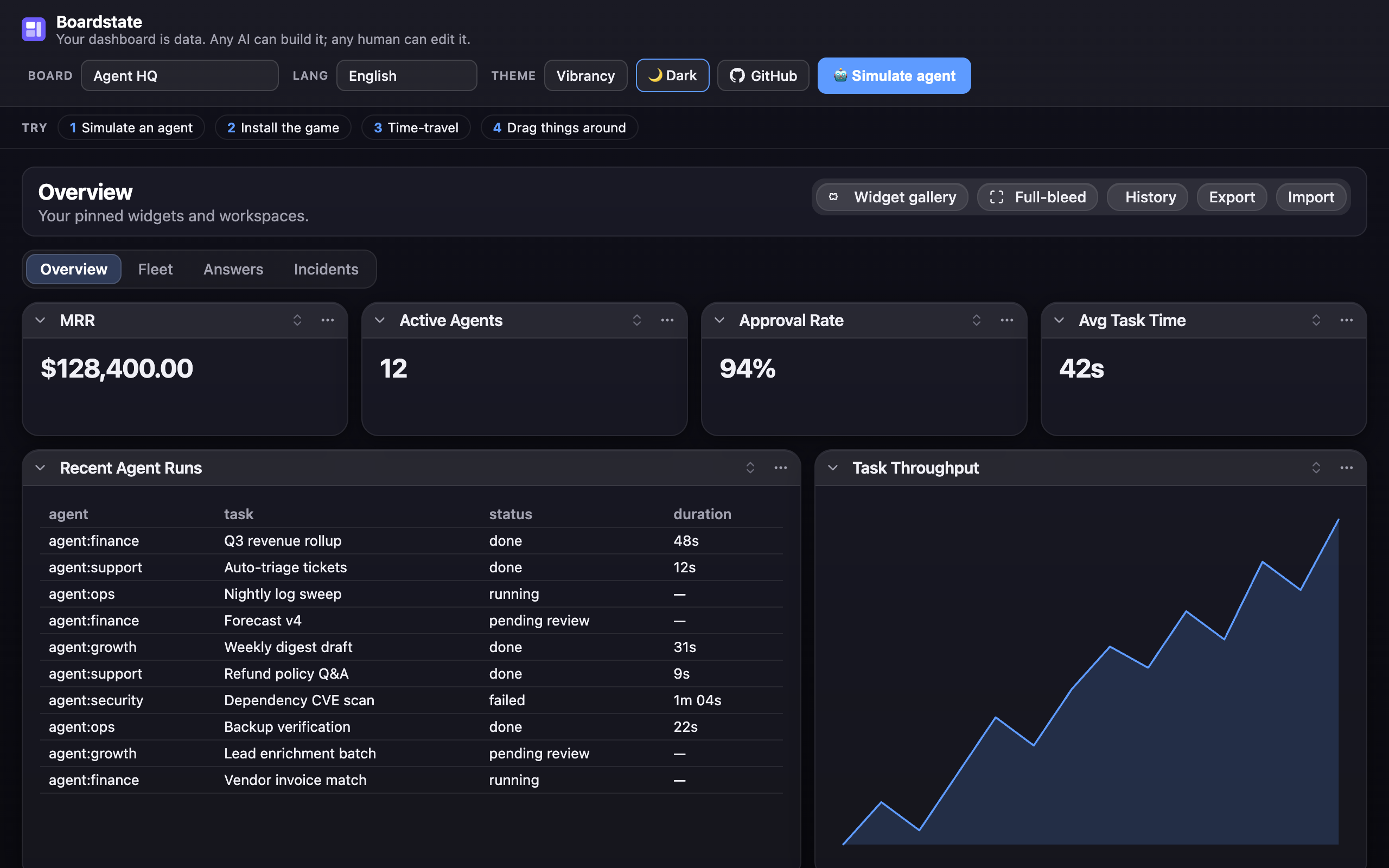 |
The **[live demo](https://100yenadmin.github.io/boardstate/)** has the theme
switcher + light/dark toggle in its header — the fastest way to see all three.
## Localization
The view ships partial translations for **20 languages** (Arabic, German, Spanish, Farsi, French, Hindi, Indonesian, Italian, Japanese, Korean, Dutch, Polish, Portuguese-BR, Russian, Thai, Turkish, Ukrainian, Vietnamese, and both Chinese scripts) — faithfully ported from the source project's catalogs; untranslated keys fall back to English. Pass a table to the view's `strings` property:
```ts
import { de } from "@boardstate/lit/locales/de";
view.strings = de; // or any BoardstateStrings partial of your own
```
The live demo's **Lang** menu switches all 20 at runtime.
## Agents
Boardstate is agent-native in both directions — agents **build** the board (MCP server,
embedded chat agent), and the board **acts** through agent-requested, operator-granted
external tools. **[AGENTS.md](AGENTS.md)** is the complete guide: setting up each agent
surface (Claude Code / Claude Desktop config, the embeddable `@boardstate/agent` with
provider adapters, the connector grant loop), the full 20-tool catalog, the composition
conventions that make agent-built boards good, the security invariants agents operate
under — and the house rules for coding agents contributing to this repo. There's also a
**ready-made agent skill** —
[`.claude/skills/using-boardstate/SKILL.md`](.claude/skills/using-boardstate/SKILL.md) —
copy it into your project's skills (or paste it into a bare-API harness's system prompt)
and your agent knows how to drive the board.
## Learn more
- **[CHANGELOG.md](CHANGELOG.md)** — the release history by milestone: what each train shipped and why; per-package changelogs hold the granular record.
- **[AGENTS.md](AGENTS.md)** — the agent guide: setup, the tool catalog, conventions, and the invariants.
- **[docs/ROADMAP.md](docs/ROADMAP.md)** — where this is going: substrate → the agent layer (plug in a provider — GLM, Anthropic, any OpenAI-compatible endpoint — and the AI builds the board live), the streaming spec, and phased milestones. Pickup-ready for any contributor.
- **[SPEC.md](packages/schema/SPEC.md)** — the protocol: document format, `dashboard.*` methods, bridge protocol v1, capability & approval model, the security invariants.
- **[docs/ARCHITECTURE.md](docs/ARCHITECTURE.md)** — the implementation: package graph, the three seams (storage / transport / server-host), the request lifecycle, and how to build your own host.
- **[docs/composition-patterns.md](docs/composition-patterns.md)** — the agent's field guide: which builtin for which job, when to scaffold a custom widget, composition rules of thumb.
- **[docs/authoring.md](docs/authoring.md)** — write a widget (builtin renderer or sandboxed custom).
- **[docs/living-answers.md](docs/living-answers.md)** — the agent convention: answer visual questions with live widgets, not prose.
- **[docs/design-review.md](docs/design-review.md)** — the agent workflow for reviewing and refining a layout it built.
- **[templates/](templates)** — workspace templates (Agent HQ, the all-builtins Showcase, small-business, OSS-maintainer), starter custom widgets — including **twenty48**, a sandboxed game you can install from the demo's gallery, and a ready-to-use **widget-gallery registry** (`templates/registry/` — the live demo's gallery points at its hosted copy; point yours at `https://100yenadmin.github.io/boardstate/registry/index.json`).
- **[docs/connectors.md](docs/connectors.md)** — the outward direction: connector setup for OfficeCLI, Pipedream, and Composio, the grant model, and the operational demo.
- **[docs/demo-script.md](docs/demo-script.md)** — the acceptance walkthrough: a scripted Do/Observe tour proving every feature, for maintainers and PR reviewers.
- **[GitHub Discussions](https://github.com/100yenadmin/boardstate/discussions)** — questions, ideas, show-and-tell.
## Status
**Actively developed.** Current release: `core` / `schema` / `host` / `server`
**@1.8.0** — the Act 4 train (multi-agent workspaces, per-tool auto-confirm + grant TTLs,
installable template recipes, board-as-memory; see **[CHANGELOG.md](CHANGELOG.md)**), and
the library now runs in production inside OpenClaw and Hermes
([Where Boardstate runs](#where-boardstate-runs)). The protocol is
[SPEC](packages/schema/SPEC.md) v0.2-draft — stable enough to build a host against, with
[`@boardstate/conformance`](conformance) to prove your host is conformant. Every release
ships to npm with provenance.
## License
MIT