# Racket
A Sublime Text 4 plugin for the [Racket](https://racket-lang.org) programming language.
Supported extensions: `.rkt`, `.rktl`, `.rktd` (Racket syntax) and `.scrbl`
(Scribble syntax: prose text with `@`-expressions, sharing every rule with
the Racket syntax). `.rkt` files understand `@`-expressions anywhere in the
file, matching `#lang at-exp racket` semantics.
Current features include:
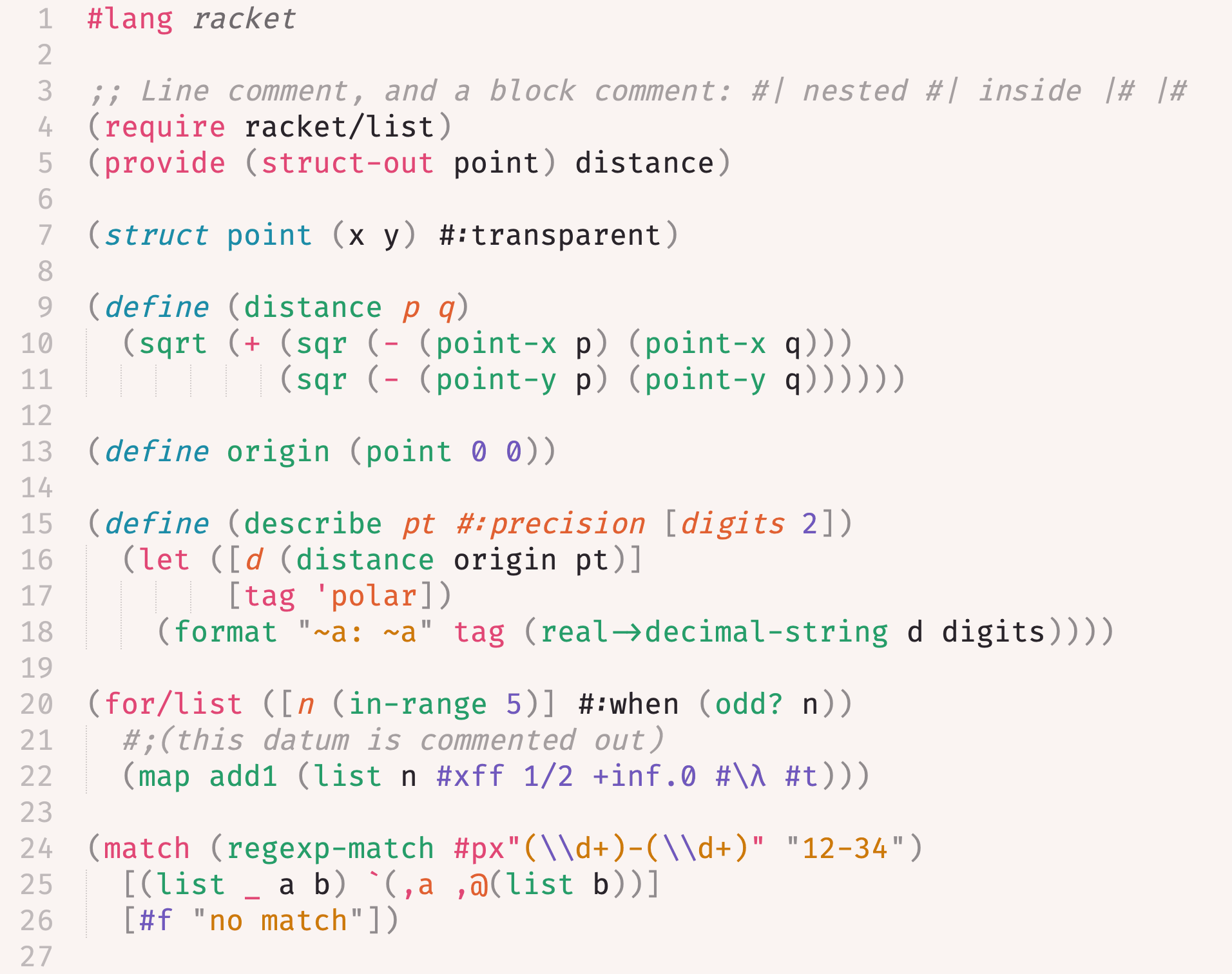
- syntax definition and highlighting: every Racket form and literal is scoped
- build system: run, test, compile and format from command palette
- symbol indexing: `Goto Symbol` lists defined functions and structs
- comment settings: `Toggle Comment` uses `;` and `#| |#`
- bracket handling: auto-indent after an open bracket, outdent on close
- REPL: `Racket: Open REPL`, `Racket: Run File in REPL` and
`Racket: Send Selection to REPL` from command palette; send selection sends
the current line when nothing is selected and starts a REPL if none is running
(needs the [Terminus](https://packagecontrol.io/packages/Terminus) package;
set `racket_executable` in the Racket syntax settings if `racket` is not on
`PATH`)
No completion or language-server integration is available. For those,
use the [LSP](https://packagecontrol.io/packages/LSP) package with
[racket-langserver](https://github.com/jeapostrophe/racket-langserver).
 ## Installation
Via Package Control: `Package Control: Install Package`, then choose
**Racket**.
## Features
### Syntax definition
The syntax is a `.sublime-syntax` written from scratch for the Sublime
Text 4 engine.
- **Complete generated identifier lists.** All 413 special
forms, 2135 procedures and 125 values exported by the `racket` module
(v9.3) are recognised; the lists are produced by a script that queries
Racket itself, so they can be regenerated for any future Racket version.
- **Works with Sublime's editing features.** `Goto Symbol` (Ctrl/Cmd+R)
lists every `define`d function and `struct` in the file. `Toggle Comment`
(Ctrl/Cmd+/) inserts `; ` and block comment inserts `#| |#`. Pressing
Enter after an open bracket indents; typing a close bracket outdents.
Double-clicking `string->list` selects the whole identifier, not
`string` alone, and `?` or `!` at the end of a name is part of the word.
- **Scopes depend on position, not just on the word.** The operator of a
form is scoped as a special form (`define`, `let`), a builtin procedure
(`map`), an operator (`+`), or a user function call (`my-fn`), while the
same identifier used as an argument is scoped as a value. Binding sites
are distinguished too: the name in `(define (add x y) …)` is a definition
and `x`, `y` are parameters; `x` in `(let ([x 1]) …)` is a binding;
`point`, `x`, `y` in `(struct point (x y))` are a type name and fields.
- **Every kind of literal Racket can read is recognised.** Comments in all
three forms: `; line`, `#| block |#` (which may nest), and `#;` followed
by one expression, which comments out exactly that expression, however
many lines it spans. Strings of every flavour: `"plain"`, `#"bytes"`,
`#rx"regexp"`, `#px"regexp"`, and `#< Build With...`):
- **Run** (`racket`): runs the current file and shows its output
- **Test** and **Test Directory** (`raco test`): runs `test` submodules and
`rackunit` tests in the current file, or in every file under its directory
- **Compile** (`raco make`): compiles to bytecode without running, so it
reports syntax and unbound-identifier errors quickly
- **Format** (`raco fmt -i`, needs `raco pkg install fmt`): reformats the
current file in place
- **Expand** (`raco expand`): prints the fully macro-expanded program, useful
for seeing what a macro produces
- **Check Requires** (`raco check-requires`): reports `require`d modules that
are unused or could be narrowed
Error locations in the output panel are clickable.
`racket` and `raco` must be on the `PATH` Sublime sees; on macOS that is the
login shell's `PATH` when launched from the Dock.
## Installation
Via Package Control: `Package Control: Install Package`, then choose
**Racket**.
## Features
### Syntax definition
The syntax is a `.sublime-syntax` written from scratch for the Sublime
Text 4 engine.
- **Complete generated identifier lists.** All 413 special
forms, 2135 procedures and 125 values exported by the `racket` module
(v9.3) are recognised; the lists are produced by a script that queries
Racket itself, so they can be regenerated for any future Racket version.
- **Works with Sublime's editing features.** `Goto Symbol` (Ctrl/Cmd+R)
lists every `define`d function and `struct` in the file. `Toggle Comment`
(Ctrl/Cmd+/) inserts `; ` and block comment inserts `#| |#`. Pressing
Enter after an open bracket indents; typing a close bracket outdents.
Double-clicking `string->list` selects the whole identifier, not
`string` alone, and `?` or `!` at the end of a name is part of the word.
- **Scopes depend on position, not just on the word.** The operator of a
form is scoped as a special form (`define`, `let`), a builtin procedure
(`map`), an operator (`+`), or a user function call (`my-fn`), while the
same identifier used as an argument is scoped as a value. Binding sites
are distinguished too: the name in `(define (add x y) …)` is a definition
and `x`, `y` are parameters; `x` in `(let ([x 1]) …)` is a binding;
`point`, `x`, `y` in `(struct point (x y))` are a type name and fields.
- **Every kind of literal Racket can read is recognised.** Comments in all
three forms: `; line`, `#| block |#` (which may nest), and `#;` followed
by one expression, which comments out exactly that expression, however
many lines it spans. Strings of every flavour: `"plain"`, `#"bytes"`,
`#rx"regexp"`, `#px"regexp"`, and `#< Build With...`):
- **Run** (`racket`): runs the current file and shows its output
- **Test** and **Test Directory** (`raco test`): runs `test` submodules and
`rackunit` tests in the current file, or in every file under its directory
- **Compile** (`raco make`): compiles to bytecode without running, so it
reports syntax and unbound-identifier errors quickly
- **Format** (`raco fmt -i`, needs `raco pkg install fmt`): reformats the
current file in place
- **Expand** (`raco expand`): prints the fully macro-expanded program, useful
for seeing what a macro produces
- **Check Requires** (`raco check-requires`): reports `require`d modules that
are unused or could be narrowed
Error locations in the output panel are clickable.
`racket` and `raco` must be on the `PATH` Sublime sees; on macOS that is the
login shell's `PATH` when launched from the Dock.