# Terminal Coding Agent
[中文文档](./README_CN.md) | English
A powerful CLI-based multi-agent coding assistant powered by [Claude Agent SDK](https://github.com/anthropics/claude-agent-sdk).
> **Rust version available**: [rust-terminal-coding-agent](https://github.com/21pounder/rust-terminal-coding-agent)







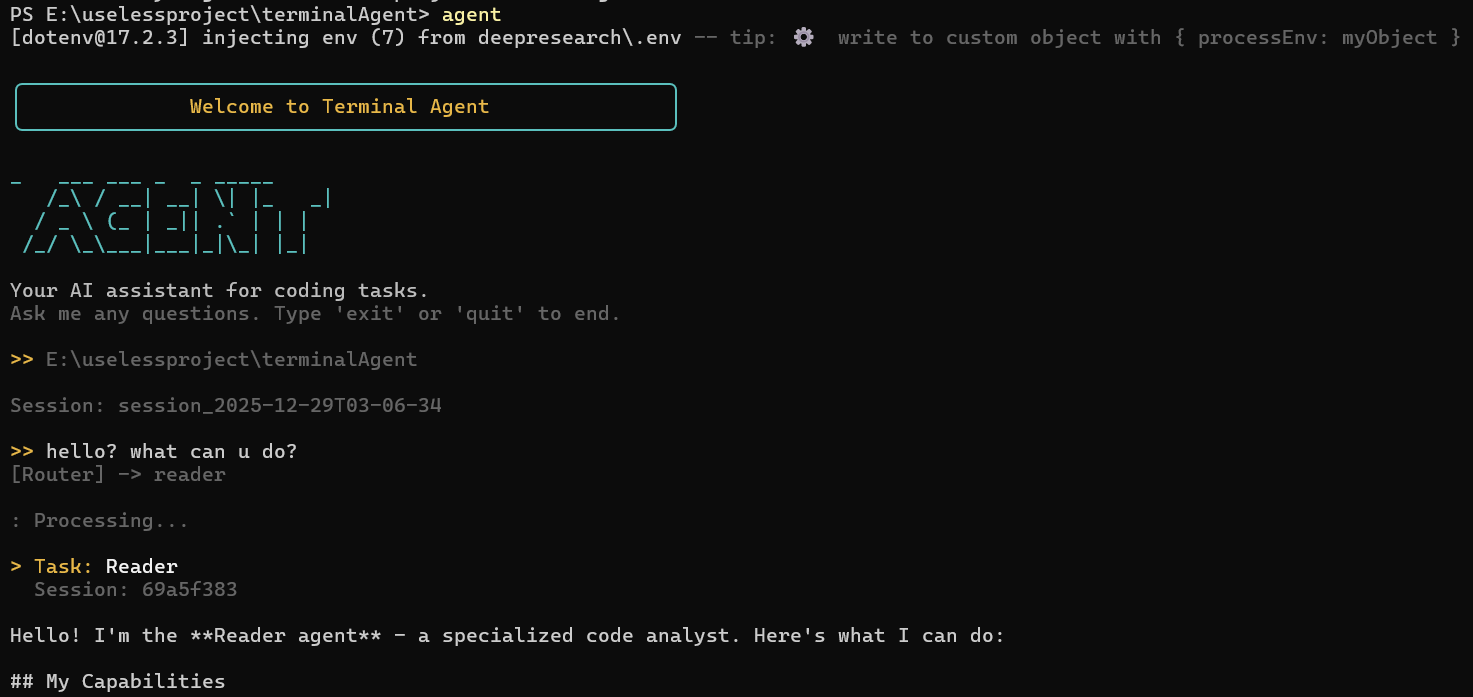
## Features
- **Multi-Agent Architecture** - Coordinator, Reader, Coder, Reviewer agents working together
- **Smart Routing** - Automatically routes tasks to the most suitable agent
- **Skills System** - Extensible skills for specialized tasks (code review, git commit, PDF analysis, etc.)
- **Interactive UI** - `/` command menu and `@` file browser for easy interaction
- **Web Scraping** - Built-in Playwright integration for web content extraction
- **Deep Research** - Dify-powered comprehensive research workflow
## Skills
Built-in skills that extend the agent's capabilities:
| Skill | Description | Agent |
|-------|-------------|-------|
| `/code-review` | Analyze code quality, find bugs, security issues | Reviewer |
| `/git-commit` | Create well-structured conventional commits | Coder |
| `/pdf-analyze` | Extract text/tables from PDFs, fill forms | Reader |
| `/web-scrape` | Scrape web content with Playwright (internal) | Coordinator |
| `/deep-research` | Comprehensive research via Dify workflow (internal) | Coordinator |
### Create Custom Skills
Create skills in `.claude/skills//SKILL.md`:
```markdown
---
name: my-skill
description: Description of what this skill does
version: 1.0.0
allowed-tools:
- Read
- Write
- Bash
---
# My Custom Skill
Instructions for Claude on how to execute this skill...
```
## Quick Start
### 1. Clone and Install
```bash
git clone https://github.com/yourusername/terminalAgent.git
cd terminalAgent
npm run install:all
```
### 2. Configure Environment
Copy the example environment file and add your API key:
```bash
cp deepresearch/.env.example deepresearch/.env
```
Edit `deepresearch/.env`:
```env
ANTHROPIC_API_KEY=your-api-key-here
ANTHROPIC_BASE_URL=https://api.anthropic.com
```
Supports custom API endpoints (e.g., API proxy services).
### 3. Run
```bash
# Development mode
npm run dev
# Or build and run
npm run build
npm start
```
### 4. Global CLI (Optional)
```bash
cd deepresearch
npm link
# Now you can use from anywhere:
agent # Interactive mode
agent "your question" # Single query
agent /code-review # Invoke a skill
```
## Usage
### Commands
| Command | Description |
|---------|-------------|
| `/help` | Show help |
| `/mode` | Switch permission mode (safe/unsafe) |
| `/clear` | Start new session |
| `/exit` | Exit program |
| `@` | Open file browser |
| `@file.ts` | Attach file to context |
## Architecture
```
┌─────────────────────────────────────────────────────────────┐
│ User Input │
└─────────────────────────┬───────────────────────────────────┘
│
▼
┌─────────────────────────────────────────────────────────────┐
│ Smart Router │
│ (Keyword matching, Skill detection) │
└───────┬─────────┬─────────┬─────────┬───────────────────────┘
│ │ │ │
▼ ▼ ▼ ▼
┌───────┐ ┌───────┐ ┌───────┐ ┌───────────┐
│Reader │ │ Coder │ │Review │ │Coordinator│
│ 📖 │ │ 💻 │ │ 🔍 │ │ 🎯 │
└───────┘ └───────┘ └───────┘ └───────────┘
│ │ │ │
└─────────┴─────────┴─────────┘
│
▼
┌───────────────────────┐
│ [DISPATCH:agent] │
│ Inter-agent calls │
└───────────────────────┘
```
### Agent Types
| Agent | Icon | Role |
|-------|------|------|
| **Coordinator** | 🎯 | Task decomposition, multi-agent dispatch |
| **Reader** | 📖 | Code reading, analysis, understanding |
| **Coder** | 💻 | Code writing, modification, implementation |
| **Reviewer** | 🔍 | Code review, quality checks, bug detection |
### Available Tools
| Tool | Description |
|------|-------------|
| `Read` | Read file contents |
| `Write` | Create/overwrite files |
| `Edit` | Edit existing files |
| `Bash` | Execute shell commands |
| `Glob` | Find files by pattern |
| `Grep` | Search text in files |
| `LSP` | Language Server Protocol integration |
| `WebFetch` | Fetch web content |
| `WebSearch` | Search the web |
| `Skill` | Invoke skills |
## Deep Research (Dify Integration)
This project integrates Dify workflows for deep research capabilities.
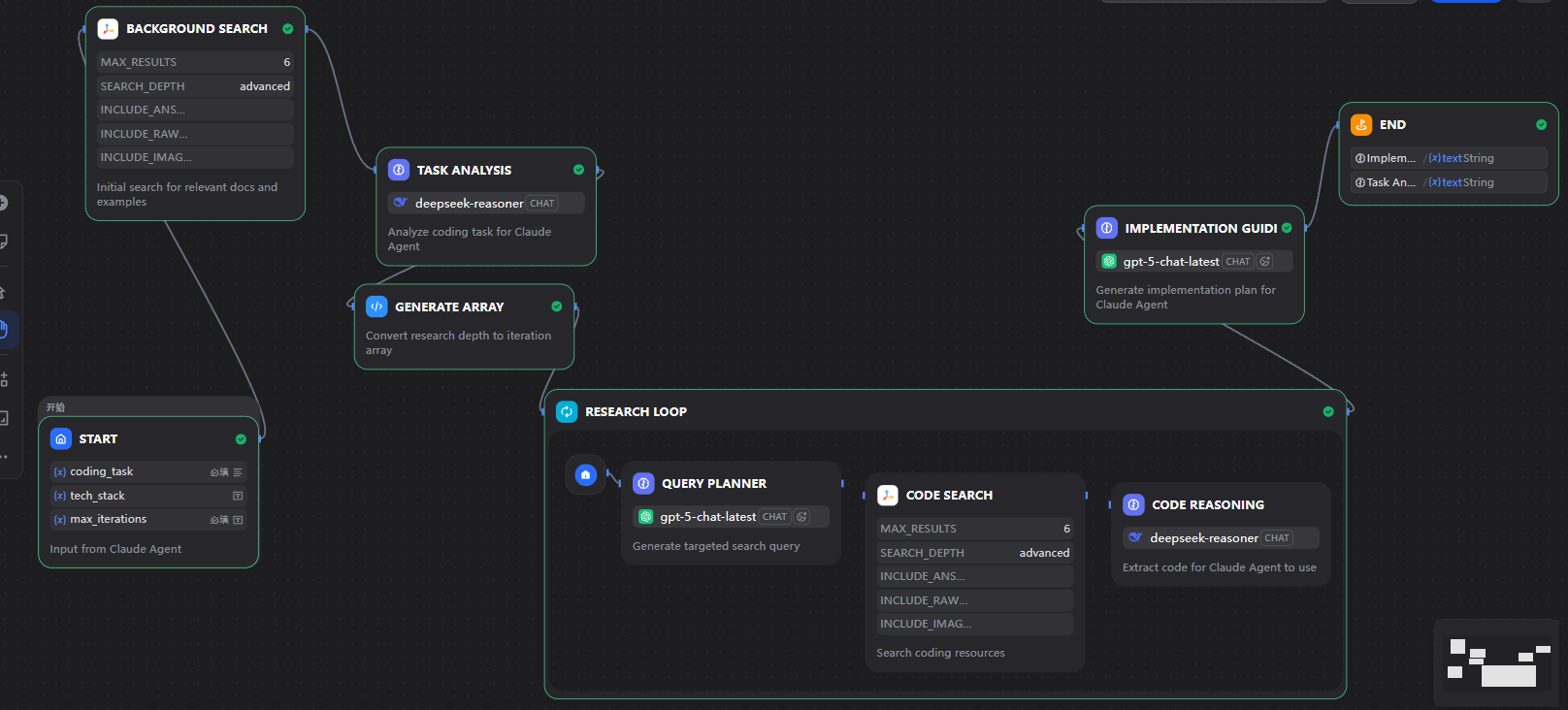
### Workflow Architecture
```
Start → Background Search → Task Analysis → Research Loop → Implementation Guide → End
↓
[DeepSeek Reasoner]
↓
┌──────────────────────────┐
│ Research Loop (1-5x) │
│ ┌─────────────────────┐ │
│ │ Plan → Search → Reason│ │
│ └─────────────────────┘ │
└──────────────────────────┘
```
### Models Used
| Node | Model | Purpose |
|------|-------|---------|
| Task Analysis | DeepSeek Reasoner | Deep analysis of coding tasks |
| Query Planner | GPT-5 | Generate precise search queries |
| Code Reasoning | DeepSeek Reasoner | Extract actionable code info |
| Implementation Guide | GPT-5 | Generate complete implementation |
### Configure Dify
1. Create an account at [Dify](https://dify.ai)
2. Import the `dify/code-research-skill.yml` workflow
3. Configure in `.env`:
```env
DIFY_API_KEY=your-dify-api-key
DIFY_BASE_URL=https://api.dify.ai/v1
```
## Project Structure
```
terminalAgent/
├── deepresearch/
│ ├── src/
│ │ ├── index.ts # Main entry point
│ │ ├── agents/ # Agent implementations
│ │ │ ├── base.ts # BaseAgent class
│ │ │ ├── coordinator.ts # Coordinator agent
│ │ │ ├── reader.ts # Reader agent
│ │ │ ├── coder.ts # Coder agent
│ │ │ └── reviewer.ts # Reviewer agent
│ │ ├── core/
│ │ │ ├── router.ts # Smart routing logic
│ │ │ └── session.ts # Session management
│ │ ├── config/
│ │ │ ├── agents.ts # Agent configurations
│ │ │ └── constants.ts # Constants
│ │ ├── ui/
│ │ │ ├── smart-input.ts # Input with "/" and "@"
│ │ │ ├── commands.ts # Command picker
│ │ │ └── file-browser.ts # File browser
│ │ └── prompts/ # Agent system prompts
│ ├── .claude/
│ │ └── skills/ # Skill definitions
│ ├── bin/agent.cjs # CLI entry point
│ └── package.json
├── dify/ # Dify workflow configs
│ └── code-research-skill.yml # Deep research workflow DSL
├── docs/images/ # Documentation images
├── CLAUDE.md # Instructions for Claude Code
└── README.md
```
## Environment Variables
| Variable | Description | Required |
|----------|-------------|----------|
| `ANTHROPIC_API_KEY` | Your Anthropic API key | Yes |
| `ANTHROPIC_BASE_URL` | API endpoint (default: api.anthropic.com) | No |
| `ANTHROPIC_MODEL` | Model to use (default: claude-sonnet-4-20250514) | No |
| `DIFY_API_KEY` | Dify API key for deep-research skill | No |
| `DIFY_BASE_URL` | Dify API endpoint | No |
## Tech Stack






- **TypeScript** - Type-safe development
- **@anthropic-ai/claude-agent-sdk** - Claude Agent SDK for multi-agent orchestration
- **Playwright** - Web automation and scraping
- **Cheerio** - HTML parsing and manipulation
- **Dify** - Deep research workflow engine
- **dotenv** - Environment configuration
## Development
```bash
# Install dependencies
npm run install:all
# Development mode with hot reload
npm run dev
# Build TypeScript
npm run build
# Run compiled version
npm start
# Test UI components
cd deepresearch && npm run test:ui
```
## License
MIT
## Contributing
1. Fork the repository
2. Create your feature branch (`git checkout -b feature/amazing-feature`)
3. Commit your changes (`git commit -m 'feat: add amazing feature'`)
4. Push to the branch (`git push origin feature/amazing-feature`)
5. Open a Pull Request