中文 · English
[](https://dsh.market/)
[](https://github.com/2BingLing/dsh-market/issues/new?template=submit_plugin.md)
[](https://github.com/2BingLing/dsh-market)
[](https://dsh.market/)
[](https://github.com/2BingLing/dsh-market/blob/master/LICENSE)
[](https://github.com/2BingLing/dsh-market/actions)
[](https://github.com/2BingLing/dsh-market/actions)
---
## Two Editions

The DSH ecosystem is growing fast, and plugins & skills are scattered across GitHub — **it's hard to know which ones are good, how to install them, and how to combine them into a working environment**. DSH Market gathers them all in one place and offers two ways to consume them:
| |  **Web edition** (Live) |
  **DSH plugin edition** (Done) |
|---|---|---|
| **Where** | Browser · GitHub Pages static site | DSH sidebar · cordis plugin |
| **Role** | Discover & evaluate | Install & manage |
| **Content** | Plugins (cordis/skill) + packs section (ecosystem content marketplace) | 5-tab panel · one-click install · beginner-friendly picks · personalized & scene recommendations · AI-assisted install (see [DSH Plugin Edition](#dsh-plugin-edition)) + packs tab |
| **Install** | Zero install, open in your browser | `npx @deepseek-ai/dsh plugin --profile web add @dsh-market/plugin` |
| **Resources** | — | Zero-token passive, never in daily conversations |
> **The two editions share only the same `plugins.json` data** (refreshed daily at 06:00 with stars & descriptions) — nothing else. The Web site is a standalone browsing site; the plugin is a standalone cordis plugin. They are independent and optional: **you don't need the plugin to use the Web edition, and installing the plugin doesn't affect the Web site**.
## Demo
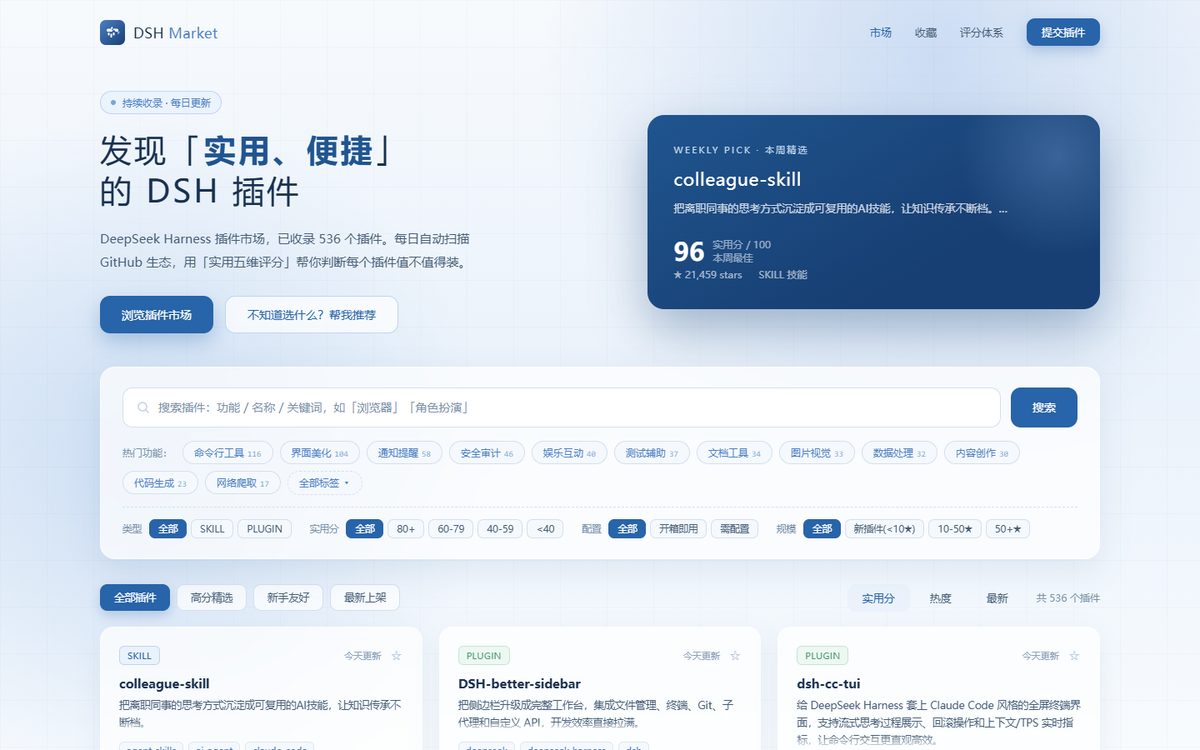
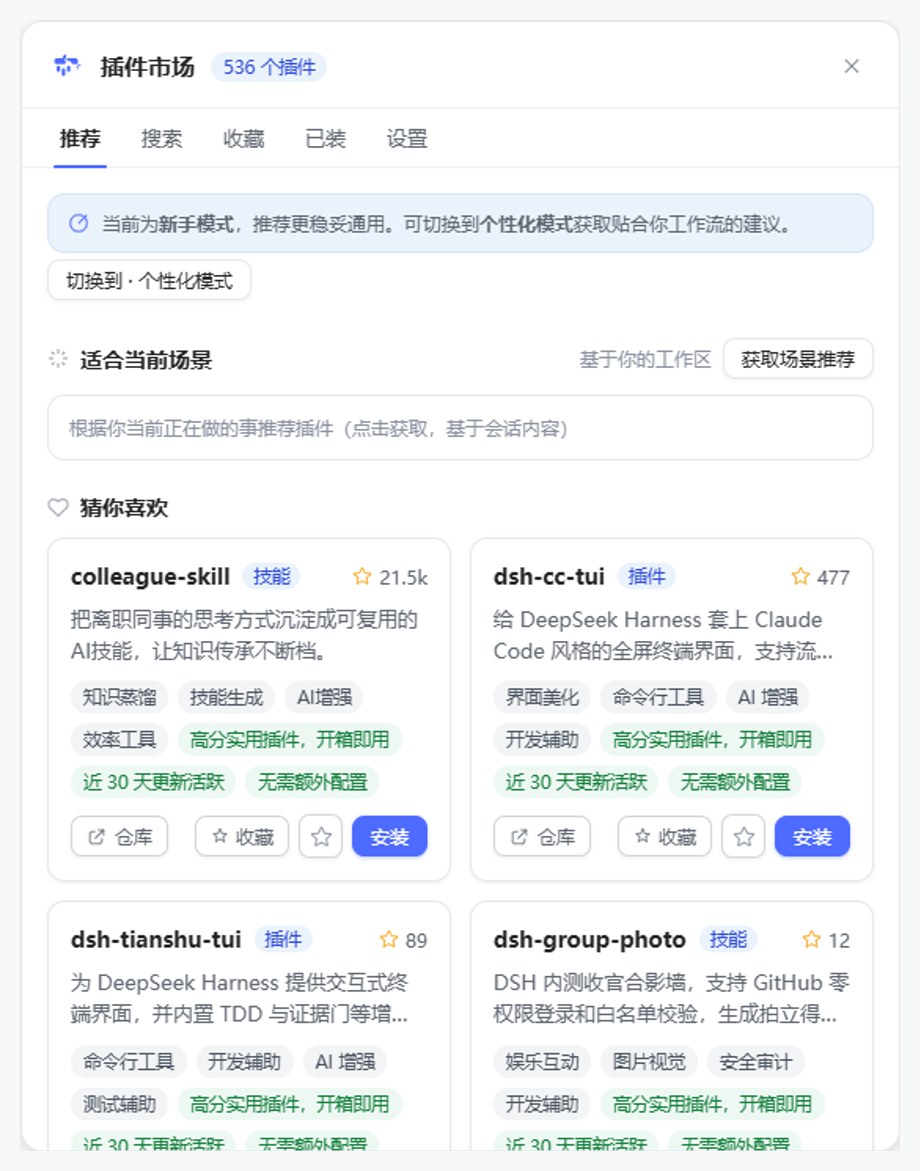
| Web edition | DSH plugin edition |
|---|---|
|  |  |
## Quick Start
### Web edition
No install needed, just visit:
### Install the plugin edition
```bash
npx @deepseek-ai/dsh plugin --profile web add @dsh-market/plugin
```
**Restart the harness** after installing — the "Plugin Market" entry appears at the bottom of the sidebar.
## DSH Plugin Edition
The plugin market lives in your DSH sidebar: **up and running in 3 minutes, and it learns what you like over time**.
**Beginner-friendly · zero learning curve**
- A **cold-start quiz** on first open (pick your common scenarios & plugin types) → instantly get curated picks + for-you recommendations
- No commands to memorize — **one-click install** on every card (skill/cordis auto-routing, retry & rollback on failure)
- **Zero-token passive**: no panel open, no resources consumed, never in daily conversations
**Personalized recommendations · the more you use, the smarter it gets**
- Your profile comes from quiz answers / favorites / GitHub stars / installed plugins — **all stored locally**
- "For You" updates dynamically as you use it (EMA decay); every recommendation carries a "why" line
**Scene recommendations · reads your session**
- Manually triggered, reads the current session title & messages (**zero token**) → suggests what fits "right now"
**AI semantic search · coming soon**
- Local recall of 60 candidates → LLM re-ranks the top 20 with reasons; fixed candidate pool that doesn't grow with the plugin count, off by default to save tokens
**AI-assisted install**
- Not sure whether to install? Hand it to a DSH subagent: read the README → verify → install; asks you first when configuration is needed
## Features
- **Continuous collection** — scans `dsh-plugin` / `dsh` GitHub topics and curated community lists every day, collecting everything (currently 2076 plugins + packs channel)
- **Practical 5-dimension scoring** — maintenance activity / usefulness / ecosystem heat / convenience / signal quality, fused with a weighted geometric mean; every plugin comes with a "why recommended" explanation
- **Chinese experience** — auto-generated Chinese summaries and feature tags; Chinese search & filters
- **One-click install** — deterministic routing in the plugin edition: `git clone` for skill plugins, `dsh plugin add` for cordis plugins; retry & rollback on failure
- **AI install** — hand it to a DSH subagent that reads the README, verifies, then installs; asks you first when configuration is needed
- **Recommendation system** — cold-start quiz / beginner-friendly / for-you (profile-based) / scene recommendations (reads the current session context; see [DSH Plugin Edition](#dsh-plugin-edition))
- **Pack ecosystem** — Web "Packs" section + plugin packs tab (browse / entry resolvability checks / install entry); backed by the `dsh.pack.json` pack protocol (see [dsh-bundler](https://github.com/2BingLing/dsh-bundler))
- **Zero-token resident** — the plugin runs purely passively; no panel open, no resources consumed
## Usage
### Web edition
| Scenario | How |
|---|---|
| Find plugins | Chinese keyword search / tag multi-select / type & score filters |
| Evaluate quality | Card pentagon radar chart + 5-dimension details + recommendation reasoning |
| Install | Copy the real install command or the "AI install prompt" from the detail page |
### Plugin edition (5-tab panel)
| Tab | What it does |
|---|---|
| For You | for-you picks / curated / scene recommendations (manual trigger, reads session context) |
| Search | local Fuse search · hot tags · 200+ results paginated |
| Favorites | plugins you starred, install later |
| Installed | detect what's installed locally (skill dir + profile), one-click uninstall |
| Settings | GitHub binding (PAT starring / device-flow read-only) · recommendation mode · target profile |
## Scoring System
Practical five dimensions (weighted geometric mean, inspired by the StarRadar fusion mechanism; oriented toward "practical & convenient"):
| Dimension | Weight | Meaning |
|---|---|---|
| Maintenance activity | 30% | commits in the last 90 days + issue health (DSH iterates fast, so fragile plugins weigh the most) |
| Usefulness | 25% | README / docs / examples completeness |
| Ecosystem heat | 20% | log-normalized stars (p99 dynamic baseline) + fork participation (Wilson for small-sample robustness) |
| Convenience | 15% | clear install steps + no extra configuration |
| Signal quality | 10% | license / topics / description / README completeness |
Every plugin carries an `explanation` (one sentence on why it was scored that way). See the [scoring guide](https://dsh.market/).
## Listing Mechanism
**Positioning**: DSH Market is the plugin listing & discovery platform for the **DeepSeek Harness ecosystem** — it lists only DSH-specific plugins, not generic projects.
The daily 06:00 pipeline scans these sources:
```text
GitHub Actions (daily 06:00 collection + deploy)
└─ collector (Node, concurrency 10, 24h cache)
├─ Sources:
│ ├─ Topic scan: dsh-plugin / dsh / deepseek-harness-plugin / dsh-bundle / dsh-skill
│ │ └─ Multi-sort union (stars + updated + created, 1000 each, deduped)
│ │ └─ GitHub Search API caps a single query at 1000 → union covers long tail (~72%+)
│ │ └─ Rate limit: Search API 30 req/min → 2.3s pause per page to avoid 403
│ ├─ Awesome lists ×2 (community-curated)
│ ├─ dsh-external org
│ └─ Submission issues in this repo (label: submission / title "[提交插件]")
├─ Listing criteria (all must hold):
│ 1. Not fork / archived / official (deepseek-ai/deepseek-harness)
│ 2. Feature detection passes: root SKILL.md (skill type)
│ or skills/ dir with SKILL.md (skill collection)
│ or cordis markers (dsh.profile / cordis.patch.yml)
│ or package.json deps contain cordis keywords (double-checked)
│ 3. No stars / score threshold — passes detection, gets listed
├─ Metadata + README: GitHub API (stars / descriptions / install command parsing)
├─ Practical 5-dimension scoring + explanation layer
└─ DeepSeek incremental i18n (only new plugins, saves API cost)
→ data/plugins.json
├─ synced to web/public/plugins.json (shared by Web site & plugin)
└─ commit → build → deploy GitHub Pages
```
**Note**: adding the `dsh-plugin` topic only gets you into the candidate pool — the repo must actually **be a DSH plugin** (SKILL.md or cordis markers) to be listed. Many of the 2000+ topic repos are not DSH plugins (casual tagging / forks); feature detection filters them out automatically.
## Directory Structure
```text
├─ collector/ # Data pipeline (Node + tsx): scan → detect → score → i18n
├─ web/ # Web site (Vite + React + TS + Fuse.js)
├─ plugin/
│ ├─ core/ # Plugin core layer (pure Node, zero DSH deps, independently testable)
│ └─ ui/ # Plugin UI layer (cordis Host RPC + browser Client panel)
├─ schema/ # Shared types (DshPlugin / MarketData / PracticalScore)
└─ scripts/ # Tooling (screenshots / data injection / visual review)
```
## Local Development
```bash
# Clone & install
git clone https://github.com/2BingLing/dsh-market.git
cd dsh-market
npm install
cp .env.example .env # GITHUB_TOKEN (required), DEEPSEEK_API_KEY (optional)
# Data pipeline (scan → detect → score → i18n → data/plugins.json)
npm run collect
# Web site
npm run dev -w web # http://localhost:5173
npm run build -w web # production build
# Plugin
npm run build -w @dsh-market/core # core layer
npm run build -w @dsh-market/plugin # plugin package (lib/index.js + lib/client.js)
```
## Contributing
### Submit a plugin (either way works)
1. **Add the `dsh-plugin` topic** to your repo — fastest; the daily scan picks it up directly.
2. **Open an issue via the [submit template](https://github.com/2BingLing/dsh-market/issues/new?template=submit_plugin.md)** — fill in the repo URL / type / one-line description.
**What happens after you submit**:
```
Submit issue → next day 06:00 the pipeline extracts the repo → plugin detection
├─ Passed (it is a DSH plugin) → listed → the bot auto-replies:
│ ✅ confirmation + "live next update" note + badge guide → issue auto-closed
└─ Rejected (not a plugin) → not listed (reopen the issue to ask why)
```
- **Fix data**: wrong scores / descriptions / install commands — open an issue or PR
- **Add the listing badge**: listed plugin authors can display the DSH Market badge at the top of their README:
[](https://dsh.market/) [](https://dsh.market/)
Usage: [PLUGIN-BADGE.md](./PLUGIN-BADGE.md) (Top Rated requires a practical score ≥ 80)
## License
[MIT](https://github.com/2BingLing/dsh-market/blob/master/LICENSE)
**DSH plugin edition** (Done) |
|---|---|---|
| **Where** | Browser · GitHub Pages static site | DSH sidebar · cordis plugin |
| **Role** | Discover & evaluate | Install & manage |
| **Content** | Plugins (cordis/skill) + packs section (ecosystem content marketplace) | 5-tab panel · one-click install · beginner-friendly picks · personalized & scene recommendations · AI-assisted install (see [DSH Plugin Edition](#dsh-plugin-edition)) + packs tab |
| **Install** | Zero install, open in your browser | `npx @deepseek-ai/dsh plugin --profile web add @dsh-market/plugin` |
| **Resources** | — | Zero-token passive, never in daily conversations |
> **The two editions share only the same `plugins.json` data** (refreshed daily at 06:00 with stars & descriptions) — nothing else. The Web site is a standalone browsing site; the plugin is a standalone cordis plugin. They are independent and optional: **you don't need the plugin to use the Web edition, and installing the plugin doesn't affect the Web site**.
## Demo
| Web edition | DSH plugin edition |
|---|---|
|  |  |
## Quick Start
### Web edition
No install needed, just visit:
### Install the plugin edition
```bash
npx @deepseek-ai/dsh plugin --profile web add @dsh-market/plugin
```
**Restart the harness** after installing — the "Plugin Market" entry appears at the bottom of the sidebar.
## DSH Plugin Edition
The plugin market lives in your DSH sidebar: **up and running in 3 minutes, and it learns what you like over time**.
**Beginner-friendly · zero learning curve**
- A **cold-start quiz** on first open (pick your common scenarios & plugin types) → instantly get curated picks + for-you recommendations
- No commands to memorize — **one-click install** on every card (skill/cordis auto-routing, retry & rollback on failure)
- **Zero-token passive**: no panel open, no resources consumed, never in daily conversations
**Personalized recommendations · the more you use, the smarter it gets**
- Your profile comes from quiz answers / favorites / GitHub stars / installed plugins — **all stored locally**
- "For You" updates dynamically as you use it (EMA decay); every recommendation carries a "why" line
**Scene recommendations · reads your session**
- Manually triggered, reads the current session title & messages (**zero token**) → suggests what fits "right now"
**AI semantic search · coming soon**
- Local recall of 60 candidates → LLM re-ranks the top 20 with reasons; fixed candidate pool that doesn't grow with the plugin count, off by default to save tokens
**AI-assisted install**
- Not sure whether to install? Hand it to a DSH subagent: read the README → verify → install; asks you first when configuration is needed
## Features
- **Continuous collection** — scans `dsh-plugin` / `dsh` GitHub topics and curated community lists every day, collecting everything (currently 2076 plugins + packs channel)
- **Practical 5-dimension scoring** — maintenance activity / usefulness / ecosystem heat / convenience / signal quality, fused with a weighted geometric mean; every plugin comes with a "why recommended" explanation
- **Chinese experience** — auto-generated Chinese summaries and feature tags; Chinese search & filters
- **One-click install** — deterministic routing in the plugin edition: `git clone` for skill plugins, `dsh plugin add` for cordis plugins; retry & rollback on failure
- **AI install** — hand it to a DSH subagent that reads the README, verifies, then installs; asks you first when configuration is needed
- **Recommendation system** — cold-start quiz / beginner-friendly / for-you (profile-based) / scene recommendations (reads the current session context; see [DSH Plugin Edition](#dsh-plugin-edition))
- **Pack ecosystem** — Web "Packs" section + plugin packs tab (browse / entry resolvability checks / install entry); backed by the `dsh.pack.json` pack protocol (see [dsh-bundler](https://github.com/2BingLing/dsh-bundler))
- **Zero-token resident** — the plugin runs purely passively; no panel open, no resources consumed
## Usage
### Web edition
| Scenario | How |
|---|---|
| Find plugins | Chinese keyword search / tag multi-select / type & score filters |
| Evaluate quality | Card pentagon radar chart + 5-dimension details + recommendation reasoning |
| Install | Copy the real install command or the "AI install prompt" from the detail page |
### Plugin edition (5-tab panel)
| Tab | What it does |
|---|---|
| For You | for-you picks / curated / scene recommendations (manual trigger, reads session context) |
| Search | local Fuse search · hot tags · 200+ results paginated |
| Favorites | plugins you starred, install later |
| Installed | detect what's installed locally (skill dir + profile), one-click uninstall |
| Settings | GitHub binding (PAT starring / device-flow read-only) · recommendation mode · target profile |
## Scoring System
Practical five dimensions (weighted geometric mean, inspired by the StarRadar fusion mechanism; oriented toward "practical & convenient"):
| Dimension | Weight | Meaning |
|---|---|---|
| Maintenance activity | 30% | commits in the last 90 days + issue health (DSH iterates fast, so fragile plugins weigh the most) |
| Usefulness | 25% | README / docs / examples completeness |
| Ecosystem heat | 20% | log-normalized stars (p99 dynamic baseline) + fork participation (Wilson for small-sample robustness) |
| Convenience | 15% | clear install steps + no extra configuration |
| Signal quality | 10% | license / topics / description / README completeness |
Every plugin carries an `explanation` (one sentence on why it was scored that way). See the [scoring guide](https://dsh.market/).
## Listing Mechanism
**Positioning**: DSH Market is the plugin listing & discovery platform for the **DeepSeek Harness ecosystem** — it lists only DSH-specific plugins, not generic projects.
The daily 06:00 pipeline scans these sources:
```text
GitHub Actions (daily 06:00 collection + deploy)
└─ collector (Node, concurrency 10, 24h cache)
├─ Sources:
│ ├─ Topic scan: dsh-plugin / dsh / deepseek-harness-plugin / dsh-bundle / dsh-skill
│ │ └─ Multi-sort union (stars + updated + created, 1000 each, deduped)
│ │ └─ GitHub Search API caps a single query at 1000 → union covers long tail (~72%+)
│ │ └─ Rate limit: Search API 30 req/min → 2.3s pause per page to avoid 403
│ ├─ Awesome lists ×2 (community-curated)
│ ├─ dsh-external org
│ └─ Submission issues in this repo (label: submission / title "[提交插件]")
├─ Listing criteria (all must hold):
│ 1. Not fork / archived / official (deepseek-ai/deepseek-harness)
│ 2. Feature detection passes: root SKILL.md (skill type)
│ or skills/ dir with SKILL.md (skill collection)
│ or cordis markers (dsh.profile / cordis.patch.yml)
│ or package.json deps contain cordis keywords (double-checked)
│ 3. No stars / score threshold — passes detection, gets listed
├─ Metadata + README: GitHub API (stars / descriptions / install command parsing)
├─ Practical 5-dimension scoring + explanation layer
└─ DeepSeek incremental i18n (only new plugins, saves API cost)
→ data/plugins.json
├─ synced to web/public/plugins.json (shared by Web site & plugin)
└─ commit → build → deploy GitHub Pages
```
**Note**: adding the `dsh-plugin` topic only gets you into the candidate pool — the repo must actually **be a DSH plugin** (SKILL.md or cordis markers) to be listed. Many of the 2000+ topic repos are not DSH plugins (casual tagging / forks); feature detection filters them out automatically.
## Directory Structure
```text
├─ collector/ # Data pipeline (Node + tsx): scan → detect → score → i18n
├─ web/ # Web site (Vite + React + TS + Fuse.js)
├─ plugin/
│ ├─ core/ # Plugin core layer (pure Node, zero DSH deps, independently testable)
│ └─ ui/ # Plugin UI layer (cordis Host RPC + browser Client panel)
├─ schema/ # Shared types (DshPlugin / MarketData / PracticalScore)
└─ scripts/ # Tooling (screenshots / data injection / visual review)
```
## Local Development
```bash
# Clone & install
git clone https://github.com/2BingLing/dsh-market.git
cd dsh-market
npm install
cp .env.example .env # GITHUB_TOKEN (required), DEEPSEEK_API_KEY (optional)
# Data pipeline (scan → detect → score → i18n → data/plugins.json)
npm run collect
# Web site
npm run dev -w web # http://localhost:5173
npm run build -w web # production build
# Plugin
npm run build -w @dsh-market/core # core layer
npm run build -w @dsh-market/plugin # plugin package (lib/index.js + lib/client.js)
```
## Contributing
### Submit a plugin (either way works)
1. **Add the `dsh-plugin` topic** to your repo — fastest; the daily scan picks it up directly.
2. **Open an issue via the [submit template](https://github.com/2BingLing/dsh-market/issues/new?template=submit_plugin.md)** — fill in the repo URL / type / one-line description.
**What happens after you submit**:
```
Submit issue → next day 06:00 the pipeline extracts the repo → plugin detection
├─ Passed (it is a DSH plugin) → listed → the bot auto-replies:
│ ✅ confirmation + "live next update" note + badge guide → issue auto-closed
└─ Rejected (not a plugin) → not listed (reopen the issue to ask why)
```
- **Fix data**: wrong scores / descriptions / install commands — open an issue or PR
- **Add the listing badge**: listed plugin authors can display the DSH Market badge at the top of their README:
[](https://dsh.market/) [](https://dsh.market/)
Usage: [PLUGIN-BADGE.md](./PLUGIN-BADGE.md) (Top Rated requires a practical score ≥ 80)
## License
[MIT](https://github.com/2BingLing/dsh-market/blob/master/LICENSE)