#  3D Manufacturing Format
## Core Specification & Reference Guide
| **Version** | 1.4.0 |
| --- | --- |
| **Status** | Published |
## Disclaimer
THESE MATERIALS ARE PROVIDED "AS IS." The contributors expressly disclaim any warranties (express, implied, or otherwise), including implied warranties of merchantability, non-infringement, fitness for a particular purpose, or title, related to the materials. The entire risk as to implementing or otherwise using the materials is assumed by the implementer and user. IN NO EVENT WILL ANY MEMBER BE LIABLE TO ANY OTHER PARTY FOR LOST PROFITS OR ANY FORM OF INDIRECT, SPECIAL, INCIDENTAL, OR CONSEQUENTIAL DAMAGES OF ANY CHARACTER FROM ANY CAUSES OF ACTION OF ANY KIND WITH RESPECT TO THIS DELIVERABLE OR ITS GOVERNING AGREEMENT, WHETHER BASED ON BREACH OF CONTRACT, TORT (INCLUDING NEGLIGENCE), OR OTHERWISE, AND WHETHER OR NOT THE OTHER MEMBER HAS BEEN ADVISED OF THE POSSIBILITY OF SUCH DAMAGE.
## Table of Contents
- [Change history](#change-history)
- [Preface](#preface)
* [About this Specification](#about-this-specification)
* [Document Conventions](#document-conventions)
* [Language Notes](#language-notes)
* [Software Conformance](#software-conformance)
- [Part I. 3MF Documents](#part-i-3mf-documents)
* [Chapter 1. 3MF Document Format](#chapter-1-3mf-document-format)
+ [1.1. Package](#11-package)
* [Chapter 2. Parts and Relationships](#chapter-2-parts-and-relationships)
+ [2.1. 3D Payload](#21-3d-payload)
+ [2.2. Naming Conventions](#22-naming-conventions)
+ [2.3. 3MF Document Markup](#23-3mf-document-markup)
* [Chapter 3. 3D Models](#chapter-3-3d-models)
+ [3.1. Coordinate Space](#31-coordinate-space)
+ [3.2. Relative Directions and Measurement](#32-relative-directions-and-measurement)
+ [3.3. 3D Matrices](#33-3d-matrices)
+ [3.4. Model](#34-model)
* [Chapter 4. Object Resources](#chapter-4-object-resources)
+ [4.1. Meshes](#41-meshes)
+ [4.2. Components](#42-components)
* [Chapter 5. Material Resources](#chapter-5-material-resources)
+ [5.1. Base Material](#51-base-material)
* [Chapter 6. 3MF Document Package Features](#chapter-6-3mf-document-package-features)
+ [6.1. Package Thumbnail and Object Thumbnail](#61-package-thumbnail-and-object-thumbnail)
+ [6.2. Core Properties](#62-core-properties)
+ [6.3. Digital Signatures](#63-digital-signatures)
+ [6.4. Protected Content](#64-protected-content)
- [Part II. Appendices](#part-ii-appendices)
* [Appendix A. Glossary](#appendix-a-glossary)
* [Appendix B.1. 3MF XSD Schema](#appendix-b1-3mf-xsd-schema)
* [Appendix B.2. 3MF Metadata Example](#appendix-b2-3mf-metadata-example)
* [Appendix C. Standard Namespaces and Content Types](#appendix-c-standard-namespaces-and-content-types)
+ [C.1 Content Types](#c1-content-types)
+ [C.2 Relationship Types](#c2-relationship-types)
+ [C.3 Namespaces](#c3-namespaces)
## Change History
| **Version** | **Changes Description** | **Date** |
| --- | --- | --- |
| 1.0 | First published version | April 29, 2015 |
| 1.1 | Clarification on namespaces and meshes | February 25, 2016 |
| 1.2 | Added must preserve, metadata group, overlapping order, and clarifications | October 19, 2017 |
| 1.2.1 | Minor update for triangle properties | March 1, 2018 |
| 1.2.2 | First reformatted markdown release | August 9, 2018 |
| 1.2.3 | Clarification on content types | March 12, 2019 |
| 1.3.0 | Added triangle sets and mirror. Clarification of ambiguities | October 7, 2021 |
| 1.4.0 | Removed deprecated mirror. Clarification on shapes and composition. Document naming conventions | February 6, 2025 |
# Preface
## About this Specification
The ***3D Manufacturing Format***, or _3MF_, describes the set of conventions for the use of XML and other widely available technologies to describe the content and appearance of one or more 3D models. It is written for developers who are building systems to process 3MF content.
A primary goal of this specification is to ensure the interoperability of independently created software and hardware systems that produce or consume 3MF content. This specification defines the formal requirements that producers and consumers must satisfy in order to achieve interoperability.
This specification describes a 3D model and containing format called the _3MF Document_. The format requirements are an extension of the packaging requirements described in the Open Packaging Conventions (OPC) specification. That specification describes packaging and physical format conventions for the use of XML, Unicode, ZIP, and other technologies and specifications to organize the content and resources that make up any model. They are an integral part of the 3MF specification.
Understanding this specification requires working knowledge of the Extensible Markup Language (XML) and XML Namespace specifications. Full understanding might also require domain knowledge of common terms and procedures within the 3D manufacturing sector, although every effort has been made to minimize such reliance.
The 3MF Consortium offers [a free to use open source implementation](https://github.com/3MFConsortium/lib3mf) of this specification in order to allow an easy adoption of the format in applications handling 3D content.
Part I, "3MF Documents," presents the details of the primarily XML-based 3MF Document format. This section describes the XML markup that defines the composition of 3D documents and the appearance of each model within the document.
Part II, "Appendices," contains additional technical details and schemas too extensive to include in the main body of the text as well as convenient reference information.
The information contained in this specification is subject to change. Every effort has been made to ensure its accuracy at the time of publication.
This core specification is extended with additions. As an example, the prefix "t" maps to the xml-namespace "http://schemas.microsoft.com/3dmanufacturing/trianglesets/2021/07", defined in version 1.3. See [Appendix C.3 Namespaces](#c3-namespaces)
## Document Conventions
Except where otherwise noted, syntax descriptions are expressed in the ABNF format as defined in RFC 4234.
Glossary terms are formatted like _this_.
Syntax descriptions and code are formatted as `Markdown code blocks.`
Replaceable items, that is, an item intended to be replaced by a value, are formatted in _`monospace cursive`_ type.
Notes are formatted as follows:
>**Note:** This is a note.
## Language Notes
In this specification, the words that are used to define the significance of each requirement are written in uppercase. These words are used in accordance with their definitions in RFC 2119, and their respective meanings are reproduced below:
- _MUST._ This word, or the adjective "REQUIRED," means that the item is an absolute requirement of the specification.
- _SHOULD._ This word, or the adjective "RECOMMENDED," means that there may exist valid reasons in particular circumstances to ignore this item, but the full implications should be understood and the case carefully weighed before choosing a different course.
- _MAY._ This word, or the adjective "OPTIONAL," means that this item is truly optional. For example, one implementation may choose to include the item because a particular marketplace or scenario requires it or because it enhances the product. Another implementation may omit the same item.
## Software Conformance
Most requirements are expressed as format or package requirements rather than implementation requirements.
In order for consumers to be considered conformant, they must observe the following rules:
- They MUST NOT report errors when processing conforming instances of the document format except when forced to do so by resource exhaustion.
- They SHOULD report errors when processing non-conforming instances of the document format when doing so does not pose an undue processing or performance burden.
In order for producers to be considered conformant, they must observe the following rules:
- They MUST NOT generate any new, non-conforming instances of the document format.
- They MUST NOT introduce any non-conformance when modifying an instance of the document format.
Editing applications are subject to all of the above rules.
# Part I. 3MF Documents
# Chapter 1. 3MF Document Format
This specification describes how the 3MF Document format is organized internally and realized in 3D objects externally. It can be used as a stand-alone file format or as a payload in a print pipeline. It is built upon the principles described in the Open Packaging Conventions specification. 3MF Documents MUST observe all requirements and recommendations of that specification, except where indicated otherwise in this specification. The information presented here is intended both for _producers_, which emit content in the 3MF Document format, and _consumers_, which access and transform into 3D objects the contents of a 3MF document. An _editor_ is an entity that acts as both a producer and a consumer of content in the 3MF Document format. A _manufacturing device_ is a consumer that produces a physical part.
The 3MF Document format represents a _3D model_, or a representation of one or more physical object descriptions in a markup format. A file that implements this format includes the fundamental information necessary for a consumer to generate a physical object through additive manufacturing or basic subtractive manufacturing techniques. This includes resources such as textures that might be required to reproduce the exact desired appearance in terms of color or internal structures in terms of materials.
This format also includes optional components that build on the minimal set of components required to generate a physical object. This includes the ability to specify print job control instructions, to describe _composition_ of objects intended to be generated simultaneously in an interlocked or disjoint manner, among others.
Finally, the 3MF Document format implements the common package features specified by the Open Packaging Conventions specification that support digital signatures and core properties.
## 1.1. Package
The 3MF Document format MUST use a ZIP archive for its physical model. The Open Packaging Conventions specification describes a packaging model, that is, how the package is represented internally with parts and relationships.
The ZIP archive MUST follow the [.ZIP File Format Specification](https://pkware.cachefly.net/webdocs/casestudies/APPNOTE.TXT) by PKWARE Inc.
Files within the ZIP archive that represents a 3MF document MUST use the compression method `Deflate` ("8 - The file is Deflated") or be `stored uncompressed` ("0 - The file is stored (no compression)") in accordance with the OPC specification ("Annex C, (normative) ZIP Appnote.txt Clarifications"). The consumers MUST support both the PKWARE ZIP64:tm: extension and streaming extension. However as some older 3MF consumers are not able to consume ZIP64 files, the producers SHOULD produce plain ZIP files if the 3MF data fits and produce ZIP64 only if necessary. To achieve this in streaming mode, the producer may pre-allocate a custom block in the ZIP Local file header with an ID (0x9999) and overwrite it optionally with a ZIP64 extension block after finishing writing the compressed file block if the ZIP64 extension is found to be necessary.
The 3MF Document format includes a well-defined set of parts and relationships, each fulfilling a particular purpose in the document. The format also extends the package features, including digital signatures and thumbnails.
# Chapter 2. Parts and Relationships
The packaging conventions described in the Open Packaging Conventions specification can be used to carry any payload. A _payload_ is a complete collection of interdependent parts and relationships within a package. This specification defines a particular payload that contains a 3D object definition and its supporting files: the 3D payload.
An OPC package that holds a 3D payload and follows the rules described in this specification is referred to as a 3MF Document. Producers and consumers of 3MF Documents can implement their own parsers and manufacturing devices based on this specification.
## 2.1. 3D Payload
A payload that has a 3D Model root part is known as a _3D payload_. There can be more than one 3D payload in a 3MF Document, but only one primary 3D payload.
### 2.1.1. 3D Parts and Payload Relationships
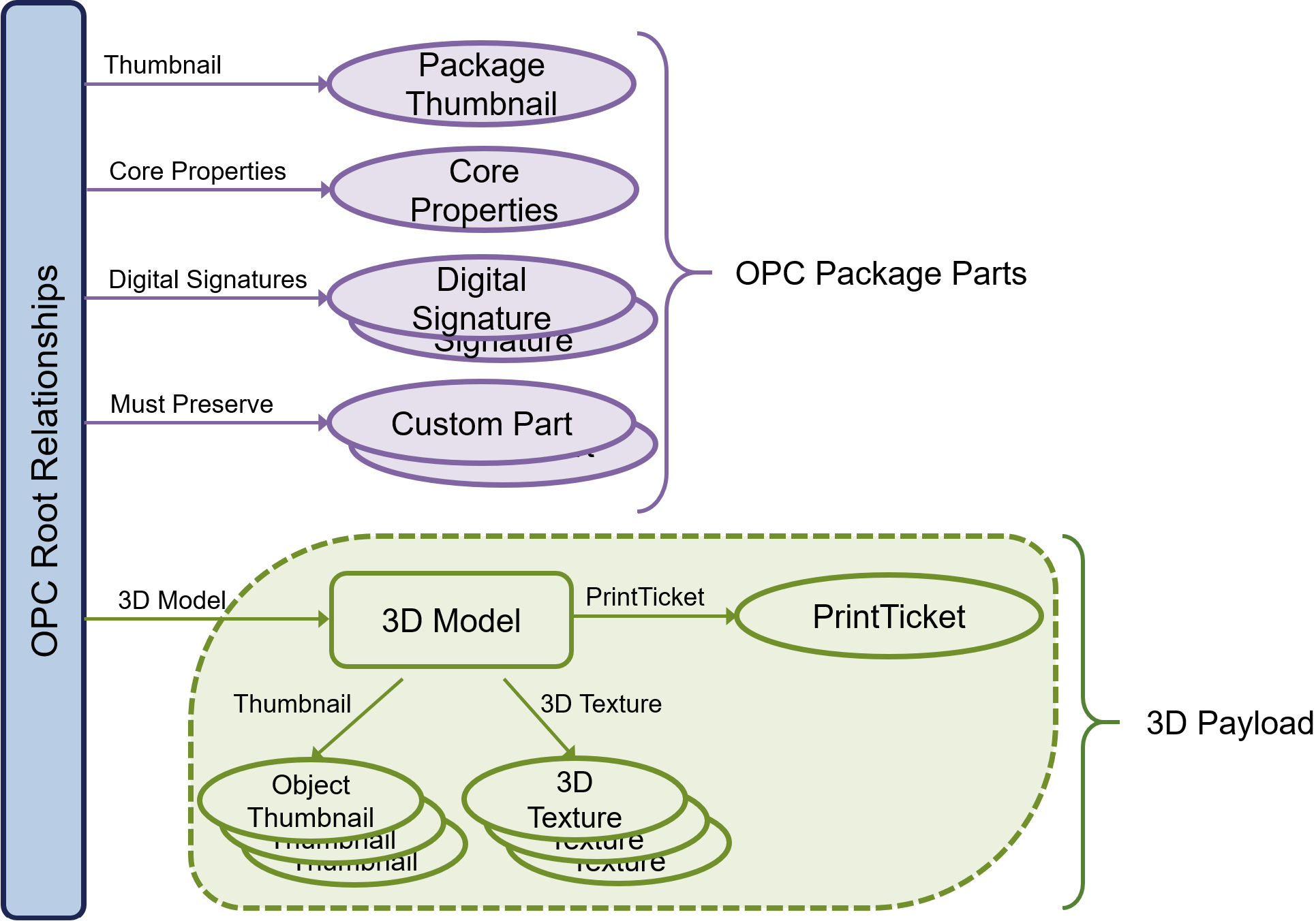
A specific relationship type is defined to identify the root of a 3D payload within a 3MF Document: the _3MF Document StartPart relationship_. The _primary 3D payload root_ is the 3D Model part that is referenced by the 3MF Document StartPart relationship to find the primary 3D payload in a package. The 3MF Document StartPart relationship MUST point to the 3D Model part that identifies the root of the 3D payload.
The payload includes the full set of parts required for processing the 3D Model part. All content to be used to manufacture an object described in the 3D payload MUST be contained in the 3MF Document. The parts that can be found in a 3MF Document are listed in Table 2-1. Relationships and content types for these parts are defined in Appendix C, "Standard Namespaces and Content Types." Each part MUST use an appropriate content type specified in Appendix C or in an extension specification to 3MF (see [2.3.1. Support for Versioning and Extensibility](#231-support-for-versioning-and-extensibility).
Parts included to the 3D payload are explicitly linked to the 3D payload root by relationship. 3MF Documents MUST NOT reference resources external to the 3MF Document package unless specified otherwise in an extension. For more information on relationships, see the Open Packaging Conventions specification.
Parts in the 3D payload MUST use one of the appropriate relationships described below to establish that relationship between two parts in the payload. There MUST NOT be more than one relationship of a given relationship type from one part to a second part. Relationship types are defined in Appendix C, "Standard Namespaces and Content Types."
Producers that generate a relationship MUST include the target part in the 3MF Document for any of the following relationship types: PrintTicket, StartPart, and Thumbnail. Consumers that access the target part of any relationship with one of these relationship types MUST generate an error if the part is not included in the 3MF Document.
_Table 2-1. 3MF Document parts_
| **Name** | **Description** | **Relationship Source** | **Required/Optional** |
| --- | --- | --- | --- |
| 3D Model | Contains the description of one or more 3D objects for manufacturing. | Package | REQUIRED |
| Core Properties | The OPC part that contains various document properties. | Package | OPTIONAL |
| Digital Signature Origin | The OPC part that is the root of digital signatures in the package. | Package | OPTIONAL |
| Digital Signature | OPC parts that each contains a digital signature. | Digital Signature Origin | OPTIONAL |
| Digital Signature Certificate | OPC parts that contain a digital signature certificate. | Digital Signature | OPTIONAL |
| PrintTicket | Provides settings to be used when outputting the 3D object(s) in the 3D Model part. | 3D Model | OPTIONAL |
| Package Thumbnail | Contains a small JPEG or PNG image that represents the 3D objects in the package or the package as a whole. | Package | OPTIONAL |
| Object Thumbnail | Contains a small JPEG or PNG image that represents a 3D object in a 3D Model. | 3D Model | OPTIONAL |
| 3D Texture | Contains a texture used to apply color to a 3D object in the 3D Model part (available for extensions) | 3D Model | OPTIONAL |
| Custom Parts | OPC parts that are associated with metadata | Package | OPTIONAL |
_Figure 2-1. A typical 3MF Document_
### 2.1.2. 3D Model Part
The _3D Model part_ contains definitions of one or more objects to be fabricated by 3D manufacturing processes. The 3D Model part is the only valid root of a 3D payload.
A 3D Model part has two sections: a set of resource definitions that include objects and materials, as well as a set of specific items to actually build. The content type of the 3D Model part is defined in Appendix C, "Standard Namespaces and Content Types."
### 2.1.3. Package Thumbnail and Object Thumbnail Part
_Package Thumbnails_ and _Object Thumbnails_ are small images that represent the contents of an entire 3MF Document. Thumbnails enable external agents to view the contents of the 3MF Document easily.
Package Thumbnails MAY be defined for the entire package by referencing the thumbnail from the root model relationship file. Object Thumbnails MAY be defined for individual objects by using the object thumbnail attribute. These _thumbnail parts_ MUST be in either JPEG or PNG format.
All thumbnails in the 3MF document MUST be referenced via the thumbnail relationship.
For more information about the relationship type for thumbnail parts, see section [C.2, Relationship Types.](#c2-relationship-types)
### 2.1.4. PrintTicket Part
_PrintTicket parts_ provide user intent and device configuration information to printing consumers. A PrintTicket part can be attached only to a 3D Model part and each 3D Model part MUST attach no more than one _PrintTicket_. The PrintTicket format is governed by the specific consumer environment. For example, for printing on Microsoft Windows, valid PrintTicket settings are specified in the Print Schema Keywords for 3D Manufacturing specification.
If no PrintTicket is provided or the PrintTicket provided is not supported by the consumer, it is left to the consumer to apply its own defaults.
### 2.1.5. MustPreserve Relationship
Producers MAY add custom OPC parts to a 3MF package. For example, a software vendor may include annotations about an object referenced by a unique id.
A MustPreserve relationship indicates that Consumers SHOULD save associated parts when modifying the 3MF file even if they do not understand how to process the data.
Parts that must be preserved in this way MUST be associated with the package root through a MustPreserve relationship. If a custom OPC part is not referenced by a MustPreserve relationship then the consumer SHOULD NOT preserve these parts when modifying the 3MF as it is assumed they are no longer valid.
The following example demonstrates how to add a MustPreserve relationship:
```xml
```
## 2.2. Naming Conventions
### 2.2.1 Document Naming Recommendation
To better differentiate between various use cases of 3MF documents, it is RECOMMENDED that producers of 3MF Documents adopt a "double extension" naming convention. This approach will help clarify the document's primary content type and its intended purpose, enhancing both human readability and machine interpretation.
The double extension SHOULD follow this structure:
- **Model Data**: Files primarily containing design models SHOULD use the extension ".model.3mf", for example, `example.model.3mf`.
- **Build Instructions**: Files that represent a complete build plate or tray of models, prepared for a specific printer, SHOULD use the extension ".build.3mf", for example, `example.build.3mf`.
- **Project Files**: Files that contain a complete project, such as multiple models, settings, and metadata, SHOULD use the extension ".project.3mf", for example, `example.project.3mf`.
- **Toolpath Data**: Files containing machine-specific toolpath data SHOULD use the extension ".toolpath.3mf", for example, `example.toolpath.3mf`.
- **Slice Data**: Files representing polygonal slice data SHOULD use the extension ".slices.3mf", for example, `example.slices.3mf`.
For proprietary use cases, where machine software or specific workflows require unique handling or metadata, it is RECOMMENDED that vendors use a custom extension naming convention. Vendor-specific 3MF files SHOULD follow the format `.vendor.3mf`, where "vendor" is replaced by the vendor's name or product identifier. For example, a proprietary file for a specific machine or process could be named `example.vendor.3mf`.
This naming convention allows both users and systems to quickly identify the purpose and structure of a 3MF file without needing to inspect its internal contents. It also supports customization for vendor-specific needs while maintaining clarity in the overall ecosystem of 3MF file types.
**Note:** This recommendation introduces additional clarity to the 3MF ecosystem, which has historically used `.3mf` as the sole extension for all file types. While this single extension remains common in the field, the adoption of a more descriptive double extension helps distinguish between the growing variety of 3MF file use cases.
### 2.2.2 Reserved Naming Conventions
To maintain consistency across the 3MF ecosystem, certain names are RESERVED for specific file types and SHOULD NOT be used for any other purpose:
- `.model.3mf` – Reserved for design model data.
- `.build.3mf` – Reserved for build instructions.
- `.toolpath.3mf` – Reserved for toolpath data.
- `.slices.3mf` – Reserved for polygonal slice data.
- `.project.3mf` – Reserved for comprehensive project files.
- `.support.3mf` – Reserved for support structure data files.
- `.analysis.3mf` – Reserved for files containing analysis or simulation results.
- `.calibration.3mf` – Reserved for files used in machine or process calibration.
- `.scan.3mf` – Reserved for files containing 3D scan data or point clouds.
- `.assembly.3mf` – Reserved for files representing assembled components or multiple parts in a build.
- `.job.3mf` – Reserved for print job-specific data, such as settings or print queue information.
- `.archive.3mf` – Reserved for bundled or archived 3MF documents, such as multiple related builds or projects.
- `.other.3mf` – Reserved for non-standard or miscellaneous content not fitting into the above categories.
These reserved names help ensure that the intent and structure of 3MF files remain clear and unambiguous across different software and hardware implementations.
### 2.2.3 Part Naming Recommendations
Producers and consumers of 3MF Documents refer to parts by name and use relationship names to identify the purpose of related parts. The Open Packaging Conventions specification describes the syntax for part name. However, following these rules alone can result in a package that is difficult for users to understand. For example, a user would have to open every Relationship part to know which parts are necessary to accurately manufacture a 3MF Document.
By choosing part names according to a well-defined, human-readable convention, the resulting package is easier to browse and specific parts are more easily located. Part names MUST still conform to the syntax specified in the Open Packaging Conventions specification.
It is RECOMMENDED that producers of 3MF Documents use the following part naming convention:
- The 3D Model part name SHOULD contain two segments, the first being "/3D/" and the second with the extension ".model" on the last segment, for example "/3D/3dModel.model".
- The PrintTicket part name SHOULD be associated via relationship with the 3D Model part and contains three segments, using "/3D/Metadata/" as the first two segments with the extension ".xml". For example, "/3D/Metadata/Model\_PT.xml".
- 3D Texture part names SHOULD contain three segments, using "/3D/Textures/" as the first two segments, for example "/3D/Textures/coloring.png". 3D Texture parts MUST be associated with the 3D Model part via a suitable relationship.
- The names of any non-standard parts that are associated with the 3D payload SHOULD contain 3 segments, using "/3D/Other/" as the first two segments.
Part names MUST use absolute paths, meaning all paths begin with "/". Part names MUST NOT be empty or lead with a period (e.g. "/3D/.png" or "/3D/").
When a part name is represented with Unicode, it SHOULD be represented with a Part URI Syntax, as described in the section 9.1.1.1 Part Name Syntax of the Open Packaging Conventions specification.
## 2.3. 3MF Document Markup
3MF Document markup has been designed to facilitate independent development of compatible systems that produce or consume 3MF Documents.
The design of 3MF Document markup reflects the tradeoffs between two, sometimes competing, goals:
1. 3MF Document markup should be parsimonious; that is, it should include only the minimum set of primitive operations and markup constructs necessary to manufacture common 3D objects with full fidelity. Redundancy in the specification increases the opportunity for independent implementations to introduce accidental incompatibilities. Redundancy also increases the cost of implementation and testing, and, typically, the required memory component.
2. 3MF Document markup should be compact; that is, the most common primitives should have compact representations. Bloated representations compromise the performance of systems handling 3MF Documents. As byte-count increases, so does communication time. Although compression can be used to improve communication time, it cannot eliminate the performance loss caused by bloated representations.
### 2.3.1. Support for Versioning and Extensibility
3MF Document markup has been designed in anticipation of the evolution of this specification. It also allows third parties to extend the markup.
Extensions are a critical part of 3MF, and as such, this core specification is as narrow as possible. Advanced features are built as extensions, using an a la carte model whereby producers can state explicitly which extensions are used (by declaring the matching XML namespace in the \ element) and consumers can state explicitly which extensions they support, so other tools in the chain know which parts will be ignored. Versioning is accomplished concurrently, as the namespace will be updated to reflect a version change. Therefore versioning happens independently for the core spec and for each extension, and the version of each can be determined by checking its namespace.
Extension specifications MUST include one or more targeted versions of this core specification to limit the number of possible configurations. Producers can specify certain extensions as required in a particular 3MF document, in which case consumers that do not support those extensions MUST fail to edit or manufacture that document, rather than ignoring the extension namespace.
Within this core XSD schema (see [Appendix B.1. 3MF XSD Schema](#appendix-b1-3mf-xsd-schema)), extension points have been explicitly entered in the form of \ elements and \ (also visible in the element diagrams further along in this specification). These are required to come from other namespaces, which SHOULD point to a way to find the appropriate specification and accompanying XSD schema.
Vendors MIGHT define private 3MF extensions. The specifications of private namespaces (i.e. that are not ratified by the 3MF Consortium) need to be negotiated between parties in the ecosystem.
### 2.3.2. XML Usage
All XML content of the parts defined in this specification MUST conform to the following validation rules:
1. XML content MUST be encoded using UTF-8. If any such part includes an encoding declaration (as defined in Section 4.3.3 of the XML specification), that declaration MUST NOT name any encoding other than UTF-8.
2. The XML 1.0 specification allows for the usage of Data Type Definitions (DTDs), which enabled denial of service attacks, typically through the use of an internal entity expansion technique. As mitigation for this potential threat, DTD content MUST NOT be used in the XML markup defined in this specification, and consumers SHOULD treat the presence of DTD content as an error.
3. XML content MUST be valid against the corresponding XSD schema defined in this specification. In particular, the XML content MUST NOT contain elements or attributes drawn from namespaces that are not explicitly defined in the corresponding XSD unless the XSD allows elements or attributes drawn from any namespace to be present in particular locations in the XML markup.
4. XML content MUST NOT contain elements or attributes drawn from the "xml" or "xsi" namespaces unless they are explicitly defined in the XSD schema or by other means in the specification.
5. XML content MUST be produced and parsed with the en-us locale, particularly with respect to values containing decimal data.
### 2.3.3. Markup Model
3MF Document markup is an XML-based markup language that uses elements, attributes, and namespaces. The schema for 3MF Document markup includes only elements and their attributes, comments, and whitespace.
#### 2.3.3.1. XML Namespaces
The 3MF Document core _XML namespace_, the principal namespace used for elements and attributes in 3D Model part markup is given in Appendix C, "Standard Namespaces and Content Types". Any elements and attributes undefined in this spec must be prefaced with the namespace corresponding to the 3MF extension they belong to.
As a reminder, a non-default XML namespace on an element DOES automatically apply to any attributes of that element (unless another namespace is prefixed), but DOES NOT apply to sub-elements, so they must all be individually prefixed. Any attributes falling into an anyattribute extension point MUST be prefixed with their corresponding namespace (as all such extension points specify "other" for the required namespace in the XSD schema).
A consumer or editor MUST ignore all XML nodes and attributes from namespaces it does not explicitely support.
### 2.3.4. Whitespace
3MF Documents allow flexible whitespace usage in markup. Wherever a single whitespace character is allowed, multiple whitespace characters MAY be used. 3MF Document markup MUST NOT use the **xml:space** attribute. Additionally, where the 3MF Document schema specifies attributes of types that allow whitespace collapsing, leading and trailing whitespace in the attribute value MAY be used along with other whitespace that relies on the whitespace collapsing behavior specified in the XML Schema Specification.
>**Note:** Consult the 3MF Schema for exact whitespace allowed.
### 2.3.5. Language
The language of the contents of a 3MF Document (typically useful for content provided in metadata) MAY be identified using the **xml:lang** attribute, the value of which is inherited by child and descendant elements. This attribute is defined in the W3C XML specification. When the language of the contents is unknown, the value "und" (undetermined) MUST be used.
# Chapter 3. 3D Models
The _model_, in this specification, refers to the object or objects to be created via 3D manufacturing processes as a single operation. It might include a single object, multiple homogenous objects, multiple heterogeneous objects, an object fully enclosed in another object, or multiple objects in an interlocked and inseparable composition.
## 3.1. Coordinate Space
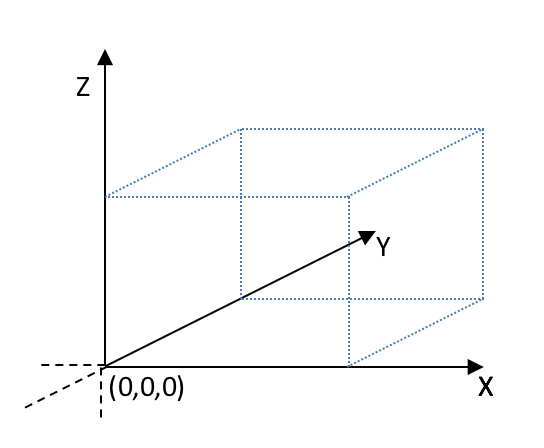
Coordinates in this specification are based on a right-handed coordinate space. Producers and consumers MUST define and map the origin of the coordinate space to the bottom-front-left corner of the device's output field (such as a tray, platform, or bed), with the x-axis increasing to the right of the output field, the y-axis increasing to the back of the output field, and the z-axis increasing to the top of the output field. Producers and consumers MUST use the unit resolution of the coordinate space as specified in the \ element.
_Figure 3-1. Coordinate space_
## 3.2. Relative Directions and Measurement
Relative directions in this specification are defined as follows. The term _top_ refers to the XY plane of the coordinate space with the maximum printable Z value. The term _bottom_ refers to the minimum printable XY plane of the coordinate space, defined as the XY plane with a Z value of 0. This is typically coincident with the print bed surface. The term _left_ refers to the minimum printable YZ plane of the coordinate space, defined as the YZ plane with an X value of 0. The term _right_ refers to the YZ plane of the coordinate space with the maximum printable X value. The term _front_ refers to the minimum printable XZ plane of the coordinate space, defined as the XZ plane with a Y value of 0. The term _back_ refers to the XZ plane of the coordinate space with the maximum printable Y value.
These terms might also be applied to models, in which case they are defined relative to the bounding box of the model when transformed to the coordinate space defined in this specification.
Producers and consumers MUST interpret coordinates in relation to the coordinate space defined in this specification.
## 3.3. 3D Matrices
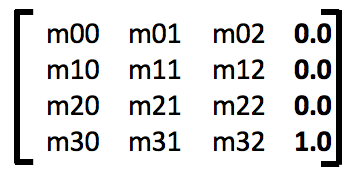
When objects need to be transformed for rotation, scaling, or translation purposes, row-major affine _3D matrices_ (4x4) are used. The matrix SHOULD NOT be singular or nearly singular.
Transforms are of the form, where only the first 3 column values are specified. The last column is never provided, and has the fixed values 0.0, 0.0, 0.0, 1.0. When specified as an attribute value, matrices have the form "m00 m01 m02 m10 m11 m12 m20 m21 m22 m30 m31 m32" where each value is a decimal number of arbitrary precision.
Transforms are applied to the shapes defined by objects. When applying a transformation with a negative determinant, the resultant shape MUST NOT change the sign of its volume.
After applying all transforms to an object, the model SHOULD have positive volume and SHOULD be located in the positive octant of the coordinate space.
## 3.4. Model
_Figure 3-2: Overview of model XML structure of 3MF_

This XML specification is designed to be used with a simple, forward only parser, and the element ordering defined supports this. Producers MUST define each element prior to referencing it elsewhere in the document, unless specifically allowed by an extension.
Element **\**
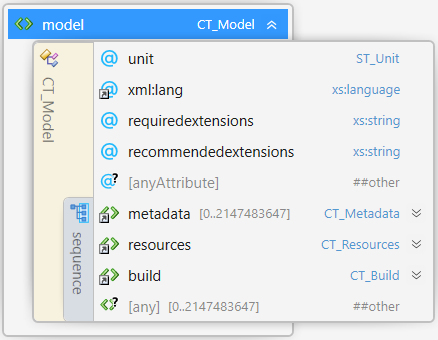
##### Attributes
| Name | Type | Use | Default | Annotation |
| --- | --- | --- | --- | --- |
| unit | **ST\_Unit** | | millimeter | Specifies the unit used to interpret all vertices, locations, or measurements in the model. Valid values are micron, millimeter, centimeter, inch, foot, and meter. |
| xml:lang | **xs:language** | | | Specifies the default language used for the current element and any descendant elements. The language is specified according to RFC 3066. |
| requiredextensions | **xs:string** | | | Space-delimited list of namespace prefixes, representing the set of extensions that are required for processing this **model-file**. Editors and manufacturing devices MUST NOT process this **model-file** if they do not support the required extensions. |
| recommendedextensions | **xs:string** | | | Space-delimited list of namespace prefixes, representing the set of extensions that are recommended for processing this **model-file** with its design intent. Editors and manufacturing devices SHOULD warn and inform the user if they do not support the recommended extensions and ask for input how to proceed. Required extensions MUST NOT be recommended at the same time. |
| @anyAttribute | | | | |
The \ element is the root element of the 3D Model part. There MUST be exactly one \ element in a 3D Model part. A model may have zero or more child metadata elements (see [3.4.1. Metadata](#341-metadata) for more information). A model must have two additional child elements: \ and \. The \ element provides a set of definitions that can be drawn from to define a 3D object. The \ element provides a set of items that should actually be manufactured as part of the job.
Producers SHOULD NOT require extensions unless this **model-file** would lose key meaning without the extension data. Allowing consumers to ignore unsupported extensions gives a more graceful fallback. Required extensions MAY supercede the requirements of the Core specification. However, the Core specification MUST be fully supported when used with optional extensions.
### 3.4.1. Metadata
Element **\**
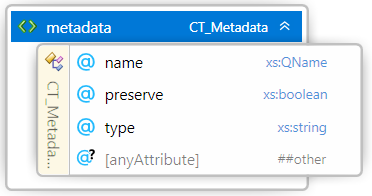
##### Attributes
| Name | Type | Use | Default | Annotation |
| --- | --- | --- | --- | --- |
| name | **xs:QName** | required | | Contains either the well-known name of the metadata defined by this specification (see Table 3-1 below) or vendor-defined metadata, which MUST be prefixed with a valid XML namespace name declared on the \ element. |
| preserve | **xs:boolean** | | | A non-zero value indicates the producer wants the consumer to preserve this value when it saves a modified version of this 3MF |
| type | **xs:string** | | | A string indicating the XML type of the data stored in the metadata value. |
| @anyAttribute | | | | |
Producers of 3MF Documents SHOULD provide additional information about this **model-file** in the form of metadata under the root \ element.
Metadata associated with the \ MAY contain a set of well known values. Metadata in 3MF Documents without a namespace name MUST be restricted to names and values defined by this specification. If a name value is not defined in this specification, it MUST be prefixed with the namespace name of an XML namespace declaration on the \ element that is not drawn from the default namespace.
The well-known metadata names and values defined by this specification include:
_Table 3-1. Metadata values_
| **Context** | **Name** | **Comment** |
| --- | --- | --- |
| Model | Title | A title for the 3MF document |
| | Designer | A name for a designer of this document |
| | Description |A description of the document |
| | Copyright | A copyright associated with this document |
| | LicenseTerms | License information associated with this document |
| | Rating | An industry rating associated with this document |
| | CreationDate | The date this documented was created by a source app |
| | ModificationDate | The date this document was last modified |
| | Application | The name of the source application that originally created this document |
The optional "type" attribute allows for the value to be any data. The default value for type is assumed to be "xs:string". If type is not present, The value of the \ value is assumed to be be any string. However, if type is specified, it MUST contain the name of a built-in Simple XML type representing the data contained in the value.
Simple XML types include any built-in primitive or derived XML types specified by the "xs:anySimpleType".
Producers MUST NOT create multiple metadata elements with the same name. A Producer that wishes to interoperate with other Consumers SHOULD publish a namespace URI and a set of well-defined metadata names and expected content in order for Consumers to function in an expected fashion.
Consumers SHOULD ignore any metadata with a name they do not recognize, typically from a future version of this specification or an unrecognized producer or target consumer.
Producers MAY indicate that certain metadata values should be preserved using the preserve attribute. The default value is assumed to be 0 or false. When the preserve attribute is 1 or true, Consumers that modify the 3MF file SHOULD retain the original metadata value even if the data it references is modified. The metadata should be preserved through the lifetime of the element it is associated with. If an \ is removed, for example, the associated metadata should be removed with it.
[Appendix B.2.](#appendix-b2-3mf-metadata-example) includes a sample 3MF supporting custom metadata.
### 3.4.2. Resources
Element **\**
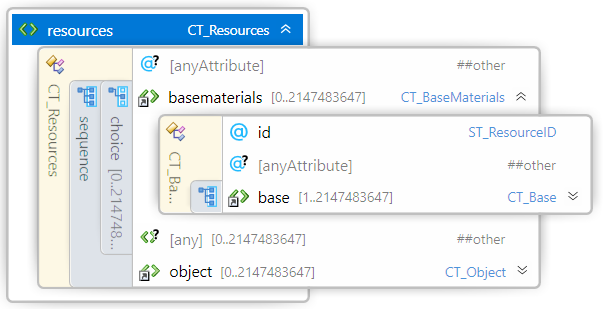
The \ element acts as the root element of a library of constituent pieces of the overall 3D object definition. Objects, properties and materials are collectively referred to as _resources_ in this specification.
Each resource might rely on other resources for its complete definition. For example, an object resource may refer to material resources, or even other object resources to fully describe a 3D object.
An object resource represents a single 3D object that could be manufactured, but not necessarily will be manufactured. The objects that actually will be manufactured are referenced from an \ element child of the \ element. Objects are defined as resources primarily to aid in modularizing design and re-use of component, thus compacting the overall markup size.
Resource IDs MUST be unique within the model.
### 3.4.3. Build Instructions
Element **\**
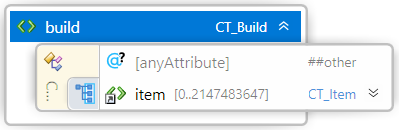
The \ element contains one or more items to manufacture as part of processing the job. A consumer MUST NOT output any 3D objects not referenced by an \ element.
#### 3.4.3.1. Item Element
Element **\**
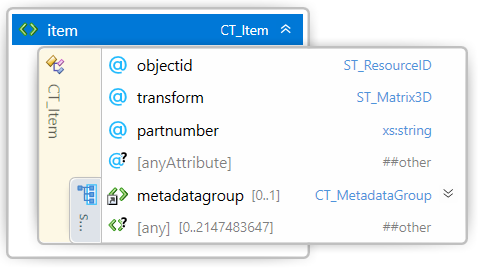
##### Attributes
| Name | Type | Use | Default | Annotation |
| --- | --- | --- | --- | --- |
| objectid | **ST\_ResourceID** | required | | Reference to the \