English · Español · Русский · 中文 · 日本語 · Português · Français · Deutsch
✧ What is this?
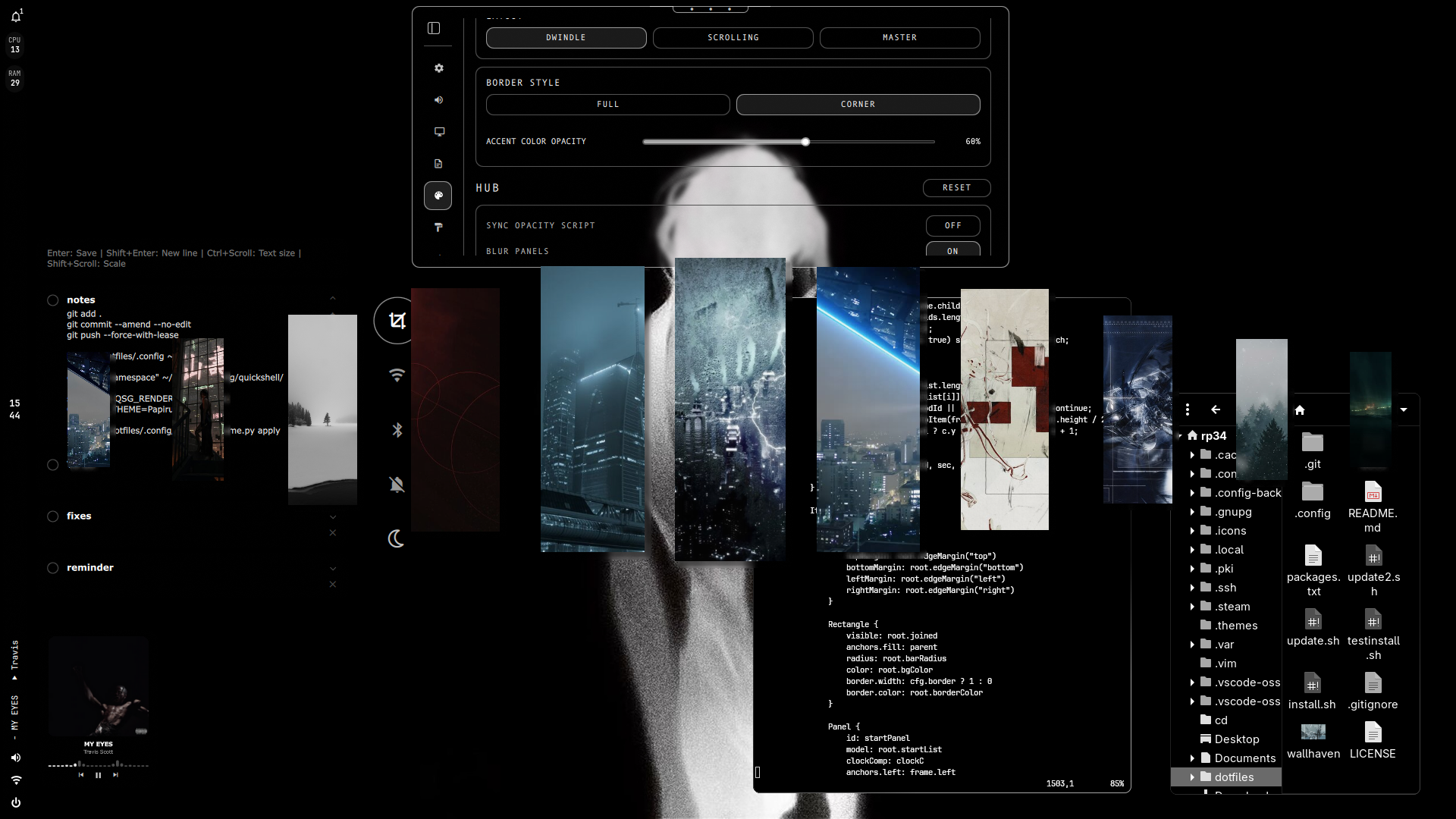
A full customizable Linux desktop: bar, system settings and menus to customize your desktop. Built on **Hyprland** (window manager) and **Quickshell** (what the bar and menus are made with).
This setup aims to keep things simple, fast and practical, and easy to make your own without editing config files.
### Requirements
- **Arch-based distro:** Arch, CachyOS, EndeavourOS, Manjaro, etc.
- **A mostly clean install.** Replaced configs are backed up automatically.
> New to Linux? I recommend [CachyOS](https://youtu.be/eo9MejbzWto). Skip the configuration part of the video, just run the install command after installing the system.
**Need help?** Join the Discord (button above).
### Is it hard to use?
Not really. Almost everything is a keyboard shortcut, with mouse alternatives.
| Action | Keyboard | Mouse |
|---|---|---|
| Open quick actions | `Super + S` | Right-click the clock |
| Open settings | `Super + I` | Middle-click the clock |
It includes options to change binds/shortcuts.
See all [Keybinds](#keybinds), or hover over bar elements to see what they do.
## Features
- **Fast & Lightweight Quickshell** — Optimized desktop components designed to be fast and easy to customize.
- **Top bar** - Customizable bar with settings menu, and quick shortcuts.
- **Settings** — System settings, customize hyprland appearance, bar & themes.
- **Wallpaper picker & Dynamic Colors** — Wallpaper-based color generation & live wallpapers support.
- **Preset Themes** — Monochrome, Nord, Tokyo Night and other popular ones, with support for creating your own.
- **App Launcher** — **Rofi** App search, clipboard history, and opacity controls.
- **Zsh + Starship** — Customizable shell with autosuggestions and history.
- **Notes & Reminders** — Quick notes, tasks, and reminders.
- **Quick Actions** - Customizable quick actions for Wi-Fi, Bluetooth, night light, and more.
- **Power Menu** — Customizable power menu to shut down, reboot, log out, etc.
- **Hyprlock** — Custom lock screen.
- **Spotify + Spicetify** — Custom theme based on **text - darkthemer**, (modified).
> All programs: [packages.txt](packages.txt)
## Keybinds
Middle click the clock to open settings. To close components use Esc key or use the same keybind. Hover over elements to see actions.
| Keybind | Action |
| ----------- | ------------------------- |
| `Super + T` | Terminal |
| `Super + Q` | Close active window |
| `Super + D` | Application launcher |
| `Super + Space` | Toggle floating window |
| `Super + F` | Toggle fullscreen |
| `Super + 1, 2, 3..` | Change workspaces |
| `Super + Shift + 1, 2..`| Move window to workspace |
| `Super + E` | File manager |
| `Super + B` | Browser |
| `Super + V` | Clipboard history |
| `Super + I` | Settings menu |
| `Super + S` | Quick actions |
| `Super + O` | Switch opacity |
| `Super + C` | Notes & Reminders |
| `Super + W` | Wallpaper selector |
| `Super + Shift + C` | Color picker tool |
| `Super + Mouse wheel` | Zoom in/out |
| `Super + Shift + W` | Toggle bar |
| `Super + Grave` | Logout menu |
| `Super + Tab` | Lock screen |
| `Super + N` | Notifications |
| `Super + R` | Toggle screen recorder |
| `Delete` | Screenshot fullscreen |
| `SHIFT + Delete` | Screenshot area select |
> [!note]
>
> Move and resize windows with Super + left/right mouse drag.
>
> All keybinds: [.config/hypr/keybinds.lua](.config/hypr/keybinds.lua)
---
## Installation
**READ ALL**
Works for Arch, CachyOS, EndeavourOS, Manjaro, etc.
This is mainly intended for a clean installation (existing configuration files that are being replaced will be backed up automatically).
**First install git then use the next command and continue the installation until it's finished**
```bash
sudo pacman -S git
```
```bash
git clone https://github.com/43PR/dotfiles.git
cd dotfiles
chmod +x install.sh
./install.sh
```
After the installation finishes log out and back in.
> [!important]
> **Do not move or delete the dotfiles repository after installation.**
>
> This setup uses **symbolic links (symlinks)** that point to files inside the cloned repository. If you move or delete the repository, those symlinks will break.
>
> If you relocate the repository, simply run:
>
> ```bash
> ./install.sh
> ```
>
> The installer will update the existing symlinks to point to the new location.
---
### Credits
**Wallpaper selector:** modified, originally built from the [hyprquickpaper](https://github.com/iamsurjog/hyprquickpaper) by iamsurjog.
**Banner artwork:** by cherry✟ ([@aletiune](https://x.com/aletiune)).