Fork MQTT traffic with no fuss, deploy in seconds. Kubernetes ready.
---
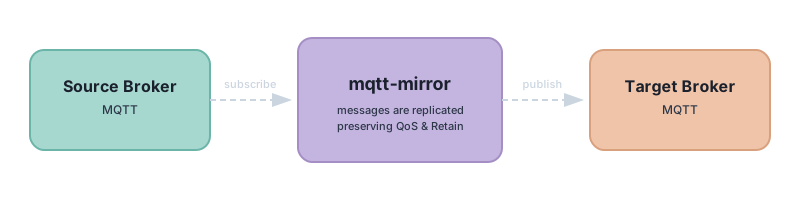
Mqtt-mirror subscribes to a _source broker_ and publishes replicated messages to a _target broker_, preserving the original _QoS_ and _Retain_ flags.
All topics are mirrored by default. Use topic filters to cherry-pick which topics to mirror — standard MQTT wildcards `+` and `#` are supported ([wildcard spec](https://mosquitto.org/man/mqtt-7.html)).

## Common use cases
1. **Prod to staging** — Shadow production traffic into staging to validate new service versions against real messages before deploying.
2. **Prod to dev** — Feed developers realistic data without simulating devices or writing mock generators.
3. **Load/stress testing** — Mirror production traffic to a test cluster to benchmark how new infrastructure handles real load profiles.
4. **Regression testing** — Route live traffic through a candidate build to catch issues that synthetic test data might miss.
5. **Broker migration** — When switching brokers (e.g., Mosquitto to EMQX, or self-hosted to managed), mirror traffic to the new broker during transition to validate it before cutting over.
6. **Cloud migration** — Run on-prem and cloud brokers in parallel with mirrored traffic to build confidence before migrating.
7. **Cross-region replication** — Replicate data from an edge/regional broker to a central cloud broker for geographic redundancy.
8. **Disaster recovery** — Maintain a hot standby broker with live data so failover is seamless.
9. **Edge-to-cloud bridging** — Lightweight one-way replication from edge brokers to cloud, without full broker bridging.
10. **Multi-tenant isolation** — Mirror specific topic trees from a shared broker to tenant-specific brokers.
## Install
Mqtt-mirror is available as a **standalone binary**, **Docker image**, **npm package**, and **Helm chart**.
**Docker**
```
docker run antegulin/mqtt-mirror ./mqtt-mirror \
tcp://username:pass@source.xyz:1883 \
tcp://target.xyz:1883 \
-t events,sensors/+/temperature/+,logs#
```
**npx** (zero install)
```
npx mqtt-mirror \
tcp://username:pass@source.xyz:1883 \
tcp://target.xyz:1883 \
-t events,sensors/+/temperature/+,logs#
```
**Helm chart**
```
helm repo add 4nte https://4nte.github.io/helm-charts/
helm install mqtt-mirror 4nte/mqtt-mirror \
--set mqtt.source=$SOURCE_BROKER \
--set mqtt.target=$TARGET_BROKER \
--set mqtt.topic_filter=foo,bar,device/+/ping
```
**Homebrew**
```
brew tap 4nte/homebrew-tap
brew install mqtt-mirror
```
**Shell script**
```
curl -sfL https://raw.githubusercontent.com/4nte/mqtt-mirror/master/install.sh | sh
```
**Compile from source**
```
git clone https://github.com/4nte/mqtt-mirror
cd mqtt-mirror
make compile
./out/mqtt-mirror --version
```
## Usage
```
mqtt-mirror [flags]
```
Broker URIs use the format `tcp://username:password@host:port`. Special characters in passwords are handled automatically.
### Flags
| Flag | Short | Default | Description |
|------|-------|---------|-------------|
| `--topic-filter` | `-t` | `#` (all) | Comma-separated topic filters with MQTT wildcard support |
| `--topic-prefix` | | | Prefix to prepend to all mirrored topic names |
| `--topic-replace` | | | Topic replacement in `old:new` format (repeatable) |
| `--name` | | random | Instance name for MQTT client ID (max 23 chars) |
| `--clean-session` | | `true` | MQTT clean session flag |
| `--health-port` | | `8080` | Port for health check HTTP server |
| `--publish-timeout` | | `10s` | Timeout for publishing messages to the target broker |
| `--subscribe-qos` | | `0` | QoS level for source broker subscription (0, 1, or 2) |
| `--verbose` | `-v` | `false` | Verbose logging output |
| `--config` | | | Path to TOML config file |
### Topic rewriting
Rewrite topic names before publishing to the target broker using `--topic-prefix` and `--topic-replace`.
**Prefix** prepends a string to all topics:
```
mqtt-mirror source target --topic-prefix "mirror/"
# devices/sensor1 → mirror/devices/sensor1
```
**Replace** performs string substitution (`old:new` format, repeatable):
```
mqtt-mirror source target --topic-replace "staging:production"
# staging/events → production/events
```
Strip a string by leaving the replacement empty:
```
mqtt-mirror source target --topic-replace "legacy/:"
# legacy/devices/sensor1 → devices/sensor1
```
When both are used, replacements are applied first, then the prefix.
### Configuration file
Instead of flags, you can use a TOML configuration file. Mqtt-mirror looks for `mirror.toml` in the current directory, or specify a path with `--config`.
```toml
source = "tcp://user:password@source-broker:1883"
target = "tcp://user:password@target-broker:1883"
topic_filter = ["devices/#", "sensors/+/temperature"]
topic_prefix = "mirror/"
topic_replace = ["staging:production", "v1:v2"]
name = "my-mirror"
verbose = true
health_port = 9090
clean_session = false
```
### Environment variables
All configuration options can be set via environment variables (uppercase, underscores instead of hyphens):
| Variable | Equivalent flag / config key |
|----------|------------------------------|
| `SOURCE` | `source` (positional arg) |
| `TARGET` | `target` (positional arg) |
| `TOPIC_FILTER` | `--topic-filter` |
| `TOPIC_PREFIX` | `--topic-prefix` |
| `TOPIC_REPLACE` | `--topic-replace` |
| `NAME` | `--name` |
| `VERBOSE` | `--verbose` |
| `HEALTH_PORT` | `--health-port` |
| `CLEAN_SESSION` | `--clean-session` |
| `PUBLISH_TIMEOUT` | `--publish-timeout` |
| `SUBSCRIBE_QOS` | `--subscribe-qos` |
**Precedence order** (highest to lowest): CLI flag > environment variable > config file > default value.
### Persistent sessions
By default, mqtt-mirror uses clean sessions. Set `--clean-session=false` to use persistent sessions — the broker will remember subscriptions and queue messages while the client is disconnected.
**Important:** Persistent sessions require a stable client ID. Always set `--name` when using `--clean-session=false`, otherwise a new random ID is generated on each restart, losing the session.
## Health & metrics
Mqtt-mirror exposes HTTP endpoints for health checks and monitoring on the health port (default `8080`).
| Endpoint | Description |
|----------|-------------|
| `/healthz` | Liveness probe — always returns `200 OK` |
| `/readyz` | Readiness probe — returns `200 OK` only when both source and target are connected, `503` otherwise |
| `/metrics` | Prometheus metrics |
### Prometheus metrics
| Metric | Type | Description |
|--------|------|-------------|
| `mqtt_mirror_messages_received_total` | Counter | Messages received from source (by QoS) |
| `mqtt_mirror_messages_published_total` | Counter | Messages published to target (by QoS) |
| `mqtt_mirror_publish_errors_total` | Counter | Publish failures (timeout or error) |
| `mqtt_mirror_message_size_bytes` | Histogram | Payload size distribution |
| `mqtt_mirror_publish_duration_seconds` | Histogram | Publish latency distribution |
| `mqtt_mirror_source_connected` | Gauge | Source broker connection status (1/0) |
| `mqtt_mirror_target_connected` | Gauge | Target broker connection status (1/0) |
| `mqtt_mirror_build_info` | Gauge | Build metadata with version label |
## Resilience
- **Auto-reconnect** — Both source and target clients automatically reconnect on connection loss (15s max interval).
- **Auto-resubscribe** — Subscriptions are re-established on reconnect.
- **Graceful shutdown** — Cleanly disconnects from both brokers on SIGINT/SIGTERM.
## Documentation
- [Kubernetes & Helm deployment](docs/kubernetes.md) — Full Helm values reference, ConfigMap configuration, secrets, ServiceMonitor setup, and deployment best practices.
- [Metrics & monitoring](docs/monitoring.md) — Detailed metric descriptions, PromQL queries, alerting rules, and Grafana tips.
- [Troubleshooting](docs/troubleshooting.md) — Common failure modes, diagnostic steps, and connection lifecycle details.
## Sponsors

## Development
If you like this project, please consider helping out. All contributions are welcome.