Official SynClub Model Context Protocol (MCP) Server that enables powerful AI generation capabilities including text-to-speech, voice cloning, video generation, image generation, and more. Compatible with MCP clients like Claude Desktop, Cursor, Windsurf, and others.
## Features - **Text-to-Speech**: Convert text to natural speech with multiple voice options - **Voice Cloning**: Clone voices from audio samples - **Video Generation**: Generate videos from text prompts or images - **Image Generation**: Create images from text descriptions - **Image Recognition**: Analyze and understand image content - **Background Removal**: Automatically remove backgrounds from images - **HD Image Restoration**: Enhance image quality and resolution - **AI Search**: Intelligent search with AI-powered results - **Japanese TTS**: Specialized Japanese text-to-speech ## Quick Start ### 1. Install uv (Python Package Manager) ```bash # macOS/Linux curl -LsSf https://astral.sh/uv/install.sh | sh # Windows (PowerShell) powershell -c "irm https://astral.sh/uv/install.sh | iex" # Or via package managers # brew install uv # pip install uv ``` ### 2. Get Your API Key Obtain your API key from your account information page on the SynClub server website. ### 3. Configure Your MCP Client #### Claude Desktop **Step 1: find your config file** You can find your config file at: - **macOS**: `~/Library/Application Support/Claude/claude_desktop_config.json` - **Windows**: `%APPDATA%\Claude\claude_desktop_config.json` Or you can find your config file in claude setting: Click claude setting: 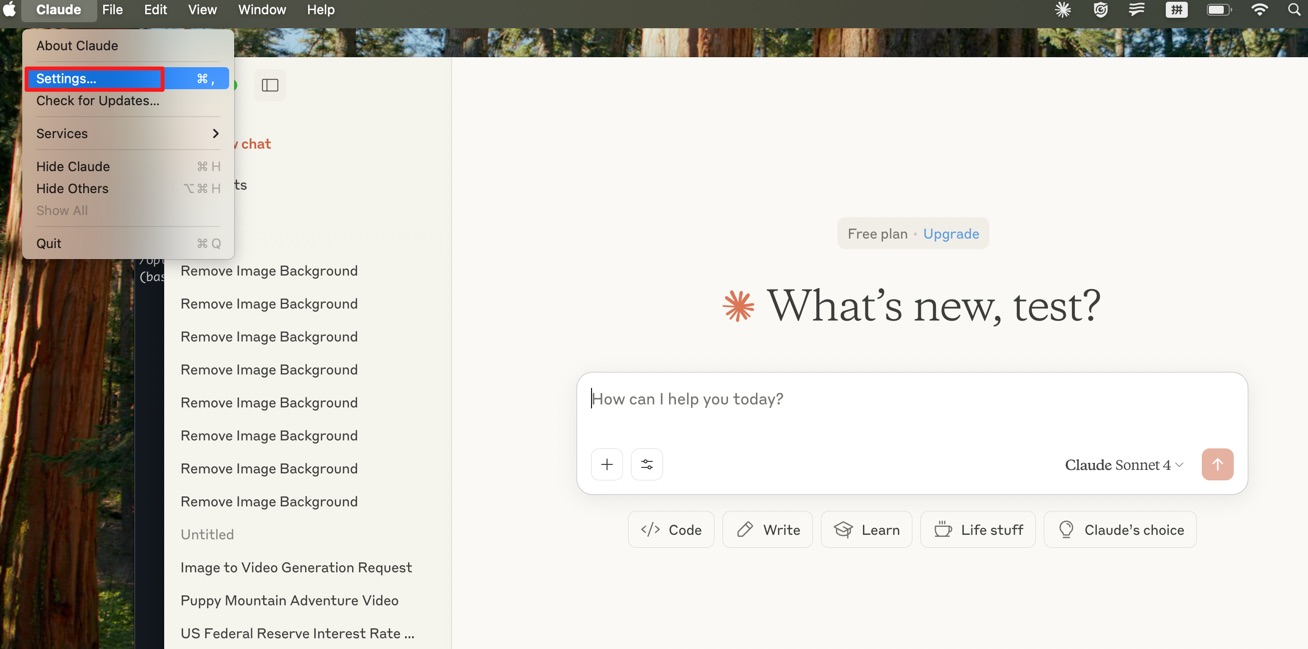 Edit config file: 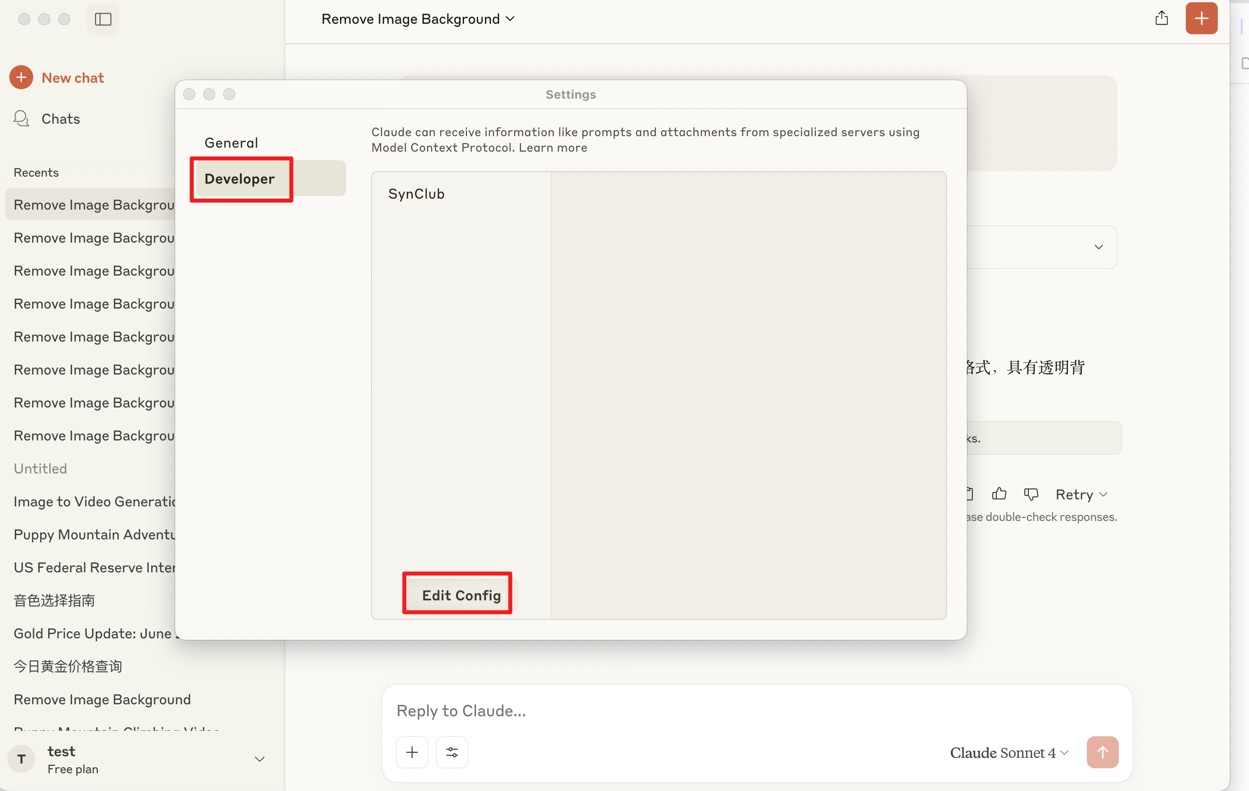 Open config file: 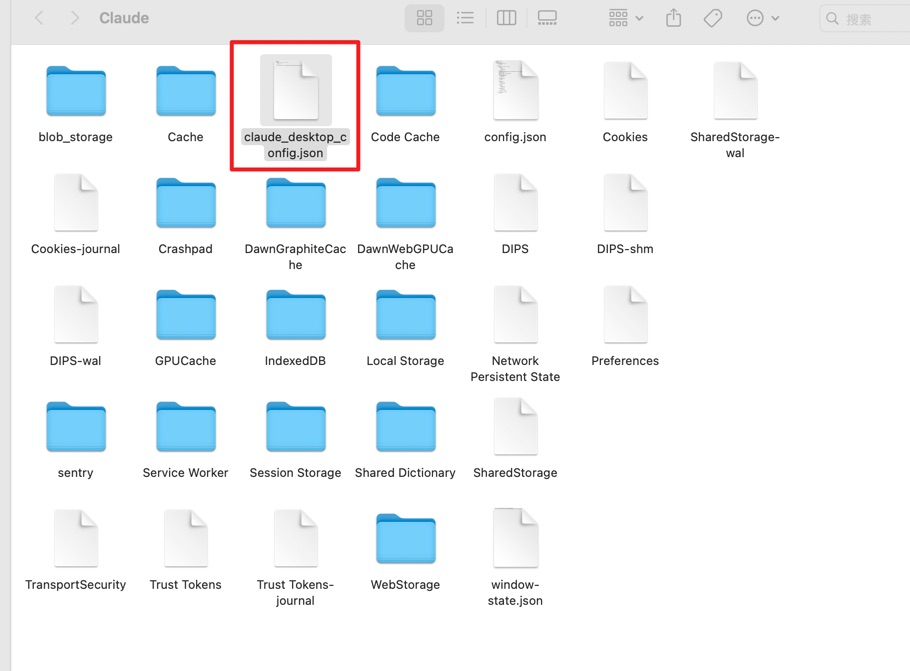 **Step 2: append this config to your own file** ```json { "mcpServers": { "SynClub": { "command": "uvx", "args": [ "synclub-mcp" ], "env": { "SYNCLUB_MCP_API": "your api key" } } } } ``` If you have any problem with the command uvx, try to use the command `which uvx` to find the absolute path of uvx and replace the command in the config file. **step 3:save and restart your claude application** - **important:make sure to restart claude that your config file will update and check the connection in claude developer** ## Available Tools | Tool Name | Description | |-----------|-------------| | `minimax_text_to_audio` | Convert text to speech with customizable voice settings | | `minimax_generate_video` | Minimax generate videos | | `minimax_voice_clone` | Clone voices from audio files | | `minimax_text_to_image` | Generate images from text prompts | | `kling_generate_text_to_video` | Start generate videos from text descriptions using Kling models| | `kling_query_ttv_task` | Get the generate result from generate_text_to_video tool| | `kling_generate_image_to_video` | Start generate videos from images with text prompts using Kling models| | `kling_query_gttv_task` | Get the generate result from generate_image_to_video tool| | `openai_image_recognition` | Analyze and recognize image content | | `openai_edit_image` | Edit images based on a text prompt | | `remove_bg` | Automatically remove image backgrounds | | `hd_restore` | Enhance image quality and resolution | | `openai_generate_image` | Generate images using alternative models | | `ai_search` | Perform AI-powered search queries | | `japanese_tts` | Japanese text-to-speech conversion | | `generate_comic_story` | Generate a comic story based on input story theme | | `generate_comic_chapters` | Generate comic story chapters based on novel input, character info and chapter number | | `generate_comic_image_prompts` | Generate image prompts based on comic story chapter and character info | | `edit_comic_story` | Edit comic story based on edit prompt and input story. | | `edit_comic_chapters` | Edit comic chapters based on edit prompt and input chapters. | | `ugc_tti` | Generate a anime character based on a text prompt | | `anime_pose_align` | Generate a pose align image based on an anime character image | | `anime_comic_image` | Generate a comic image based on prompt | | `flux_edit_image` | edit image based on image url and image prompts | | `google_nano_tti` | generate image based on text prompt using google nano model | | `google_nano_edit_image` | Edit and modify existing images based on text prompts using Google Nano banana model | | `google_nano_edit_image_highlight_feature` | Generate specialized images based on text prompts using Google Nano model for 4 specific highlight features | | `sora_generate_text_to_video_` | Generate video based on text prompt using sora-2 api | `veo_generate_text_to_video` | Generate video based on text prompt using google veo api | `sora_generate_text_to_video_` | Generate video based on text prompt using google veo api | `flux_pro_tti` | Generate image based on text prompt using flux pro model | `flux_pro_edit_image` | Generate image based on text prompt and image using flux pro model | `google_nano_banana_pro_generate_image` | Generate image based on text prompt and image using Google Nano banana pro model ### Environment Variables - `SYNCLUB_MCP_API`: Your API key (required) ## License This project is licensed under the MIT License - see the [LICENSE](LICENSE) file for details. ## From https://github.com/520chatgpt01/Synclub-mcp-server