# Zotero MCP: Chat with your Research Library—Local or Web—in Claude, ChatGPT, and more.




**Zotero MCP** seamlessly connects your [Zotero](https://www.zotero.org/) research library with [ChatGPT](https://openai.com), [Claude](https://www.anthropic.com/claude), and other AI assistants (e.g., [Cherry Studio](https://cherry-ai.com/), [Chorus](https://chorus.sh), [Cursor](https://www.cursor.com/)) via the [Model Context Protocol](https://modelcontextprotocol.io/introduction). Review papers, get summaries, analyze citations, extract PDF annotations, and more!
---
## ✨ Features
### 🧠 AI-Powered Semantic Search
- **Vector-based similarity search** over your entire research library (requires `[semantic]` extra)
- **Multiple embedding models**: Default (free, local), OpenAI, Gemini, and Ollama
- **Intelligent results** with similarity scores and contextual matching
- **Auto-updating database** with configurable sync schedules
### 🔍 Search Your Library
- Find papers, articles, and books by title, author, or content
- Perform complex searches with multiple criteria
- Browse collections, tags, and recent additions
- Semantic search for conceptual and topic-based discovery
### 📚 Access Your Content
- Retrieve detailed metadata for any item (markdown or BibTeX export)
- Get full text content (when available)
- Look up items by BetterBibTeX citation key
### 📝 Work with Annotations
- Extract and search PDF annotations with page numbers
- Access Zotero's native annotations
- Create and update notes and annotations
- Extract PDF table of contents / outlines (requires `[pdf]` extra)
### ✏️ Write Operations
- **Add papers by DOI** with auto-fetched metadata and open-access PDF cascade (Unpaywall, arXiv, Semantic Scholar, PMC)
- **Add papers by URL** (arXiv, DOI links, generic webpages) or from local files
- Create and manage collections, update item metadata, batch-update tags
- Find and merge duplicate items with dry-run preview
- **Hybrid mode**: local reads + web API writes for local-mode users
### 📊 Scite Citation Intelligence (optional `[scite]` extra)
- **Citation tallies**: See how many papers support, contrast, or mention each item — the MCP version of the [Scite Zotero Plugin](https://github.com/scitedotai/scite-zotero-plugin)
- **Retraction alerts**: Scan your library for retracted or corrected papers
- No Scite account required — uses public API endpoints
### 🌐 Flexible Access Methods
- Local mode for offline access (no API key needed)
- Web API for cloud library access
- Hybrid mode: read from local Zotero, write via web API
### ⌨️ Standalone CLI (`zotero-cli`)
- Search, browse, and edit your library directly from the terminal — no AI assistant required
- Ideal for scripting, automation, and quick lookups
- Short aliases (`s`, `g`, `ann`, `coll`) for interactive use
## 🚀 Quick Install
> **New to the command line?** Try the community-built [Zotero MCP Setup](https://github.com/ehawkin/zotero-mcp-setup) — includes a macOS GUI installer (DMG), one-click install scripts for Mac/Windows, and a step-by-step guide. No Terminal experience needed.
### Default Installation (core tools only)
The base install is lightweight — it includes search, metadata retrieval, annotations, and write operations. No ML/AI dependencies are pulled in.
#### Installing via uv (recommended)
```bash
uv tool install zotero-mcp-server
zotero-mcp setup # Auto-configure (Claude Desktop supported)
```
#### Installing via pip
```bash
pip install zotero-mcp-server
zotero-mcp setup # Auto-configure (Claude Desktop supported)
```
#### Installing via pipx
```bash
pipx install zotero-mcp-server
zotero-mcp setup # Auto-configure (Claude Desktop supported)
```
### Optional Extras
Heavy ML/PDF dependencies are separated into optional extras so the base install stays fast and small:
| Extra | What it adds | Install command |
|-------|-------------|-----------------|
| `semantic` | Semantic search via ChromaDB, sentence-transformers, OpenAI/Gemini embeddings | `pip install "zotero-mcp-server[semantic]"` |
| `pdf` | PDF outline extraction (PyMuPDF) and EPUB annotation support | `pip install "zotero-mcp-server[pdf]"` |
| `scite` | [Scite](https://scite.ai) citation intelligence — tallies and retraction alerts (no account needed) | `pip install "zotero-mcp-server[scite]"` |
| `all` | Everything above | `pip install "zotero-mcp-server[all]"` |
For example, with uv:
```bash
uv tool install "zotero-mcp-server[all]" # Full install with all features
uv tool install "zotero-mcp-server[semantic]" # Just semantic search
```
If you only need basic library access (search, read, annotate, write), the default install with no extras is all you need.
#### Updating Your Installation
Keep zotero-mcp up to date with the smart update command:
```bash
# Check for updates
zotero-mcp update --check-only
# Update to latest version (preserves all configurations)
zotero-mcp update
```
## 🧠 Semantic Search
Zotero MCP now includes powerful AI-powered semantic search capabilities that let you find research based on concepts and meaning, not just keywords.
### Setup Semantic Search
During setup or separately, configure semantic search:
```bash
# Configure during initial setup (recommended)
zotero-mcp setup
# Or configure semantic search separately
zotero-mcp setup --semantic-config-only
```
**Available Embedding Models:**
- **Default (all-MiniLM-L6-v2)**: Free, runs locally, good for most use cases
- **OpenAI**: Better quality, requires API key (`text-embedding-3-small` or `text-embedding-3-large`)
- **Gemini**: Better quality, requires API key (`gemini-embedding-001`)
- **Ollama**: Runs locally via Ollama API (requires model name, e.g., 'qwen3-embedding')
**Using Ollama embeddings:**
Install and start Ollama, then pull an embedding model before running `zotero-mcp update-db`:
```bash
ollama serve
# Small model: fast and lightweight
ollama pull nomic-embed-text
# Medium model: better multilingual retrieval quality
ollama pull bge-m3
```
When prompted by `zotero-mcp setup --semantic-config-only`, choose **Ollama** and use either `nomic-embed-text` or `bge-m3` as the model name. If you change embedding models later, rebuild the index:
```bash
zotero-mcp update-db --force-rebuild
```
Two `semantic_search.embedding_config` keys tune the Ollama path for slower
hardware or very large libraries:
```jsonc
"embedding_config": {
"model_name": "bge-m3",
"timeout": 600, // HTTP timeout per /api/embed call (default 120s)
"request_batch_size": 64 // documents per request (default 64)
}
```
Raise `timeout` if indexing reports `Read timed out`; lower
`request_batch_size` to make each request cover less GPU work, which usually
fixes timeouts more reliably than raising the timeout alone.
When you choose OpenAI, setup also asks whether database updates should use
OpenAI Batch API. Batch updates are cheaper for large libraries, but they are
asynchronous: submit the batch, wait for completion, then import the embeddings.
**Update Frequency Options:**
- **Manual**: Update only when you run `zotero-mcp update-db`
- **Auto on startup**: Update database every time the server starts
- **Daily**: Update once per day automatically
- **Every N days**: Set custom interval
### Using Semantic Search
After setup, initialize your search database:
```bash
# Build the semantic search database (fast, metadata-only)
zotero-mcp update-db
# Submit OpenAI embeddings through Batch API for this update
zotero-mcp update-db --openai-batch
# Check and import completed OpenAI Batch API embeddings
zotero-mcp openai-batch-status
zotero-mcp openai-batch-import
# Force realtime OpenAI embeddings even if Batch API is enabled in config
zotero-mcp update-db --no-openai-batch
# Build with full-text extraction (slower, more comprehensive)
zotero-mcp update-db --fulltext
# Use your custom zotero.sqlite path
zotero-mcp update-db --fulltext --db-path "/Your_custom_path/zotero.sqlite"
# If you have embedding conflicts or changed models, force a rebuild
zotero-mcp update-db --force-rebuild
# Check database status
zotero-mcp db-status
```
**Example Semantic Queries in your AI assistant:**
- *"Find research similar to machine learning concepts in neuroscience"*
- *"Papers that discuss climate change impacts on agriculture"*
- *"Research related to quantum computing applications"*
- *"Studies about social media influence on mental health"*
- *"Find papers conceptually similar to this abstract: [paste abstract]"*
The semantic search provides similarity scores and finds papers based on conceptual understanding, not just keyword matching.
### Text Extraction Settings
PDFs are parsed with [pdf-inspector](https://github.com/firecrawl/pdf-inspector), which produces Markdown with the document's heading structure intact. These keys live under `semantic_search.extraction` in `~/.config/zotero-mcp/config.json`:
```json
{
"semantic_search": {
"extraction": {
"pdf_max_pages": 50,
"fulltext_display_max_pages": 10,
"attachment_priority": ["markdown", "pdf", "html", "other"]
}
}
}
```
| Key | Default | What it does |
|---|---|---|
| `pdf_max_pages` | `50` | Pages extracted per PDF when indexing. Raising it does not widen what search sees on its own — that is bounded by the embedding model's token limit or `chunking.max_chunks_per_item`. |
| `fulltext_display_max_pages` | `10` | Pages returned by `zotero_get_item_fulltext`. Separate from the above because reading a paper is bounded by your assistant's context, not by recall. |
| `attachment_priority` | `["pdf", "html", "other"]` | Order in which attachment kinds are tried when an item has several readable files. |
**`attachment_priority`** exists for the case where you have converted a paper to clean Markdown yourself and attached it next to the original PDF. By default the PDF still wins; listing `"markdown"` first makes your converted copy the one that gets read and indexed. Valid entries are `pdf`, `html`, `markdown`, `text` and `other`. `other` is a catch-all matching every kind not named elsewhere in the list, so the default sweeps Markdown and plain text into one bucket where the larger file wins. Omitting `other` means anything unlisted is never chosen.
Changing this setting marks affected items for re-extraction, so a following `zotero-mcp update-db` refreshes text that came from a now-deprioritized attachment rather than leaving stale embeddings behind.
To read one specific attachment regardless of priority, pass that attachment's own key to `zotero_get_item_fulltext` (find it with `zotero_get_item_children`) — an attachment key bypasses the priority order and reads exactly that file.
## 🖥️ Setup & Usage
Full documentation is available at [Zotero MCP docs](https://stevenyuyy.com/zotero-mcp/).
**Requirements**
- Python 3.10+
- Zotero 7+ (for local API with full-text access)
- An MCP-compatible client (e.g., Claude Desktop, ChatGPT Developer Mode, Cherry Studio, Chorus)
**For ChatGPT setup: see the [Getting Started guide](./docs/getting-started.md).**
### Configure Zotero
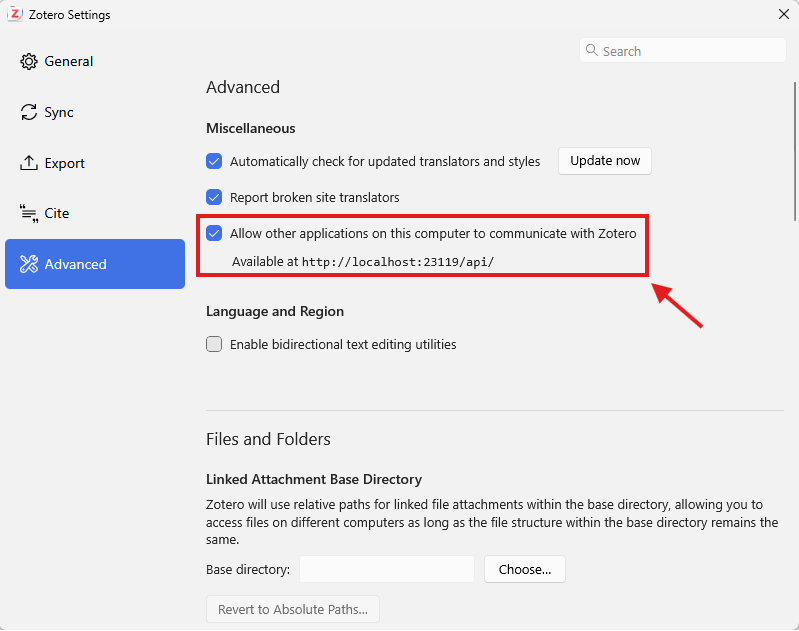
The Zotero local API must be enabled for the MCP server to work.
In Zotero 9, the local API toggle is under Settings → Advanced → 'Allow other applications on this computer to communicate with Zotero'.
Here is a screenshot:
### For Claude Desktop / Claude Code (MCP client)
#### Configuration
After installation, either:
1. **Auto-configure** (recommended):
```bash
zotero-mcp setup
```
2. **Manual configuration**:
For Claude Desktop, add this to `claude_desktop_config.json`.
For Claude Code, add this to `~/.claude.json`:
```json
{
"mcpServers": {
"zotero": {
"command": "zotero-mcp",
"env": {
"ZOTERO_LOCAL": "true",
"ZOTERO_API_KEY": "YOUR_API_KEY",
"ZOTERO_LIBRARY_ID": "YOUR_LIBRARY_ID"
}
}
}
}
```
For **local read-only use**, `ZOTERO_LOCAL: "true"` is all you need — drop the `ZOTERO_API_KEY` and `ZOTERO_LIBRARY_ID` lines entirely.
The local API is fast but read-only, so the MCP server uses the Zotero web API for write operations.
To enable **write mode**:
- Keep `ZOTERO_LOCAL: "true"` — with API credentials set, the server runs in hybrid mode (fast local reads, web API writes)
- Click [here](https://www.zotero.org/settings/security#applications) to generate a Zotero API key and replace `YOUR_API_KEY` with it
- `ZOTERO_LIBRARY_ID` is your numeric **userID**, shown on that same page (for a group library, use the group's ID and also set `ZOTERO_LIBRARY_TYPE: "group"`).
> **Important Note**: Environmental variables set in the shell you run `claude` in will override these values.
> **Tip:** If Claude Desktop reports it can't find the `zotero-mcp` command, use the
> absolute path instead (run `zotero-mcp setup-info` or `which zotero-mcp` to find it) —
> GUI apps don't always inherit your shell `PATH`.
#### Usage
1. Start Zotero desktop (make sure local API is enabled in preferences)
2. Launch Claude Desktop / Claude Code
3. For Claude Desktop, access the Zotero-MCP tool through Claude Desktop's tools interface.
For Claude Code, run the `/mcp` command, and make sure the Zotero MCP server is connected.
Example prompts:
- "Search my library for papers on machine learning"
- "Find recent articles I've added about climate change"
- "Summarize the key findings from my paper on quantum computing"
- "Extract all PDF annotations from my paper on neural networks"
- "Search my notes and annotations for mentions of 'reinforcement learning'"
- "Show me papers tagged '#Arm' excluding those with '#Crypt' in my library"
- "Search for papers on operating system with tag '#Arm'"
- "Export the BibTeX citation for papers on machine learning"
- **"Find papers conceptually similar to deep learning in computer vision"** *(semantic search)*
- **"Research that relates to the intersection of AI and healthcare"** *(semantic search)*
- **"Papers that discuss topics similar to this abstract: [paste text]"** *(semantic search)*
### For Autohand Code
After installing Zotero MCP, add a local read-only server with:
```bash
autohand mcp add zotero env ZOTERO_LOCAL=true zotero-mcp
```
Add `--scope project` after `add` to keep the server configuration in the current project. For hybrid or web API access, add the credentials described above to the `env` command. See [Autohand Code](https://github.com/autohandai/code-cli/) for current installation and CLI details.
### For Cherry Studio
#### Configuration
Go to Settings -> MCP Servers -> Edit MCP Configuration, and add the following:
```json
{
"mcpServers": {
"zotero": {
"name": "zotero",
"type": "stdio",
"isActive": true,
"command": "zotero-mcp",
"args": [],
"env": {
"ZOTERO_LOCAL": "true"
}
}
}
}
```
Then click "Save".
Cherry Studio also provides a visual configuration method for general settings and tools selection.
## 🔧 Advanced Configuration
### Using Web API Instead of Local API
For accessing your Zotero library via the web API (useful for remote setups):
```bash
zotero-mcp setup --no-local --api-key YOUR_API_KEY --library-id YOUR_LIBRARY_ID
```
### Environment Variables
**Zotero Connection:**
- `ZOTERO_LOCAL=true`: Use the local Zotero API (default: false)
- `ZOTERO_API_KEY`: Your Zotero API key (for web API)
- `ZOTERO_LIBRARY_ID`: Your Zotero library ID (for web API)
- `ZOTERO_LIBRARY_TYPE`: The type of library (user or group, default: user)
- `ZOTERO_WEBDAV_URL`: Optional WebDAV folder URL for direct attachment downloads in remote mode
- `ZOTERO_WEBDAV_USERNAME`: Optional WebDAV username
- `ZOTERO_WEBDAV_PASSWORD`: Optional WebDAV password
**Semantic Search:**
- `ZOTERO_EMBEDDING_MODEL`: Embedding model to use (default, openai, gemini, ollama)
- `OPENAI_API_KEY`: Your OpenAI API key (for OpenAI embeddings)
- `OPENAI_EMBEDDING_MODEL`: OpenAI model name (text-embedding-3-small, text-embedding-3-large)
- `OPENAI_BASE_URL`: Custom OpenAI endpoint URL (optional, for use with compatible APIs)
- OpenAI Batch API indexing is configured by `zotero-mcp setup` and can be overridden with
`zotero-mcp update-db --openai-batch` or `--no-openai-batch`
- `GEMINI_API_KEY`: Your Gemini API key (for Gemini embeddings)
- `GEMINI_EMBEDDING_MODEL`: Gemini model name (gemini-embedding-001)
- `GEMINI_BASE_URL`: Custom Gemini endpoint URL (optional, for use with compatible APIs)
- `OLLAMA_EMBEDDING_MODEL`: Ollama embedding model name (qwen3-embedding by default)
- `OLLAMA_BASE_URL`: Ollama server URL (default: http://localhost:11434)
- `ZOTERO_DB_PATH`: Custom `zotero.sqlite` path (optional). When unset, the
database is located automatically: a data directory configured in Zotero's
preferences (read from the profile's `prefs.js`) is tried first, then the
default `~/Zotero` location.
**Tool surface:**
- `ZOTERO_MCP_TOOLSETS`: Which optional tool groups to expose. Every tool the
server registers is sent to the model on *every* request, so the tool list is
a fixed cost on your context window. Groups that need an external service,
serve maintenance rather than research, or apply only to some users are off
by default. See [Tool Groups](#-tool-groups) below.
**Item schema:**
- `ZOTERO_MCP_SCHEMA_REFRESH=0`: Disable the weekly background refresh of
Zotero's item-type schema from `api.zotero.org`. The schema is what routes a
generic `title=` update to the field a type actually stores it under (a
statute's `nameOfAct`, a case's `caseName`). A copy ships with the package, so
disabling the refresh only means new item types added by Zotero after this
release won't be picked up until you upgrade. `zotero-mcp schema-refresh`
still refreshes on demand.
- `ZOTERO_MCP_SCHEMA_CACHE`: Custom path for the refreshed schema cache
(default: `~/.cache/zotero-mcp/schema.json`).
### Command-Line Options
```bash
# Run the server directly
zotero-mcp serve
# Specify transport method
zotero-mcp serve --transport stdio|streamable-http|sse
# Setup and configuration
zotero-mcp setup --help # Get help on setup options
zotero-mcp setup --semantic-config-only # Configure only semantic search
zotero-mcp setup-info # Show installation path and config info for MCP clients
# Updates and maintenance
zotero-mcp update # Update to latest version
zotero-mcp update --check-only # Check for updates without installing
zotero-mcp update --force # Force update even if up to date
# Semantic search database management
zotero-mcp update-db # Update semantic search database (fast, metadata-only)
zotero-mcp update-db --openai-batch # Submit OpenAI embeddings through Batch API
zotero-mcp update-db --no-openai-batch # Force realtime OpenAI embeddings for this run
zotero-mcp openai-batch-status # Check latest OpenAI embedding batch status
zotero-mcp openai-batch-import # Import completed OpenAI batch embeddings
zotero-mcp update-db --fulltext # Update with full-text extraction (comprehensive but slower)
zotero-mcp update-db --force-rebuild # Force complete database rebuild
zotero-mcp update-db --fulltext --force-rebuild # Rebuild with full-text extraction
zotero-mcp update-db --fulltext --db-path "your_path_to/zotero.sqlite" # Customize your zotero database path
zotero-mcp db-status # Show database status and info
# General
zotero-mcp version # Show current version
```
## 🐳 Docker Images (GHCR)
This repository publishes multi-arch container images to GitHub Container Registry:
- `ghcr.io//zotero-mcp:-core` - lightweight install (no optional extras)
- `ghcr.io//zotero-mcp:-all` - full install with `[semantic,pdf,scite]`
- Unsuffixed tags (for example `:latest`, `:vX.Y.Z`) point to the `all` flavor
Detailed publishing and runtime notes are in `docs/docker-images.md`.
Tag strategy:
- Release tags: `vX.Y.Z`, `vX.Y`, `vX` (plus `-core` and `-all` variants)
- Main branch: `latest` (plus `latest-core` and `latest-all`)
- Immutable SHA tags: `sha--core`, `sha--all` (and unsuffixed SHA for `all`)
### Runtime modes in the container
The image supports both MCP server and standalone CLI modes.
- **Server mode (default)**: runs `zotero-mcp serve --transport stdio`
- **CLI mode**: set `ZOTERO_APP=cli` and pass normal `zotero-cli` arguments
### Docker env vars and persistence
- Container runtime vars: `ZOTERO_APP` (`server` or `cli`) and `ZOTERO_TRANSPORT` (default: `stdio`)
- All standard Zotero MCP vars are supported in containers (`ZOTERO_LOCAL`, `ZOTERO_API_KEY`, `ZOTERO_LIBRARY_ID`, embedding provider keys, etc.)
- ChromaDB persistence path in the container is `/home/app/.config/zotero-mcp/chroma_db/`
- Persist config + ChromaDB by mounting `/home/app/.config/zotero-mcp`
Examples:
```bash
# Default MCP server mode (stdio)
docker run --rm ghcr.io//zotero-mcp:latest
# MCP server mode with explicit transport
docker run --rm ghcr.io//zotero-mcp:latest serve --transport streamable-http --host 0.0.0.0 --port 8000
# Standalone CLI mode
docker run --rm -e ZOTERO_APP=cli ghcr.io//zotero-mcp:latest search "machine learning"
# Persist config + ChromaDB across runs
docker run --rm -v zotero-mcp-data:/home/app/.config/zotero-mcp --env-file .env ghcr.io//zotero-mcp:latest
```
## ⌨️ CLI Mode (`zotero-cli`)
`zotero-cli` is a standalone terminal interface to your Zotero library. It uses the same tools as the MCP server but without needing an AI assistant — useful for quick lookups, shell scripts, and automation.
Use `zotero-mcp` when your AI client supports MCP (Claude Desktop, ChatGPT). Use `zotero-cli` for shell scripts, cron jobs, or agentic pipelines with shell access (e.g. Claude Code) — CLI commands cost far fewer tokens than MCP tool schemas and compose naturally with Unix pipes.
Both share the same configuration set up by `zotero-mcp setup`.
### Quick reference
```bash
# Search
zotero-cli search "machine learning" # keyword search
zotero-cli s "neural networks" --limit 5 # short alias, limit results
zotero-cli search --mode semantic "attention mechanisms"
zotero-cli search --mode tag "important,reviewed"
# Get item details
zotero-cli get metadata ABC123 # markdown metadata
zotero-cli g metadata ABC123 --format bibtex # BibTeX export
zotero-cli get fulltext ABC123 # full text
zotero-cli get children ABC123 # attachments and notes
# Edit item metadata
zotero-cli edit ABC123 --title "New Title"
zotero-cli edit ABC123 --add-tags "reviewed,important" --date "2024"
# Notes and annotations
zotero-cli notes list ABC123
zotero-cli notes create --item-key ABC123 --text "My note" --tags "idea"
zotero-cli notes create --item-key ABC123 --text - # read from stdin
zotero-cli ann list --item-key ABC123 # annotations (short alias)
zotero-cli ann list --item-key ABC123 --format json # structured export
zotero-cli ann search "highlight text"
# Add items
zotero-cli add doi 10.1038/s41586-021-03819-2
zotero-cli add url https://arxiv.org/abs/2301.00001
zotero-cli add file --filepath /path/to/paper.pdf --title "Override Title"
zotero-cli add isbn 9780262046305
zotero-cli add bibtex --file refs.bib # or --bibtex '@article{...}'
zotero-cli add bibtex --bibtex - < refs.bib # stdin via -
zotero-cli add csl-json --file refs.json # or --json '...' / --json -
# --collections accepts keys, names, or parent/child paths — resolved and
# validated before the item is created (a typo fails the add, with suggestions,
# instead of leaving an unfiled item)
zotero-cli add doi 10.1038/s41586-021-03819-2 --collections "Reading List"
zotero-cli collections manage --item-keys ABC123 --add-to "_project/topic"
# Adds are idempotent by default (--if-exists file): if the item is already in
# the library it is reused — filed into any missing collections, given any
# missing tags — instead of duplicated. Re-running the same command is a no-op.
zotero-cli add doi 10.1038/s41586-021-03819-2 -c "Reading List" # run it twice: converges
zotero-cli add doi 10.1038/s41586-021-03819-2 --if-exists skip # never touch existing
zotero-cli add doi 10.1038/s41586-021-03819-2 --if-exists duplicate # old behavior
zotero-cli add doi 10.1038/s41586-021-03819-2 -c "New Topic" --create-collections
# -c/--collection is repeatable and never comma-split (names with commas work);
# --collections remains the comma-separated form
# Collections and tags
zotero-cli coll list # list collections (short alias)
zotero-cli coll search "PhD Research"
zotero-cli tags list
# Semantic search database
zotero-cli db update
zotero-cli db update --fulltext --force-rebuild
zotero-cli db status
# Library and duplicates
zotero-cli library info
zotero-cli duplicates find
```
### Verbose mode
Add `-v` anywhere to see progress messages (e.g., which API calls are made):
```bash
zotero-cli -v search "CRISPR"
```
## 📑 PDF Annotation Extraction
Zotero MCP includes advanced PDF annotation extraction capabilities:
- **Direct PDF Processing**: Extract annotations directly from PDF files, even if they're not yet indexed by Zotero
- **Enhanced Search**: Search through PDF annotations and comments
- **Image Annotation Support**: Extract image annotations from PDFs
- **Seamless Integration**: Works alongside Zotero's native annotation system
For optimal annotation extraction, it is **highly recommended** to install the [Better BibTeX plugin](https://retorque.re/zotero-better-bibtex/installation/) for Zotero. The annotation-related functions have been primarily tested with this plugin and provide enhanced functionality when it's available.
The first time you use PDF annotation features, the necessary tools will be automatically downloaded.
## 🔗 Managing Related Items
Zotero MCP supports managing relationships between items in your library. This is useful for linking related papers, tracking versions, or connecting preprints to their published versions.
> These tools are in the opt-in `relations` group. Enable them with
> `ZOTERO_MCP_TOOLSETS=relations` — see [Tool Groups](#-tool-groups).
### View Related Items
```
zotero_get_item_related(item_key="ABCD1234")
```
### Add a Relation
Create a bidirectional link between two items:
```
zotero_add_item_relation(
item_key="ABCD1234",
related_item_key="EFGH5678",
relation_type="dc:relation" # Optional, defaults to "dc:relation"
)
```
### Remove a Relation
```
zotero_remove_item_relation(
item_key="ABCD1234",
related_item_key="EFGH5678",
remove_bidirectional=True # Also remove the reverse relation (default: true)
)
```
**Relation Types:**
- `dc:relation` — General related items (default)
- `owl:sameAs` — Items that are the same work (e.g., preprint and published version)
## 🧰 Tool Groups
Every tool this server registers is sent to the model on **every** request, so
the tool list is a fixed tax on your context window before you type anything.
To keep that cost proportionate, optional capabilities are grouped into
*toolsets* that you turn on when you need them.
Set `ZOTERO_MCP_TOOLSETS` to control which groups are exposed:
| Value | Effect |
|---|---|
| *(unset)* | Default profile — core tools plus `libraries`, `search-admin`, `pdf-geometry` |
| `all` | Everything (the pre-0.9 behaviour) |
| `none` | Core tools only — the smallest surface |
| `scite,feeds` | Core plus the named groups |
| `all,-scite` | Everything except the named groups |
Values are case-insensitive and may be comma- or space-separated. An unknown
group name is an error at startup rather than a silent no-op.
| Group | Default | Contents |
|---|---|---|
| `scite` | off | Scite citation tallies and retraction checks (calls scite.ai; pairs with the `[scite]` extra) |
| `duplicates` | off | Find and merge duplicate items — library maintenance |
| `discovery` | off | `find_related_papers`, `library_coverage` — corpus-level exploration |
| `feeds` | off | Zotero RSS feed subscriptions |
| `relations` | off | Explicit item-to-item "related items" links |
| `libraries` | **on** | List and switch between personal/group libraries |
| `search-admin` | **on** | Build and inspect the semantic search index |
| `pdf-geometry` | **on** | Page layout and PDF outline — pairs with area annotations |
| `chatgpt-connector` | auto | The `search`/`fetch` pair required by ChatGPT deep research |
`chatgpt-connector` is scoped by transport: it turns on automatically when the
server is served over `streamable-http` or `sse` (how ChatGPT reaches it) and
stays off for `stdio`. Name it explicitly to override either way.
Anything not listed above is **core** and always available.
**Note:** a disabled tool is genuinely absent — not merely hidden — so the
model cannot call it. If you rely on a capability, enable its group.
Example (Claude Desktop / Claude Code):
```json
"env": {
"ZOTERO_LOCAL": "true",
"ZOTERO_MCP_TOOLSETS": "scite,duplicates"
}
```
## 📚 Available Tools
> Availability depends on your `ZOTERO_MCP_TOOLSETS` setting — see
> [Tool Groups](#-tool-groups) above.
### 🧠 Semantic Search Tools
- `zotero_semantic_search`: AI-powered similarity search with embedding models
- `zotero_update_search_database`: Manually update the semantic search database
- `zotero_get_search_database_status`: Check database status and configuration
### 🔍 Search Tools
- `zotero_search_items`: Search your library by keywords
- `zotero_advanced_search`: Perform complex searches with multiple criteria
- `zotero_get_collections`: List collections
- `zotero_get_collection_items`: Get items in a collection
- `zotero_get_tags`: List all tags
- `zotero_get_recent`: Get recently added items
- `zotero_search_by_tag`: Search your library using custom tag filters
### 📚 Content Tools
- `zotero_get_item_metadata`: Get detailed metadata (supports `format="markdown"`, `format="json"` for complete raw Zotero metadata, and `format="bibtex"`)
- `zotero_get_item_fulltext`: Get full text content
- `zotero_get_item_children`: Get attachments and notes for one item or many (pass an array of keys)
### 📝 Annotation & Notes Tools
- `zotero_get_annotations`: Get annotations (including direct PDF extraction); use `format="json"` for normalized records suitable for scripts and other MCP tools
- `zotero_synthesize_annotations`: Build a per-paper annotation/note digest; supports `format="json"` for structured grouped output
- `zotero_get_notes`: Retrieve notes from your Zotero library; pass `query` to search note and annotation text instead of listing
- `zotero_create_annotation`: Create a highlight (`text=`) or an area annotation (`rect=[x, y, width, height]`)
- `zotero_manage_note`: Create, update, or delete a note via `action="create"|"update"|"delete"` (beta feature)
- `zotero_get_page_layout`: Detect figure/table regions on a PDF page (with captions and normalized coordinates) for accurate area annotation placement — its reported `bbox` can be passed straight to `zotero_create_annotation(rect=...)`
### 📊 Scite Citation Intelligence Tools
> Opt-in group: enable with `ZOTERO_MCP_TOOLSETS=scite` — see [Tool Groups](#-tool-groups).
- `scite_enrich_item`: Get Scite citation tallies and retraction alerts for a paper
- `scite_enrich_search`: Search your Zotero library with Scite-enriched results (tallies + alerts inline)
- `scite_check_retractions`: Scan items for retractions and editorial notices
### 📦 Item & Collection Management Tools
- `zotero_add_by_doi`: Add a paper by DOI with automatic metadata and open-access PDF attachment
- `zotero_add_by_url`: Add a paper by URL (arXiv, DOI URLs, and general webpages)
- `zotero_add_by_isbn`: Add a book by ISBN (Open Library + Google Books cascade)
- `zotero_add_by_bibtex`: Add one or more items from BibTeX (inline or .bib file)
- `zotero_add_by_csl_json`: Add one or more items from CSL JSON (inline or file)
- `zotero_add_from_file`: Import a local PDF or EPUB file with automatic DOI extraction
All add tools take a `collections` parameter accepting collection keys, names, or `parent/child` paths — resolved and validated before the item is created, so unknown or ambiguous specs fail with suggestions instead of producing an unfiled item. They also take `if_exists` (`"duplicate"` — default — always creates; `"file"` reuses an existing item matching the DOI/arXiv ID/ISBN/URL, filing it into missing collections and adding missing tags; `"skip"` leaves a match untouched) and `create_missing_collections` (create unknown collection specs, including path chains, instead of failing). The `zotero-cli add` commands default to `--if-exists file`.
- `zotero_attach_file`: Attach a local file or a PDF URL to an existing item by key (no new item created; returns the attachment key; idempotent per filename and content hash)
- `zotero_create_collection`: Create a new collection (folder/project) in your library
- `zotero_search_collections`: Search for collections by name to find their keys
- `zotero_manage_collections`: Add or remove items from collections (accepts keys, names, or `parent/child` paths)
- `zotero_update_item`: Update metadata for an existing item (title, tags, abstract, date, etc.)
- `zotero_find_duplicates`: Find duplicate items by title and/or DOI
- `zotero_merge_duplicates`: Merge duplicate items with dry-run preview; consolidates all child items
- `zotero_get_pdf_outline`: Extract the table of contents / outline from a PDF attachment
- `zotero_search_by_citation_key`: Look up items by BetterBibTeX citation key (with Extra field fallback)
### 🔗 Related Items Tools
- `zotero_get_item_related`: Get all related items for a specific Zotero item
- `zotero_add_item_relation`: Add a related item relationship (creates bidirectional link)
- `zotero_remove_item_relation`: Remove a related item relationship
## 🧪 Testing
### Unit Tests
```bash
uv run pytest tests/ # 294 tests, ~2 seconds
```
### Integration Test Plan
A 45-point live integration test plan is included at `docs/integration-test-plan.md`. It's designed to be given to Claude in Claude Desktop, which will execute each test against your real Zotero library. Tests cover all tools, PDF attachment cascade, attach_mode, BetterBibTeX lookups, and multi-step showcase prompts. See the file for full instructions.
## 🔍 Troubleshooting
### General Issues
- **No results found**: Ensure Zotero is running and the local API is enabled. You need to toggle on `Allow other applications on this computer to communicate with Zotero` in Zotero preferences.
- **Can't connect to library**: Check your API key and library ID if using web API
- **Full text not available**: Make sure you're using Zotero 7+ for local full-text access
- **Local library limitations**: Some functionality (tagging, library modifications) may not work with local JS API. Consider using web library setup for full functionality. (See the [docs](docs/getting-started.md#local-library-limitations) for more info.)
- **Installation/search option switching issues**: Database problems from changing install methods or search options can often be resolved with `zotero-mcp update-db --force-rebuild`
### Semantic Search Issues
- **"Missing required environment variables" when running update-db**: Run `zotero-mcp setup` to configure your environment, or the CLI will automatically load settings from your MCP client config (e.g., Claude Desktop)
- **ChromaDB / stale embedding model errors**: If you changed embedding models and see 404 errors (e.g., `text-embedding-004 is not found`), run `zotero-mcp update-db --force-rebuild` to recreate the collection with your current model. If that doesn't work, delete `~/.config/zotero-mcp/chroma_db/` and rebuild.
- **Database update takes long**: By default, `update-db` is fast (metadata-only). For comprehensive indexing with full-text, use `--fulltext` flag. Use `--limit` parameter for testing: `zotero-mcp update-db --limit 100`
- **Semantic search returns no results**: Ensure the database is initialized with `zotero-mcp update-db` and check status with `zotero-mcp db-status`
- **Limited search quality**: For better semantic search results, use `zotero-mcp update-db --fulltext` to index full-text content (requires local Zotero setup)
- **OpenAI/Gemini API errors**: Verify your API keys are correctly set and have sufficient credits/quota
### Update Issues
- **Update command fails**: Check your internet connection and try `zotero-mcp update --force`
- **Configuration lost after update**: The update process preserves configs automatically, but check `~/.config/zotero-mcp/` for backup files
## ☕ Support
Zotero MCP is free and MIT-licensed.
If it saves you or your lab time, sponsoring helps cover the unglamorous parts: Windows and WSL2 edge
cases, Zotero schema changes, group-library support, and the embedding/search infrastructure.

 **Labs and institutions:** the $50 and $200 tiers are meant to be expensable, and include priority
triage on the issues affecting your workflow.
## 📄 License
MIT
**Labs and institutions:** the $50 and $200 tiers are meant to be expensable, and include priority
triage on the issues affecting your workflow.
## 📄 License
MIT