[](https://app.fossa.io/projects/git%2Bgithub.com%2F5anthosh%2Ffcal?ref=badge_shield)
[](https://www.npmjs.com/package/fcal)
[](https://github.com/5anthosh/fcal/blob/master/LICENSE)
[](https://www.jsdelivr.com/package/npm/fcal)
[](https://www.npmjs.com/package/fcal)
### 🏠 [Homepage](https://github.com/5anthosh/fcal/wiki)
> Fcaljs is an extensive math expression evaluator library for JavaScript and Node.js.
> Using fcal, you can perform basic arithmetic, percentage operations with precision.
> It features a flexible expression parser with a large set of built-in units, functions and constants.
> Inspired from [Soulver](https://soulver.app/)
## Features
- Units
- Variables
- Functions
> Playground [Fcal GUI](https://github.com/5anthosh/fcal-gui), [Codepen](https://codepen.io/5anthosh/full/XWWdyMg) , [CLI](https://github.com/5anthosh/fcal-cli)
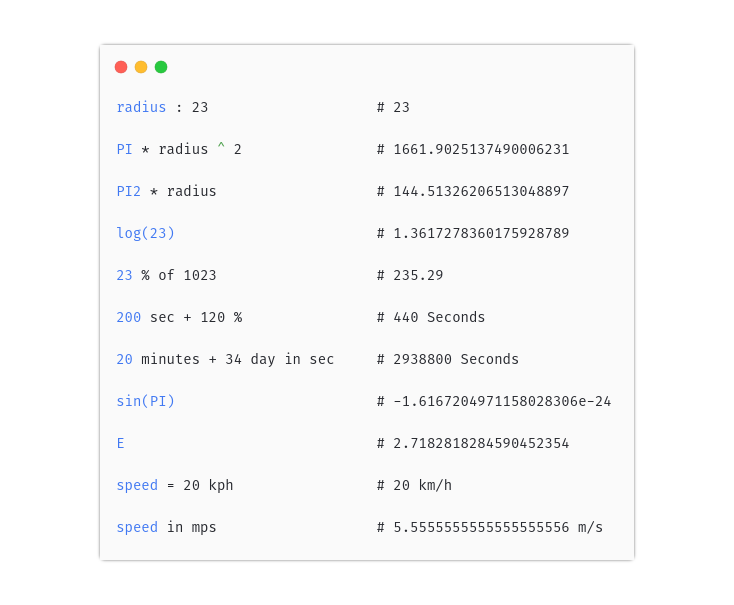
## Example
```js
const fcal = new Fcal();
// New variable
fcal.evaluate('radius : 23 m'); // 23 Meters
fcal.evaluate('PI * radius ^ 2'); // 1661.9025137490006231 Meters
fcal.evaluate('PI2 * radius'); // 144.51326206514 Meters
// Predefined functions
fcal.evaluate('log(23)'); // 1.3617278360175928789
// Percentage
fcal.evaluate('23 % of 1023'); // 235.29
fcal.evaluate('200 sec + 120 %'); // 440 Seconds
// Unit conversion
fcal.evaluate('20 minutes + 34 day in sec'); // 2938800 Seconds
fcal.evaluate('sin(PI)'); // -1.6167204971158028306e-24
// Constants
fcal.evaluate('E'); // 2.718281828459045235360287
// Predefined units
fcal.evaluate('speed = 20 kph'); // 20 km/h
fcal.evaluate('speed in mps'); // 5.5555555555555555556 m/s
fcal.evaluate('23 C add 123 F'); // 196.40000000000004 °F
fcal.evaluate('1.2 nsec + 3 week in sec'); // 1814400.0000000012 Seconds
// Various number system
fcal.evaluate('0b1010011 day + 45'); // 128 Days
fcal.evaluate('23.44 kmh in oct'); // 0o27.341217270243656051 km/h
```
## Install
### Browser
the library is the single JavaScript file fcal.js (or minified, fcal.min.js).
```html
```
### With [NPM](https://www.npmjs.com/)
```sh
$ npm install --save fcal
```
```js
const { Fcal } = require('fcal');
```
## Use
```js
const { Fcal } = require('fcal');
const fcal = new Fcal();
var value = fcal.evaluate('102 day in minutes + abs(-34 day) in sec');
console.log(value); // 11750400 Seconds
```
### Percentage
```js
var value = fcal.evaluate('27% of 230 cm');
console.log(value); // 62.1 Centimeters
```
You can perform general percentage operation with `+` , `-`
```js
var value = fcal.evaluate('1024 m + 6.1%');
console.log(value); // 1086.464 Meters
```
If type of left and right hand side of `of` is same, then operation will return percentage
```js
var value = fcal.evaluate('10 of 10.100');
console.log(value); // % 99.009900990099009901
```
### Scales
You can use Thousand `k`, million `M` and billion `B` scales.
```js
var value = Fcal.eval('-0x14 M');
console.log(value); //-20000000
```
### Equality and comparison
```js
console.log(Fcal.eval('100 == 1230')); // false
console.log(Fcal.eval('20 cm < 1 m')); // true
console.log(Fcal.eval('100 cm != 100 m')); // true
```
You can use `===` to compare irrespective type of value
```js
console.log(Fcal.eval('100 C === 100 F')); // true
```
#### Ternary operator
```js
var value = Fcal.eval('234 cm > 1 m and true ? 34: 100');
console.log(value); // 34
```
### Syntax errors
Fcal will throw exception if there is error with expression
For more error context, use _info_ method in _FcalError_
```js
try {
var value = Fcal.eval('343 + 23.45E+*34');
} catch (e) {
if (e instanceof FcalError) {
console.log(e.info());
}
}
/*
err: Expecting number after + but got '*'
| 343 + 23.45E+*34
| ......^^^^^^^
*/
```
### Format
Format the results
```js
var value = Fcal.eval('10345345.3454');
console.log(value.toFormat()); // 10,345,345.3554
```
#### Strict mode
By default, fcal will not throw exception if you try to use operations between different types or different units
But with strict mode
```js
const fcal = new Fcal();
fcal.setStrict(true)
try {
var value = fcal.evaluate('23% + 34 cm + 1');
} catch (e) {
if (e instanceof FcalError) {
console.log(e.info());
}
/*
err: Unexpected '+' operation between different types (unit, number)
| 23% + 34 cm + 1
| ^^^^^^^^^^^^^^^
*/
```
### Using expression
You can change state of expression , re evaluate it
```js
const { Fcal } = require('fcal');
const exp = new Fcal().expression('PI * radius cm ^ 2');
exp.setValues({ radius: 8 });
console.log(exp.evaluate()); // 201.06192982974676726 Centimeters
exp.setValues({ radius: 10 });
console.log(exp.evaluate()); // 314.15926535897932385 Centimeters
exp.setValues({ radius: Infinity });
console.log(exp.evaluate()); // Infinity Centimeters
```
## 🤝 Contributing
Contributions, issues and feature requests are welcome!
Feel free to check [issues page](https://github.com/5anthosh/fcal/issues).
To contribute
```sh
$ git clone https://github.com/5anthosh/fcal
```
```sh
$ npm install
```
### Run tests
```sh
$ npm test
```
## Author
👤 **Santhosh Kumar**
- Github: [@5anthosh](https://github.com/5anthosh)
 ## 📝 License
Copyright © 2019 [Santhosh Kumar](https://github.com/5anthosh).
## 📝 License
Copyright © 2019 [Santhosh Kumar](https://github.com/5anthosh).
This project is [MIT](https://github.com/5anthosh/fcal/blob/master/LICENSE) licensed.
[](https://app.fossa.io/projects/git%2Bgithub.com%2F5anthosh%2Ffcal?ref=badge_large)