## Robot Design Overview
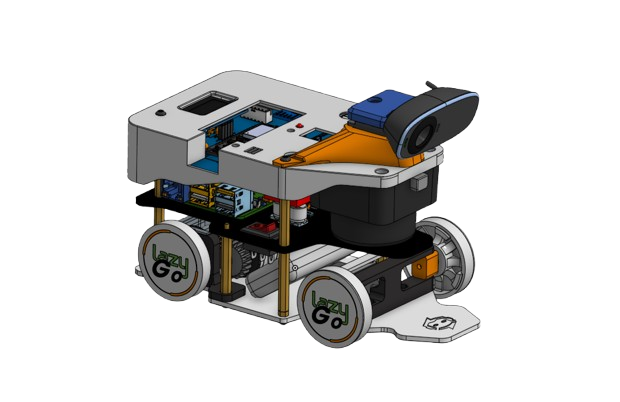 Our robot was fully designed in **Onshape**, enabling seamless collaboration and easy replication through a shared project link. The mechanical structure was developed with a core objective:
> **Achieve an extremely tight turning radius while maintaining excellent balance and traction.**
To reach this goal, we combined a **differential drive system** with **Ackermann steering**, allowing sharp, controlled turns **without wheel slip**—significantly improving odometry accuracy.
The robot fits within a **20 cm × 10 cm footprint** with a **wheelbase of 11.5 cm**, and through geometric steering angle calculations, we successfully achieved a **turning radius below 15 cm**.
---
Our robot was fully designed in **Onshape**, enabling seamless collaboration and easy replication through a shared project link. The mechanical structure was developed with a core objective:
> **Achieve an extremely tight turning radius while maintaining excellent balance and traction.**
To reach this goal, we combined a **differential drive system** with **Ackermann steering**, allowing sharp, controlled turns **without wheel slip**—significantly improving odometry accuracy.
The robot fits within a **20 cm × 10 cm footprint** with a **wheelbase of 11.5 cm**, and through geometric steering angle calculations, we successfully achieved a **turning radius below 15 cm**.
---
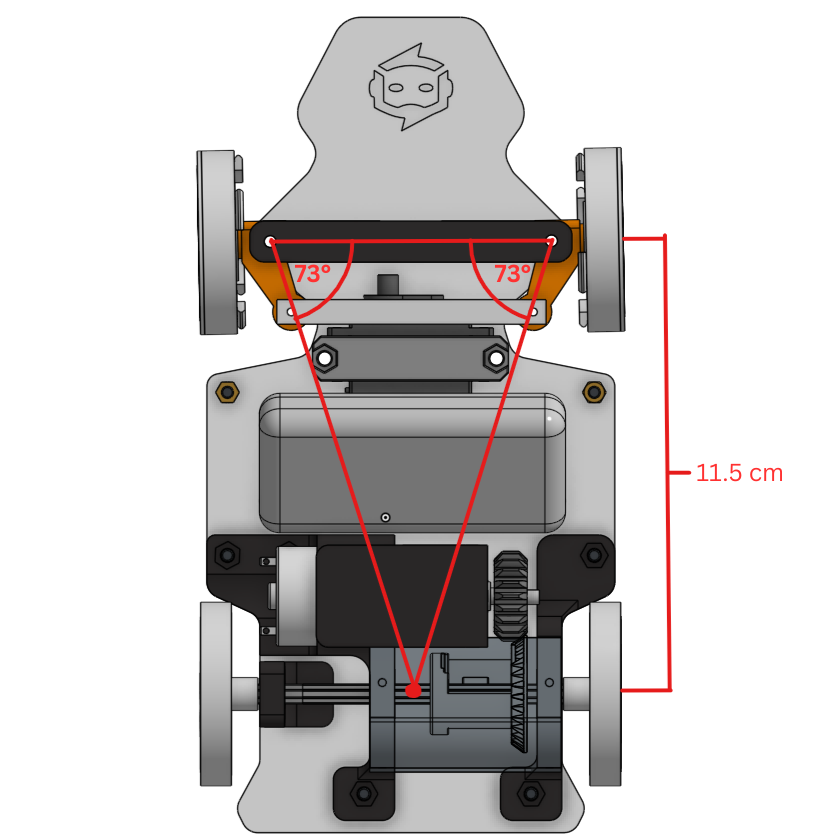
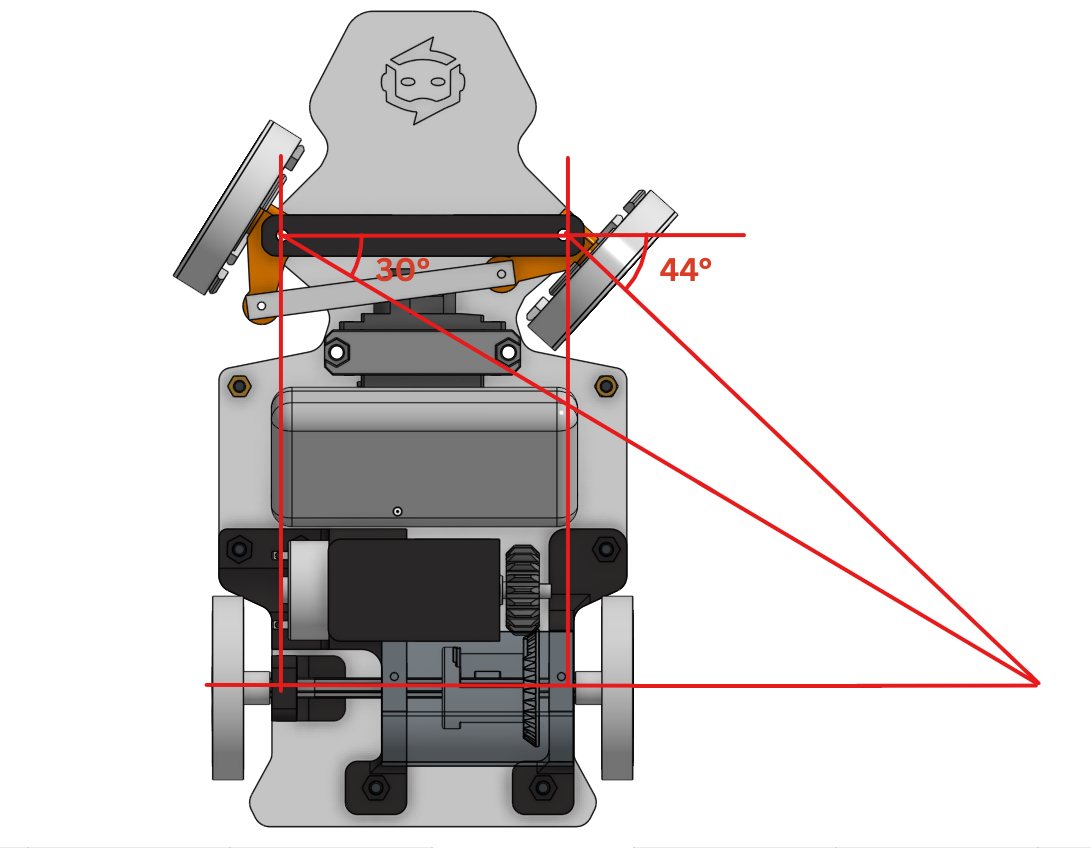
The Ackermann geometry was designed by projecting steering axis and wheel intersection lines and shaping the linkage based on the resulting steering angles.
Here is our Onshape project link: [Onshape CAD Project](https://cad.onshape.com/documents/0ec023d9700593bfeebabdea/w/02e5710fbedd7baee1480c4a/e/63f1a3919addf09c73a6e4d6?renderMode=0&uiState=692353830b89481e7565ca33)
---
### Modular Three-Stage Structure
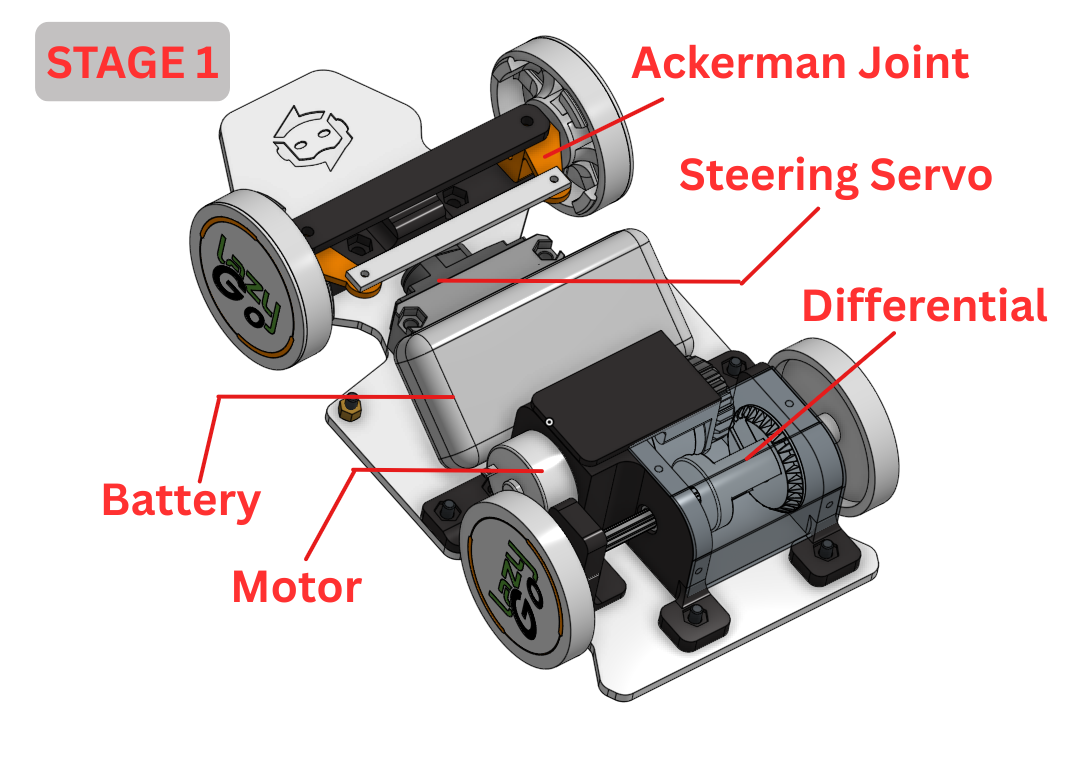 To maximize maintainability and simplify repairs, the robot is constructed in **three stacked stages**:
#### Stage 1 – Base Chassis
- Drive motors and actuators
- Battery compartment
- Low center of gravity for stability
---
To maximize maintainability and simplify repairs, the robot is constructed in **three stacked stages**:
#### Stage 1 – Base Chassis
- Drive motors and actuators
- Battery compartment
- Low center of gravity for stability
---
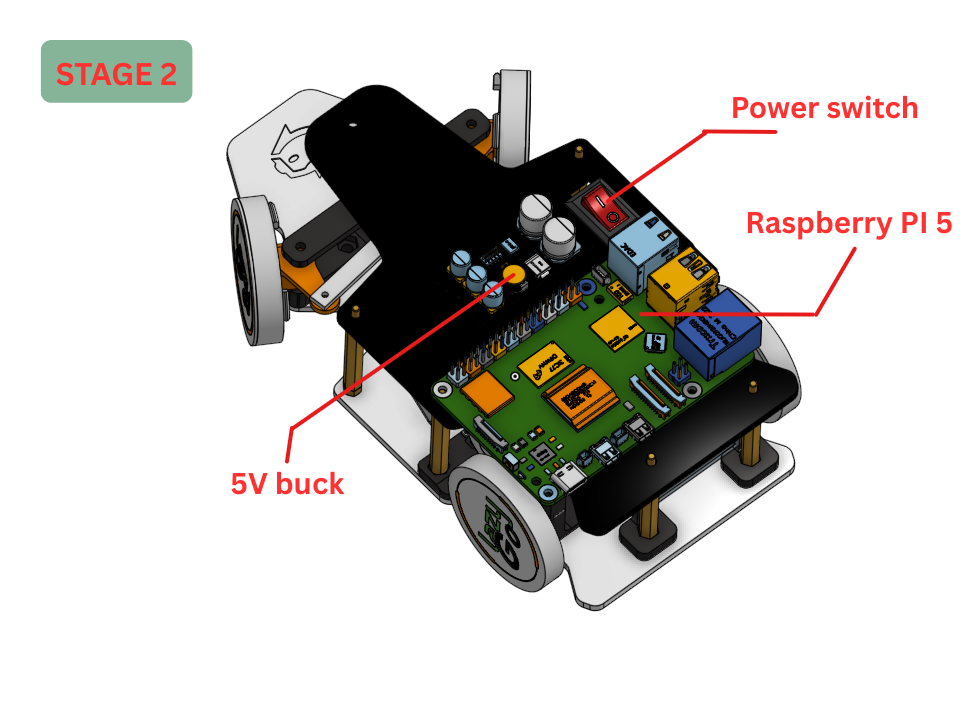 #### Stage 2 – Control Platform
- Raspberry Pi main computing unit
- 5V 5A buck converter
- Reserved front clearance for the LiDAR
- Motor driver mounted beneath the plate
---
#### Stage 3 – Electronics & Interface Layer
- Custom PCB with secondary microcontroller
#### Stage 2 – Control Platform
- Raspberry Pi main computing unit
- 5V 5A buck converter
- Reserved front clearance for the LiDAR
- Motor driver mounted beneath the plate
---
#### Stage 3 – Electronics & Interface Layer
- Custom PCB with secondary microcontroller 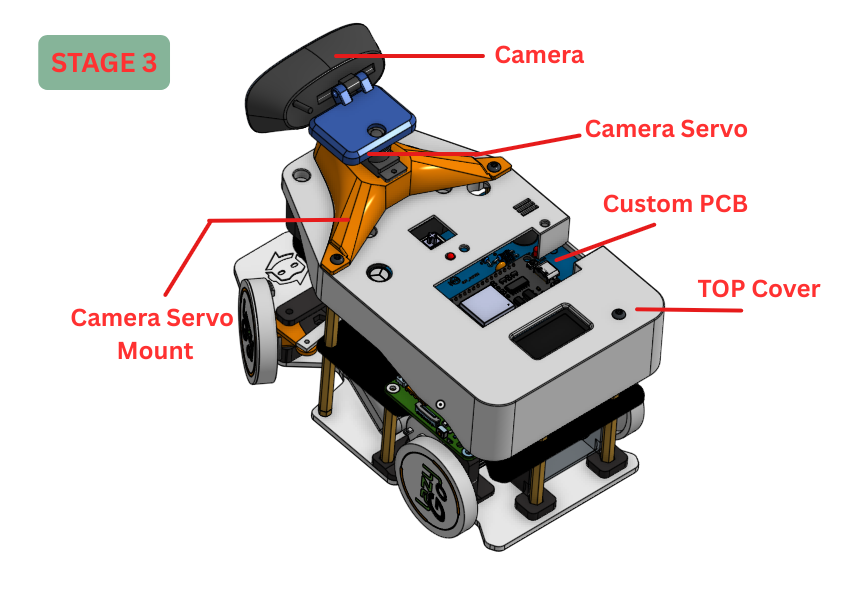 - IMU and onboard OLED display
- 3D-printed protective shell that:
- holds the LiDAR upside down at **5 cm height** for accurate wall and obstacle sensing
- protects the electronics
- enhances the robot’s appearance
---
---
### Camera Head
- IMU and onboard OLED display
- 3D-printed protective shell that:
- holds the LiDAR upside down at **5 cm height** for accurate wall and obstacle sensing
- protects the electronics
- enhances the robot’s appearance
---
---
### Camera Head
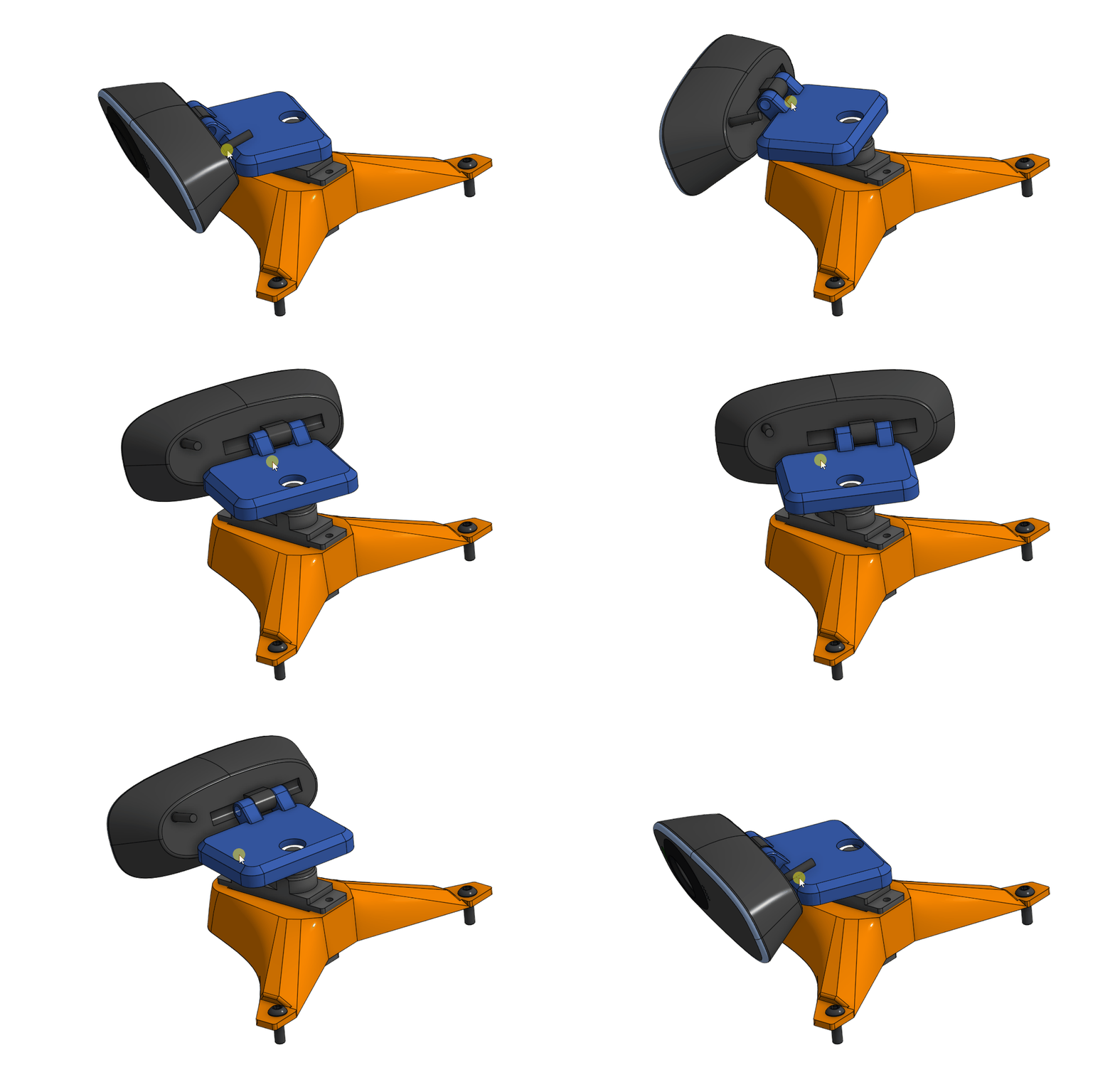
Mounted at the top is a **servo-controlled camera**, giving the robot a dynamic, head-like field of view.
For a tactile interaction point, we incorporated a **mechanical switch** as the main start trigger.
---
### Design Philosophy
While our primary objective is **reliable mission performance**, we also believe that:
> **If the robot can look awesome while working flawlessly — why not embrace both?**
---
---
## 3D Printing Guide
Our robot consists of **22 individual STL models**, with only **three parts requiring two prints each**. Most components can be printed using standard settings, but a few pieces benefit from special preparation due to mechanical fit, bearings, and multi-color detailing.
### Recommended Print Settings
- **Layer height:** 0.2 mm (adaptive layer height recommended for curved or detailed parts like the camera servo mount)
- **Infill:** ~20% (gyroid or cubic suggested)
- **Supports:** Standard support angle works for most parts
- **Bridging:** Performs well on nearly all models
- **Perimeters:** 3 walls for stronger screw-mount areas
### Front Wheel Bearing Insertion
The **front wheel parts include an integrated 625 bearing seat**.
To print these correctly:
1. Start the print **without supports** (bearing housing must remain clean)
2. Pause the print at **7 mm height**
3. Insert the **625 bearing**
4. Resume printing—the upper layers will lock the bearing in place
This ensures smooth rolling and perfect concentric alignment.
### Multi-Color Components
Some parts are designed for color separation, including:
- Rear wheels
- Front wheels
- Bottom chassis plate
If you prefer **single-color printing**, simply slice the STL normally and ignore color segmentation.
### Slicer & Printer Notes
We printed all components on a **Bambu Lab P1S** with AMS, giving us:
- precise tolerances
- clean multicolor transitions
- consistent dimensional accuracy
All slicing was performed in **Bambu Studio**.
If you are using the same printer and want to skip slicing setup, you can download our **pre-sliced project files** from our MakerLab profile (linked in this repository).
### Additional Printing Tips
- **Dry your filament**—better tolerances and cleaner overhangs
- **PLA+ or PETG** recommended for durability
- **Slow down first-layer speed** for better bed adhesion
- **Test-fit before full assembly** to avoid overly tight tolerances
- **Label parts during printing** to simplify sorting
These guidelines ensure strong, dimensionally accurate parts that assemble smoothly with the mechanical system.