# 输入框文件引用插件 · Input File Reference
> ## ⛔ Archived — no longer maintained
>
> **DeepSeek Harness 0.1.2-alpha.3+ natively supports `@` file, folder, and session picking.** This plugin's mission is complete, and **this project is no longer maintained or updated** (the code and docs are kept for reference only).
>
> Do not install this plugin — **just upgrade to the latest DeepSeek Harness** and use the built-in `@` file picker.
> **Type `@` in the composer to open a file picker under the session's working directory — like Kimicode / Claude Code / Cursor — and pick a file so `@relative/path ` is backfilled and the model can read it.**
> Adds a **"file"** `@` reference source to the [DeepSeek Harness](https://github.com/deepseek-ai/deepseek-harness) Web GUI input: a **searchable, drill-down, full-width** picker panel; the backfill keeps the leading `@` with a trailing space (which stops `@` from re-triggering).
[](LICENSE)
---
## 1. What problem it solves
The dsh input already has an `@` trigger pipeline (`dsh-client-ui-input-trigger`), but only two reference sources: skills and subagents. There was no way to reference a file in the working directory.
This plugin adds a **searchable, drill-down file picker panel** that replaces the default narrow menu; data is provided by the host half:
```
dsh-input-file-ref (node half, lib/index.js — zero external deps, Node builtins only)
GET /api/input-file-list?sessionId=…&dir= — BROWSE: list one directory level
GET /api/input-file-list?sessionId=…&query= — SEARCH: recursive, excludes ignored dirs
├─ locates the session log ($DSH_HOME/sessions directory tree)
├─ reads the log's first `session` record → the session's cwd (never a client-supplied path)
└─ directory/file relative paths + sizes + mtimes (file contents never read)
│
▼ (browser fetch, same-origin)
File picker panel (client half, conversation.input.overlay) ── search bar on top + drill-down
├─ same width as the composer; only 50 rows by default, more with a longer query
├─ folders can be entered level by level (.git/node_modules/target included; search excludes them)
└─ pick → keeps "@" and backfills the full relative path (one trailing space) ──send──► the model reads that file
```
**Read-only**: this plugin modifies no files. The host half only **reads** session-log headers and filesystem metadata (path/size/mtime) — it never reads, writes, or deletes any file contents.
## 2. Features
- ✅ Typing `@` opens a picker panel **as wide as the composer input**, with a search bar on top.
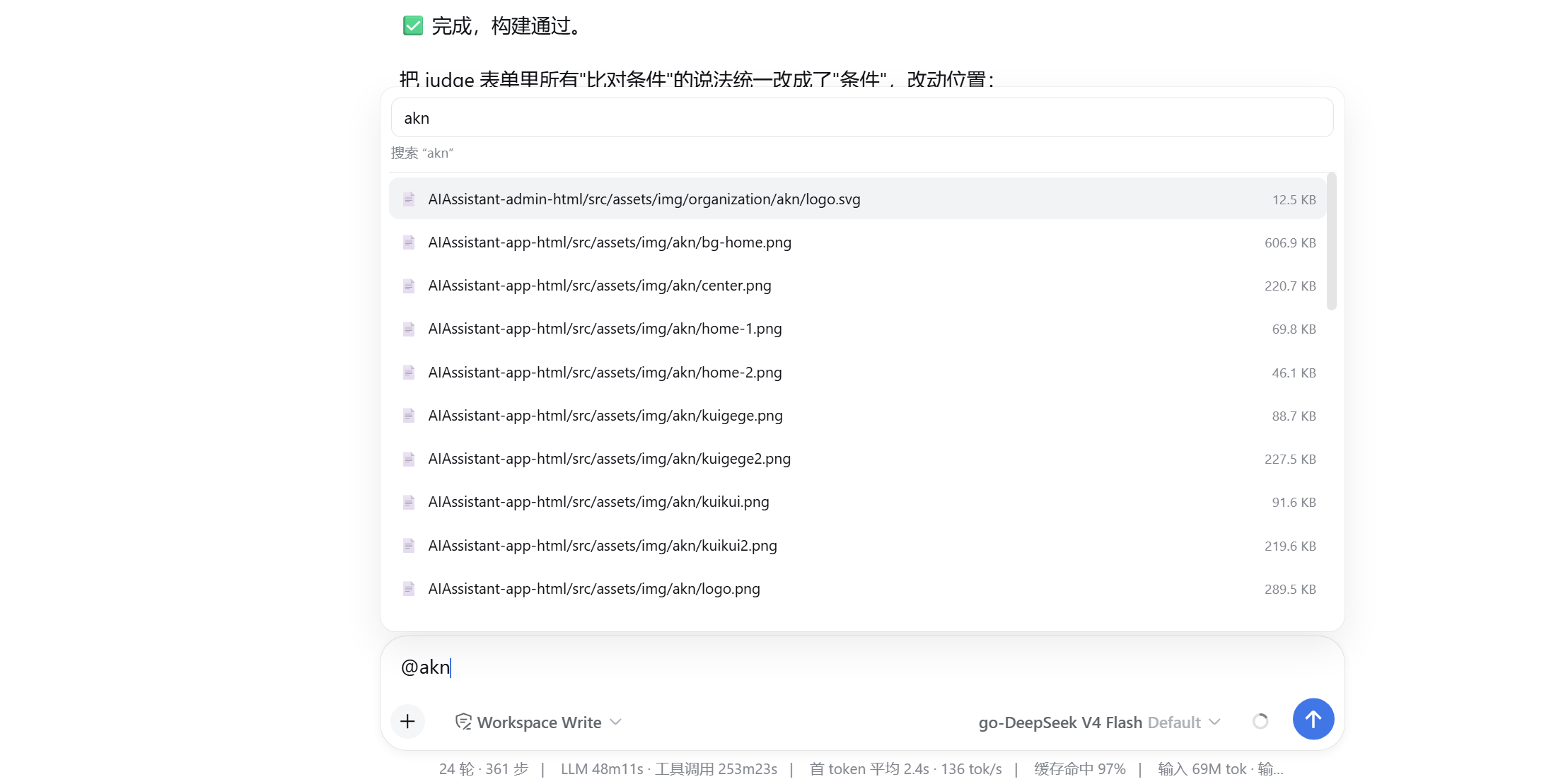
- ✅ The search bar recursively **searches** files as you type (case-insensitive substring; more characters reveal more results).
- ✅ **Drill into folders** level by level; `.git` / `node_modules` / `target` etc. are **browsable one level at a time** but never appear in search results (better performance).
- ✅ File rows show the **relative full path**, with a **middle `…` ellipsis** when long.
- ✅ Only **50 rows** shown by default; typing longer queries gradually raises the limit to 100 / 200 / 500.
- ✅ Both keyboard (↑/↓/Enter/Esc) and mouse selection.
- ✅ On pick, the code keeps the **leading `@`** and backfills the file's **relative full path** into the input as ordinary text with **one trailing space** (e.g. `@src/main.ts `), directly editable/removable; the trailing space stops `@` from re-triggering, so you can keep typing or reference several files in a row.
- ✅ On send the message carries the referenced relative paths; the model reads them with its own fs tool (sandbox rooted at the session cwd).
- ✅ A session without a working directory shows a hint in the panel instead of crashing.
- ✅ Coexists with the existing `@` skill / subagent references.
- ✅ Bilingual (Chinese/English) UI text, follows the interface language.
- ✅ Read-only, zero external dependencies, and a browser-trust fence (blocks DNS rebinding / cross-site).
**MVP not included**: content is not inlined into messages; no file preview / syntax highlighting; no multi-select batches.
## Screenshots
| Fast file filtering (search + 50-row cap; more results with a longer query) | Picking backfills `@relative/path ` (leading `@` kept + trailing space) |
|:---:|:---:|
|  |  |
## 3. Directory layout
```
dsh-input-file-ref/ # repo root = npm package root
├── package.json # dsh.bundle.patch + dsh.client (browser declaration) + exports["./client"]
├── cordis.patch.yml # composition row: inject webRuntime + trustedHosts config
├── LICENSE # MIT
├── .gitignore
└── lib/
├── index.js # host half: /api/input-file-list (browse dir / search query) + cwd resolution (zero deps)
└── client.js # browser bundle: '@' file source + custom file picker panel (insert + codec path)
```
## 4. Quick start
One-click install (GitHub):
```powershell
dsh plugin --profile web add github:AFAP/dsh-input-file-ref
```
Then **restart `dsh web`** to activate.
> After install the plugin lives at `$DSH_HOME\profiles\web\node_modules\dsh-input-file-ref` (pnpm clones it from GitHub), independent of the source repo location.
Update:
```powershell
dsh plugin --profile web update dsh-input-file-ref
```
Uninstall:
```powershell
dsh plugin --profile web remove dsh-input-file-ref
```
### Manual install from a source directory (equivalent, for verification)
```powershell
dsh plugin --profile web add "D:\path\to\dsh-input-file-ref"
```
### Verify it loaded
Create or open a session that already has a working directory → type `@` in the input → a "file" group with the file list appears.
## 5. Usage
1. **Pick a working directory**: the session must have a cwd.
2. Type `@` in the input → a picker panel **as wide as the composer** opens.
3. **At the top level = browse the current directory**: files and subfolders appear; click a folder to drill in level by level (`.git`, `node_modules`, `target` etc. are shown and browsable too).
4. **Search bar on top** (or keep typing after `@` in the composer): type to recursively search the whole cwd; only 50 rows are shown by default — **type more characters to reveal more** (limit rises to 100 / 200 / 500).
5. **Go back up**: when inside a folder, the list starts with "↑ Parent directory"; Backspace returns too.
6. Use ↑/↓ + Enter (or click a `📄` row) to select a file → the code **keeps the `@`** and backfills the file's **relative full path** as plain text with **one trailing space**, e.g. `@src/main.ts `.
7. On send the message carries the referenced relative paths; the model reads them with its fs tool.
8. To remove/modify: the backfilled text is ordinary text — edit or delete it like any other text; the trailing space stops `@` from re-triggering; reference several files by typing a space + `@` to reopen the picker each time.
For a session without a working directory, typing `@` shows a "no working directory" hint instead of crashing. Searching never surfaces files under `.git`, `node_modules`, `target` etc. (but you can drill into them in browse mode).
## 6. API quick reference
```text
# BROWSE: list one directory level under dir ("" = cwd)
GET /api/input-file-list?sessionId=[&dir=]
# SEARCH: recursively search cwd (excludes .git/node_modules/target etc.)
GET /api/input-file-list?sessionId=...&query=
```
- Requires the browser-trust fence to pass (loopback / `trustedHosts` + same-origin), otherwise `403`.
- An invalid/unknown `sessionId` returns `404` (an error, never arbitrary path content).
- A missing `sessionId` returns `400`.
- An invalid `dir` (containing `..`, an absolute path, backslashes, or a drive letter) returns `400`; a missing directory returns `404`.
Browse-mode response example (`dir=src`):
```json
{
"mode": "browse",
"cwd": "D:/workspace/MyProject",
"dir": "src",
"noCwd": false,
"truncated": false,
"dirs": ["util"],
"files": [{ "path": "src/main.ts", "size": 2384, "mtime": 1719300000000 }]
}
```
Search-mode response example (`query=main`):
```json
{
"mode": "search",
"cwd": "D:/workspace/MyProject",
"noCwd": false,
"truncated": false,
"files": [{ "path": "src/main.ts", "size": 2384, "mtime": 1719300000000 }]
}
```
Session without a working directory:
```json
{ "noCwd": true, "files": [] }
```
## 7. Configuration
| Key | Default | Description |
|---|---|---|
| `trustedHosts` | from `webRuntime` (loopback + LAN + `--trusted-host`) | Non-loopback authorities the browser-trust fence trusts. |
| `ignore` | `.git`, `node_modules`, `target`, `.venv`, etc. (below) | Directory basenames skipped in SEARCH (browse drill-down can still enter them). Defaults: `.git`, `node_modules`, `.venv`, `venv`, `__pycache__`, `.next`, `.nuxt`, `dist`, `build`, `target`, `.idea`, `.vscode`, `.DS_Store`. |
> `ignore` can be overridden at the composition layer by appending to the `config` of `cordis.patch.yml` (the defaults are already built in; usually no change is needed).
## 8. Logs & troubleshooting
| Symptom | Where to look |
|---|---|
| Typing `@` does nothing / no file panel | Confirm `dsh web` was restarted and the plugin is installed; check that skill/subagent `@` groups are still listed (coexistence is normal). |
| Panel stuck at "Loading…" | Open devtools Network and check the `/api/input-file-list` status: `403` = trust fence, `404` = session not found. |
| Hint "no working directory" | The session has no cwd; pick a working directory first. |
| Search misses some files | They may live in `.git`/`node_modules`/`target` (ignored dirs); use browse mode and drill in level by level. |
| Only 50 rows shown | That is the default cap; type more characters to reveal more results. |
## 9. Security & compliance (please read)
- **Read-only**: this plugin modifies/deletes nothing; the host only reads session-log headers and filesystem metadata, never file contents.
- **Path red line**: the cwd is resolved **only** from the session's persisted header (the absolute path recorded at session creation), **never** from a client-supplied path; the `sessionId` is single-segment-escaped before any path use, preventing directory traversal.
- **Browser-trust fence**: `/api/input-file-list` only accepts loopback or declared `trustedHosts` same-origin requests; it rejects `sec-fetch-site: cross-site` and differing-Origin requests to block DNS rebinding and cross-site calls.
- **Minimal information**: only relative paths, file names, sizes, and mtimes are returned — never absolute paths, never file contents.
- **Local sessions only**: the file list only serves local session logs; it does not expose an arbitrary directory browser.
- **No private data in the repo**: no secrets, no local absolute paths (documentation uses placeholders like ``).
## 10. FAQ
- **Q: Does the plugin read file contents?** A: No. The host only lists metadata; the picked relative path is backfilled as text, and the model reads contents with **its own fs tool** once it receives it (sandbox rooted at the session cwd).
- **Q: Can I reference multiple files?** A: Yes — reopen the `@` panel for each (type a space + `@`); every pick backfills one `@`-prefixed relative path with a trailing space, so you can reference several files in one message.
- **Q: Don't certain files show up when searching?** A: `.git`, `node_modules`, `target` and other ignored directories are excluded from search results (for performance). Use browse mode — click the folder and drill in level by level — to find and select files inside them.
## 11. Development & build
Pure JS, no build step (no GitHub Actions workflow needed). Layering:
- `lib/index.js`: host half, **zero external deps** (Node builtins only), so it loads correctly no matter how it is installed (git / registry / file: / link:).
- `lib/client.js`: browser bundle (classic script via `window.__ModuleLoader__.load`) that registers the `@` file source plus the custom file picker panel (`conversation.input.overlay`).
## 12. Related docs
- Input reference contract: `@deepseek-ai/dsh-client-ui-input-trigger/lib/types/types.d.ts`
- References: the `/` skill source `@deepseek-ai/dsh-client-ui-skill`, the `@` subagent source `@deepseek-ai/dsh-client-ui-subagent`, and the exact-route example [dsh-token-usage](https://github.com/AFAP/dsh-token-usage).
## 13. License
MIT © AFAP