# Fast Browser Use
**An ultra-fast, local-first "System 1" browser automation engine & Agent Skill for Claude Code, Codex, and Cursor.**
*Powered by local Qwen3.5-9B / Qwen3.5-35B-A3B via MLX or PyTorch (CUDA / CPU). Zero cloud inference, second-level reflexes, zero selector hallucinations.*
[](LICENSE)
[](https://www.python.org/downloads/)
[](#linux--windows--gpu-pytorch)
[](https://huggingface.co/Qwen)
[-orange.svg)](#-local-first-architecture)
[](skills/fast-browser-use/SKILL.md)
[English](README.md) · [简体中文](README.zh-CN.md) · [Quickstart](#-quickstart) · [Architecture & Deep Dive](#-architecture--deep-dive) · [Benchmarks](#-benchmarks--measurements) · [Agent Skill Setup](#-agent-skill-setup) · [Python API](#-python-api)
---
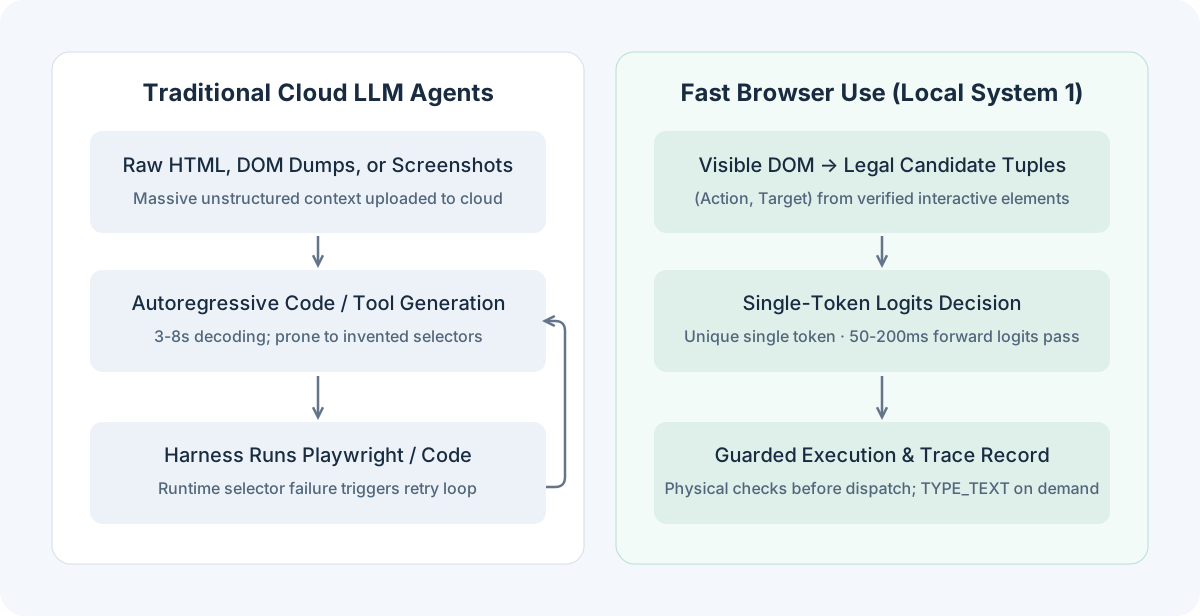 - **System 2 (Host Brain: Claude Code, Codex, Cursor, Antigravity)**:
Handles high-level user intent, multi-file code analysis, macro planning, and independent outcome verification.
- **System 1 (Local Engine: Fast Browser Use)**:
Handles high-frequency DOM sensing, micro-action selection, bounded waiting, and atomic page interactions.
- **Independent Audit**:
Upon completion, Fast Browser Use returns an immutable execution trace. The host agent independently verifies the resulting page state against ground truth before proceeding.
---
## 🔬 Architecture & Deep Dive
How does Fast Browser Use achieve extreme speed without closed-source weights? By transforming open-ended text generation into a **bounded categorical decision problem**:
- **System 2 (Host Brain: Claude Code, Codex, Cursor, Antigravity)**:
Handles high-level user intent, multi-file code analysis, macro planning, and independent outcome verification.
- **System 1 (Local Engine: Fast Browser Use)**:
Handles high-frequency DOM sensing, micro-action selection, bounded waiting, and atomic page interactions.
- **Independent Audit**:
Upon completion, Fast Browser Use returns an immutable execution trace. The host agent independently verifies the resulting page state against ground truth before proceeding.
---
## 🔬 Architecture & Deep Dive
How does Fast Browser Use achieve extreme speed without closed-source weights? By transforming open-ended text generation into a **bounded categorical decision problem**:
 ### 1. Structurally Eliminating Selector Hallucinations
A lightweight in-page scanner inspects the rendered layout tree, extracting only **currently visible, interactable** elements. These are formatted into discrete candidate tuples:
```python
("CLICK", "btn_search")
("SELECT", "opt_timezone_sg")
("TYPE_TEXT", "input_query")
("DONE", "task_completed")
```
The model selects an action from this finite set. Because the model never writes selectors or Playwright code, selector hallucinations and syntax errors are mathematically impossible.
### 2. Single-Token Logits Scoring
Each legal candidate action is dynamically mapped to a unique single token in the tokenizer vocabulary (`A`, `B`, `C`...).
Rather than generating text, the engine performs **one single forward pass**, extracts the next-token logits, and evaluates normalized Softmax probabilities:
$$P(c_i \mid \text{Context}) = \frac{\exp(z_i / T)}{\sum_{j=1}^K \exp(z_j / T)}$$
This reduces scoring from an $O(\text{tokens} \times \text{layers})$ autoregressive decoding loop to an $O(1)$ logits projection completed in seconds.
### 3. Action Selection & Text Generation Decoupling
Most browser interactions (clicking buttons, expanding dropdowns, scrolling) do not require creative writing.
Fast Browser Use decouples structural navigation from text input:
- Structural choices use **single-token discrete scoring**.
- Only when the chosen action is `TYPE_TEXT` does the model perform targeted generative inference to compose the required field text.
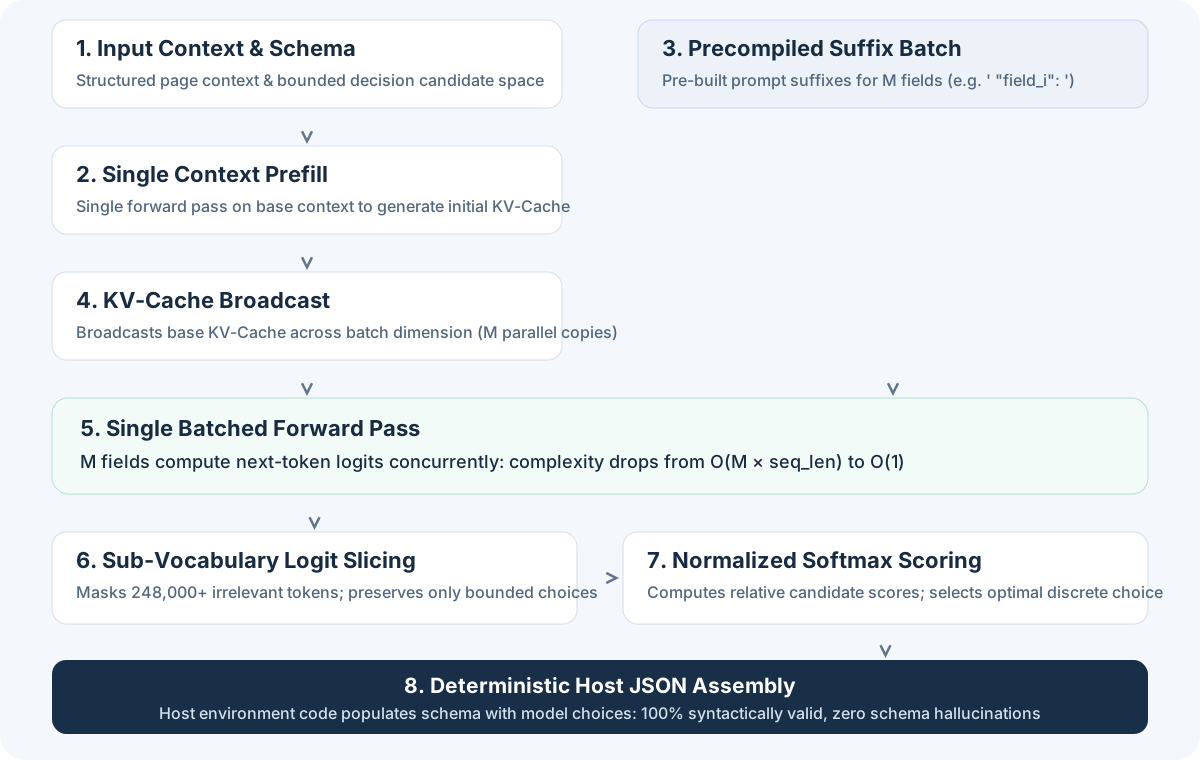
### 4. KV-Cache Broadcasting & Batched Evaluation
By prefilling the common page context once and broadcasting the base KV-Cache across candidate dimensions, evaluating multiple fields or candidate options is parallelized into a single batch forward pass without cascading autoregressive error.
---
## 🛡️ Guarded Loop Engineering (The Harness)
A fast model without rigorous guardrails is brittle. Fast Browser Use wraps local inference inside a robust multi-layer harness:
### 1. Structurally Eliminating Selector Hallucinations
A lightweight in-page scanner inspects the rendered layout tree, extracting only **currently visible, interactable** elements. These are formatted into discrete candidate tuples:
```python
("CLICK", "btn_search")
("SELECT", "opt_timezone_sg")
("TYPE_TEXT", "input_query")
("DONE", "task_completed")
```
The model selects an action from this finite set. Because the model never writes selectors or Playwright code, selector hallucinations and syntax errors are mathematically impossible.
### 2. Single-Token Logits Scoring
Each legal candidate action is dynamically mapped to a unique single token in the tokenizer vocabulary (`A`, `B`, `C`...).
Rather than generating text, the engine performs **one single forward pass**, extracts the next-token logits, and evaluates normalized Softmax probabilities:
$$P(c_i \mid \text{Context}) = \frac{\exp(z_i / T)}{\sum_{j=1}^K \exp(z_j / T)}$$
This reduces scoring from an $O(\text{tokens} \times \text{layers})$ autoregressive decoding loop to an $O(1)$ logits projection completed in seconds.
### 3. Action Selection & Text Generation Decoupling
Most browser interactions (clicking buttons, expanding dropdowns, scrolling) do not require creative writing.
Fast Browser Use decouples structural navigation from text input:
- Structural choices use **single-token discrete scoring**.
- Only when the chosen action is `TYPE_TEXT` does the model perform targeted generative inference to compose the required field text.
### 4. KV-Cache Broadcasting & Batched Evaluation
By prefilling the common page context once and broadcasting the base KV-Cache across candidate dimensions, evaluating multiple fields or candidate options is parallelized into a single batch forward pass without cascading autoregressive error.
---
## 🛡️ Guarded Loop Engineering (The Harness)
A fast model without rigorous guardrails is brittle. Fast Browser Use wraps local inference inside a robust multi-layer harness:
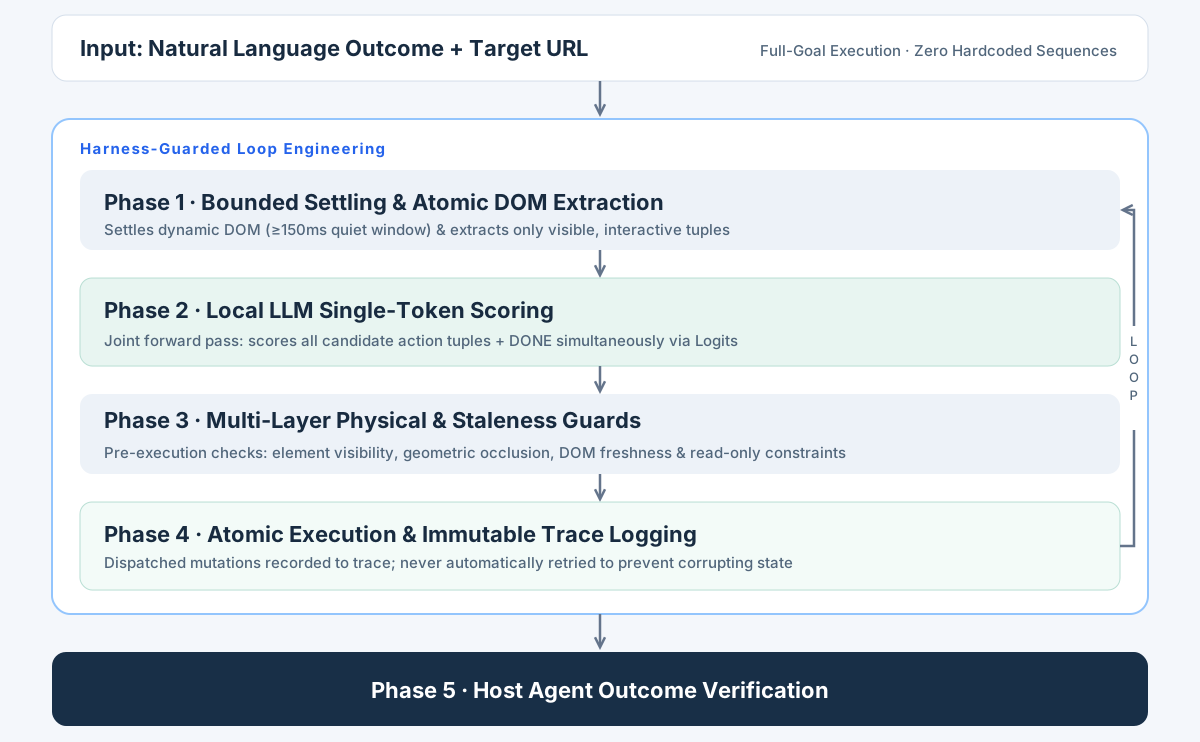 1. **Bounded Settling Window**: Dynamic single-page apps (SPAs) often render asynchronously. A mandatory 150ms quiet window (≥500ms on new documents, ≥300ms post-input) ensures controls are fully mounted before scoring begins.
2. **Joint Action & `DONE` Scoring**: Candidate actions and completion (`DONE`) are scored within the same forward pass, slashing per-task inference passes from 14 to 4.
3. **Pre-Execution Physical Guards**:
- **Visibility & Occlusion**: Ensures target elements are not hidden beneath overlays, modals, or banners.
- **DOM Freshness**: Confirms that referenced nodes have not been detached or replaced by dynamic frameworks.
- **Read-Only Protection**: Intercepts disabled or read-only controls before mutations occur.
4. **Write-Once Trace & No Mutation Retries**: Every action is immutably recorded to the execution trace before dispatch. Dispatched mutations are **never blindly retried** to prevent duplicate form submissions or destructive side effects.
5. **Independent Outcome Verification**: The model's `DONE` output is treated as a subjective hypothesis. Automated workflows must verify success through external assertions (`--expect-url`, `--expect-title`, `--expect-text`).
---
## ⚡ Benchmarks & Measurements
All measurements below were collected on NVIDIA RTX PRO 6000 Blackwell Workstation (96 GB VRAM) with **100% local inference** (zero cloud API requests):
- **Hardware**: NVIDIA RTX PRO 6000 Blackwell Workstation (96 GB VRAM, Linux x86_64)
- **Inference Stack**: PyTorch 2.14.0 (CUDA 13.0) + Flash Linear Attention (`fla`) + `causal-conv1d` native hardware kernels
- **Evaluated Models**: `Qwen3.5-9B` (BF16) & `Qwen3.5-35B-A3B` (BF16)
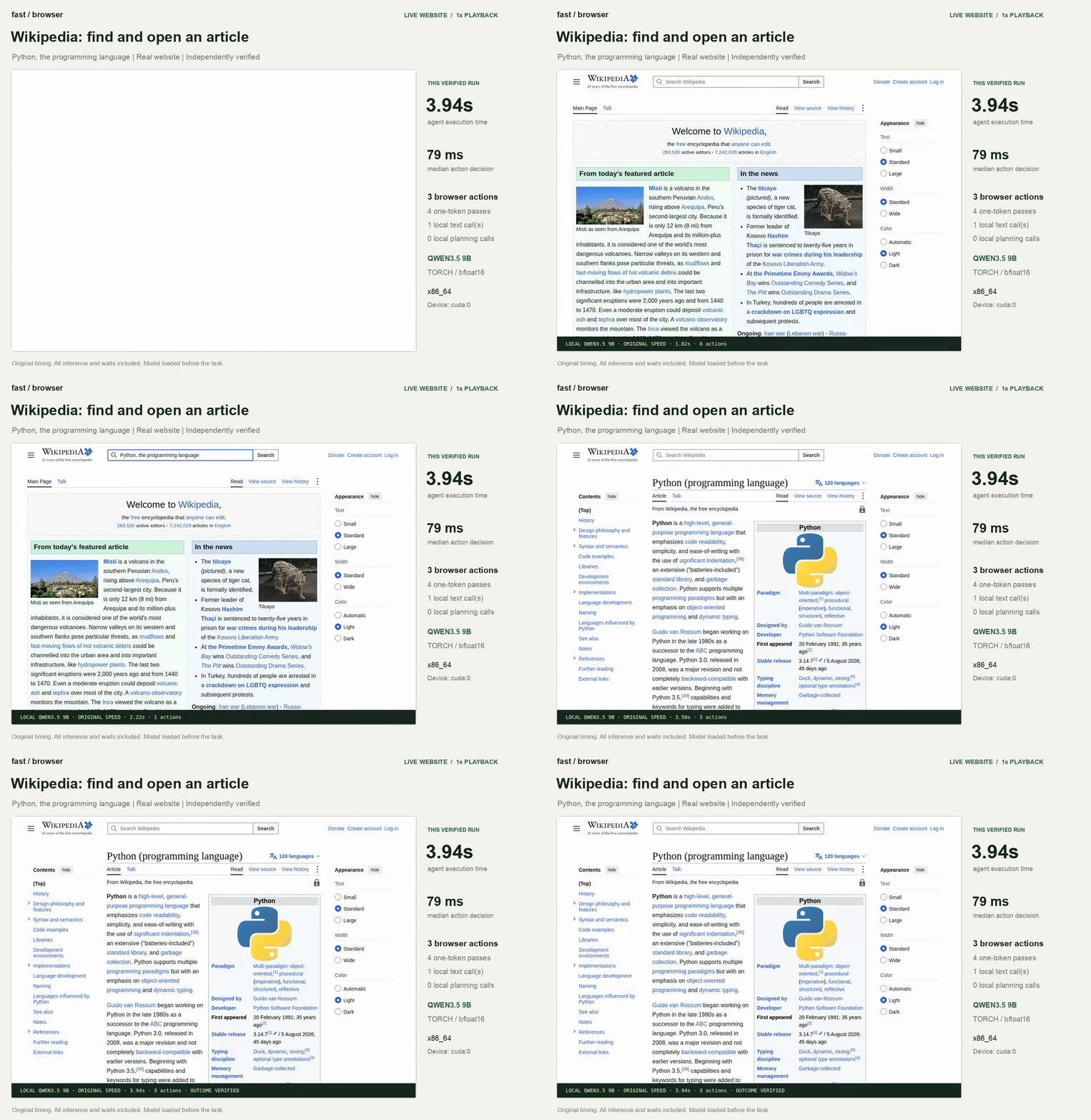
### 1. Wikipedia End-to-End Live Navigation
Task: *"Find and open the Wikipedia article about Python (programming language) starting from Main_Page, strictly verifying final URL and title."*
| Run Trial | Qwen3.5-9B Task Time | Qwen3.5-35B-A3B Task Time |
| :---: | :---: | :---: |
| Trial 1 | 4.055 s | 8.221 s |
| Trial 2 | 3.935 s | 4.933 s |
| Trial 3 | 4.067 s | 4.944 s |
| **Median** | **4.055 s** | **4.944 s** |
*Task completed in 4 discrete single-token scoring steps.*
### 2. Multi-Scenario Suite Performance
| Scenario & Task | Qwen3.5-9B Task Time | Qwen3.5-35B-A3B Task Time | Actions Executed | Independent Verification |
| :--- | :---: | :---: | :---: | :--- |
| **Wikipedia Navigation** (Find & open Python article) | **4.055 s** | **4.944 s** | Search focus, fill, select result, done | Strict match on final canonical URL & page title |
| **Workspace Settings Form** (Name, timezone dropdown, toggle weekly digest) | **2.488 s** | **3.360 s** | Fill, Select, Toggle, Save | Exact match on saved confirmation notification |
| **Local Reading Room Navigation** | **0.808 s** | **1.049 s** | Search, Link Click | Exact match on target article URL and title |
| **Python.org Navigation** (Navigate to About page) | **1.789 s** | **2.120 s** | Nav menu hover & click | Exact match on target `/about/` URL |
| **Example.com → IANA Info** | **1.263 s** | **1.535 s** | Anchor detection & jump | Exact match on destination domain |
---
## 🚀 Quickstart
### Prerequisites
- **System**: Linux, Windows or macOS; Python 3.12+, [uv](https://docs.astral.sh/uv/getting-started/installation/)
- **Optional**: Node.js / npm (for `npx skills` installation)
- **Hardware**: Apple M1/M2/M3/M4/M5 chips (for MLX); or NVIDIA GPU or CPU supporting PyTorch
Fast Browser Use runs 100% locally with zero cloud API calls. Recommended configurations:
1. **Bounded Settling Window**: Dynamic single-page apps (SPAs) often render asynchronously. A mandatory 150ms quiet window (≥500ms on new documents, ≥300ms post-input) ensures controls are fully mounted before scoring begins.
2. **Joint Action & `DONE` Scoring**: Candidate actions and completion (`DONE`) are scored within the same forward pass, slashing per-task inference passes from 14 to 4.
3. **Pre-Execution Physical Guards**:
- **Visibility & Occlusion**: Ensures target elements are not hidden beneath overlays, modals, or banners.
- **DOM Freshness**: Confirms that referenced nodes have not been detached or replaced by dynamic frameworks.
- **Read-Only Protection**: Intercepts disabled or read-only controls before mutations occur.
4. **Write-Once Trace & No Mutation Retries**: Every action is immutably recorded to the execution trace before dispatch. Dispatched mutations are **never blindly retried** to prevent duplicate form submissions or destructive side effects.
5. **Independent Outcome Verification**: The model's `DONE` output is treated as a subjective hypothesis. Automated workflows must verify success through external assertions (`--expect-url`, `--expect-title`, `--expect-text`).
---
## ⚡ Benchmarks & Measurements
All measurements below were collected on NVIDIA RTX PRO 6000 Blackwell Workstation (96 GB VRAM) with **100% local inference** (zero cloud API requests):
- **Hardware**: NVIDIA RTX PRO 6000 Blackwell Workstation (96 GB VRAM, Linux x86_64)
- **Inference Stack**: PyTorch 2.14.0 (CUDA 13.0) + Flash Linear Attention (`fla`) + `causal-conv1d` native hardware kernels
- **Evaluated Models**: `Qwen3.5-9B` (BF16) & `Qwen3.5-35B-A3B` (BF16)
### 1. Wikipedia End-to-End Live Navigation
Task: *"Find and open the Wikipedia article about Python (programming language) starting from Main_Page, strictly verifying final URL and title."*
| Run Trial | Qwen3.5-9B Task Time | Qwen3.5-35B-A3B Task Time |
| :---: | :---: | :---: |
| Trial 1 | 4.055 s | 8.221 s |
| Trial 2 | 3.935 s | 4.933 s |
| Trial 3 | 4.067 s | 4.944 s |
| **Median** | **4.055 s** | **4.944 s** |
*Task completed in 4 discrete single-token scoring steps.*
### 2. Multi-Scenario Suite Performance
| Scenario & Task | Qwen3.5-9B Task Time | Qwen3.5-35B-A3B Task Time | Actions Executed | Independent Verification |
| :--- | :---: | :---: | :---: | :--- |
| **Wikipedia Navigation** (Find & open Python article) | **4.055 s** | **4.944 s** | Search focus, fill, select result, done | Strict match on final canonical URL & page title |
| **Workspace Settings Form** (Name, timezone dropdown, toggle weekly digest) | **2.488 s** | **3.360 s** | Fill, Select, Toggle, Save | Exact match on saved confirmation notification |
| **Local Reading Room Navigation** | **0.808 s** | **1.049 s** | Search, Link Click | Exact match on target article URL and title |
| **Python.org Navigation** (Navigate to About page) | **1.789 s** | **2.120 s** | Nav menu hover & click | Exact match on target `/about/` URL |
| **Example.com → IANA Info** | **1.263 s** | **1.535 s** | Anchor detection & jump | Exact match on destination domain |
---
## 🚀 Quickstart
### Prerequisites
- **System**: Linux, Windows or macOS; Python 3.12+, [uv](https://docs.astral.sh/uv/getting-started/installation/)
- **Optional**: Node.js / npm (for `npx skills` installation)
- **Hardware**: Apple M1/M2/M3/M4/M5 chips (for MLX); or NVIDIA GPU or CPU supporting PyTorch
Fast Browser Use runs 100% locally with zero cloud API calls. Recommended configurations: