
Watch DarkMoon in action — Full autonomous penetration test demo
Here's an example of penetration testing of a [GOAD Active Directory Lab](https://github.com/Orange-Cyberdefense/GOAD)
[Back to Summary](#summary)
# II. Installation
## II.1. Prerequisites
Before starting, you must have:
- Docker
- Docker Compose
- Access to an LLM provider (OpenRouter, Anthropic, OpenAI…)
## II.1.a General project structure
Darkmoon relies on **Docker** and **Docker Compose**.
The important components are :
- an **OpenCode** container (AI + agents),
- a **Darkmoon Toolbox** container (pentest tools),
- **shared volumes** for configuration.
---
## II.2. 📘 Darkmoon – GPU Troubleshooting Guide (Official)
### 🔧 GPU Troubleshooting (NVIDIA / AMD / Docker / WSL)
### Overview
Darkmoon supports GPU acceleration when available, but **GPU configuration depends entirely on your host environment**.
There are three major supported setups:
| Environment | GPU Vendor | Setup Method |
|------------|-----------|----------------|
| Native Linux (Debian/Ubuntu) | NVIDIA | NVIDIA driver + NVIDIA Container Toolkit |
| Native Linux (Debian/Ubuntu) | AMD / ATI | ROCm + `amdgpu` driver |
| Windows + Docker Desktop + WSL2 | NVIDIA | Windows driver + Docker Desktop GPU integration |
> **No GPU?** Darkmoon falls back to CPU via `pocl-opencl-icd` automatically — no configuration needed.
Darkmoon **does not install GPU dependencies automatically** to avoid breaking system configurations.
### 🚨 Common Error
```bash
Error: could not select device driver "nvidia" with capabilities: [[gpu]]
````
or
```bash
Failed to initialize NVML: GPU access blocked by the operating system
```
### 🧠 Step 1 — Identify Your Environment
Run:
```bash
uname -a
```
#### If you see:
* `microsoft` → you are in **WSL**
* otherwise → **native Linux**
### 🖥️ Case 1 — Windows + Docker Desktop + WSL2
#### ✅ Important
In this setup:
* ❌ DO NOT install `nvidia-container-toolkit` inside WSL
* ❌ DO NOT configure `nvidia-ctk`
* ✔ Docker Desktop handles GPU automatically
#### 🔍 Check GPU availability
##### 1. On Windows (PowerShell)
```powershell
nvidia-smi
```
##### 2. Inside WSL
```bash
/usr/lib/wsl/lib/nvidia-smi
```
---
#### 🧪 Test Docker GPU
```bash
docker run --rm --gpus all nvidia/cuda:12.3.2-base-ubuntu22.04 nvidia-smi
```
##### 🔥 If GPU is blocked
If you see:
```text
GPU access blocked by the operating system
```
##### Fix:
```powershell
wsl --update
wsl --shutdown
```
👉 Then **restart Windows completely**
#### ⚙️ Docker Desktop settings
Check:
* Settings → General → ✅ *Use WSL2 backend*
* Settings → Resources → WSL Integration → ✅ your distro enabled
### 🐧 Case 2 — Native Linux (Debian / Ubuntu)
#### 🔍 Check GPU
```bash
nvidia-smi
```
#### 🧪 Test Docker GPU
```bash
docker run --rm --gpus all nvidia/cuda:12.3.2-base-ubuntu22.04 nvidia-smi
```
#### ❌ If it fails → install NVIDIA Container Toolkit
##### ⚠️ Known issue (IMPORTANT)
You may encounter:
```text
E: Type ' Darkmoon's container image is built on `nvidia/cuda` but includes `ocl-icd-libopencl1` and `pocl-opencl-icd` for CPU fallback. AMD GPU passthrough requires ROCm on the **host**.
#### 🔍 Check AMD GPU availability
```bash
lspci | grep -i amd
rocm-smi # if ROCm is installed
```
#### ✅ Install ROCm (Ubuntu 22.04)
```bash
# Add ROCm repo
wget -q -O - https://repo.radeon.com/rocm/rocm.gpg.key | sudo apt-key add -
echo 'deb [arch=amd64] https://repo.radeon.com/rocm/apt/5.7 jammy main' \
| sudo tee /etc/apt/sources.list.d/rocm.list
sudo apt update
sudo apt install -y rocm-hip-sdk rocm-opencl-runtime
# Add your user to the render & video groups
sudo usermod -aG render,video $USER
```
#### ✅ Docker GPU passthrough (AMD)
AMD GPUs use the `/dev/kfd` and `/dev/dri` devices instead of NVIDIA's driver interface.
Add to your `docker-compose.yml` under the `darkmoon` service:
```yaml
devices:
- /dev/kfd:/dev/kfd
- /dev/dri:/dev/dri
group_add:
- video
- render
```
#### 🧪 Test AMD GPU in Docker
```bash
docker run --rm \
--device=/dev/kfd --device=/dev/dri \
--group-add video --group-add render \
rocm/rocm-terminal rocm-smi
```
#### ❌ Common AMD issues
| Error | Cause | Fix |
|-------|-------|-----|
| `/dev/kfd: Permission denied` | User not in `render` group | `sudo usermod -aG render,video $USER` + logout |
| `No OpenCL platforms found` | ROCm not installed | Install `rocm-opencl-runtime` |
| Container can't see GPU | Missing device mounts | Add `--device=/dev/kfd --device=/dev/dri` |
> **WSL2 + AMD**: AMD GPU passthrough in WSL2 is **not officially supported** by Microsoft at this time. Use native Linux or a VM for AMD GPU workloads.
---
### 🧠 Final Notes
* Darkmoon runs perfectly **without GPU** (CPU fallback via `pocl-opencl-icd`)
* GPU is **optional acceleration**, not required
* NVIDIA: use CUDA stack + `nvidia-container-toolkit`
* AMD: use ROCm + device mounts (`/dev/kfd`, `/dev/dri`)
* WSL GPU issues are often **OS-level, not Docker-level**
* Native Linux GPU issues are usually **driver or toolkit misconfiguration**
### 🚀 Quick Debug Checklist
| Check | Command |
| ---------------- | ---------------------------------- |
| NVIDIA (Windows) | `nvidia-smi` |
| NVIDIA (WSL) | `/usr/lib/wsl/lib/nvidia-smi` |
| NVIDIA (Docker) | `docker run --gpus all ...` |
| AMD (Linux) | `rocm-smi` |
| AMD (Docker) | `docker run --device=/dev/kfd ...` |
| CPU fallback | `clinfo` (shows pocl platform) |
| WSL reset | `wsl --shutdown` |
| NVIDIA repo fix | remove corrupted `.list` |
### 💬 Summary
Darkmoon does not modify your system GPU stack automatically.
Instead, it:
* detects Docker
* builds and runs the stack
* lets you configure GPU safely according to your environment (NVIDIA, AMD, or CPU)
This ensures **maximum stability across Linux, WSL, and Docker Desktop environments**.
[Back to Summary](#summary)
## II.3. Configuration of environment variables
LLM provider configuration is no longer done in `docker-compose.yml`. It is now handled interactively by `install.sh`, which generates a `.opencode.env` file at the root of the project. This file is automatically loaded by Docker Compose at startup.
[Back to Summary](#summary)
### II.3.a Interactive configuration via install.sh
On first run (or with `--init`), `install.sh` prompts you to choose between a **cloud provider** or a **local model**:
```bash
./install.sh # skip form if .opencode.env already configured
./install.sh --init # force reconfiguration
./install.sh --help # show usage
```
**Cloud provider example:**
```
[1] Cloud provider (Anthropic, OpenRouter, OpenAI, etc.)
[2] Local model (Ollama, llama.cpp / llama-server)
Your choice [1/2]: 1
Provider name (e.g. anthropic): anthropic
Model name (e.g. claude-opus-4-7): claude-opus-4-7
API key: ****
```
**Local model example (llama.cpp):**
```
Your choice [1/2]: 2
Local engine [1/2/3]: 2
Base URL [http://localhost:8080/v1]: http://localhost:8001/v1
Model name (e.g. glm-4.6:32b): Qwen2.5-Coder-32B-Instruct-Q4_K_M.gguf
```
[Back to Summary](#summary)
### II.3.b Generated .opencode.env file
**Cloud provider:**
```env
# Darkmoon — LLM cloud provider config
OPENROUTER_PROVIDER=anthropic
OPENCODE_MODEL=claude-opus-4-7
OPENROUTER_API_KEY=***REMOVED***
```
**Local model:**
```env
# Darkmoon — LLM local provider config
OPENCODE_LOCAL_MODE=true
OPENCODE_LOCAL_PROVIDER_ID=llama.cpp
OPENCODE_LOCAL_PROVIDER_NAME=llama-server (local)
OPENCODE_LOCAL_BASE_URL=http://localhost:8001/v1
OPENCODE_LOCAL_MODEL=Qwen2.5-Coder-32B-Instruct-Q4_K_M.gguf
```
[Back to Summary](#summary)
### II.3.c Role of the variables
**Cloud provider variables:**
| Variable | Role |
| --------------------- | --------------------------- |
| `OPENROUTER_PROVIDER` | LLM provider name |
| `OPENCODE_MODEL` | Exact model used |
| `OPENROUTER_API_KEY` | Provider API key |
**Local model variables:**
| Variable | Role |
| ----------------------------- | ----------------------------------------- |
| `OPENCODE_LOCAL_MODE` | Set to `true` to enable local mode |
| `OPENCODE_LOCAL_PROVIDER_ID` | Provider ID (`ollama`, `llama.cpp`, etc.) |
| `OPENCODE_LOCAL_PROVIDER_NAME`| Display name |
| `OPENCODE_LOCAL_BASE_URL` | OpenAI-compatible endpoint URL |
| `OPENCODE_LOCAL_MODEL` | Model name served by the local server |
> [!IMPORTANT]
> No secret is stored in the Docker image or in `docker-compose.yml`. All credentials are isolated in `.opencode.env` which is excluded from version control.
> [!NOTE]
> For local models, the local server (Ollama or llama.cpp) must be running and accessible **before** starting the Darkmoon stack. The local server must be on the same Docker network as the `opencode` container. See [network configuration](#) for details.
[Back to Summary](#summary)
### II.3.d Compatible Models & Hardware
Darkmoon is a **fully autonomous** pentest agent: a single campaign chains hundreds to thousands of tool calls, spawns sub-agents, and must drive the whole methodology (Discovery → Validation → Reporting → Finalization) to completion on its own. This places a hard requirement on the underlying LLM — it must be excellent at long-horizon reasoning and strict, repeated tool-calling.
> [!IMPORTANT]
> **Ideal conditions — Claude Opus 4.6 / 4.7.** Darkmoon is built and tuned around frontier models. **Claude Opus 4.7** (or 4.6) is the reference configuration and delivers the most complete scans, the deepest exploitation chains, and the most reliable reports. If you want Darkmoon to perform as designed, use Opus 4.6 / 4.7.
#### Why small models do not work
A 7B or 13B model (e.g. a generic `llama3`, a 7B coder, `gpt-oss-20b`) cannot hold the autonomous loop: it emits malformed tool calls, loses track over long sessions, and never reaches the final `finish_scan` / campaign-finalization step. The visible symptom is a campaign that stays in **`Unknown`** forever and a scan that never reaches *Finished*. **This is a model-capability limit, not a Darkmoon bug.**
#### Cloud models (recommended)
| Model | Provider | Status |
| ------------------- | --------- | --------------------------------------------- |
| `claude-opus-4-7` | Anthropic | **Reference — optimal** |
| `claude-opus-4-6` | Anthropic | Recommended |
| `claude-sonnet-4-6` | Anthropic | Good (faster / cheaper, slightly less depth) |
#### ★ Local Opus-class equivalents (highlighted)
If you need an on-premise / air-gapped deployment but want results as close as possible to Claude Opus 4.6 / 4.7, use one of these **frontier-grade open-weight** models. They are large Mixture-of-Experts models that top the agentic and function-calling leaderboards (Berkeley Function Calling Leaderboard, SWE-Bench) in 2026 — the only open models that reliably drive Darkmoon's autonomous loop end-to-end.
| Model | Size (total / active) | Why it qualifies | HuggingFace |
| ---------------------------------------------- | --------------------- | ---------------------------------------------------------------------- | ------------------------------------------ |
| **`DeepSeek-V3.2`** / `V4-Pro` | 671B MoE / 37B active | Near-frontier reasoning, native “thinking with tools” tool-calling | `deepseek-ai/DeepSeek-V3.2` |
| **`Kimi-K2-Thinking`** (K2.6) | 1T MoE / 32B active | Best-in-class agentic intelligence, 256K context | `moonshotai/Kimi-K2-Thinking` |
| **`GLM-4.6`** (GLM-4.7 / GLM-5 family) | 357B MoE / 32B active | Strongest all-round open coding/agentic model, 200K context | `zai-org/GLM-4.6` |
| **`Qwen3-Coder-480B-A35B-Instruct`** | 480B MoE / 35B active | SOTA open agentic tool-use, comparable to Claude Sonnet 4, 256K–1M ctx | `Qwen/Qwen3-Coder-480B-A35B-Instruct` |
> These flagship models are the **recommended local target if you want Opus-class behaviour**. At full precision they need a multi-GPU server, but quantized GGUF builds (2–4 bit) run on a high-end workstation with MoE offloading — see hardware below.
#### Local models — efficient single-workstation options
When a multi-GPU server is not available, these run on a single high-end GPU while still completing real campaigns (MoE designs keep only a few billion parameters active per token):
| Model | Size (total / active) | Notes | HuggingFace |
| ------------------------------ | --------------------- | ----------------------------------------------------------------------- | ---------------------------------------- |
| `Qwen3-Coder-30B-A3B-Instruct` | 30B MoE / 3B active | Best efficiency — fits a single 24 GB GPU, strong agentic tool-use | `Qwen/Qwen3-Coder-30B-A3B-Instruct` |
| `Qwen3-Coder-Next` | MoE | Highest capability-per-active-parameter | `Qwen/Qwen3-Coder-Next` |
| `Qwen2.5-Coder-32B-Instruct` | 32B dense | Dense fallback, excellent tool-calling | `Qwen/Qwen2.5-Coder-32B-Instruct` |
#### Security / pentest-specialised models
Models fine-tuned for offensive security write deeper exploit code and reason about CVEs more directly. They are best used *in addition* to a strong agentic driver — on their own the smaller ones still won't sustain a full autonomous campaign.
| Model | Focus | HuggingFace / source |
| --------------------------- | -------------------------------------------------------------- | --------------------------- |
| `WhiteRabbitNeo` (Deep Hat) | Uncensored red/blue-team, exploit generation, CVE reasoning | `WhiteRabbitNeo/*` · deephat.ai |
> [!WARNING]
> **Not supported for autonomous campaigns:** any small model (7B / 13B coders, `gpt-oss-20b`, generic `llama3`, Phi, Gemma 9B, the older WhiteRabbitNeo-13B, etc.). Fine for quick experiments, but they will not finish a real campaign — the scan stays in `Unknown`.
#### Recommended hardware (local inference)
The Opus-class models above are 355B–1T-parameter MoE. Figures assume the listed quantization and a single concurrent campaign; more VRAM / additional GPUs shorten run time and raise precision.
| Target | VRAM | System RAM | Example hardware |
| ------------------------------------------------------------------------------------------------------- | --------------------------------------------- | ------------ | ------------------------------------------------- |
| Opus-class MoE — **full precision** (DeepSeek-V3.2, Kimi K2, GLM-4.6, Qwen3-Coder-480B) | multi-GPU, ≥ 8× 80 GB (up to 16–32× H100) | 512 GB – 1 TB+ | H100 / H200 NVLink server |
| Opus-class MoE — **4-bit GGUF** (workstation, MoE offload) | 1× 40–48 GB | ~256 GB | A6000 / RTX 6000 Ada + 256 GB RAM |
| Opus-class MoE — **2-bit GGUF** (slow, workstation) | 1× 24 GB | 128 GB | RTX 4090 + 128 GB RAM (~few tok/s) |
| Efficient MoE 30B-A3B (Qwen3-Coder-30B-A3B) | ~16–24 GB | 32–64 GB | RTX 4090 / 3090 — fast, single GPU |
| Dense 32B (Qwen2.5-Coder-32B, Q4) | ~22–24 GB | 32–64 GB | RTX 4090 / 3090, A5000 |
> VRAM / RAM figures for GLM-4.6 quantization are from Unsloth & apxml; MoE “active parameters” explain why a 30B-A3B model runs far lighter than a 32B dense model.
#### Ideal on-premise workstation (single-GPU)
- **GPU:** NVIDIA RTX 4090 24 GB minimum — RTX 6000 Ada / A6000 48 GB to run Opus-class MoE in 4-bit
- **CPU:** 16+ cores (Ryzen 9 / Threadripper / Core i9)
- **RAM:** 128 GB (256 GB for 4-bit Opus-class MoE offload)
- **Disk:** NVMe SSD, 200 GB+ free (Docker images + quantized weights — a 4-bit 355B model is ~135–200 GB)
- **OS:** Linux x86_64 (native preferred; WSL2 supported)
> [!NOTE]
> **No server-grade GPU?** Use the cloud path with `claude-opus-4-7` — zero local hardware, best results. Local Opus-class models are for fully air-gapped / on-premise constraints; for a single 24 GB GPU, `Qwen3-Coder-30B-A3B` is the most practical starting point.
[Back to Summary](#summary)
## II.4. Automatic generation of OpenCode files
On first launch, Darkmoon :
1. reads the variables,
2. automatically generates :
- `opencode.json`,
- `auth.json`,
3. configures the main agent,
4. initializes OpenCode.
All of this is done by the script :
```
conf/apply-settings.sh
```
> [!IMPORTANT]
> You **do not need to generate anything manually**.
You can choose not to fill in the variables, in which case the default opencode model `opencode/big-pickle` will be executed
[Back to Summary](#summary)
## II.5. Volumes and persistence
Configuration files are persisted via Docker volumes.
[Back to Summary](#summary)
### II.5.a Important volumes
```yaml
- ./darkmoon-settings:/root/.config/opencode/:rw
- ./darkmoon-settings:/root/.local/share/opencode/:rw
- ./darkmoon-settings/agents:/root/.opencode/agents/:rw
```
[Back to Summary](#summary)
### II.5.b What this allows
- Modify the configuration **without rebuild**
- Add or modify AI agents
- Keep logs and OpenCode state
## II.6. Build and launch Darkmoon
### II.6.a Building the images
#### Using install.sh
#### 🧹 Clean Install & Stack Reset: `install.sh`
Darkmoon provides a dedicated installation and recovery script:
```bash
./install.sh
```
This script is designed to **fully reset and recreate the Darkmoon Docker stack** in a clean and deterministic way.
It is useful both for **initial setup** and for **recovering from Docker-related issues**.
---
##### What the script does
When executed, `install.sh` performs the following operations:
1. **Checks prerequisites**
* verifies that **Docker** is installed,
* verifies that the **Docker daemon is running**,
* verifies that **Docker Compose v2** is available.
If any requirement is missing, the script stops and displays installation instructions.
2. **Stops the running stack**
```bash
docker compose down --remove-orphans --volumes --rmi all
```
This stops all containers and removes:
* containers,
* networks,
* volumes,
* images associated with the compose stack.
3. **Removes local bind mounts**
The following directories are deleted to ensure a clean environment:
* `./data`
* `./darkmoon-settings`
* `./workflows`
4. **Cleans Docker build cache**
```bash
docker builder prune -f
```
This removes cached build layers that could cause inconsistent builds.
5. **Rebuilds all images from scratch**
```bash
docker compose build --no-cache
```
This guarantees that all images are rebuilt without using previous layers.
6. **Recreates the Darkmoon stack**
```bash
docker compose up -d --force-recreate
```
Containers are recreated and started in detached mode.
---
##### When to use `install.sh`
This script should be used when:
* performing the **initial installation** of Darkmoon,
* Docker builds fail unexpectedly,
* volumes or bind mounts become inconsistent,
* configuration files were modified,
* switching **LLM providers or models**,
* troubleshooting Docker-related issues.
It guarantees that the stack is rebuilt from a **clean state**.
---
##### What it ensures
Running `install.sh` guarantees:
* a **clean Docker environment**
* **fresh image builds**
* **no leftover volumes or caches**
* a fully recreated **Darkmoon stack**
This prevents issues caused by stale caches or corrupted Docker layers.
---
##### When you do NOT need to run it
You typically **do not need to run `install.sh`** when modifying:
* agent Markdown files
* prompts
* workflows mounted through volumes
These changes are usually applied **live without rebuilding the stack**.
#### Using Docker compose
```bash
docker compose build
```
[Back to Summary](#summary)
### II.6.b Launching the stack
```bash
docker compose up -d
```
> [!NOTE]
> The first launch may take some time (image build).
[Back to Summary](#summary)
## II.7. Launch Darkmoon (User CLI)
A wrapper is provided : `darkmoon.sh`.
[Back to Summary](#summary)
### II.7.a Make the wrapper executable
```bash
chmod +x darkmoon.sh
```
[Back to Summary](#summary)
### II.7.b Install globally (optional)
```bash
sudo cp darkmoon.sh /usr/local/bin/darkmoon
```
[Back to Summary](#summary)
### II.7.c Launch Darkmoon with TUI Console
```bash
darkmoon
```
Or with a direct command :
```bash
darkmoon "TARGET: mydomain.com"
```
#### Pentest Agent — Scope definition
##### Quick Pentest (zero config)
```
TARGET: http://172.19.0.3:3000
```
That's it. Blackbox, all planes, no config needed.
##### Bug Bounty (flags activate it)
```
TARGET: http://172.19.0.3:3000 PROGRAM="Juice Shop" FOCUS=sqli,xss,idor,auth-bypass EXCLUDE=dom-xss,self-xss,clickjacking CREDS=user:user@juice-sh.op:user123,admin:admin@juice-sh.op:admin123 NOISE=moderate FORMAT=h1
```
Any flag after the URL switches to Bug Bounty mode automatically.
##### Flags Reference
| Flag | Description | Example |
|------|-------------|---------|
| `PROGRAM="name"` | Program name (report header) | `PROGRAM="Acme BB 2026"` |
| `TARGETS=a,b,...` | Additional in-scope assets | `TARGETS=*.acme.com,API:https://api.acme.com` |
| `OUT=a,b,...` | Out-of-scope (never touched) | `OUT=payments.acme.com,10.0.0.0/8` |
| `EXCLUDE=a,b,...` | Attacks to skip (free-text, LLM interprets) | `EXCLUDE=dom-xss,clickjacking,CWE-352` |
| `FOCUS=a,b,...` | Attacks to prioritize (free-text, LLM interprets) | `FOCUS=sqli,rce,ssrf,idor` |
| `CREDS=r:u:p,...` | Test credentials (role:user:pass[@url]) | `CREDS=admin:admin@test.com:Pass1@http://t/login` |
| `TOKEN=t:v,...` | Pre-auth tokens (bearer, cookie, apikey) | `TOKEN=bearer:eyJhbG...@api.acme.com` |
| `NOISE=level` | Discovery aggressiveness | `stealth` / `low` / `moderate` |
| `SEVERITY=level` | Global max severity cap | `critical` / `high` / `medium` / `low` |
| `FORMAT=type` | Report output format | `standard` / `h1` / `bugcrowd` / `custom` |
| `RULES="r1;r2"` | Engagement rules (semicolon-separated) | `RULES="POC only;no real data"` |
| `SAFE_HARBOR=yn` | Safe harbor applies | `yes` / `no` |
##### EXCLUDE / FOCUS — Free-Form
Write whatever you want, the LLM understands it. No enum, no fixed list.
```
EXCLUDE=dom-xss,self-xss,clickjacking
EXCLUDE=H1
EXCLUDE=brute-force,rate-limiting,CWE-352
EXCLUDE=csrf on logout,info disclosure
```
```
FOCUS=sqli,rce,ssrf,idor
FOCUS=auth-bypass,jwt,deserialization
```
Only shortcut: `H1` = HackerOne Core Ineligible Findings.
##### Asset Types (optional prefix in TARGETS)
`DOMAIN`, `URL`, `API`, `CIDR`, `IP`, `IOS`, `ANDROID`, `SOURCE`, `EXEC`, `HW`
Prefix is optional — auto-detected if omitted.
Wildcards supported: `*.example.com`
##### Examples
**Minimal bounty:**
```
TARGET: http://172.19.0.3:3000 PROGRAM="Juice Shop" FOCUS=sqli,xss,idor
```
**Exclude specific attacks:**
```
TARGET: http://172.19.0.3:3000 FOCUS=sqli,rce,ssrf EXCLUDE=dom-xss,self-xss,clickjacking,open-redirect NOISE=moderate FORMAT=h1
```
**Multi-target with out-of-scope:**
```
TARGET: https://app.acme.com PROGRAM="Acme" TARGETS=*.acme.com,API:https://api.acme.com/v2 OUT=payments.acme.com,10.0.0.0/8 FOCUS=sqli,rce,ssrf EXCLUDE=H1 FORMAT=h1
```
**Full scope:**
```
TARGET: https://app.acme.com PROGRAM="Acme BB 2026" TARGETS=*.acme.com,API:https://api.acme.com/v2 OUT=payments.acme.com,10.0.0.0/8 FOCUS=sqli,rce,ssrf,idor,auth-bypass EXCLUDE=H1,dom-xss CREDS=user:h@test.com:Bug1!,admin:a@test.com:Adm1! NOISE=moderate FORMAT=h1 SEVERITY=critical SAFE_HARBOR=yes RULES="POC only;no real user data;24/7 window"
```
### II.7.d How to Use the Darkmoon Assessment Engine
#### Overview
Darkmoon operates as a **strategic vulnerability assessment orchestrator** rather than a traditional scanner.
Instead of executing a fixed sequence of tools, the system behaves like an **audit conductor** that:
1. Discovers the target environment
2. Models the attack surface
3. Classifies technology domains
4. Dispatches specialized assessment agents
5. Continuously adapts based on discovered signals
6. Produces a structured security report
This approach mirrors professional methodologies such as:
* ISO 27001
* NIST SP 800-115
* MITRE ATT&CK modeling
* Industrial audit practices
The orchestrator coordinates specialized sub-agents such as:
* PHP
* NodeJS
* Flask / Python
* ASP.NET
* GraphQL
* Kubernetes
* Active Directory
* Ruby on Rails
* Spring Boot
* Headless Browser
* CMS engines (WordPress, Drupal, Joomla, Magento, PrestaShop, Moodle)
Each agent focuses on **a specific technology stack**.
---
### Step-by-Step Workflow
The Darkmoon assessment process follows a structured lifecycle.
### II.7.e Step 1 — Start an Assessment
The user begins by providing a **target host, domain, or IP address**.
Example:
```
TARGET: 172.20.0.4
```
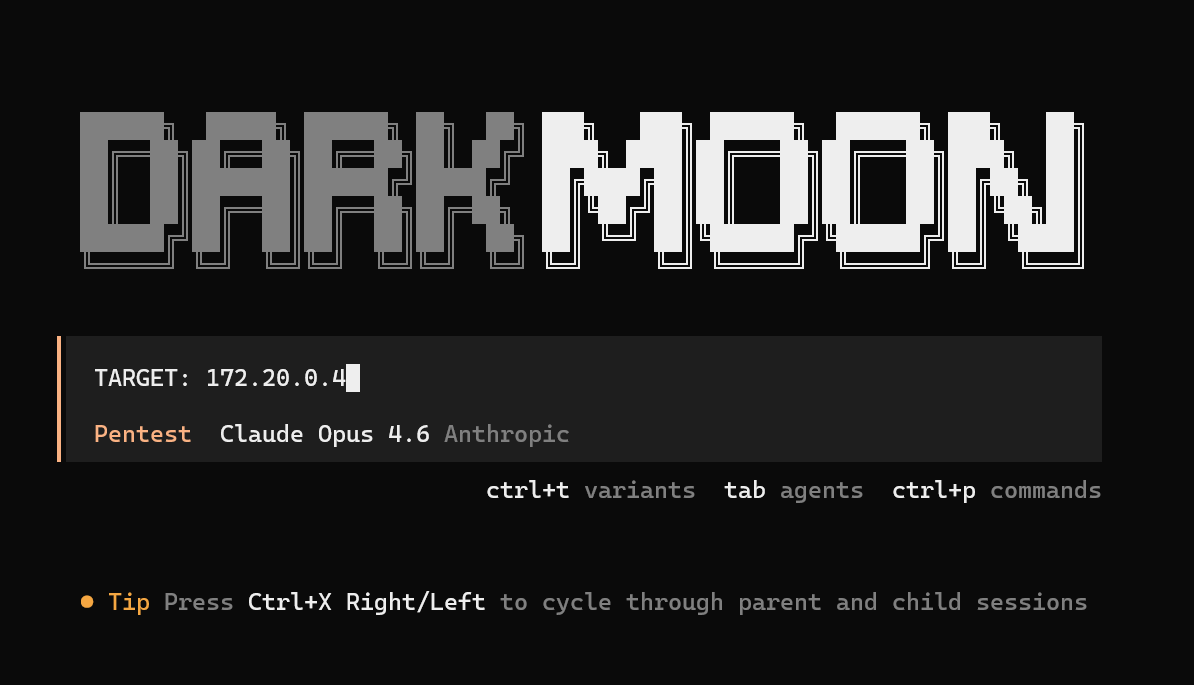 This launches the assessment campaign.
The orchestrator immediately initializes a **session context**.
From the session logs we can see this initialization stage:
```
darkmoon_get_session
→ session_id returned
```
The user receives a **monitoring command** to observe the assessment in real time:
```
./darkmoon.sh --log
This launches the assessment campaign.
The orchestrator immediately initializes a **session context**.
From the session logs we can see this initialization stage:
```
darkmoon_get_session
→ session_id returned
```
The user receives a **monitoring command** to observe the assessment in real time:
```
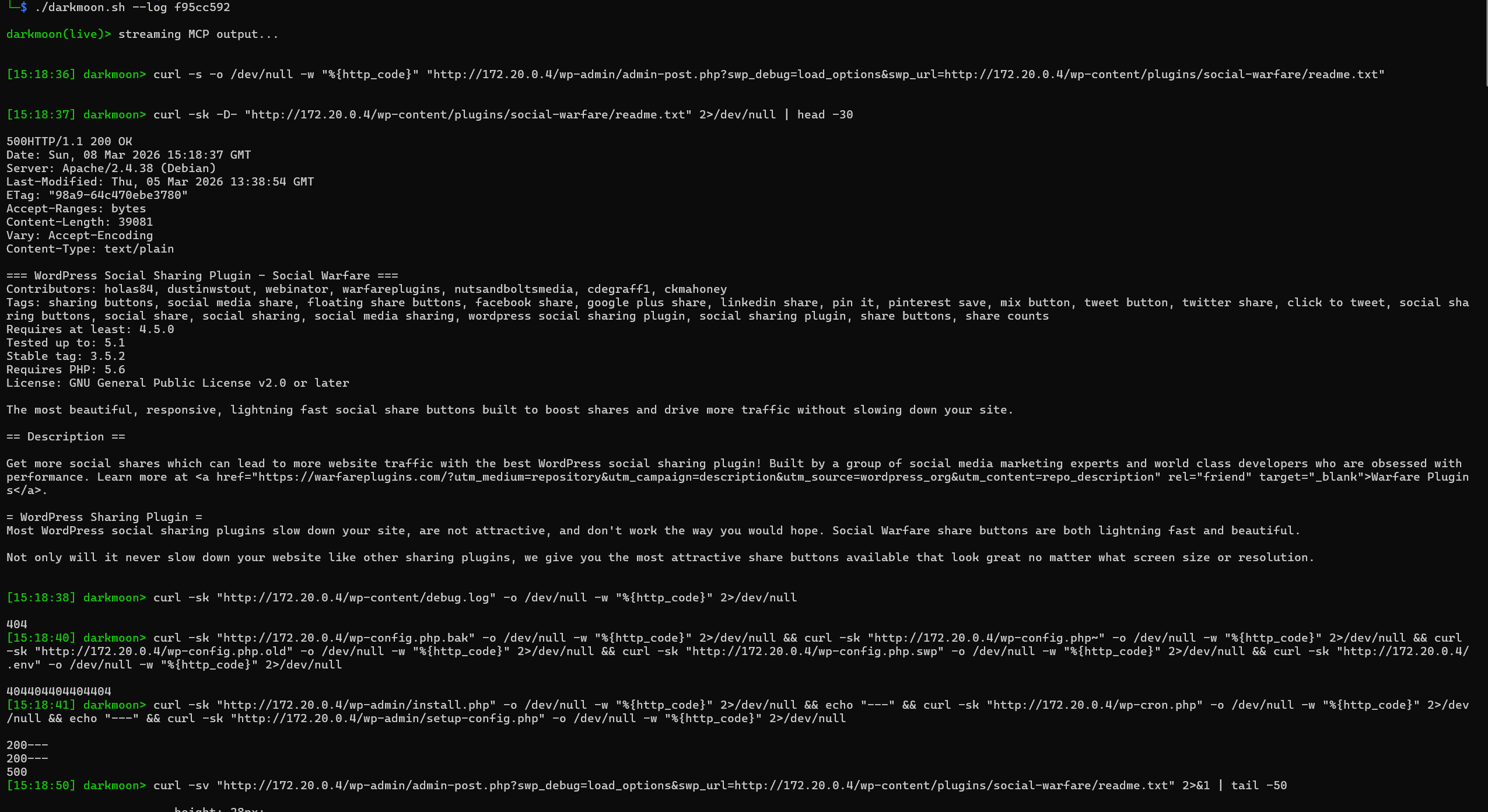
./darkmoon.sh --log 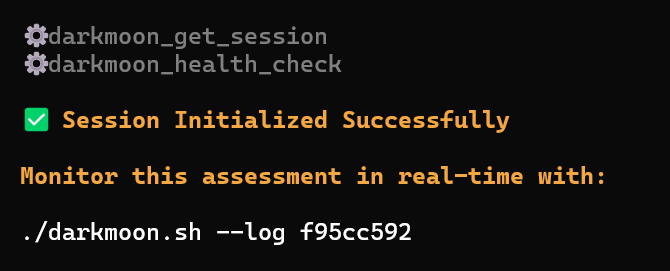 This allows the user to track the progress of the audit while it runs.
 ---
### II.7.f Step 2 — Environmental Discovery
Once the session begins, the system performs **controlled reconnaissance**.
The goal is not exploitation but **environment understanding**.
Activities include:
* Port scanning
* Protocol detection
* HTTP service discovery
* Banner analysis
* Basic service fingerprinting
Example from the session log:
```
workflow: port_scan
target: 172.20.0.4
ports discovered: 80
```
At this stage the system answers questions such as:
* Which ports are exposed?
* Which protocols are running?
* Is the target a web application, network service, or identity service?
This phase builds the **initial attack surface model**.
---
### II.7.f Step 2 — Environmental Discovery
Once the session begins, the system performs **controlled reconnaissance**.
The goal is not exploitation but **environment understanding**.
Activities include:
* Port scanning
* Protocol detection
* HTTP service discovery
* Banner analysis
* Basic service fingerprinting
Example from the session log:
```
workflow: port_scan
target: 172.20.0.4
ports discovered: 80
```
At this stage the system answers questions such as:
* Which ports are exposed?
* Which protocols are running?
* Is the target a web application, network service, or identity service?
This phase builds the **initial attack surface model**.
 ---
### II.7.g Step 3 — Technology Fingerprinting
Once exposed services are identified, Darkmoon determines the **technology stack**.
Typical signals collected include:
* HTTP headers
* Server banners
* Framework fingerprints
* CMS signatures
* API endpoints
* JavaScript frameworks
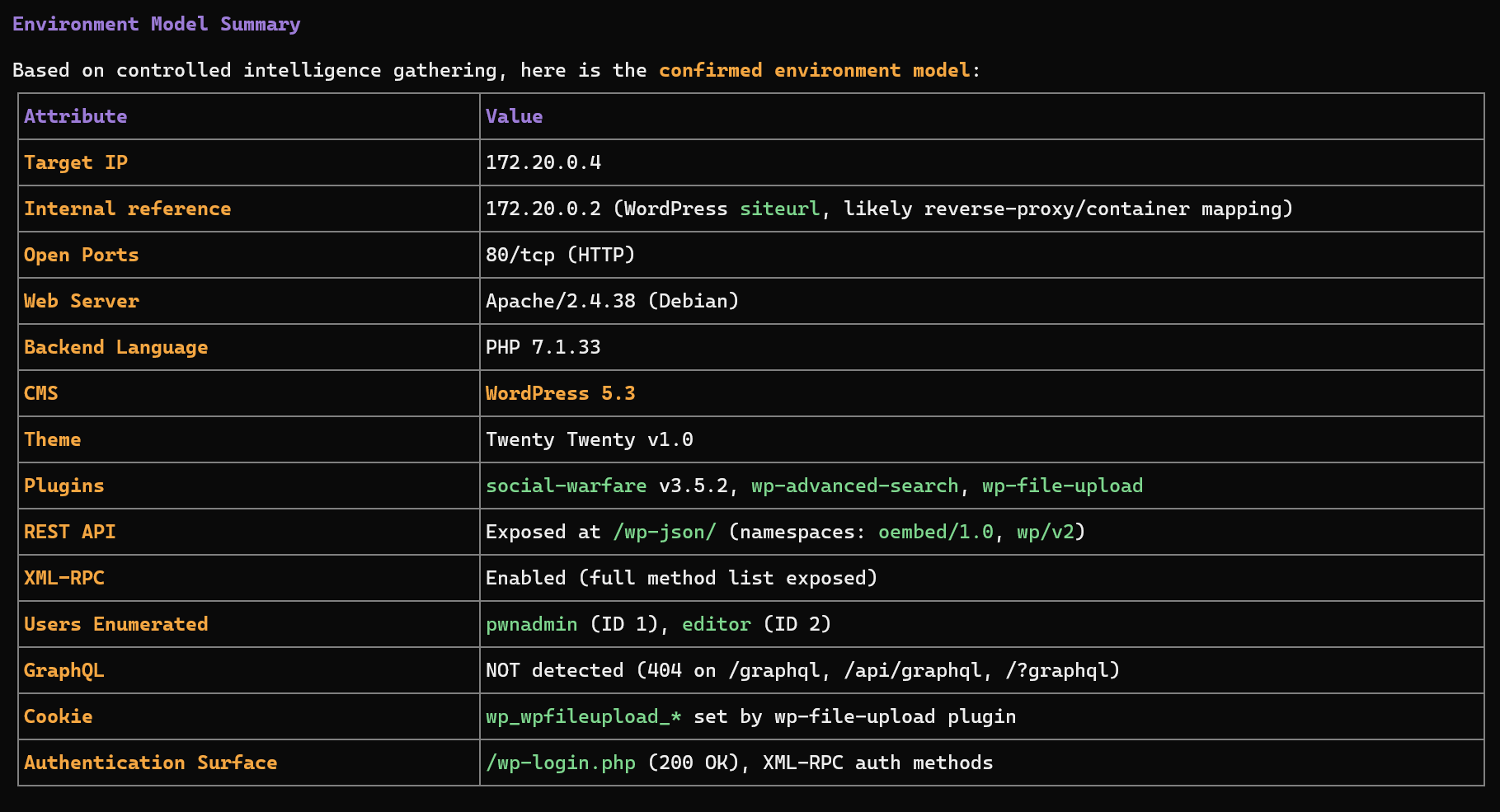
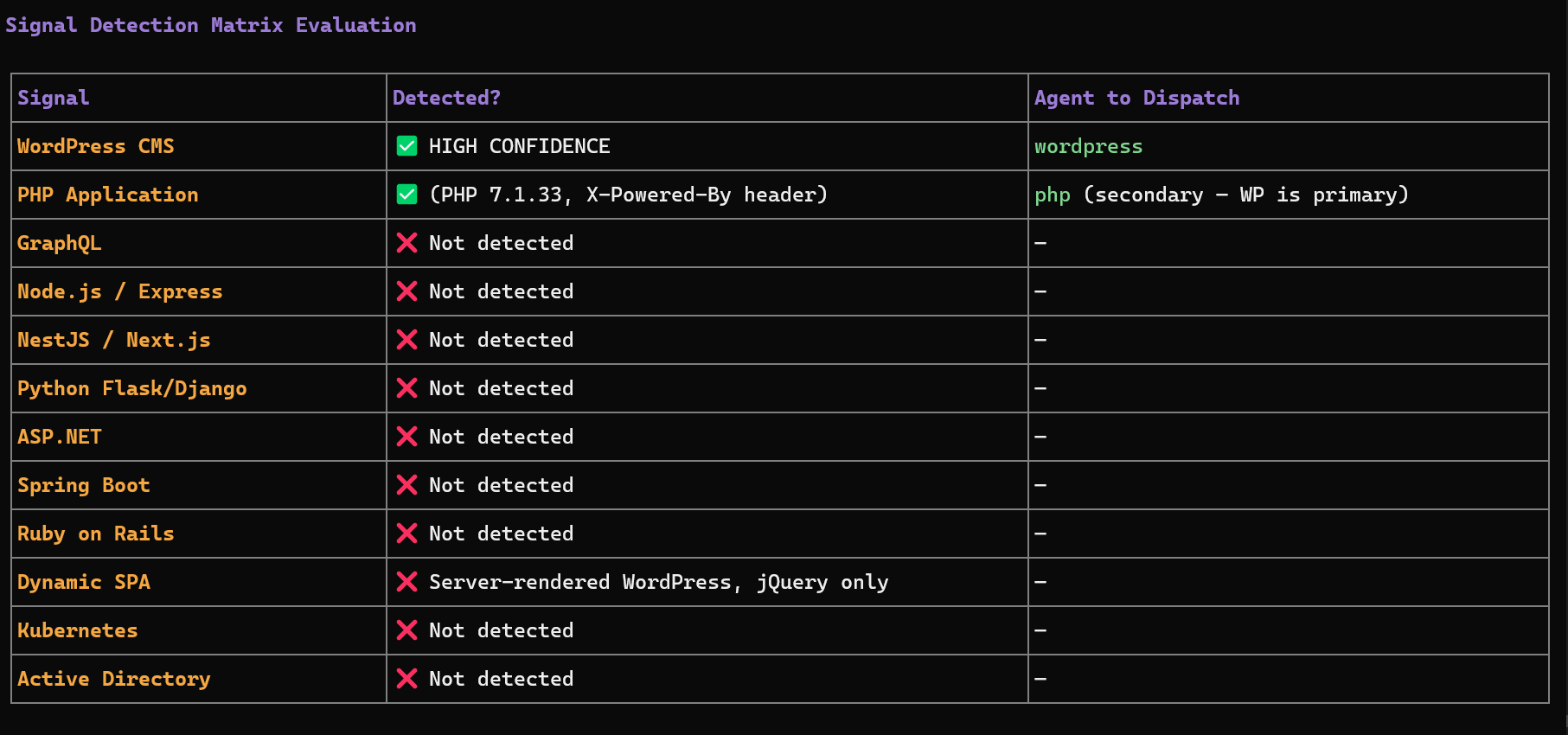
Example signals observed in the session:
```
Server: Apache/2.4.38
X-Powered-By: PHP/7.1.33
WordPress detected
plugins detected
```
At this stage the orchestrator builds a **technology profile** such as:
```
Web Application
├── Apache
├── PHP
└── WordPress CMS
```
This classification is critical because it determines **which specialized agents must be executed**.
---
### II.7.g Step 3 — Technology Fingerprinting
Once exposed services are identified, Darkmoon determines the **technology stack**.
Typical signals collected include:
* HTTP headers
* Server banners
* Framework fingerprints
* CMS signatures
* API endpoints
* JavaScript frameworks
Example signals observed in the session:
```
Server: Apache/2.4.38
X-Powered-By: PHP/7.1.33
WordPress detected
plugins detected
```
At this stage the orchestrator builds a **technology profile** such as:
```
Web Application
├── Apache
├── PHP
└── WordPress CMS
```
This classification is critical because it determines **which specialized agents must be executed**.
 ---
### II.7.h Step 4 — Attack Surface Modeling
The system then constructs an internal representation of the target environment.
The model includes:
* exposed endpoints
* authentication surfaces
* APIs
* frameworks
* infrastructure components
Example elements discovered in the session:
```
/wp-json/ → REST API
/xmlrpc.php → remote publishing interface
/wp-login.php → authentication endpoint
```
This information defines the **attack surface map** used by the orchestrator.
---
### II.7.i Step 5 — Sub-Agent Selection
Once the environment is understood, the orchestrator dynamically selects **specialized agents**.
The selection is based on detected technology signals.
Examples:
| Signal detected | Agent triggered |
| ------------------ | --------------- |
| WordPress | wordpress |
| GraphQL endpoint | graphql |
| NodeJS / Express | nodejs |
| Flask / Django | flask |
| ASP.NET | aspnet |
| Java Spring | springboot |
| Ruby | ruby |
| Active Directory | ad |
| Kubernetes cluster | kubernetes |
Multiple agents may run **in parallel** if several technologies are detected.
This prevents the tool from missing vulnerabilities across **hybrid architectures**.
---
### II.7.j Step 6 — Reactive Multi-Agent Execution
The orchestrator uses a **reactive feedback loop**.
After each agent finishes:
1. The results are analyzed.
2. Newly discovered technologies are evaluated.
3. Additional agents may be dispatched.
Example logic:
```
Initial scan
↓
WordPress detected
↓
WordPress agent executed
↓
Plugin exposes GraphQL API
↓
GraphQL agent triggered
```
This allows the system to **adapt dynamically** to the architecture discovered during the audit.
---
### II.7.h Step 4 — Attack Surface Modeling
The system then constructs an internal representation of the target environment.
The model includes:
* exposed endpoints
* authentication surfaces
* APIs
* frameworks
* infrastructure components
Example elements discovered in the session:
```
/wp-json/ → REST API
/xmlrpc.php → remote publishing interface
/wp-login.php → authentication endpoint
```
This information defines the **attack surface map** used by the orchestrator.
---
### II.7.i Step 5 — Sub-Agent Selection
Once the environment is understood, the orchestrator dynamically selects **specialized agents**.
The selection is based on detected technology signals.
Examples:
| Signal detected | Agent triggered |
| ------------------ | --------------- |
| WordPress | wordpress |
| GraphQL endpoint | graphql |
| NodeJS / Express | nodejs |
| Flask / Django | flask |
| ASP.NET | aspnet |
| Java Spring | springboot |
| Ruby | ruby |
| Active Directory | ad |
| Kubernetes cluster | kubernetes |
Multiple agents may run **in parallel** if several technologies are detected.
This prevents the tool from missing vulnerabilities across **hybrid architectures**.
---
### II.7.j Step 6 — Reactive Multi-Agent Execution
The orchestrator uses a **reactive feedback loop**.
After each agent finishes:
1. The results are analyzed.
2. Newly discovered technologies are evaluated.
3. Additional agents may be dispatched.
Example logic:
```
Initial scan
↓
WordPress detected
↓
WordPress agent executed
↓
Plugin exposes GraphQL API
↓
GraphQL agent triggered
```
This allows the system to **adapt dynamically** to the architecture discovered during the audit.
 ---
### II.7.k Step 7 — Evidence-Based Findings
The system follows strict validation rules.
A vulnerability is reported only when **evidence exists**, such as:
* HTTP request used
* payload sent
* raw response received
* extracted data or proof of execution
If proof is incomplete, the finding is labeled:
```
UNCONFIRMED SIGNAL
```
This ensures the report remains **audit-grade** and defensible.
---
### II.7.k Step 7 — Evidence-Based Findings
The system follows strict validation rules.
A vulnerability is reported only when **evidence exists**, such as:
* HTTP request used
* payload sent
* raw response received
* extracted data or proof of execution
If proof is incomplete, the finding is labeled:
```
UNCONFIRMED SIGNAL
```
This ensures the report remains **audit-grade** and defensible.
 ---
### II.7.l Step 8 — Campaign Completion
The assessment ends when:
* no new technology signals appear
* all relevant agents have executed
* attack surface coverage is sufficient
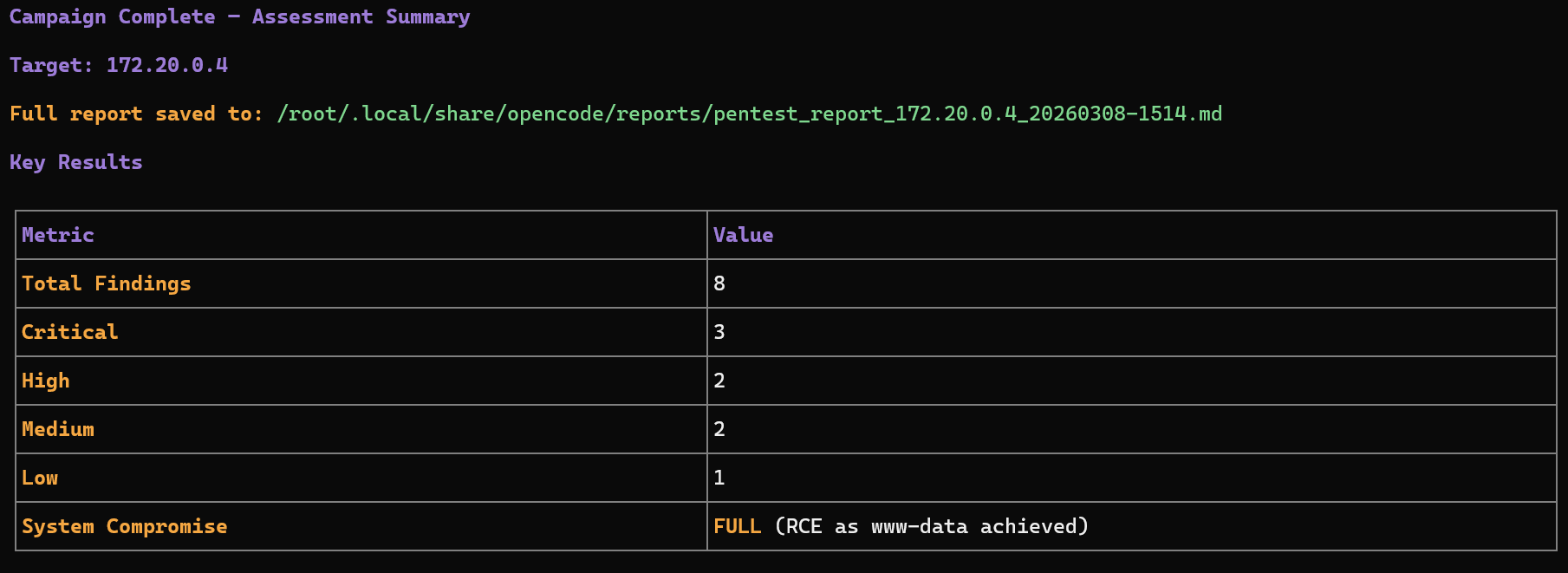
The orchestrator then triggers the **reporting phase**.
The final report summarizes:
* discovered technologies
* attack surfaces
* validated vulnerabilities
* supporting evidence
* risk classification
---
### II.7.m High-Level Workflow Diagram
```
+--------------------+
| User provides |
| target address |
+----------+---------+
|
v
+----------------------+
| Session Initialization|
| darkmoon_get_session |
+----------+-----------+
|
v
+----------------------+
| Environmental |
| Discovery |
| (ports, services) |
+----------+-----------+
|
v
+----------------------+
| Technology |
| Fingerprinting |
+----------+-----------+
|
v
+----------------------+
| Attack Surface |
| Modeling |
+----------+-----------+
|
v
+----------------------+
| Sub-Agent Selection |
+----------+-----------+
|
v
+-----------------------+
| Multi-Agent Execution |
| Reactive Loop |
+----------+------------+
|
v
+-----------------------+
| Evidence Validation |
+----------+------------+
|
v
+-----------------------+
| Final Security Report |
+-----------------------+
```
### II.7.n What the User Needs to Do
From the user's perspective the workflow is extremely simple.
#### 1️⃣ Provide a target
```
TARGET:
---
### II.7.l Step 8 — Campaign Completion
The assessment ends when:
* no new technology signals appear
* all relevant agents have executed
* attack surface coverage is sufficient
The orchestrator then triggers the **reporting phase**.
The final report summarizes:
* discovered technologies
* attack surfaces
* validated vulnerabilities
* supporting evidence
* risk classification
---
### II.7.m High-Level Workflow Diagram
```
+--------------------+
| User provides |
| target address |
+----------+---------+
|
v
+----------------------+
| Session Initialization|
| darkmoon_get_session |
+----------+-----------+
|
v
+----------------------+
| Environmental |
| Discovery |
| (ports, services) |
+----------+-----------+
|
v
+----------------------+
| Technology |
| Fingerprinting |
+----------+-----------+
|
v
+----------------------+
| Attack Surface |
| Modeling |
+----------+-----------+
|
v
+----------------------+
| Sub-Agent Selection |
+----------+-----------+
|
v
+-----------------------+
| Multi-Agent Execution |
| Reactive Loop |
+----------+------------+
|
v
+-----------------------+
| Evidence Validation |
+----------+------------+
|
v
+-----------------------+
| Final Security Report |
+-----------------------+
```
### II.7.n What the User Needs to Do
From the user's perspective the workflow is extremely simple.
#### 1️⃣ Provide a target
```
TARGET: