**DarkMoon is autonomous AI penetration testing for your own infrastructure.** Point it at an authorized target and it runs the whole assessment on its own, then documents every finding with the exact command and raw output.
- 🟢 **Truly open source.** GPLv3 and self-hosted, every agent's methodology is plain Markdown you can read, diff and fork.
- 🎯 **Finds AND proves.** Each vulnerability ships with the exact command and raw output (exploitation is agent-asserted; the Pro remediation retest is the machine-verified step), so there is almost nothing to triage.
- 🔒 **Runs on a local LLM + Privacy Gateway.** The gateway tokenizes your real IPs, hosts and credentials locally, so the model reasons on placeholders while real values stay on your perimeter.
- 🧩 **Everywhere you build.** Run it from GitHub, GitLab, Jenkins, VS Code, JetBrains, n8n, Grafana or Splunk — the open-source edition works with the CLI-based ones. [See the integrations ↓](#-darkmoon-everywhere)
---
## See the open source engine (CLI)
The open source Darkmoon is a command line tool. This is what you get when you clone the repo. You launch an assessment from the command line and watch every agent, command and finding stream past in real time.
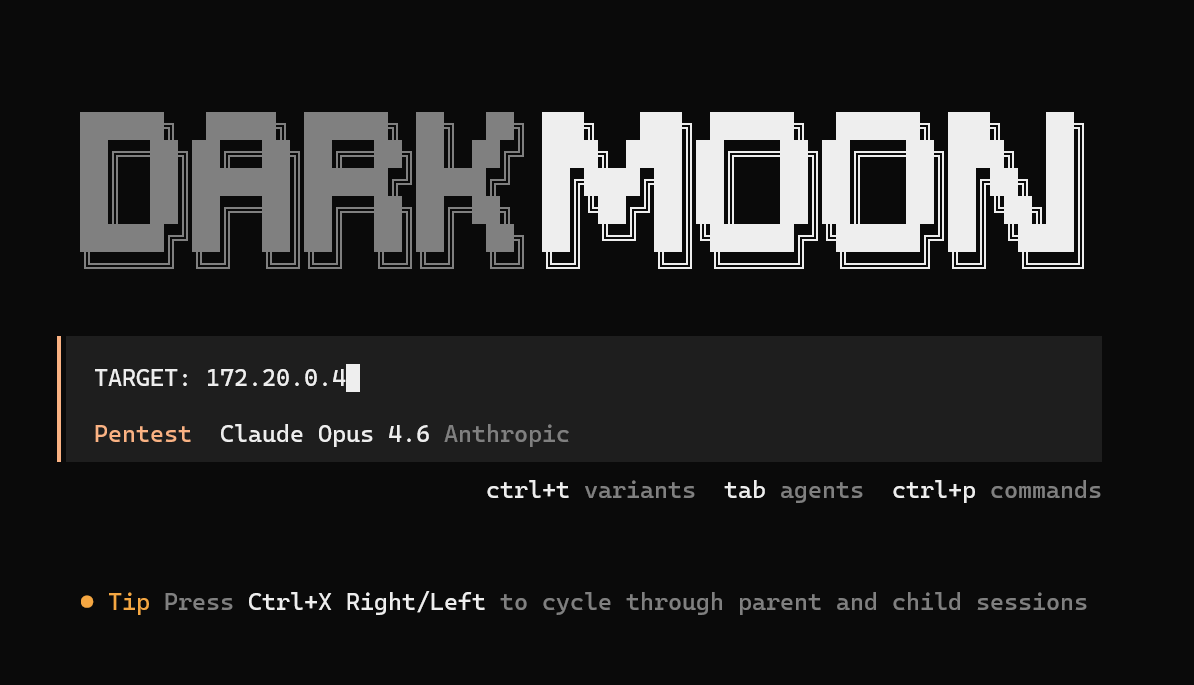
Kick off a run from the CLI. One TARGET line and DarkMoon takes over the whole assessment.
|
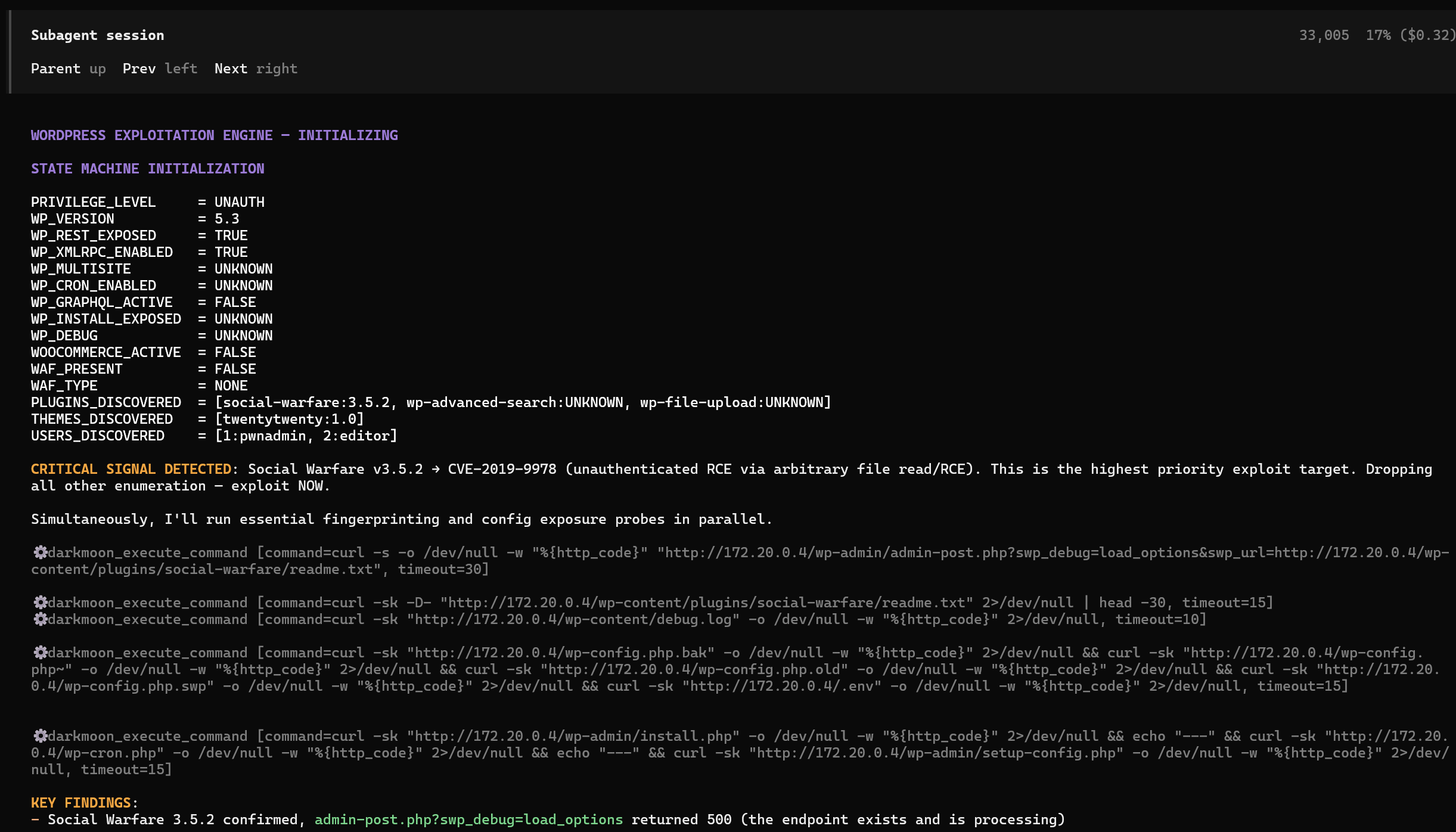
Autonomous agents reason and exploit, live in your terminal. Here a sub-agent flags CVE-2019-9978 and pivots straight to exploitation.
|
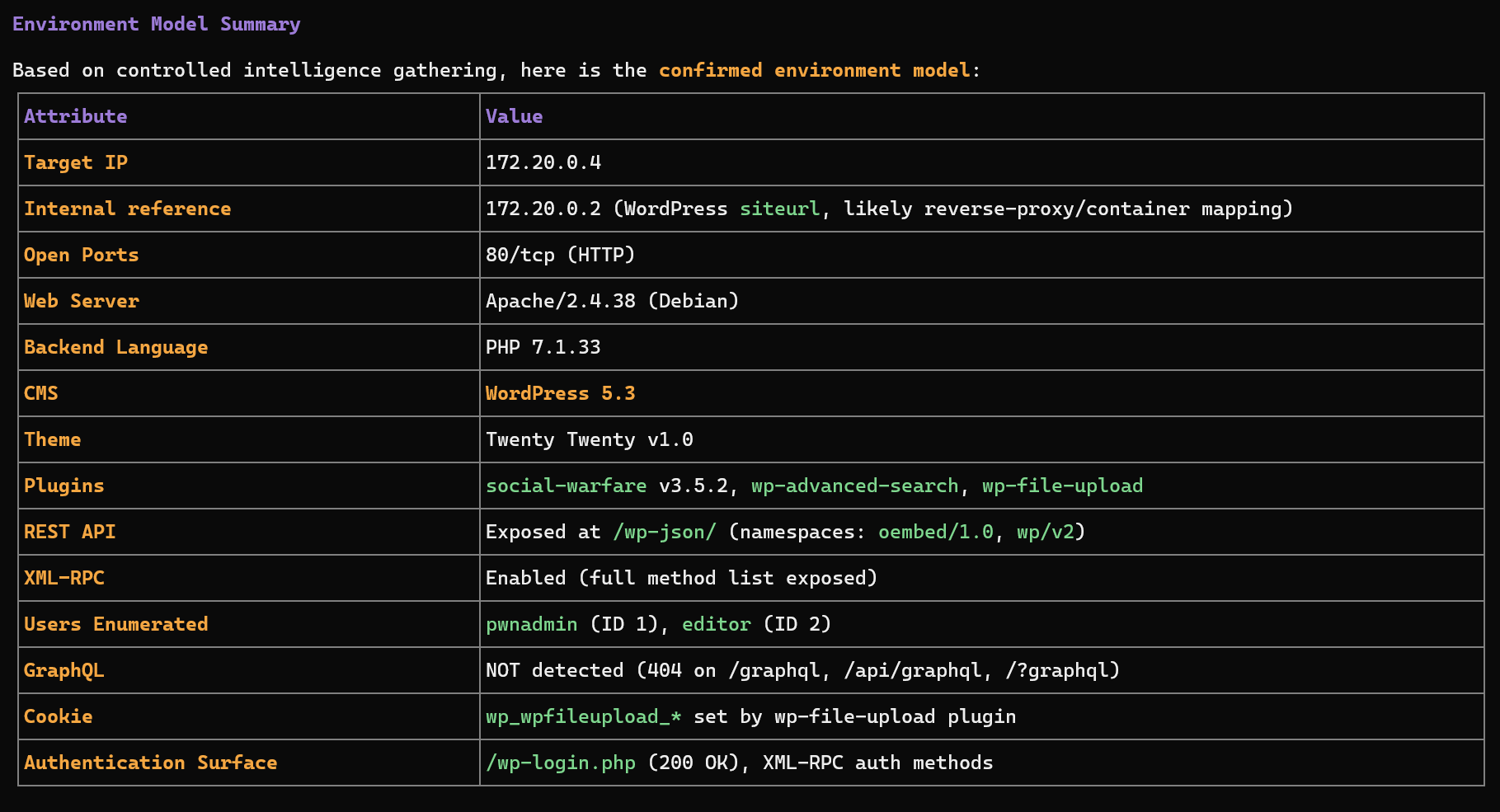
Recon and environment model. DarkMoon fingerprints the stack and confirms the attack surface before it strikes.
|
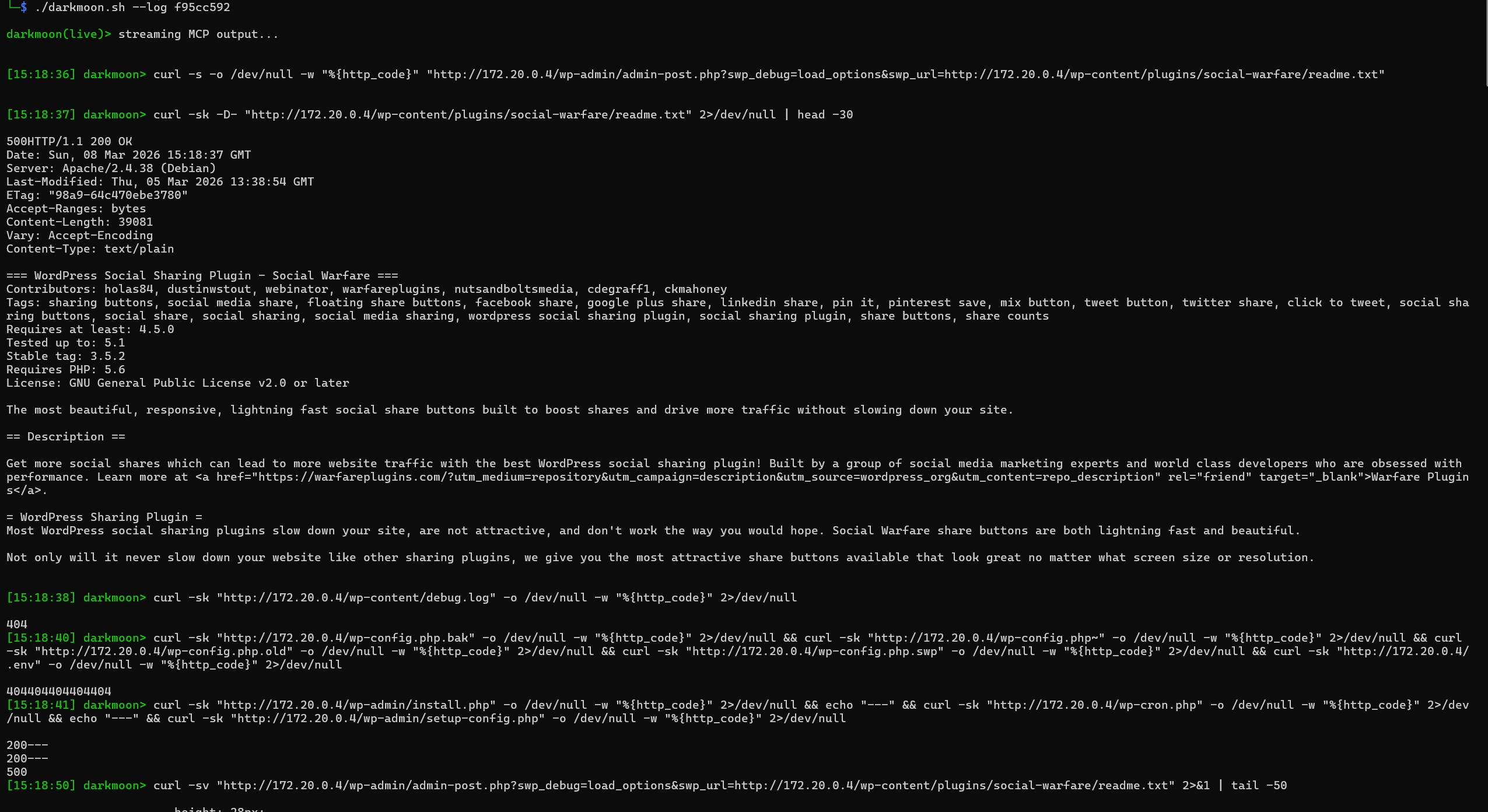
Live MCP stream. Every command the agent runs and its raw output, timestamped, with ./darkmoon.sh --log <session>.
|
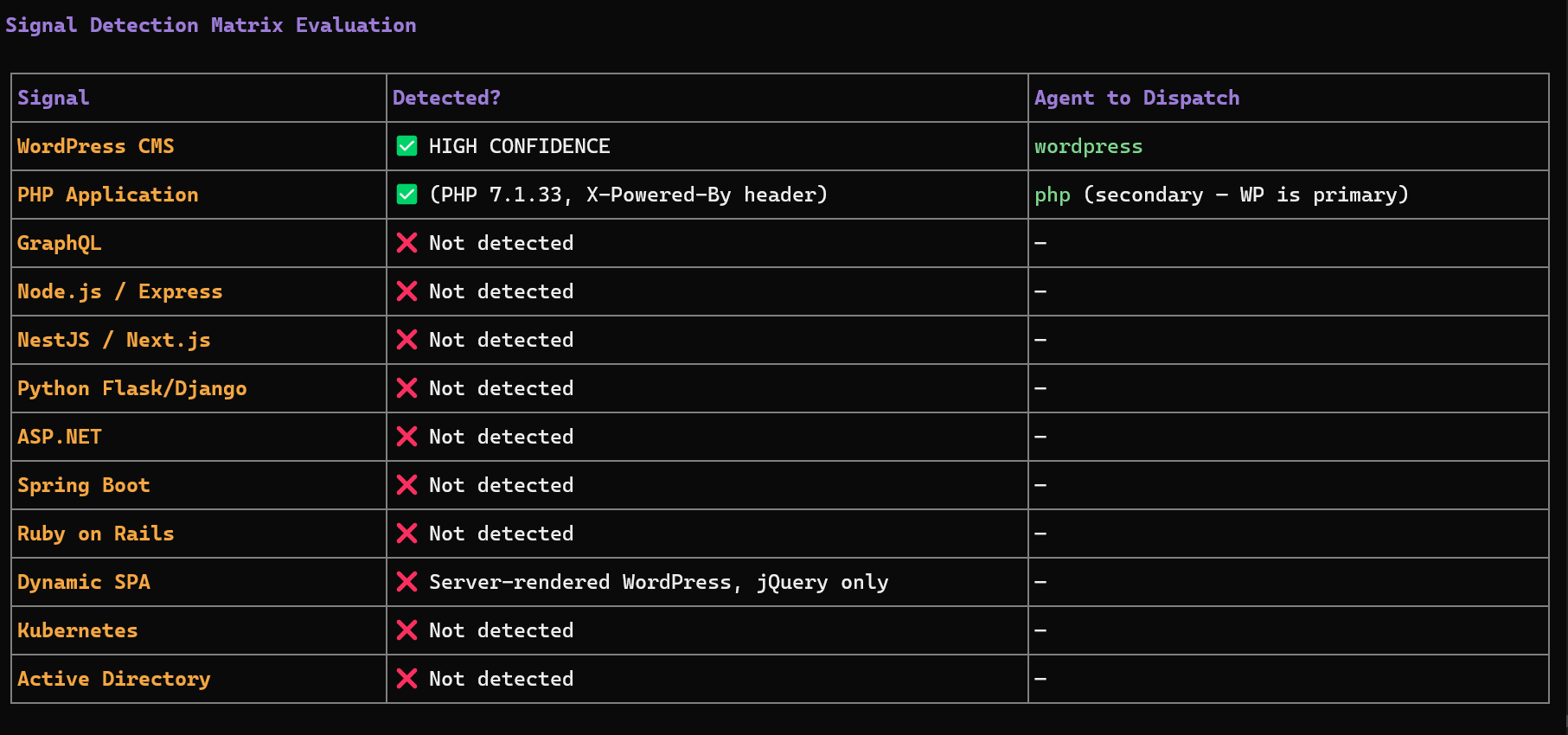
Signal to agent dispatch. DarkMoon decides which specialist agents to deploy from exactly what it detects on the target.
**As featured in** [Help Net Security](https://www.helpnetsecurity.com/2026/06/29/darkmoon-open-source-ai-pentesting-platform/) · [Cyber Security News](https://cybersecuritynews.com/darkmoon-penetration-testing-platform/) · [DevOps.com](https://devops.com/why-ci-cd-security-testing-is-going-autonomous-and-why-it-should-stay-local/) · [SecurityBrief](https://securitybrief.co.uk/story/asc-it-launches-darkmoon-for-private-ai-pentesting) · [LinuxLinks](https://www.linuxlinks.com/darkmoon-ai-powered-autonomous-penetration-testing-platform/) · [IT Brief](https://itbrief.co.uk/story/asc-it-launches-darkmoon-for-private-ai-pentesting) · [ChannelLife](https://channellife.co.uk/story/asc-it-launches-darkmoon-for-private-ai-pentesting)
---
## Quick Start
```bash
git clone https://github.com/ASCIT31/Dark-Moon.git
cd Dark-Moon
./install.sh
```
`install.sh` configures your LLM provider interactively (no need to edit `docker-compose.yml`) and builds the full stack:
```bash
./install.sh # skip form if .opencode.env already configured
./install.sh --init # force reconfiguration (cloud or local model)
./install.sh --help # show usage
```
Supports **cloud providers** (Anthropic, OpenAI, OpenRouter…) and **local models** (Ollama, llama.cpp). Then run your first assessment and watch it live:
```bash
./darkmoon.sh "TARGET: example.com"
./darkmoon.sh --log
```
**Prerequisites:** Docker & Docker Compose, and an LLM API key (or a local model). GPU setup, environment variables and the full flags reference live in the [Full Documentation](docs/full.md).
---
## Feature grid
| | |
|---|---|
| 🧠 **50 specialist agents** | One agentic system reasons, plans and dispatches specialist agents across every surface it discovers. |
| 🌐 **Every surface** | Web, APIs, Active Directory, Kubernetes, cloud (AWS, Azure, GCP), CI/CD, databases, IoT firmware and AI/LLM endpoints, chained end to end. |
| 🔒 **Privacy Gateway** | Reversible local tokenization turns real IPs, hosts, URLs and credentials into deterministic placeholders, rehydrated only locally at the moment a tool runs. |
| 🏠 **Local model** | Run the whole assessment on a local LLM (Ollama, llama.cpp) so your infrastructure values stay on your own perimeter. |
| 🧾 **Evidence, not scores** | Every finding ships with the exact command and raw output; the Pro retest re-runs the exploit to confirm a fix. |
| 🛡️ **Security by design** | The AI never runs a command directly, every action flows through a controlled, logged MCP interface. |
| 🤖 **Pentests your AI too** | A dedicated LLM agent probes AI/LLM inference endpoints for the OWASP LLM Top 10 with garak-backed probes. |
| ♾️ **CI/CD native** | Trigger a pentest in the pipeline and get findings back as artifacts. |
| 🔌 **MCP** | Orchestrate 140+ offensive tools over MCP. |
| 🔧 **Fix it (Pro)** | The paid Pro tier turns findings into human-reviewed pull requests, retested against the original exploit. |
Built for **security teams**, **DevSecOps engineers**, **red teamers** and **ethical hacking** professionals.
---
## 🧩 DarkMoon everywhere
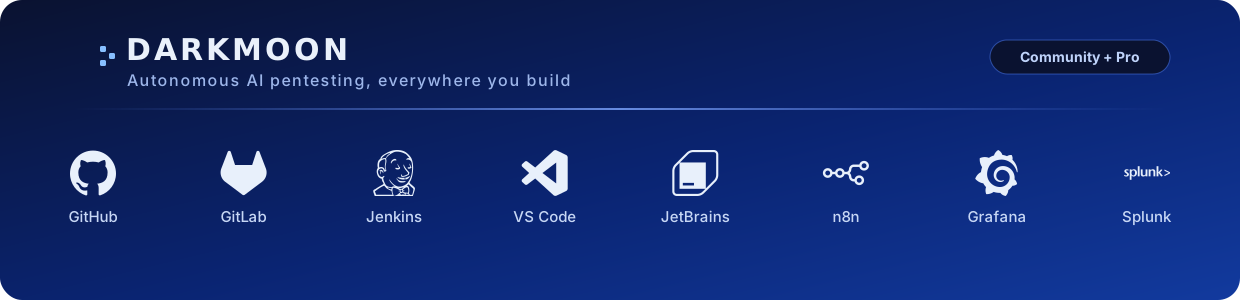
Run DarkMoon where you already build — in CI/CD, your IDE, automation and SecOps. Integrations marked **OSS + Pro** work with the open-source edition (local CLI + JSON); the Pro-only ones consume the [DarkMoon Pro](#-darkmoon-pro--paid-edition-web-dashboard-and-automated-remediation) REST API (live dashboard, remediation→PR).
| Platform | What it does | Get it | Edition | Tutorial |
|---|---|---|---|---|
| **GitHub Actions** | Fail the pipeline on findings by severity | [GitHub Marketplace](https://github.com/marketplace/actions/darkmoon-pentest) | OSS + Pro | [▶ Watch](https://youtu.be/e67klNk79vg) |
| **GitLab CI/CD** | Findings as Code Quality + SAST reports | [CI/CD Catalog](https://gitlab.com/explore/catalog/Dark-Moon-X/darkmoon-scan) | OSS + Pro | [▶ Watch](https://youtu.be/ui7NHD41cMM) |
| **Jenkins** | Findings as Warnings-NG issues in the build | [Plugin `.hpi` (Releases)](https://github.com/ASCIT31/darkmoon-jenkins/releases) | OSS + Pro | [▶ Watch](https://youtu.be/G0TgyGpVLZ8) |
| **VS Code** | Browse and launch assessments from the editor | [VS Code Marketplace](https://marketplace.visualstudio.com/items?itemName=Darkmoon.darkmoon-vscode) | OSS + Pro | [▶ Watch](https://youtu.be/GY7YOnYpteQ) |
| **JetBrains** | Findings in an IDE tool window | [JetBrains Marketplace](https://plugins.jetbrains.com/plugin/34497-darkmoon) | OSS + Pro | [▶ Watch](https://youtu.be/obUUrbTN3Jg) |
| **n8n** | Automate campaigns, retests and alerts | [npm `n8n-nodes-darkmoon`](https://www.npmjs.com/package/n8n-nodes-darkmoon) | Pro | [▶ Watch](https://youtu.be/3htg8kh7Dr8) |
| **Grafana** | Security-posture dashboards | [Self-host (Releases)](https://github.com/ASCIT31/darkmoon-grafana/releases) | Pro | [▶ Watch](https://youtu.be/L7K-y0HPudk) |
| **Splunk** | SOC ingestion (HEC) + "Send to Darkmoon" alert action | [App (Releases)](https://github.com/ASCIT31/darkmoon-splunk/releases) — Splunkbase pending | OSS + Pro | [▶ Watch](https://youtu.be/8w2i8nEBdQQ) |
| **SDK / CLI** | Build your own integration on the shared contract | [npm `@darkmoon_ai/client`](https://www.npmjs.com/package/@darkmoon_ai/client) | OSS + Pro | [▶ Watch](https://youtu.be/jMIMvV8yEK8) |
Every integration emits **safe metadata only** (severity, status, MITRE, ids) — never evidence, secrets or tokens. Full guides on [docs.dark-moon.org](https://docs.dark-moon.org); source under [ASCIT31](https://github.com/ASCIT31).
---
## 🔒 Darkmoon Pro — paid edition: web dashboard and automated remediation
> 🔒 **These are Darkmoon Pro features (paid).** The open source edition is the CLI shown above; the web dashboard and the automated remediation to pull requests are not in the open source build.
The screenshots below are the **paid Darkmoon Pro** web dashboard. They are **not** part of the open source repository you clone. The open source edition is the command line tool shown in the section above.
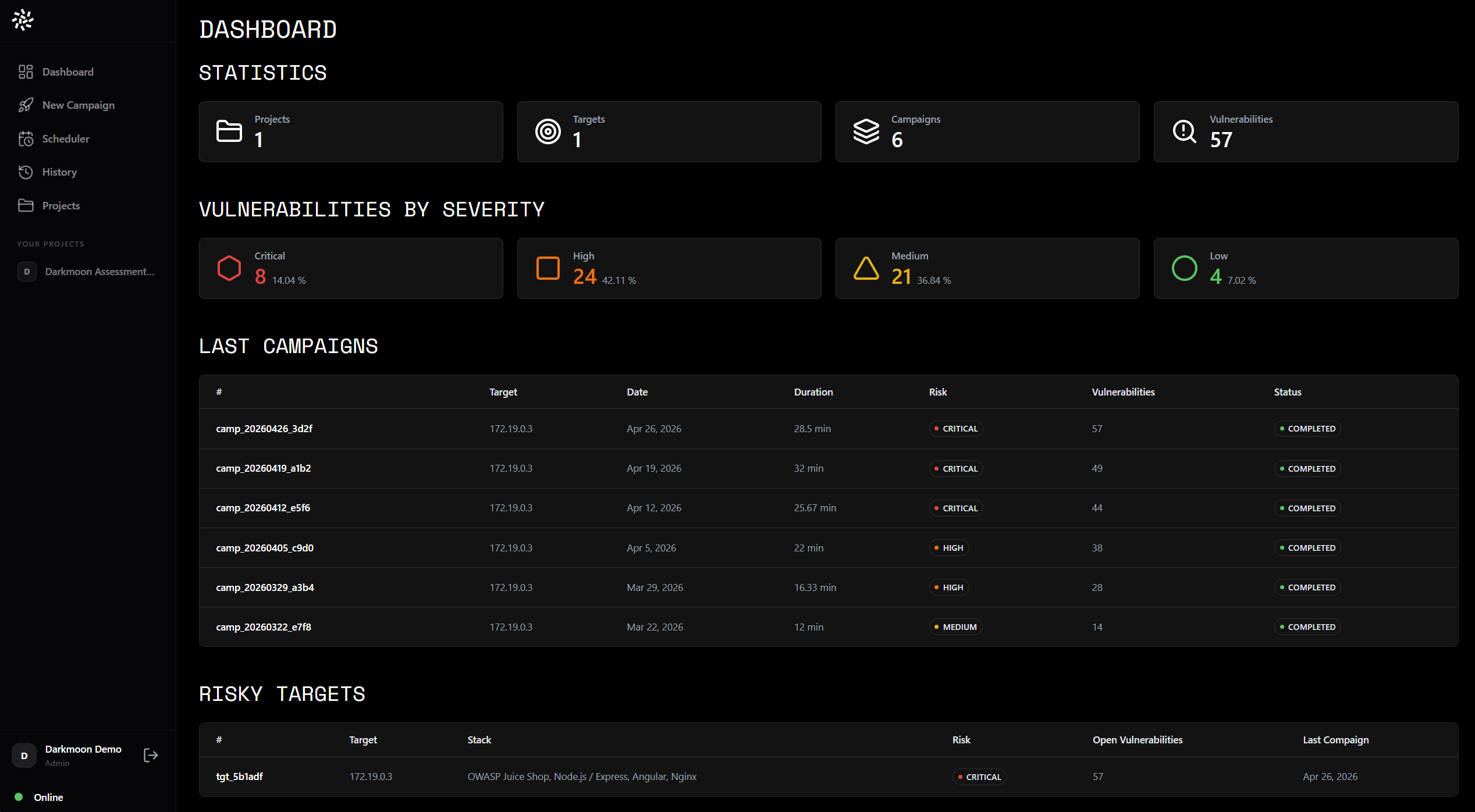
Pro: live web dashboard. Projects, targets and campaigns at a glance, with every finding bucketed by severity.
|
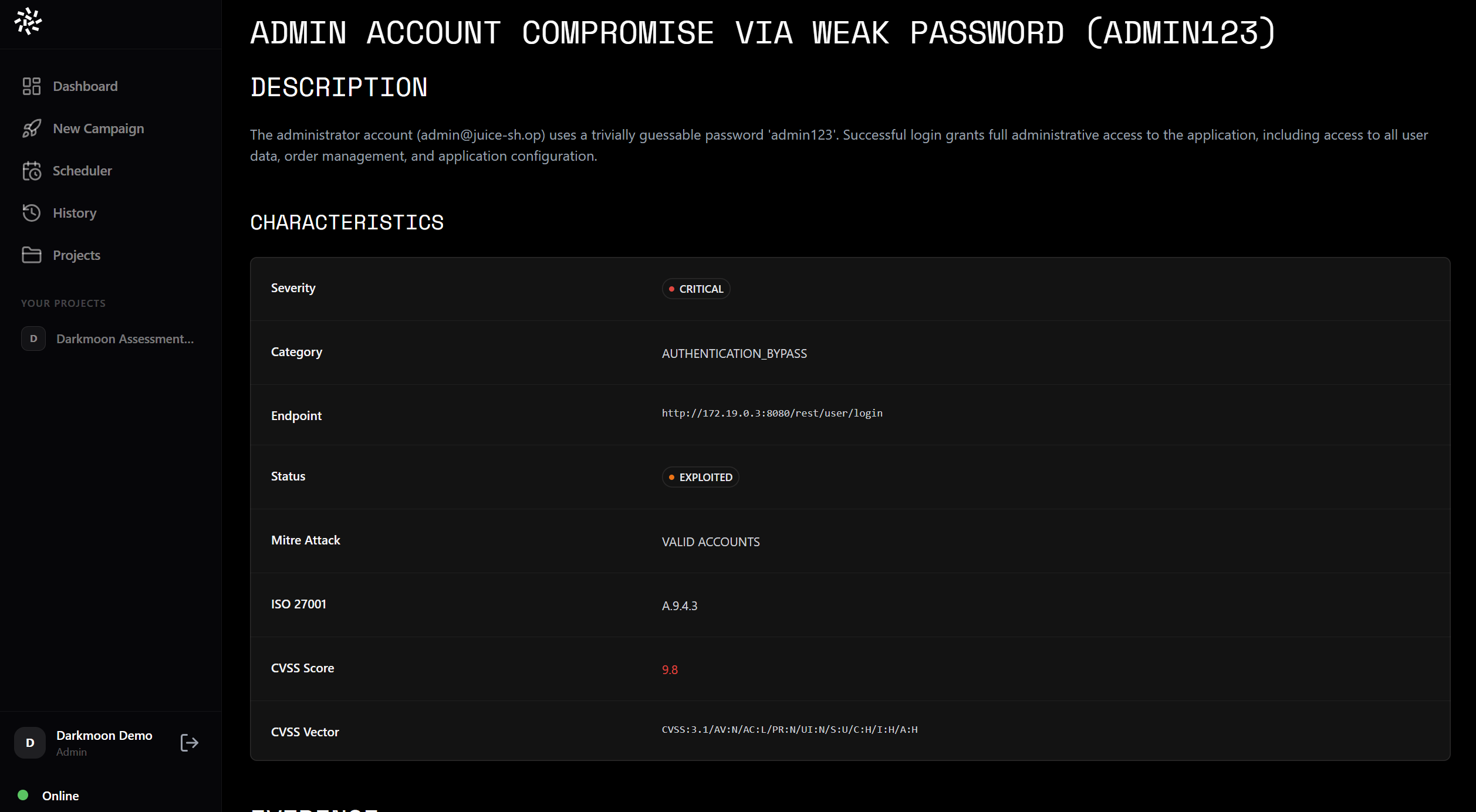
Pro: findings with CVSS and ATT&CK mapping. Each finding carries CVSS, MITRE ATT&CK and ISO 27001 mapping with an EXPLOITED status backed by a real exploit.
|
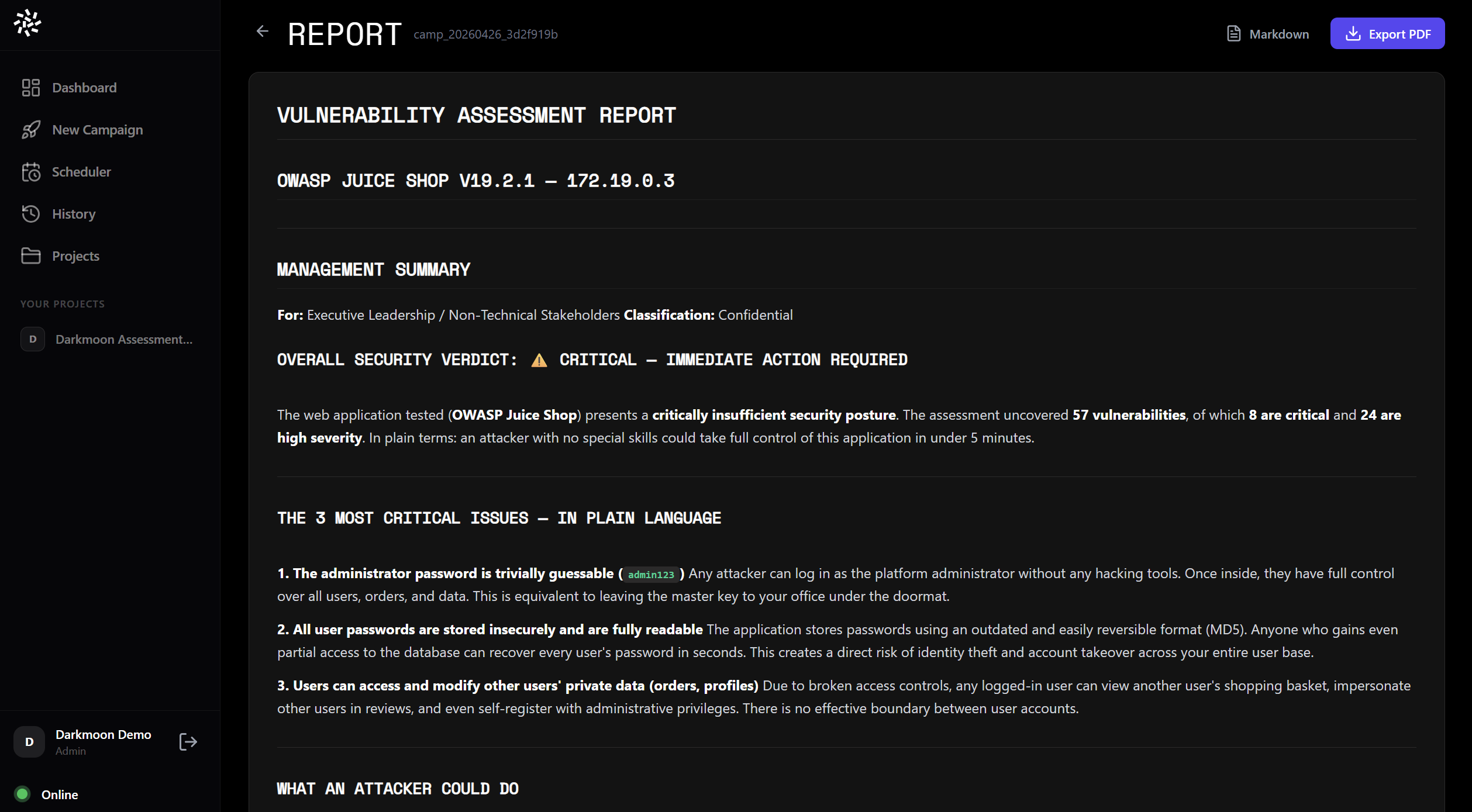
Pro: exportable web reports. A management summary in plain language plus full technical detail, exportable to Markdown and PDF.
|
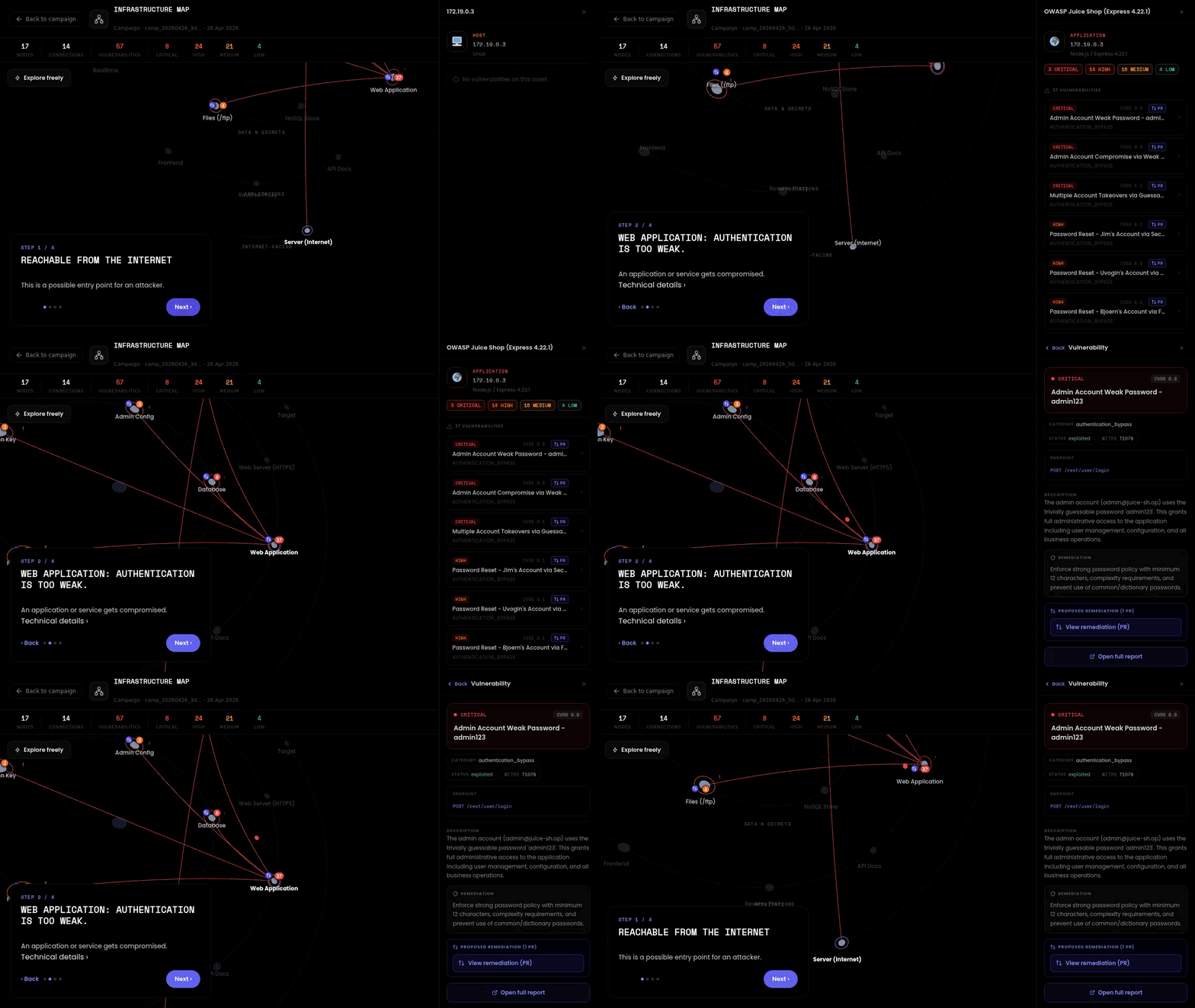
Pro: orbital attack-surface map. A live 3D graph of nodes, connections and per-node vulnerabilities, with the MITRE attack path walked across the whole target, and **every finding linked to its proposed remediation as a reviewed pull request**. Renders in the browser and in VR.
|
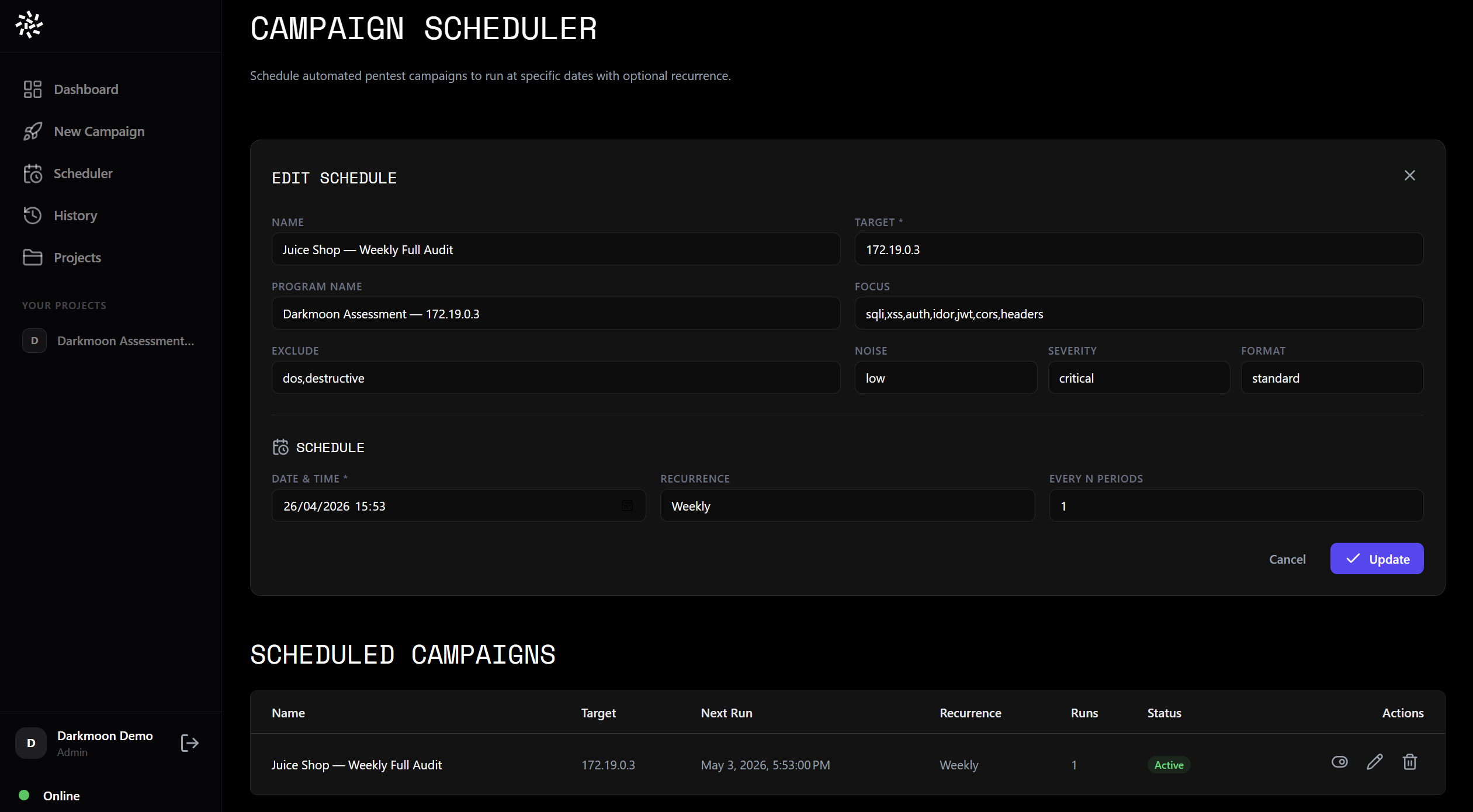
Pro: scheduled recurring runs. Recurring automated campaigns with FOCUS, severity and recurrence built into the web dashboard.
|
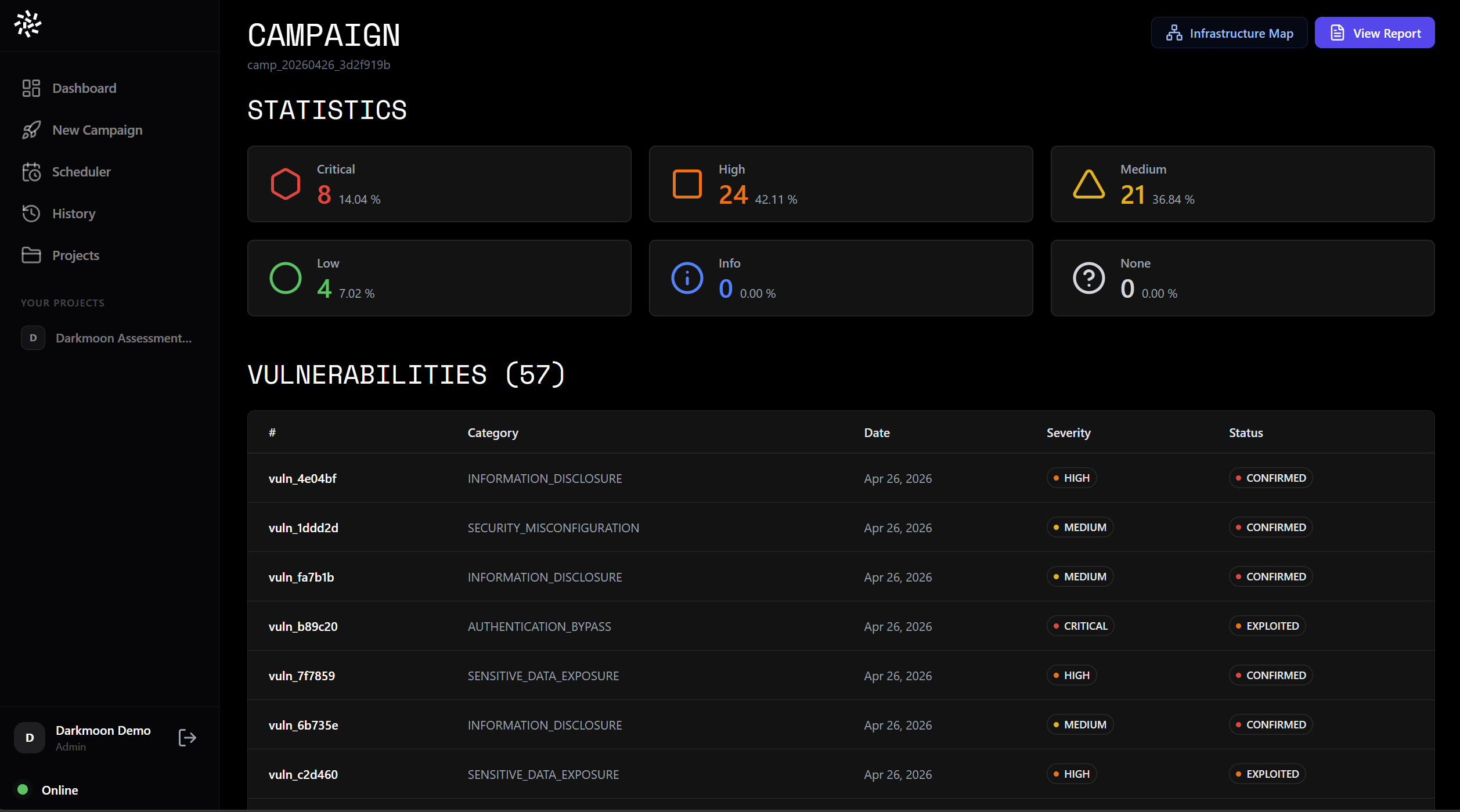
Pro: campaign view. Every vulnerability in a campaign with its severity and confirmation status.
|
### 🔒 Pro: from finding to fix (automated remediation, paid)
> 🔒 **Paid Pro feature.** The open source engine finds and proves vulnerabilities. Automated remediation into pull requests is available only in Darkmoon Pro.
In the paid Pro tier, every finding flows _finding → sandbox-validated fix → **human-reviewed pull request, retested against the original exploit**_, and is never auto-merged. On our OWASP Juice Shop demo run, the Pro remediation agent **fixed findings end-to-end with a clean live exploit-retest** (a fix only counts when the original exploit is re-run and confirmed closed). See the [remediation benchmark](https://dark-moon.org/remediation-benchmark/), the [remediation agent docs](docs/remediation-agent.md) and the [57 open PRs on ASCIT31/juice-shop](https://github.com/ASCIT31/juice-shop/pulls).
**▶️ Watch the demo (shows the Darkmoon Pro web dashboard)**
### 🔒 Pro: deploy on any cloud in one click — no box, no marketplace
> 🔒 **Paid Pro feature.** The open source edition is the CLI shown above. One-click cloud provisioning ships with Darkmoon Pro (a valid Pro license key is required) and is not part of the open source build.
"Do you sell a hardware box?" No. One command turns any cloud VM into a dedicated Darkmoon Pro appliance in your own tenancy — it creates the machine, opens the dashboard port and installs everything for you. No proprietary hardware, no cloud marketplace, no lock-in — the same packaged Docker images run on every cloud and on your own bare metal.
```bash
# one command, from your cloud's browser shell (AWS / GCP / Azure / OVH)
curl -fsSL https://portal.dark-moon.org/deploy | bash -s -- aws --license --api-key
```
**[Cloud deployment guide →](https://github.com/ASCIT31/darkmoon-cloud-deploy)** · [Docs](https://docs.dark-moon.org/#cloud-deployment) · [Appliance](https://dark-moon.org/appliance)
---
## What is DarkMoon?
DarkMoon is an **open-source AI penetration testing** platform. Point it at a target you are authorized to test, and it runs the whole assessment on its own: it reasons, plans, and dispatches **50 specialist agents** that execute real offensive operations through a controlled MCP layer, then reports every vulnerability with the exact command, the raw output and the proof behind it.
It does not replace the pentester. It clears the repetitive part of an assessment with evidence, so your experts spend their time on judgment, not toil.
---
## 📊 Benchmark: 57 real vulnerabilities on OWASP Juice Shop
Real, reproducible **black-box** run against OWASP Juice Shop with a **cloud frontier model (Anthropic Claude)**. DarkMoon also runs **fully local** (Ollama / llama.cpp) behind the Privacy Gateway — so nothing leaves your infrastructure; local-model coverage depends on the model you run.
| Metric | Result |
|---|---|
| Vulnerabilities found | **57** (8 critical / 24 high / 21 medium / 4 low) |
| Wall-clock time | **28.5 min** |
| Proof-of-exploitation | command + raw output per finding |
| LLM | Anthropic Claude (cloud frontier); local models supported |
Reproduce it and compare tools yourself: **[ASCIT31/Darkmoon-Benchmarks](https://github.com/ASCIT31/Darkmoon-Benchmarks)**.
## 🆚 How DarkMoon compares
| | **DarkMoon** | strix | shannon | PentAGI |
|---|:--:|:--:|:--:|:--:|
| Runs on **local LLM** (data never leaves) | ✅ | ❌ cloud | ❌ cloud | partial |
| Privacy Gateway (local tokenization) | ✅ | ❌ | ❌ | ❌ |
| Active Directory + Kubernetes | ✅ | ❌ | ❌ | partial |
| Proof-of-exploitation | ✅ | ✅ | ✅ | ✅ |
| Open source | ✅ GPL-3.0 | ✅ | ✅ | ✅ |
*Compiled from public repos/docs (2026-08); corrections welcome via PR.*
---
## How It Works
DarkMoon operates as a strategic **AI security agent** orchestrator aligned with ISO 27001, NIST SP 800-115, and MITRE ATT&CK methodologies.
When you provide a target, the platform automatically:
1. 🔍 **Discovers** the target environment (ports, services, protocols)
2. 🧠 **Fingerprints** the technology stack (frameworks, CMS, APIs)
3. 🎯 **Models** the attack surface
4. 🚀 **Deploys** specialized sub-agents based on detected technologies
5. 🔬 **Executes** an **intelligent vulnerability scanning** loop with reactive adaptation
6. ✅ **Validates** findings with evidence (requests, payloads, responses)
7. 📝 **Generates** a structured audit report
### Sub-Agent Orchestration
DarkMoon dynamically selects and dispatches specialized agents depending on the technologies discovered:
| Detected Technology | Agent Triggered |
|---|---|
| WordPress, Drupal, Joomla, Magento, PrestaShop, Moodle | CMS-specific agent |
| PHP, Node.js, Flask, ASP.NET, Spring Boot, Ruby on Rails, Go | Stack-specific agent |
| GraphQL | GraphQL agent |
| LLM / AI inference endpoint (OpenAI-compatible, Ollama, vLLM, TGI) | LLM agent |
| Active Directory | AD agent |
| Kubernetes | Kubernetes agent |
| AWS, Azure, GCP | Cloud-provider agent |
| Entra ID (Microsoft identity) | Identity agent |
| GitHub, GitLab, Jenkins | SCM & CI/CD agent |
| Terraform, Ansible | Infrastructure-as-Code agent |
| Docker, container registries | Container agent |
| HashiCorp Vault | Secrets agent |
| PostgreSQL, MySQL, MSSQL, Oracle | Database agent |
| Redis, RabbitMQ, Kafka, MQTT | Messaging & cache agent |
| Firmware / IoT images | Firmware agent |
| Headless browser required | Headless browser agent |
Multiple agents can execute **in parallel** across hybrid architectures.
Planes that require credentials to be meaningful (cloud accounts, CI/CD, secret stores, databases, Active Directory, Kubernetes) are **never dispatched on inference**. They fire only when a concrete artifact is found (a key, a token, a reachable metadata endpoint) or when you authorize them explicitly, and are otherwise flagged in the report.
> **Note:** For the complete list of agents, their structure, lifecycle, and how to create custom agents, see [Full Documentation, AI Agents](docs/full.md#v-ai-agents).
### Architecture Overview
```
User ──> DarkmoonCLI ──> OpenCode (AI Brain) ──> MCP (Security Gatekeeper) ──> Docker Toolbox (Real Tools)
```
```mermaid
sequenceDiagram
participant U as User
participant O as OpenCode
participant A as AI Agent
participant M as MCP Darkmoon
participant T as Docker Toolbox
U->>O: User prompt
O->>A: Delegate task
A->>M: MCP function call
M->>T: Execute real tool
T-->>M: Results
M-->>A: Structured output
A-->>O: Next decision
O-->>U: Summary / result
```
The AI reasons and plans. The MCP controls what can be executed. The Toolbox runs isolated tools inside Docker. **The AI never directly touches the system**, this is **security by design**.
> **Note:** For the full architecture breakdown (deployment diagrams, network flows, security boundaries), see [Full Documentation, Architecture](docs/full.md#iv-architecture).
---
## Scope Definition
DarkMoon supports flexible scope definition directly from the command line.
**Quick pentest (zero config):**
```bash
./darkmoon.sh "TARGET: http://172.19.0.3:3000"
```
**Bug bounty mode (flags activate automatically):**
```bash
./darkmoon.sh "TARGET: http://172.19.0.3:3000 PROGRAM=\"Juice Shop\" FOCUS=sqli,xss,idor NOISE=moderate FORMAT=h1"
```
Key flags include `FOCUS`, `EXCLUDE`, `CREDS`, `TOKEN`, `NOISE`, `SEVERITY`, `FORMAT`, and more, all interpreted naturally by the AI.
> **Note:** For the complete flags reference, asset types, EXCLUDE/FOCUS free-form syntax, and advanced multi-target scoping, see [Full Documentation, Scope Definition](docs/full.md#ii7c-launch-darkmoon-with-tui-console).
---
## Integrated Toolbox
DarkMoon ships with a purpose-built Docker image containing **140+ security tools** compiled and optimized in a multi-stage build:
| Category | Tools (examples) |
|---|---|
| Port scanning | Naabu (discovery), nmap (targeted service probes) |
| Web scanning | Nuclei, ffuf, dirb, sqlmap, Arjun, wafw00f |
| Recon & crawling | Subfinder, Katana, Waybackurls, httpx |
| CMS | WPScan, CMSeeK, WhatWeb |
| Active Directory | NetExec, BloodHound, Impacket (30+ scripts) |
| Kubernetes | kubectl, Kubescape, Kubeletctl, kube-bench, rbac-police |
| Cloud CLIs | aws, az, gcloud, gsutil, bq |
| Databases & cache | psql, mysql, redis-cli, sqlite3 |
| Firmware / IoT | binwalk, unsquashfs, sasquatch, firmwalker |
| Cracking | hashcat, john, 7z2john |
| Network | Hydra, curl, dig, SNMP tools |
| Browser | Lightpanda (headless) |
All tools are directly accessible, no path configuration needed.
> **Note:** For the complete tools list with installation details and how to add new tools, see [Full Documentation, Toolbox](docs/full.md#vi-toolbox).
---
## 📖 Documentation Guide
DarkMoon's [Full Documentation](docs/full.md) covers everything you need to operate the platform. Here is a quick reference to the most important sections:
| Topic | What You'll Find | Link |
|---|---|---|
| **GPU & Driver Setup** | NVIDIA troubleshooting for Docker, WSL, and native Linux | [GPU Guide](docs/full.md#ii2--darkmoon--gpu-troubleshooting-guide-official) |
| **Environment Variables** | LLM provider configuration, API keys, model selection | [Environment Config](docs/full.md#ii3-configuration-of-environment-variables-in-docker-compose) |
| **Startup & Build** | install.sh behavior, docker compose build, stack management | [Build & Launch](docs/full.md#ii6-build-and-launch-darkmoon) |
| **Scope & Flags** | TARGET syntax, bug bounty mode, FOCUS/EXCLUDE, credentials | [Scope Definition](docs/full.md#ii7c-launch-darkmoon-with-tui-console) |
| **Assessment Workflow** | Step-by-step: discovery, fingerprinting, agents, reporting | [Assessment Engine](docs/full.md#ii7d-how-to-use-the-darkmoon-assessment-engine) |
| **Real-Time Session Logs** | Monitor commands executed by the MCP server live | [Session Logs](docs/full.md#ii7e-step-1--start-an-assessment) |
| **AI Agents** | Agent structure, lifecycle, how to create or modify agents | [AI Agents](docs/full.md#v-ai-agents) |
| **Architecture** | Deployment diagrams, security boundaries, execution flow | [Architecture](docs/full.md#iv-architecture) |
| **Toolbox** | Complete tool list, adding tools, Docker image internals | [Toolbox](docs/full.md#vi-toolbox) |
| **MCP Workflows** | Workflow structure, creating custom workflows, best practices | [MCP Workflows](docs/full.md#vii-mcp-workflows) |
| **Available Tools List** | Full table of 142 security tools with paths and sources | [Tools List](docs/full.md#vi10-toolbox-list) |
| **Training Labs** | Recommended vulnerable labs to train DarkMoon | [Pentester Labs](docs/full.md#vi11-bonus-pentester-lab-to-train-darkmoon) |
| **Remediation Agent** (Pro) | Findings → sandbox-validated fix → pull request for human review (never merged) | [Remediation Agent](docs/remediation-agent.md) |
| **n8n (Pro)** | Community node to trigger a pentest, pull findings and review fix PRs from an n8n workflow | [n8n Node](docs/n8n-integration.md) |
---
## Use Cases
DarkMoon is designed as a versatile **security testing platform** for:
- 🔒 **Security teams**, run continuous **automated penetration testing** across your infrastructure
- ⚙️ **DevSecOps pipelines**, integrate **AI-driven security research** into CI/CD workflows
- 🎯 **Bug bounty hunters**, accelerate **ethical hacking** with autonomous target analysis
- 🔬 **Security researchers**, explore attack surfaces with an **AI cybersecurity platform** that adapts in real time
- 🎓 **Training & education**, learn offensive security with guided, reproducible assessments
---
## Example Prompts
```bash
# Web application pentest
./darkmoon.sh "TARGET: http://172.19.0.3:3000"
# Active Directory assessment
./darkmoon.sh "TARGET: 192.168.1.10"
# Bug bounty with specific focus
./darkmoon.sh "TARGET: https://app.example.com PROGRAM=\"Example BB\" FOCUS=sqli,rce,ssrf EXCLUDE=H1 FORMAT=h1"
```
> **Note:** For more prompt examples including DVGA, Juice Shop, and headless browser scenarios, see [Full Documentation, Prompt Examples](docs/full.md#iii-uses).
---
## Contributing
DarkMoon is open source and welcomes contributions. Whether you want to add new agents, integrate tools, create workflows, or improve documentation, see [CONTRIBUTING.md](CONTRIBUTING.md) for guidelines.
---
## License
This project is licensed under the **GNU General Public License v3.0**. See [LICENSE](LICENSE) for details.
---
**Built by ASC-IT with 💚 for the global security community**
🔒 Open Source · 🤖 AI-Powered · 🇫🇷 Made in France
[⭐ Star us on GitHub](https://github.com/ASCIT31/Dark-Moon) · [📖 Full Documentation](docs/full.md) · [▶️ Watch the Demo (Pro dashboard)](https://youtu.be/zQE95bVLZgM)
 # DarkMoon
### Open-source autonomous AI penetration testing — finds, exploits and qualifies every vulnerability on your own infrastructure
# DarkMoon
### Open-source autonomous AI penetration testing — finds, exploits and qualifies every vulnerability on your own infrastructure







