English · 简体中文


Keyboard shortcuts for the [DeepSeek Harness](https://github.com/deepseek-ai/deepseek-harness) (`dsh`) Web UI — three focused chords behind one listener, wired to whichever right-side surface is actually present.
## Shortcuts
| Chord | Action |
|---|---|
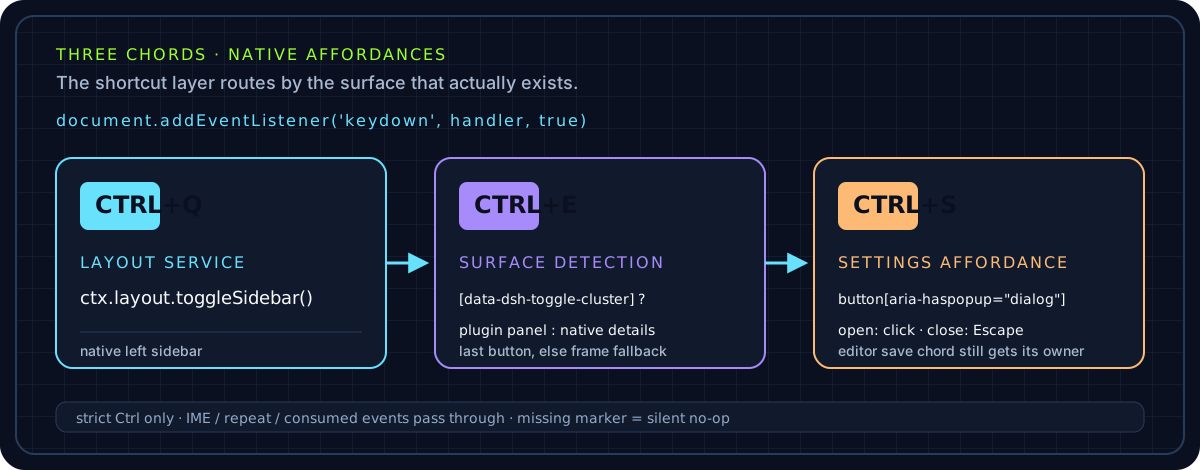
| `Ctrl+Q` | toggle the built-in left sidebar |
| `Ctrl+E` | toggle the RIGHT sidebar — the [dsh-better-sidebar](https://github.com/omdsh-dev/DSH-better-sidebar) panel (Files / git / terminal / browser…) when that plugin is loaded, otherwise the native conversation details panel |
| `Ctrl+S` | open / close the Settings modal |
Rules that keep the bindings predictable:
- **Strict chords only.** Plain `Ctrl` with no `Cmd` / `Shift` / `Alt` riders; `Cmd` variants stay with the browser or OS.
- **Never fights the page.** IME composition, key auto-repeat, and events another listener already consumed are left alone.
- **`Ctrl+S` yields inside dsh-better-sidebar.** Its editor binds `Ctrl/Cmd+S` to save, so with focus inside that plugin's panel the chord passes through.
- **`Ctrl+E` needs an active session.** Both the plugin panel and the native details column are session-scoped surfaces.
## Install
Defaults are `Ctrl+Q` / `Ctrl+E` / `Ctrl+S`. Physical key codes can be overridden in the profile patch; see Keymap configuration below.
```sh
dsh plugin --profile web add github:Aafff623/dsh-keyboard-manager
```
Then hard-refresh the browser (`Ctrl+Shift+R`). `dsh.bundle.patch` adds the plugin to the profile bundle — no profile file edits.
`lib/` is committed on purpose: a git install works with zero build step. If you change `src/`, run `npm run build` and commit the refreshed `lib/` together — CI fails on drift.
## How it works
DSH's layout service exposes actions but no state reads, and the settings modal's open state is component-local. So the bindings ride on **stable DOM markers and the shell's own affordances** instead of React internals or hashed CSS classes. Every path degrades to a silent no-op when its marker is missing — it never misfires.
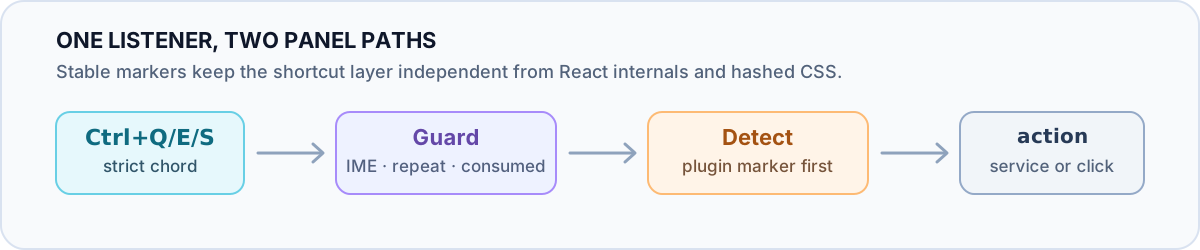
- **`Ctrl+Q`** — pure service call (`ctx.layout.toggleSidebar()`).
- **`Ctrl+E`** — with dsh-better-sidebar loaded, clicks the right-panel switch in `[data-dsh-toggle-cluster]` (prefers a button whose `aria-label` or `data-panel` mentions `right`, otherwise the last button); otherwise calls `ctx.layout.openDetails()/closeDetails()`, deciding direction from the frame root's `data-details-collapsed` located via `[data-shell-overlay]`.
- **`Ctrl+S`** — clicks the sidebar settings trigger (`button[aria-haspopup="dialog"]`, the first one in frame document order) to open; dispatches a document-level `Escape` — exactly what the panel's close logic listens for — to close.
### Keymap configuration
The defaults are `KeyQ`, `KeyE`, and `KeyS`. All three physical key codes are overridable through plugin config:
```yaml
# ~/.dsh/profiles/web/cordis.patch.yml (the profile's own patch layer)
- id: dsh-keyboard-manager
config:
sidebar: KeyQ
rightPanel: KeyE
settings: KeyS
```
Key codes are validated against `/^[A-Z][A-Za-z0-9]+$/`, duplicate codes are rejected, and invalid input falls back to the defaults. Restart `dsh` and refresh the page to apply.
**How the config reaches the browser**: DSH's web boot mounts client halves without plugin config (`loader.create({ name })`), so the browser half's `apply` second argument is always `undefined`. The node half therefore serves the config as JSON on `/plugin-config/dsh-keyboard-manager`, and the browser half pulls it once at activation and hot-swaps the bindings. If the pull fails — or on headless profiles, where there is no web server — the defaults stay in effect.
### DOM contract
The bindings rely only on the following stable, centrally-declared markers (verified against the `dsh-client-ui-layout` and `dsh-better-sidebar` sources):
| Marker | Source | Purpose |
|---|---|---|
| `[data-dsh-toggle-cluster]` | dsh-better-sidebar | right-panel button cluster |
| `[data-dsh-panel-host]` | dsh-better-sidebar | scope where `Ctrl+S` yields to the editor |
| `[data-shell-overlay]` | dsh-client-ui-layout | native AppFrame anchor |
| `data-details-collapsed` | dsh-client-ui-layout | native details panel collapsed state |
| `button[aria-haspopup="dialog"]` | dsh-client-ui-settings-general | the settings trigger |
## Development
```sh
npm install
npm run typecheck # tsc --noEmit
npm run build # esbuild → lib/index.js + lib/client.js (ModuleLoader-wrapped)
npm test # node:test, vm-isolated fake-DOM suite
```
Plugin layout follows the standard DSH dual-half shape:
- `src/index.ts` — node / host half (serves the plugin config as a JSON route for the browser half to pull)
- `src/client/index.ts` — browser half (all keymap behavior)
- `lib/client.js` — the browser bundle wrapped in the `window.__ModuleLoader__.load()` factory shape
- `cordis.patch.yml` — the bundle insert that mounts the plugin
Dev overlay against a running web profile, without installing:
```sh
dsh web --patch D:/code/dsh-plugin/dsh-keyboard-manager/cordis.dev.yml
```
## Compatibility
- Requires `@deepseek-ai/cordis ^4.0.2` and the DSH Web UI.
- `dsh-better-sidebar` is **optional**: the right-panel chord falls back to the native details column when it is absent.
- The `Ctrl+S` save hand-off depends on `dsh-better-sidebar`'s editor; the chord behaves globally everywhere else.
## License
[MIT](LICENSE)