Docker DB Manager
The easiest way to manage your Docker databases


> [!IMPORTANT]
> **Currently available only for macOS**. Windows and Linux versions are in development and will be available soon.
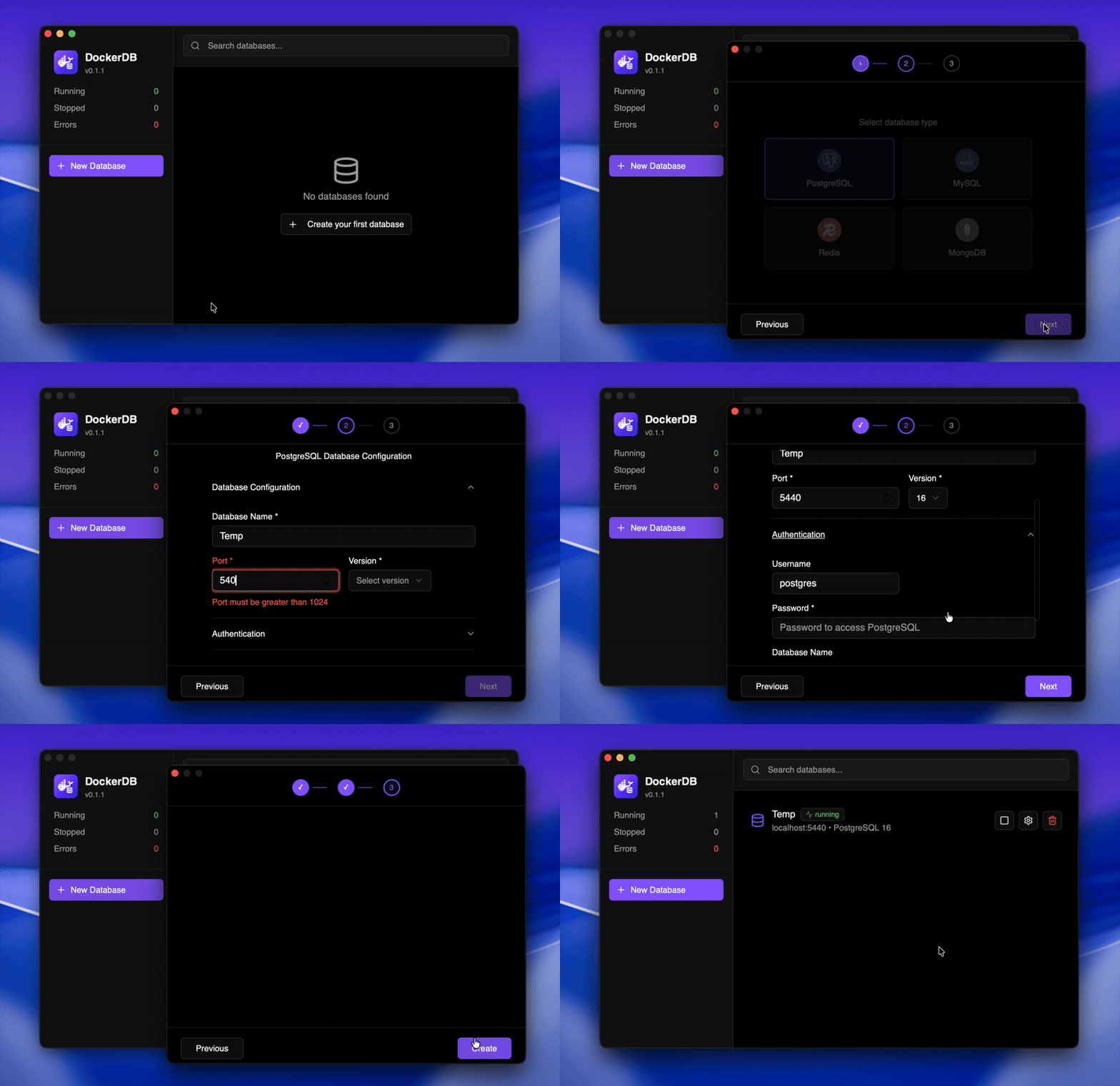
Docker DB Manager is a desktop application that simplifies Docker database container management. No complex commands, no terminal, just an intuitive interface to create and manage your development databases.
## 🎯 Features
- 🐳 **Intuitive visual management** - Create, start, stop, and delete containers with one click
- 🗄️ **Multiple databases** - Support for the most popular database engines
- 💾 **Data persistence** - Automatic Docker volume management
- 🔧 **Advanced configuration** - Custom ports, environment variables, and specific options
- 📋 **Copy connections** - Connection strings ready to use with one click
- 🔄 **Real-time sync** - Live status updates of your containers
- ⚡ **Native performance** - Built with Rust and Tauri v2
- 🆓 **100% free and open source** - No limits or subscriptions
## 📥 Download
Download the latest version for macOS from the [releases page](https://github.com/AbianS/docker-db-manager/releases).
**Available versions:**
- ✅ macOS (Apple Silicon & Intel)
- ⏳ Windows (coming soon)
- ⏳ Linux (coming soon)
**Requirements:**
- Docker installed and running
- macOS 10.15 or higher
### 🔒 macOS Security Notice
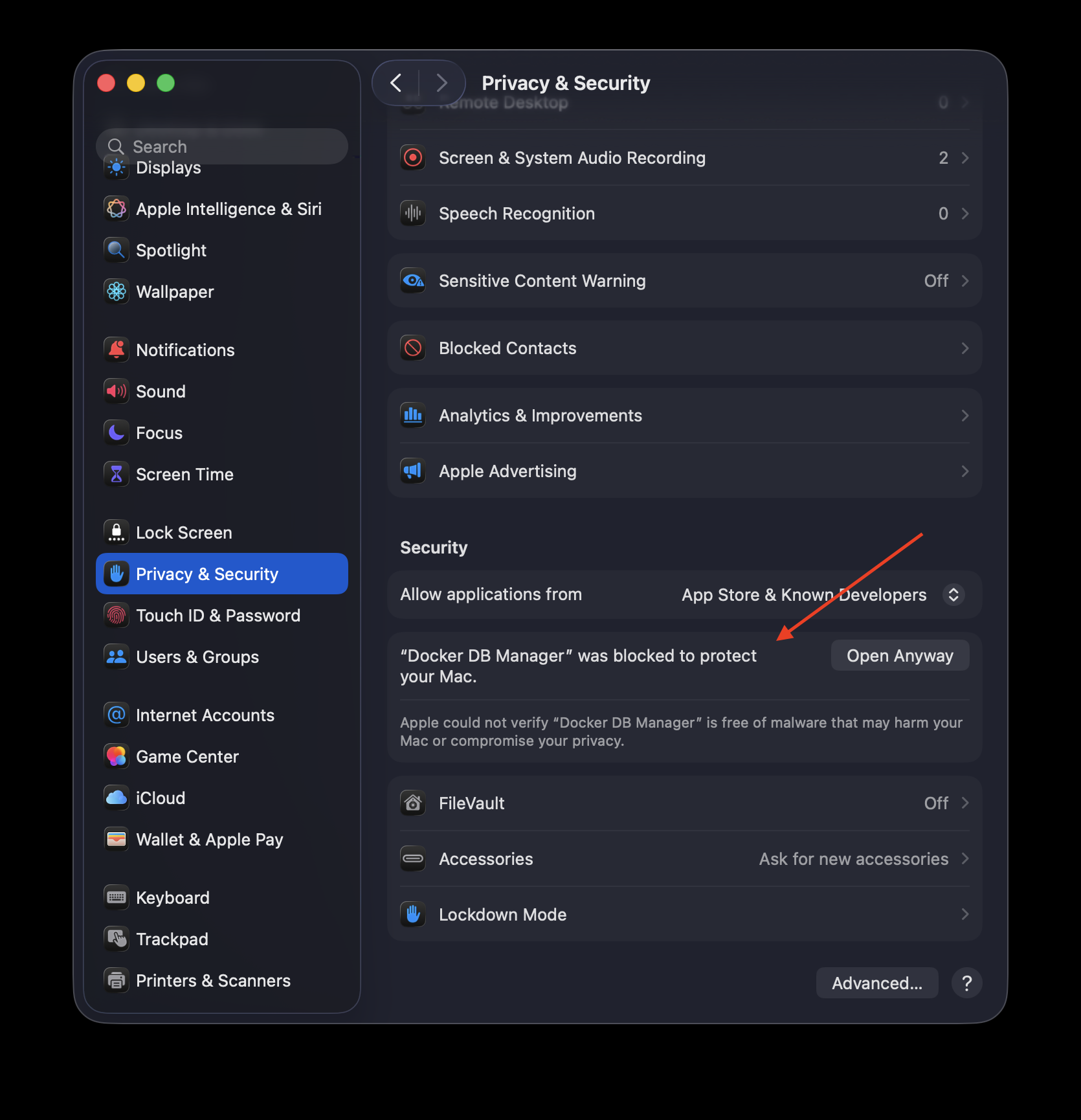
When you first open the app, macOS may show a security warning because the application is not notarized by Apple. To open the app:
1. Go to **System Settings** → **Privacy & Security**
2. Scroll down to the **Security** section
3. You'll see a message: *"Docker DB Manager was blocked to protect your Mac."*
4. Click the **"Open Anyway"** button
5. Confirm by clicking **"Open"** in the dialog
## 📚 Quick Start
1. **Install Docker** if you don't have it yet
2. **Download Docker DB Manager** from [releases](https://github.com/AbianS/docker-db-manager/releases)
3. **Open the application** - it will automatically detect Docker
4. **Create your first container** with the step-by-step wizard
5. **Copy the connection string** and use it in your application
### Connection strings
The application automatically generates connection strings for each database type. Just copy and paste into your application.
## 🛠️ Development
Want to contribute or run the project locally?
```bash
# Clone the repository
git clone https://github.com/AbianS/docker-db-manager.git
cd docker-db-manager
# Install dependencies
npm install
# Run in development mode
npm run tauri dev
# Build for production
npm run tauri build
```
**Tech stack:** React 19, TypeScript, Rust, Tauri v2, Tailwind CSS
## 🤝 Contributing
Contributions are welcome! If you find a bug or have an idea:
1. Open an [Issue](https://github.com/AbianS/docker-db-manager/issues)
2. Fork the project
3. Create your feature branch (`git checkout -b feature/AmazingFeature`)
4. Commit your changes (`git commit -m 'Add some AmazingFeature'`)
5. Push to the branch (`git push origin feature/AmazingFeature`)
6. Open a Pull Request
## 📄 License
This project is licensed under GPL v3. See [LICENSE](LICENSE) for more information.
## ⭐ Like the project?
If you find Docker DB Manager useful, give it a star! ⭐
This helps more developers discover the tool.
---
Made with ❤️ for the developer community