
Hermes Gadget
Hold a button. Ask Hermes. Hear the answer.
A small device for your own Hermes Agent, with its tools, memory, and skills.
Set up a board ·
Try the simulator ·
Read the docs
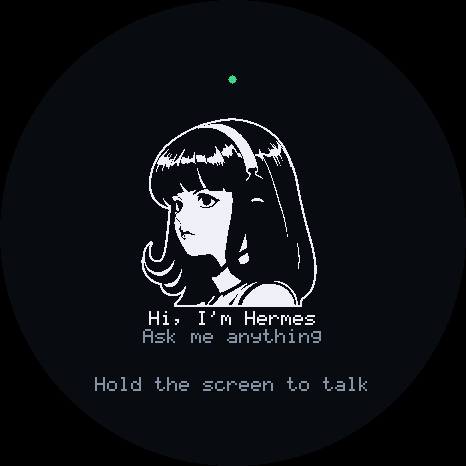
The desktop simulator runs the same device core. No board needed to try it.
## Choose your starting point
| I have a board | I want to try it first | I want to build with it |
|---|---|---|
| [Open the browser installer](https://adolanium.github.io/hermes-gadget-sdk/installer.html) | [Start the desktop simulator](docs/desktop.md) | [Explore the SDK](docs/development.md) |
| Install over USB, connect Wi-Fi, and pair with your Hermes. | Try a scripted demo, then connect your own Hermes. | Add a board, device actions, sensors, or your own face. |
| Chrome or Edge, a USB data cable, 2.4 GHz Wi-Fi, and Hermes. No firmware toolchain. | Python 3.10+, CMake 3.16+, and a C++17 compiler. | Start with the development guide and tests. |
## What you can do
- **Talk and listen.** Hold TALK to speak, release to send, and hear your Hermes reply.
- **See what is happening.** Read replies, answer confirmation questions, and receive cards from your agent.
- **Let Hermes act.** Expose the gadget's LEDs, sensors, and other controls as agent tools.
Your Hermes does the thinking. Real conversations need Hermes Agent and the Gadget plugin. Voice also needs speech recognition and text-to-speech configured. The demo server gives scripted replies. Follow [Connect Hermes](docs/connect-hermes.md) when you are ready.
## Supported hardware
Hermes Gadget runs on ESP32-S3 boards and Raspberry Pi 4/5, with a desktop simulator for trying it without hardware. See [Supported hardware](docs/supported-hardware.md) to compare boards, controls, audio, and setup options.
Hardware ports remain experimental until a complete physical verification report is recorded for the exact revision. Check the [verification table](docs/hardware-validation.md) before choosing a board.
## Try the demo from a checkout
Already have Python, CMake, and a compiler? Start here.
In your activated environment at the repository root:
```bash
python -m pip install -e ".[dev]"
hermes-gadget build-sim --test
hermes-gadget devserver --pairing
```
In a second terminal with the same environment activated:
```bash
hermes-gadget sim --url ws://127.0.0.1:8765/gadget --board sim-466x466-round
```
Type `approve ` in the first terminal, using the code on the device. Type a message in the simulator to receive a streamed echo. The [desktop guide](docs/desktop.md) covers platform-specific prerequisites and live audio.
## On the screen
| Ready | Listening | Thinking | Speaking |
|:---:|:---:|:---:|:---:|
|  | 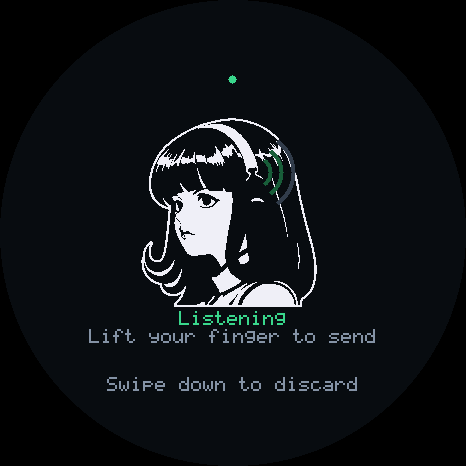 | 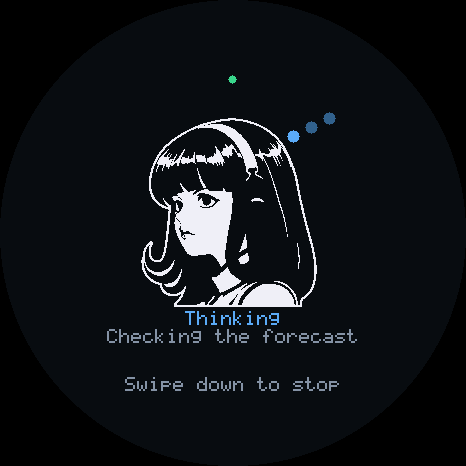 | 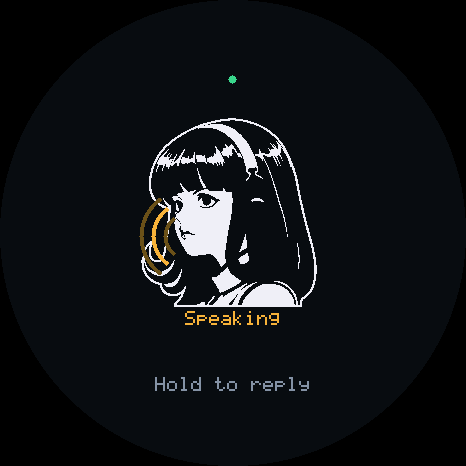 |
These images show the simulator's device display. The [simulator guide](docs/simulator.md) covers its desktop controls, board profiles, and scripted runs.
## Find the right guide
| Use a gadget | Build with the SDK |
|---|---|
| [Choose a starting point](docs/getting-started.md) | [Development and tests](docs/development.md) |
| [Set up a board](docs/setup-board.md) | [Add a board, actions, or sensors](docs/porting.md) |
| [Try the simulator](docs/desktop.md) | [Customize the face](docs/faces.md) |
| [Run a Linux gadget](docs/linux.md) | [Hardware verification](docs/hardware-validation.md) |
| [Connect Hermes](docs/connect-hermes.md) | [Architecture](docs/architecture.md) |
| [What the plugin does on your machine](plugin/README.md#what-it-does-on-your-machine) | |
| [Talk, type, and interrupt](docs/using-gadget.md) | [Protocol](docs/protocol.md) |
| [Change Wi-Fi or update firmware](docs/setup-board.md#manage-an-existing-gadget) | [Hermes integration reference](docs/hermes-integration.md) |
| [Remote access with Tailscale Funnel](docs/tailscale-funnel.md) | |
| [Reach Hermes over your tailnet](docs/tailnet.md) | Experimental |
| [Troubleshooting](docs/troubleshooting.md) | [Hardware and wiring](docs/hardware.md) |
## Project status
See the [changelog](CHANGELOG.md) for release highlights and contributor credits.
[Releases](https://github.com/Adolanium/hermes-gadget-sdk/releases/latest) include prebuilt firmware for the profiles listed in that release. Newly merged profiles need a source build until the next release. After the first USB flash, `hermes gadget update` installs new firmware over the air. A build that cannot reach Hermes rolls itself back.
The simulator and firmware share a portable C++17 core. CI tests the core, Python tools, installer, and plugin against a real Hermes gateway, and builds every supported board. The [development guide](docs/development.md) describes the test suites and pinned Hermes version.
After installing firmware, you can [configure Wi-Fi from your phone](docs/setup-board.md#set-up-wi-fi-with-your-phone) through the gadget's temporary network. USB setup remains available. Wake-word activation is not included.
The [Home Assistant and MQTT examples](docs/home-automation.md) expose a configured lamp and temperature sensor through a Linux gadget. They include pairing instructions, fixed action targets, asynchronous completion and local integration tests.
[](https://github.com/Adolanium/hermes-gadget-sdk/actions/workflows/ci.yml)
[](https://github.com/Adolanium/hermes-gadget-sdk/actions/workflows/hermes.yml)
[](https://www.greptile.com/?utm_source=oss_badge&utm_medium=readme&utm_campaign=greptile_for_open_source)
## Contributing
Bug reports from real boards, new boards, fixes, and docs are welcome. Read [CONTRIBUTING.md](CONTRIBUTING.md). Report security problems privately through [SECURITY.md](SECURITY.md).
## Affiliation and trademarks
Hermes Gadget is an **independent, community-made project**. It is not affiliated with, endorsed by, sponsored by or supported by Nous Research.
"Hermes", "Hermes Agent", "Nous Research" and the Hermes Agent mascot (the girl with the headphones, sometimes called "Nous Girl") are trademarks or brand assets of Nous Research. They appear here only to describe compatibility with Hermes Agent.
## License
Project code and documentation are licensed under the [MIT license](LICENSE).
Third-party dependencies, adapted drivers, and artwork retain their respective licenses. See [Third-party licenses and attribution](THIRD_PARTY_NOTICES.md) and [NOTICE](NOTICE) for details.
The MIT license grants no rights to Nous Research's names or marks.