


Install · One window · What a factory is · Subharnesses · Benchmarks · Headless · Guide
 https://github.com/user-attachments/assets/bc87e460-17b1-4d7a-8c69-284b524ea194
Real speed, with sound. The three tasks run live on DeepSeek V4.1 Flash; the other projects and the large task tree are a seeded demo machine.
## Install
```bash
curl -fsSL https://agentfield.ai/get/codeaf | bash
codeaf
```
https://github.com/user-attachments/assets/bc87e460-17b1-4d7a-8c69-284b524ea194
Real speed, with sound. The three tasks run live on DeepSeek V4.1 Flash; the other projects and the large task tree are a seeded demo machine.
## Install
```bash
curl -fsSL https://agentfield.ai/get/codeaf | bash
codeaf
```
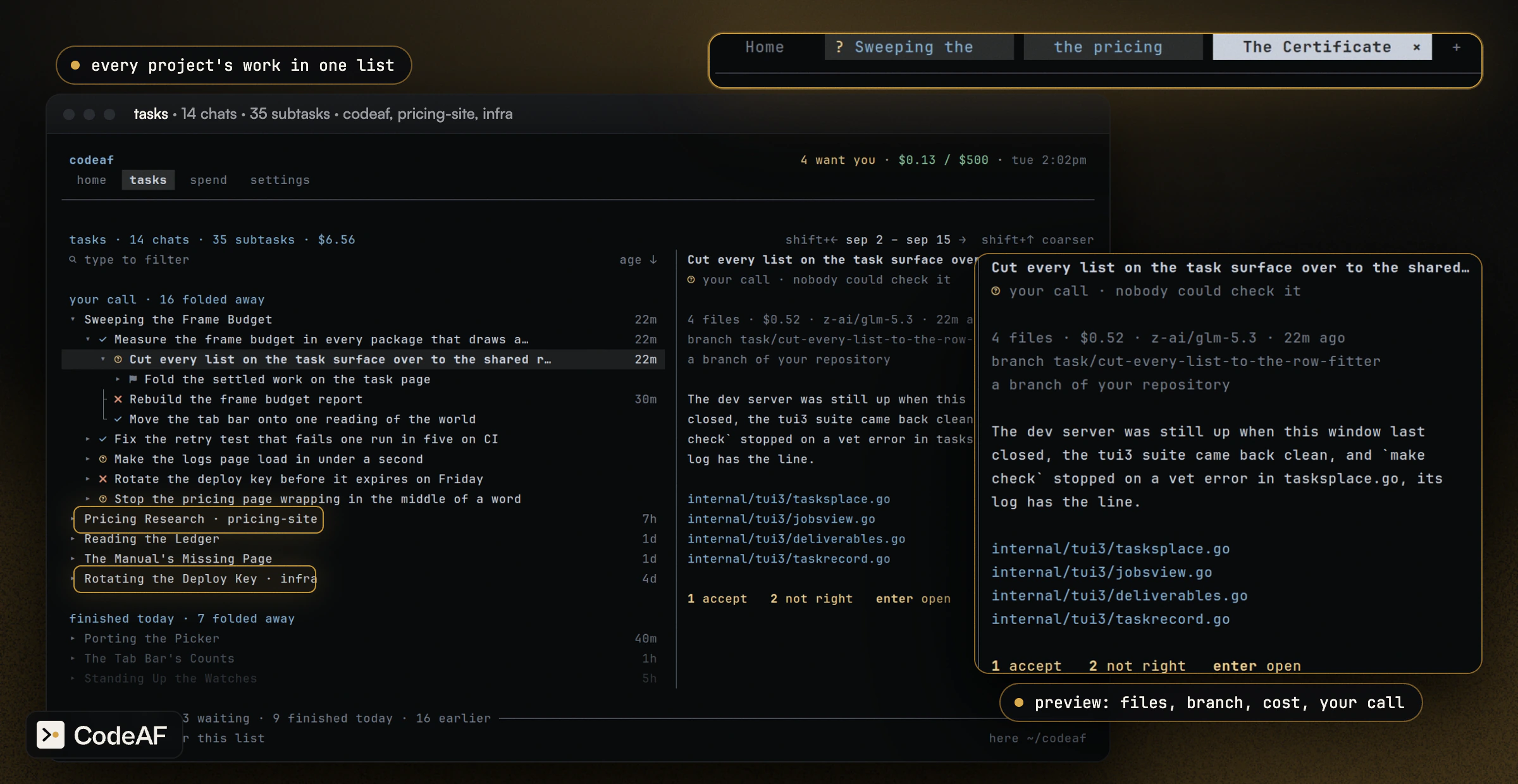 `home` answers what needs you, what is unread, what is running and what it
cost, for all of them at once. A digit answers a question from its row.
`home` answers what needs you, what is unread, what is running and what it
cost, for all of them at once. A digit answers a question from its row.
 ## Talk, and it becomes tasks
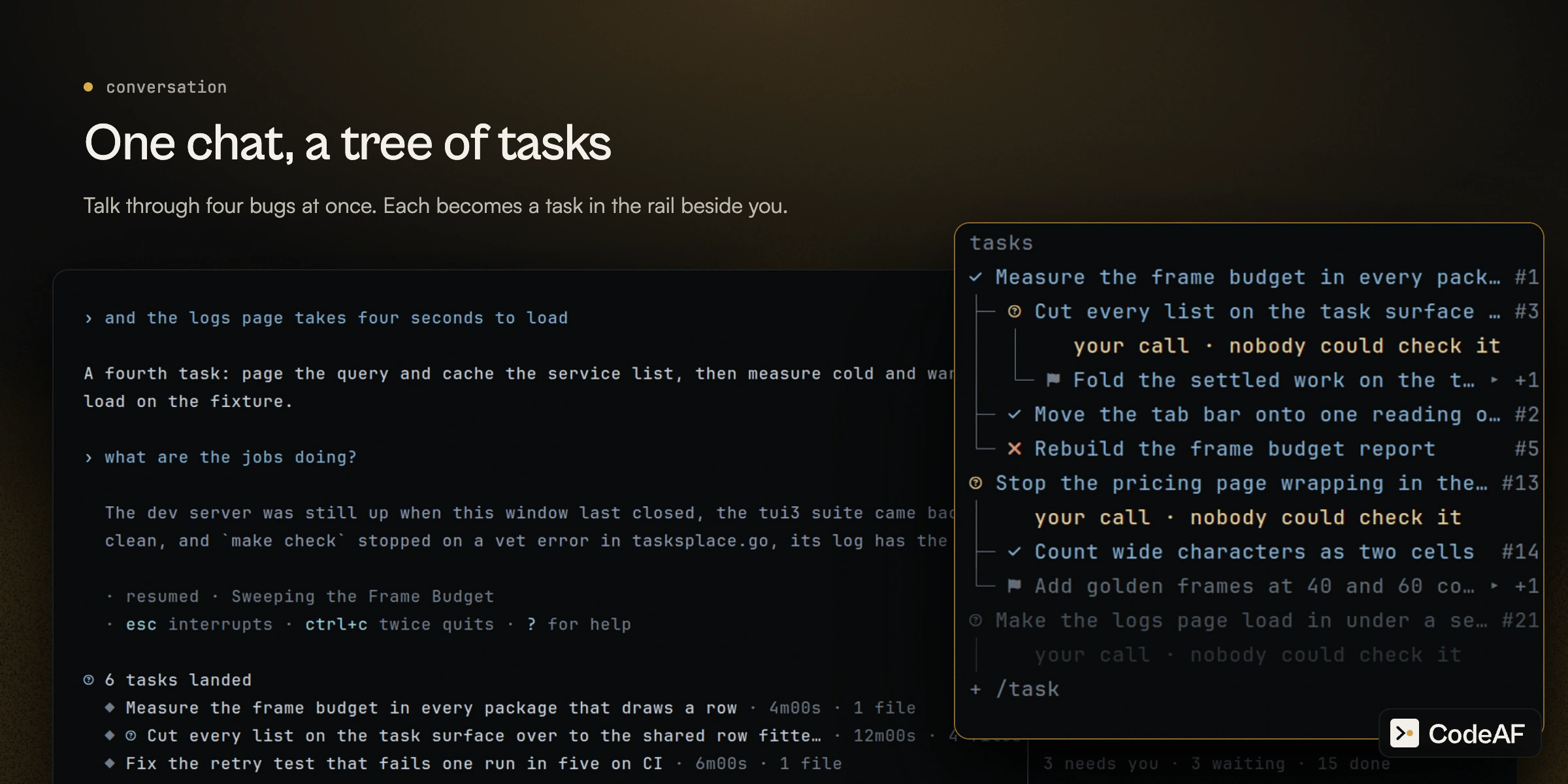
Say what is wrong the way you would to a colleague. Name three things in one
message and each can become its own task, in its own copy of the repository, on
its own branch. The conversation stays yours while they run, and the rail beside it
shows every task and its subtasks.
```text
› three more while you are on it: the retry test fails one run in five on CI,
the pricing page wraps mid word on phones, and the deploy key expires friday
```
## Talk, and it becomes tasks
Say what is wrong the way you would to a colleague. Name three things in one
message and each can become its own task, in its own copy of the repository, on
its own branch. The conversation stays yours while they run, and the rail beside it
shows every task and its subtasks.
```text
› three more while you are on it: the retry test fails one run in five on CI,
the pricing page wraps mid word on phones, and the deploy key expires friday
```
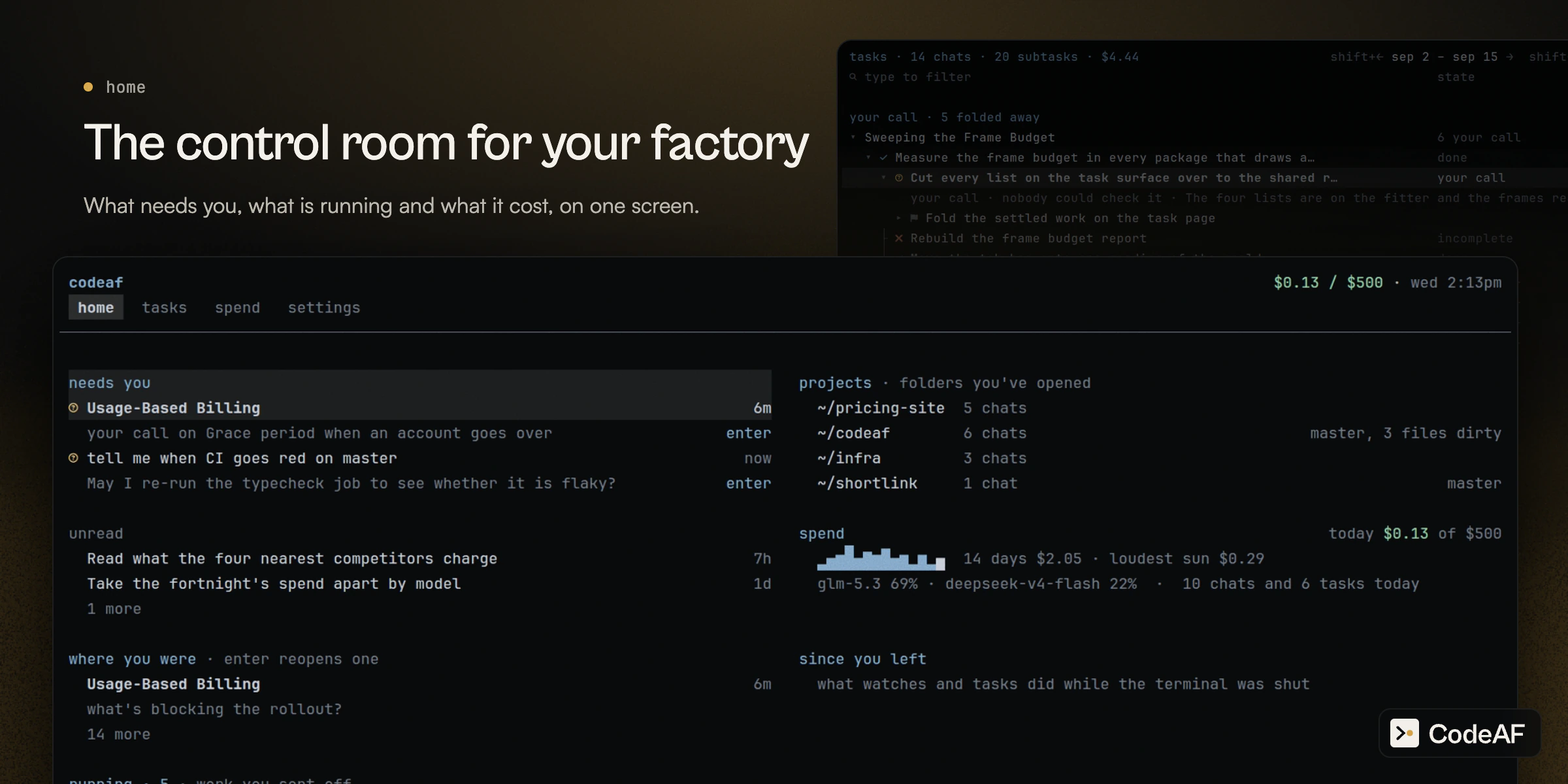
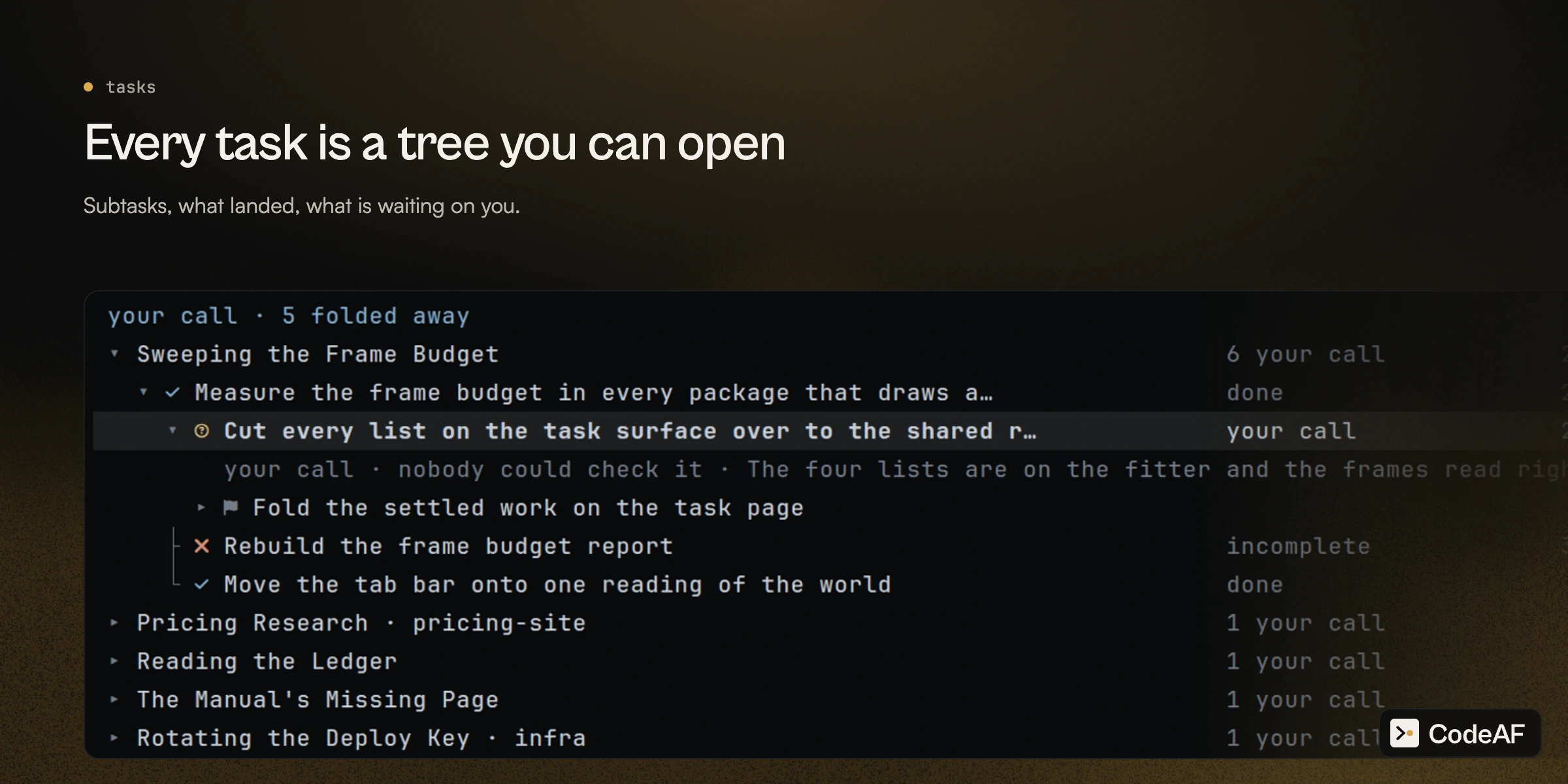
 Work that passes its check lands on your branch by itself, never on `main`,
`dev` or a release branch. Work nothing could check waits under `unread`:
`1` accept, `2` not right.
Work that passes its check lands on your branch by itself, never on `main`,
`dev` or a release branch. Work nothing could check waits under `unread`:
`1` accept, `2` not right.
 ## What a factory is
Agents run by hand got fast, but the scheduling, checking and merging stayed
with you.
## What a factory is
Agents run by hand got fast, but the scheduling, checking and merging stayed
with you.
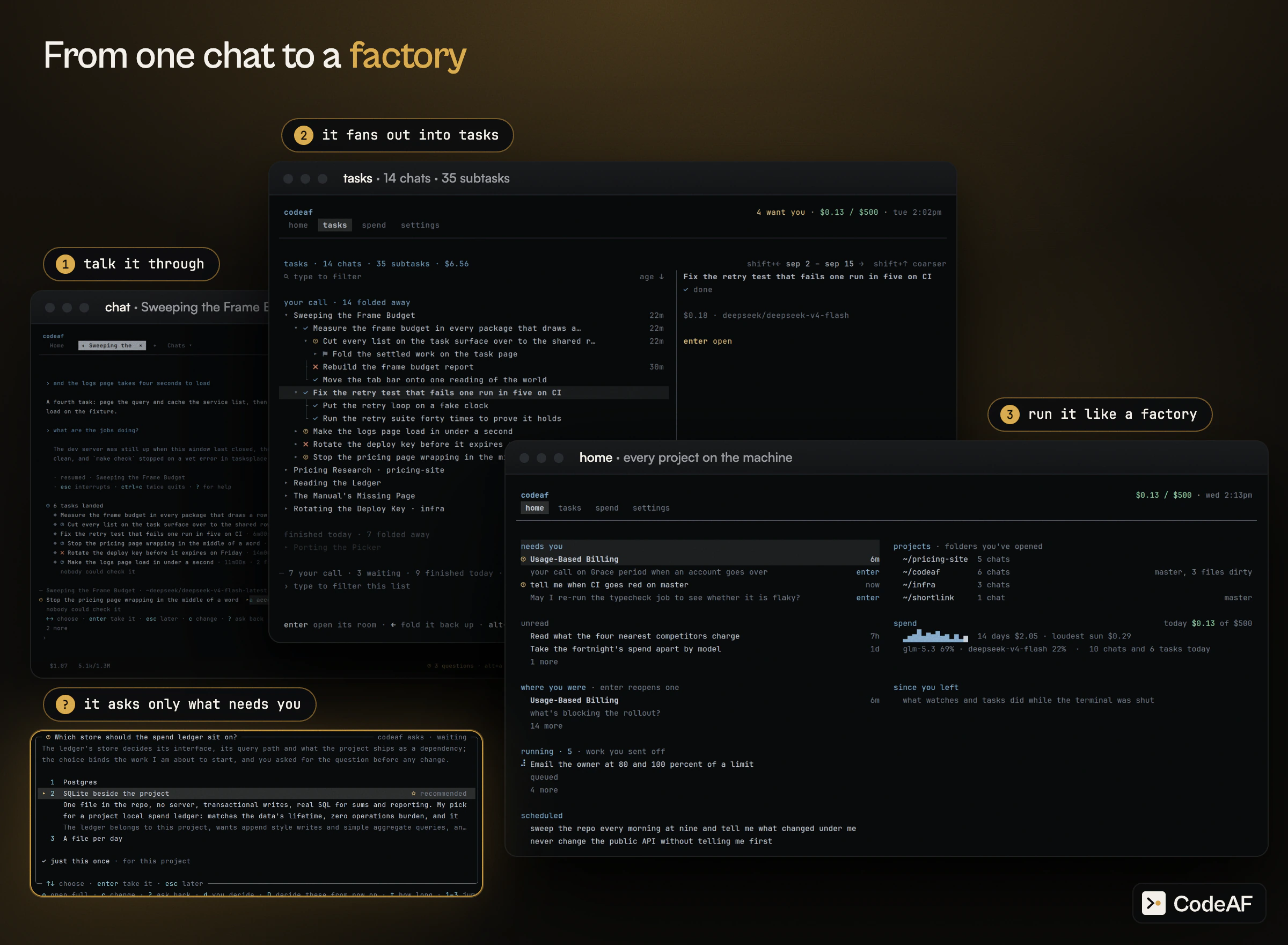
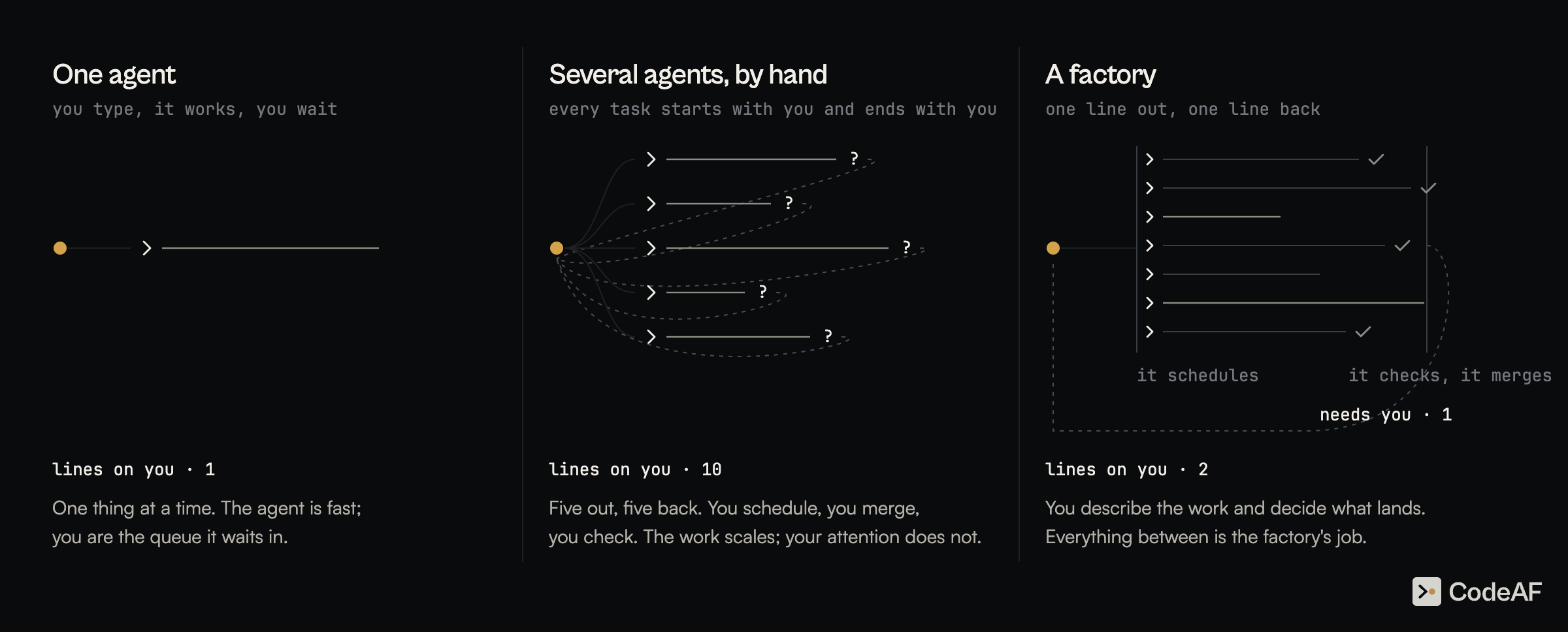 A factory is the third picture: one line out, one line back.
- **It does the middle.** It sizes the work, splits it, runs the parts where
they cannot collide, tests what came back and merges what passed.
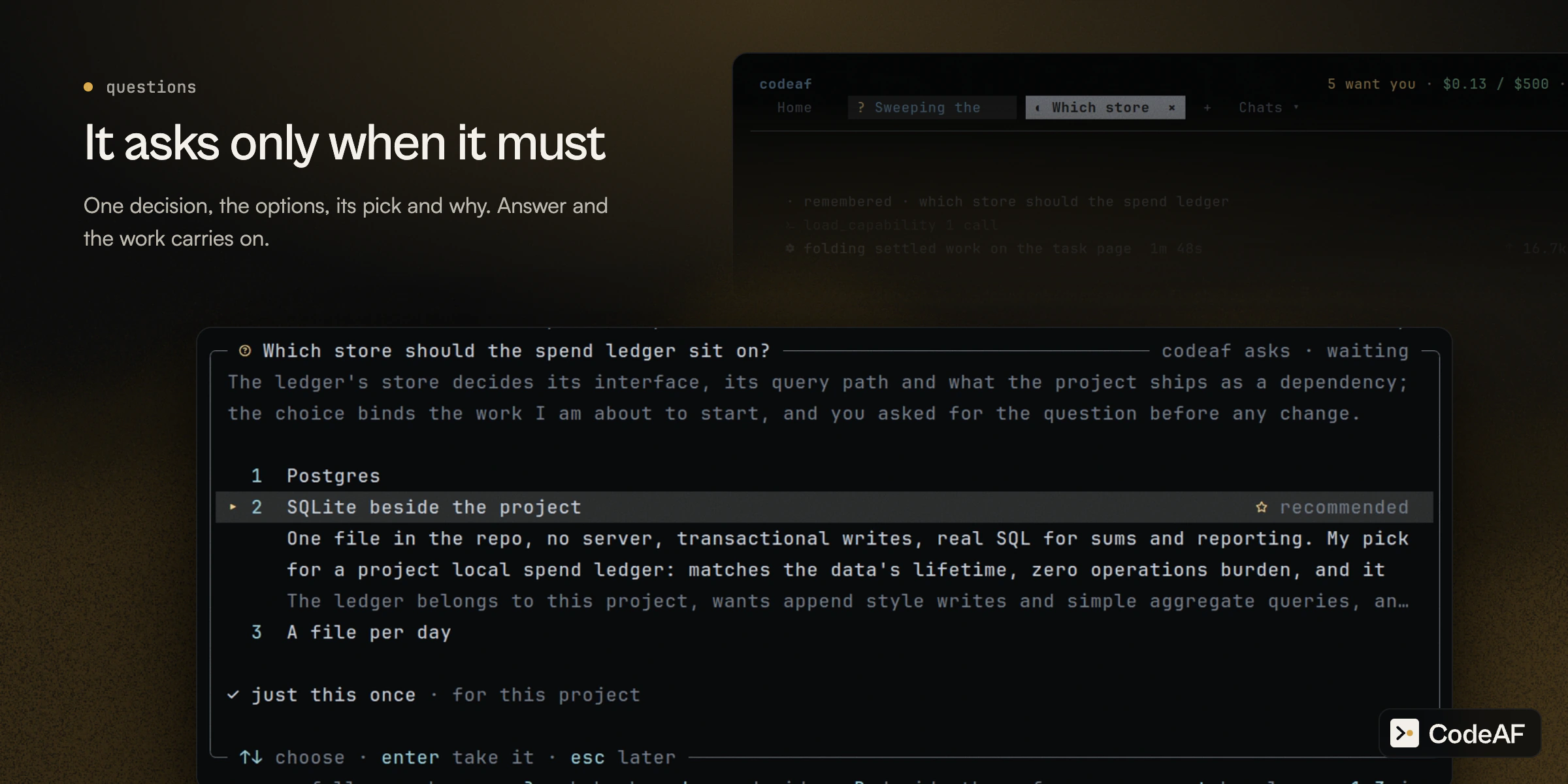
- **It asks only when it must.** A question waits under `needs you`, from every
project. Everything else it decides, writes down, and carries on.
A factory is the third picture: one line out, one line back.
- **It does the middle.** It sizes the work, splits it, runs the parts where
they cannot collide, tests what came back and merges what passed.
- **It asks only when it must.** A question waits under `needs you`, from every
project. Everything else it decides, writes down, and carries on.
 ## Subharnesses: specialists built for one job
Build a change, review a pull request, or audit local code. Each built-in specialist has a process for its own job and runs as a task beside your conversation. Open its task to follow the work or stop it; its result comes back to the chat. The built-in specialists run on macOS and Linux, with no extra specialist installation.
| Specialist | Try it in the chat | What comes back |
| --- | --- | --- |
| [senior-dev](https://agentfield.ai/docs/codeaf/senior-dev): coding changes | `/senior-dev fix the retry bug and add tests` | A submitted change and the project's build and test results, or an explanation of what could not be checked. In git, it works in a private copy on its own branch. |
| [sec](https://agentfield.ai/docs/codeaf/sec): local security audits | `/sec changes since main` | Security findings with evidence and suggested fixes; Markdown, JSON and SARIF reports. Use `/sec` alone for the whole repository. |
| [review](https://agentfield.ai/docs/codeaf/review): GitHub pull requests | `/review owner/repo#123 focus on retries` | Findings with file locations, reasons, suggested fixes and review coverage; Markdown and JSON reports. |
**review** is imported from [PR-AF](https://github.com/Agent-Field/pr-af), and **sec** from [SEC-AF](https://github.com/Agent-Field/sec-af), under their codeaf command names. Both read source code without running your tests, build, app or exploits. They leave your code unchanged; posting a review or fixing findings is a separate action you request. Read the report's coverage and any incomplete analysis before acting on it. As always, it's important to note that a lack of findings does not and can not guarantee a lack of security problems.
The [coding benchmark below](#benchmarks) measures senior-dev. PR-AF publishes its own [Martian Code-Review-Bench results](https://github.com/Agent-Field/pr-af#benchmark-position); those are results for the original project, not a measurement of codeaf's imported review specialist.
**Your own saved programs:** ask codeaf to design a harness for recurring work, such as triaging flaky tests. Review and approve its design, then open `/subharness` to run it again. See [Saved shapes of work](internal/manual/chat/saved-shapes-of-work.md).
## Benchmarks
## Subharnesses: specialists built for one job
Build a change, review a pull request, or audit local code. Each built-in specialist has a process for its own job and runs as a task beside your conversation. Open its task to follow the work or stop it; its result comes back to the chat. The built-in specialists run on macOS and Linux, with no extra specialist installation.
| Specialist | Try it in the chat | What comes back |
| --- | --- | --- |
| [senior-dev](https://agentfield.ai/docs/codeaf/senior-dev): coding changes | `/senior-dev fix the retry bug and add tests` | A submitted change and the project's build and test results, or an explanation of what could not be checked. In git, it works in a private copy on its own branch. |
| [sec](https://agentfield.ai/docs/codeaf/sec): local security audits | `/sec changes since main` | Security findings with evidence and suggested fixes; Markdown, JSON and SARIF reports. Use `/sec` alone for the whole repository. |
| [review](https://agentfield.ai/docs/codeaf/review): GitHub pull requests | `/review owner/repo#123 focus on retries` | Findings with file locations, reasons, suggested fixes and review coverage; Markdown and JSON reports. |
**review** is imported from [PR-AF](https://github.com/Agent-Field/pr-af), and **sec** from [SEC-AF](https://github.com/Agent-Field/sec-af), under their codeaf command names. Both read source code without running your tests, build, app or exploits. They leave your code unchanged; posting a review or fixing findings is a separate action you request. Read the report's coverage and any incomplete analysis before acting on it. As always, it's important to note that a lack of findings does not and can not guarantee a lack of security problems.
The [coding benchmark below](#benchmarks) measures senior-dev. PR-AF publishes its own [Martian Code-Review-Bench results](https://github.com/Agent-Field/pr-af#benchmark-position); those are results for the original project, not a measurement of codeaf's imported review specialist.
**Your own saved programs:** ask codeaf to design a harness for recurring work, such as triaging flaky tests. Review and approve its design, then open `/subharness` to run it again. See [Saved shapes of work](internal/manual/chat/saved-shapes-of-work.md).
## Benchmarks
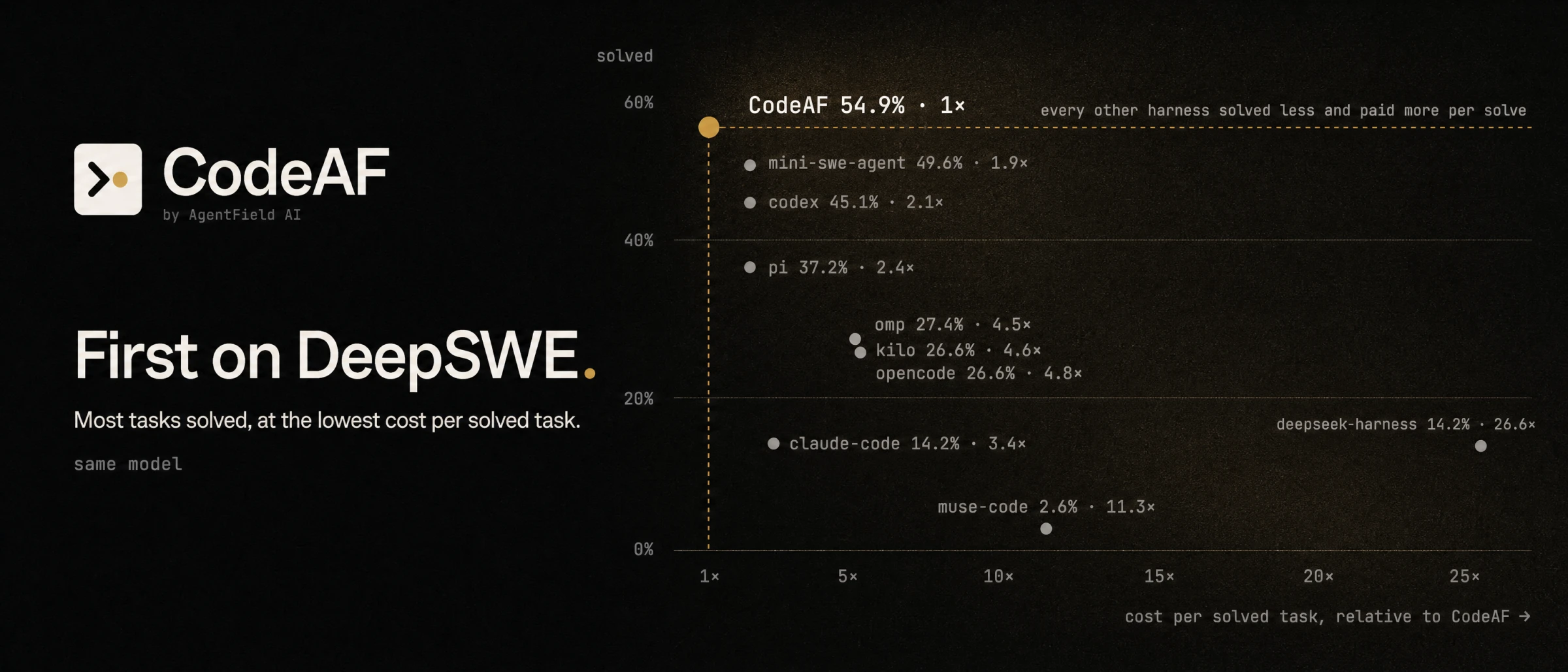 `/senior-dev`, CodeAF's developer subharness, against nine other coding harnesses
on the same model, DeepSeek V4 Flash: 113 real GitHub issues from DeepSWE, graded
by the official verifiers. It solved the most issues and paid the least for each
one it solved.
## The right model for each call
One session, many models. The model you talk to is one seat. Every task you hand
off runs on a crew of three more, picked for that task from what kind of work it
is — a bug fix, a complex fix, open-ended work, or something else:
| seat | what it does |
| --- | --- |
| worker | does the work. Most of the bill. |
| planner | plans runs and designs subharnesses |
| checker | checks finished work before it lands |
The crew is auto by default. Each seat is scored from its catalog metadata by
learned weights, moved by how this install's own tasks ended, over every model your
connected providers serve. `/crew` shows it: the seats, the allowed models, the
providers, a per-task limit ($5 unless set) and an optional daily cap, and today's
spend. `/crew pin checker
`/senior-dev`, CodeAF's developer subharness, against nine other coding harnesses
on the same model, DeepSeek V4 Flash: 113 real GitHub issues from DeepSWE, graded
by the official verifiers. It solved the most issues and paid the least for each
one it solved.
## The right model for each call
One session, many models. The model you talk to is one seat. Every task you hand
off runs on a crew of three more, picked for that task from what kind of work it
is — a bug fix, a complex fix, open-ended work, or something else:
| seat | what it does |
| --- | --- |
| worker | does the work. Most of the bill. |
| planner | plans runs and designs subharnesses |
| checker | checks finished work before it lands |
The crew is auto by default. Each seat is scored from its catalog metadata by
learned weights, moved by how this install's own tasks ended, over every model your
connected providers serve. `/crew` shows it: the seats, the allowed models, the
providers, a per-task limit ($5 unless set) and an optional daily cap, and today's
spend. `/crew pin checker 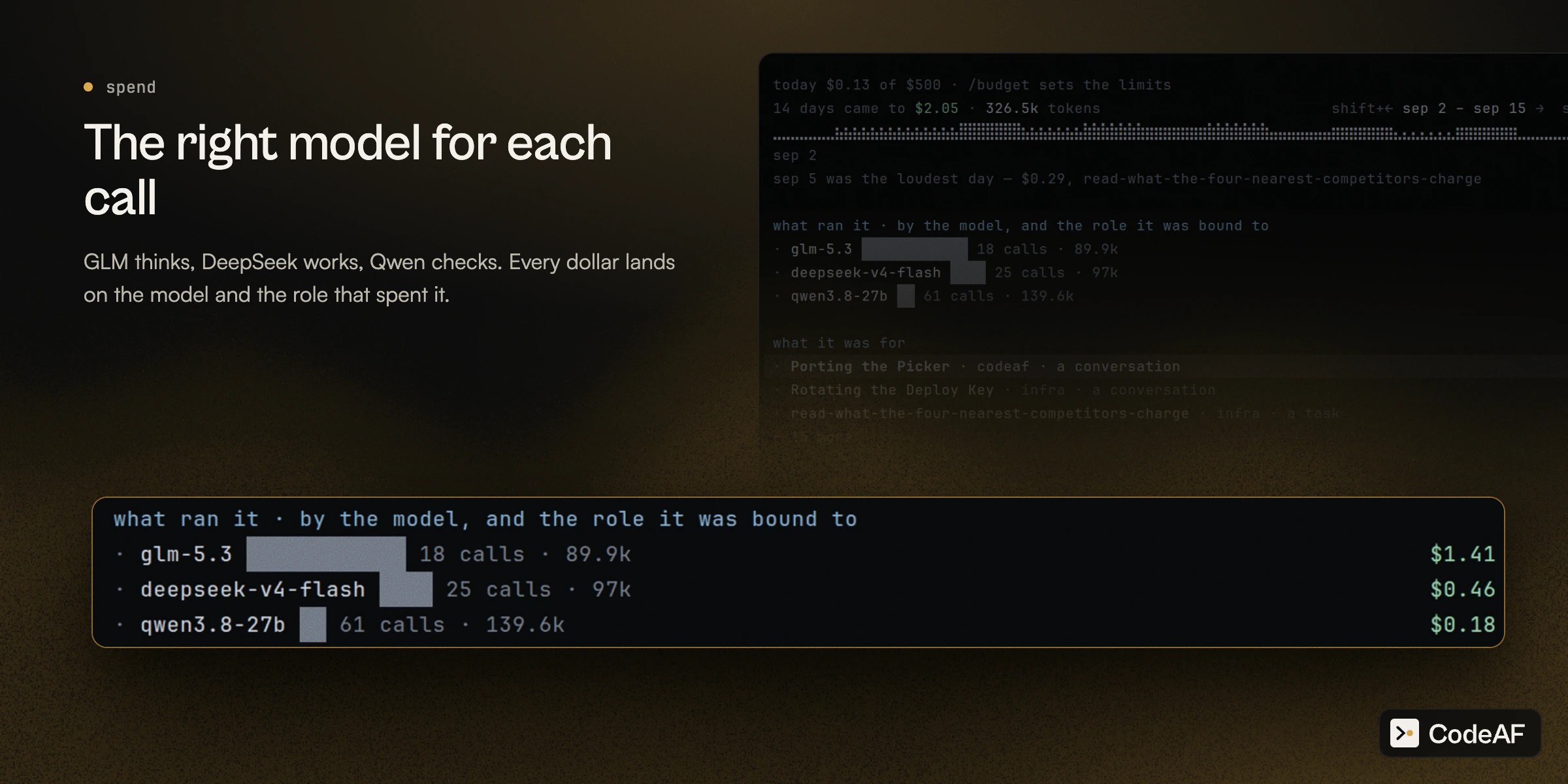 Providers built in: OpenRouter, DeepSeek, GLM, Kimi, MiniMax, Qwen, Codex through a
ChatGPT plan, Ollama and any OpenAI-compatible endpoint.
## Model Pool
Installs can pool what they have measured about models. It is on by
default: what an install sends is computed, text-free numbers about the models
it ran (role, model, a number, which model judged, door, size bucket, day) under
a per-install nonce, never code,
prompts, paths or an identity, and `codeaf pool status` shows exactly what is
waiting to go. Turn it off with `model_pool = off` on the settings sheet or
`CODEAF_MODEL_POOL=off`; `read` uses the pool and sends nothing, and
`CODEAF_TELEMETRY=off` caps it at `read` along with the usage counts. The relay
publishes a signed index of what the installs measured. The index is mirrored on the `model-pool` branch at
`pool/index.json`. See [the relay guide](docs/relay.md) for running your own.
[](https://github.com/Agent-Field/CodeAF/tree/model-pool)
## Automations
Reminders, scheduled work and watches are one thing, and you set them up by
saying them. "Remind me at 6 to leave." "Every Monday at 9, draft the weekly
update." "Tell me when CI on main goes red." A card shows exactly what will run,
when, and what one run may spend; `1` saves it. They run while codeaf is open,
anything missed while it was closed runs once when it opens, and `/automations`
shows each one with its history. A rule for all future work — "never commit
straight to main here" — is a memory marked always.
## Headless is the other front door
The same factory, with the conversation removed, for CI, cron, scripts and
benchmark harnesses.
```bash
codeaf do "bump every dependency whose changelog is worth reading" --timeout 30m --json
```
`do` takes your brief byte for byte, plans, runs and checks it, and prints one
JSON object and an exit code. Where the conversation would ask, it takes its
best answer and records the assumption. `exec` runs one worker with no plan;
`run` executes a plan you edited. [The contract](docs/HEADLESS.md).
## Run it on your dev box, drive it from anywhere
Most agents on a remote box mean ssh, tmux, and a terminal that lags on every
key. CodeAF splits in two instead. The screen runs on the machine in front of
you. The conversation runs on the machine that owns the work, and `home` shows
that machine: its projects, tasks and automations.
Providers built in: OpenRouter, DeepSeek, GLM, Kimi, MiniMax, Qwen, Codex through a
ChatGPT plan, Ollama and any OpenAI-compatible endpoint.
## Model Pool
Installs can pool what they have measured about models. It is on by
default: what an install sends is computed, text-free numbers about the models
it ran (role, model, a number, which model judged, door, size bucket, day) under
a per-install nonce, never code,
prompts, paths or an identity, and `codeaf pool status` shows exactly what is
waiting to go. Turn it off with `model_pool = off` on the settings sheet or
`CODEAF_MODEL_POOL=off`; `read` uses the pool and sends nothing, and
`CODEAF_TELEMETRY=off` caps it at `read` along with the usage counts. The relay
publishes a signed index of what the installs measured. The index is mirrored on the `model-pool` branch at
`pool/index.json`. See [the relay guide](docs/relay.md) for running your own.
[](https://github.com/Agent-Field/CodeAF/tree/model-pool)
## Automations
Reminders, scheduled work and watches are one thing, and you set them up by
saying them. "Remind me at 6 to leave." "Every Monday at 9, draft the weekly
update." "Tell me when CI on main goes red." A card shows exactly what will run,
when, and what one run may spend; `1` saves it. They run while codeaf is open,
anything missed while it was closed runs once when it opens, and `/automations`
shows each one with its history. A rule for all future work — "never commit
straight to main here" — is a memory marked always.
## Headless is the other front door
The same factory, with the conversation removed, for CI, cron, scripts and
benchmark harnesses.
```bash
codeaf do "bump every dependency whose changelog is worth reading" --timeout 30m --json
```
`do` takes your brief byte for byte, plans, runs and checks it, and prints one
JSON object and an exit code. Where the conversation would ask, it takes its
best answer and records the assumption. `exec` runs one worker with no plan;
`run` executes a plan you edited. [The contract](docs/HEADLESS.md).
## Run it on your dev box, drive it from anywhere
Most agents on a remote box mean ssh, tmux, and a terminal that lags on every
key. CodeAF splits in two instead. The screen runs on the machine in front of
you. The conversation runs on the machine that owns the work, and `home` shows
that machine: its projects, tasks and automations.
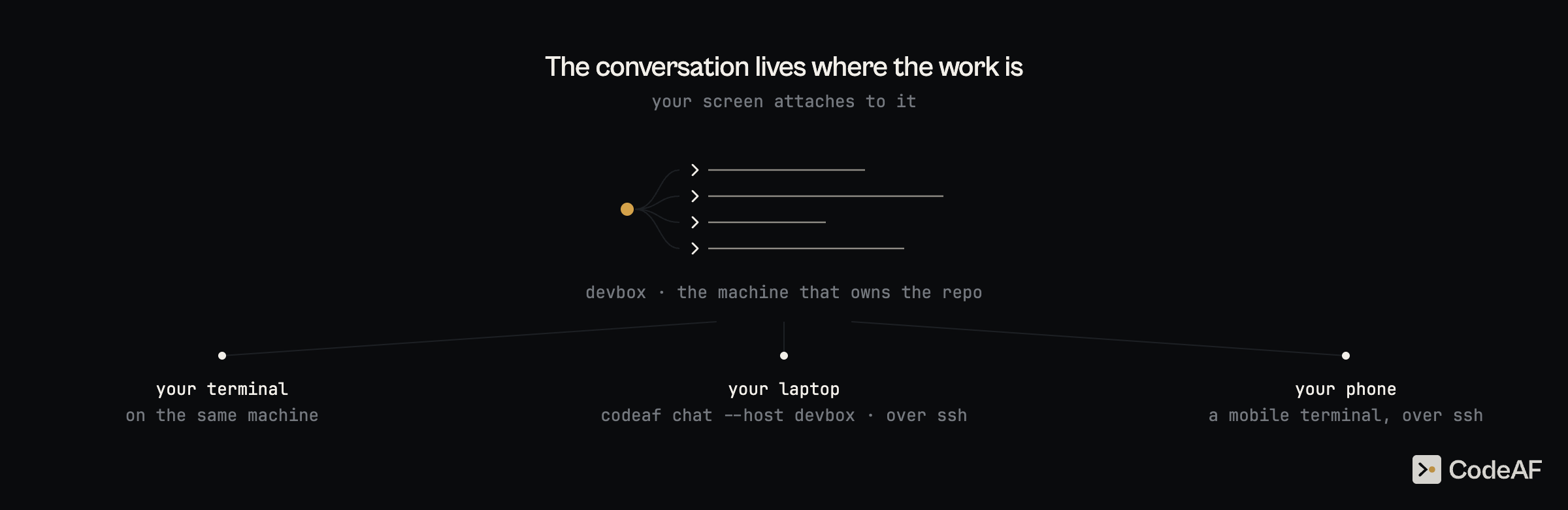 ```bash
codeaf chat --host devbox # your own ssh: config, keys, jump hosts. nothing to install there but codeaf
```
- **Typing never waits on the network.** Drawing the screen makes no round
trip. Pressing enter makes one.
- **Close the lid, the work keeps going.** The conversation lives on devbox. A
dropped link redials for five minutes, a question asked while you were away
is still waiting when you come back, and desk and laptop can watch the same
turn.
- **Files cross both ways.** Paste a screenshot or drop a file and it lands on
devbox. Click a path in a reply and it opens here, in your own editor.
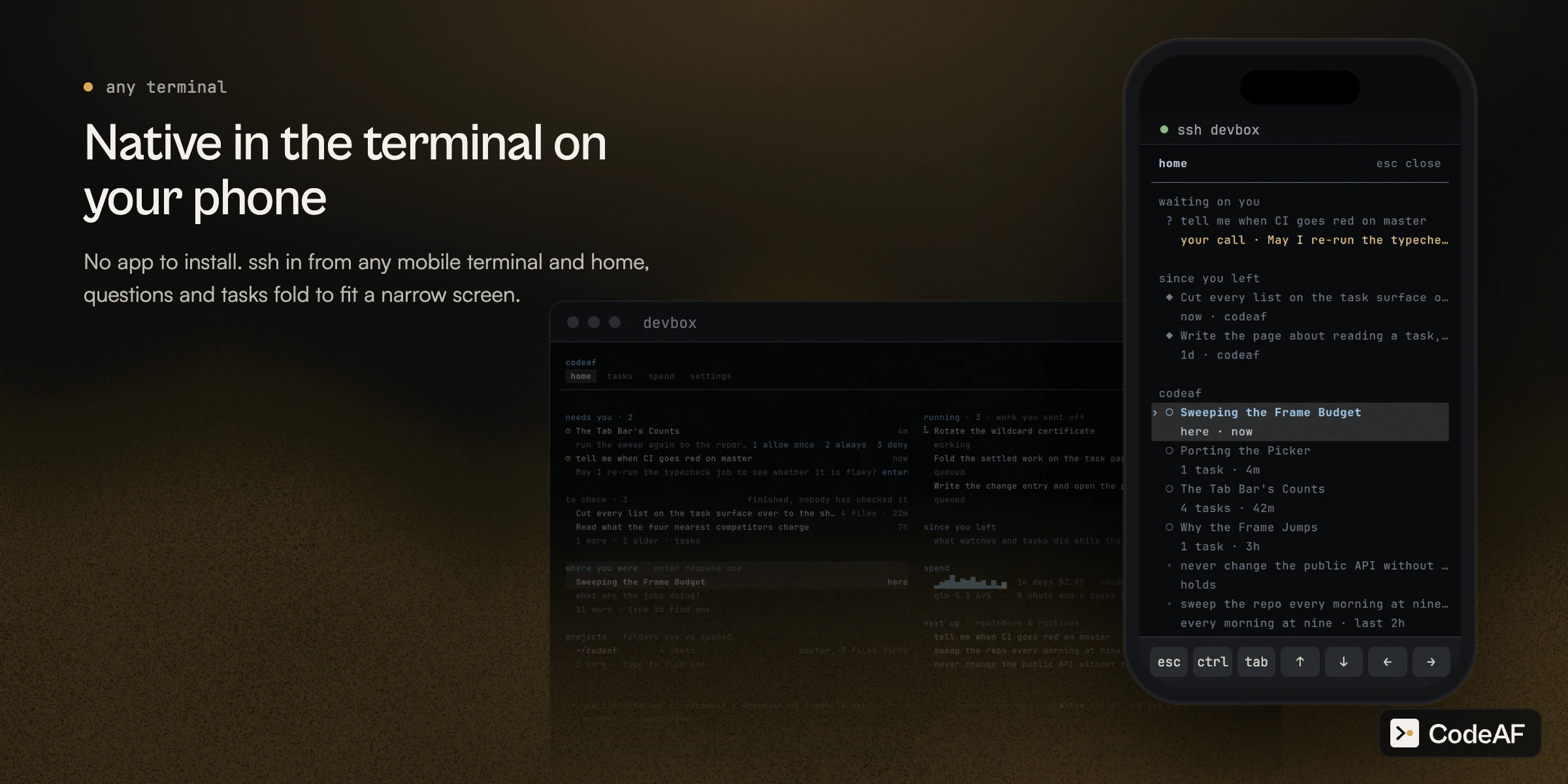
On your phone there is no app to install. ssh in from any mobile terminal, run
`codeaf` in the project, and it joins the same live conversation, folded to fit
the screen.
```bash
codeaf chat --host devbox # your own ssh: config, keys, jump hosts. nothing to install there but codeaf
```
- **Typing never waits on the network.** Drawing the screen makes no round
trip. Pressing enter makes one.
- **Close the lid, the work keeps going.** The conversation lives on devbox. A
dropped link redials for five minutes, a question asked while you were away
is still waiting when you come back, and desk and laptop can watch the same
turn.
- **Files cross both ways.** Paste a screenshot or drop a file and it lands on
devbox. Click a path in a reply and it opens here, in your own editor.
On your phone there is no app to install. ssh in from any mobile terminal, run
`codeaf` in the project, and it joins the same live conversation, folded to fit
the screen.
 Still local over a connection: spend, search and memory. Reaching a machine
with no ssh at all, through a relay and a pairing code, is built and switches on
when the hosted relay does. [How it works](docs/REMOTE.md).
## What a copilot does, and what CodeAF does
| | a copilot | CodeAF |
| --- | --- | --- |
| where you work | one window, one repository | every project on the machine, from one control room |
| what you do | watch it type | describe work, answer what needs you, decide what lands |
| what runs | one model, one thread | six seats chosen per call, and subharnesses built for one job |
| how long it lasts | one session | conversations and tasks that outlive the window, automations on a clock |
| without you | it stops | headless, automations, a phone in your pocket |
## Performance benchmark
One Go binary, 53 MB on disk: up to 21x smaller than the field.
| | CodeAF | claude | heaviest rival measured |
| ------------------------ | ------- | -------------- | ----------------------- |
| On disk | 53 MB | 224 MB, 4x | 1.1 GB, 21x (omp) |
| RAM per added session | 27 MB | 216 MB, 8x | 653 MB, 24x (opencode) |
| 16 idle sessions | 507 MB | 3.5 GB, 7x | 10.5 GB, 21x (opencode) |
| Peak during one turn | 122 MB | 421 MB, 3.4x | 1.0 GB, 8x (opencode) |
| Resume a 50-turn session | 145 ms | 392 ms, 2.7x | 3.0 s, 20x (opencode) |
Sixteen of ours fit in half a gigabyte; claude's fourth tab alone needs more.
## Docs
- `codeaf manual`, or `alt+.` for the key map. The manual ships in the binary and the chat reads it too.
- [Guide](docs/GUIDE.md): every flag, key, slash command and exit code.
- [Documentation map](docs/README.md): product manuals, developer architecture, contracts and history.
- [Contributing](CONTRIBUTING.md): setup, validation and pull requests.
## Telemetry
codeaf sends anonymous usage counts to AgentField, on by default.
- **Sent:** version, OS, mode (chat or task), session counts, errors, and total
tokens used — as counts and bands, under a random per-install id.
- **Never:** anything about you or your work. No prompts, code, file names,
paths, repo names, keys, email, IP address, machine name, or model names.
- **Turn off:** the `telemetry` switch in the chat's `/settings`,
`CODEAF_TELEMETRY=off`, or `DO_NOT_TRACK=1`. Any one of them stops every
stream, the Model Pool's rows included.
The `/settings` switch stops sending immediately; turning it back on takes
effect the next time codeaf starts.
This page and [docs/TELEMETRY.md](docs/TELEMETRY.md) are the whole disclosure:
the product itself prints no notice and has no telemetry command. The document
lists every field, when it is sent, and every way to turn it off, and a test
holds it to the code.
Built by the [AgentField](https://github.com/Agent-Field/agentfield) team.
Still local over a connection: spend, search and memory. Reaching a machine
with no ssh at all, through a relay and a pairing code, is built and switches on
when the hosted relay does. [How it works](docs/REMOTE.md).
## What a copilot does, and what CodeAF does
| | a copilot | CodeAF |
| --- | --- | --- |
| where you work | one window, one repository | every project on the machine, from one control room |
| what you do | watch it type | describe work, answer what needs you, decide what lands |
| what runs | one model, one thread | six seats chosen per call, and subharnesses built for one job |
| how long it lasts | one session | conversations and tasks that outlive the window, automations on a clock |
| without you | it stops | headless, automations, a phone in your pocket |
## Performance benchmark
One Go binary, 53 MB on disk: up to 21x smaller than the field.
| | CodeAF | claude | heaviest rival measured |
| ------------------------ | ------- | -------------- | ----------------------- |
| On disk | 53 MB | 224 MB, 4x | 1.1 GB, 21x (omp) |
| RAM per added session | 27 MB | 216 MB, 8x | 653 MB, 24x (opencode) |
| 16 idle sessions | 507 MB | 3.5 GB, 7x | 10.5 GB, 21x (opencode) |
| Peak during one turn | 122 MB | 421 MB, 3.4x | 1.0 GB, 8x (opencode) |
| Resume a 50-turn session | 145 ms | 392 ms, 2.7x | 3.0 s, 20x (opencode) |
Sixteen of ours fit in half a gigabyte; claude's fourth tab alone needs more.
## Docs
- `codeaf manual`, or `alt+.` for the key map. The manual ships in the binary and the chat reads it too.
- [Guide](docs/GUIDE.md): every flag, key, slash command and exit code.
- [Documentation map](docs/README.md): product manuals, developer architecture, contracts and history.
- [Contributing](CONTRIBUTING.md): setup, validation and pull requests.
## Telemetry
codeaf sends anonymous usage counts to AgentField, on by default.
- **Sent:** version, OS, mode (chat or task), session counts, errors, and total
tokens used — as counts and bands, under a random per-install id.
- **Never:** anything about you or your work. No prompts, code, file names,
paths, repo names, keys, email, IP address, machine name, or model names.
- **Turn off:** the `telemetry` switch in the chat's `/settings`,
`CODEAF_TELEMETRY=off`, or `DO_NOT_TRACK=1`. Any one of them stops every
stream, the Model Pool's rows included.
The `/settings` switch stops sending immediately; turning it back on takes
effect the next time codeaf starts.
This page and [docs/TELEMETRY.md](docs/TELEMETRY.md) are the whole disclosure:
the product itself prints no notice and has no telemetry command. The document
lists every field, when it is sent, and every way to turn it off, and a test
holds it to the code.
Built by the [AgentField](https://github.com/Agent-Field/agentfield) team.