# Does AI recommend your product? Who shows up instead?
**Enter a domain. Compare how models describe your product, who they recommend, and which sources they cite.**
You have built a product, written the docs and worked to get the word out. When people ask AI for tools, does your product make it into the answer?
**NiubiGEO is an open-source tool for tracking brand visibility and competitors in AI answers.** Start with a domain to see how different models describe your product and which competitors they name. Then test keywords to find out who appears in the answers. Open any result to inspect the original response and returned sources.
> **Open the GEO reporting black box. Put evidence in your hands.**
---
## What can you find out?
- **How AI sees your product.** What does it call your brand, and what does it think you do? Do different models agree?
- **Who else appears.** Which products does each model associate with yours? Do you or your competitors appear in keyword tests?
- **Which words it associates with you.** Compare the keywords models connect to your brand and other products to find differences worth investigating.
- **Where the results come from.** Inspect original answers, returned citations and changes across repeated tests.
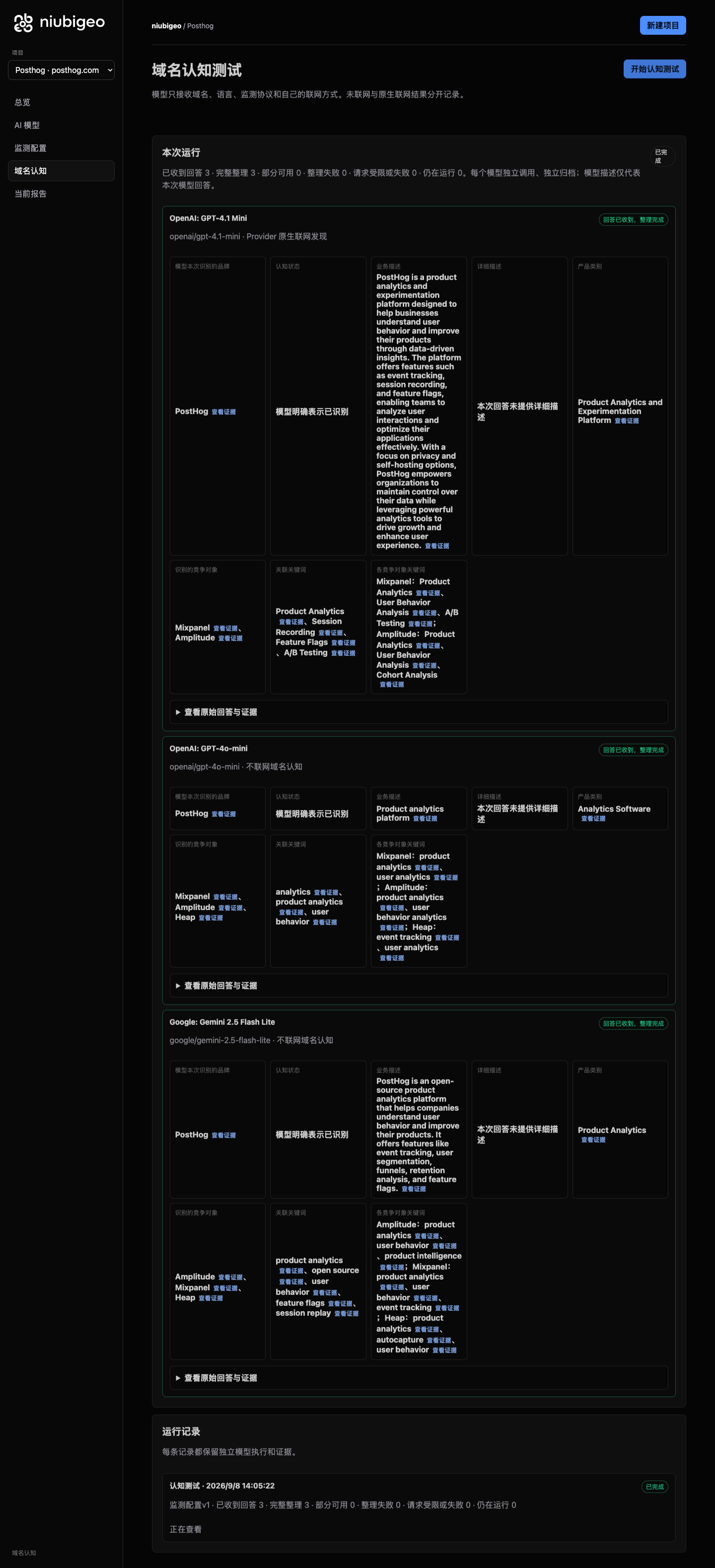
See the workbench: PostHog model answers and evidence links
[](examples/cases/R04/README.md)
*Read what each model actually said, then open the sources to check. An original screenshot from the September 8, 2026 study. [Read the PostHog case](examples/cases/R04/README.md).*
## Get started
**Want to see it in action first? [Explore 20 real cases](examples/README.md).** No installation or API key needed.
To test your own product, you will need Node.js 22+ and your own OpenRouter API key:
```bash
git clone --branch v0.2.0 --depth 1 https://github.com/Albert-Weasker/niubigeo.git
cd niubigeo
npm ci
cp .env.example .env
```
Set `OPENROUTER_API_KEY` in `.env`, then start the app:
```bash
npm run server
```
Open [**http://localhost:8787**](http://localhost:8787) to create your first project.
Prefer a container? Follow the [Docker guide](docs/deployment/docker.md). Existing users should read [Backups and upgrades](docs/upgrade.md).
## How to use it
1. **Enter a domain.** Create a project for your product. It is saved before you start testing.
2. **Choose your models.** Search for and select one or more models, then set web search separately for each.
3. **Save your configuration and start a test.** Models answer independently. If one fails, the other results remain available.
4. **Open the results.** Review descriptions, competitors, keywords and sources. Open the original answer to check a finding.
5. **Keep observing.** Confirm the keywords you want to test, then run keyword tests. Repeat measurements or set up scheduled monitoring to collect comparable records.
Start with one model, then add more once you know what to look for. Reading the cases is free; testing your own project incurs model and search API charges.
## From one answer to ongoing observation
| What you want to do | What NiubiGEO provides |
| :--- | :--- |
| **Manage several products** | Each domain has its own project, configuration, runs and evidence. Switch projects without mixing products into one report. |
| **Compare models** | Search, filter and select OpenRouter models. Inspect each model’s answer, result and errors, and retry a failed model separately. |
| **Choose whether to use web search** | Set each model to offline or its supported native search mode. Results retain the actual execution conditions. |
| **Understand brand and competitor descriptions** | Read business descriptions, categories, competing products and their associated keywords side by side. |
| **See who appears without naming your brand** | Confirm keywords, then test them without including your target brand’s name. Inspect actual mentions, recommendations and original wording. |
| **Check the evidence** | Original answers, text locations, Provider citations and ordinary answer URLs are shown separately. Failures and uncertainty remain on record. |
| **Build a history** | Save what you want to measure, repeat tests or schedule them. Follow historical records and data points back to the answers behind them. |
### Repeated measurements and scheduled monitoring
The first domain test shows how models describe your product now. Confirm the competing products and keywords to measure that scope again or create a schedule. Previous records remain when your model selection changes; new models do not acquire invented history.
Scheduled execution requires the [monitoring worker](docs/deployment/docker.md#显式启用-worker) to be running. [PostHog’s three recorded measurements](examples/cases/R04/README.md) include a scheduled run, with answers and failures available for each. A few minutes of repeated tests do not establish long-term growth.
**[How it works in detail](docs/how-it-works.md)** · [Metrics and comparison conditions](docs/measurement-methodology.md) · [Known issues](docs/known-issues.md)
## Three real examples
| Notion | Figma | PostHog |
| :--- | :--- | :--- |
| [How models describe a product](#case-notion) | [Who appears without naming a brand](#case-figma) | [Sources and repeated tests](#case-posthog) |
### Notion · One product, different descriptions
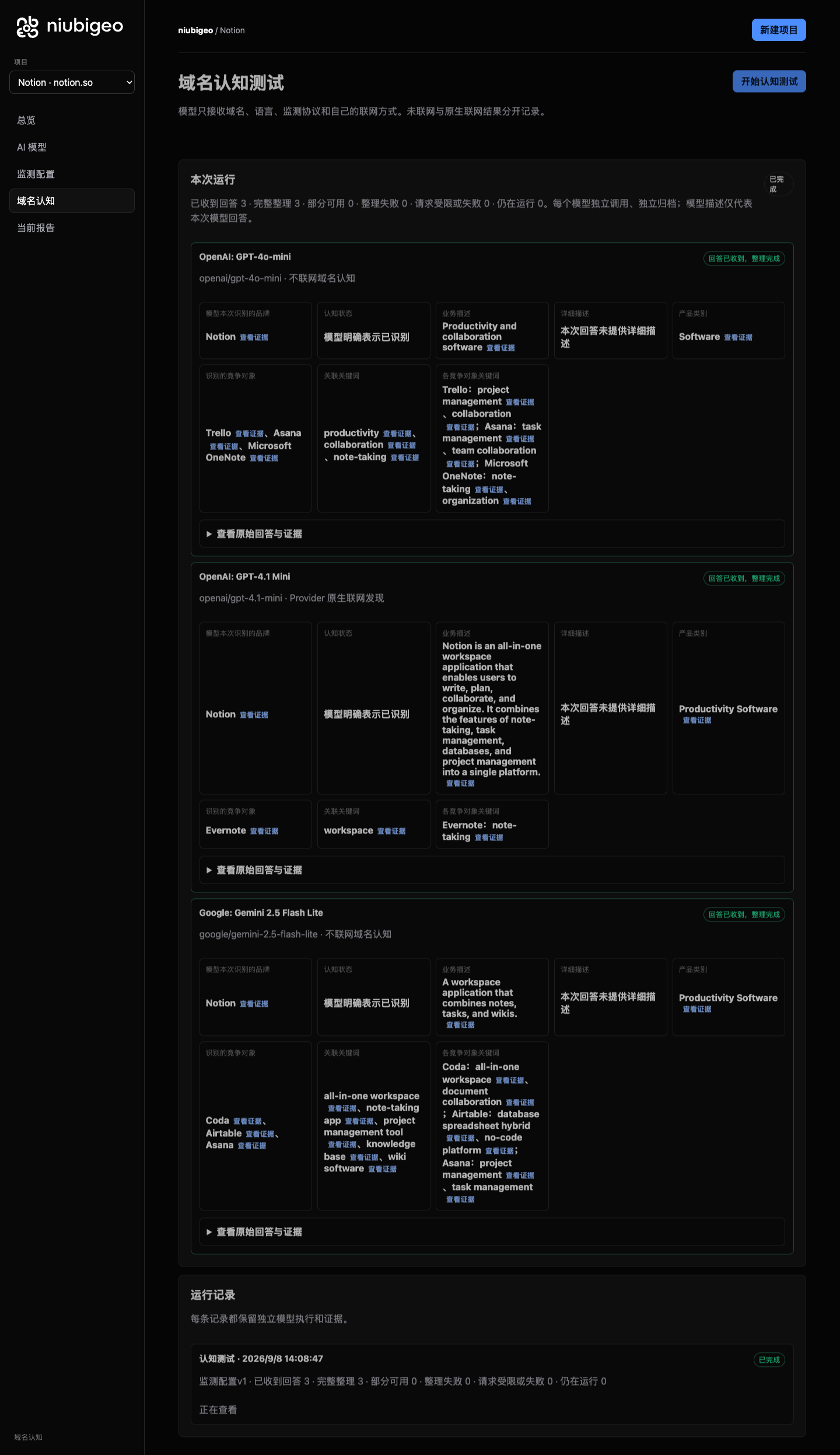
In the `notion.so` test, models emphasized different aspects of the product: notes, a workspace and collaboration. They also named different competing products.
Reading the answers side by side shows which capabilities each model mentioned, which it left out and which products it associated with Notion.
These are descriptions from this test. Recognizing a domain after being asked about it is not the same as recommending it unprompted.
**[Read Notion’s descriptions and competing products](examples/cases/R08/README.md)**
View Notion’s original model-results screenshot
### Figma · Who appears when the brand is not named?
In a **Prototyping** keyword test that did not name Figma, two offline answers mainly explained the concept of prototyping. An answer with web search requested named Figma and described its prototyping features.
This reveals which answers named an actual product and which only explained a concept. A brand mention, a positive description and an explicit recommendation are different things.
> Figma’s prototyping tools make it easy to build and share high-fidelity, no-code, interactive prototypes.
*Excerpt from the original answer: [GPT-4.1 mini · native search requested](examples/cases/R14/README.md#attempt-2afd57bb-3566-40f2-b339-995bd17b3687).*
**[Explore the Figma keyword test](examples/cases/R14/README.md)**
### PostHog · Follow a source back to the answer
In the **Feature Flags** test for PostHog, model responses returned citations to pages including a Splunk blog post. NiubiGEO stores these separately from ordinary URLs in the answer text.
Follow a source to the corresponding answer and check where it appeared. A citation helps you inspect the response; it does not, by itself, explain why a model recommended something.
The case also includes three closely spaced measurements, one triggered by a schedule. Each run includes its results and failures. These records demonstrate repeated testing, not long-term growth.
**[Explore PostHog’s sources and repeated measurements](examples/cases/R04/README.md)**
### 17 more products
The collection covers **20 real domains**, each with at least one analyzable domain answer. **11 cases also ran keyword tests.** Every case includes its test conditions, results, original answers and screenshots, along with failures and unresolved findings.
**[Browse all cases](examples/README.md)** · [Known issues](docs/known-issues.md)
---
## Which AI visibility tool fits your team?
**Choose NiubiGEO** when you want free access to the source, self-hosting, model choice with your own API key, and domain and keyword tests that you can trace back to the original evidence. You cover model, search and hosting costs.
**Consider a commercial platform** when hosted services, marketing workflows or an existing search dataset matter more to you. The priorities below offer a starting point.
| Tool and official site | Consider it when you need |
| :--- | :--- |
| [Profound](https://www.tryprofound.com/) | AI brand monitoring, prompt-demand data and content marketing workflows. |
| [Peec AI](https://peec.ai/) | AI search analytics and brand-performance tracking for marketing teams. |
| [Otterly.AI](https://otterly.ai/) | AI search monitoring, content audits and optimization guidance. |
| [Semrush AI Visibility](https://www.semrush.com/pricing/ai/) | AI visibility and brand-performance tracking within the Semrush product suite. |
| [Ahrefs Brand Radar](https://ahrefs.com/brand-radar) | A brand visibility index, custom prompt tracking and search data. |
| [AthenaHQ](https://athenahq.ai/) | AI search citation analysis, content-gap discovery and action guidance. |
| [Scrunch](https://scrunch.com/) | Brand monitoring, citation analysis and content delivery for AI agents. |
*These are selection suggestions based on the linked official sites, checked on September 8, 2026, not a controlled benchmark or ranking. Check each vendor’s site for current plans and capabilities.*
## Why we built NiubiGEO
Product teams need more than a score. We want to know whether our product is being seen, where it is misunderstood, why a competitor appears in an answer and what to investigate next.
Without the original answers, sources and test conditions, it is hard to know which findings to trust or where to spend your time and budget.
NiubiGEO makes those questions easier to investigate: read different models’ answers, spot differences in descriptions and keywords, check the sources and keep observing. Where the evidence is missing, the result stays uncertain. Failed runs stay on record, too.
### Where we want to go
Give developers, small teams and brands a way to check for themselves how AI describes their products.
An inaccurate description can point you back to your website or docs. Different keywords associated with competitors may reveal something worth investigating. After changing your content, you can test again and observe subsequent answers.
We want NiubiGEO to help you find questions worth acting on and keep a record you can revisit. Publishing an article does not guarantee an AI recommendation, and one answer is not a permanent ranking.
## Open source, costs and community
Community Edition is free, open source and self-hosted under **[Apache-2.0](LICENSE)**. Bring your own API key and pay for the models, search services and hosting you use.
To contribute code, report an issue or join the discussion, open an [Issue](https://github.com/Albert-Weasker/niubigeo/issues) or a [Pull Request](https://github.com/Albert-Weasker/niubigeo/pulls).
## Sponsors
Thank you to the sponsors supporting NiubiGEO’s open-source development.