# three.quarks ✨
[![npm][npm]][npm-url]
[![npm-downloads][npm-downloads]][npmtrends-url]
[![build-size][build-size]][build-size-url]
[![github][github-star]][github-url]
[![discord][discord]][discord-url]
**three.quarks** is a high-performance particle system and visual effects library for [three.js](https://threejs.org), written in TypeScript.
Create stunning real-time VFX for games, interactive experiences, and web applications with an intuitive API and powerful visual editor.
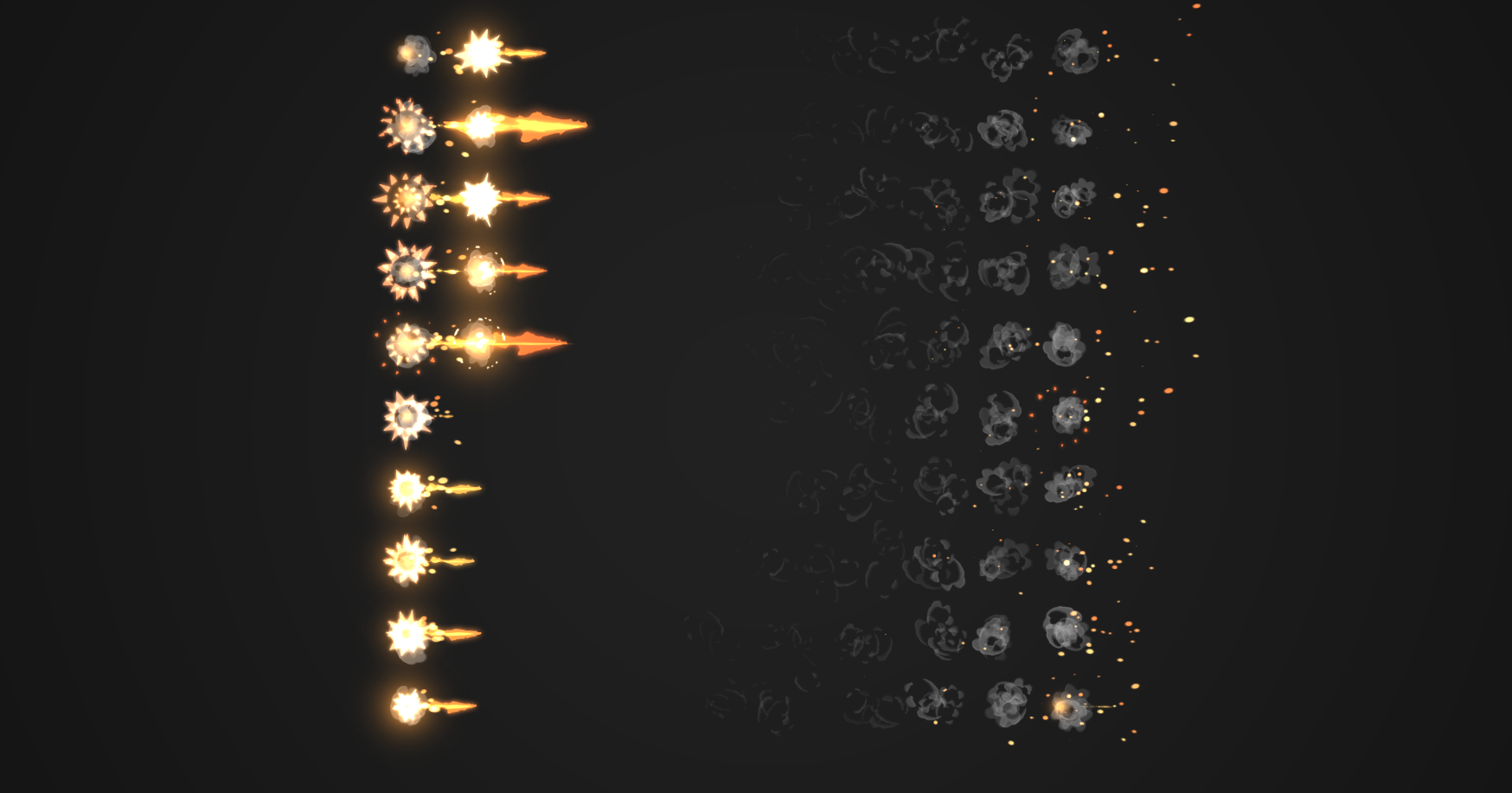
## 🎮 Try the Demo
> **[▶️ Launch Live Demo](https://demo.quarks.art/)** - See three.quarks in action with interactive examples!
## 🔗 Quick Links
| | Resource | Description |
|--|----------|-------------|
| 📖 | [Documentation](https://quarks.art/) | Official website and guides |
| 🎨 | [Visual Editor](https://quarks.art/create) | WYSIWYG particle effect creator |
| 💬 | [Discord](https://discord.gg/5Tv3kJCrQZ) | Community support and discussion |
## 🚀 Why three.quarks?
- ⚡ **High Performance** - Optimized batch rendering minimizes draw calls
- 🎮 **Unity Compatible** - Import particle systems from Unity's Shuriken system
- 🎨 **Visual Editor** - Design effects visually with [three.quarks-editor](https://quarks.art/create)
- 🔧 **Flexible** - Extensible plugin system for custom behaviors and emitters
- ✅ **Production Ready** - Used in games and interactive applications
## 📦 Installation
```bash
npm install three.quarks
```
## ⚡ Quick Start
```javascript
import * as THREE from 'three';
import {
BatchedRenderer,
ParticleSystem,
ConstantValue,
IntervalValue,
ConstantColor,
PointEmitter,
RenderMode
} from 'three.quarks';
// 1. Create the batch renderer (manages all particle systems)
const batchRenderer = new BatchedRenderer();
scene.add(batchRenderer);
// 2. Define your particle system
const particles = new ParticleSystem({
duration: 2,
looping: true,
startLife: new IntervalValue(1, 2),
startSpeed: new ConstantValue(5),
startSize: new IntervalValue(0.1, 0.3),
startColor: new ConstantColor(new THREE.Vector4(1, 1, 1, 1)),
maxParticle: 100,
emissionOverTime: new ConstantValue(20),
shape: new PointEmitter(),
material: new THREE.MeshBasicMaterial({
map: yourTexture,
transparent: true
}),
renderMode: RenderMode.BillBoard
});
// 3. Add to scene and renderer
scene.add(particles.emitter);
batchRenderer.addSystem(particles);
// 4. Update in your animation loop
function animate() {
const delta = clock.getDelta();
batchRenderer.update(delta);
renderer.render(scene, camera);
requestAnimationFrame(animate);
}
```
## 🌐 WebGPU (three.js `WebGPURenderer`)
three.quarks also renders with three.js' [`WebGPURenderer`](https://threejs.org/docs/#api/en/renderers/webgpu/WebGPURenderer).
Particle systems, behaviors, emitters and JSON effects are shared; only the batch renderer changes.
It is built on TSL node materials, so it runs on the WebGPU backend **and** on WebGPURenderer's WebGL2 fallback.
```javascript
import {WebGPURenderer} from 'three/webgpu';
import {BatchedRenderer, ParticleSystem /* ... */} from 'three.quarks/webgpu';
const renderer = new WebGPURenderer({antialias: true});
await renderer.init();
// 'desktop' (default, full fidelity) | 'mobile' | 'auto'
const batchRenderer = new BatchedRenderer({target: 'auto'});
scene.add(batchRenderer);
renderer.setAnimationLoop(() => {
batchRenderer.update(clock.getDelta());
renderer.render(scene, camera);
});
```
| | WebGL `BatchedRenderer` | WebGPU `BatchedRenderer` (`three.quarks/webgpu`) |
|---|---|---|
| Billboard / vertical / horizontal / stretched / mesh / trail | ✅ | ✅ |
| Lit mesh particles (`MeshStandardMaterial`, `MeshPhysicalMaterial`, env maps) | ✅ | ✅ |
| Sprite sheets, frame blending, alpha test, custom blending, layers, render order | ✅ | ✅ |
| Soft particles | needs a depth pre-pass + `setDepthTexture` | automatic (reads the framebuffer depth), `setDepthTexture` still supported |
**Targets.** `desktop` gives the same output as WebGL. `mobile` is tuned for tile-based GPUs: soft particles are off by default (they force a depth resolve and a render-pass split), the sRGB decode uses a pow-free polynomial, and buffers start smaller. Options can be overridden one by one, for example `new BatchedRenderer({target: 'mobile', softParticles: true})`. `getRecommendedRendererSettings(profile)` returns a pixel-ratio cap and `WebGPURenderer` parameters for the target.
**Colors and blending.** WebGPURenderer blends in a linear framebuffer, while the WebGL particle shaders write display-space colors directly. The default `colorSpaceMode: 'webgl-compatible'` decodes particle colors so opaque and single-layer pixels look exactly like WebGL. Semi-transparent overlaps blend in linear space and look slightly lighter. For WebGL-identical blending, render through the optional `QuarksCompositor`: it composites transparent particles in a display-space target, at the cost of two extra full-screen passes.
```javascript
import {QuarksCompositor} from 'three.quarks/webgpu';
const compositor = new QuarksCompositor(renderer, batchRenderer);
renderer.setAnimationLoop(() => {
batchRenderer.update(clock.getDelta());
compositor.render(scene, camera); // instead of renderer.render(scene, camera)
});
```
Use `colorSpaceMode: 'linear'` for a fully physically based workflow.
**Data layout.** Each sprite batch uploads one interleaved buffer per frame (48–64 bytes per particle). WebGPU trails upload one 48-byte storage-buffer record per trail point and are expanded in the vertex shader. Batches of the same kind share one shader build. `halfFloat: true` packs color, size and velocity as float16 (native `Float16Array` required). It uploads 25–38% fewer bytes, but in desktop Chrome the conversion costs more CPU than the upload saves, so it is off by default; measure it with `benchmark.html` on your target device.
**React Three Fiber 9.** Pass the WebGPU batch renderer to the provider and create `WebGPURenderer` in the canvas:
```jsx
import {WebGPURenderer} from 'three/webgpu';
import {WebGPUBatchedRenderer} from 'three.quarks/webgpu';
```
## 📂 Loading VFX from JSON
Export effects from the visual editor and load them at runtime:
```javascript
import { QuarksLoader, QuarksUtil, BatchedRenderer } from 'three.quarks';
const batchRenderer = new BatchedRenderer();
const loader = new QuarksLoader();
loader.load('effects/explosion.json', (effect) => {
QuarksUtil.addToBatchRenderer(effect, batchRenderer);
scene.add(effect);
});
scene.add(batchRenderer);
```
### Playing Multiple Instances
```javascript
// Clone and play the effect multiple times
const instance = loadedEffect.clone();
scene.add(instance);
QuarksUtil.addToBatchRenderer(instance, batchRenderer);
QuarksUtil.setAutoDestroy(instance, true); // Auto-cleanup when finished
QuarksUtil.play(instance);
```
## ⚛️ React Three Fiber
Use the `quarks.r3f` package for declarative React integration:
```bash
npm install quarks.r3f three.quarks
```
```tsx
import { Canvas } from '@react-three/fiber'
import { QuarksProvider, ParticleSystem } from 'quarks.r3f'
import { ConeEmitter, SizeOverLife, PiecewiseBezier, Bezier, RenderMode } from 'three.quarks'
function FireEffect() {
const shape = useMemo(() => new ConeEmitter({ angle: 0.3, radius: 0.2 }), [])
const behaviors = useMemo(() => [
new SizeOverLife(new PiecewiseBezier([[new Bezier(1, 0.5, 0.2, 0), 0]]))
], [])
return (
)
}
function App() {
return (
)
}
```
See [quarks.r3f documentation](./packages/quarks.r3f/README.md) for full API reference.
## ✨ Features
### 🎬 Renderers
- **WebGL** (`three.quarks`) and **WebGPU** (`three.quarks/webgpu`) batch renderers
- **Billboard** - Camera-facing sprites
- **Stretched Billboard** - Velocity-aligned sprites
- **Mesh** - 3D geometry particles
- **Trail** - Ribbon trails behind particles
### 📐 Emitter Shapes
- Point, Sphere, Hemisphere, Cone, Circle
- Mesh Surface - Emit from 3D model surfaces
- Grid - Structured emission patterns
### 🎭 Behaviors
- Color over lifetime
- Size over lifetime
- Rotation over lifetime
- Force fields
- Orbital motion
- Texture animation
- Sub-emitters
- Custom behaviors via plugin system
### 🎨 Materials
- MeshBasicMaterial (unlit)
- MeshStandardMaterial (PBR)
- Configurable blending modes
- Texture atlas support
## 🧪 Examples
Browse the [examples folder](./packages/quarks.examples) or run locally:
```bash
npm install
npm run build
npm run examples
```
Open `vanilla.html` (WebGL), `vanilla-webgpu.html` (same demos on WebGPU, `?target=desktop|mobile|auto`) or
`benchmark.html` (WebGL vs WebGPU frame timings). `node packages/quarks.examples/scripts/build-showcase.mjs` builds
a static, bundler-free copy of the demos and the benchmark.
## 📦 Packages
This project is a monorepo with modular packages:
| Package | Description |
|---------|-------------|
| **[three.quarks](https://www.npmjs.com/package/three.quarks)** | 🎯 Main package - Three.js particle system with batched rendering, shaders, and full VFX toolkit |
| **[quarks.core](https://www.npmjs.com/package/quarks.core)** | 🧱 Core library - Framework-agnostic math, behaviors, emitter shapes, and functions (zero dependencies) |
| **[quarks.r3f](https://www.npmjs.com/package/quarks.r3f)** | ⚛️ React Three Fiber - Declarative R3F components with hooks, Suspense support, and flexible props API |
| **[quarks.nodes](https://www.npmjs.com/package/quarks.nodes)** | 🔮 Node system - Experimental node-based VFX with visual programming and WebGPU compute support |
| **quarks.examples** | 🎮 Examples - Interactive demos showcasing particle effects and features |
| **quarks.playground** | 🧪 Playground - Development sandbox for testing and experimenting with effects |
### 🛠️ Editor
- **[three.quarks-editor](https://quarks.art/create)** - Visual editor for creating and previewing particle effects with real-time preview and JSON export
## 📚 Resources
- [Change Log](./CHANGELOG.md)
- [Contributing Guide](./CONTRIBUTING.md)
- [Development Guide](./DEVELOPMENT_GUIDE.md)
- [Code of Conduct](./CODE_OF_CONDUCT.md)
- [CodeSandbox Example](https://codesandbox.io/s/three-quarks-atom-particle-system-xp3fvz)
- [React Three Fiber Package](./packages/quarks.r3f) - Official R3F integration
## 🗺️ Roadmap
- 🔲 WebGPU rendering support
- 🔲 WebAssembly particle simulation
- 🔲 Node-based scriptable particle systems
- 🔲 Cross-platform native plugins
## 📄 License
MIT
[github-star]: https://img.shields.io/github/stars/Alchemist0823/three.quarks.svg?style=flat
[github-url]: https://github.com/Alchemist0823/three.quarks
[npm]: https://img.shields.io/npm/v/three.quarks
[npm-url]: https://www.npmjs.com/package/three.quarks
[build-size]: https://badgen.net/bundlephobia/minzip/three.quarks
[build-size-url]: https://bundlephobia.com/result?p=three.quarks
[npm-downloads]: https://img.shields.io/npm/dw/three.quarks
[npmtrends-url]: https://www.npmtrends.com/three.quarks
[discord]: https://img.shields.io/discord/1042342883056963664
[discord-url]: https://discord.gg/5Tv3kJCrQZ