# Alchemist Coder
**The lab for your coding agents.**
A free, open-source desktop app for Claude Code and Codex. Follow every agent and every subagent it spawns, live. Give work to your own organization of agents, let them drive a browser while you watch, or put them on Autopilot. Search every conversation you've had with Claude Code, Codex, Gemini CLI and Grok Build.
[](https://github.com/Alekla0126/alchemist-coder/releases/latest)
[](LICENSE)

[](https://agentclientprotocol.com/get-started/clients)
[](https://github.com/Alekla0126/alchemist-coder/stargazers)
**[Download](https://coder.alekla.com/#download)** · [Website](https://coder.alekla.com) · [What's new in 1.3.9](https://github.com/Alekla0126/alchemist-coder/releases/tag/v1.3.9) · [Ideas and questions](https://github.com/Alekla0126/alchemist-coder/discussions) · [Español](#español)
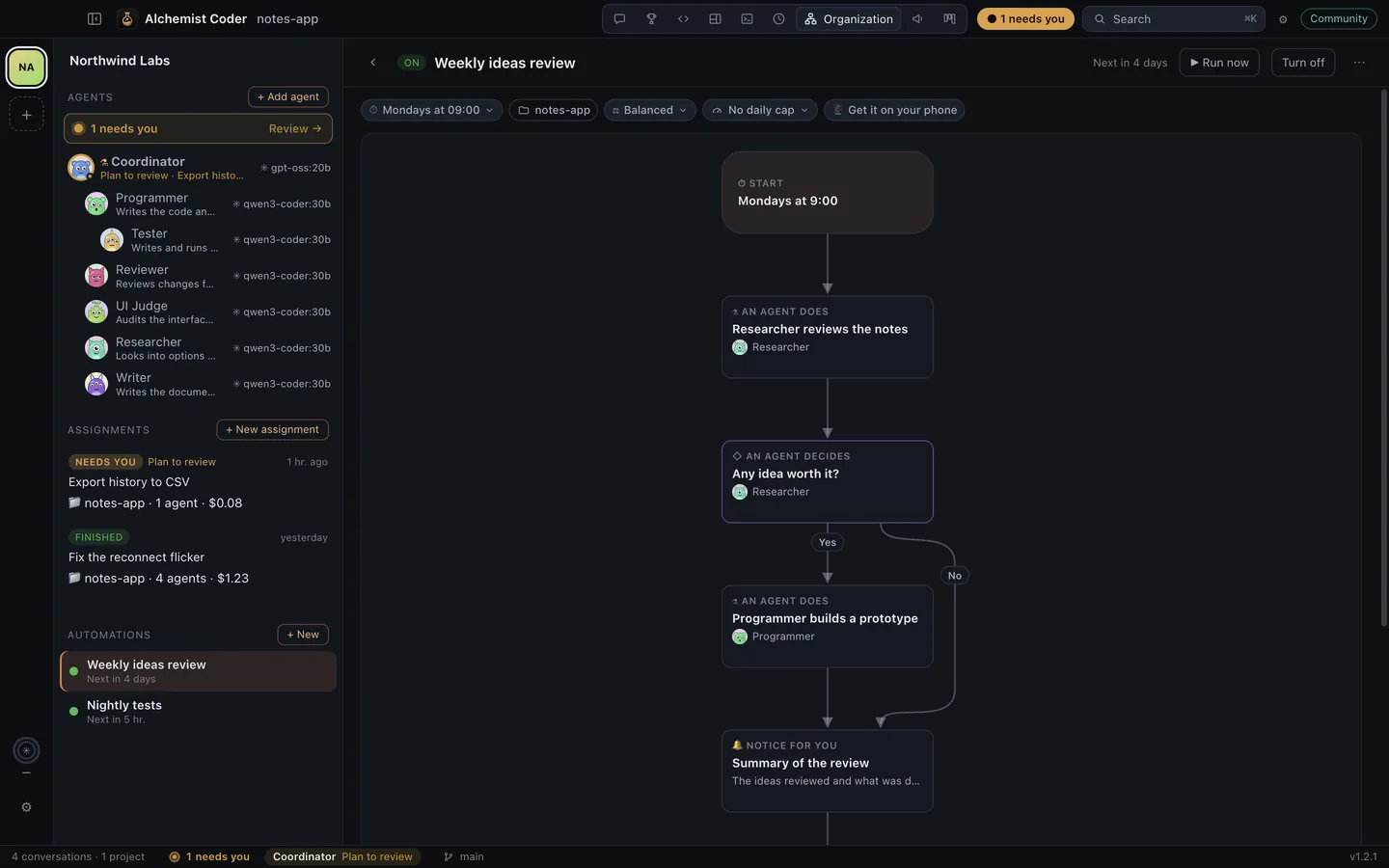
 Real screens with a demo project; the agents run on local models. If it's useful to you, a star helps other people find it.
> **Version 1.3.9**, in English, Español, Português, Français, Deutsch, Italiano, Русский, 日本語, 한국어, 简体中文 and हिन्दी. [Download](https://coder.alekla.com/#download) for macOS (Apple Silicon or Intel), Windows or Linux (AppImage or .deb), or from [Releases](https://github.com/Alekla0126/alchemist-coder/releases). The builds aren't signed with an Apple or Microsoft certificate yet. The first time on a Mac, macOS says it can't verify the app: click Done, then open System Settings → Privacy & Security and click Open Anyway. On Windows, if SmartScreen warns you, choose More info → Run anyway. Feedback and issues are welcome.
## What it does
- **Autopilot (new in 1.3).** One switch in the title bar and your agents stop waiting for you: permissions are allowed once, questions go back to the agent to decide, and plans and automation steps are approved for you. What can't be undone (`sudo`, force-pushes, publishing to npm, cargo, GitHub releases, the stores or Docker, wiping a disk) is always refused. The Coordinator has its own "Decides everything" switch for the organization, and saves a short lesson after each mistake that every later prompt carries.
- **A browser your agents drive (new in 1.3).** The globe in the title bar opens a browser next to the conversation. Every agent gets tools to open, read, click, type, scroll and screenshot pages, the pane says which agent is driving, and "Take over" makes it wait until you hand it back. New in 1.3.1: tabs, and a browser of its own for each project, with its own cookies and sign-ins, so one project's agents never see another's pages. New in 1.3.6: agents can read only the part of a page that mentions what they're looking for, instead of the whole page. New in 1.3.7: sign in once — a project's browser offers the sign-ins you already have in your other projects, one site at a time, so you don't sign in to Google or your Apple ID again in every project.
- **Google Play, App Store Connect and AdMob, built in.** Agents get tools for the stores through their official APIs instead of driving the consoles in a browser: listings, .aab uploads, tracks and staged rollouts, Android vitals, versions, builds and App Review submission, reviews and replies, sales and AdMob earnings. Everything that changes something is a dry run until you approve it. Set up a service once with [app-console-mcp](https://github.com/Alekla0126/app-console-mcp) (`appconsole config set …`) and every agent and automation gets its tools; services you haven't set up add nothing. Needs [uv](https://docs.astral.sh/uv/).
- **Attach any file (new in 1.3).** Drop, paste or pick PDFs, spreadsheets, archives, audio, video or code; agents open each file with their own tools.
- **One history for all four agents.** Indexes Claude Code (`~/.claude/projects`), Codex (`~/.codex/sessions`), Gemini CLI (`~/.gemini/tmp/*/chats`) and Grok Build (`~/.grok/sessions`) into a local SQLite index with full-text search. Your original files are only read, never modified.
- **Organization navigation (new in 1.3.9).** Keep agents, tasks and assignments beside the office, task detail and organization settings. Each list scrolls separately; a folded or narrow window keeps named shortcuts within reach.
- **Keep every conversation.** Claude Code deletes transcripts after 30 days by default; the opt-in versioned backup mirrors your Claude Code and Codex history into a git repository you choose, and conversations the CLIs delete stay in the app. Export any conversation, subagents included, to Markdown, HTML or JSON.
- **An organization of agents.** A standing coordinator takes your assignments, plans them (review the plan first if you like) and hands the work to the agents you add over time, each with its own little monster (or a picture you choose), role and instructions, model, permissions and projects. Write what you need once, in one box: you stay on the organization chart, where each agent's card shows its task and what it's doing right now, and you approve the plan right there. Drag an agent onto another to put it on its team. A "Needs you" inbox gathers their questions, permission requests and plans, and each agent keeps a record of what it did.
- **In 11 languages.** English, Spanish, Brazilian Portuguese, French, German, Italian, Russian, Japanese, Korean, Simplified Chinese and Hindi: the app, its menus and what automations say. It follows your system's language, or pick one in Settings.
- **Automations.** Describe a routine in plain words and an agent draws it as a flow diagram: steps your agents do, decisions they make and the ones that wait for you. It runs on its own (every day, on some weekdays, every few minutes or nonstop) with a daily spending cap; you choose how much it decides alone, and its questions reach your Mac and your phone through your own Telegram bot. The office template hands cards on the Board to your agents like employees.