# Flightradar24 integration for Home Assistant
[](https://github.com/AlexandrErohin/home-assistant-flightradar24/releases/latest)
[](https://github.com/hacs/integration)
[](https://community.home-assistant.io/t/custom-component-flightradar24)


[](https://github.com/AlexandrErohin/home-assistant-flightradar24/releases)
[](https://github.com/AlexandrErohin/home-assistant-flightradar24/actions)
[](https://github.com/AlexandrErohin/home-assistant-flightradar24/actions)
[](https://www.home-assistant.io/)
[](https://github.com/AlexandrErohin)
## 📡 Overview
The **Flightradar24** integration brings real-time aviation tracking into Home Assistant.
Track flights above your location, monitor airports, follow specific aircraft worldwide, and trigger powerful automations based on live flight events.
> ✅ **No Flightradar24 subscription required**
---
# ✨ Features
- 🌍 Track flights currently in your area
- ✈️ Follow aircraft anywhere in the world
- 🛬 Monitor airport arrivals and departures
- 🔔 Create flight-based notifications and automations
- 📊 View airport delay and cancellation statistics
- 🗺️ Add live flight maps to Home Assistant dashboards
- 📱 Track flights as Home Assistant `device_tracker`
- 🔥 Monitor the top 10 most tracked flights on Flightradar24
---
It allows you:
1. Know how many flights in your area right now, or just have entered or exited it. And get list of flights with [full information](#flight) by every relevant flight for the sensor
2. Track a particular plane or planes no matter where it currently is, even if it is a scheduled flight
3. Monitor daily statistics (like on time/delayed/canceled flights) of the [selected airport](#edit-configuration)
4. Get [top 10 most tracked flights on FlightRadar24](#most-tracked)
5. Create notifications (example - [Get a notification when a flight enters or exits your area](#notification-enters), [Get a notification when a tracked scheduled flight takes off](#notification-scheduled))
6. Create automations (example - [Automatically track a flight by your needs](#automation))
7. Add a live [map card](#flightradar24-card) with aircraft markers and flight tracks to your [Home Assistant dashboard](https://www.home-assistant.io/dashboards/)
8. Add flights table for your area to your [Home Assistant dashboard](https://www.home-assistant.io/dashboards/) by [Lovelace Card](#lovelace)
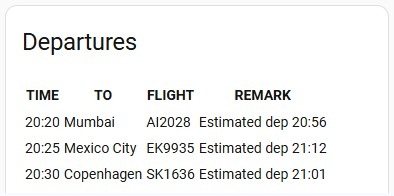
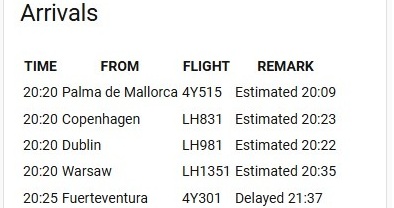
9. Add departures/arrivals boards of the selected airport to your [Home Assistant dashboard](https://www.home-assistant.io/dashboards/) by [Lovelace Airport Card](#lovelace-airport)
10. Track your flight as [Device Tracker](#device-tracker)
11. Get info for last flights which were in your area or get info about latest exited flight by creating [Last Flights History Sensor](#last-flights)
# 🚀 Installation
## HACS (Recommended)
1. Install [HACS](https://hacs.xyz/)
2. Open **HACS**
3. Search for `Flightradar24`
4. Click **Download**
5. Restart Home Assistant
### One-click install
---
## Manual Installation
1. Locate the `custom_components` directory in your Home Assistant configuration directory. It may need to be created.
2. Copy the `custom_components/flightradar24` directory into the `custom_components` directory.
3. Restart Home Assistant.
## Configuration
Flightradar24 is configured via the GUI. See [the HA docs](https://www.home-assistant.io/getting-started/integration/) for more details.
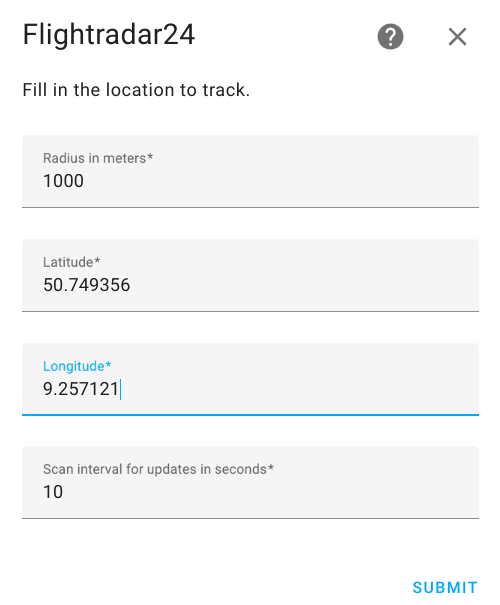
The default data is preset already
1. Go to the Settings->Devices & services.
2. Click on `+ ADD INTEGRATION`, search for `Flightradar24`.
3. You may change the default values for Radius, Latitude and Longitude
4. Click `SUBMIT`
> **⚠️ IMPORTANT NOTE ⚠️**
> 1. After integration installation or reload and after every HA restart Current in area sensor may stay at 0 for some minutes or show less than real amount of flights in your area for a while. It is because of downloading information from FR24. Downloading information for a flight takes time. The more flights in your area the more time it takes to load all of them
> 2. Log messages such as `FlightRadar24: got an empty session (bot mitigation)...` or `rate limited (HTTP 429)... pausing` are **expected** and do **not** indicate a broken integration. FlightRadar24 actively rate-limits automated requests; on HTTP 429 the integration **pauses** that endpoint with exponential back-off (up to 15 minutes) and resumes when FR24 lifts the limit. Occasional appearances of these messages in the Home Assistant log are normal
> 3. Prefer a scan interval of **20–60 seconds**. Values near the 10-second minimum, and multiple config entries all polling quickly on the same IP, make rate limits more likely
> 4. Increasing the radius means more flights will be in your area, which may also trigger more rate-limiting or bot-mitigation responses from FR24
> 5. If your airport sensors stay Unavailable - check if you [track the airport](#lovelace-airport)
### Edit Configuration
You may edit configuration data like:
1. Latitude and longitude of your point
2. Radius of your zone
3. Scan interval for updates in seconds
4. The minimum and maximum altitudes in feet between which the aircraft will be tracked
5. Enable/Disable [device_tracker for flights](#device-tracker)
6. Optional: Username and password if you have FlightRadar24 subscription
7. Enable/Disable auto-cleanup of landed tracked flights. That automatically removes flights from the "Additional tracked" list once they arrive at the gate
8. Map Tracker Naming Style.
- Callsign Only (e.g., KLM1412) - Default
- Callsign + Route (e.g., KLM1412 (CDG - AMS))
- Registration + Route (e.g., PH-BXE (CDG - AMS))
To do that:
1. Go to the Settings->Devices & services.
2. Search for `Flightradar24`, and click on it.
3. Click on `CONFIGURE`
4. Edit the options you need and click `SUBMIT`
5. Reload the integration (a full Home Assistant restart is usually not required)
---
## Configuration Options
You can configure:
| Option | Description |
|---|---|
| Radius | Flight detection radius |
| Coordinates | Monitoring location |
| Scan interval | Update frequency |
| Altitude filters | Minimum & maximum altitude |
| Device tracker | Enable aircraft tracking entity |
| FR24 credentials | Optional premium login |
| Auto cleanup | Remove landed tracked flights |
| Naming style | Customize map tracker names |
---
# 🧩 Components
## Events
| Event | Description |
|---|---|
| `flightradar24_entry` | Flight entered your area |
| `flightradar24_exit` | Flight exited your area |
| `flightradar24_area_landed` | Aircraft landed nearby |
| `flightradar24_area_took_off` | Aircraft took off nearby |
| `flightradar24_tracked_took_off` | Tracked aircraft departed |
| `flightradar24_tracked_landed` | Tracked aircraft landed |
| `flightradar24_tracked_arrived_gate` | Flight arrived at gate |
| `flightradar24_tracked_left_gate` | Flight left gate |
| `flightradar24_most_tracked_new` | A new flight appeared in the Most tracked list |
## Sensors
| Area tracking | Description |
|---|---|
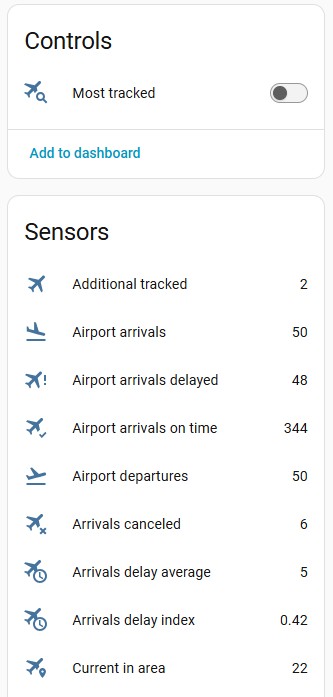
| `Current in area` | Flights currently in your area |
| `Entered area` | Flights that just have entered your area |
| `Exited area` | Flights that just have exited your area |
| `Additional tracked` | Your additional tracked flights outside your area |
| Airport tracking | Description |
|---|---|
| `Airport arrivals` | List of current arrival flights for the selected airport |
| `Airport departures` | List of current departure flights for the selected airport |
| `Airport arrivals on time` | Amount of arrivals on time for the selected airport today |
| `Airport arrivals delayed` | Amount of delayed arrivals for the selected airport today |
| `Airport arrivals delay average` | Average arrivals delay for the selected airport today |
| `Airport arrivals delay index` | Disruption arrivals index for the selected airport today |
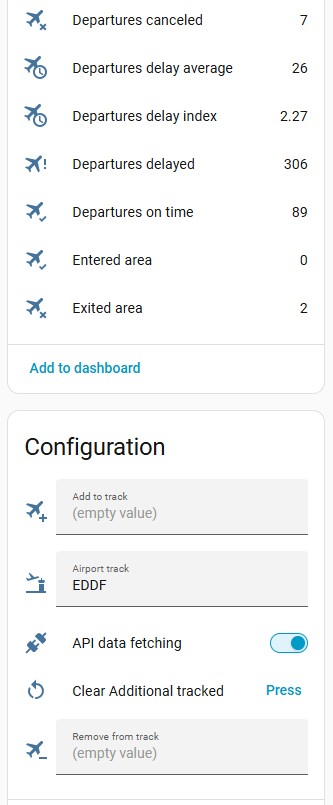
| `Airport arrivals canceled` | Amount of canceled arrivals for the selected airport today |
| `Airport departures on time` | Amount of departures on time for the selected airport today |
| `Airport departures delayed` | Amount of delayed departures for the selected airport today |
| `Airport departures delay average` | Average departures delay for the selected airport today |
| `Airport departures delay index` | Disruption departures index for the selected airport today |
| `Airport departures canceled` | Amount of canceled departures for the selected airport today |
Sensors (Current in area, Entered area, Exited area, Additional tracked) shows how many flights in the given area, additional tracked, just have entered or exited it. All these sensors have attribute `flights` with list of [flight object](#flight) contained a full information by every relevant flight for the sensor
Sensors Airport arrivals and Airport departures have attribute `flights` with list of the next 50 [airport flights](#airport-flight)
### Switches
| Other tracking | Description |
|---|---|
| `Most tracked` | Most tracked flights on FlightRadar24 |
Switch Most tracked has attribute `flights` with list of [most tracked object](#most-tracked)
### Configuration entities
| Name | Type | Description |
|----------------|-------------|----------------------------------------------------------------------------------------------------------------------|
| `Add to track` | input field | Pass flight number or call sign or aircraft registration number to track flight outside your area. It adds flight to Additional tracked sensor |
| `Remove from track` | input field | Pass flight number or call sign or aircraft registration number to remove a flight from Additional tracked sensor |
| `Airport track` | input field | Pass IATA or ICAO airport code to start receiving data in Airport sensors. To stop receiving airport data just pass an empty string |
| `API data fetching` | switch | you may disable FlightRadar API calls when not needed to prevent unnecessary API calls and save bandwidth and server load. |
| `Clear Additional tracked` | button | Clear all flights in Additional tracked sensor |
### Device Tracker
You may be interested to add a live flight as device_tracker with the flight information to a person in HA.
To use it - you need to activate this feature in [Edit Configuration](#edit-configuration).
When it is enabled - this integration creates device_tracker with static name `device_tracker.flightradar24` and
this device_tracker updates when there is a live flight in the additional tracked list.
It works ONLY with one live flight from the additional tracked list at a time!
---
## Uses
### Notification - When a flight enters or exits your area
To receive notifications of the entering flights add following lines to your `configuration.yaml` file:
```yaml
automation:
- alias: "Flight entry notification"
trigger:
platform: event
event_type: flightradar24_entry
action:
service: notify.mobile_app_
data:
message: >-
Flight entry of {{ trigger.event.data.callsign }} to {{ trigger.event.data.airport_destination_city }}
[Open FlightRadar](https://www.flightradar24.com/{{ trigger.event.data.callsign }})
data:
url: >-
https://fr24.com/{{ trigger.event.data.callsign }}/{{
trigger.event.data.id }}
clickAction: >-
https://fr24.com/{{ trigger.event.data.callsign }}/{{
trigger.event.data.id }}
image: "{{ trigger.event.data.aircraft_photo_medium }}"
```
All available fields in `trigger.event.data` you can check [here](#flight)
If you have defined more than one device of FlightRadar24 for more places to observe - you may be interested to know what device has fired the event
It is stored in
#### `trigger.event.data.tracked_by_device`
To change name in tracked_by_device
1. Go to the Settings->Devices & services.
2. Search for `Flightradar24`, and click on it.
3. Click on three-dot near of device you wanted
4. Click on `Rename` in the opened sub-menu
5. Enter new name and click `OK`
### Notification - When a tracked scheduled flight takes off
To receive notification of taking off tracked scheduled flight add following lines to your `configuration.yaml` file:
```yaml
automation:
- alias: "Scheduled flight takes off"
trigger:
platform: event
event_type: flightradar24_tracked_took_off
action:
service: notify.mobile_app_
data:
message: >-
Flight takes off {{ trigger.event.data.callsign }} to {{ trigger.event.data.airport_destination_city }}
[Open FlightRadar](https://www.flightradar24.com/{{ trigger.event.data.callsign }})
data:
url: >-
https://fr24.com/{{ trigger.event.data.callsign }}/{{
trigger.event.data.id }}
clickAction: >-
https://fr24.com/{{ trigger.event.data.callsign }}/{{
trigger.event.data.id }}
image: "{{ trigger.event.data.aircraft_photo_medium }}"
```
### Automation
To automatically add a flight to additional tracking add following lines to your `configuration.yaml` file:
```yaml
automation:
- alias: "Track flights"
trigger:
platform: event
event_type: flightradar24_exit
condition:
- condition: template
value_template: "{{ 'Frankfurt' == trigger.event.data.airport_origin_city }}"
action:
- service: text.set_value
data:
value: "{{ trigger.event.data.aircraft_registration }}"
target:
entity_id: text.flightradar24_add_to_track
```
This is an example to filter flights to track, change the conditions for your needs
### Last Flights History Sensor
You may get info for last flights which were in your area. Or get info about latest exited flight.
Here is an example for recording history for the last 5 flights.
The sensor has the same structure as `sensor.flightradar24_current_in_area` and so you can use the same markdown code.
Only the sensor state is different - it shows the latest exited flight.
You may change it for your needs.
Add following lines to your `configuration.yaml` file:
```yaml
template:
- trigger:
- platform: event
event_type: flightradar24_exit
sensor:
- unique_id: flightradar24_last_5_flights
name: "FlightRadar24 Last 5 Flights"
state: >-
{% set flight = trigger.event.data %}
{{ flight.flight_number }} - {{ flight.airline_short }} - {{ flight.aircraft_model }} ({{ flight.aircraft_registration }})
{{ flight.airport_origin_city }} > {{ flight.airport_destination_city }}
attributes:
flights: >-
{% set n = 5 %}
{% set m = this.attributes.flights | count | default(0) %}
{{ [ trigger.event.data ] +
( [] if m == 0 else
this.attributes.flights[0:n-1] )
}}
icon: mdi:airplane
```
### Flightradar24 Map Card
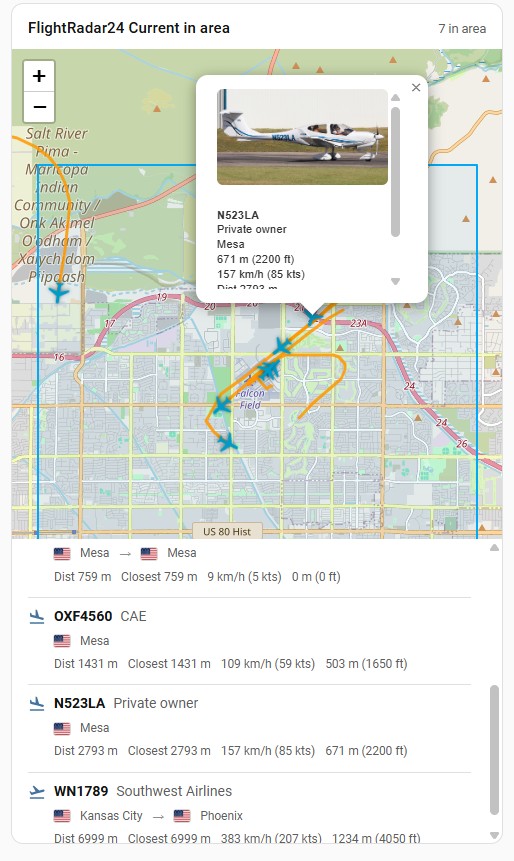
Built-in Lovelace card with a map of your monitored area, aircraft markers (airplane or helicopter from `aircraft_category`), optional flight tracks, an optional monitored-area outline, an optional marker at the centre of the area, and a list of flights currently in the area. Basemap styles (OpenStreetMap, satellite, topographic) are selectable without an API key.
> **Note:** The map card currently supports only the **Current in area** sensor (`sensor.flightradar24_current_in_area`). Other Flightradar24 sensors — tracked flights, entered/exited, airport boards, and so on — are not supported yet. The card needs the `bounds` and `flights` attributes, which only the in-area sensor provides.
The card is registered automatically when the integration is loaded — no manual Lovelace resource setup is required.
#### Add via UI
1. Go to your [Home Assistant dashboard](https://www.home-assistant.io/dashboards/)
2. In the top right corner, select the three-dot menu, then select **Edit dashboard**
3. Click **+ ADD CARD**, search for `Flightradar24 Card`, and select it
4. Choose the sensor entity (usually `sensor.flightradar24_current_in_area`), set options if needed, and click **SAVE**
#### Add via YAML
1. Go to your [Home Assistant dashboard](https://www.home-assistant.io/dashboards/)
2. In the top right corner, select the three-dot menu, then select **Edit dashboard**
3. Click **+ ADD CARD**, search for `Manual`, click on **Manual**
4. Add the following code and click **SAVE**
```yaml
type: custom:flightradar24-card
entity: sensor.flightradar24_current_in_area
title: Flights Nearby
map_style: osm
show_header: true
show_flights: true
show_tracks: true
```
#### Configuration options
| Option | Type | Default | Description |
| ------ | ---- | ------- | ----------- |
| `entity` | string | — | **Required.** Use the **Current in area** sensor only (typically `sensor.flightradar24_current_in_area`) |
| `title` | string | — | Optional card title |
| `map_style` | string | `osm` | Basemap style: `osm` (OpenStreetMap), `satellite` (Esri World Imagery), `topo` (OpenTopoMap). No API key required |
| `show_header` | boolean | `true` | Show the title/count header above the map. Set to `false` together with `show_flights: false` for a map-only card |
| `show_flights` | boolean | `true` | Show the flights list under the map |
| `show_tracks` | boolean | `true` | Draw flight tracks on the map from each flight's `coordinates` history |
| `show_area` | boolean | `true` | Show the monitored area outline and tint. Hiding it preserves map bounds, zoom and the area centre marker |
| `show_area_center` | boolean | `true` | Mark the centre of the observed area — the latitude/longitude this device is configured with (not `zone.home`) |
| `interactive_map` | boolean | `false` | Enable mouse/touch dragging and two-finger pinch zoom. Show fixed Close details and Reset view controls; preserve manual navigation when details close or flights update |
| `zoom` | number | — | Fixed map zoom level (1–19). When omitted, the map auto-fits the monitored area. Useful for static dashboards and e-ink displays where manual zoom is not available |
| `icon_size` | number | `28` | Aircraft marker size in pixels (12–64). Increase for wall displays or e-ink dashboards where planes are hard to see at the default size |
| `altitude_unit` | string | `both` | Altitude display: `both` (meters and feet), `m`, or `ft` |
| `distance_unit` | string | `m` | Current and closest distance display: `m`, `km`, `mi` (miles), or `nmi` (nautical miles) |
| `speed_unit` | string | `both` | Ground speed display: `both` (km/h and knots), `km/h`, `mph`, or `kts` |
Choose altitude, distance, and speed units independently in the card editor.
For example, use feet for altitude, kilometers for distance, and knots for speed:
```yaml
type: custom:flightradar24-card
entity: sensor.flightradar24_current_in_area
altitude_unit: ft
distance_unit: km
speed_unit: kts
```
These options apply to the flight list and map popups. They only change the
card's display; flight attributes, altitude filters, and automation inputs keep
their existing units. Existing cards retain the same display when the options
are omitted. Distances in kilometers, miles, and nautical miles use two decimal
places; meters, altitude, and speed use whole numbers. Common aliases such as
`feet`, `kilometers`, `kmh`, and `knots` are accepted and normalized to the
canonical values above.
For a touchscreen, enable **Enable map dragging and pinch zoom** in the editor,
or add `interactive_map: true` to the card configuration. Drag with one finger
to pan; pinch with two fingers to zoom. Mouse dragging and the existing +/−
and wheel zoom controls also work. Tap a plane for details without the map
auto-panning away from your chosen view. **Close details** stays at the map's
upper right even if the aircraft popup's own X is offscreen after you pan;
**Reset view** closes details and returns to the configured monitored area and
initial zoom. Plane selection does not scroll the page down to its flight row.
Interactive mode permits navigation outside the outlined monitored area, but
does not increase flight coverage or make additional API requests. Opening or
closing details and normal flight updates preserve the current view. Changing
the monitored bounds or card zoom refits the map. Without this option, the
existing static map and popup-close recentering behavior are unchanged.
### Lovelace Card
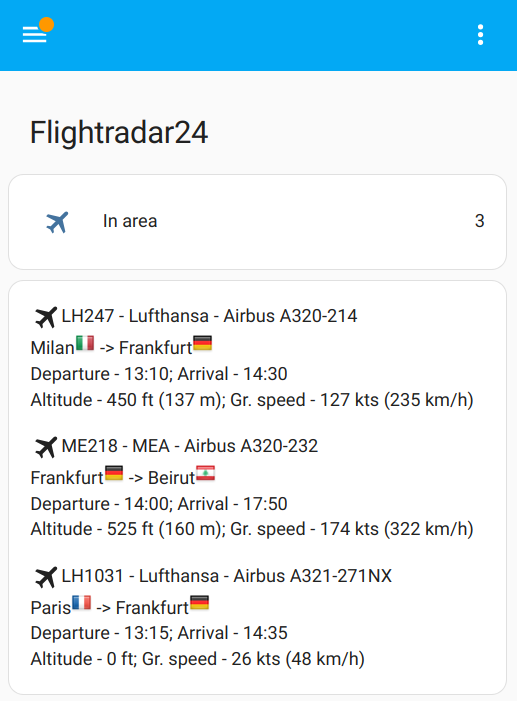
You can add flight table to your [Home Assistant dashboard](https://www.home-assistant.io/dashboards/)
1. Go to your [Home Assistant dashboard](https://www.home-assistant.io/dashboards/)
2. In the top right corner, select the three-dot menu, then select Edit dashboard
3. Click on `+ ADD CARD`, search for `Manual`, click on `Manual`.
4. Add following code to the input window and click `SAVE`
```yaml
type: vertical-stack
title: Flightradar24
cards:
- type: entities
entities:
- entity: sensor.flightradar24_current_in_area
name: In area
- type: conditional
conditions:
- condition: numeric_state
entity: sensor.flightradar24_current_in_area
above: 0
card:
type: markdown
content: >-
{% set data = state_attr('sensor.flightradar24_current_in_area',
'flights') | default([], true) %} {% for flight in data %}{% if (flight.tracked_type | default('live')) == 'live' %}
{{ flight.flight_number }} - {{ flight.airline_short }} - {{ flight.aircraft_model }}
{{ flight.airport_origin_city }}{%if flight.airport_origin_city %} {% endif %} -> {{ flight.airport_destination_city }}{%
if flight.airport_destination_country_code %}
{% endif %} -> {{ flight.airport_destination_city }}{%
if flight.airport_destination_country_code %} {% endif %}
{%if flight.time_scheduled_departure %}Departure - {{ flight.time_scheduled_departure | timestamp_custom('%H:%M') }}; {% endif %}{%if flight.time_scheduled_arrival%}Arrival - {{ flight.time_scheduled_arrival | timestamp_custom('%H:%M') }}{% endif %}
Altitude - {{ flight.altitude }} ft{%if flight.altitude > 0 %} ({{(flight.altitude * 0.3048)| round(0)}} m){% endif%}; Gr. speed - {{ flight.ground_speed }} kts{%if flight.ground_speed > 0 %} ({{(flight.ground_speed * 1.852)| round(0)}} km/h){% endif%}
{% else%}
{{ flight.flight_number }} - {{ flight.callsign }} - {{ flight.tracked_type }}
{% endif%}{% endfor %}
```
This example for `sensor.flightradar24_current_in_area` which shows flights in your area, to show additional tracked flights replace sensor name to `sensor.flightradar24_additional_tracked`
All available fields for flight you can check [here](#flight)
## Flight fields
| Field | Description |
|-------------------------------------|-------------------------------------------------------------------------------------------------------------------------------------------------------------------------------------------------------------|
| id | FlightRadar24 flight id |
| tracked_by_device | If you have defined more than one device of FlightRadar24 for more places to observe - you may be interested to know what device has fired the event. To rename the device check [this](#tracked_by_device) |
| tracked_type | Only for tracked flights. It shows is flight live or scheduled |
| tracked_by | Only for tracked flights. The flight is tracked by registration number, flight number or callsign |
| flight_number | Flight Number |
| latitude | Current latitude of the aircraft |
| longitude | Current longitude of the aircraft |
| coordinates | Track history as a list of `[latitude, longitude]` points. Seeded from FR24 `trail` on first details fetch (newest `COORDINATES_MAX_POINTS` points, stored oldest→newest), then appended on each update |
| altitude | Altitude (measurement: foot) |
| on_ground | Is the aircraft on ground (measurement: 0 - in the air; 1 - on ground) |
| distance | Distance between the aircraft and your point (measurement: kilometers) |
| closest_distance | Closest distance the aircraft reached to your point while tracking (measurement: kilometers) |
| ground_speed | Ground speed (measurement: knots) |
| squawk | Squawk code are what air traffic control (ATC) use to identify aircraft when they are flying **(for subscription only)** |
| vertical_speed | Vertical speed |
| heading | The compass direction in which the craft's bow or nose is pointed (measurement: degrees) |
| callsign | Callsign of the flight |
| aircraft_registration | Aircraft registration number |
| aircraft_photo_small | Aircraft small size photo url |
| aircraft_photo_medium | Aircraft medium size photo url |
| aircraft_photo_large | Aircraft large size photo url |
| aircraft_model | Aircraft model |
| aircraft_code | Aircraft code |
| aircraft_icao_24bit | Unique aircraft ID |
| aircraft_category | Aircraft category (example: Helicopter or Airplane) |
| airline | Airline full name |
| airline_short | Airline short name |
| airline_iata | Airline IATA code |
| airline_icao | Airline ICAO code |
| airport_origin_name | Origin airport name |
| airport_origin_code_iata | Origin airport IATA code |
| airport_origin_code_icao | Origin airport ICAO code |
| airport_origin_country_name | Origin airport country name |
| airport_origin_country_code | Origin airport country code |
| airport_origin_city | Origin airport city name |
| airport_origin_timezone_offset | Origin airport timezone offset (in seconds) |
| airport_origin_timezone_abbr | Origin airport timezone abbreviation |
| airport_origin_terminal | Origin airport terminal |
| airport_origin_latitude | Origin airport latitude |
| airport_origin_longitude | Origin airport longitude |
| airport_destination_name | Destination airport name |
| airport_destination_code_iata | Destination airport IATA code |
| airport_destination_code_icao | Destination airport ICAO code |
| airport_destination_country_name | Destination airport country name |
| airport_destination_country_code | Destination airport country code |
| airport_destination_city | Destination airport city name |
| airport_destination_timezone_offset | Destination airport timezone offset (in seconds) |
| airport_destination_timezone_abbr | Destination airport timezone abbreviation |
| airport_destination_terminal | Destination airport terminal |
| airport_destination_latitude | Destination airport latitude |
| airport_destination_longitude | Destination airport longitude |
| time_scheduled_departure | Scheduled departure time |
| time_scheduled_arrival | Scheduled arrival time |
| time_real_departure | Real departure time |
| time_real_arrival | Real arrival time |
| time_estimated_departure | Estimated departure time |
| time_estimated_arrival | Estimated arrival time |
## Most tracked
Switch `Most tracked` when is enabled - shows top 10 most tracked flights on FlightRadar24. It has attribute `flights` with next flight fields
| Field | Description |
|---|---|
| id | FlightRadar24 flight id |
| flight_number | Flight Number |
| callsign | Callsign of the flight |
| squawk | Squawk code are what air traffic control (ATC) use to identify aircraft when they are flying |
| aircraft_model | Aircraft model |
| aircraft_code | Aircraft code |
| clicks | How many people track this flight |
| airport_origin_code_iata | Origin airport IATA code |
| airport_origin_city | Origin airport city name |
| airport_destination_code_iata | Destination airport IATA code |
| airport_destination_city | Destination airport city name |
#### Display on dashboard
1. Go to your [Home Assistant dashboard](https://www.home-assistant.io/dashboards/)
2. In the top right corner, select the three-dot menu, then select **Edit dashboard**
3. Click **+ ADD CARD**, search for `Manual`, click on **Manual**
4. Add the following code and click **SAVE**
5. Turn on the **Most tracked** switch on the card (or under **Settings → Devices & Services → Entities**) to start fetching data
```yaml
type: vertical-stack
title: Flightradar24 Most Tracked
cards:
- type: entities
entities:
- entity: switch.flightradar24_most_tracked
name: Most tracked
- type: conditional
conditions:
- condition: state
entity: switch.flightradar24_most_tracked
state: "on"
card:
type: markdown
title: Top 10 most tracked flights
content: >
{% set flights = state_attr('switch.flightradar24_most_tracked', 'flights') | default([], true) %}
| # | FLIGHT | ROUTE | CLICKS |
| - | ------ | ----- | ------ |
{% for f in flights %}
| {{ loop.index }} | {{ f.flight_number | default(f.callsign, true) | default('---', true) }} | {{ f.airport_origin_city | default(f.airport_origin_code_iata, true) | default('---', true) }} → {{ f.airport_destination_city | default(f.airport_destination_code_iata, true) | default('---', true) }} | {{ f.clicks | default('---', true) }} |
{% endfor %}
```
### Lovelace Airport Card
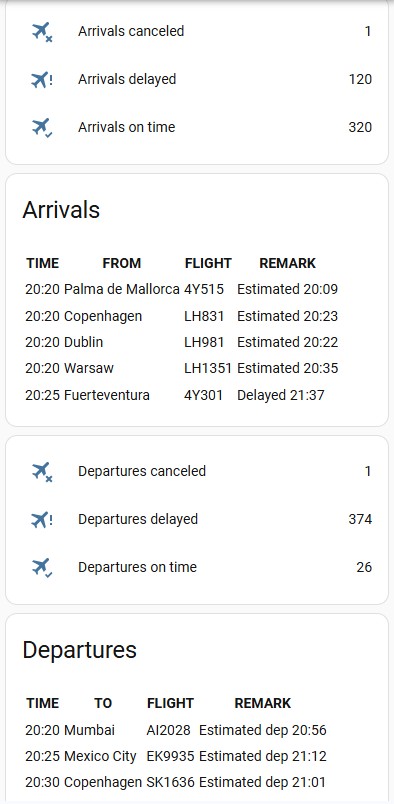
You can add departures/arrivals boards of the selected airport to your [Home Assistant dashboard](https://www.home-assistant.io/dashboards/)
To start receiving data for an airport - Pass IATA or ICAO airport code to `text.flightradar24_airport_track`. To stop receiving airport data just pass an empty string
{% endif %}
{%if flight.time_scheduled_departure %}Departure - {{ flight.time_scheduled_departure | timestamp_custom('%H:%M') }}; {% endif %}{%if flight.time_scheduled_arrival%}Arrival - {{ flight.time_scheduled_arrival | timestamp_custom('%H:%M') }}{% endif %}
Altitude - {{ flight.altitude }} ft{%if flight.altitude > 0 %} ({{(flight.altitude * 0.3048)| round(0)}} m){% endif%}; Gr. speed - {{ flight.ground_speed }} kts{%if flight.ground_speed > 0 %} ({{(flight.ground_speed * 1.852)| round(0)}} km/h){% endif%}
{% else%}
{{ flight.flight_number }} - {{ flight.callsign }} - {{ flight.tracked_type }}
{% endif%}{% endfor %}
```
This example for `sensor.flightradar24_current_in_area` which shows flights in your area, to show additional tracked flights replace sensor name to `sensor.flightradar24_additional_tracked`
All available fields for flight you can check [here](#flight)
## Flight fields
| Field | Description |
|-------------------------------------|-------------------------------------------------------------------------------------------------------------------------------------------------------------------------------------------------------------|
| id | FlightRadar24 flight id |
| tracked_by_device | If you have defined more than one device of FlightRadar24 for more places to observe - you may be interested to know what device has fired the event. To rename the device check [this](#tracked_by_device) |
| tracked_type | Only for tracked flights. It shows is flight live or scheduled |
| tracked_by | Only for tracked flights. The flight is tracked by registration number, flight number or callsign |
| flight_number | Flight Number |
| latitude | Current latitude of the aircraft |
| longitude | Current longitude of the aircraft |
| coordinates | Track history as a list of `[latitude, longitude]` points. Seeded from FR24 `trail` on first details fetch (newest `COORDINATES_MAX_POINTS` points, stored oldest→newest), then appended on each update |
| altitude | Altitude (measurement: foot) |
| on_ground | Is the aircraft on ground (measurement: 0 - in the air; 1 - on ground) |
| distance | Distance between the aircraft and your point (measurement: kilometers) |
| closest_distance | Closest distance the aircraft reached to your point while tracking (measurement: kilometers) |
| ground_speed | Ground speed (measurement: knots) |
| squawk | Squawk code are what air traffic control (ATC) use to identify aircraft when they are flying **(for subscription only)** |
| vertical_speed | Vertical speed |
| heading | The compass direction in which the craft's bow or nose is pointed (measurement: degrees) |
| callsign | Callsign of the flight |
| aircraft_registration | Aircraft registration number |
| aircraft_photo_small | Aircraft small size photo url |
| aircraft_photo_medium | Aircraft medium size photo url |
| aircraft_photo_large | Aircraft large size photo url |
| aircraft_model | Aircraft model |
| aircraft_code | Aircraft code |
| aircraft_icao_24bit | Unique aircraft ID |
| aircraft_category | Aircraft category (example: Helicopter or Airplane) |
| airline | Airline full name |
| airline_short | Airline short name |
| airline_iata | Airline IATA code |
| airline_icao | Airline ICAO code |
| airport_origin_name | Origin airport name |
| airport_origin_code_iata | Origin airport IATA code |
| airport_origin_code_icao | Origin airport ICAO code |
| airport_origin_country_name | Origin airport country name |
| airport_origin_country_code | Origin airport country code |
| airport_origin_city | Origin airport city name |
| airport_origin_timezone_offset | Origin airport timezone offset (in seconds) |
| airport_origin_timezone_abbr | Origin airport timezone abbreviation |
| airport_origin_terminal | Origin airport terminal |
| airport_origin_latitude | Origin airport latitude |
| airport_origin_longitude | Origin airport longitude |
| airport_destination_name | Destination airport name |
| airport_destination_code_iata | Destination airport IATA code |
| airport_destination_code_icao | Destination airport ICAO code |
| airport_destination_country_name | Destination airport country name |
| airport_destination_country_code | Destination airport country code |
| airport_destination_city | Destination airport city name |
| airport_destination_timezone_offset | Destination airport timezone offset (in seconds) |
| airport_destination_timezone_abbr | Destination airport timezone abbreviation |
| airport_destination_terminal | Destination airport terminal |
| airport_destination_latitude | Destination airport latitude |
| airport_destination_longitude | Destination airport longitude |
| time_scheduled_departure | Scheduled departure time |
| time_scheduled_arrival | Scheduled arrival time |
| time_real_departure | Real departure time |
| time_real_arrival | Real arrival time |
| time_estimated_departure | Estimated departure time |
| time_estimated_arrival | Estimated arrival time |
## Most tracked
Switch `Most tracked` when is enabled - shows top 10 most tracked flights on FlightRadar24. It has attribute `flights` with next flight fields
| Field | Description |
|---|---|
| id | FlightRadar24 flight id |
| flight_number | Flight Number |
| callsign | Callsign of the flight |
| squawk | Squawk code are what air traffic control (ATC) use to identify aircraft when they are flying |
| aircraft_model | Aircraft model |
| aircraft_code | Aircraft code |
| clicks | How many people track this flight |
| airport_origin_code_iata | Origin airport IATA code |
| airport_origin_city | Origin airport city name |
| airport_destination_code_iata | Destination airport IATA code |
| airport_destination_city | Destination airport city name |
#### Display on dashboard
1. Go to your [Home Assistant dashboard](https://www.home-assistant.io/dashboards/)
2. In the top right corner, select the three-dot menu, then select **Edit dashboard**
3. Click **+ ADD CARD**, search for `Manual`, click on **Manual**
4. Add the following code and click **SAVE**
5. Turn on the **Most tracked** switch on the card (or under **Settings → Devices & Services → Entities**) to start fetching data
```yaml
type: vertical-stack
title: Flightradar24 Most Tracked
cards:
- type: entities
entities:
- entity: switch.flightradar24_most_tracked
name: Most tracked
- type: conditional
conditions:
- condition: state
entity: switch.flightradar24_most_tracked
state: "on"
card:
type: markdown
title: Top 10 most tracked flights
content: >
{% set flights = state_attr('switch.flightradar24_most_tracked', 'flights') | default([], true) %}
| # | FLIGHT | ROUTE | CLICKS |
| - | ------ | ----- | ------ |
{% for f in flights %}
| {{ loop.index }} | {{ f.flight_number | default(f.callsign, true) | default('---', true) }} | {{ f.airport_origin_city | default(f.airport_origin_code_iata, true) | default('---', true) }} → {{ f.airport_destination_city | default(f.airport_destination_code_iata, true) | default('---', true) }} | {{ f.clicks | default('---', true) }} |
{% endfor %}
```
### Lovelace Airport Card
You can add departures/arrivals boards of the selected airport to your [Home Assistant dashboard](https://www.home-assistant.io/dashboards/)
To start receiving data for an airport - Pass IATA or ICAO airport code to `text.flightradar24_airport_track`. To stop receiving airport data just pass an empty string
1. Go to your [Home Assistant dashboard](https://www.home-assistant.io/dashboards/)
2. In the top right corner, select the three-dot menu, then select Edit dashboard
3. Click on `+ ADD CARD`, search for `Manual`, click on `Manual`.
4. Add following code to the input window and click `SAVE`
```yaml
type: vertical-stack
title: Flightradar24
cards:
- type: entities
entities:
- entity: sensor.flightradar24_airport_arrivals_canceled
name: Arrivals canceled
- entity: sensor.flightradar24_airport_arrivals_delayed
name: Arrivals delayed
- entity: sensor.flightradar24_airport_arrivals_on_time
name: Arrivals on time
- type: markdown
title: Arrivals
content: >
{% set flights =
state_attr('sensor.flightradar24_airport_arrivals','flights') |
default([], true) %}
| TIME | FROM | FLIGHT | REMARK |
| ---- | ---- | ------ | ------ | {% for f in flights %}
| {{ f.time_scheduled_arrival | timestamp_custom('%H:%M') if f.time_scheduled_arrival else '--:--' }} | {{ f.airport_city | default('---', true) }} | {{ f.flight_number | default('---', true) }} | {{ f.status_text | default('---', true) }} | {% endfor %}
- type: entities
entities:
- entity: sensor.flightradar24_airport_departures_canceled
name: Departures canceled
- entity: sensor.flightradar24_airport_departures_delayed
name: Departures delayed
- entity: sensor.flightradar24_airport_departures_on_time
name: Departures on time
- type: markdown
title: Departures
content: >
{% set flights = state_attr('sensor.flightradar24_airport_departures',
'flights') | default([], true) %}
| TIME | TO | FLIGHT | REMARK |
| ---- | ---- | ------ | ------ | {% for f in flights %}
| {{ f.time_scheduled_departure | timestamp_custom('%H:%M') if f.time_scheduled_departure else '--:--' }} | {{ f.airport_city | default('---', true) }} | {{ f.flight_number | default('---', true) }} | {{ f.status_text | default('---', true) }} |{% endfor %}
```
All available fields for flight you can check [here](#airport-flight)
### Airport Flight fields
Sensor `sensor.flightradar24_airport_arrivals` and `sensor.flightradar24_airport_departures` shows flights with next flight fields
| Field | Description |
|---|---|
| status_text | Flight status text (example: Delayed 17:02) |
| status | Flight status (example: delayed) |
| flight_id | Flight id on FlightRadar24 |
| flight_number | Flight Number |
| callsign | Callsign of the flight |
| aircraft_model | Aircraft model |
| aircraft_code | Aircraft code |
| aircraft_registration | Aircraft registration number |
| airline | Airline full name |
| airline_short | Airline short name |
| airline_iata | Airline IATA code |
| airline_icao | Airline ICAO code |
| airport_name | Airport name |
| airport_code_iata | Airport IATA code |
| airport_code_icao | Airport ICAO code |
| airport_country_name | Airport country name |
| airport_country_code | Airport country code |
| airport_city | Airport city |
| time_scheduled_departure | Scheduled departure time |
| time_scheduled_arrival | Scheduled arrival time |
| time_real_departure | Real departure time |
| time_real_arrival | Real arrival time |
| time_estimated_departure | Estimated departure time |
| time_estimated_arrival | Estimated arrival time |
## Thanks To
- [FlightRadarAPI](https://github.com/JeanExtreme002/FlightRadarAPI) by [@JeanExtreme002](https://github.com/JeanExtreme002)
- [The OpenSky integration](https://github.com/home-assistant/core/tree/dev/homeassistant/components/opensky)
This integration should only be used for your own educational purposes. If you are interested in accessing Flightradar24 data commercially, please contact business@fr24.com. See more information at [Flightradar24's terms and conditions](https://www.flightradar24.com/terms-and-conditions).