# Kuma Mieru :traffic_light:
**Kuma Mieru - A Modern Third-Party Monitoring Dashboard for Uptime Kuma**
Built with Next.js 16, TypeScript, and Recharts, this project enhances Uptime Kuma's public status pages with intuitive visualizations and latency charts.
[中文版](README.md) | English Version
> [!WARNING]
> New version (v1.1.4+) has refactored the time processing logic,
>
> please note to modify the `Display Timezone` (Display Timezone) to `UTC+0` time zone in the _Uptime Kuma_ settings.
## Table of Contents
- [Kuma Mieru :traffic_light:](#kuma-mieru-traffic_light)
- [Table of Contents](#table-of-contents)
- [Key Features :sparkles:](#key-features-sparkles)
- [Preview :camera:](#preview-camera)
- [Deployment :star:](#deployment-star)
- [Vercel Deployment (Recommended)](#vercel-deployment-recommended)
- [1. Fork Repository](#1-fork-repository)
- [2. Import to Vercel](#2-import-to-vercel)
- [3. Configure Environment Variables](#3-configure-environment-variables)
- [4. Update Repository](#4-update-repository)
- [Cloudflare Workers Deployment](#cloudflare-workers-deployment)
- [Local Installation](#local-installation)
- [Docker Deployment :whale: (Beta)](#docker-deployment-whale-beta)
- [Using Docker Compose (Recommended)](#using-docker-compose-recommended)
- [Manual Docker Deployment](#manual-docker-deployment)
- [1. Pull Container Image](#1-pull-container-image)
- [Pull from GHCR (Recommended)](#pull-from-ghcr-recommended)
- [2. Modify Environment Variables](#2-modify-environment-variables)
- [3. Start Container Service](#3-start-container-service)
- [Using GHCR Image](#using-ghcr-image)
- [Version Strategy](#version-strategy)
- [Environment Variables](#environment-variables)
- [Integration with Uptime Kuma :link:](#integration-with-uptime-kuma-link)
- [FAQ :question:](#faq-question)
- [Why is the time I see in Kuma Mieru offset from the time I see in Uptime Kuma?](#why-is-the-time-i-see-in-kuma-mieru-offset-from-the-time-i-see-in-uptime-kuma)
- [Is Uptime Robot / Better Stack / other monitoring data sources compatible?](#is-uptime-robot--better-stack--other-monitoring-data-sources-compatible)
- [Contribution Guide :handshake:](#contribution-guide-handshake)
- [Star History :star2:](#star-history-star2)
- [License :lock:](#license-lock)
## Key Features :sparkles:
- **Real-Time Monitoring & Auto-Refresh** :arrows_clockwise: Live status updates without manual refreshing.
- **Elegant Responsive UI** :art: Modern interface powered by **HeroUI components**, optimized for all devices.
- **Interactive Analytics** :chart_with_upwards_trend: Explore node latency/status data through **Recharts-powered visualizations**.
- **Multi-Theme Support** :bulb: Dark/Light/System themes with automatic detection.
- **Maintenance Announcements**: Native support for Uptime Kuma's **incident updates** and **status events**.
## Preview :camera:
| Dark Mode | Light Mode |
| --------------------------------------- | ----------------------------------------- |
| 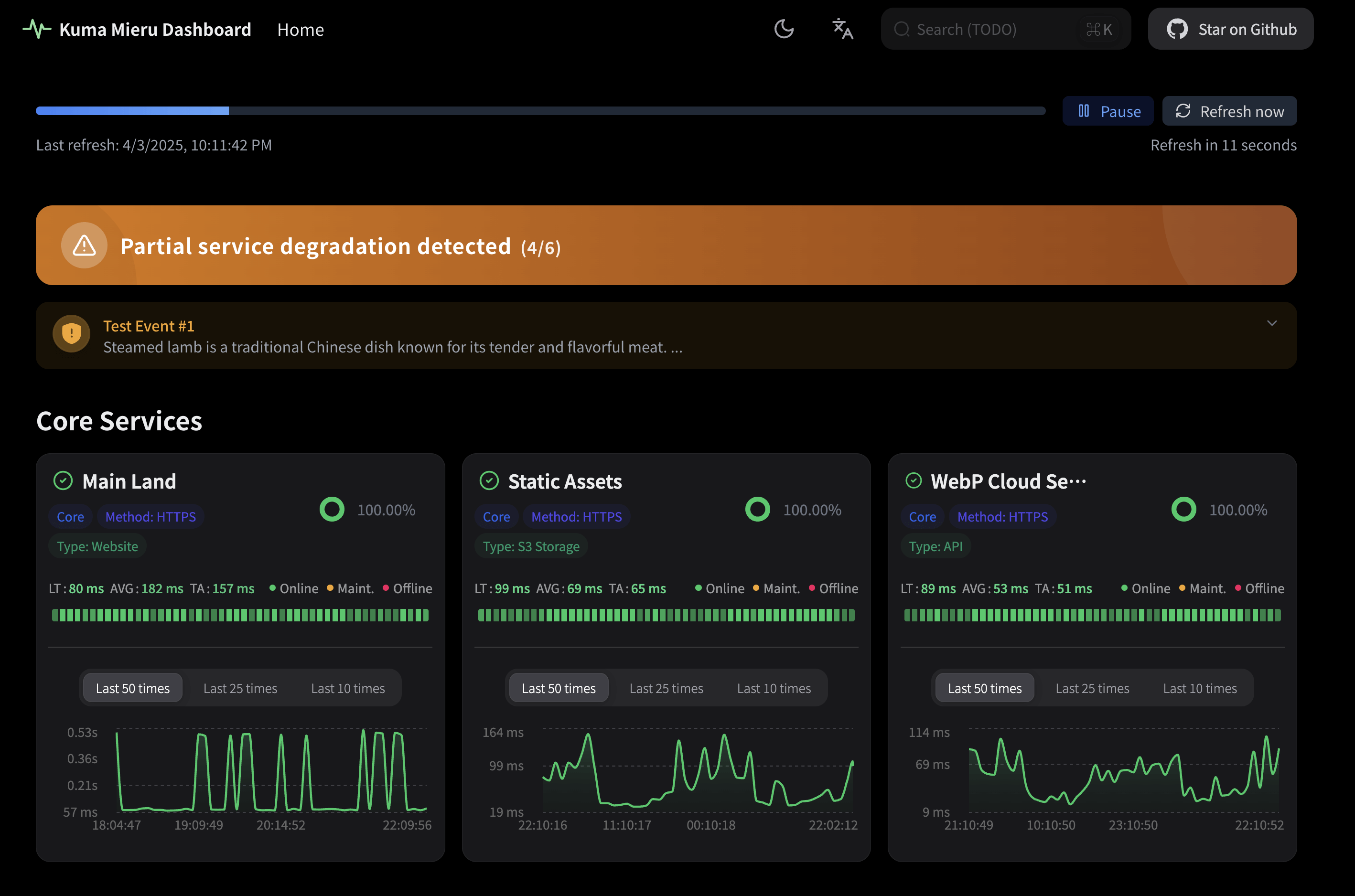 | 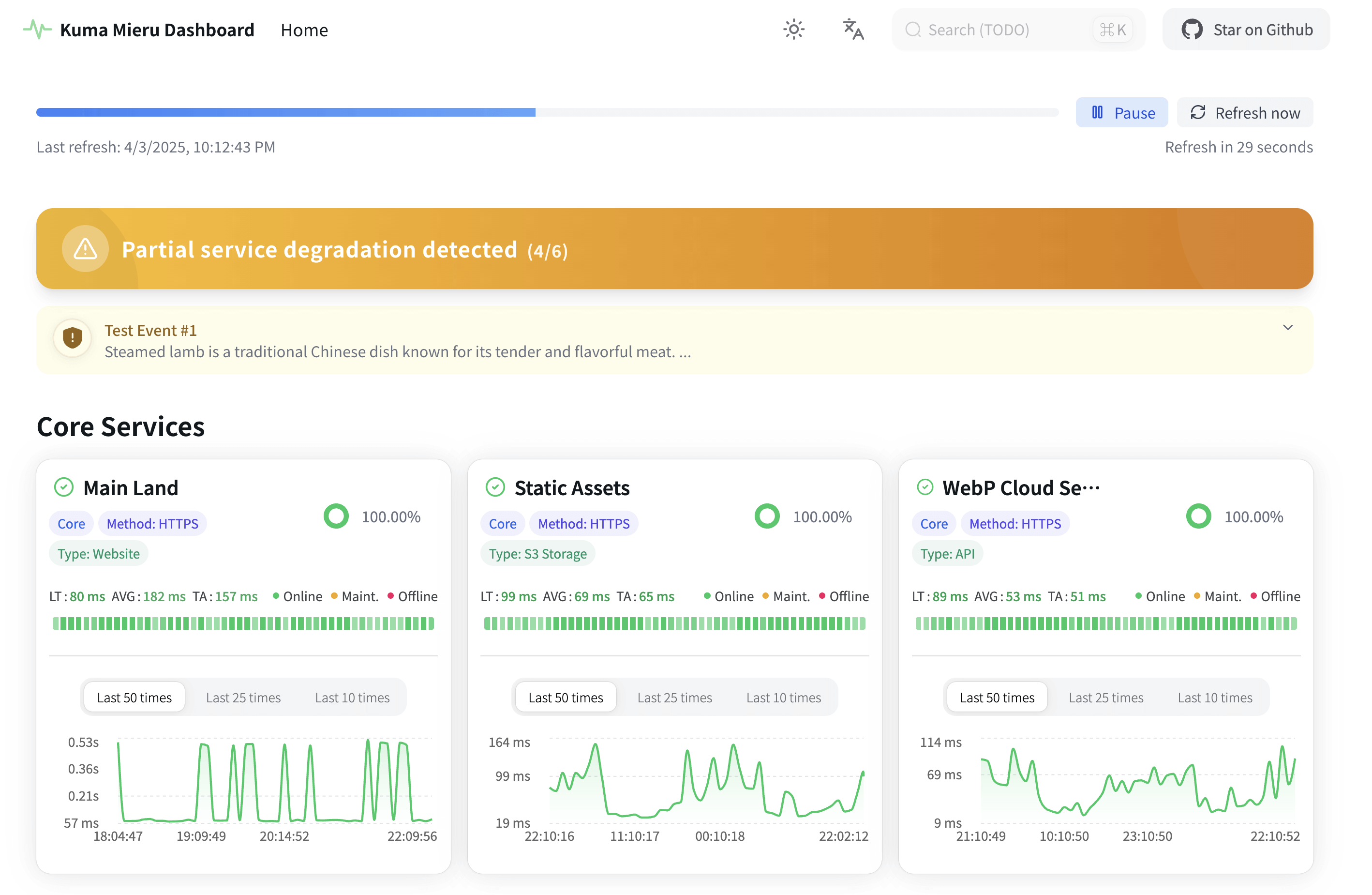 |
## Deployment :star:
### Vercel Deployment (Recommended)
#### 1. Fork Repository
1. Click [Fork](https://github.com/Alice39s/kuma-mieru/fork) button to fork this repository to your GitHub account.
2. Click `Create fork` button to create a new fork.
> [!NOTE]
> Please ensure your forked repository is public, otherwise you may encounter issues when synchronizing updates.
>
> Your configuration is stored in environment variables, so your forked repository will not leak any configuration information.
#### 2. Import to Vercel
Go to , select **Import** to import the repository you just forked.
#### 3. Configure Environment Variables
> [!NOTE]
> Please configure `UPTIME_KUMA_URLS` (recommended), otherwise monitoring data will not be displayed correctly.
>
> Legacy `UPTIME_KUMA_BASE_URL` + `PAGE_ID` is still supported. See [Environment Variables](#environment-variables) for details.
1. Click `Environment Variables` and add `UPTIME_KUMA_URLS` (recommended).
2. Click the `Deploy` button to deploy instantly on Vercel.
#### 4. Update Repository
1. Enter your forked GitHub repository, click the `Sync fork` button.
2. Click the `Update branch` button, and follow the prompts to automatically synchronize the latest code from this repository.
### Cloudflare Workers Deployment
> [!WARNING]
> Cloudflare Workers deployment is not supported yet, it is recommended to use [Vercel Deployment](#vercel-deployment-recommended) / Netlify instead.
>
> References: [#88](https://github.com/Alice39s/kuma-mieru/issues/88#issuecomment-2919619066)
~~Similar to [Vercel Deployment](#vercel-deployment-recommended), you can deploy to Cloudflare by importing the repository to Cloudflare.~~
~~Note:~~
~~1. Please use `bun run deploy:cloudflare` as the `Build command`, otherwise the deployment will fail.~~
~~2. Please ensure that the environment variables are configured, please refer to the [Environment Variables](#environment-variables) section for more details.~~
### Local Installation
1. **Clone Repository**
```bash
git clone https://github.com/Alice39s/kuma-mieru.git
cd kuma-mieru
```
2. **Install Dependencies**
Kuma Mieru uses [Bun](https://bun.sh/) as its package manager, please install Bun first:
```bash
# Linux/macOS
curl -fsSL https://bun.sh/install | bash
# Windows
powershell -c "irm bun.sh/install.ps1 | iex"
```
Then install the dependencies:
```bash
bun install
```
3. **Configure Environment**
Copy `.env.example` to `.env` and modify:
```bash
UPTIME_KUMA_URLS=https://your-kuma-instance.com/status/your_status_page_id
```
_Multiple pages example:_
```bash
UPTIME_KUMA_URLS=https://status.kuma-mieru.invalid/status/prod|https://status.kuma-mieru.invalid/status/staging
```
4. **Start Development Server**
```bash
bun run dev
```
Access at: [http://localhost:3883](http://localhost:3883)
5. **Production Build**
```bash
bun run build
bun run start
```
## Docker Deployment :whale: (Beta)
### Using Docker Compose (Recommended)
1. **Clone Repository**
```bash
git clone https://github.com/Alice39s/kuma-mieru.git
cd kuma-mieru
```
2. **Configure Environment Variables**
Duplicate the `.env.example` file to create your `.env` file:
```bash
cp .env.example .env
```
Edit the `.env` file with required configurations:
```
UPTIME_KUMA_URLS=https://example.kuma-mieru.invalid/status/your-status-page-id
```
3. **Start Services**
```bash
docker compose up -d
```
Service will be available at `http://0.0.0.0:3883`.
4. **View Logs**
```bash
docker compose logs -f
```
5. **Update Image**
```bash
docker compose pull
docker compose up -d
```
### Manual Docker Deployment
#### 1. Pull Container Image
##### Pull from GHCR (Recommended)
```bash
docker pull ghcr.io/alice39s/kuma-mieru:1
```
#### 2. Modify Environment Variables
Copy `.env.example` file to create your `.env` file:
```bash
cp .env.example .env
```
Please refer to the [Environment Variables](#environment-variables) section for more details, and prioritize configuring the `UPTIME_KUMA_URLS` variable in `.env`.
#### 3. Start Container Service
##### Using GHCR Image
```bash
docker run -d \
--name kuma-mieru \
-p 3883:3000 \
-e UPTIME_KUMA_URLS="https://example.kuma-mieru.invalid/status/default|https://example.kuma-mieru.invalid/status/secondary" \
-e KUMA_MIERU_TITLE="Kuma Mieru" \
ghcr.io/alice39s/kuma-mieru:1
```
## Version Strategy
> [!WARNING]
> Docker image recommends using `ghcr.io/alice39s/kuma-mieru:1` (major version channel).
>
> Forward compatibility will be maintained as much as possible within `v1` major version; `v2` will be a version containing major Breaking Changes.
>
> Pinning to minor/patch versions (e.g., `:1.6` or `:1.6.2`) is not recommended unless you have a clear canary and rollback strategy.
## Environment Variables
First, assume your Uptime Kuma status page URL is:
`https://example.kuma-mieru.invalid/status/test1`
Recommended:
`UPTIME_KUMA_URLS=https://example.kuma-mieru.invalid/status/test1`
For multiple status pages, separate full URLs with `|`:
`UPTIME_KUMA_URLS=https://example.kuma-mieru.invalid/status/test1|https://example.kuma-mieru.invalid/status/test2`
Environment variables (including backward compatibility):
| Variable Name | Required | Description | Example |
| ------------------------------- | -------- | -------------------------------------------------------------------------------------------------------------------- | ---------------------------------------------------------------------------------------------------------- |
| UPTIME_KUMA_URLS | Yes\* | Recommended. Full status page URL(s), supports `\|` separated multiple URLs (can come from different Kuma instances) | |
| UPTIME_KUMA_BASE_URL | Yes\* | Legacy. Base URL of Uptime Kuma instance (used only when `UPTIME_KUMA_URLS` is not set) | |
| PAGE_ID | Yes\* | Legacy. Status page IDs, comma-separated and first value is default (used only when `UPTIME_KUMA_URLS` not set) | default,status-asia |
| KUMA_MIERU_EDIT_THIS_PAGE | No | Show "Edit This Page" button (new variable name) | false |
| KUMA_MIERU_SHOW_STAR_BUTTON | No | Show "Star on GitHub" button (new variable name) | true |
| KUMA_MIERU_TITLE | No | Custom page title (new variable name) | My Monitoring Dashboard |
| KUMA_MIERU_DESCRIPTION | No | Custom page description (new variable name) | A beautiful monitoring dashboard |
| KUMA_MIERU_ICON | No | Custom page icon URL (new variable name) | /icon.svg |
| FEATURE_EDIT_THIS_PAGE | No | Legacy alias of `KUMA_MIERU_EDIT_THIS_PAGE` | false |
| FEATURE_SHOW_STAR_BUTTON | No | Legacy alias of `KUMA_MIERU_SHOW_STAR_BUTTON` | true |
| FEATURE_TITLE | No | Legacy alias of `KUMA_MIERU_TITLE` | My Monitoring Dashboard |
| FEATURE_DESCRIPTION | No | Legacy alias of `KUMA_MIERU_DESCRIPTION` | A beautiful monitoring dashboard |
| FEATURE_ICON | No | Legacy alias of `KUMA_MIERU_ICON` | /icon.svg |
| ALLOW_INSECURE_TLS | No | Whether to skip HTTPS certificate validation when requesting upstream Uptime Kuma (trusted self-signed only) | `false` (default, strict validation) / `true` (skip validation, security risk) |
| REQUEST_TIMEOUT_MS | No | Global upstream request timeout (milliseconds, default 8000) | `8000` |
| REQUEST_RETRY_MAX | No | Global upstream request max retry count (default 3) | `3` |
| REQUEST_RETRY_DELAY_MS | No | Global upstream request retry base interval (milliseconds, default 500) | `500` |
| SSR_STRICT_MODE | No | Enable strict SSR failure mode (trigger global error page when all pages fail) | `true` / `false` (default) |
| NEXT_PUBLIC_ERROR_PAGE_DEV_MODE | No | Whether to show full stack trace in error page | `false` (default) / `true` |
| ALLOW_EMBEDDING | No | Whether to allow embedding in iframe (applies at runtime; no image rebuild needed) | `false` (block) / `true` (allow all, not recommended) / `example.com,app.com` (whitelist) |
| STRICT_IMAGE_REMOTE_PATTERNS | No | Enable strict remote image domain allowlist (build-time) | `false` (default, allow all remote image domains) / `true` (allow only domains generated by image-domains) |
\* Use either `UPTIME_KUMA_URLS` or `UPTIME_KUMA_BASE_URL + PAGE_ID`. If both are set, `UPTIME_KUMA_URLS` takes precedence.
After editing `.env`, run `docker compose up -d --force-recreate` so the container picks up updated environment variables.
> [!WARNING]
> By default (`STRICT_IMAGE_REMOTE_PATTERNS=false`), `next/image` remote domain restrictions are relaxed to avoid image failures when Docker runtime endpoints change.
> In high-security environments, set `STRICT_IMAGE_REMOTE_PATTERNS=true` for self-built images and ensure your build step generates a complete domain allowlist.
## Integration with Uptime Kuma :link:
> [!NOTE]
> For the latest stable version of Uptime Kuma (v1.23.0+), Kuma Mieru has been fully tested and is compatible.
>
> If you are using an older version, please refer to the [Uptime Kuma official documentation](https://github.com/louislam/uptime-kuma/wiki/%F0%9F%86%99-How-to-Update) to try to upgrade to the latest stable version (v1.23.0+), and remember to back up your data.
Seamlessly works with the popular self-hosted monitoring tool:
[Uptime Kuma](https://github.com/louislam/uptime-kuma)
**Prerequisites**:
1. A running Uptime Kuma instance
2. Change `Display Timezone` to any `UTC+0` time zone in the Uptime Kuma settings.
3. Created status page in Uptime Kuma
4. Correct environment variables configuration
## FAQ :question:
### Why is the time I see in Kuma Mieru offset from the time I see in Uptime Kuma?
Since the time passed from the Uptime Kuma backend to the frontend **doesn't carry time zone information**, Kuma Mieru **automatically converts the time to the UTC+0 time zone** and displays it in order to facilitate development.
If you find that the time zone is shifted, please go to Uptime Kuma settings and change `Display Timezone` to any `UTC+0` time zone.
### Is Uptime Robot / Better Stack / other monitoring data sources compatible?
Kuma Mieru was designed to address the shortcomings of Uptime Kuma, so v1 does not consider supporting other monitoring data sources for now.
However, v2 may consider to support API interface of other monitoring tools such as Uptime Robot / Better Stack.
## Contribution Guide :handshake:
We welcome contributions! Please review:
[CONTRIBUTING.md](CONTRIBUTING.md) for development guidelines.
## Star History :star2:
## License :lock:
Open-sourced under [MPL-2.0](LICENSE) (Mozilla Public License 2.0).