# dsh-webui-m3e
[日本語](README.md) | English | [简体中文](README.zh-CN.md)
A Material 3 Expressive mobile Web UI plugin for DeepSeek Harness (DSH). The UI text is Japanese only.
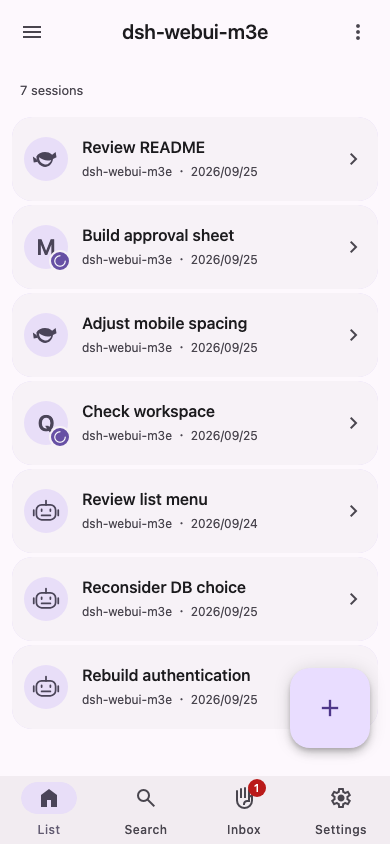
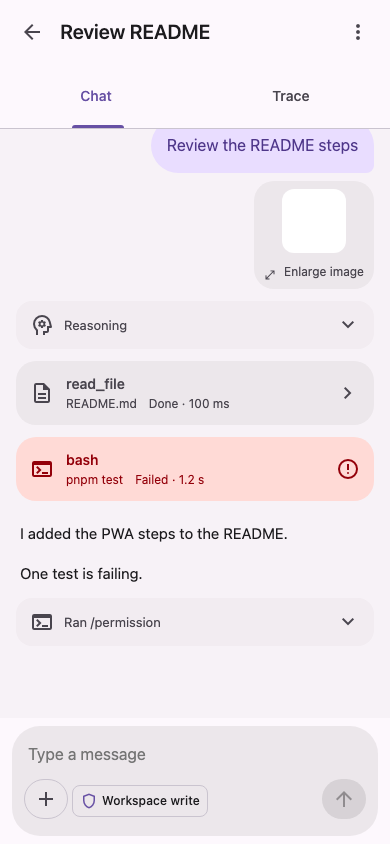
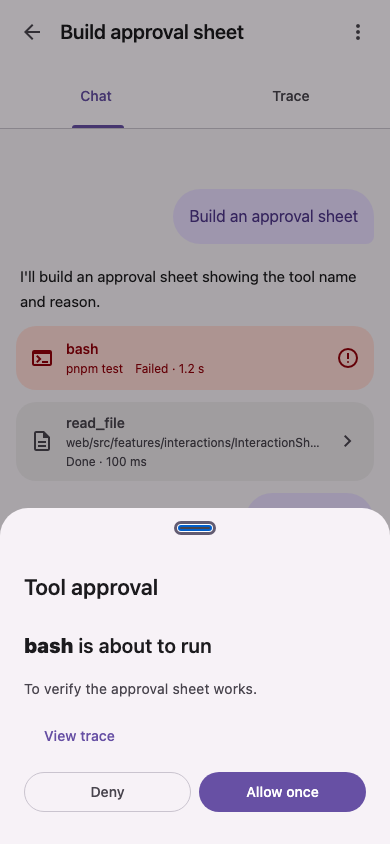
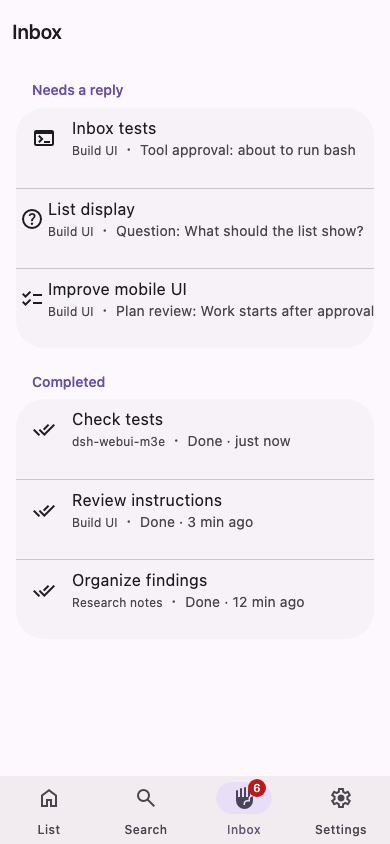
The screenshots show translated mock screens. The actual app UI is Japanese only.
> [!NOTE]
> This is a personal project and is not an official DeepSeek product. It is under development and may contain bugs. Please use it with care.
## Quick Start
Run this on the machine running DSH:
```bash
dsh plugin --profile web add https://github.com/AliceSaikawa/dsh-webui-m3e/releases/download/v0.0.8/dsh-webui-m3e-0.0.8.tgz
```
M3E is not published to the npm registry, so installing by name with `add dsh-webui-m3e` is unavailable.
`web` is an example: select the profile that actually serves your Web UI. A misspelled name can create a new profile without an error, so a successful installation alone does not confirm the target.
Only **DSH 0.2.0-rc.2** is supported. The regular npm-installed DSH CLI uses **pnpm on PATH**. DSH itself declares no minimum Node version, but its CLI dependency commander 15 requires Node `>=22.12.0`, and pnpm 11.17.0 requires `>=22.13`. Use Node that meets both DSH's and your pnpm version's requirements.
The tested environment is macOS 27.2, Node.js 26.7.0 and pnpm 11.17.0; those dependency declarations do not establish M3E's minimum supported Node version.
M3E has no additional runtime packages to install. You do not need M3E's source, a local build, or its development dependencies.
After adding the plugin, sign in through the standard interface (`http:///?ui=classic`), then open `http:///m3e/`. Always restart that profile's Host after an update or rollback so the Host code switches versions.
Desktop has an [upstream bundled-pnpm path](https://github.com/deepseek-ai/deepseek-harness/blob/master/apps/desktop/README.md#bundled-command-runtime). Desktop has not been verified for this release in this environment; the regular CLI results do not establish Desktop support.
## Features
- **Conversations:** Read AI responses, tool results, and reasoning on a phone-sized screen. You can also switch to a chronological trace view.
- **Responses:** Approve tools, answer AI questions, and review plans from a bottom sheet on any screen.
- **Inbox:** See conversations that need a response alongside completed conversations.
- **Composer:** Attach images, get file and command suggestions, and switch models and permission modes.
- **More:** Search conversations, manage DSH settings and API keys, and add the Web app to your home screen.
The existing DSH interface remains available. You can choose which interface to use on each device.
## Requirements
- DeepSeek Harness **0.2.0-rc.2**
- Support for the 0.1.5 series has been removed. See [docs/dsh-compatibility.md](docs/dsh-compatibility.md) (Japanese) for results, known differences, and unverified paths.
- Node.js that meets DSH's and pnpm's requirements, and pnpm on PATH (regular CLI). See Quick Start above for version requirements.
## Updates, installed version, and removal
Read `dependencies.dsh-webui-m3e.version` in the JSON output for the installed version and `resolved` for its source.
```bash
dsh plugin --profile web list dsh-webui-m3e --depth 0 --json
```
To update, choose a compatible version from the [release list](https://github.com/AliceSaikawa/dsh-webui-m3e/releases) and add its attached tgz URL. URLs follow `https://github.com/AliceSaikawa/dsh-webui-m3e/releases/download/v/dsh-webui-m3e-.tgz`. This example migrates to 0.0.8. Local-tgz users use the same command in the same profile, restart the Host, and check the installed version above. No manual version editing is needed.
```bash
dsh plugin --profile web add https://github.com/AliceSaikawa/dsh-webui-m3e/releases/download/v0.0.8/dsh-webui-m3e-0.0.8.tgz
```
To roll back from a future release, choose a verified compatible version's URL from the release list, add it again, and restart the Host. The same command returns to 0.0.8. Do not use the previously distributed 0.0.7 as a rollback target with DSH 0.2.0-rc.2. A saved compatible tarball can also be selected:
```bash
dsh plugin --profile web add file:/path/to/dsh-webui-m3e-.tgz
```
Before removing M3E, visit `http:///?ui=classic`. After removal, `/m3e/` returns 404, so use that standard interface:
```bash
dsh plugin --profile web remove dsh-webui-m3e
```
For a download returning 404, check the tag, asset filename and URL in the release list; for missing pnpm, check PATH; for a missing UI, check the profile and restart the Host. Failed CLI operations also print a diagnostics path.
For source builds, see the [development and distribution guide](docs/development.md#配布) (Japanese).
## Usage
1. Sign in once through the usual DSH interface (`http:///`).
2. Open `http:///m3e/`.
3. On iPhone, choose “Add to Home Screen” from Safari's Share menu to open it like an app.
### Switching interfaces
Choose which interface to use on this device with any of the following options. Your choice is saved separately on each device.
- In the usual interface: `設定 → 一般 → この端末で M3E の画面を使う` (Settings → General → Use the M3E interface on this device)
- In this interface: `設定 → 今の画面に戻す` (Settings → Switch back to the classic interface)
- Add `?ui=m3e` or `?ui=classic` to the URL
If either interface fails to load, open `http:///?ui=classic` to return to the usual interface.
## Notes
- The UI text is Japanese only.
- This plugin bundles internal DSH libraries (`@deepseek-ai/cordis` and `@deepseek-ai/dsh-client-store`), so it may not work with every DSH version.
- UI tests mainly use mock data, and the DSH connection is checked with an isolated real DSH and a fake LLM. Real LLMs and operation in iPhone Safari or as a Web app added to the Home Screen have not been verified for this supported DSH version (see [docs/dsh-compatibility.md](docs/dsh-compatibility.md) for the detailed verification scope).
- See [docs/development.md](docs/development.md) for architecture, development instructions and verification records.
## License
MIT. See [LICENSE](LICENSE).