## How to contribute to FXGL
Contribution of any form is welcome!
Please see the list below on how you can contribute to the project.
Once you've decided what you would like to do, let us know about it first.
This is to make sure that the issue you want hasn't already been implemented or being worked on in newer versions.
* Proof read the public documentation for errors, ambiguities and typos.
* Crash test features for bugs.
* Add missing tests.
* Create an issue or suggest a feature backed up by a use case.
* Provide or suggest an implementation of an issue from [GitHub Issues](https://github.com/AlmasB/FXGL/issues).
* Suggest an API change to simplify user workflow.
* [Samples](fxgl-samples) might get outdated quickly, see if you can find something weird or not working.
* Share details about your project based on FXGL (this will go to the showcase section).
* Write a tutorial on how to use FXGL.
If you want to be involved with the project on a long-term basis, please scroll down to [community roles](#Community-Roles).
## Workflow
There are 2 branches: `dev` and `release`.
The `release` branch is for releases only.
All the work goes to your `dev` branch, then pull a request back to `dev`.
## Development
Due to use of Kotlin, [IntelliJ IDEA](https://www.jetbrains.com/idea/) is recommended.
To start developing FXGL you can set up IDEA (2025.3.2+) as follows:
1. Fork FXGL into your GitHub repo, then clone your repo to your machine.
2. Open IDEA -> File -> New -> Project from Existing Sources -> Select the cloned FXGL directory.
3. Import project from external model -> Maven -> Finish.
Ensure you are using [JDK 25](https://jdk.java.net/) (or higher). You can set this via File -> Project Structure -> Project.
You should now see something like this:
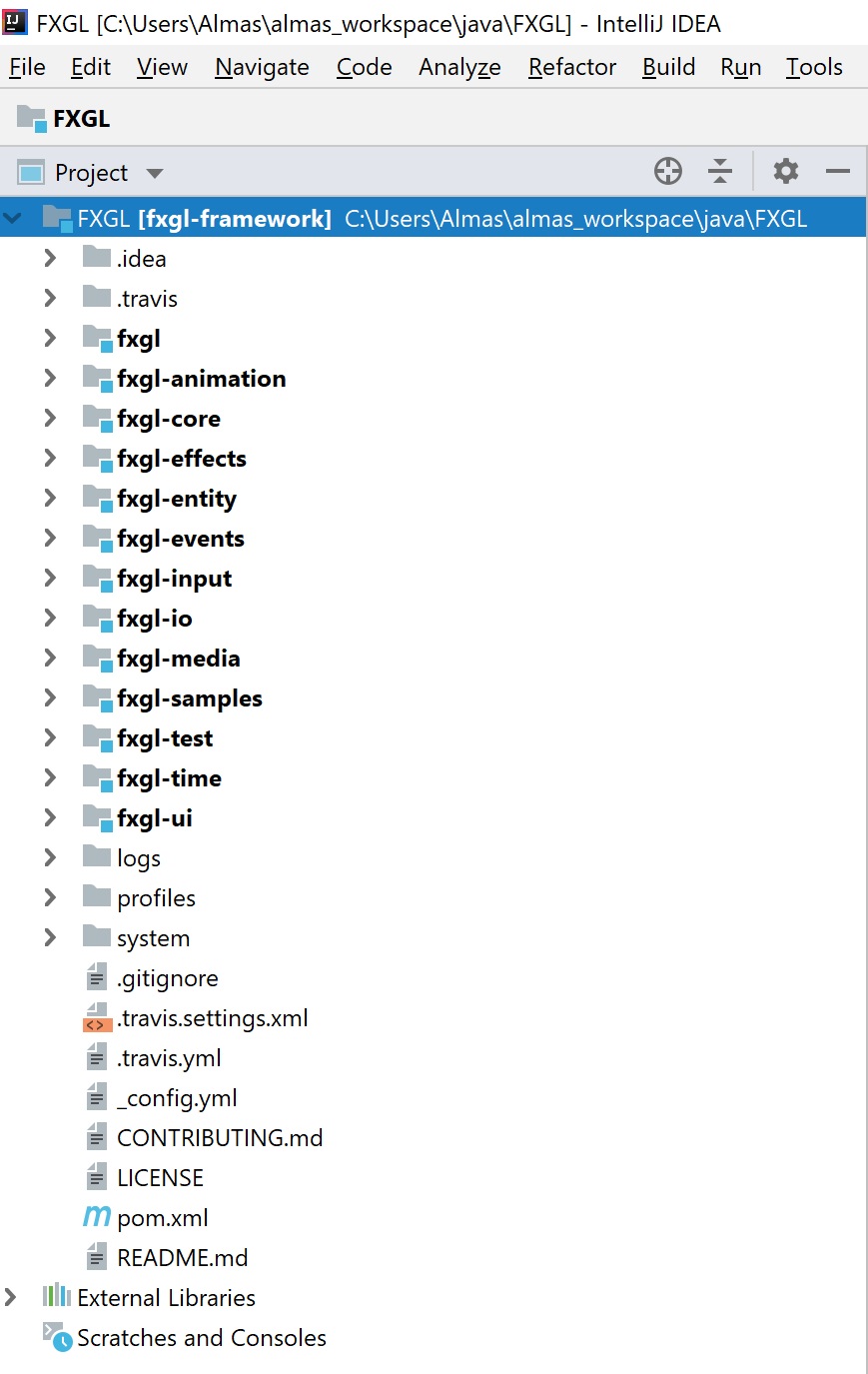 Next:
1. In the `fxgl` module, in IntelliJ, right-click on `src/main/java-templates` and mark directory as sources root.
2. Right-click on the `fxgl-test` module and rebuild `fxgl-test` module.
You should now be able to run samples and tests.
## Running all tests
In IntelliJ,
1. Run -> Edit Configurations
2. Add new JUnit configuration with name "ALL FXGL TESTS"
3. Select "Test kind" - "All in package" and "Search for tests" - "In whole project".
4. Clear the "working directory" text field.
5. Apply -> OK.
Next:
1. In the `fxgl` module, in IntelliJ, right-click on `src/main/java-templates` and mark directory as sources root.
2. Right-click on the `fxgl-test` module and rebuild `fxgl-test` module.
You should now be able to run samples and tests.
## Running all tests
In IntelliJ,
1. Run -> Edit Configurations
2. Add new JUnit configuration with name "ALL FXGL TESTS"
3. Select "Test kind" - "All in package" and "Search for tests" - "In whole project".
4. Clear the "working directory" text field.
5. Apply -> OK.
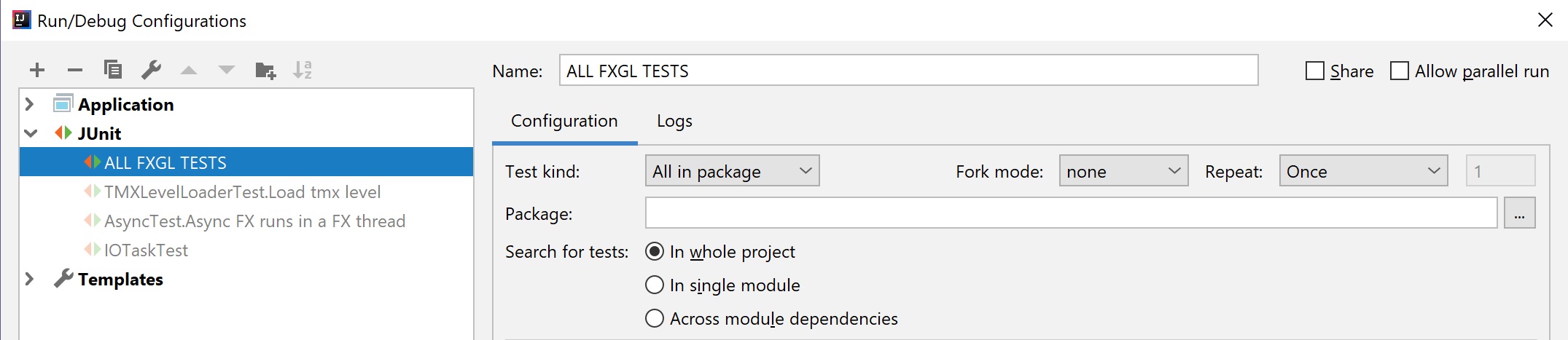 Now you can run your configuration "ALL FXGL TESTS" which runs tests from all modules.
## Coding Standards
The project uses the following guidelines:
* Tabs set to 4 spaces & consistent indentation.
* Consistent naming conventions (no [Hungarian notation](https://en.wikipedia.org/wiki/Hungarian_notation)).
* Javadoc on public and protected API (where appropriate).
* Keep access to fields and methods as restricted as you can.
* When using text in UI, use localization (e.g. english.properties).
* Short license header in each new file and `@author`.
If in doubt, skim through the existing source code to get a feel for it.
## Conventional Commits for Changelogs
The project uses the following commit message guidelines to auto-generate changelogs, mostly based on [Conventional Commits 1.0.0](https://www.conventionalcommits.org/en/v1.0.0/):
* **build: message** -- change affects the build system, configuration files, scripts, or external dependencies
* **docs: message** -- change affects documentation **only**
* **feat: message** -- change adds a new or modifies an existing feature
* **fix: message** -- change fixes a bug
* **perf: message** -- change improves performance
* **refactor: message** -- change cleans up or restructures code
* **test: message** -- change that adds new or updates existing tests
* **repo: message** -- change that is related to repository maintenance
Examples:
* `build: use latest JDK as baseline`
* `docs: update description of method X to match behavior`
If a commit does not have the `:` character, then it is excluded from the changelog.
Hence, the `:` character is banned from non-changelog commit messages.
## Community Roles
Community developers may apply to any of these roles by opening a [discussion](https://github.com/AlmasB/FXGL/discussions). Each role is allocated based on discussions with the individual. The individual is expected to be **committed** to the role guidance. However, the role descriptions are merely a guidance and not binding in any way. The role may be revoked at the request of the individual or due to violation of the [Code of Conduct](CODE_OF_CONDUCT.md).
#### Maintainer (Collaborator):
* Lead the project development and set out project goals
* Represent the project at conferences and other events
* Engage with the community to obtain feedback
* Review Pull Requests
* Guide new and existing Contributors to develop Pull Requests
* Provide technical support in the community chat
#### Coordinator:
* Lead one or more areas of the project development
* Engage with the Maintainers to discuss the development
* Review Pull Requests
* Guide new and existing Contributors to develop Pull Requests
* Provide technical support in the community chat
#### Tester:
* Provide feedback on latest project versions
* Crash test new and existing features after major updates
* Provide technical support in the community chat
#### Contributor:
Any developer whose Pull Request has been merged is considered a Contributor.
#### Sponsor:
Any developer who is sponsoring (or has sponsored in the past) the project is considered a Sponsor.
Now you can run your configuration "ALL FXGL TESTS" which runs tests from all modules.
## Coding Standards
The project uses the following guidelines:
* Tabs set to 4 spaces & consistent indentation.
* Consistent naming conventions (no [Hungarian notation](https://en.wikipedia.org/wiki/Hungarian_notation)).
* Javadoc on public and protected API (where appropriate).
* Keep access to fields and methods as restricted as you can.
* When using text in UI, use localization (e.g. english.properties).
* Short license header in each new file and `@author`.
If in doubt, skim through the existing source code to get a feel for it.
## Conventional Commits for Changelogs
The project uses the following commit message guidelines to auto-generate changelogs, mostly based on [Conventional Commits 1.0.0](https://www.conventionalcommits.org/en/v1.0.0/):
* **build: message** -- change affects the build system, configuration files, scripts, or external dependencies
* **docs: message** -- change affects documentation **only**
* **feat: message** -- change adds a new or modifies an existing feature
* **fix: message** -- change fixes a bug
* **perf: message** -- change improves performance
* **refactor: message** -- change cleans up or restructures code
* **test: message** -- change that adds new or updates existing tests
* **repo: message** -- change that is related to repository maintenance
Examples:
* `build: use latest JDK as baseline`
* `docs: update description of method X to match behavior`
If a commit does not have the `:` character, then it is excluded from the changelog.
Hence, the `:` character is banned from non-changelog commit messages.
## Community Roles
Community developers may apply to any of these roles by opening a [discussion](https://github.com/AlmasB/FXGL/discussions). Each role is allocated based on discussions with the individual. The individual is expected to be **committed** to the role guidance. However, the role descriptions are merely a guidance and not binding in any way. The role may be revoked at the request of the individual or due to violation of the [Code of Conduct](CODE_OF_CONDUCT.md).
#### Maintainer (Collaborator):
* Lead the project development and set out project goals
* Represent the project at conferences and other events
* Engage with the community to obtain feedback
* Review Pull Requests
* Guide new and existing Contributors to develop Pull Requests
* Provide technical support in the community chat
#### Coordinator:
* Lead one or more areas of the project development
* Engage with the Maintainers to discuss the development
* Review Pull Requests
* Guide new and existing Contributors to develop Pull Requests
* Provide technical support in the community chat
#### Tester:
* Provide feedback on latest project versions
* Crash test new and existing features after major updates
* Provide technical support in the community chat
#### Contributor:
Any developer whose Pull Request has been merged is considered a Contributor.
#### Sponsor:
Any developer who is sponsoring (or has sponsored in the past) the project is considered a Sponsor.