# visual-plan
*The design of one change, on one interactive page. See it, answer it, lock it.*
[](SKILL.md)
[](#installation)
[](#installation)
[](#the-pack)
[](LICENSE)
⭐ If it saves you from one 10-page plan, star it on GitHub.
[Features](#features) • [Installation](#installation) • [Usage](#usage) • [How it works](#how-it-works) • [Example](#example)
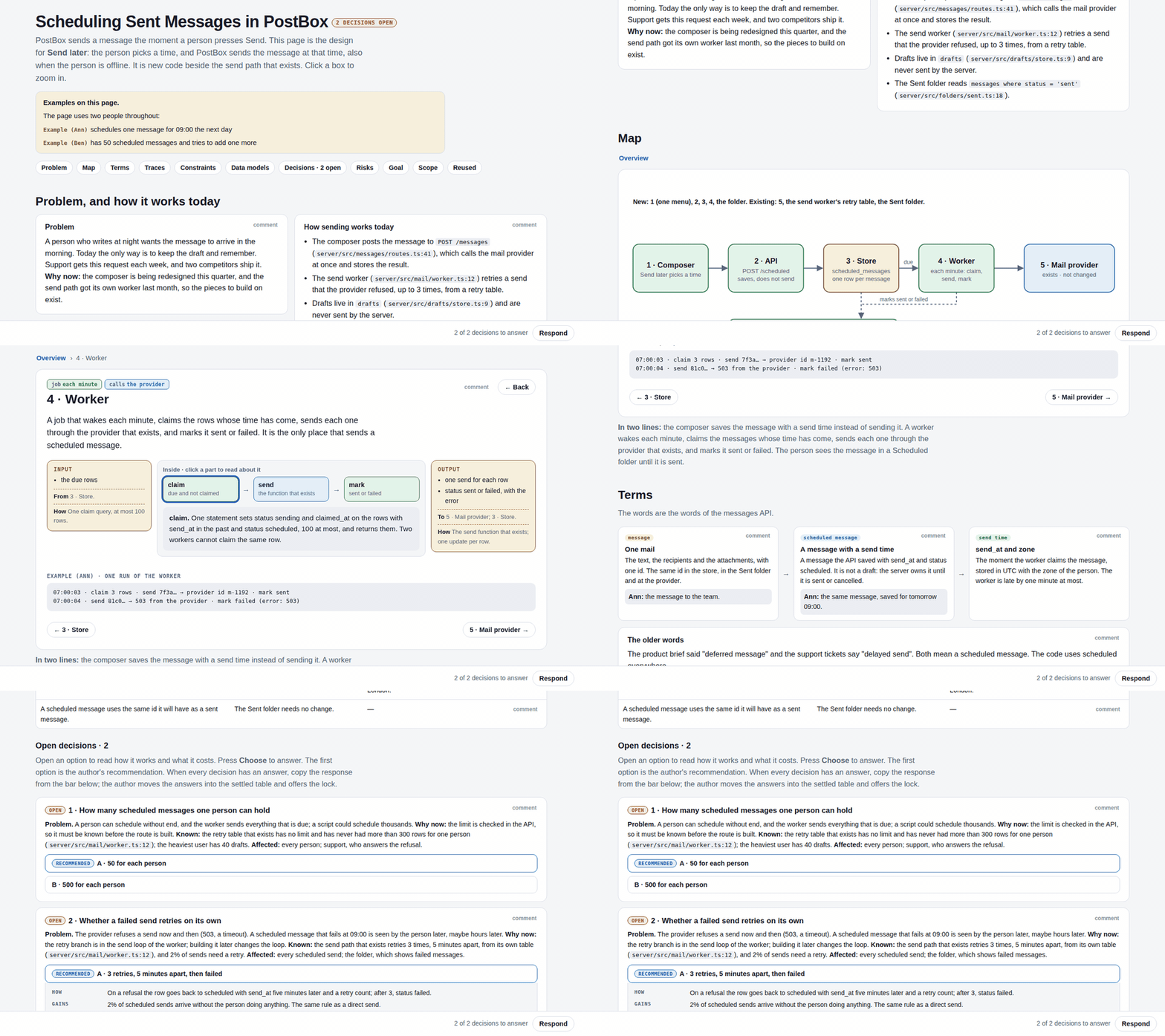
Coding agents got good at building. Now they write 10-page plans, and the two decisions that are actually
yours are buried on page 7. **visual-plan** is an agent skill that writes the design for one change as a
single self-contained HTML page: a map of the target design you can click into, your open decisions as
controls on the part they change, and a lock. The implementation plan (tasks, files, tests) comes after
the lock, as a separate document.
## Features
- **Zoomable map of the target design.** One overview diagram; click a box to zoom in (map → zoom → detail), with input, inside, output, and one real example at each level.
- **Only your decisions, as controls.** Each open decision has its context, one-line options with the recommendation first, and a panel per option (how, gains, costs, effort, reversible). Nothing is preselected.
- **Respond and Lock.** One button returns every pick, struck row, and comment as a single markdown message. The Lock button appears only when no decision is open.
- **Plain words, linted.** Prose follows ASD-STE100 Simplified Technical English, and the pack checks it, along with "no code in the plan" and retired terms.
- **Built in a subagent.** The page builder writes, packs, and lints the page in its own context and returns only a path and the open decisions, so your main session stays clean.
- **One file.** The output is one self-contained `plan.html`: no network, no build, no framework. Open it from disk, host it anywhere, or drop it into an artifact.
- **Design, not tasks.** Built around the target state. No task lists, no code sketches, no who-does-what.
## Installation
With the [skills](https://skills.sh) CLI, for any supported agent:
```bash
npx skills add AlmogBaku/visual-plan
```
Or clone it into your agent's skills folder. For Claude Code:
```bash
git clone https://github.com/AlmogBaku/visual-plan ~/.claude/skills/visual-plan
```
For Codex and other agents, clone it wherever your agent loads skills from. The entry point is `SKILL.md`.
> [!NOTE]
> The pack needs only [Node.js](https://nodejs.org). There is nothing to `npm install`: the one parser it uses (js-yaml) is vendored.
## Usage
Ask your agent for it by name, in the session where you are designing a change:
```text
/visual-plan for adding "send later" to the composer
make a visual plan for moving auth to the new gateway
```
The agent reads the code the change touches and settles what the page will say. Then a **subagent** (the
page builder) writes `plan.yaml`, packs it, and fixes every lint error, and hands back only the path and
the list of open decisions. The YAML, the HTML, and the lint rounds never enter your main session's
context. You pick options and leave comments on the page, press **Respond**, and paste
the markdown it gives you back into the chat; the agent answers there first, then updates the page. When
nothing is open, you lock it, and only then does the implementation plan get written.
> [!NOTE]
> On the bundled example, the page builder reads and writes about 15k tokens (references plus the content file) and returns about 0.2k. Runtimes without subagents build the page inline.
> [!TIP]
> Planning skills can call it too. Any skill that wants an interactive brief can ask visual-plan for the page and name where the locked HTML is saved.
### The pack
The agent writes data, never HTML. The pack lints the content file and composes it with the runtime:
```bash
node runtime/pack.mjs plan.yaml # → plan.html
node runtime/pack.mjs plan.yaml --out page.html # choose the output file
node runtime/pack.mjs plan.yaml --strict # warnings fail the build
```
It also accepts `plan.json`, or `plan.js` with `window.PLAN = {...}`.
## How it works
A page is a list of blocks. The core blocks are always present, in this order:
| Block | Holds |
|---|---|
| **opening** | The change and the place, in a few words, and what this page is |
| **problem** | What breaks, for whom, why now, and only the parts of today's code the plan replaces |
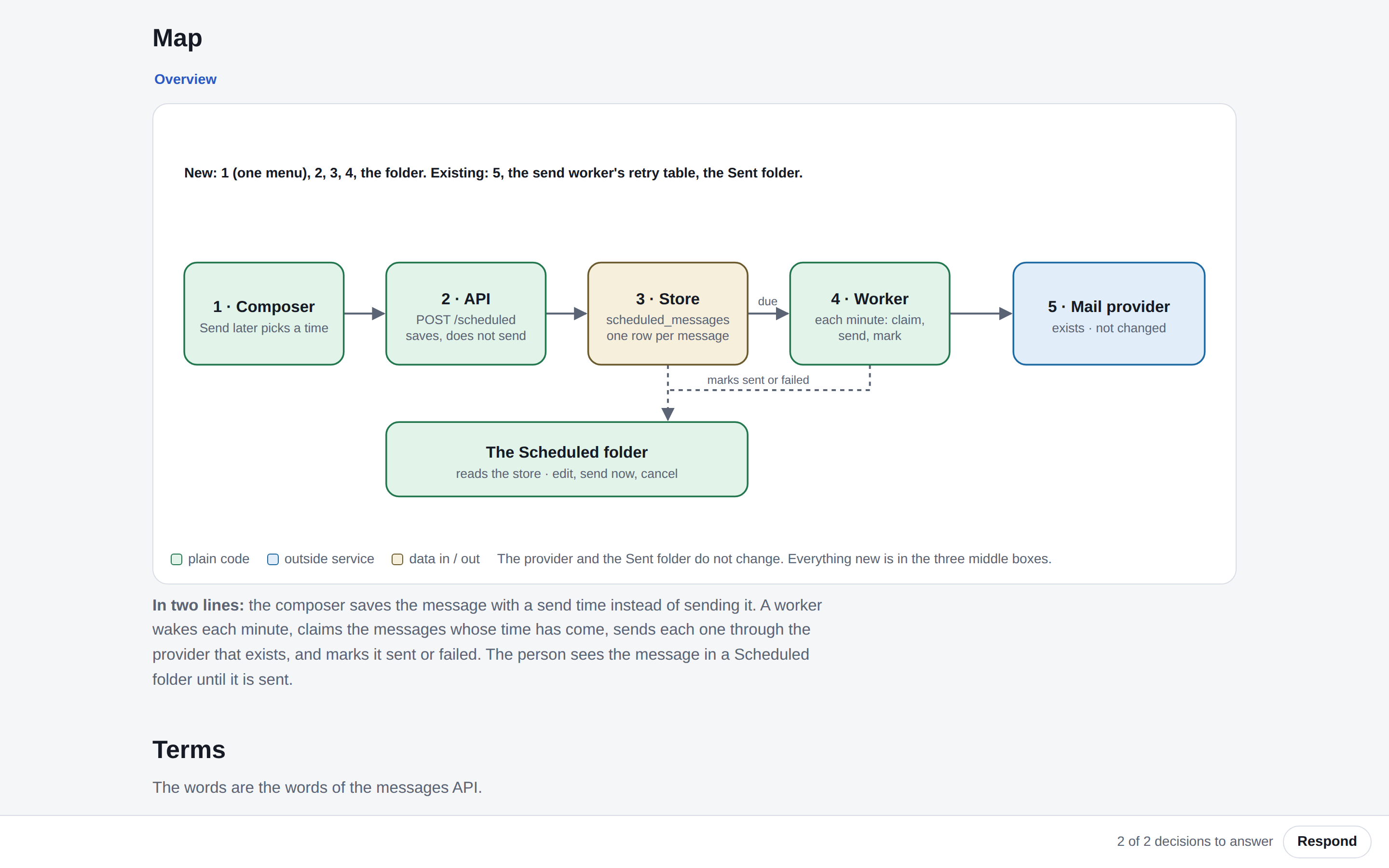
| **map** | The overview diagram of the target design, as a node tree, with a two-line walkthrough |
| **decisions** | Settled decisions as a table; open decisions as questions with options |
| **goal** | The acceptance checks |
| **scope** | What is out |
Extras appear only when they have content: examples, design reference, terms, traces, constraints, data
models, risks and behaviour changes, reused parts.
A page has two states. **Open**: one or more decisions wait for you, and the Respond sheet has no Lock.
**Locked**: every decision is settled and dated. A plan moves from open to locked by your answers, never
by the agent's choice, and a change after the lock reopens it.
The full contract lives in the skill:
```text
SKILL.md what the page is and is not, the steps, the two states
references/sections.md each block: what it holds, and the mistake it exists to prevent
references/nodes.md the node tree and its views: diagram, ports, calls, machine, table, options, section
references/words.md the STE writing rules and the badge vocabulary
runtime/ visualplan.css, visualplan.js, and pack.mjs (lint + compose)
```
## Example
`examples/` holds a full synthetic plan: **Send later** for a made-up mail app, PostBox, with two open
decisions. Pack it and open it:
```bash
node runtime/pack.mjs examples/example.yaml
open examples/example.html # xdg-open on Linux
```
---
Made by [@AlmogBaku](https://github.com/AlmogBaku) · from the talk *FML. My Plan Slopped to 10 Pages: Visual Plans to the Rescue*