
Lumina-Image 2.0: A Unified and Efficient Image Generative Framework
[](https://arxiv.org/abs/2503.21758)
[](https://github.com/ChinChyi/ipictures/blob/main/20250421.jpg?raw=true)
[-yellow?logoColor=violet&label=%F0%9F%A4%97%20Lumina-Image-2.0%20checkpoints)](https://huggingface.co/Alpha-VLLM/Lumina-Image-2.0)
[](https://huggingface.co/spaces/Alpha-VLLM/Lumina-Image-2.0)
[]([https://arxiv.org/abs/2503.21758](https://huggingface.co/docs/diffusers/main/en/api/pipelines/lumina2))
[](https://magic-animation.intern-ai.org.cn/image/create)
[](http://47.100.29.251:10010/)
¹The University of Sydney, ²Shanghai AI Laboratory, ³Shanghai Innovation Institute
⁴The Chinese University of Hong Kong, ⁵Shanghai Jiao Tong University
## 📰 News
- [2025-6-26] 🎉🎉🎉 Lumina-Image 2.0 is accepted by ICCV 2025.
- [2025-4-21] 🚀🚀🚀 We have released [Lumina-Accessory](https://github.com/Alpha-VLLM/Lumina-Accessory), which supports single-task and multi-task fine-tuning for controllable generation, image editing, and identity preservation based on Lumina-Image 2.0.
- [2025-3-28] 👋👋👋 We are excited to announce the release of the Lumina-Image 2.0 [Tech Report](https://arxiv.org/abs/2503.21758). We welcome discussions and feedback!
- [2025-2-20] Diffusers team released a LoRA fine-tuning script for Lumina2. Find out more [here](https://github.com/huggingface/diffusers/blob/main/examples/dreambooth/README_lumina2.md).
- [2025-2-12] Lumina 2.0 is now available in Diffusers. Check out the [docs](https://huggingface.co/docs/diffusers/main/en/api/pipelines/lumina2) to know more.
- [2025-2-10] The official [Hugging Face Space](https://huggingface.co/spaces/Alpha-VLLM/Lumina-Image-2.0) for Lumina-Image 2.0 is now available.
- [2025-2-10] Preliminary explorations of video generation with **[Lumina-Video 1.0](https://github.com/Alpha-VLLM/Lumina-Video)** have been released.
- [2025-2-5] **[ComfyUI](https://huggingface.co/Comfy-Org/Lumina_Image_2.0_Repackaged) now supports Lumina-Image 2.0!** 🎉 Thanks to **ComfyUI**[@ComfyUI](https://github.com/comfyanonymous/ComfyUI)! 🙌 Feel free to try it out! 🚀
- [2025-1-31] We have released the latest .pth format weight file [Hugging Face](https://huggingface.co/Alpha-VLLM/Lumina-Image-2.0/tree/main).
- [2025-1-25] 🚀🚀🚀 We are excited to release `Lumina-Image 2.0`, including:
- 🎯 Checkpoints, Fine-Tuning and Inference code.
- 🎯 Website & Demo are live now! Check out the [Huiying](https://magic-animation.intern-ai.org.cn/image/create) and [Gradio Demo](http://47.100.29.251:10010/)!
## 📑 Open-source Plan
- [x] Inference
- [x] Checkpoints
- [x] Web Demo (Gradio)
- [x] Finetuning code
- [x] ComfyUI
- [x] Diffusers
- [x] LoRA
- [x] Technical Report
- [x] Unified multi-image generation
- [x] Control
- [ ] PEFT (LLaMa-Adapter V2)
## 🎥 Demo
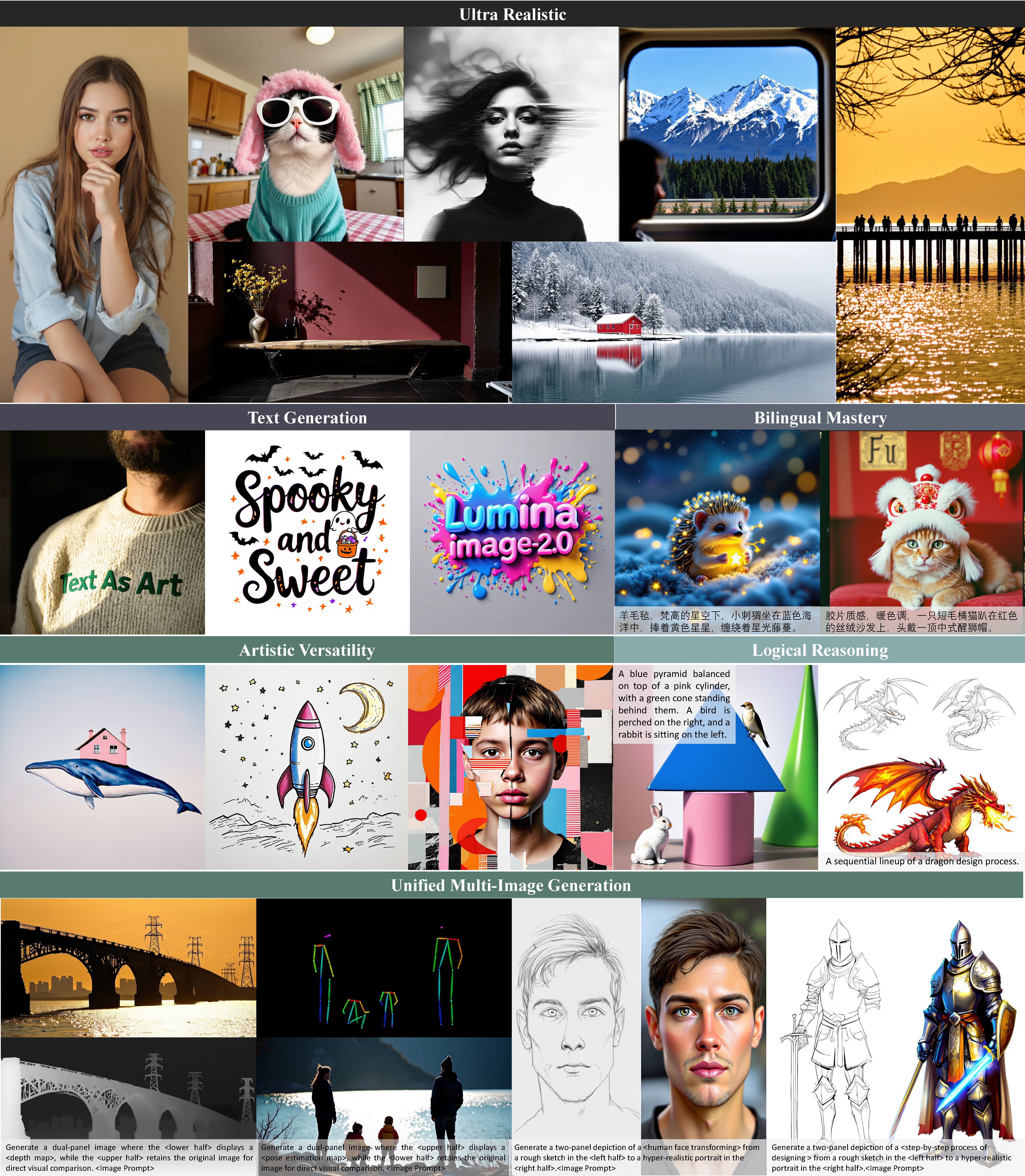
## 🎨 Qualitative Performance
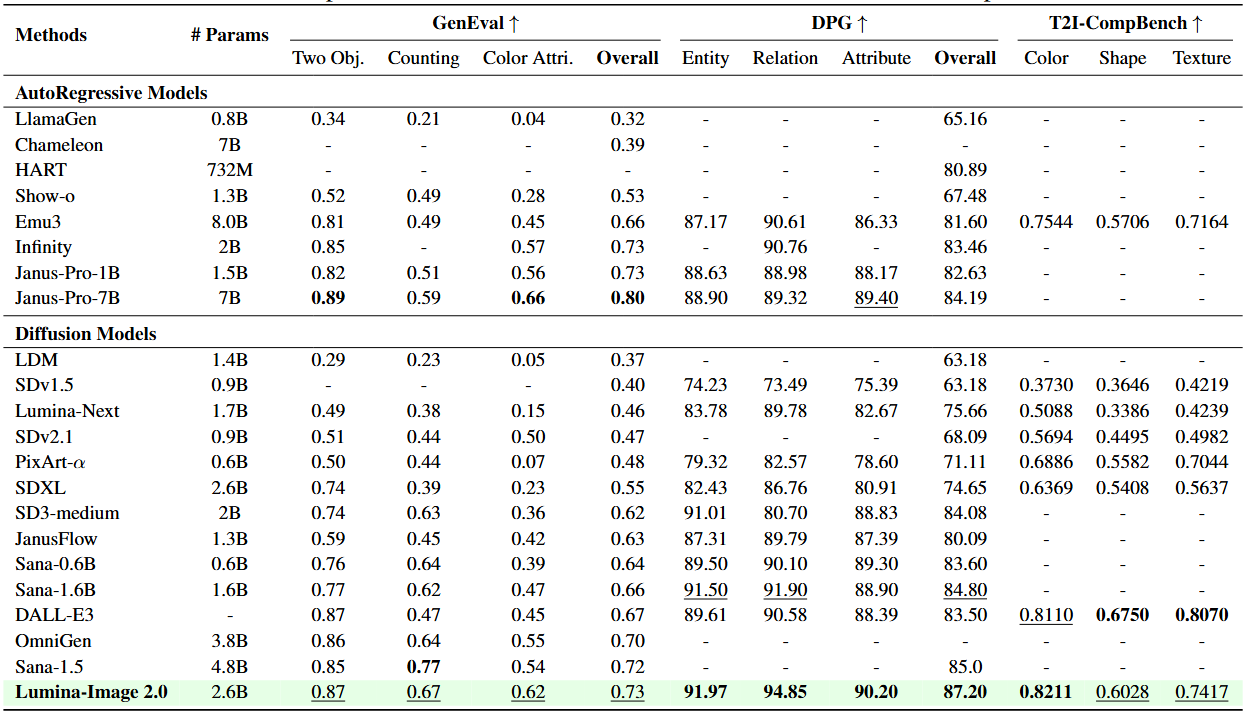
## 📊 Quantitative Performance
## 🎮 Model Zoo
| Resolution | Parameter| Text Encoder | VAE | Download URL |
| ---------- | ----------------------- | ------------ | -----------|-------------- |
| 1024 | 2.6B | [Gemma-2-2B](https://huggingface.co/google/gemma-2-2b) | [FLUX-VAE-16CH](https://huggingface.co/black-forest-labs/FLUX.1-dev/tree/main/vae) | [hugging face](https://huggingface.co/Alpha-VLLM/Lumina-Image-2.0) |
## 💻 Finetuning Code
### 1. Create a conda environment and install PyTorch
```bash
git clone https://github.com/Alpha-VLLM/Lumina-Image-2.0.git
conda create -n Lumina2 python=3.11 -y
conda activate Lumina2
```
### 2.Install dependencies
```bash
cd Lumina-Image-2.0
pip install -r requirements.txt
pip install https://github.com/Dao-AILab/flash-attention/releases/download/v2.7.4.post1/flash_attn-2.7.4.post1+cu12torch2.2cxx11abiFALSE-cp311-cp311-linux_x86_64.whl --no-build-isolation
```
> Kindly find proper flash-attn version from this [link](https://github.com/Dao-AILab/flash-attention/releases).
>
### 3. Prepare data
You can place the links to your data files in `./configs/data.yaml`. Your image-text pair training data format should adhere to the following:
```json
{
"image_path": "path/to/your/image",
"prompt": "a description of the image"
}
```
### 4. Start finetuning
> [!Note]
>Since **gemma2-2B** requires authentication, you’ll need a Huggingface [Access Token](https://huggingface.co/settings/tokens) and pass it via the ```--hf_token``` argument.
```bash
bash scripts/run_1024_finetune.sh
```
## 🚀 Inference Code
We support multiple solvers including Midpoint Solver, Euler Solver, and **DPM Solver** for inference.
> [!Note]
> You can also directly download from [huggingface](https://huggingface.co/Alpha-VLLM/Lumina-Image-2.0/tree/main). We have uploaded the .pth weight files, and you can simply specify the `--ckpt` argument as the download directory.
### Gradio Demo
```python
python demo.py \
--ckpt /path/to/your/ckpt \
--res 1024 \
--port 10010 \
--hf_token xxx
```
### Direct Batch Inference
* **`--model_dir`**: provide the path to your local checkpoint directory **or** specify `Alpha-VLLM/Lumina-Image-2.0`.
* **`--cap_dir`**: point to either
* a JSON file that contains a `"prompt"` field, **or**
* a plain-text file with one prompt per line.
```bash
bash scripts/sample.sh
```
### Diffusers inference
```python
import torch
from diffusers import Lumina2Pipeline
pipe = Lumina2Pipeline.from_pretrained("Alpha-VLLM/Lumina-Image-2.0", torch_dtype=torch.bfloat16)
pipe.enable_model_cpu_offload() #save some VRAM by offloading the model to CPU. Remove this if you have enough GPU power
prompt = "A serene photograph capturing the golden reflection of the sun on a vast expanse of water. "
image = pipe(
prompt,
height=1024,
width=1024,
guidance_scale=4.0,
num_inference_steps=50,
cfg_trunc_ratio=0.25,
cfg_normalization=True,
generator=torch.Generator("cpu").manual_seed(0)
).images[0]
image.save("lumina_demo.png")
```
## 🔥 Open Positions
We are hiring interns and full-time researchers at the Alpha VLLM Group, Shanghai AI Lab. If you are interested, please contact alphavllm@gmail.com.
## Citation
If you find the provided code or models useful for your research, consider citing them as:
```bib
@misc{lumina2,
author={Qi Qin and Le Zhuo and Yi Xin and Ruoyi Du and Zhen Li and Bin Fu and Yiting Lu and Xinyue Li and Dongyang Liu and Xiangyang Zhu and Will Beddow and Erwann Millon and Victor Perez,Wenhai Wang and Yu Qiao and Bo Zhang and Xiaohong Liu and Hongsheng Li and Chang Xu and Peng Gao},
title={Lumina-Image 2.0: A Unified and Efficient Image Generative Framework},
year={2025},
eprint={2503.21758},
archivePrefix={arXiv},
primaryClass={cs.CV},
url={https://arxiv.org/pdf/2503.21758},
}
```