# ColliePWA

The Collie mark beside the ColliePWA wordmark and the line: your agent herd, from your phone.

Try it in your browser — no install · colliepwa.dev
A real Collie build running in the page against faked data.

ColliePWA is an open-source (MIT) mobile client for [Herdr](https://herdr.dev), with experimental support for [tmux](https://github.com/tmux/tmux) and [zellij](https://zellij.dev). It is a self-hosted web app (PWA) for driving terminal AI agents such as Claude Code, Codex and OpenCode from your phone. Each instance connects to one terminal multiplexer, and can show your own agent durable agents beside it. It is served over Tailscale by default. Open the URL on an iPhone or Android phone to see which agent needs input and respond directly from your mobile keyboard. Using Herdr? Read about the [Herdr mobile client](https://colliepwa.dev/herdr-mobile-client?utm_source=github&utm_medium=readme&utm_campaign=collie&utm_content=herdr). The input box uses a standard text field compatible with system voice dictation. Collie also includes built-in [voice input](./docs/voice-and-push.md#voice-input-optional) that remains disabled until explicitly configured. ## Get it on your phone in 3 steps You need [Tailscale](https://tailscale.com) on your computer and your phone, and [Herdr](https://herdr.dev) (or tmux or zellij, experimental) running on your computer. New to either? **[Install in five minutes](./docs/five-minute-install.md)** has one path per system. On Windows, follow [Install in five minutes → Windows](./docs/five-minute-install.md#windows). **1. Install** on your computer (no `sudo`, checksum-verified): ```bash curl -fsSL https://colliepwa.dev/install.sh | sh ``` **2. Start** it on your tailnet: ```bash COLLIE_MUX=herdr collie start # or: tmux, zellij ``` **3. Pair your phone.** Run `collie qr` and scan it. Add Collie to your home screen and open it from the icon. Then run `collie pair` and type the code under **Settings → System → Paired devices**. That's it: agents waiting on you show up first. Tap one to reply. > Collie is remote shell access to your machine. Keep it on your tailnet (`tailscale serve`, never > `funnel`) and read [Security](#security--read-this-first) before you run it. Prefer to have your agent do it? Ask it to run `collie skill` and follow the brief. **Features** - **React Router + Vite** with TypeScript, Tailwind, shadcn, and a Bun bridge - **Status dashboard** led by what needs your input; every other pane sits under its own workspace, tab on the row - **Push notifications** when an agent blocks on user input - **Quick actions and slash commands** configured per agent - **Keys board you arrange**: `Esc`, `Ctrl+C`, arrows and modifier combinations, plus wider keys, your own chords and sequences, sticky `Ctrl`/`Alt`/`Shift`, presets (Claude Code, Prefix, Vim) and a layout code to share - **Start from the phone**: a **+ New** button opens one page where you pick the machine, an agent or a command, the folder and an optional new worktree; each machine shows which agents it has, a lost reply never opens a second pane, and you can add your own launchers from the phone - **Output search** and full conversation history beyond standard terminal scrollback - **Files screen**: the files of an agent's workspace folder with the changes marked, and a Changes segment with what it changed in its git repos, as diffs with syntax colour, and its last commit, read-only - **File attachments**: images from the camera roll, and markdown, text and code files - **Device pairing** always on: a device needs its token for every request, reads and writes, and an unpaired browser sees only the pair screen - **Crews**: several machines' Collies behind one URL, with operator-triggered failover - **Walky talky**: one agent session sends a short message to another, on any harness and across a crew, and you can message sessions from the phone; every message gets a receipt and a log entry, an address carries the pane's token so a message does not reach a new session in a reused pane id, and a crew machine signs it - **Durable agents**: a long-running durable agent is a session on the phone, with approvals and history (experimental) - **Twelve UI languages** and a per-device typeface setting - **Herdr session switching** managed from the web interface - **PWA support** running locally on loopback with no external accounts or cloud dependencies - **No telemetry**: the app sends no analytics, usage statistics or crash reports. Its one unprompted call is the update check to GitHub ([details](./docs/security.md#what-leaves-your-machine)) ## Demo Using Collie from a phone: the dashboard places agents that need input at the top. You can inspect spaces, tabs, and panes. Long-press a pane pill or tab chip to rename or close it; Claude panes reflect names set via `/rename`. Hold a dashboard row or a pane pill, or right-click it with a mouse, to pin that pane to the top of the dashboard and the switcher. Tap to answer an `AskUserQuestion` prompt, switch between herds, and receive push notifications when an agent blocks on input. The [interactive demo](https://colliepwa.dev/demo?utm_source=github&utm_medium=readme&utm_campaign=collie&utm_content=demo-section) runs the web client in your browser against mock data without installation.
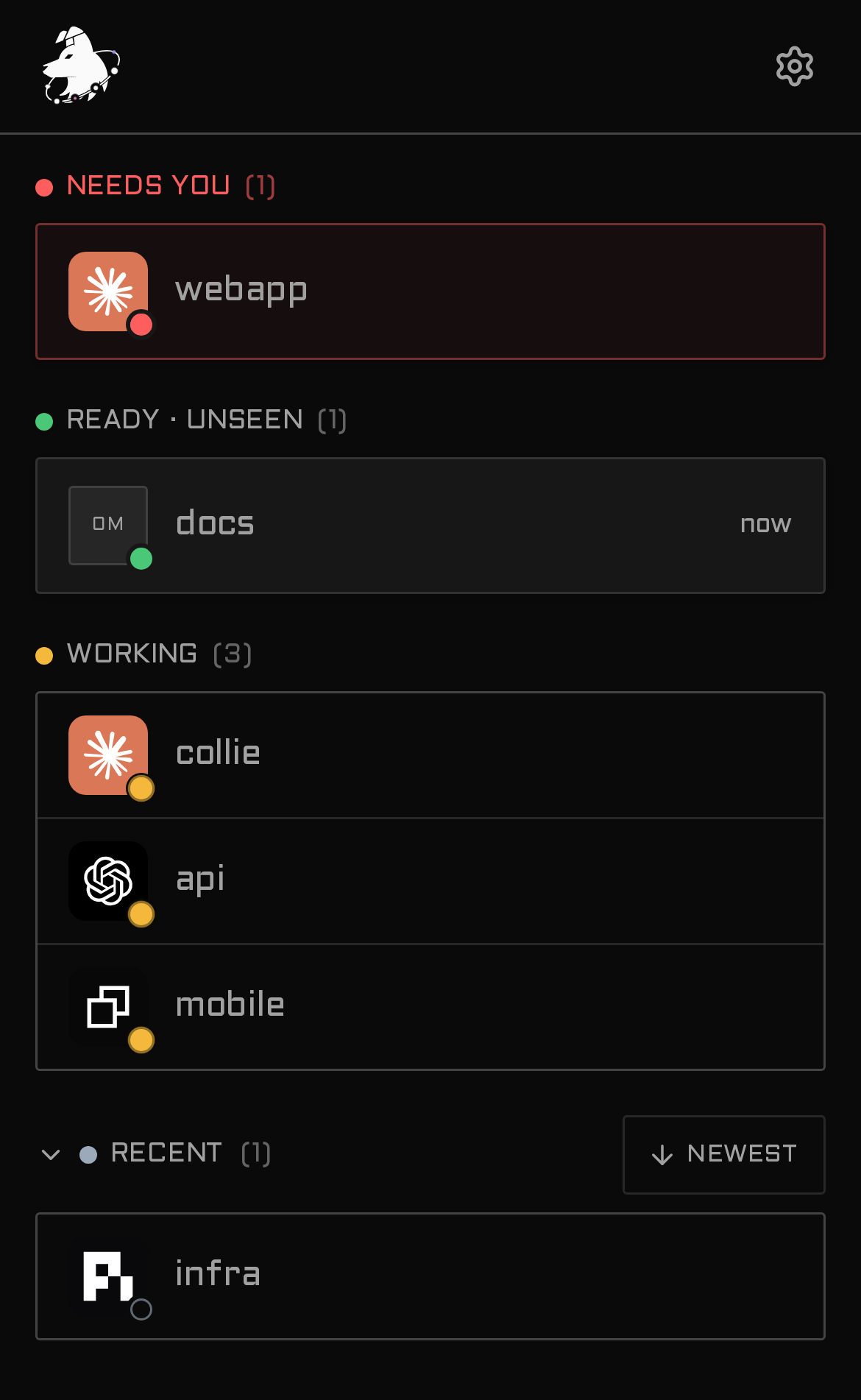
Collie dashboard: a workspace filter, a status summary, then panes grouped by workspace
Dashboard — every pane stays in its workspace, what needs you is marked in place
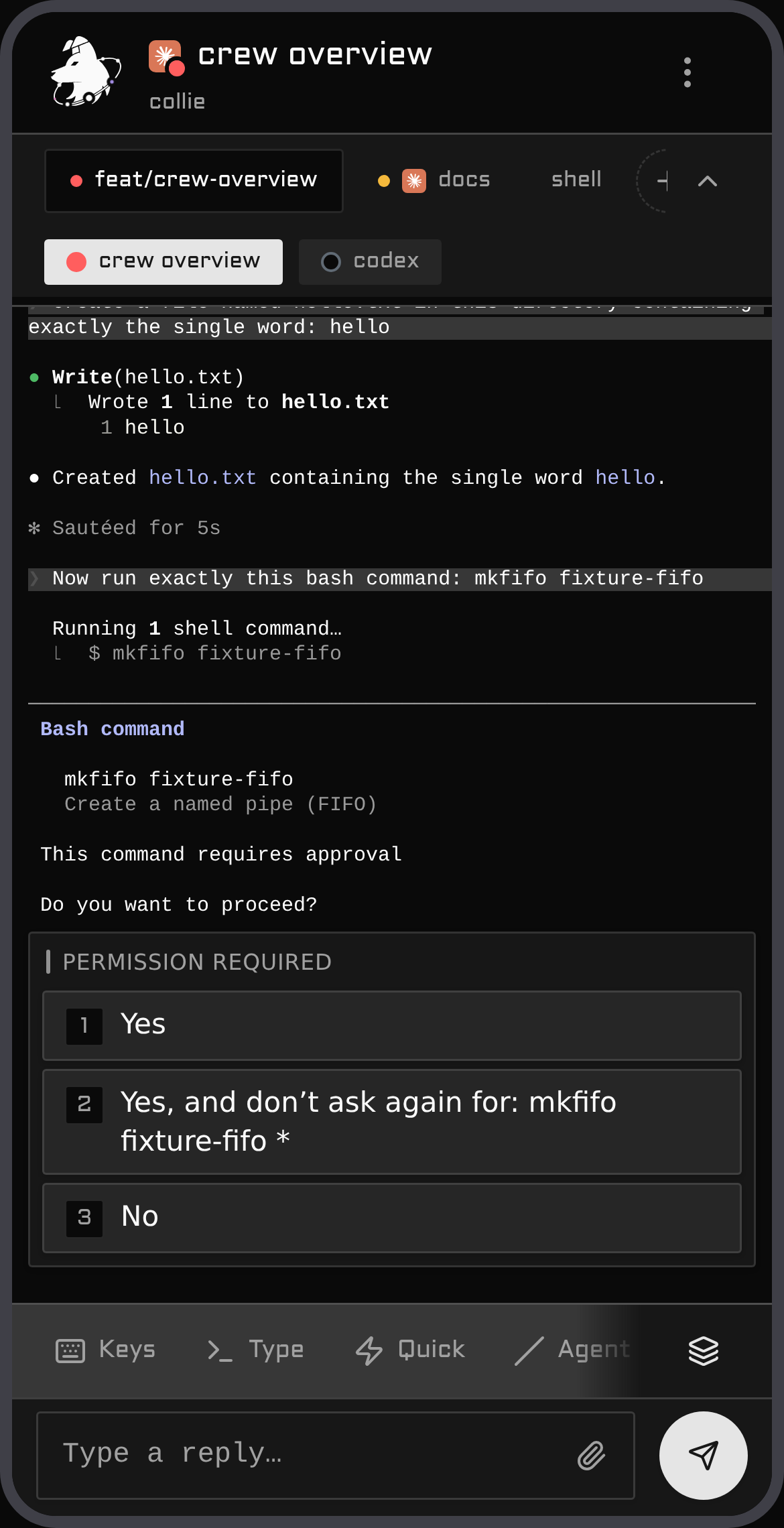
A Claude permission prompt up-leveled into tappable buttons
Ask — the agent's own prompts become tappable buttons
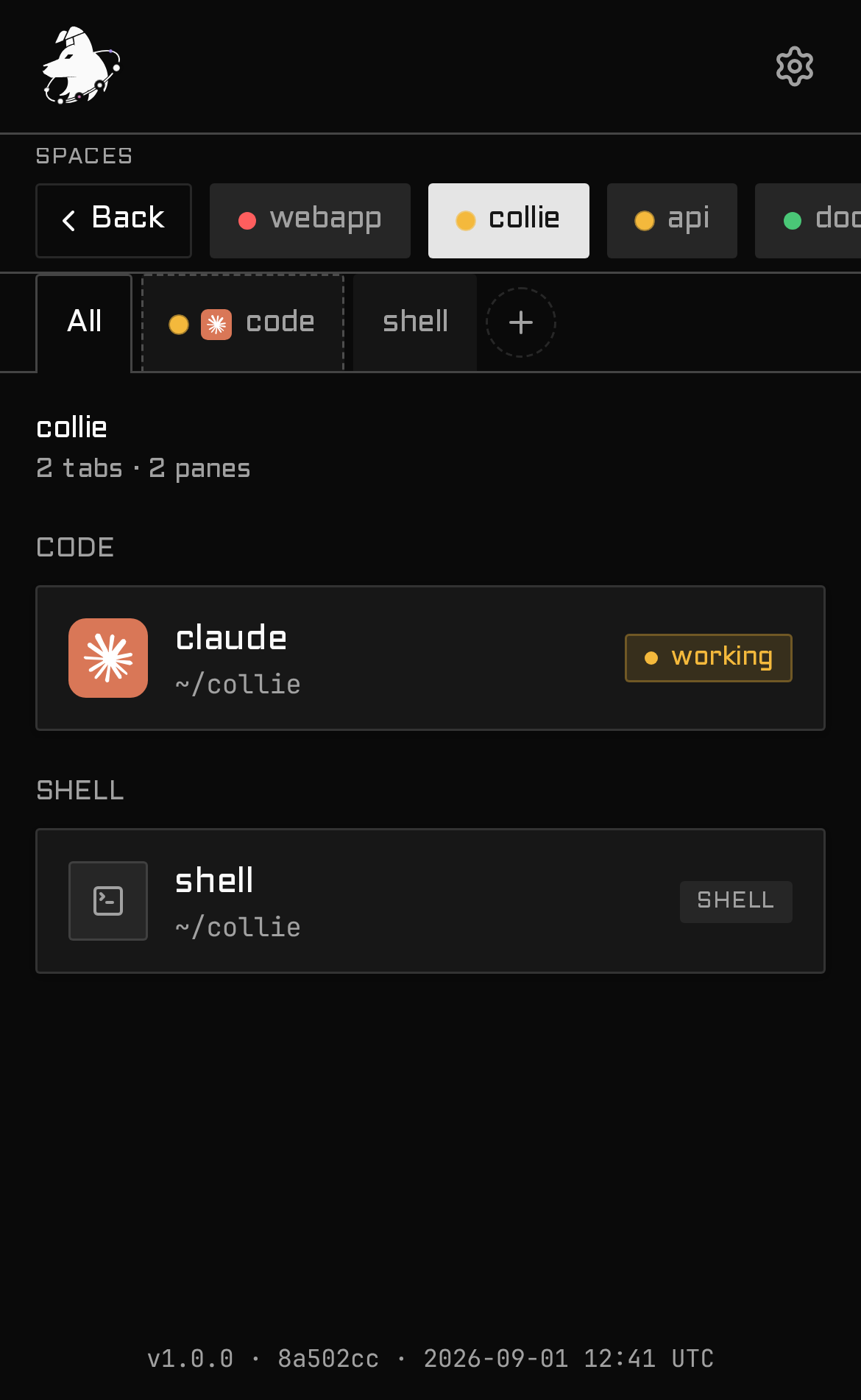
A space's tabs and panes
Space — its tabs and panes, deep-linkable
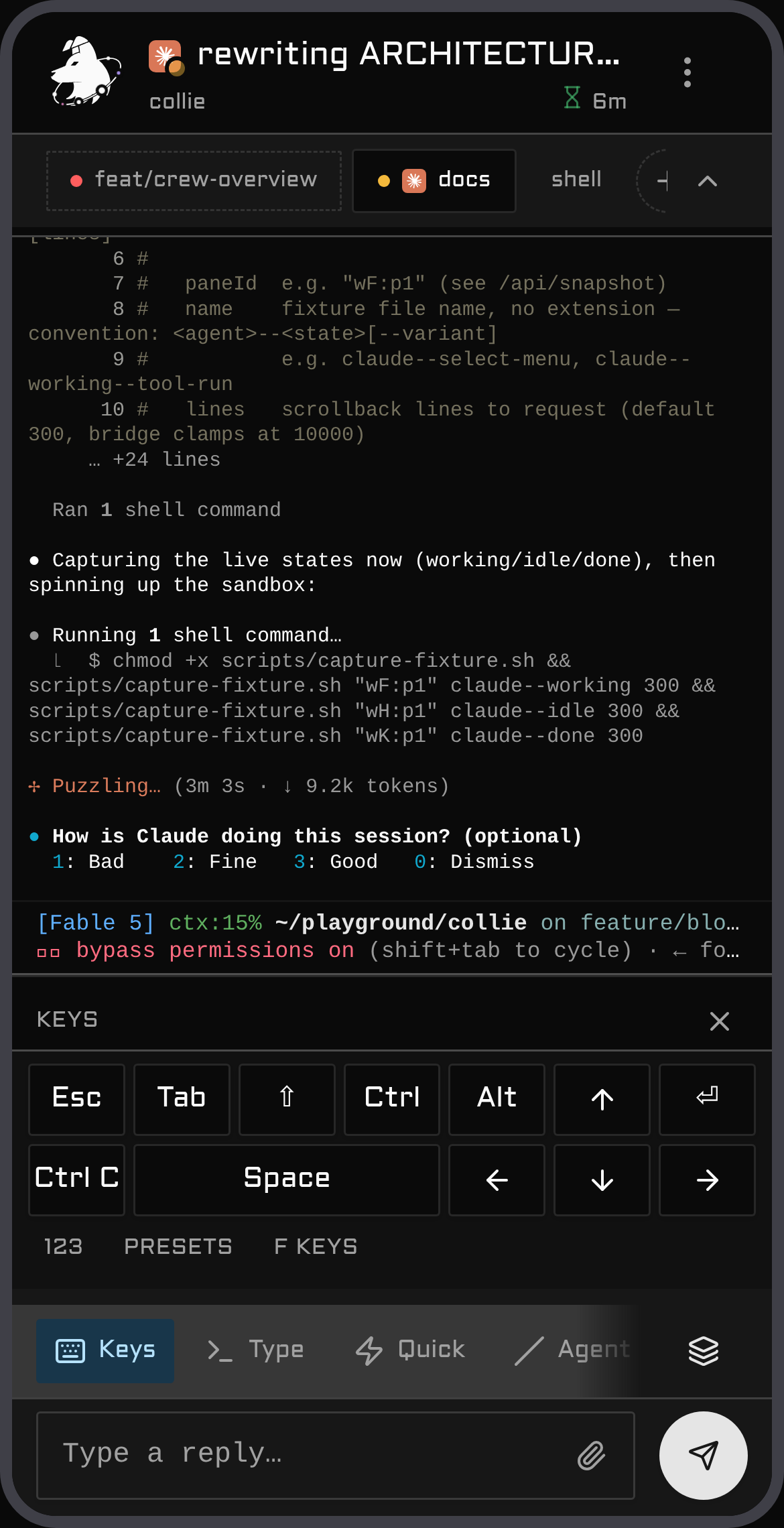
The special-keys pad — arrows, Esc, Tab, Ctrl, Alt, Shift
Keys — the special-keys pad, arranged the way you work
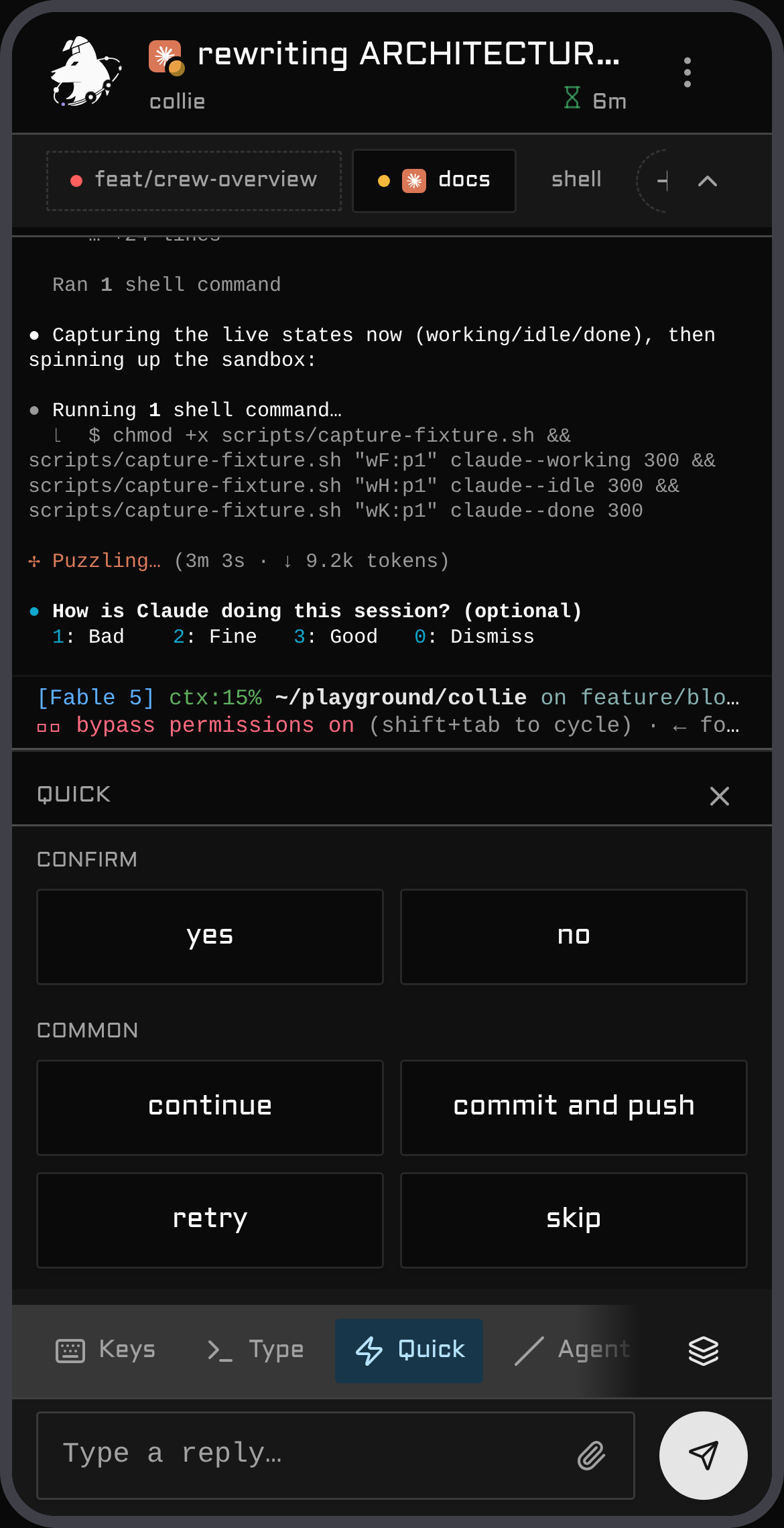
The Quick dock — one-tap replies over a working pane
Quick — your own one-tap replies, from quick-replies.toml
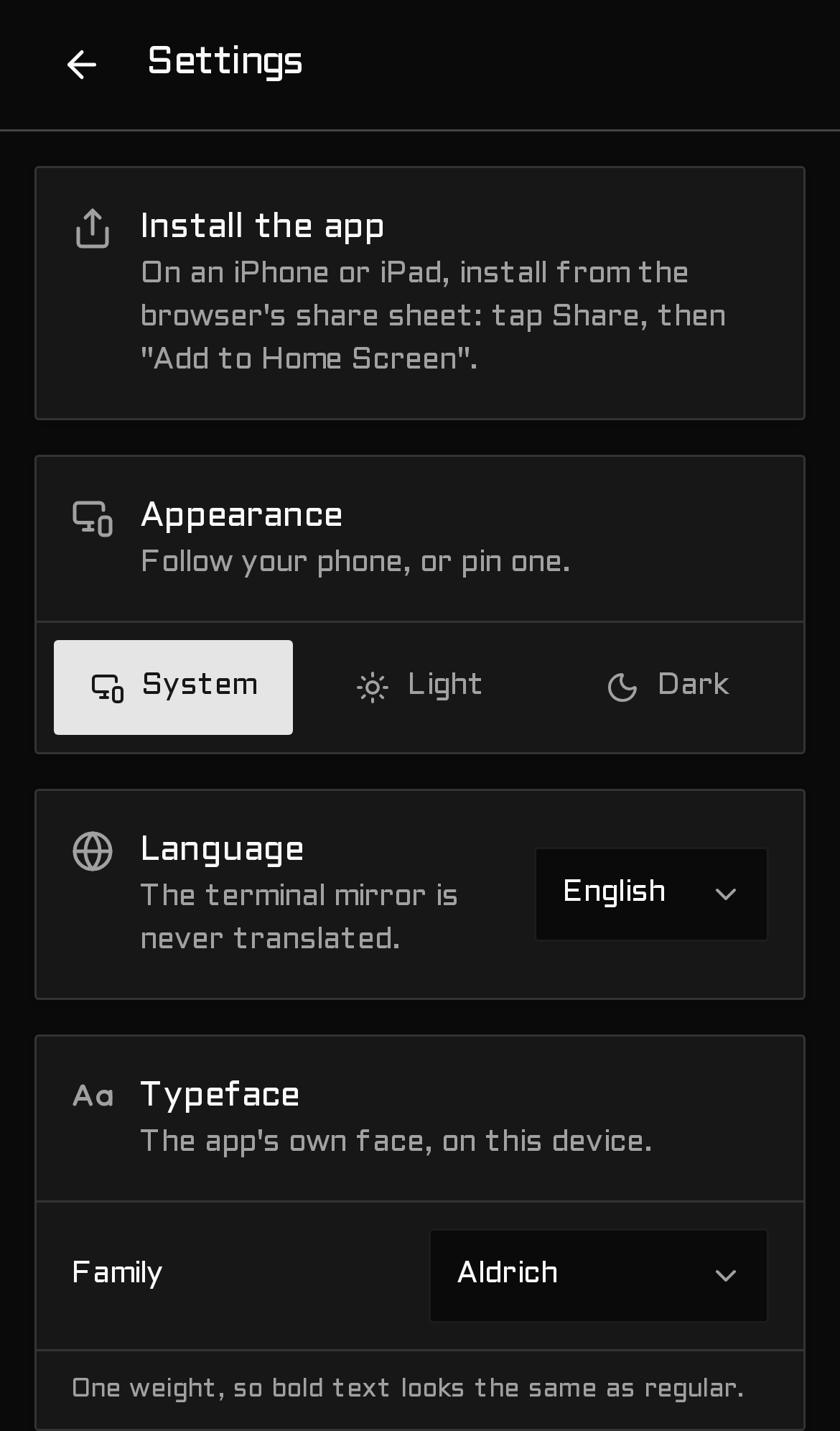
Settings — appearance, language, typeface
Settings — appearance, language, typeface, per device
## Motivation I wanted to check on my agents from my phone. The usual route is [Termux](https://termux.dev) to SSH in and attach to the tmux or zellij session. Driving a TUI through on-screen controls is clumsy: special keys are fiddly, `Ctrl`/`Esc`/arrows require awkward chords, and simple text input fights the soft keyboard. I wanted a mobile interface instead of a terminal shoehorned onto a touchscreen. Collie lets you tap the agent that needs input, type normally, and send `Esc` or `Ctrl+C` with one thumb. ## Who is this for Collie is for developers running AI agents in a terminal multiplexer who want to resume sessions from a phone. Herdr is the primary supported target in 1.0. Support for **tmux and zellij is experimental**: both run, but testing is limited to a single operator on one machine. If you use either, [bug reports are welcome](./docs/multiplexers.md#pointing-collie-at-a-multiplexer), including reports of working setups. The setup assumes a **[Tailscale](https://tailscale.com) tailnet**. Your phone and host must share a tailnet, with `tailscale serve` configured as the default ingress. Collie is **single-user**: it supports one operator on one tailnet, with no multi-tenant authentication. Do not use it for shared or public access. Read the security section below before running it. ## Security — read this first **Collie provides remote shell access to your machine by design.** A single Collie API call sends arbitrary keystrokes directly into a live terminal pane. Anyone with access to the URL can read pane output (source code, secrets, environment variables, agent output) and execute arbitrary commands with your full user privileges. There is no sandbox and no command allow-list, as these would defeat the core workflow. Treat the URL as a root login: bind it strictly to your tailnet, set `COLLIE_TRUSTED_USER`, and pair only the physical phone you are using. Read [`docs/security.md`](./docs/security.md) for details on the security model, defense layers, and device gating before running the service. > 🚫 **Never `tailscale funnel` this**: `funnel` exposes the port to the public internet, whereas > `serve` limits access to your private tailnet. Do not funnel Collie under any circumstances. ## Quickstart New to Tailscale or Herdr? **[Install in five minutes](./docs/five-minute-install.md)** walks the whole setup, from an empty computer to Collie on your phone. Run this on the host, not your phone. It requires `curl`, `tar`, and a sha256 utility. It needs no compiler toolchain and does not ask for `sudo`: ```bash curl -fsSL https://colliepwa.dev/install.sh | sh ``` The script downloads the latest release for your platform, verifies the sha256 checksum, installs the files, and puts `collie` on your PATH. It then prints the remaining steps, the same as [Get it on your phone in 3 steps](#get-it-on-your-phone-in-3-steps). Without `COLLIE_MUX`, `collie start` in a terminal detects Herdr, tmux, and zellij, then prompts for your choice. If you prefer to build from source, **[`docs/install.md`](./docs/install.md)** covers manual builds, each system and package, Herdr routes, and adding Collie to the home screen of an iPhone or Android phone. ColliePWA is not in the App Store or Google Play. You add it to your home screen from the browser, and that is the only way to install it on a phone. ## Documentation ### Guides | | | | --- | --- | | [**Install in five minutes**](./docs/five-minute-install.md) | The recommended setup, step by step: Tailscale, Herdr and Collie on your computer, then a paired phone with Collie on its home screen | | [**Claude Code in tmux or Herdr, on your phone**](./docs/claude-code-on-your-phone.md) | Keep Claude Code running in tmux or Herdr when SSH drops. Manage sessions, start new agents and worktrees, approve prompts, and send Esc or Ctrl from your phone with push alerts. | ### Sessions | | | | --- | --- | | [**Sessions**](./docs/sessions.md) | What a session is, where sessions come from, a terminal or a durable agent, and what the phone shows for each | | [**Terminals**](./docs/multiplexers.md) | Pointing Collie at Herdr, tmux, zellij, tuios or Tern, what each can answer, and agent beacons. Experimental for tmux, zellij, tuios and Tern; bug reports wanted | ### Durable agents | | | | --- | --- | | [**Durable agents (experimental)**](./docs/durable-agents.md) | Show your own durable agent on your phone: the quickstart, `collie durable attach` and `sources.json`, the three verbs, tokens, the files Collie keeps, and the versions | | [**Durable agents on the phone**](./docs/durable-agents-on-the-phone.md) | What a durable agent's section, conversations, questions and receipts look like | | [**Troubleshooting a durable agent**](./docs/durable-agents-troubleshooting.md) | A durable agent that does not show up or says Unreachable: the first checks, every reason and what fixes it, the doctor rows, and the cases that come up | | [**Security of a durable agent**](./docs/durable-agents-security.md) | What a durable agent can and cannot do, the trust rules of the socket and of the token, what Collie does to a durable agent's text, and what the audit log keeps | | [**The durable SDK (experimental)**](./docs/durable-sdk.md) | The npm package `@colliepwa/durable-sdk`, part by part: its entries and runtimes, `openCollie`, the pane methods, the four kinds of question and `requireApproval`, hooks, history, caps, the helpers, the Pi glue and the versions | | [**The durable wire (experimental)**](./docs/durable-wire.md) | What travels between Collie and a durable agent, for a builder: the routes, hello and the epoch, the life of an ask and the request ids, the socket and token transports, the limits and the version rule, with a link to `WIRE.md` for the exact rules | ### Reference | | | | --- | --- | | [**Install**](./docs/install.md) | The front door you need, then the install for your system: Linux, Arch and Omarchy, Nix, macOS, Windows, or as a Herdr plugin. Covers first run, setup on an iPhone or Android phone, updates, and uninstallation | | [**Windows**](./docs/windows.md) | Windows 11 with Herdr: what is supported, installing with `install.ps1`, the unsigned binary, updating, long paths, and what is not tested | | [**Security**](./docs/security.md) | What a Collie exposes, the defenses, and pairing a device, the credential for every request | | [**Configure**](./docs/configure.md) | The `.env`, your own slash commands, keys, quick replies, launchers and typefaces; appearance, Zen mode, language | | [**Themes**](./docs/themes.md) | The four looks Collie ships, picking one in Settings, importing a theme file after a preview, exporting one to edit, and writing your own: the 43 colour tokens, the shape and look words, the terminal palette, and what a theme cannot change | | [**Changes**](./docs/changes.md) | The Files screen: a workspace's folder with its changes marked, the changed files and their diffs, and the last commit, from the pane or the dashboard's Files tab. Read-only git, nested repos, and the two settings that decide how far it looks | | [**Deployment**](./docs/deployment.md) | Front doors other than the default: an identity-aware proxy, a reverse proxy with no Tailscale, an off-host ingress, several Collies on one host (one per user, or several instances for one user), and a crew's standby door | | [**Commands**](./docs/commands.md) | Every `collie` verb, putting `collie` on your PATH, and the Herdr actions that mirror the verbs on a Herdr-managed install | | [**Crews**](./docs/crew.md) | Several machines' Collies behind one URL: invite, join, deputy, failover | | [**Walky talky**](./docs/walky-talky.md) | Messages between agent sessions: `collie walky who`, `send`, `reply`, `inbox` and `status`, pane tokens, receipts, how a message crosses a crew and how its outcome comes back, the phone's cards and composer, installing the skill into your agents, and the limits | | [**Voice input and Web Push**](./docs/voice-and-push.md) | The microphone in the composer, and notifications when an agent is waiting on you | | [**Manage & update**](./docs/upgrading.md) | Update from the phone or the terminal, roll back, update a crew, cross a major, stop, uninstall, and upgrading a 0.x install to 1.0 | | [**Troubleshooting**](./docs/troubleshooting.md) | Symptoms in the words you would actually search for | | [**Terminology**](./docs/terminology.md) | Collie's words in plain words, beside the names other tools use: session, space, tab, pane, terminal, durable agent, harness, crew, lead, and more | | **For an AI coding agent in your terminal** | `collie skill` prints a brief on how Collie works, and `collie docs` prints the pages above, both out of the binary and with no network | Repository-level specifications live at the root: [`ARCHITECTURE.md`](./ARCHITECTURE.md) · [`docs/deployment.md`](./docs/deployment.md) · [`MUX_CONTRACT.md`](./MUX_CONTRACT.md) · [`CREW_PROTOCOL.md`](./CREW_PROTOCOL.md) · [`HERDR_API.md`](./HERDR_API.md) · [`DESIGN.md`](./DESIGN.md) · [`CONTRIBUTING.md`](./CONTRIBUTING.md). ## Deployment variants Collie always binds **loopback only**; what changes between deployments is *what sits in front of it* and *how a request proves who it is*. Variant A is the default and sits below; the other four are in [`docs/deployment.md`](./docs/deployment.md). Pick one. ### Variant A — `tailscale serve` + person identity (default) The happy path from [Install](./docs/install.md#install). `tailscale serve` terminates TLS on your MagicDNS name and injects `Tailscale-User-Login`; set `COLLIE_TRUSTED_USER` to your tailnet login and Collie rejects anyone else. ```bash # in your .env COLLIE_TRUSTED_USER=you@example.com ``` - **Granularity:** the tailnet *person*, not the device. - **Why it's safe on bare `tailscale serve`:** serve is the *trusted injector* of `Tailscale-User-Login` — it sets that header itself and a client can't forge it through the proxy. - Nothing else to configure; origins match automatically on the MagicDNS name. - Want *per-device* control without standing up a proxy? [Pair the device](./docs/security.md#pair-a-device--the-write-credential) — it composes on top of this variant. This is the right choice unless you specifically need a proxy in the path. If you do, or if Tailscale isn't in the path at all, [`docs/deployment.md`](./docs/deployment.md) has the rest: - **[B — identity-aware proxy, authorised by device](./docs/deployment.md#variant-b--identity-aware-proxy--per-device-authorisation)** — a proxy on this host; some devices drive, others watch. - **[C — reverse proxy as the only front door](./docs/deployment.md#variant-c--reverse-proxy-as-the-only-front-door-no-tailscale)** — no Tailscale anywhere in the path. - **[D — off-host identity proxy over the tailnet](./docs/deployment.md#variant-d--off-host-identity-proxy-over-the-tailnet)** — one central ingress node fronting Collie among your other services. - **[E — any other mesh or tunnel](./docs/deployment.md#variant-e--any-other-mesh-or-tunnel-netbird-zerotier-cloudflare-tunnel)** — NetBird, ZeroTier, Cloudflare Tunnel: you own the ingress, Collie publishes nothing. ## Windows Linux and macOS: nothing changes for you. ```powershell irm https://colliepwa.dev/install.ps1 | iex ``` v1.16.0 is the first release with a Windows zip. The installer was run against that public release on a Windows 11 VM, and `collie start`, `status`, `doctor` and `stop` worked. Phone access over HTTP through Tailscale Serve was run too. Not tested yet are an update between two real releases on Windows and the HTTPS form of Tailscale Serve on Windows, which is why it stays experimental. The release check requires the Windows zip from now on. Only the maintainer can override that, for a Linux hotfix. Windows 11 on x64 with Herdr is a supported host: the maintainer owns the code and tests it. The conditions for dropping the word are on the Windows page. [**docs/windows.md**](./docs/windows.md) has the install, the update, and what is not tested. In short: - **Tested.** The `windows.yml` workflow runs the bridge, cli and scripts tests on every push, and a Windows 11 VM rehearses an install, an update and a rollback before each release tag. ([ADR 0075](./.adr/0075-windows-is-a-supported-host.md)) - **Installed without a toolchain.** Each release builds `collie--windows-x64.zip`, and `scripts/install.ps1` installs it. The binary is unsigned, and Smart App Control can block it. - **Run by Task Scheduler.** `collie start`, `stop`, `restart`, `status` and `uninstall` work as they do elsewhere. The task is named `herdr.collie` and starts at your logon. - **Not covered.** tmux and zellij (neither has a Windows build), Windows 10, Windows on ARM, a Windows machine joining a crew, and a managed front door: Collie does not run `tailscale serve` on Windows, so bring your own, [Variant C](./docs/deployment.md#variant-c--reverse-proxy-as-the-only-front-door-no-tailscale). Herdr's action buttons need `bash`, so the manifest lists only `linux` and `macos`. Herdr on Windows exposes its control socket as a named pipe derived from the full socket path instead of an AF_UNIX socket. Collie connects through `node:net` rather than `Bun.connect`, with a single shim, [`bridge/dial.ts`](./bridge/dial.ts), which documents the path mapping. The socket path defaults to `%APPDATA%\herdr\herdr.sock`; override it with `HERDR_SOCKET_PATH`. Explicit `\\.\pipe\...` values pass through directly. The bridge logs `[events] stream up` on startup when event streaming runs over the pipe. `COLLIE_HERDR_DIAL=net` forces the `node:net` dialer on Linux and macOS. This allows testing the Windows connection path without a Windows environment; `bridge/dial.test.ts` relies on it. ## Architecture A small Bun process sits between your phone and your multiplexer — the browser never touches the multiplexer. ``` phone (PWA) │ HTTPS over the tailnet ▼ tailscale serve terminates TLS, injects the identity header │ 127.0.0.1:PORT (the bridge binds loopback only) ▼ Collie bridge (Bun) serves the UI + a small JSON API; polls the multiplexer │ one mux adapter, chosen per install ▼ the multiplexer owns the panes, agents and terminal state Herdr · tmux · zellij ``` Under [Variant C](./docs/deployment.md#variant-c--reverse-proxy-as-the-only-front-door-no-tailscale) a reverse proxy replaces the `tailscale serve` box; everything below the front door is identical. - **Only the adapter touches the multiplexer** (`bridge/mux//` — Herdr dials a Unix socket, tmux and zellij shell out to their CLIs); everything else speaks the bridge's HTTP API. What every adapter must answer is [`MUX_CONTRACT.md`](./MUX_CONTRACT.md). - **Polling is still the model** — the bridge takes one snapshot per tick from the adapter and the browser polls `/api/snapshot`; where the multiplexer offers an event stream (Herdr does) it only pokes the bridge's poll to go faster, it never replaces it. No resync logic. - **Actions are plain HTTP** — a reply or key `POST`s to `/api/pane/:id/{reply,keys}`, and the adapter types it into a real terminal (hence the security posture). - **The UI is a static PWA** — Vite builds `web/dist`, served from disk, so a rebuild is live with no restart. - **A second Collie is a peer, not a second bridge** — one machine's bridge mirrors one multiplexer, and a lead reads its peers over the crew link ([`CREW_PROTOCOL.md`](./CREW_PROTOCOL.md)). Full design rationale in [`ARCHITECTURE.md`](./ARCHITECTURE.md). ## Developing Clone and build the repository ([Install → the same result, from source](./docs/install.md#the-same-result-from-source)), then edit in place. - **Every verb is implemented once, in `cli/`,** and runs as `bin/collie ` ([Commands](./docs/commands.md)). No other layer implements verbs. `scripts/collie-ctl.sh` is a bootstrap shim that compiles the binary and passes your argv. The Herdr adapter's `herdr-plugin.toml` is a thin registration file whose `[[actions]]` call that shim ([Herdr actions](./docs/commands.md#herdr-actions)). Both files contain explanatory comments. - **Development loop asymmetry:** `web/` rebuilds appear immediately without a restart because the bridge serves `web/dist` directly from disk. Changes to `bridge/` require `systemctl --user restart collie`. Build, test, and versioning rules live in [`CLAUDE.md`](./CLAUDE.md). Versioning is enforced by git hooks, so check the document before committing. - **Multiplexer adapters:** [`MUX_CONTRACT.md`](./MUX_CONTRACT.md) defines the interface an adapter must implement, and [`MUX_CONTRIBUTING.md`](./MUX_CONTRIBUTING.md) covers the integration boundaries. [`ARCHITECTURE.md`](./ARCHITECTURE.md) §3 explains why Collie runs as a supervised service instead of an embedded pane, which keeps the Herdr manifest limited to `[[actions]]` and `[[build]]`. - **Pull requests:** [`CONTRIBUTING.md`](./CONTRIBUTING.md) documents base branches (`main` for bugfixes, `v1` for features), CI checks, and version bump requirements. ### The states playground A development page that renders the web components across mock states (boot, idle, dashboard, crew, settings) without a running agent. This lets you inspect visual elements like banners, marks, boot screens, and lock states without manually reproducing each condition. Its browser tab wears a red icon, so it is never mistaken for a real Collie build. ``` cd web && COLLIE_DEV_HOSTS=bluefin,localhost bun run playground ``` Open `http://:5199/playground.html`. Port 5199 redirects root requests to the playground and disables `/api`, preventing requests to a live Collie instance. Vite targets only `index.html` during production builds, keeping `playground.html` and `src/playground/` out of `dist` and the PWA precache. This exclusion is tested in `src/playground/playground-entry.test.ts`. The page is split into pages: one section is shown at a time, picked from a sidebar on wide screens and a top bar on narrow ones. Each section's code loads only when you open it, and only its components are mounted. The section lives in the URL hash, and a click pushes it, so Back returns to the page before. `#pane` opens the Pane section, and `#pane/` also scrolls that card into view once it mounts (the handle is the card's `data-state`, e.g. `pane-mid-tool-run`). A section's groups are sub-pages: the bar under its title opens one, `#changes:one-file`, and mounts only that group's cards. With no hash, the last section you were on is remembered (`localStorage`); with neither, the page opens on the first. `src/playground/layout.tsx` holds the page's layout and routes; `src/playground/harness.tsx` holds the routers that mount real app routes, so a section that needs no router never loads them. The tabs, in order: Dashboard, Pane, Crew, Settings, Boot & connection, Idle & resume, Brand, Notices, Motion. Notices covers everything that ANNOUNCES (the notice primitive, the strip band, the status toast); Motion covers everything that MOVES without announcing anything (collapse and swap primitives, loading bars, sheets, menus, pending and pulsing controls). Within a tab, cards are grouped under a `Group` — a small heading over its own `.pg-grid` — ordered from the everyday state to the rare one, so a tab with a dozen cards can be skimmed by its group titles instead of scrolled blind. To add a state, add a `` to the relevant `Group` in the relevant file under `src/playground/sections/` and the corresponding mock data in `src/playground/fixtures.ts`. To add a whole new section, add a file there exporting `DEF` (a `SectionDef`) and a `Section` component wrapping its cards in one or more `Group`s, then add one line to the `SECTIONS` registry in `src/playground/app.tsx`. For Herdr adapter development, refer to upstream documentation for the plugin system: [authoring](https://herdr.dev/docs/plugins/) · [CLI reference](https://herdr.dev/docs/cli-reference/) · [example plugins](https://github.com/ogulcancelik/herdr-plugin-examples). Collie's socket integration is documented in [`HERDR_API.md`](./HERDR_API.md). ## See also - All how-to pages: [`docs/`](./docs/) - Deployment variants B through E: [`docs/deployment.md`](./docs/deployment.md) - Architecture and design rationale: [`ARCHITECTURE.md`](./ARCHITECTURE.md) - Multiplexer query interface and capabilities: [`MUX_CONTRACT.md`](./MUX_CONTRACT.md) - Lead-to-peer crew protocol: [`CREW_PROTOCOL.md`](./CREW_PROTOCOL.md) (topology diagram in [§2](./CREW_PROTOCOL.md#2-shape-of-the-thing)) - Crew recovery from a phone after lead failure: [`docs/deployment.md` → the standby door](./docs/deployment.md#the-standby-door--a-crews-failover-path) - Verified Herdr socket API: [`HERDR_API.md`](./HERDR_API.md) - Operations, versioning, and project conventions: [`CLAUDE.md`](./CLAUDE.md) - Contribution guidelines: [`CONTRIBUTING.md`](./CONTRIBUTING.md) - Names, logo and forks: [`TRADEMARKS.md`](./TRADEMARKS.md) - Release history: [`CHANGELOG.md`](./CHANGELOG.md) - Third-party code: the Whistle speech engine, `needle` by Cactus Compute (Apache-2.0), is vendored in [`web/public/stt/`](./web/public/stt/needle-3-93e88ede/LICENSE)