> [!CAUTION]
> The only official places to download NPTE are this GitHub repository, [anakin-bb8.github.io](https://anakin-bb8.github.io/Nuitka-GUI-NPTE/) and Winget. Any other websites offering downloads or claiming to be me are not controlled by me.






---
# Table of Contents
Go read the [full documentation](https://anakin-bb8.gitbook.io/npte)
[Description](#about-npte)
[System requirements](#system-requirements)
Windows
- [How to use](#using-npte-on-windows)
- [Installation](#windows-installation)
- [Winget Installation](#install-via-winget)
MacOS
- [How to use](#using-npte-on-macos)
- [Installation](#macos-installation)
[Contributing](#contributing)
---
## About NPTE
**NPTE (Nuitka Python Executable Tool)** is a GUI application developed entirely in **Python** and compiled into a standalone `.exe` or `.app` using **Nuitka**.
It simplifies the process of converting your Python scripts into fully functional executables for **Windows** and **macOS**.
---
## System Requirements
| Platform | Minimum Requirements |
| ----------- | ------------------------------------------------------------------------------------- |
| **Windows** | Windows 10/11 (x64), Python 3.x or higher |
| **macOS** | macOS 10.13 (High Sierra) or newer, Python 3.x, `Imageio`, `Xcode Command Line Tools` |
| **General** | Nuitka library installed |
---
## Installation
### Windows Installation
1. Go to the [Releases](https://github.com/Anakin-bb8/Nuitka-GUI-NPTE/releases) section.
2. Download the latest `NPTESetup{version}.exe` file.
3. Run the installer and follow the setup instructions.
4. Alternatively, download the ZIP archive containing the Python source and assets folder.
### Install via Winget
```bash
winget install Anakin-bb8.NPTE
```
### macOS Installation
1. Download the `.pkg` installer from the [Releases](https://github.com/Anakin-bb8/Nuitka-GUI-NPTE/releases) page.
2. Double-click the installer to begin installation.
3. If macOS blocks the app, go to **System Settings → Privacy & Security → Open Anyway**.
4. Alternatively, you can use the `.dmg` file available in the MacOS folder.
---
## How to Use
### Using NPTE on Windows
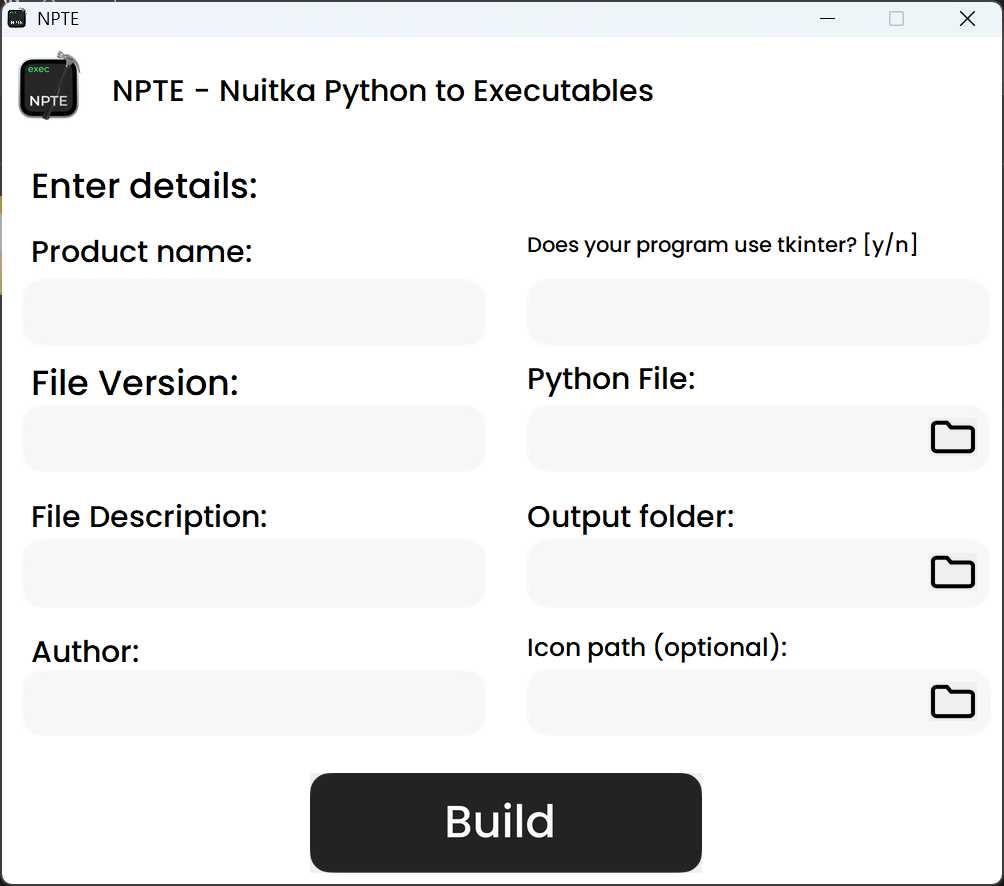
1. Enter your project details (Name, Author, etc.).
2. Click **Start Build**.
3. The app generates a `Build.bat` file; run it to compile your Python script into a standalone Windows executable.
 ---
### Using NPTE on macOS
1. Enter your project details (Name, Author, etc.).
2. Click **Start Build**.
3. The app generates a `Build.sh` file; execute it to create your macOS application.
> Make sure all required dependencies are installed before building.

---
## Contributing
If you’d like to contribute:
1. Fork this repository.
2. Create a feature branch (`git checkout -b feature/YourFeature`).
3. Commit your changes and open a Pull Request.
Bug reports and feature suggestions are also welcome in the [Issues section](https://github.com/Anakin-bb8/Nuitka-GUI-NPTE/issues).
---
## License
This project is released under the [MIT License](LICENSE).
---
### Using NPTE on macOS
1. Enter your project details (Name, Author, etc.).
2. Click **Start Build**.
3. The app generates a `Build.sh` file; execute it to create your macOS application.
> Make sure all required dependencies are installed before building.

---
## Contributing
If you’d like to contribute:
1. Fork this repository.
2. Create a feature branch (`git checkout -b feature/YourFeature`).
3. Commit your changes and open a Pull Request.
Bug reports and feature suggestions are also welcome in the [Issues section](https://github.com/Anakin-bb8/Nuitka-GUI-NPTE/issues).
---
## License
This project is released under the [MIT License](LICENSE).