
Marbor
The private AI inference control plane for self-hosted GPU fleets
Marbor intelligently places inference workloads across your GPU fleet using model residency,
GPU capacity, replica topology, workload pressure, and runtime capabilities.





Cold model loads kill your time-to-first-token. Marbor keeps hot state ready.
43x faster warm vs. cold, measured on real hardware (one consumer GPU, VRAM-constrained -
see methodology). Bearer-token auth, per-key rate limits, and cost-metered
cloud overflow that activates only when local capacity is fully saturated. Tracks $200-3,000+/mo
of token spend served locally instead of by a cloud API, from real parsed token counts - never
estimated, and not a total cost comparison (your hardware and power are not in that number).



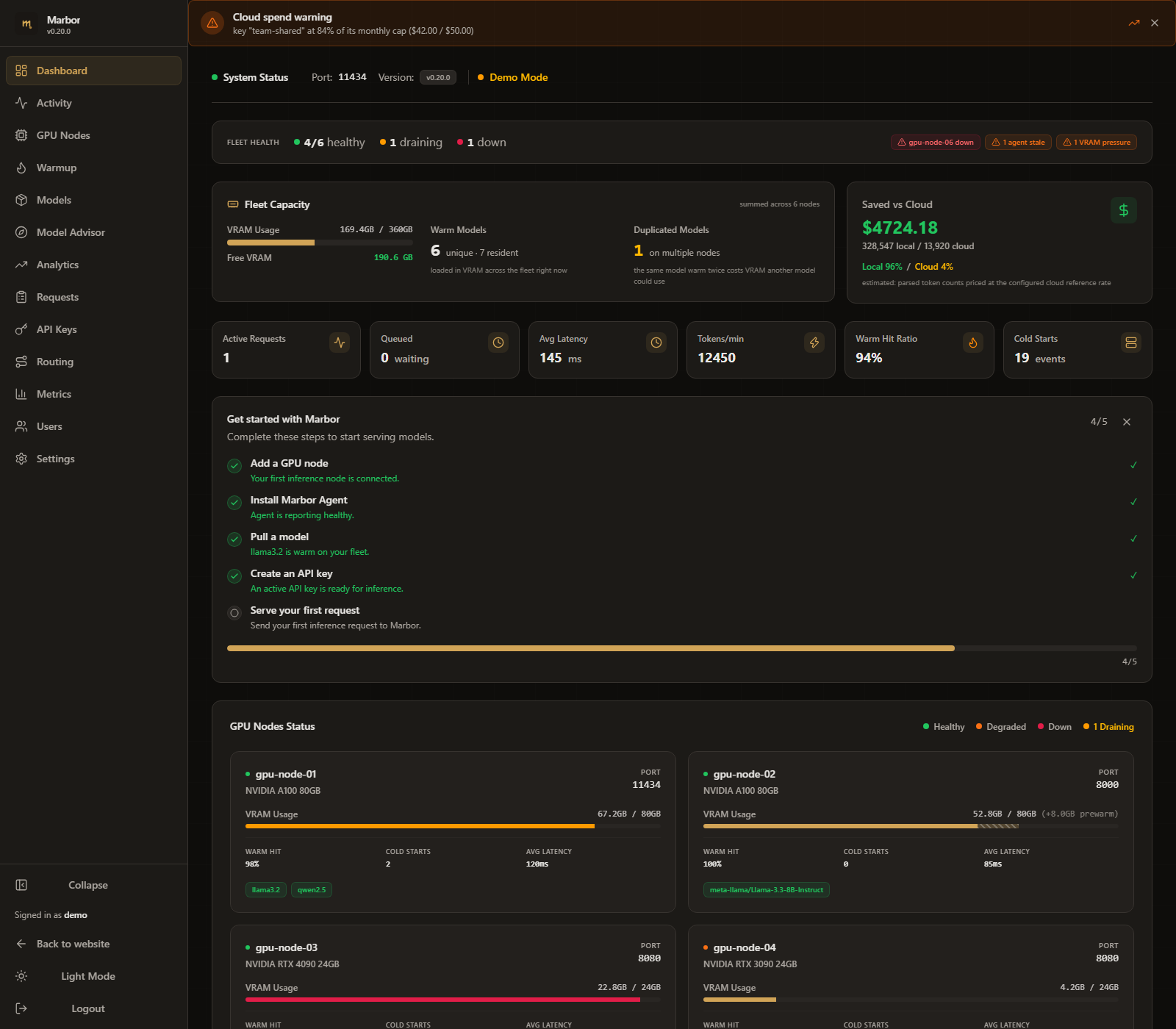
Enterprise dashboard: live request telemetry, cluster-wide VRAM utilization, per-key cost attribution, and cloud-deflection savings - all from real parsed token counts.
(demo data shown)
---
> **[Try the live demo](https://marbor.in/demo/)** - see the real admin dashboard (read-only) with live cluster telemetry, VRAM state, and request logs. No install required.
## Quick Start
### Try it in 5 minutes (No GPU/Ollama required)
Experience the complete gateway and monitoring stack locally in 5 minutes using mock backends:
1. **Clone and start the demo stack**:
```bash
git clone https://github.com/Anirudhx7/marbor && cd marbor
make demo
```
This spins up `marbor`, two mock Ollama backend nodes, Prometheus, and Grafana, then runs a 20-request benchmark to generate live telemetry. Everything the demo uses (compose files, Dockerfiles, the seeded database) is in [`demo/`](demo/).
2. **Access the dashboards**:
* **Marbor Dashboard**: [http://localhost:8080](http://localhost:8080) (Credentials: `admin` / `admin`)
* **Grafana Telemetry**: [http://localhost:3000](http://localhost:3000) (Pre-configured dashboard included)
3. **Run a manual benchmark**:
Test the cold-vs-warm latency gap through the marbor proxy:
```bash
go run ./cmd/bench -endpoint http://localhost:11434
```
4. **Clean up**:
```bash
make demo-down
```
---
### Quick Installer (Linux & macOS)
* **Install only**
```bash
curl -fsSL raw.githubusercontent.com/Anirudhx7/marbor/main/install.sh | sh
```
Downloads the official matching binary for your platform (`linux`/`darwin` and `amd64`/`arm64`) and installs it to `/usr/local/bin`. Run `marbor` manually to start. If a version is already installed, this reports old → new instead of upgrading silently.
* **Quick demo - Auto-Discover & Run in background**
```bash
curl -fsSL raw.githubusercontent.com/Anirudhx7/marbor/main/install.sh | START=1 sh
```
Installs the binary, starts the gateway in the background against a fresh `marbor.db`, and prints operational access details. Before starting, it scans the local physical network subnet (and localhost) for active GPU backends (Ollama, vLLM, TGI, and llama.cpp; MLX on Apple Silicon is registered manually) and interactively prompts you to pick which discovered nodes to seed into `marbor.db` (comma-separated numbers, `all`, or `skip`) - there's no config file to hand-edit. This starts a plain background process (`nohup`) - it won't survive a reboot, so treat this as a way to try marbor, not run it long-term. After starting, the installer verifies the proxy, admin dashboard, and metrics endpoints are actually responding (not just that the process exists) and prints diagnostics if anything's off. Re-running this command while an instance is already running won't spawn a duplicate - it detects the existing process and re-verifies its health instead.
* **Production - Auto-Discover & Run as a managed service (recommended for real deployments)**
```bash
curl -fsSL raw.githubusercontent.com/Anirudhx7/marbor/main/install.sh | SERVICE=1 sh
```
Same as the quick-demo command (including the interactive node-discovery prompt), but instead of a background process it installs and enables a proper OS service (`Restart=on-failure`, starts on boot) - this is what you want for anything you intend to keep running. Currently implemented via `systemd` on Linux (requires root/sudo; logs via `journalctl -u marbor -f`). `SERVICE=1` is deliberately OS-agnostic - on macOS or any host without a supported service manager, it prints a notice and falls back to the same background mode as the quick-demo command rather than failing the install.
### Uninstalling
```bash
curl -fsSL raw.githubusercontent.com/Anirudhx7/marbor/main/uninstall.sh | sh
```
Run this from the same directory `install.sh` was run in (it looks for `marbor.db` and the pidfile there). It stops and removes the systemd service or background process and removes the binary. `marbor.db` is always kept by default when piped like this (stdin isn't a terminal, so the keep/remove prompt never runs) - pass `KEEP_DB=0` to remove it instead:
```bash
curl -fsSL raw.githubusercontent.com/Anirudhx7/marbor/main/uninstall.sh | KEEP_DB=0 sh
```
To get the interactive `Keep SQLite database? [Y/n]` prompt instead of relying on the env vars, download the script first so it runs with a real terminal attached: `curl -fsSL .../uninstall.sh -o uninstall.sh && sh uninstall.sh`.
---
### Docker Compose (Production Deployment)
Deploy the gateway via Docker Compose, optionally with the metrics stack scraping the proxy:
```bash
git clone https://github.com/Anirudhx7/marbor && cd marbor
docker compose up -d # gateway only
docker compose -f docker-compose.yml -f docker-compose.monitoring.yml up -d # gateway + Prometheus + Grafana
```
This starts:
* **Marbor** ([http://localhost:8080](http://localhost:8080)): Main gateway container.
* **Prometheus** (with the monitoring overlay): configured to scrape the Marbor metrics endpoint. Metrics are off by default, so the dashboard stays empty until you enable them: `echo '{"metrics":{"enabled":true}}' > metrics.json && marbor settings set --file metrics.json`, then restart Marbor (see [Monitor a fleet with Prometheus and Grafana](docs/guides/monitor-llm-fleet-prometheus-grafana.md)).
* **Grafana** (with the monitoring overlay, [http://localhost:3000](http://localhost:3000)): Pre-provisioned with the official [Marbor dashboard](grafana/marbor.json).
> [!NOTE]
> **Docker Networking & Auto-Discovery:** Containers on Docker's default bridge network cannot scan or reach local subnet backends via network auto-discovery. To allow network discovery to reach host-networked backends, use `network_mode: host` in your compose file or add remote GPU nodes manually from the dashboard (**GPU Nodes** page) using their reachable LAN IP. If discovery finds 0 backends, it indicates no reachable backends from this container's network mode, not that no GPUs exist.
---
## The Problem: Uncontrolled LLM Cloud Spend at Scale
Enterprise teams deploying LLM-powered applications - coding agents, RAG pipelines, internal copilots - face a compounding cost problem:
- **Cold-start latency tax.** Generic load balancers spray requests across GPU nodes with no awareness of model residency. Each miss triggers a 15-45 second model load from disk to VRAM, destroying time-to-first-token (TTFT) SLAs.
- **Invisible cloud egress.** Without a local-first routing layer, traffic silently overflows to OpenAI/Anthropic at $0.15-$60/M tokens. Platform teams discover the bill at month-end.
- **No GPU utilization visibility.** Ops teams have Grafana for CPU and memory. They have nothing for per-node VRAM residency, model warm state, or inference cost attribution across API keys.
**Marbor eliminates all three.** It sits between your applications and your GPU fleet, routing every request to the node that already has the model loaded in VRAM. Cloud overflow is explicit, metered, and off by default. Every token is counted, attributed to an API key, and valued against your configured cloud reference rate.
---
## Core Architecture
```
Client Application (Agent / RAG / Copilot)
│
▼
┌───────────────────────────────────────────────────────┐
│ Marbor endpoint (:11434) │
│ │
│ Auth ─► Rate Limit ─► Quota Check ─► Model Allow │
│ │ │
│ ▼ │
│ Request Queue (configurable depth + backpressure) │
│ │ │
│ ▼ │
│ Router: extract model from JSON body │
│ ├── Warm in VRAM? ──► Route to warm node │
│ │ (least-connections among warm candidates) │
│ ├── VRAM-fit placement ──► Node with most headroom │
│ ├── Session affinity (X-Session-ID, when enabled) ─► KV-cache │
│ └── All busy/down? ──► Cloud fallback │
│ (OpenAI/Anthropic, format-translated) │
│ │
│ Token Tracking ─► Cost Attribution ─► Audit Log │
└───────────────────────────────────────────────────────┘
│ │ │
▼ ▼ ▼
GPU Nodes Cloud APIs Prometheus :9090
(Ollama/ (overflow) Grafana Dashboard
vLLM/TGI/
llama.cpp/MLX)
```
**Single static Go binary. Zero runtime dependencies. No Python. No JVM. No Node.js.** GPU nodes run an optional second, equally-static companion binary - the [marbor agent](#marbor-agent) - for live telemetry, model pulls, and runtime control.
---
## Enterprise Feature Matrix
| Category | Feature | Detail |
|----------|---------|--------|
| **GPU-Aware Routing** | Warm-first model routing | Polls `/api/ps` on every node every 2s. Routes to the node where the model is already resident in VRAM. Minimizes cold-start latency on warm hits. |
| | VRAM-fit placement | Cold requests route to the node with the most free VRAM. Prevents OOM under concurrent multi-model traffic. |
| | Deployment-aware GPU-count placement | Nodes declare tensor/pipeline/expert/data-parallel width (or one-click "Adopt" what the marbor agent auto-detects; a detection only steers placement on its own when the agent confirmed it against the NVIDIA GPU process list, which needs the agent's opt-in `--read-runtime-env`; that flag does not gate the docker socket path, which separately reads a container's configured environment via `docker inspect` with the same allowlist). A model needing 8 GPUs for tensor-parallel inference can no longer be routed to a 4-GPU node - the scheduler gates on GPU count, not just VRAM. |
| | Multi-host replica scheduling | Declare which nodes together form one tensor/pipeline-parallel deployment spanning more than one physical machine. The head node is the only one ever routed to; worker nodes stay visible in the fleet but are automatically excluded from routing and session-affinity revalidation. Conflicting or one-sided declarations show a clear "Unresolved replica" state instead of routing to a broken deployment. Agents also report how a multi-host launch was started, and marbor turns that into a suggestion in the Replica groups tab on the GPU nodes page (and `marbor nodes suggestions`) that you review and confirm in one step; nothing is applied on its own. This needs a current agent on each host, covers vLLM multiprocessing and llama.cpp RPC launches only, and is separate from the agent's opt-in environment reading. |
| | Session affinity (KV-cache, opt-in) | When enabled, `X-Session-ID` header pins a conversation to a node so KV-cache stays hot and subsequent turns skip re-prefill. Disabled by default; TTL-based eviction. |
| | Model aliases | Keep existing client model names: map `gpt-4` to a real fleet model like `llama3.2:8b` and OpenWebUI, Cursor, or app configs keep working unchanged. Routed, rate-limited, and recorded under the real model; takes effect without a restart. |
| | Proactive model warmup | `keep_alive` pings on a configurable schedule keep priority models resident between requests. |
| **Financial Controls** | Real-time savings tracking | Every locally-served token valued against your cloud reference rate. Dashboard shows exact dollar savings vs pure-cloud baseline. |
| | Per-key cost attribution | Token totals and estimated cost per API key per month. Attribute inference spend to teams, projects, or agents. |
| | Cloud spend metering | Overflow tokens priced at provider-configured rates. Full local-vs-cloud cost breakdown. |
| | Per-key quotas | Hard `daily_limit`/`monthly_limit` per key. 429 when exceeded. Persisted across restarts. |
| **API Key Auth & Limits** | Per-key rate limiting | Token-bucket rate limiter per API key. `X-RateLimit-Limit/Remaining/Reset` headers on every response. |
| | Model allow-lists | Per-key model restrictions. 403 on unauthorized model access - enforced at the control plane, not advisory. |
| | Key expiration | `expires_at` per key. Automatic invalidation. No manual rotation under pressure. |
| **Observability** | Prometheus metrics | 21 production metrics: request throughput and TTFT, latency percentiles, active connections, token counts, cache hit/miss, retry rates, cloud fallback frequency, local model degradation, quota rejections, request queue depth/timeouts, warmup pings and residency, schedule fires, model evictions, prewarming accuracy, panic recovery, dropped audit entries, node health. |
| | Grafana dashboard | Included JSON ([`grafana/marbor.json`](grafana/marbor.json)). One-click import. Request throughput and error rate, latency percentiles, warm-routing hit ratio, connections per node, tokens/s by key. |
| | Structured logging | `--log-format json` for Loki, Datadog, Fluentd, Splunk. Per-request access log with key name, model, node, status, latency, request ID. |
| | Audit trail | Best-effort audit trail persisted in SQLite (`audit_log`) and pruned by the configured retention period (see the audit log section of SECURITY.md), with crypto/rand request IDs. Records requests that reach proxy completion handling. Authentication and policy rejections that happen earlier (missing or invalid key, expired key, rate limit, quota) are not persisted in it, and entries are dropped when the async write queue is full (counted in `marbor_audit_dropped_total`). Not a lossless security audit trail. |
| | Webhook alerts | `node_down`/`node_up` and `agent_down`/`agent_up` (marbor agent reachability) events with HMAC-SHA256 signatures. PagerDuty/OpsGenie/Slack-ready. |
| **Resilience** | Automatic retry/failover | Dead node before first byte triggers retry on alternate healthy nodes → cloud → 502. Transparent to the client. |
| | Request queue | Configurable `queue_max_depth` and `queue_timeout_ms`. Traffic spikes queue and drain rather than immediately 502-ing. |
| | Per-node in-flight cap | Optional `max_in_flight_per_node` (global) with a per-node override. A node at/over its cap is excluded from routing - failover/cloud/503 - instead of queued, for operators who need overflow rather than piling onto a slow node. Best-effort (approximate under a concurrent request burst), not an atomic guarantee. |
| | Node drain | `POST /admin/nodes/{name}/drain` marks a node so the router skips it for new requests while in-flight work completes. Zero-downtime GPU maintenance. Before draining, marbor names any model the node is the only server of and asks you to confirm (API callers pass `force=true`, and may add one `acknowledge_sole=` per model they reviewed so the call is refused if that list went stale). |
| | Config hot-reload | `SIGHUP` or `POST /admin/v1/config/reload` re-syncs state from `marbor.db` in place. Key rotations and routing changes take effect without dropping connections. |
| **Cluster Telemetry** | Cluster-wide VRAM | Per-node used-VRAM live across the entire cluster from each node's own `/api/ps`. No sidecar agent required. |
| | GPU metrics | nvidia-smi integration on marbor host: temperature, power draw, total capacity. Remote nodes: real telemetry via the optional marbor agent, or operator-declared `vram_total_mb` if it is not installed. Every figure labelled with its source (nvidia/api/declared/agent). |
| | VRAM fit indicators | Green/yellow/red badges per model per node. Ops teams see at a glance whether a model fits in available VRAM. |
| **Multi-Backend** | Ollama, vLLM, llama.cpp, MLX, plus TGI (legacy) | Declare `runtime: ollama/vllm/tgi/llamacpp/mlx` per node. The router is runtime-agnostic; health probes and model-list calls use the correct API per runtime. TGI stays supported but frozen: Hugging Face archived the project in March 2026, so marbor only fixes bugs for it. |
| | Path-aware routing | `/api/*` routes to Ollama nodes only. `/v1/*` routes to any runtime. Non-Ollama nodes are transparent to OpenAI SDK clients. |
| **Deployment** | Single binary | One static Go binary per platform. Drop onto a VM and run. No package manager, no virtualenv, no container runtime required. |
| | Docker auto-discovery | Scans Docker socket for `ollama/ollama` containers. Auto-registers nodes. Zero config. |
| | Cloud format translation | Ollama-native requests that overflow to cloud get OpenAI responses translated back to Ollama NDJSON. Clients never see a format difference. |
---
## TTFT Performance: The Business Case
The single most impactful metric for LLM infrastructure is **Time-to-First-Token (TTFT)**. Every cold model load adds tens of seconds of latency before the first token appears. In a multi-agent workflow making hundreds of calls per hour, this compounds into minutes of wasted wall-clock time per pipeline execution.
Marbor's warm-first routing avoids this: the router knows which models are resident in VRAM on which nodes at sub-3-second granularity and sends each request to a node that already has the model loaded.
### Measured numbers (real hardware, not estimates)
Measured through a deployed Marbor v0.13.1 instance routing to a single consumer-GPU
Ollama node, using the harnesses in [`bench/`](bench/). Model: an 8B-parameter Q4_K_M model
(~9.6 GB on disk). Cold = model evicted from VRAM before each request; warm = model
already resident.
| Scenario (via Marbor) | n | p50 TTFT | min | max |
|---|---|---|---|---|
| Cold (model must load from disk) | 3 | **17.3 s** | 11.5 s | 18.1 s |
| Warm (model resident) | 10 | **8.1 s** | 1.9 s | 13.8 s |
Fastest warm sample observed through Marbor: **0.4 s** - a 43× improvement over the
median cold start.
Honest context for these numbers: on the benchmark node only ~3.3 GB of the model's
~10.6 GB runtime footprint fit in VRAM, so even "warm" first-token latency was partly
CPU-bound and jittery. On a node where the model fully fits in VRAM, the warm path is
the GPU's native prompt-eval speed and the cold-vs-warm gap widens further. A control
run direct-to-node (bypassing Marbor) showed the same warm-latency profile, i.e. the
Marbor's proxy overhead is negligible. Reproduce it on your own hardware with the
harness in [`bench/`](bench/).
---
## The Savings Angle
This is the dashboard screenshot that sells itself: Marbor tracks every token you served locally vs in the cloud, and shows you exactly how much that local inference saved compared to routing everything to OpenAI.
The math uses real parsed token counts from each response (`eval_count` from Ollama, `usage.total_tokens` from cloud), valued at your configured reference rate. When token data is unavailable, the dashboard shows "-" rather than a fabricated number. No fake math.
Platform engineers routing steady token volume through local GPU hardware can see $200-$3,000+/month in avoided cloud API spend (depending on volume and reference rate; excludes hardware/power) visible in the dashboard within the first week. Full financial model: [SAVINGS-MATH.md](docs/SAVINGS-MATH.md).
---
## Supported Backends
Marbor is runtime-agnostic. Declare `runtime:` per node and the router uses the correct health probe and model-discovery call for each backend.
| Backend | `runtime:` value | Health check | Model discovery | Path routing |
|---------|-----------------|--------------|-----------------|--------------|
| Ollama | `ollama` (default) | GET /api/ps | /api/ps response | /api/* and /v1/* |
| vLLM | `vllm` | GET /health | GET /v1/models | /v1/* only |
| TGI (HuggingFace, legacy: upstream archived) | `tgi` | GET /health | GET /info | /v1/* only |
| llama.cpp server | `llamacpp` | GET /health | GET /v1/models | /v1/* only |
| MLX (`mlx_lm.server`, Apple Silicon) | `mlx` | GET /v1/models | GET /v1/models | /v1/* only |
`/api/*` paths (Ollama-native) route only to Ollama nodes. `/v1/*` paths route to any runtime - OpenAI SDK clients work unchanged against a mixed fleet.
**Adding nodes:** nodes are written straight to `marbor.db` from the admin dashboard's **GPU Nodes** page, or via one `POST /admin/nodes` call per node - repeat the call per backend (for whole-fleet registration use the [GPU node registration Ansible playbook](docs/deploy/gpu-node-registration.md) or `install.sh`'s network-discovery wizard):
```json
{
"name": "vllm-gpu",
"url": "http://10.0.1.20:8000",
"runtime": "vllm",
"vram_total_mb": 81920
}
```
---
**Supported platforms** (single static binary per target + Docker image):
| Platform | Architecture | Asset | Typical hardware |
|----------|-------------|-------|------------------|
| Linux | amd64 | `marbor-linux-amd64` | Production GPU servers, x86 workstations |
| Linux | arm64 | `marbor-linux-arm64` | ARM servers, Graviton instances |
| macOS | Apple Silicon | `marbor-darwin-arm64` | Mac Studio, Mac Pro, M-series dev machines |
| macOS | Intel | `marbor-darwin-amd64` | Intel Macs |
| Windows | amd64 | `marbor-windows-amd64.exe` | Windows GPU workstations |
| Docker | linux/amd64 image | `ghcr.io/anirudhx7/marbor` | x86_64 Linux hosts |
> **macOS Gatekeeper:** binaries are not yet Apple-notarized. Clear the quarantine flag once: `xattr -d com.apple.quarantine marbor`.
All builds and `checksums.txt` on the [releases page](https://github.com/Anirudhx7/marbor/releases/latest).
**Man pages:** `install.sh` installs them for you. To install by hand, download `marbor-man-pages.tar.gz` from the same page and unpack it into a man root: `sudo tar -xzf marbor-man-pages.tar.gz -C /usr/local/share/man`, then `man marbor`.
**Build from source:**
```bash
git clone https://github.com/Anirudhx7/marbor
cd marbor
make build
./marbor
```
Point your LLM clients at `:11434`. Marbor speaks the Ollama API and passes through Ollama's OpenAI-compatible `/v1` endpoints - both `ollama` clients and OpenAI SDKs work unchanged.
**Integration guides:** [Open WebUI](docs/integrations/open-webui.md) · [Continue](docs/integrations/continue.md) · [LibreChat](docs/integrations/librechat.md) · [LiteLLM](docs/integrations/litellm.md) · [AWS EC2 deploy](docs/deploy/aws-ec2.md) · [GPU node registration (Ansible)](docs/deploy/gpu-node-registration.md) · [marbor agent enrollment (Ansible)](docs/deploy/marbor-agent-enrollment.md)
---
## Configuration
There is no config file. Marbor is DB-first: everything lives in `marbor.db` (SQLite), and you configure it entirely through the admin dashboard or the REST API - nothing to hand-edit, nothing to redeploy for a settings change. Nodes, keys, quotas, and routing config live in that database, so they survive a reboot with no re-registration - see the [Production Deployment Guide](docs/PRODUCTION.md) for the systemd unit and Compose restart policy that keep the process itself running.
**First boot:**
```bash
./marbor # or --db /path/to/marbor.db to pick the database location
```
The binary opens (or creates) `marbor.db`, starts blank-slate, and prints a banner pointing you at the dashboard. Sign in at `http://localhost:8080` as `admin` / `admin`. You are required to set a new password immediately, and that first-login change cannot be skipped. Until you do, the dashboard (plain HTTP) accepts the default login from anyone who can reach it, so do this right after install.
**Secrets at rest:** cloud provider API keys, marbor-issued API keys, the LiteLLM key, HuggingFace token, and webhook secret are encrypted in `marbor.db` with AES-256-GCM. The encryption key lives in `marbor.db.key`, generated next to the database on first boot (0600 permissions) - back it up alongside `marbor.db`. Losing or deleting this key while `marbor.db` exists causes marbor to generate a new key on boot, orphaning previously encrypted secrets (which drop silently from active key/provider lists until re-entered). To supply your own key instead (e.g. from a secrets manager), set `MARBOR_ENCRYPTION_KEY` to a base64-encoded 32-byte value before starting the binary; `marbor.db.key` is not created when this is set. Upgrading from an older version that stored these fields as plaintext encrypts them automatically on first boot - no manual migration step.
From there, everything is a dashboard page or an `/admin/v1/...` API call:
| Area | Where |
|---|---|
| GPU nodes | **GPU Nodes** page, or `install.sh`'s network-discovery wizard (`--seed-node` under the hood) |
| API keys, rate limits, model allow-lists, quotas | **API Keys** page |
| Routing strategy, timeouts, retries, session affinity, queueing, thermal watchdog | **Settings → Routing & Reliability** |
| Cloud overflow providers (OpenAI/Anthropic), cost-per-1k, spend caps | **Settings → Cloud Providers** / **Cloud Spend Cap** |
| Docker auto-discovery, webhooks | **Settings** (dedicated cards for each) |
| Model warmup schedule | **Settings → Global Warmup**, or per-node in the **Warmup** page |
| Model context windows | **Settings → Model Context Windows** |
| Proxy/admin ports, CORS, access log | **Settings → Proxy Configuration** / **Admin & Security** |
Prefer scripting it? Every one of those pages is a thin wrapper over `GET/PUT /admin/v1/settings`, `/admin/v1/nodes`, `/admin/v1/keys`, and `/admin/v1/cloud/providers` - GitOps-style operators can drive the same REST API from an init job instead of clicking through the UI.
---
## How Routing Works
```
Request arrives at :11434
│
▼
Auth middleware: Bearer token validation → rate limit → quota check → model allow-list
│
▼
Request queue: absorbs traffic spikes (configurable depth + timeout)
│
▼
Router: extract model name from JSON body, resolve a model alias if one is declared (gpt-4 → llama3.2:8b)
│
├── X-Session-ID present + session affinity enabled?
│ └── Yes → route to pinned node (KV-cache affinity)
│
├── Model warm in VRAM on any node?
│ └── Yes → route to warm node with least active connections
│
├── All nodes healthy?
│ └── Yes → VRAM-fit placement (most free VRAM) or least-connections fallback
│
└── All nodes busy/down?
└── Cloud overflow → OpenAI/Anthropic → response format-translated → cost logged
```
The router polls `/api/ps` on each node every 2 seconds. State is real-time, not cached guesses.
**Config hot-reload:** `kill -HUP ` or `POST /admin/v1/config/reload` re-syncs live routing/nodes/keys/cloud-providers from `marbor.db` without dropping connections. (Listen ports/addresses and a few other startup-only settings still need a restart - the dashboard flags which ones.)
---
## Model Warmup
Marbor proactively keeps priority models loaded in VRAM between requests. Without this, idle models get evicted and the next request pays the cold-start tax.
Configure it in the dashboard's **Settings → Global Warmup** card: enable it, set the interval (default every 5 minutes), and list your highest-traffic models. Per-node warmup overrides live on the **Warmup** page.
How keep-warm behaves across the fleet:
- **Ollama nodes only, for now.** Other runtimes show keep-warm as unsupported (`KEEP-WARM` column in `marbor nodes`, a disabled input on the Warmup page); an existing config there can still be trimmed or turned off.
- **Only models already on the node.** Adding a model to a node's keep-warm list, or to a warmup schedule, is rejected unless that model is already pulled on that node. A bare name like `llama3` matches `llama3:latest`.
- **Multi-host replicas are warmed through the head.** A replica worker is never warmed directly: its keep-warm input is locked, a warmup schedule aimed at a worker runs against its head, and a leftover config on a worker can only be cleared or trimmed. A node with an unresolved replica declaration is not warmed at all until the declaration is fixed.
- **Unhealthy nodes are skipped** by both the periodic keep-warm cycle and warmup schedules.
- **Digest drift is reported, not blocked.** If a node's resident copy of a keep-warm model has a different content digest from the fleet's reference copy, the model is still kept warm and a notice appears on the node (Warmup page, GPU Nodes page, `marbor nodes`).
- **Active sessions are protected when making room.** When a warmup has to evict something to fit, it prefers models no live sticky session is using, and only evicts a session's model as a last resort.
- Saving a node's keep-warm config triggers a full warmup cycle right away.
---
## Check What Fits Before You Pull
Learn a model will not fit before you download it, not after. For each node, **Model Advisor** (the "What fits" list under the node card, plus a "Pick" marker on Hugging Face quantizations) and `marbor fit` say whether a model fits the node's total VRAM and free disk, and which already-offered quantization to pull:
```bash
marbor fit # every built-in catalog model, every node
marbor fit --node gpu-1 # one node
marbor fit unsloth/Qwen3-8B-GGUF --node gpu-1 --ctx 16384 # a Hugging Face repo
```
- **The pick** is the catalog's recommended quantization when it fits, otherwise the largest one that fits. A pick that only fits with little headroom (above 85% of total VRAM) is flagged **tight**. If nothing offered fits, the answer says so and, when the model is too large for the node, names the smallest option.
- **Sized against total VRAM**, not what is free right now, and against combined VRAM on multi-GPU Ollama and llama.cpp nodes or the largest single GPU for vLLM, TGI and MLX. Figures are estimates (published file sizes or the built-in catalog, plus context for Hugging Face repos); an unknown VRAM or model size shows `-`, never a guess.
- **Runtime coverage.** Built-in catalog models are Ollama-format tags. On vLLM and TGI nodes, a curated set of ungated model families (Qwen 2.5 and Coder, DeepSeek reasoning distills, Phi, Code Llama) shows its **Hugging Face equivalent** instead: one full-precision (BF16) repo with an approximate download size and an estimated VRAM need, and **Pull** downloads it through the node's agent. Pull only downloads: relaunch the runtime on the node to serve the new model (there is no load check for these runtimes). Gated families (Llama, Gemma), Mistral and Mixtral (not yet mapped) and models without a mapped repo still show as "other format" on those nodes, as do all curated models on llama.cpp and MLX nodes. Hugging Face GGUF repos get a pick on Ollama and llama.cpp nodes; a safetensors repo on vLLM, TGI or MLX gets a fit answer for that one repo. Suggesting an AWQ or GPTQ alternative repo is not included yet.
- Read-only: nothing is pulled, changed or routed differently.
The same answer is in the Admin API as an additive `recommendation` object on each model in `GET /admin/models/catalog` (`nodes[].models[]`) and at the top level of `GET /admin/models/repo`: `picked`, `tag`, `quantization`, `vram_est_mb`, `size_mb`, `fit`, `tight`, and, when nothing fits, `reason` (`too_large`, `vram_unknown`, `disk_insufficient`, `incompatible_runtime`, `no_variants`) with an optional `closest_tag`.
---
## Cloud Fallback Setup
Add a cloud overflow provider from the dashboard's **Settings → Cloud Providers** card, or via one `POST /admin/v1/cloud/providers` call per provider - providers are persisted to `marbor.db`:
```json
{
"name": "openai-overflow",
"provider": "openai",
"base_url": "https://api.openai.com",
"api_key": "sk-...",
"default_model": "gpt-4o-mini",
"cost_per_1k_tokens": 0.00015,
"enabled": true
}
```
Ollama-native (`/api/*`) requests that fall back to cloud get the OpenAI response translated back to Ollama NDJSON - clients never see a format difference.
Set `local_only: true` on an API key (`PATCH /admin/v1/keys/{name}`, or the API Keys page's edit modal) to forbid that key from ever reaching a cloud provider - a request that would otherwise fall back instead fails closed with a `503 local_only_blocked` error. Every request's local/cloud/blocked outcome is durably counted per key and per provider, readable via `GET /admin/v1/spill` or `marbor spill`, and shown on the Analytics page's Cloud Spill table.
---
## Operational Topology
| Port | Service | Auth |
|------|---------|------|
| `:11434` | Ollama-compatible endpoint - drop-in replacement | Per-key Bearer token |
| `:8080` | Admin dashboard + REST API | Admin token |
| `:9090` | Prometheus metrics | Unauthenticated (scrape target); binds `127.0.0.1` only by default outside Docker - widen via `metrics.bind_address` if Prometheus scrapes from another host. Inside Docker it binds every interface by default, matching the shipped monitoring overlay's container-to-container scrape. |
---
## Marbor Agent
`marbor-agent` is an optional second binary installed on each GPU node: `install.sh ROLE=agent` for a single host, or the [agent enrollment Ansible playbook](docs/deploy/marbor-agent-enrollment.md) for mass enrollment - one inventory-driven run (`ansible/playbooks/install-marbor-agent.yml`) enrolls and installs the agent on every already-registered node at once, idempotently skipping any that are already enrolled and healthy. It serves `GET /v1/status` and `GET /metrics` on **`:9200`** (default) and is polled by marbor - clients never talk to it, and it contains no control-plane code, so a compromised agent host cannot start the gateway.
A foreground `marbor-agent` without `--cert`/`--key` serves plaintext HTTP and refuses to start on a non-loopback bind unless you pass `--allow-insecure-plaintext` (or bind to loopback with `--bind=127.0.0.1`); `marbor-agent service install` provisions TLS automatically and is unaffected. See [SECURITY.md](SECURITY.md).
One agent covers an entire physical host: multiple runtimes on the same box (e.g. Ollama on `:11434` plus vLLM on `:8000`) share one enrollment instead of needing one per node. Its bearer tokens are scope-tiered (`readonly` / `operator` / `admin`), and its TLS certificate can be pinned TOFU-style for headless enrollment (`marbor nodes confirm-tls`).
The fleet runs without it - remote nodes fall back to operator-declared `vram_total_mb`, always labelled `declared`. What the agent adds:
| Capability | Without agent | With agent |
|---|---|---|
| Remote node telemetry | Declared capacity only, labelled `declared` | Live fan/temp/power/disk/CPU/RAM and per-model residency, labelled `agent` |
| Model pulls on nodes | Proxied through marbor's own HTTP client | Dispatched to the node, with your HuggingFace token injected for gated downloads |
| Runtime process control | Not available | Start/stop/restart/logs of the node's runtime via an accepted control driver (systemd unit, Docker container, launchd label, Windows service, or bare PID file) |
| Node health | Passive HTTP polling from marbor | On-demand active liveness probe (`marbor runtime health `) |
---
## Admin API
| Method | Path | Description |
|--------|------|-------------|
| GET | `/admin/v1/nodes` | Node list: status, VRAM usage, active models, source labels, and a `signals` array per node (`healthy`, `degraded`, `draining`, `down`, `agent`, `warm`, `pressure`). Optional `?signal=degraded,down` (comma list or repeated, any match) and `?q=text` (name or GPU model) narrow the list; an unknown signal is a 400 listing the valid ones. The same applies to `/admin/nodes`, and `GET /admin/nodes/{name}` carries `signals` too |
| GET | `/admin/v1/keys` | API keys: usage stats, monthly cost, token totals |
| GET | `/admin/v1/metrics/savings` | Cost savings vs pure cloud - current process lifetime |
| GET | `/admin/v1/cloud/providers` | Cloud fallback providers: status, spend |
| GET | `/admin/v1/spill` | Per-key, per-provider local/cloud/blocked request counts |
| GET | `/health` | 200 OK when control plane is ready (unauthenticated, for LB health checks) |
| POST | `/admin/nodes/{name}/drain` | Drain node for maintenance. Returns 409 with `code: sole_replica` when the node is the only server of a model it holds, until `force=true` is passed (a runtime restart is checked the same way). `force=true` alone overrides without checking the list; add one `acknowledge_sole=` per model you reviewed (an empty `acknowledge_sole=` counts as an empty list) and a list that no longer covers every such model gets a 409 with an `unacknowledged` array and changes nothing. Models match by exact name; keep the encoded query under 6000 bytes. Script recipe: GET `/admin/nodes/{name}/sole-replica`, then POST with `force=true` plus one `acknowledge_sole` per model, and on a 409 review and repeat |
| GET | `/admin/nodes/{name}/sole-replica` | Read-only check a drain or runtime restart runs: models only this node can serve, models only an Ollama node could cold-load, and places where other nodes cannot be verified |
| PATCH | `/admin/keys/{name}` | Mutate key rate limits, quotas, model allow-lists at runtime |
| PATCH | `/admin/nodes/{name}` | Override `vram_total_mb`, `gpu_model`, `gpu_indices` at runtime |
| GET | `/admin/v1/models/catalog` | Built-in model catalog with per-node fit and a `recommendation` (quantization to pull) per model |
| GET | `/admin/v1/models/repo?id=owner/name&node=&ctx=` | Hugging Face repo quantizations with per-node fit and a `recommendation` |
| POST | `/admin/v1/config/reload` | Re-sync live settings from `marbor.db` without SIGHUP |
---
## CLI
`marbor` is a single static binary that is two tools in one - the server and a thin CLI client
of the Admin API - selected by its first argument. The marbor agent is a separate binary,
`marbor-agent`, installed on each GPU node (see [marbor agent enrollment](docs/deploy/marbor-agent-enrollment.md)):
| Command | Purpose |
|---|---|
| `marbor` | Run the marbor server (default, no argument needed) |
| `marbor bench` | Benchmark warm-vs-cold first-token latency against a running marbor |
| `marbor uninstall [--purge]` | Remove the marbor's own service registration from this host |
| `marbor version` | print CLI and (if reachable) server version |
| `marbor status` | print marbor health/status summary |
| `marbor login` | authenticate once and save the session locally (recommended) |
| `marbor logout` | remove the saved session |
| `marbor whoami` | show the CLI's saved identity (live-verified) |
| `marbor nodes` | list nodes known to marbor (requires auth) |
| `marbor nodes confirm-tls ` | pin a marbor agent's TLS certificate fingerprint (headless enrollment) (requires auth) |
| `marbor nodes patch ` | update a node's deployment/placement fields (url, runtime, GPU, VRAM, parallelism, replica membership, TLS pin clear) (requires auth) |
| `marbor nodes tls-probe ` | read a node's Marbor Agent TLS certificate fingerprint without pinning it (requires auth) |
| `marbor nodes add ` | add (or update, by name) a node in the fleet (requires auth) |
| `marbor nodes remove ` | remove a node from the fleet (requires auth) |
| `marbor nodes warmup` | get or set a node's proactive warmup config (requires auth) |
| `marbor nodes warmup get ` | show a node's proactive warmup config (requires auth) |
| `marbor nodes warmup set ` | set a node's proactive warmup config (requires auth) |
| `marbor nodes pinned` | get or set a node's never-evict (pinned) model list (requires auth) |
| `marbor nodes pinned get ` | show a node's pinned model list (requires auth) |
| `marbor nodes pinned set ` | set a node's pinned model list (whole-list replace) (requires auth) |
| `marbor nodes prewarm` | disable or re-enable predictive prewarm for a node (requires auth) |
| `marbor nodes prewarm set ` | disable or re-enable predictive prewarm for a node (requires auth) |
| `marbor nodes fit` | show per-node VRAM fit analysis for resident/warm models (requires auth) |
| `marbor nodes suggestions` | list multi-host replica groups detected from agent launch details, and confirm or dismiss them (requires auth) |
| `marbor nodes suggestions confirm ` | declare a detected replica group on every member in one step (requires auth) |
| `marbor nodes suggestions dismiss ` | hide a suggestion until its members change (requires auth) |
| `marbor nodes suggestions restore ` | show a dismissed suggestion again (requires auth) |
| `marbor models` | fleet-wide list, or pull/delete/unload/list on one node (requires auth) |
| `marbor models pull ` | start pulling a model onto a node (async - does not wait for completion) (requires auth) |
| `marbor models delete ` | delete a model from a node's local storage (requires auth) |
| `marbor models unload ` | unload a model from a node's warm state (requires auth) |
| `marbor models list ` | list models present on a node's local storage (per-node, not the fleet-wide aggregate above) (requires auth) |
| `marbor models fleet` | fleet residency with VRAM totals and drift (same live data as bare models, filterable) (requires auth) |
| `marbor models search` | search Hugging Face models (requires auth) |
| `marbor models repo ` | show Hugging Face repo detail with per-node fit (requires auth) |
| `marbor models pull-progress ` | show a point-in-time snapshot of an active pull (requires auth) |
| `marbor models alias` | map client-facing model names (e.g. gpt-4) to real models on the fleet (requires auth) |
| `marbor models alias list` | list model aliases with their target's live status (requires auth) |
| `marbor models alias set ` | create or replace an alias (requires auth) |
| `marbor models alias remove ` | remove an alias (clients still using its name start failing) (requires auth) |
| `marbor models cancel-pull ` | cancel an in-flight pull (requires auth) |
| `marbor runtime` | start/stop/restart/logs/drain/undrain/health on one node (requires auth) |
| `marbor runtime start ` | start the node's inference runtime process (requires auth) |
| `marbor runtime stop ` | stop the node's inference runtime process (requires auth) |
| `marbor runtime restart ` | restart the node's inference runtime process (requires auth) |
| `marbor runtime logs ` | fetch recent log lines from the node's runtime process (requires auth) |
| `marbor runtime drain ` | mark the node draining (stop routing new requests to it) (requires auth) |
| `marbor runtime undrain ` | reverse "runtime drain" (requires auth) |
| `marbor runtime health ` | run an on-demand active liveness probe on the node (requires auth) |
| `marbor node` | node control driver operations |
| `marbor node control` | show or accept a node's control driver (requires auth) |
| `marbor node control probe ` | show a node's control-driver status (configured + discovered) (requires auth) |
| `marbor node control accept ` | accept a control driver + identifier for a node (requires auth) |
| `marbor node control clear ` | clear the accepted control driver for a node (requires auth) |
| `marbor node agent` | manage marbor agent lifecycle for a node (requires auth) |
| `marbor node agent get ` | show a node's marbor agent config (does not display the auth token) (requires auth) |
| `marbor node agent enable ` | enable or reconfigure the marbor agent for a node (requires auth) |
| `marbor node agent disable ` | disable the marbor agent for a node (requires auth) |
| `marbor node agent regenerate ` | issue a fresh token for an already-enabled marbor agent (requires auth) |
| `marbor key` | per-API-key local/cloud routing overrides (masked list, plaintext-once on create) (requires auth) |
| `marbor key list` | list keys (masked) (requires auth) |
| `marbor key create` | create a key (prints plaintext once) (requires auth) |
| `marbor key revoke ` | revoke (delete) a key (requires auth) |
| `marbor key patch ` | update key settings (requires auth) |
| `marbor key set-local-only ` | block (or re-allow) cloud fallback for one API key (requires auth) |
| `marbor key set-allow-local-degradation ` | let (or forbid) one API key receive a local alternate model (requires auth) |
| `marbor schedules` | manage time-of-day warmup/unload/drain/undrain automations (requires auth) |
| `marbor schedules list` | list schedules (requires auth) |
| `marbor schedules create` | create a schedule (requires auth) |
| `marbor schedules patch ` | update a schedule (only flags you pass are changed) (requires auth) |
| `marbor schedules delete ` | delete a schedule (requires auth) |
| `marbor routing` | manage routing rules and global routing strategy (requires auth) |
| `marbor routing rules` | list/add/remove/toggle routing rules (requires auth) |
| `marbor routing rules list` | list routing rules (requires auth) |
| `marbor routing rules add` | add a routing rule (requires auth) |
| `marbor routing rules remove ` | remove a routing rule (requires auth) |
| `marbor routing rules toggle ` | toggle a routing rule's enabled state (requires auth) |
| `marbor routing strategy` | get/set the global routing strategy (requires auth) |
| `marbor routing strategy get` | show the global routing strategy (requires auth) |
| `marbor routing strategy set ` | set the global routing strategy (requires auth) |
| `marbor cloud` | manage cloud overflow providers and view budget status (requires auth) |
| `marbor cloud providers` | list/add/update/delete/reorder/test cloud providers (requires auth) |
| `marbor cloud providers list` | list cloud providers (does not display the API key) (requires auth) |
| `marbor cloud providers add` | add a cloud provider (requires auth) |
| `marbor cloud providers update ` | update a cloud provider (omit --api-key to keep the stored key) (requires auth) |
| `marbor cloud providers delete ` | delete a cloud provider (requires auth) |
| `marbor cloud providers reorder ` | set cloud provider fallback priority order (requires auth) |
| `marbor cloud providers test` | verify a base-url+api-key pair authenticates, without saving it (requires auth) |
| `marbor cloud budget-status` | show global and per-key cloud spend vs budget caps (requires auth) |
| `marbor favorites` | manage your starred model list (requires auth) |
| `marbor favorites list` | list starred model ids (requires auth) |
| `marbor favorites add ` | star a model (requires auth) |
| `marbor favorites remove ` | unstar a model (requires auth) |
| `marbor model-config` | manage per-node model parameter profiles (requires auth) |
| `marbor model-config get` | get a model's parameter profile on one node (requires auth) |
| `marbor model-config set` | create/update a model's parameter profile (full JSON body) (requires auth) |
| `marbor model-config delete` | reset a model on a node to backend defaults (requires auth) |
| `marbor model-config list` | list every configured model parameter profile (requires auth) |
| `marbor model-config capabilities` | show which parameter fields take effect per runtime (requires auth) |
| `marbor catalog` | show the fleet-aware HF/local model catalog with per-node fit (requires auth) |
| `marbor fit [owner/name]` | show which models fit each node and which quantization to pull (requires auth) |
| `marbor backup` | manage marbor.db backups (requires auth) |
| `marbor backup now` | trigger an on-demand backup and download it (gzip, .db.gz) (requires auth) |
| `marbor backup list` | list backup files on the server, with the last backup result (requires auth) |
| `marbor backup ack-restore` | clear the remembered result of the last restore (requires auth) |
| `marbor backup download ` | download a stored backup file from the server (requires auth) |
| `marbor backup restore ` | restore marbor.db from a backup file (marbor restarts) (requires auth) |
| `marbor backup delete ` | delete a stored backup file from the server (cannot be undone) (requires auth) |
| `marbor backup upload` | upload a local .db or .db.gz file as a restorable backup (requires auth) |
| `marbor analytics` | hourly analytics + per-model stats (requires auth) |
| `marbor analytics show` | show analytics (raw JSON) (requires auth) |
| `marbor analytics export` | export analytics to a local file (requires auth) |
| `marbor savings` | show cloud-vs-local savings summary (requires auth) |
| `marbor metrics` | dashboard metrics |
| `marbor metrics summary` | show the dashboard summary strip (nodes, active requests, latency, tokens/min) (requires auth) |
| `marbor pulls` | list every active model pull job across the fleet (requires auth) |
| `marbor warmup` | global warmup engine status and manual controls (requires auth) |
| `marbor warmup status` | show global warmup engine status (requires auth) |
| `marbor warmup predictive` | enable/disable the predictive prewarm engine (requires auth) |
| `marbor warmup predictive set` | enable/disable the predictive prewarm engine (requires auth) |
| `marbor warmup ping` | manually trigger a warmup cycle now (requires auth) |
| `marbor predictive` | show recent predictive prewarm decisions (requires auth) |
| `marbor predictive decisions` | show recent predictive prewarm decisions (requires auth) |
| `marbor prefix-locality` | show prefix-locality routing hit and miss counts (requires auth) |
| `marbor prefix-locality stats` | show prefix-locality routing hit and miss counts (requires auth) |
| `marbor system-info` | show control-plane host system info and per-node GPU summary (requires auth) |
| `marbor config` | control-plane configuration operations |
| `marbor config reload` | re-sync live router/auth state from SQLite (requires auth) |
| `marbor settings` | get/set the full control-plane config (requires auth) |
| `marbor settings get` | print the current settings (secrets masked) (requires auth) |
| `marbor settings set` | apply a settings payload from a local JSON file (requires auth) |
| `marbor benchmark` | run/inspect in-dashboard hardware benchmark jobs (requires auth) |
| `marbor benchmark run ` | start a benchmark job (requires auth) |
| `marbor benchmark progress ` | show a point-in-time snapshot of a running benchmark job (requires auth) |
| `marbor benchmark cancel ` | cancel an in-flight benchmark job (requires auth) |
| `marbor benchmark runs` | show persisted benchmark run history (requires auth) |
| `marbor spill` | show per-key, per-provider local-vs-cloud request counts (requires auth) |
| `marbor activity` | show unified fleet activity feed (drain, agent, runtime, node, warmup, schedule, predictive, config) (requires auth) |
| `marbor requests` | inspect routing decisions for past requests (requires auth) |
| `marbor requests explain ` | show why the router picked the node it did for one request (requires auth) |
| `marbor requests list` | show the in-memory request log, newest first (requires auth) |
| `marbor requests live` | show the same bounded request ring in its raw live-widget shape (requires auth) |
| `marbor audit` | inspect the persisted, filterable request audit log (requires auth) |
| `marbor users` | manage dashboard users (requires auth) |
| `marbor users list` | list users (requires auth) |
| `marbor users create` | create a user (password printed once) (requires auth) |
| `marbor users approve ` | approve a pending user (requires auth) |
| `marbor users suspend ` | suspend a user and revoke sessions (requires auth) |
| `marbor users reset-password ` | reset a user's password (printed once) (requires auth) |
| `marbor users patch ` | update a user's email or role (requires auth) |
| `marbor users delete ` | delete a user (requires auth) |
| `marbor users pending-count` | show the number of users awaiting approval (requires auth) |
| `marbor users change-password` | change your own password (interactive, masked prompts) (requires auth) |
| `marbor users skip-password-change` | dismiss the forced-password-change prompt (not available for the default admin login) (requires auth) |
| `marbor completion ` | generate a shell completion script (bash, zsh, or fish) (hidden from `--help`; see `docs/cli.md`) |
> **Breaking change (beta, no migration shim):** the separate `marbor`/`marbor-cli` binary
> (`cmd/marbor`) has been merged into the main `marbor` binary above. There were no external
> users of the standalone CLI binary, so it was removed outright rather than kept as an alias.
The CLI subcommands never talk to a marbor agent directly - every command is exactly one Admin API
request:
```bash
marbor version # CLI version, plus server version if reachable
marbor status # health/uptime/node-count summary (GET /health)
marbor login # authenticate once (prompts interactively) ...
marbor nodes # ... then every other command works with zero flags
marbor whoami # who the CLI is currently authenticated as
marbor logout # remove the saved session
marbor node control probe gpu-03 # what control driver was auto-discovered
marbor node control accept gpu-03 --driver systemd --identifier ollama.service
marbor runtime restart gpu-03 # requires an accepted control driver first
```
Every command supports `--json` from day one - this is the actual compatibility contract for
scripts/CI/Ansible, not the human table output, which may change shape between releases. `--server`
(default `http://localhost:8080`, env `MARBOR_SERVER`) points at a different Admin API instance.
`nodes`, `models`, `node control probe|accept`, and `runtime start|stop|restart` require a session.
The recommended flow is `marbor login` once (interactively, or with
`--username`/`--password`) - the CLI persists the resulting session to a local file (`0600`, under
the OS user config dir) so every later command in that shell, in a fresh terminal, or across a
reboot works with zero flags until the session expires. For scripts/CI/containers where a
persisted file isn't wanted, pass credentials on every invocation instead:
`--username`/`--password` or `MARBOR_USERNAME`/`MARBOR_PASSWORD` (these always take priority over the
saved session). There is no `--token`/`MARBOR_TOKEN` flag - a bearer token passed as a CLI argument
or read from an env var would still be visible in shell history, `ps`/Task Manager, and
process-creation logging for the life of that process, so login/saved-session and
username+password are the only credential paths. `marbor whoami` reports the saved identity,
live-verified against the server; `marbor logout` deletes the saved file. `status` and
`version` never need auth (`GET /health` is unauthenticated).
**Shared Linux accounts are not recommended for administrative use.** The audit log records the
authenticated marbor user, not necessarily the individual human using a shared operating-system
account. If a shared account is unavoidable, prefer a per-shell `MARBOR_USERNAME`/`MARBOR_PASSWORD`
pair over the persisted session file (env vars are process-scoped and don't collide across
concurrent sessions on the same account; the saved file is one shared file). For production
environments, the recommended deployment is one Linux account per administrator and one marbor user
per administrator - this gives accurate audit attribution and isolated CLI sessions.
Exit codes: `0` success, `1` user/input error (bad flag, missing credentials, no control driver
accepted yet), `2` server/Admin API error (unreachable, 5xx, agent dispatch failure), `4`
authentication/authorization failure (401/403, including an expired or invalid saved session).
`runtime start|stop|restart ` only works once a control driver has been accepted for that
node (via `node control accept`, or the GPU Nodes page's "Runtime Control" panel) - marbor never
guesses which service manager controls a node's runtime process.
### Running the CLI against a container
The Docker image already contains the merged binary, so no image changes are needed to use the
CLI against a containerized marbor - run it inside the running container:
```bash
docker exec marbor status
```
---
## Observability Stack
### Prometheus
20 metrics exported at `:9090/metrics`:
- `marbor_requests_total` - total proxied requests (labels: key_name, model, node, status)
- `marbor_request_duration_seconds` - histogram of request latency
- `marbor_request_ttft_seconds` - histogram of time-to-first-token
- `marbor_active_connections` - active connections per node
- `marbor_node_healthy` - health gauge per node (1=healthy, 0=unhealthy)
- `marbor_warmup_model_resident` - warmup-target model residency per model/node (1=warm, 0=cold)
- `marbor_schedule_fires_total` - scheduled actions fired (labels: action, node)
- `marbor_model_evictions_total` - models unloaded from VRAM to free headroom, per node
- `marbor_cache_hits_total` - warm-model cache hits
- `marbor_cache_misses_total` - cold-start cache misses
- `marbor_tokens_total` - tokens processed (labels: key_name, node)
- `marbor_retries_total` - upstream failover retries per node
- `marbor_cloud_fallbacks_total` - cloud overflow events per provider
- `marbor_local_degradation_total` - requests substituted to a declared local alternate (labels: from, to)
- `marbor_quota_rejections_total` - 429 quota enforcement events (labels: key_name, period)
- `marbor_panics_total` - recovered handler panics
- `marbor_audit_dropped_total` - request audit entries dropped because the async audit write queue was full
- `marbor_queue_depth` - current request queue depth
- `marbor_queue_timeouts_total` - queued requests that timed out before getting a node
- `marbor_warmup_pings_total` - proactive keepalive pings per model/node
- `marbor_prediction_accuracy_ratio` - rolling prewarming prediction accuracy (0.0-1.0)
### Grafana
Import [`grafana/marbor.json`](grafana/marbor.json) into Grafana and point its Prometheus datasource at your Prometheus instance - which scrapes marbor's `:9090/metrics`. Pre-built panels: request throughput and error rate, latency percentiles, warm-routing hit ratio, active connections per node, healthy-node count, tokens/s by API key. Running the Docker monitoring overlay provisions the datasource and this dashboard, but metrics must be enabled in Marbor first or the panels stay empty (see [Docker Compose](#docker-compose-production-deployment)).
### Structured Logging
`--log-format json` emits slog JSON objects that Loki, Datadog, Fluentd, and Splunk parse natively. Every request that is proxied to a node or a cloud provider is logged with: key name (never the key value), model, target node, HTTP status, latency, request ID. Requests rejected earlier (missing or invalid key, rate limit, quota) are not written to this log.
---
## Competitive Positioning
| | Marbor | LiteLLM | nginx/HAProxy | Portkey/Helicone |
|---|---|---|---|---|
| **GPU-aware routing** | ✅ Polls VRAM state every 2s | ❌ Treats Ollama as a dumb URL | ❌ No GPU visibility | ❌ Cloud-only |
| **Warm-model routing** | ✅ Routes to node with model in VRAM | ❌ | ❌ | ❌ |
| **VRAM-fit placement** | ✅ Cold requests → most free VRAM | ❌ | ❌ | ❌ |
| **KV-cache session affinity** | ✅ X-Session-ID sticky routing | ❌ | ❌ | ❌ |
| **Cloud overflow (consent-first)** | ✅ Off by default, explicit opt-in | Configurable / cloud-centric | ❌ | ✅ (cloud-native) |
| **Savings tracking** | ✅ Real parsed token math | ❌ | ❌ | Partial |
| **Per-key cost attribution** | ✅ Tokens + USD per key per month | ✅ | ❌ | ✅ |
| **Single binary, zero deps** | ✅ Go static binary | ❌ Python + deps | ✅ | ❌ SaaS |
| **Embedded dashboard** | ✅ React UI in the binary | Separate UI | ❌ | SaaS dashboard |
| **Prometheus + Grafana** | ✅ 20 metrics + included dashboard | ✅ | Partial | ❌ |
| **Local-first architecture** | ✅ GPU traffic never leaves your network | ❌ Cloud-centric | ✅ | ❌ |
### Use Marbor when:
- You have on-premises GPU hardware running Ollama, vLLM, TGI, llama.cpp, or MLX (Apple Silicon) and want to maximize utilization before paying for cloud tokens.
- You need per-key auth, rate limiting, cost attribution, and a usage dashboard without standing up a Python service.
- You need GPU-warm-first routing to avoid cold-start latency in multi-agent workflows.
- You want cloud overflow that is explicitly opt-in - not a default that silently generates bills.
- You need a single static binary that ops teams can deploy and manage like any other Go service.
### Use LiteLLM instead when:
- You route primarily between cloud providers (Bedrock, Vertex, Cohere) and don't have on-premises GPU hardware.
- You are already invested in the LiteLLM ecosystem and don't need GPU-aware routing.
- You are comfortable with the Python operational footprint.
---
## Roadmap
See [ROADMAP.md](ROADMAP.md) for the full open-core strategy.
---
## Documentation
- Runtime guides: [Ollama](docs/ollama.md), [vLLM without Kubernetes](docs/vllm.md), [MLX on Mac](docs/mlx.md)
- [Production Deployment Guide](docs/PRODUCTION.md)
- [Savings Math](docs/SAVINGS-MATH.md) - how every dollar figure is computed
- [Ollama Alternatives & Use Cases](docs/USE-CASES.md)
- How-to guides: [load balance vLLM servers](docs/guides/load-balance-vllm-servers.md), [several Ollama machines](docs/guides/one-endpoint-for-several-ollama-machines.md), [several llama.cpp servers](docs/guides/several-llama-cpp-servers-one-endpoint.md), [a Mac fleet with MLX](docs/guides/mac-fleet-mlx-one-endpoint.md), [per-key quotas](docs/guides/per-key-quotas-self-hosted-llm.md), [when every GPU is busy](docs/guides/when-every-gpu-is-busy.md), [Prometheus and Grafana](docs/guides/monitor-llm-fleet-prometheus-grafana.md), [draining a node](docs/guides/drain-gpu-node-without-downtime.md)
- [Security](SECURITY.md)
- [Changelog](CHANGELOG.md)
- [Contributing](CONTRIBUTING.md)
---
## License
Apache-2.0 - see [LICENSE](LICENSE) and [NOTICE](NOTICE). The open-source core is free for any use, including commercial.