# Deep Research Web UI
[English | [中文](README_zh.md)]
This is a web UI for https://github.com/dzhng/deep-research, with several improvements and fixes.
Features:
- 🚀 **Safe & Secure**: In Client Mode, config and API requests stay in your browser locally
- 🕙 **Realtime feedback**: Stream AI responses and reflect on the UI in real-time
- 🌳 **Search visualization**: Shows the research process using a tree structure. Supports searching in different languages
- 📄 **Export as PDF**: Export the final research report as Markdown / PDF
- 🤖 **Supports more models**: Uses plain prompts instead of newer, less widely supported features like Structured Outputs. This ensures to work with more providers that haven't caught up with the latest OpenAI capabilities.
- 🐳 **Docker support**: Deploy in your environment in one-line command
- 🔧 **Server Mode**: Deploy with environment variables, no need for users to configure API keys
Currently available providers:
- AI: OpenAI compatible, SiliconFlow, InfiniAI, DeepSeek, OpenRouter, Ollama and more
- Web Search: Tavily (1000 free credits / month), [Firecrawl](https://firecrawl.dev) (cloud / self-hosted), fastCRW (cloud / self-hosted), Google PSE
Please give a 🌟 Star if you like this project!
---
**Sponsors**
MangoProxy provides Residential, ISP, Mobile, and Datacenter proxies in 200+ locations for web scraping, automation, SEO, and multi-account management. Promo code: `GITHUBISP` - 8% off Static ISP proxies.
 ---
Swiftproxy provides high-quality residential proxies for web scraping, browser automation, AI workflows, and multi-account management. Promo code: `PROXY90` - 10% off.
---
Swiftproxy provides high-quality residential proxies for web scraping, browser automation, AI workflows, and multi-account management. Promo code: `PROXY90` - 10% off.
 ---
## How to use
Live demo: https://deep-research.ataw.top
### Deployment modes
- **Client Mode**: users enter their own API keys in the browser. This is the best fit for static deployments such as EdgeOne Pages or `pnpm generate`.
- **Server Mode**: API keys are configured as server-side environment variables, so users do not need to enter keys in the UI. This requires an SSR/Nitro runtime such as the Docker image; it is not available in purely static deployments.
### Self hosted
#### Server Mode (Recommended)
Deploy with environment variables - users don't need to configure API keys. Use this mode when you can run the Nuxt server:
**Using Docker with environment variables:**
```bash
docker run -p 3000:3000 \
-e NUXT_PUBLIC_SERVER_MODE=true \
-e NUXT_AI_API_KEY=your-ai-api-key \
-e NUXT_WEB_SEARCH_API_KEY=your-search-api-key \
-e NUXT_PUBLIC_AI_PROVIDER=openai-compatible \
-e NUXT_PUBLIC_AI_MODEL=gpt-4o-mini \
-e NUXT_PUBLIC_WEB_SEARCH_PROVIDER=tavily \
anotia/deep-research-web:latest
```
**Using Docker with .env file:**
```bash
# Copy .env.example and update it with your configuration
cp .env.example .env
docker run -p 3000:3000 --env-file .env anotia/deep-research-web:latest
```
#### Client Mode (Traditional)
Users configure their own API keys in the browser. Use this mode for static deployments:
One-click deploy with [EdgeOne Pages](https://edgeone.ai/products/pages):
[](https://edgeone.ai/pages/new?from=github&template=https://github.com/AnotiaWang/deep-research-web-ui&from=github)
Use pre-built Docker image:
```bash
docker run -p 3000:3000 --name deep-research-web -d anotia/deep-research-web:latest
```
Use self-built Docker image:
```
git clone https://github.com/AnotiaWang/deep-research-web-ui
cd deep-research-web-ui
docker build -t deep-research-web .
docker run -p 3000:3000 --name deep-research-web -d deep-research-web
```
### Environment Variables
#### Server Mode Configuration
| Variable | Description | Default |
|----------|-------------|---------|
| `NUXT_PUBLIC_SERVER_MODE` | Enable server mode | `false` |
| `NUXT_AI_API_KEY` | AI provider API key | - |
| `NUXT_AI_API_BASE` | AI provider base URL | - |
| `NUXT_WEB_SEARCH_API_KEY` | Web search API key | - |
| `NUXT_WEB_SEARCH_API_BASE` | Web search base URL | - |
#### Public Configuration (Server Mode)
| Variable | Description | Default |
|----------|-------------|---------|
| `NUXT_PUBLIC_AI_PROVIDER` | AI provider type | `openai-compatible` |
| `NUXT_PUBLIC_AI_MODEL` | AI model name | `gpt-4o-mini` |
| `NUXT_PUBLIC_AI_CONTEXT_SIZE` | Context size | `128000` |
| `NUXT_PUBLIC_WEB_SEARCH_PROVIDER` | Search provider | `tavily` |
| `NUXT_PUBLIC_WEB_SEARCH_CONCURRENCY_LIMIT` | Max concurrency | `2` |
| `NUXT_PUBLIC_WEB_SEARCH_SEARCH_LANGUAGE` | Search language | `en` |
| `NUXT_PUBLIC_TAVILY_ADVANCED_SEARCH` | Use Tavily advanced search | `false` |
| `NUXT_PUBLIC_TAVILY_SEARCH_TOPIC` | Tavily search topic | `general` |
| `NUXT_PUBLIC_GOOGLE_PSE_ID` | Google PSE ID | - |
#### Provider values
| Type | Supported values |
|------|------------------|
| AI provider | `openai-compatible`, `siliconflow`, `302-ai`, `infiniai`, `openrouter`, `deepseek`, `ollama` |
| Web search provider | `tavily`, `firecrawl`, `crw`, `google-pse` |
Notes:
- `NUXT_WEB_SEARCH_API_KEY` supports comma-separated keys for Tavily and Google PSE, for example `key1,key2,key3`.
- Google PSE requires both `NUXT_WEB_SEARCH_API_KEY` and `NUXT_PUBLIC_GOOGLE_PSE_ID`.
- Firecrawl self-hosted deployments can set `NUXT_WEB_SEARCH_API_BASE`.
- fastCRW (`crw`) is a Firecrawl-compatible web scraper (single binary; self-host or cloud). It defaults to the cloud base `https://fastcrw.com/api` and reads the key from `NUXT_WEB_SEARCH_API_KEY` (document as `CRW_API_KEY`); self-hosted deployments can set `NUXT_WEB_SEARCH_API_BASE`.
- Ollama uses `http://localhost:11434/v1` as the default API base. When running the app inside Docker, `localhost` refers to the container itself, so set `NUXT_AI_API_BASE` to a reachable host or Docker network address if Ollama runs outside the container.
---
## Developing
### Setup
Make sure to install dependencies:
```bash
pnpm install
```
## Development Server
Start the development server on `http://localhost:3000`:
```bash
pnpm dev
```
## Production
Build the application for production:
If you want to deploy a SSR application:
```bash
pnpm build
```
If you want to deploy a static, SSG application:
```bash
pnpm generate
```
Locally preview production build:
```bash
pnpm preview
```
Check out the [deployment documentation](https://nuxt.com/docs/getting-started/deployment) for more information.
## License
MIT
## Star History
[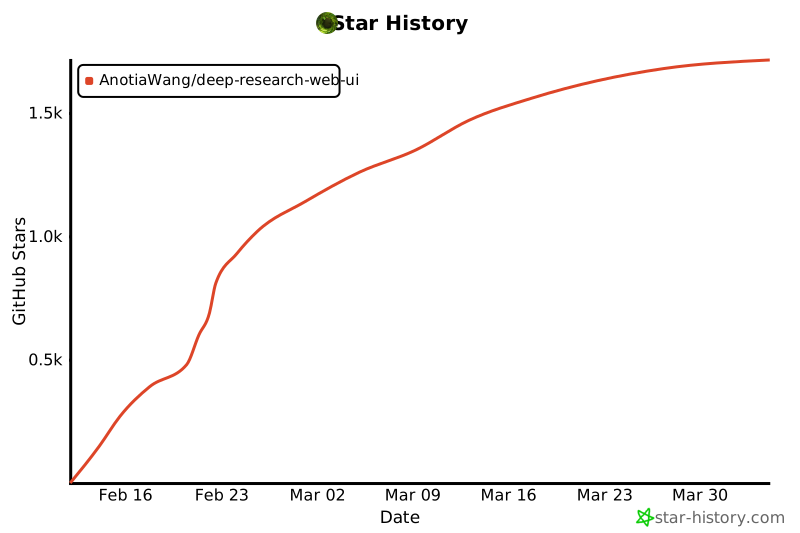](https://star-history.com/#AnotiaWang/deep-research-web-ui&Date)
---
## How to use
Live demo: https://deep-research.ataw.top
### Deployment modes
- **Client Mode**: users enter their own API keys in the browser. This is the best fit for static deployments such as EdgeOne Pages or `pnpm generate`.
- **Server Mode**: API keys are configured as server-side environment variables, so users do not need to enter keys in the UI. This requires an SSR/Nitro runtime such as the Docker image; it is not available in purely static deployments.
### Self hosted
#### Server Mode (Recommended)
Deploy with environment variables - users don't need to configure API keys. Use this mode when you can run the Nuxt server:
**Using Docker with environment variables:**
```bash
docker run -p 3000:3000 \
-e NUXT_PUBLIC_SERVER_MODE=true \
-e NUXT_AI_API_KEY=your-ai-api-key \
-e NUXT_WEB_SEARCH_API_KEY=your-search-api-key \
-e NUXT_PUBLIC_AI_PROVIDER=openai-compatible \
-e NUXT_PUBLIC_AI_MODEL=gpt-4o-mini \
-e NUXT_PUBLIC_WEB_SEARCH_PROVIDER=tavily \
anotia/deep-research-web:latest
```
**Using Docker with .env file:**
```bash
# Copy .env.example and update it with your configuration
cp .env.example .env
docker run -p 3000:3000 --env-file .env anotia/deep-research-web:latest
```
#### Client Mode (Traditional)
Users configure their own API keys in the browser. Use this mode for static deployments:
One-click deploy with [EdgeOne Pages](https://edgeone.ai/products/pages):
[](https://edgeone.ai/pages/new?from=github&template=https://github.com/AnotiaWang/deep-research-web-ui&from=github)
Use pre-built Docker image:
```bash
docker run -p 3000:3000 --name deep-research-web -d anotia/deep-research-web:latest
```
Use self-built Docker image:
```
git clone https://github.com/AnotiaWang/deep-research-web-ui
cd deep-research-web-ui
docker build -t deep-research-web .
docker run -p 3000:3000 --name deep-research-web -d deep-research-web
```
### Environment Variables
#### Server Mode Configuration
| Variable | Description | Default |
|----------|-------------|---------|
| `NUXT_PUBLIC_SERVER_MODE` | Enable server mode | `false` |
| `NUXT_AI_API_KEY` | AI provider API key | - |
| `NUXT_AI_API_BASE` | AI provider base URL | - |
| `NUXT_WEB_SEARCH_API_KEY` | Web search API key | - |
| `NUXT_WEB_SEARCH_API_BASE` | Web search base URL | - |
#### Public Configuration (Server Mode)
| Variable | Description | Default |
|----------|-------------|---------|
| `NUXT_PUBLIC_AI_PROVIDER` | AI provider type | `openai-compatible` |
| `NUXT_PUBLIC_AI_MODEL` | AI model name | `gpt-4o-mini` |
| `NUXT_PUBLIC_AI_CONTEXT_SIZE` | Context size | `128000` |
| `NUXT_PUBLIC_WEB_SEARCH_PROVIDER` | Search provider | `tavily` |
| `NUXT_PUBLIC_WEB_SEARCH_CONCURRENCY_LIMIT` | Max concurrency | `2` |
| `NUXT_PUBLIC_WEB_SEARCH_SEARCH_LANGUAGE` | Search language | `en` |
| `NUXT_PUBLIC_TAVILY_ADVANCED_SEARCH` | Use Tavily advanced search | `false` |
| `NUXT_PUBLIC_TAVILY_SEARCH_TOPIC` | Tavily search topic | `general` |
| `NUXT_PUBLIC_GOOGLE_PSE_ID` | Google PSE ID | - |
#### Provider values
| Type | Supported values |
|------|------------------|
| AI provider | `openai-compatible`, `siliconflow`, `302-ai`, `infiniai`, `openrouter`, `deepseek`, `ollama` |
| Web search provider | `tavily`, `firecrawl`, `crw`, `google-pse` |
Notes:
- `NUXT_WEB_SEARCH_API_KEY` supports comma-separated keys for Tavily and Google PSE, for example `key1,key2,key3`.
- Google PSE requires both `NUXT_WEB_SEARCH_API_KEY` and `NUXT_PUBLIC_GOOGLE_PSE_ID`.
- Firecrawl self-hosted deployments can set `NUXT_WEB_SEARCH_API_BASE`.
- fastCRW (`crw`) is a Firecrawl-compatible web scraper (single binary; self-host or cloud). It defaults to the cloud base `https://fastcrw.com/api` and reads the key from `NUXT_WEB_SEARCH_API_KEY` (document as `CRW_API_KEY`); self-hosted deployments can set `NUXT_WEB_SEARCH_API_BASE`.
- Ollama uses `http://localhost:11434/v1` as the default API base. When running the app inside Docker, `localhost` refers to the container itself, so set `NUXT_AI_API_BASE` to a reachable host or Docker network address if Ollama runs outside the container.
---
## Developing
### Setup
Make sure to install dependencies:
```bash
pnpm install
```
## Development Server
Start the development server on `http://localhost:3000`:
```bash
pnpm dev
```
## Production
Build the application for production:
If you want to deploy a SSR application:
```bash
pnpm build
```
If you want to deploy a static, SSG application:
```bash
pnpm generate
```
Locally preview production build:
```bash
pnpm preview
```
Check out the [deployment documentation](https://nuxt.com/docs/getting-started/deployment) for more information.
## License
MIT
## Star History
[](https://star-history.com/#AnotiaWang/deep-research-web-ui&Date)