* [English](#en)
* [日本語](#ja)
----
# focheck – Validate XSL-FO and Antenna House extensions in oXygen or standalone
**focheck** bundles a Relax NG schema and a Schematron grammar in an oXygen framework for detailed validation
of XSL-FO – including FOs and properties added in XSL 1.1 – within oXygen XML Editor. **focheck** also validates the extension FOs and properties that Antenna House Formatter provides for improved formatted output. You can enable additional Schematron checks of some of the requirements of PDF/UA.
You can, of course,
also use the **focheck** Relax NG (or equivalent W3C XSD) and Schematron outside of oXygen, either together or separately.
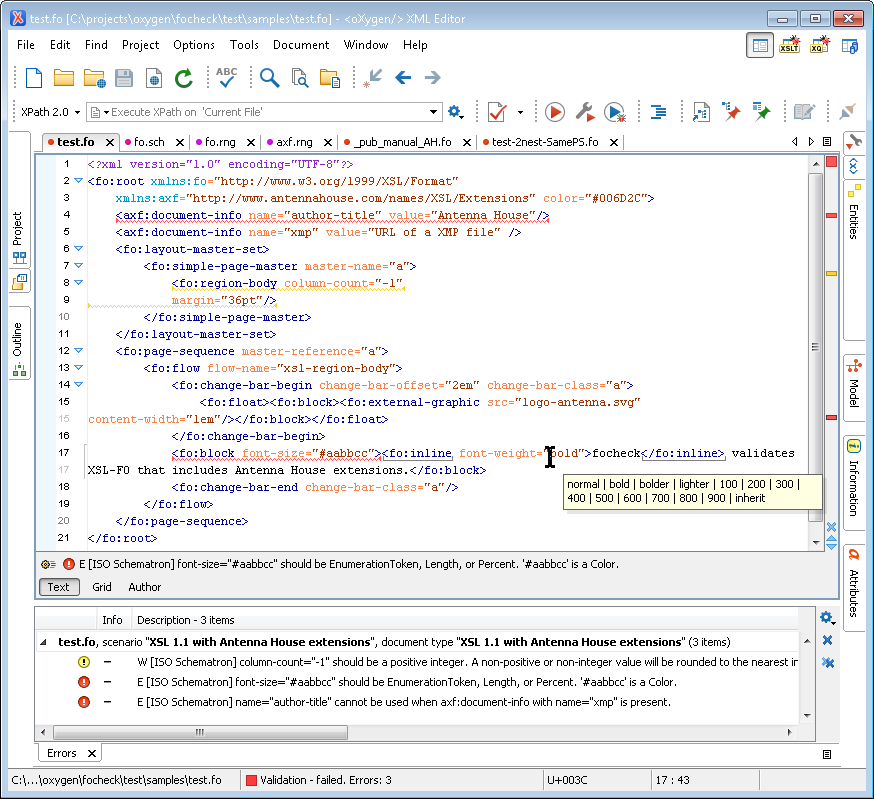
The Relax NG handles structural validation and the
Schematron handles the additional constraints that cannot be
expressed in Relax NG. The Schematron parses property value
expressions using an XSLT-based parser generated by the REx
parser generator plus an XSLT library for reducing the parse tree
to XSL-FO datatypes.
**focheck** version numbers correspond to the `version.xml` values of the Antenna House Formatter version current at the time of the release.
## Disclaimer
**focheck** is a work in progress. It does not (yet) handle every XSL-FO property or every requirement in the XSL-FO spec, nor does it evaluate either functions or relative lengths.
Pull requests and new issues are welcome.
## Installing
* If you want to keep up-to-date with **focheck** releases, then you can install **focheck** as an add-on oXygen framework.
* Versions of **focheck** have been bundled with oXygen since Oxygen 17.1.
* If you want to use the current **focheck** version with an older oXygen version, then you can install **focheck** as an add-on oXygen framework.
* Alternatively, you can download a static copy of the oXygen framework from GitHub.
* If you want to easily keep up-to-date with changes, then you can clone this repository and 'pull' the latest version whenever you want.
* If you want to hack on **focheck** or submit pull requests, then you can fork this repository and clone that onto your local machine.
### Installing as add-on oXygen framework
Follow the instructions in the oXygen manual at https://www.oxygenxml.com/doc/ug-editor/topics/installing-and-updating-add-ons.html
The **focheck** update site URL is https://raw.githubusercontent.com/AntennaHouse/focheck/master/add-on.xml
Note that oXygen will require you to restart the editor after installing the add-on framework.
### Installing a ZIP archive to oXygen `frameworks` directory
1. Download the ZIP archive from the latest release on the 'Releases' page.
2. Extract the folder in the ZIP archive to the oXygen `frameworks` directory.
- On Windows, this is `C:\Program Files\Oxygen XML Editor 24.1\frameworks`, or something similar.
- If you don't have permission to copy the folder to the `frameworks` directory, then you can use an alternative location as described below.
3. Restart oXygen.
### Installing a ZIP archive to an alternative frameworks location
If you don't have permission to modify the oXygen installation – for example, if oXygen is installed on Windows under `C:\Program Files\` and you are not an Administrator – you can set oXygen to also use an alternative frameworks location.
1. Click on the "Download ZIP" button on this project's main page to download the files.
2. Extract the folder in the ZIP archive to a folder where you can create the new folder.
3. In your oXygen preferences, add the **focheck** folder as an alternative frameworks location.
- See https://www.oxygenxml.com/doc/ug-editor/topics/framework-location.html
4. Restart oXygen.
### Installing a repository clone
1. Clone the repository into either the oXygen `frameworks` directory or another directory.
- **focheck** incorporates **[stf](https://github.com/Schematron/stf)** as a submodule. There are two ways to also check out **stf**:
- Pass `--recursive` to `git clone` when you check out **focheck**
- If you've already checked out **focheck**, you can run
`git submodule init`
`git submodule update`
2. If necessary, add the **focheck** folder as an alternative frameworks location.
3. Restart oXygen.
## Using **focheck**
### oXygen XML Editor
When you open an XSL-FO document – where the document element is `root` in the XSL-FO namespace – oXygen will automatically validate the document against both the Relax NG schema and the Schematron grammar.
#### 'Antenna House' external FO processor
The transformation scenario expects Oxygen to have an 'Antenna House' FO processor configuration that runs the Antenna House command-line formatter.
If your Oxygen is not already configured:
1. Oxygen will overwrite every current FO processor configuration in the following steps, so if desired, backup your current Oxygen global options by exporting them to a file.
1. Install Antenna House Formatter V7.4 (64-bit version) then restart Oxygen.
1. Download https://github.com/AntennaHouse/focheck/raw/master/resources/formatter-options/formatter-options.xml
1. In Oxygen, under the **Options** menu, select **Import Global Options...**.
1. Select the `formatter-options.xml` file that you downloaded then click on **Open**.
1. When the **Import Global Options** dialog box is displayed, click on **Open**.
1. Oxygen will advise that a restart is required, but the FO processor configuration has been made already.
If you are using a different Antenna House Formatter version (for example, if these instructions have not been updated to refer to the current version), you can follow these instructions to add the FO processor configurations then edit the processor entries in the 'XML / PDF Output / FO Processors' preferences.
#### PDF/UA checks
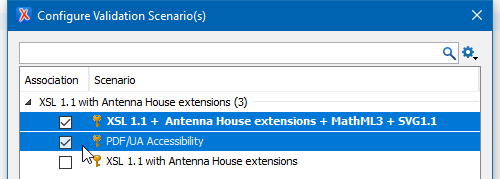
Enable the 'PDF/UA Accessibility' validation scenario to enable additional Schematron checks of some of the requirements of PDF/UA.
#### Schematron severity levels
oXygen uses the Schematron `role` attribute to determine the severity level of a failed `assert` or `report`. See https://www.oxygenxml.com/doc/ug-editor/topics/validate-xml-with-sch.html
**focheck** maps the RFC 2119 keywords that are used in the XSL 1.1 Recommendation to oXygen severity levels as follows:
| RFC 2119 Keyword | oXygen severity level |
| ---------------- | --------------------- |
| MUST, MUST NOT, REQUIRED, SHALL, SHALL NOT | Error |
| SHOULD, SHOULD NOT, RECOMMENDED, MAY, OPTIONAL | Warning |
#### Transformation scenarios
As well as providing validation, **focheck** defines two validation scenarios for processing your FO file with Antenna House Formatter. See https://github.com/AntennaHouse/focheck/wiki/focheck
### Ant
Use the `build-focheck.xml` Ant build file and the `validate.single` target to validate a file using both Relax NG and Schematron. Alternatively, use the `schematron.single` or `schematron.dir` target to run Schematron on one or multiple files.
### Emacs mode
`focheck.el` associates the RELAX NG schema with `.fo` files. The `fo-format` command runs Antenna House Formatter (or any command-line formatter) on the current file.
If you have the [`lorem-ipsum`](https://github.com/jschaf/emacs-lorem-ipsum) package installed, you can generate Lorem Ipsum paragraphs and lists in FO markup (as well as sentences without markup).
Add this to your `.emacs` file.
```elisp
(setq load-path
(append
(list
"/path/to/focheck/emacs"
)
load-path))
;; XSL-FO mode
(autoload 'fo-mode "focheck" "Major mode for editing XSL-FO." t)
(setq auto-mode-alist
(append
(list
'("\\.fo$" . fo-mode))
auto-mode-alist))
;; Uncomment if you have the `lorem-ipsum` package installed:
;(add-hook 'fo-mode-hook #'lorem-ipsum-fo-mode-hook)
```
### Standalone
You can use the Relax NG schema in the `schema` folder and the Schematron files in the `schematron` folder outside of oXygen and Ant. However:
- The Relax NG schema works with Jing and with Emacs `nxml-mode` but not with `xmllint`.
- The Schematron requires an XSLT 2.0 binding and a Schematron implementation that will both match on attributes as contexts as well as import and use external XSLT 2.0 stylesheets.
- Use `focheck.sch` for XSL-FO and Antenna House Formatter checks, and use `pdf-ua.sch` for checking some of the requirements of PDF/UA.
Standalone checking requires Saxon 9 and Jing. You can get Jing from https://github.com/relaxng/jing-trang/releases.
## Building
### oXygen XML Editor
1. Open `build.xml` in oXygen.
2. Run the default "ANT" transformation scenario.
### Standalone
1. If the properties in `build.properties` are not correct for your system, then copy `build.properties` to `build.local.properties` in the same directory and set the correct values there.
- You can delete or comment out any properties in `build.local.properties` that you don't need to change.
1. Run Ant.
## Other Ant targets
### `run.parser`
Runs the parser on `${input}`.
### `framework.zip`
Makes a Zip archive of just the oXygen framework.
## License
Copyright 2015-2025 Antenna House, Inc.
Licensed under the Apache License, Version 2.0 (the "License");
you may not use this file except in compliance with the License.
You may obtain a copy of the License at
http://www.apache.org/licenses/LICENSE-2.0
Unless required by applicable law or agreed to in writing, software
distributed under the License is distributed on an "AS IS" BASIS,
WITHOUT WARRANTIES OR CONDITIONS OF ANY KIND, either express or implied.
See the License for the specific language governing permissions and
limitations under the License.
### Emacs mode license
Copyright (C) 2016-2025 Antenna House
This program is free software; you can redistribute it and/or
modify it under the terms of the GNU General Public License
as published by the Free Software Foundation; either version 2
of the License, or (at your option) any later version.
This program is distributed in the hope that it will be useful,
but WITHOUT ANY WARRANTY; without even the implied warranty of
MERCHANTABILITY or FITNESS FOR A PARTICULAR PURPOSE. See the
GNU General Public License for more details.
You should have received a copy of the GNU General Public License
along with this program; if not, write to the Free Software
Foundation, Inc., 675 Mass Ave, Cambridge, MA 02139, USA.
### Additional components:
The HTML MathML entity set is bundled with the **focheck** oXygen framework but is not included in the **focheck** schema.
The entity set was downloaded from http://www.w3.org/TR/xml-entity-names/
Copyright 1998 - 2011 W3C.
Use and distribution of this code are permitted under the terms of
either of the following two licences:
1) W3C Software Notice and License.
http://www.w3.org/Consortium/Legal/2002/copyright-software-20021231.html
2) The license used for the WHATWG HTML specification,
which states, in full:
You are granted a license to use, reproduce and create derivative
works of this document.
The schema for MathML3 is included in the Relax NG and Relax NG compact syntax versions of **focheck**.
The MathML3 schema was downloaded from http://www.w3.org/Math/RelaxNG/
````
# This is the Mathematical Markup Language (MathML) 3.0, an XML
# application for describing mathematical notation and capturing
# both its structure and content.
#
# Copyright 1998 - 2010 W3C (MIT, ERCIM, Keio)
#
# Use and distribution of this code are permitted under the terms
# W3C Software Notice and License
# http://www.w3.org/Consortium/Legal/2002/copyright-software-20021231
````
The schema for SVG 1.1 is included in the Relax NG and Relax NG compact syntax versions of **focheck**.
The SVG 1.1 DTD was downloaded from http://www.w3.org/TR/SVG/svgdtd.html
````
The Scalable Vector Graphics (SVG)
Copyright 2001, 2002, 2011 World Wide Web Consortium
(Massachusetts Institute of Technology, Institut National de
Recherche en Informatique et en Automatique, Keio University).
All Rights Reserved.
Permission to use, copy, modify and distribute the SVG DTD and its
accompanying documentation for any purpose and without fee is hereby
granted in perpetuity, provided that the above copyright notice and
this paragraph appear in all copies. The copyright holders make no
representation about the suitability of the DTD for any purpose.
It is provided "as is" without expressed or implied warranty.
````
----
# focheck – oXygenまたはスタンドアロンで XSL-FO とアンテナハウスの拡張を検証します。
**focheck** には、( XSL 1.1で追加された FO とプロパティを含めた) XSL-FO の詳細な検証のための Relax NG スキーマと Schematron グラマーが oXygen XML Editor の oXygen フレームワーク内にバンドルされます。
**focheck** は、より良い組版出力のため、Antenna House Formatter が提供する拡張とプロパティも検証します。もちろん、**focheck** Relax NG (または、W3C XSD と等しい)と oXygen 以外の Schematron を一緒に、または別々に使用することもできます。
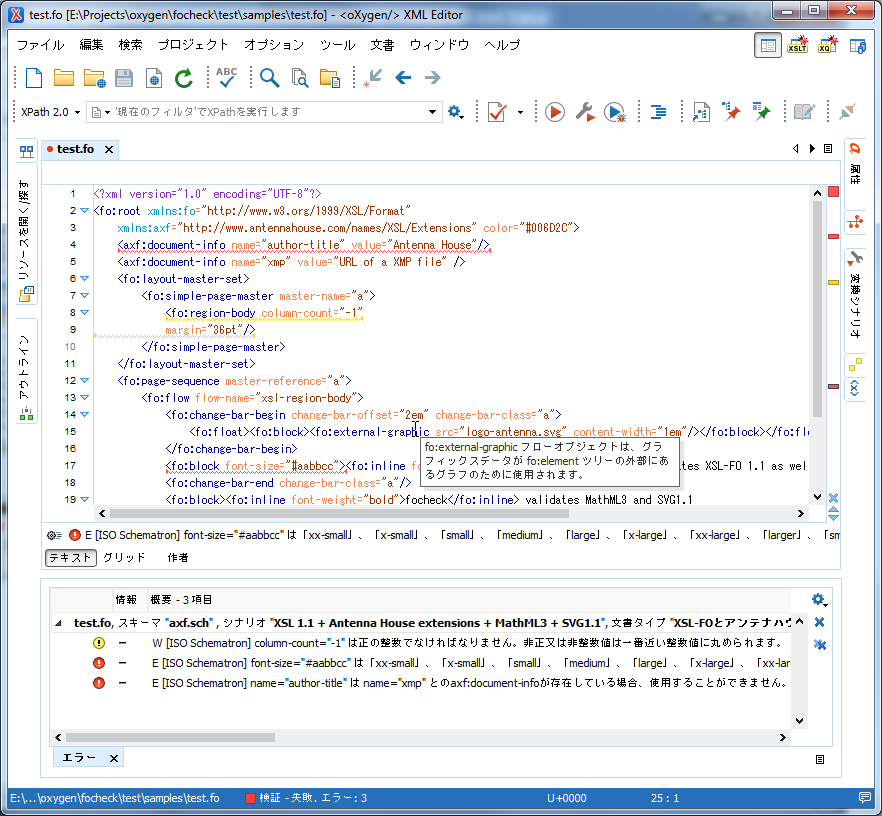
Relax NG は、構造的な検証を扱い、Schematron は Relax NG では表現できない追加の制約を扱います。Schematron は、 REx パーサジェネレータによって生成された XSLT ベースのパーサと、 パースツリーを削減するための XSLT ライブラリを使用して、プロパティ値の式を XSL-FO のデータタイプにパースします。
**focheck** 版の番号は、リリース時の Antenna House Formatter 版に対応しています。
## 免責事項
**focheck** の開発は進行中です。まだ全ての XSL-FO プロパティ又は XSL-FO 仕様の全ての必要条件を扱わない、また、関数や相対的な長さを評価しません。
Pullリクエストや問題がありましたらお知らせください。
## インストール
*最新の **focheck** リリースに追従したい場合、oXygen のアドオンフレームワークとして **focheck** をインストールすることができます。
* **focheck** 0.3.1 は ( 2015 年から) oXgen 17.1 から 19.1 までにバンドルされています。
** oXygen の古い版での **focheck** を使用する場合、oXygen のアドオンフレームワークとして **focheck** をインストールすることができます。
*代わりに、ここから oXygen フレームワークの静的なコピーをダウンロードすることができます。
*最新の変更に追従したい場合、このリポジトリをクローンして、いつでも好きな時に最新版を pull することができます。
* **focheck** をハックしたり pull リクエストをサブミットしたり場合は、このリポジトリをフォークして、ローカルマシンにクローンすることができます。
### アドオン oXygen フレームワークとしてのインストール
https://www.oxygenxml.com/doc/ug-editor/topics/installing-and-updating-add-ons.html の oXygen のマニュアルの指示に従ってください。
**focheck** の最新サイトの URL は https://raw.githubusercontent.com/AntennaHouse/focheck/master/add-on-ja.xml
oXygen はアドオンフレームワークをインストールした後、エディタの再起動が必要になります。
### oXygen `frameworks` ディレクトリに ZIP アーカイブをインストールする
1. Releases ページにある最新リリースから ZIP アーカイブをダウンロードして下さい。
2. oXygen `frameworks` ディレクトリに ZIP アーカイブにあるフォルダを解凍します。
- Windows では、これは `C:\Program Files\Oxygen XML Editor 24.1\frameworks` か同様のものです。
- `frameworks` ディレクトリにフォルダをコピーする許可がない場合は、以下に説明するように、別の場所を使用することができます。
3. oXygen を再起動します。
### 代替 フレームワークの場所に ZIP アーカイブをインストールする
インストールを変更する許可がない場合は、例えば、 Windows で `C:\Program Files\` 下に oXygen が インストールされていて、あなたが管理者でない場合、代替フレームワークの場所を使用するように oXygen を設定することができます。
1. ファイルをダウンロードするには、このプロジェクトのメインページの Download ZIP をクリックします。
2. 新しいフォルダを作成することができるフォルダに ZIP アーカイブ内のフォルダを解凍します。
3. oXygen の環境設定で、代替フレームワークの場所として解凍した **focheck** フォルダを追加します。
- https://www.oxygenxml.com/doc/ug-editor/topics/framework-location.html を参照して下さい。
4. oXygen を再起動します。
### リポジトリクローンをインストールする
1. oXygen `frameworks` ディレクトリ又は別のディレクトリのどちらかにリポジトリをクローンします。
- **focheck** はサブモジュールとして **[stf](https://github.com/Schematron/stf)** を組み込まれています。**stf** を確認するのは、二つの方法があります。
- **focheck** を確認すると、`git clone` に `--recursive` を飛び出します。
- **focheck** を既に確認していた場合、次下を実行できます。
`git submodule init `
`git submodule update`
2. 必要ならば、別のフレームワークの場所として **focheck** フォルダを追加します。 .
3. oXygen を再起動します。
## **focheck** の使用
### oXygen XML エディタ
XSL-FO 名前空間の `root` が文書要素がである XSL-FO 文書を開くと、oXygen は Relax NG スキーマと Schematron グラマーの両方に対して文書を自動的に検証します。
#### 変換のシナリオ
同様に有効を用意するとして、**focheck** は、Antenna House Formatter を使用して FO ファイルを処理するための二つの有効なシナリオを定義します。https://github.com/AntennaHouse/focheck/wiki/focheck を参照して下さい。
### Ant
Relax NG と Schematron の両方を使用してファイルを検証するため、Ant のビルドファイル `build-focheck.xml` と `validate.single` のターゲットを使用します。代わりに、一つまたは複数のファイルでの Schematron を実行するには、`schematron.single` 又は `schematron.dir` ターゲットを使用します。
### Emacs モード
`focheck.el` は RELAX NG スキーマを `.fo` ファイルに関連付けます。
### スタンドアロン
oXygen と Ant を使用せずに、`schema-ja` のフォルダに Relax NG のスキーマと `schematron-ja` のフォルダに Schematron ファイルを使用することができます。しかし:
- Relax NG は、`xmllint` ではなく、Jing と Emacs `nxml-mode` で動作します。
- Schematron は XSLT 2.0 バインディングと、次の Schematron 実装を必要とします。それは、外部 XSLT 2.0 スタイルシートを読み込み使用するのと同様のコンテキストで属性に合致するものです。
Standalone での確認は Saxon 9 と Jing が必要です。Jing は https://github.com/relaxng/jing-trang/releases からダウンロードできます。
## 構築
### oXygen XML エディタ
1. oXygen で `build.xml` を開きます。
2. デフォルトの Ant 変換のシナリオを実行します。
### スタンドアロン
1. `build.properties` の プロパティが使用するシステムに合わない場合は、同じディレクトリで `build.properties` を `build.local.properties` に コピーして、そこに正しい値を設定します。
- `build.local.properties` にあるいずれのプロパティも変更する必要はない場合、削除するか、コメントアウトできます。
1. Antを実行します。
## その他の Ant ターゲット
### `run.parser`
`${input}` でパーサを実行します。
### `framework.zip`
oXygen フレームワークの Zip アーカイブを生成します。
## ライセンス
Copyright 2015-2025 Antenna House, Inc.
Licensed under the Apache License, Version 2.0 (the "License");
you may not use this file except in compliance with the License.
You may obtain a copy of the License at
http://www.apache.org/licenses/LICENSE-2.0
Unless required by applicable law or agreed to in writing, software
distributed under the License is distributed on an "AS IS" BASIS,
WITHOUT WARRANTIES OR CONDITIONS OF ANY KIND, either express or implied.
See the License for the specific language governing permissions and
limitations under the License.
### Additional components
The HTML MathML entity set is bundled with the **focheck** oXygen framework but is not included in the **focheck** schema.
The entity set was downloaded from http://www.w3.org/TR/xml-entity-names/
Copyright 1998 - 2011 W3C.
Use and distribution of this code are permitted under the terms of
either of the following two licences:
1) W3C Software Notice and License.
http://www.w3.org/Consortium/Legal/2002/copyright-software-20021231.html
2) The license used for the WHATWG HTML specification,
which states, in full:
You are granted a license to use, reproduce and create derivative
works of this document.
The schema for MathML3 is included in the Relax NG and Relax NG compact syntax versions of **focheck**.
The MathML3 schema was downloaded from http://www.w3.org/Math/RelaxNG/
````
# This is the Mathematical Markup Language (MathML) 3.0, an XML
# application for describing mathematical notation and capturing
# both its structure and content.
#
# Copyright 1998 - 2010 W3C (MIT, ERCIM, Keio)
#
# Use and distribution of this code are permitted under the terms
# W3C Software Notice and License
# http://www.w3.org/Consortium/Legal/2002/copyright-software-20021231
````
The schema for SVG 1.1 is included in the Relax NG and Relax NG compact syntax versions of **focheck**.
The SVG 1.1 DTD was downloaded from http://www.w3.org/TR/SVG/svgdtd.html
````
The Scalable Vector Graphics (SVG)
Copyright 2001, 2002, 2011 World Wide Web Consortium
(Massachusetts Institute of Technology, Institut National de
Recherche en Informatique et en Automatique, Keio University).
All Rights Reserved.
Permission to use, copy, modify and distribute the SVG DTD and its
accompanying documentation for any purpose and without fee is hereby
granted in perpetuity, provided that the above copyright notice and
this paragraph appear in all copies. The copyright holders make no
representation about the suitability of the DTD for any purpose.
It is provided "as is" without expressed or implied warranty.
````