Go-Browse: Training Web Agents with Structured Exploration


## Table of Contents
- [Overview](#overview)
- [Setup](#setup)
- [Collect Dataset](#collect-dataset)
- [Process Collected Go-Browse Dataset for Training](#process-collected-go-browse-dataset-for-training)
- [Process NNetNav Dataset for Training](#process-nnetnav-dataset-for-training)
- [Finetune a Model](#finetune-a-model)
- [Benchmark a Model on WebArena](#benchmark-a-model-on-webarena)
- [Run an Episode on a Website](#run-an-episode-on-a-website)
- [Go-Browse-WA Dataset and Trained Models Release](#go-browse-wa-dataset-and-trained-models-release)
- [Citation](#citation)
## Overview
Go-Browse is a method for automatic, unsupervised collection of high-quality and diverse web agent training data via structured exploration of websites.
Go-Browse has an outer loop that iteratively builds up a graph of previously visited webpages on a website (incentivizing global website coverage) and an inner loop that thoroughly explores each discovered webpage by: (1) Proposing tasks to solve on that page and tasks to discover neighboring pages; (2) Filtering these tasks to feasible ones by trying to solve them and judging successes with a strong computer-use LM + a VLM-as-a-judge and (3) Sampling additional task-solving trajectories with various other pretrained LMs.
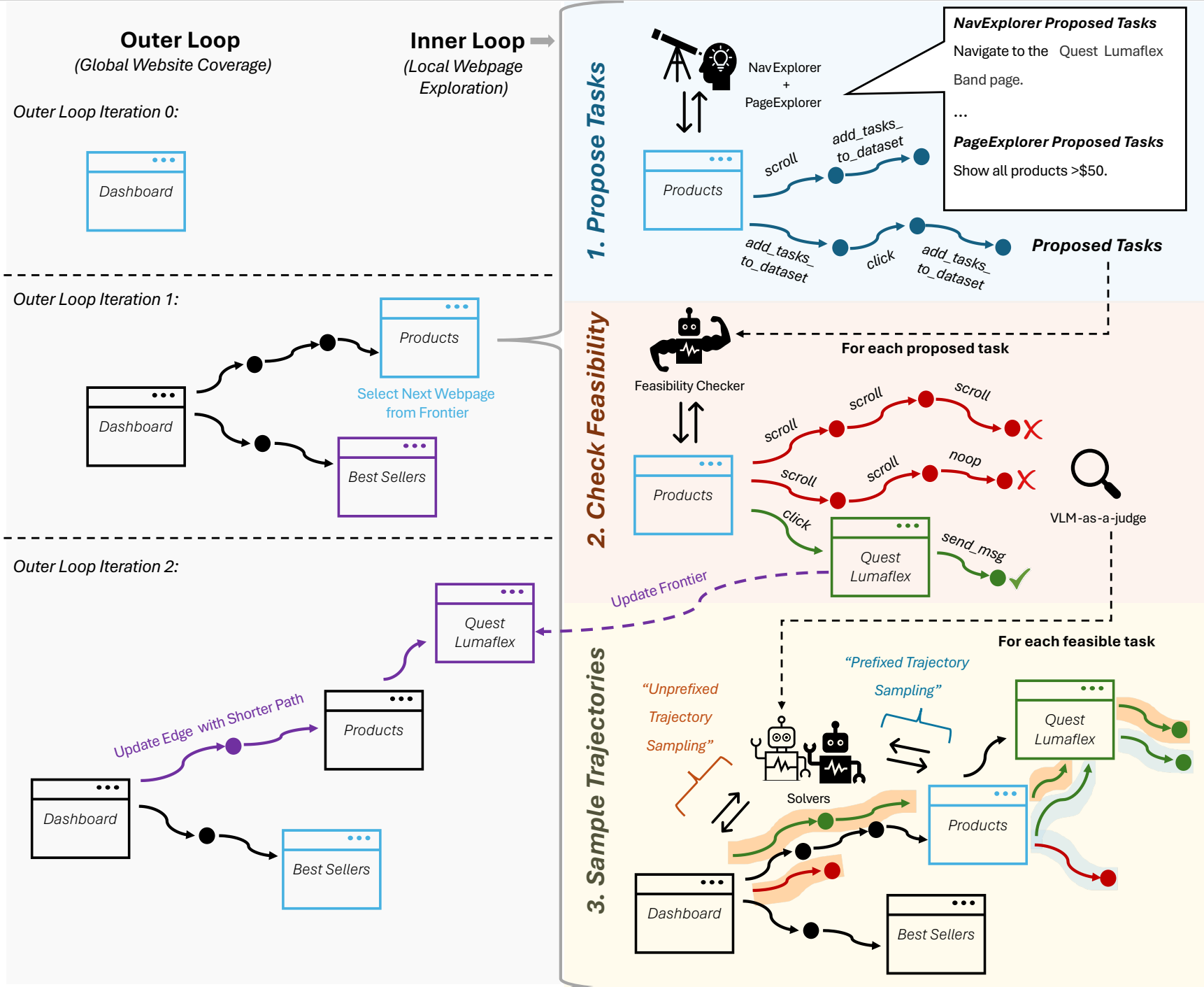
By resetting the inner loop to previously discovered webpages, the outer loop helps Go-Browse reuse information across the multiple inner loop invocations, enabling more efficient and deeper exploration of websites.
We release [Go-Browse-WA](#go-browse-wa-dataset-and-trained-models-release), a dataset collected by running Go-Browse on 100 webpages from WebArena websites, collecting ~10K successful task-solving trajectories and ~17K unsuccessful ones.
Finetuning Qwen-2.5-7B-Instruct on Go-Browse-WA achieves state-of-the-art performance for sub-10B parameter models on the WebArena benchmark with a overall success rate of 21.7%, beating the previous best finetuned sub-10B model by 2.9 percentage points and beating GPT-4o-mini by 2.4 percentage points.
## Setup
Note, we ran our experiments with Python 3.12, though earlier python versions may also work.
1. Follow the instructions here to install browsergym with webarena and playwright with chromium: https://github.com/ServiceNow/BrowserGym
2. Install `webexp` and dependencies:
```sh
pip install -r requirements.txt
pip install -e .
```
3. Setup a WebArena Server using the instructions here: [webarena readme](https://github.com/web-arena-x/webarena/blob/main/environment_docker/README.md). You can also optionally setup the a reset server to remotely reset the webarena environments by:
- Copy/clone over the webarena-reset folder to your webarena hosting instance
- `pip install fastapi[standard]` on this instance.
- `cd webarena-reset`
- `export BASE_URL=`
- `fastapi run reset_server.py`
- You can now reset a specific domain at once (e.g. map with `/reset/map`) or all domains at once with (e.g., `/reset/all`).
## Collect Dataset
Example config file used for Go-Browse-WA data generation is: `configs/go_browse_config.yaml`
For each domain (website) that you want to run data generation for, duplicate/modify the config file by filling in placeholders and then run:
```sh
python -m webexp.explore.algorithms.web_explore -c configs/web_explore_config.yaml
```
### Process Collected Go-Browse Dataset for Training
First, set the input and output paths as appropriate in `projects/go-browse/data/generate_dataset.py` and `projects/go-browse/data/process_dataset.py`
Then:
```sh
python projects/go-browse/data/generate_dataset.py
python projects/go-browse/data/process_dataset.py
```
### Process NNetNav Dataset for Training
First, set the output path as appropriate in `projects/go-browse/data/process_nnetnav_data.py`
Then:
```
python projects/go-browse/data/process_nnetnav_data.py
```
## Finetune a Model
First, replace the placeholder paths/env vars as appropriate in `webexp/train/sft_policy.py`
Then:
```
python webexp/train/sft_policy.py
```
## Benchmark a Model on WebArena
If benchmarking a finetuned model, first serve the model using an inference server like [vllm](https://docs.vllm.ai/en/latest/) or [sglang](https://docs.sglang.ai/). We used `vllm` in our experiments.
Duplicate/edit the following config file by filling in the placeholders: `configs/benchmark_webarena.yaml`.
Then:
```
python -m webexp.benchmark.run_webarena -c configs/benchmark_webarena.yaml
```
## Run an Episode on a Website
If performing inference with a finetuned model, first serve the model using an inference server like [vllm](https://docs.vllm.ai/en/latest/) or [sglang](https://docs.sglang.ai/).
Duplicate/edit the following config file by filling in the placeholders: `configs/benchmark_webarena.yaml`.
Then:
```
python -m webexp.agents.run_episode -c configs/benchmark_webarena.yaml
```
## Go-Browse-WA Dataset and Trained Models Release
Datasets (on HF Hub):
- Processed dataset (output of `projects/go-browse/data/process_dataset.py`): [apurvaga/go-browse-wa](https://huggingface.co/datasets/apurvaga/go-browse-wa).
This includes both successful and unsuccessful trajectories processed for finetuning. Page observations are represented as accessibility trees (potentially truncated for context length limits while training).
- Raw dataset: [apurvaga/go-browse-wa-raw](https://huggingface.co/datasets/apurvaga/go-browse-wa-raw)
Raw version includes screenshots, pruned_html, full accessibility tree text and additional metadata.
Finetuned models (on HF Hub):
- [apurvaga/go-browse-wa-qwen-7B](https://huggingface.co/apurvaga/go-browse-wa-qwen-7B)
- [apurvaga/nnetnav-wa-qwen-7B](https://huggingface.co/apurvaga/nnetnav-wa-qwen-7B)
## Citation
```bibtex
@misc{gandhi2025gobrowse,
title={Go-Browse: Training Web Agents with Structured Exploration},
author={Apurva Gandhi and Graham Neubig},
year={2025},
eprint={2506.03533},
archivePrefix={arXiv},
primaryClass={cs.CL},
url={https://arxiv.org/abs/2506.03533},
}
```