
[](https://cursor.com/en/install-mcp?name=rsi-boot&config=eyJjb21tYW5kIjoidXZ4IiwiYXJncyI6WyItLWZyb20iLCJyc2ktYm9vdCIsInJzaSIsInNlcnZlIl19)
[](vscode:mcp/install?%7B%22name%22%3A%22rsi-boot%22%2C%22command%22%3A%22uvx%22%2C%22args%22%3A%5B%22--from%22%2C%22rsi-boot%22%2C%22rsi%22%2C%22serve%22%5D%7D)
[](https://glama.ai/mcp/servers/Apollo-lwx/rsi-boot)
# RSI Boot
[简体中文](README.md) | English
> **Engineering memory for agents, not chat memory: conventions and prohibitions live in the repo, so another host reads the same copy.**
Cursor removed Memories in 2.1 — new chats know nothing about your project. Claude Code's memory lives on one machine, outside git, so a teammate never sees it. Cloud memory asks for keys and servers, and follows your account. The same gap shows up when one person moves a repo between Cursor, Claude Code, Codex, and DeepSeek Harness, or when a team splits across those tools: conventions, prohibitions, and bug-fix lessons stay behind in whichever tool wrote them down.
RSI Boot keeps conventions, prohibitions, repair lessons, and harness slots in the repo's `.rsi/`. Install once; Cursor, Claude Code, Codex, Qoder, and DeepSeek Harness share that copy. The main path needs no API key and makes no model calls.
The loop is fixed: **recall → do the work → distill a pending note → a person approves it → the next recall reads what was kept.** Negative feedback also lands in failure buckets and may change only writable slots (prompts, skills, recall strategy, intent rules, knowledge). A proposal is promoted only after a static gate and human review, watched for 7 days, and rolled back if adoption drops. That is how the software is built. The published retrieval table is in [benchmark/results/recall-20261028/SUMMARY.md](benchmark/results/recall-20261028/SUMMARY.md). It is not an answer-judge score.
## Not another memory plugin
**rsi-harness (Harness-RSI)**
Negative feedback lands in failure buckets and only writable slots change (prompts / skills / recall strategy / intent rules / knowledge). A proposal must pass the static gate and human review before promotion; it is watched for 7 days and rolled back if adoption drops. What gets kept is a slot version. This loop is in the software. The public benchmark has not yet measured whether the next round is better.
**Follows the project**
Memory is isolated per repo — not per account, not per IDE. Copy the repo, move machines, or rename the directory, and `.rsi/` comes along. Open another repo and you get another copy; nothing leaks across. The harness genome can be exported as a bundle for backup or a slot move.
**One project memory across AI tools and teammates**
One MCP server (`rsi serve`) plugs into Cursor, Qoder, Codex, and DeepSeek Harness; the status line speaks both Claude Code and Cursor CLI. What gets shared is project memory for this repo: how names are written, rules such as "never log card numbers", and how a past null-pointer was fixed. Chat transcripts are not part of it.
Approved conventions are written into the `AGENTS.md` managed block at the repo root, and into `.cursor/rules`. Cursor, Claude Code, Codex, Qoder, and DeepSeek Harness all read that block when they open the repo. With the MCP server connected, recall reads the same `.rsi/`: a prohibition noted in Cursor in the morning is what DeepSeek Harness, or a teammate on Codex, reads from this repo later.
Teammates get the full recall text when the repo contains the same `.rsi/`. Learning adds `.rsi/` to `.gitignore` by default, so logs and cache stay on the machine that created them. To hand the memory over, put the approved files under `.rsi/memory` in version control. Once git ignores the `.rsi/` directory itself, files inside it stay untracked until that ignore rule is narrowed. `AGENTS.md` lives at the repo root and is what everyone already pulls; the managed block comes with it.
| | Host-native memory | Cloud memory (Mem0 and the like) | Generic local memory MCP | RSI Boot |
|---|---|---|---|---|
| Data follows | the account / the host | the cloud user | depends | **the current repo** |
| Switch AI tools or teammates | start over, each copy private | only if that host is wired | usually store-and-recall | **the same `.rsi/` and `AGENTS.md`** |
| Harness self-improvement | no | no | weak or none | **propose → gate → observe → roll back** |
| API key on the main path | bound to the host | required | often | **none** |
| Write gate | the model decides | server-side policy | rare | **review + prohibitions + conflict rulings** |
## Public benchmark
The leaderboard is recall. The cold start returns 5 items. The denominator is questions that have a gold evidence id. MRR is the reciprocal rank of the first hit, from 0 to 1. Tokens are null. Protocol and the per-type breakdown: [benchmark/results/recall-20261028/SUMMARY.md](benchmark/results/recall-20261028/SUMMARY.md).
### This run
| Dataset | Questions with evidence | Hit@5 | Recall@5 | MRR | Hit@10 | Recall@10 | Empty stayed empty |
|---|---:|---:|---:|---:|---:|---:|---:|
| LoCoMo | 1536 | 56.5% | 51.0% | 0.427 | 64.0% | 57.8% | 0/450 |
| LongMemEval-S | 500 | 96.6% | 90.1% | 0.907 | 98.4% | 94.8% | — |
These are retrieval scores, not answer-judge scores.
### Against published retrieval numbers
The published column is a retrieval figure from the papers. This-run column is the table above. Delta is this run minus the published figure, in percentage points. The LoCoMo paper reports dialog recall accuracy; this run uses Hit@5 at k=5 and Hit@10 at k=10. The paper's overall includes adversarial questions. This run's overall is the 1,536 answerable questions. ECHO labels its LoCoMo Hit@10 as a development measurement, and query expansion may have used question-side phrases.
| Source | Slice | Published | This run | Delta |
|---|---|---:|---:|---:|
| LoCoMo paper, dialog k=5 | Single-hop | 68.0 | 38.7 | −29.3 |
| LoCoMo paper, dialog k=5 | Multi-hop | 35.4 | 63.2 | +27.8 |
| LoCoMo paper, dialog k=5 | Temporal | 70.4 | 31.5 | −38.9 |
| LoCoMo paper, dialog k=5 | Open-domain | 33.1 | 62.7 | +29.6 |
| LoCoMo paper, dialog k=5 | Overall, paper includes adversarial | 56.7 | 56.5 | −0.2 |
| LoCoMo paper, dialog k=10 | Overall, paper includes adversarial | 66.2 | 64.0 | −2.2 |
| ECHO, LoCoMo 1,536 questions | Hit@10, development measurement | 96.29 | 64.0 | −32.3 |
| ECHO, LongMemEval-S 500 questions | Hit@10 | 97.60 | 98.4 | +0.8 |
| ECHO, LongMemEval-S | Session Recall@5 | 88.71 | 90.1 | +1.4 |
### Deltas
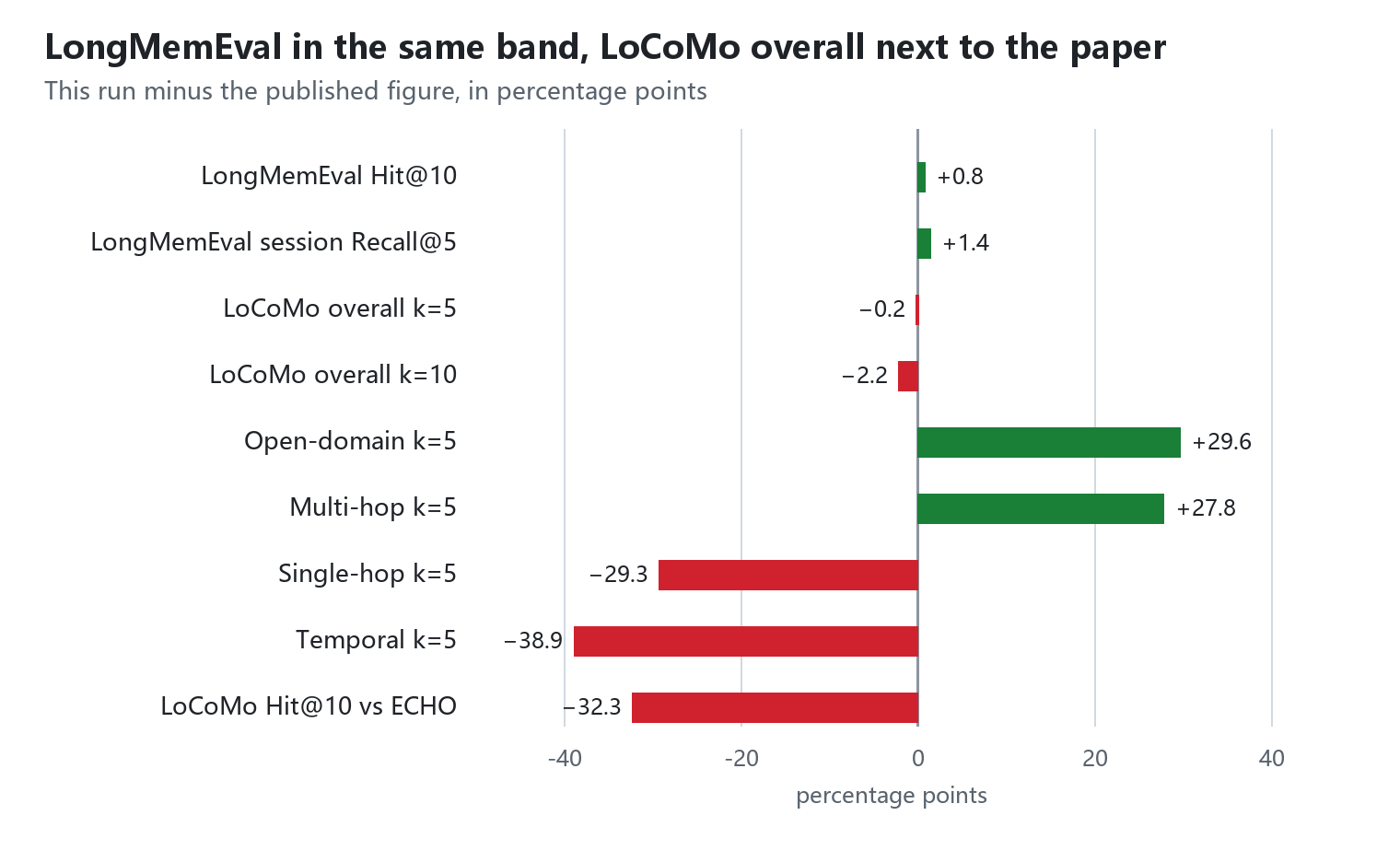
The four rows within 5 points sit together. The wide gaps are the slices: multi-hop and open-domain are higher; single-hop, temporal, and LoCoMo Hit@10 against ECHO are lower.
| Comparison | This run | Published | Delta |
|---|---:|---:|---:|
| LongMemEval-S Hit@10 | 98.4 | 97.60 | +0.8 |
| LongMemEval-S session Recall@5 | 90.1 | 88.71 | +1.4 |
| LoCoMo overall k=5 | 56.5 | 56.7 | −0.2 |
| LoCoMo overall k=10 | 64.0 | 66.2 | −2.2 |
| LoCoMo open-domain k=5 | 62.7 | 33.1 | +29.6 |
| LoCoMo multi-hop k=5 | 63.2 | 35.4 | +27.8 |
| LoCoMo single-hop k=5 | 38.7 | 68.0 | −29.3 |
| LoCoMo temporal k=5 | 31.5 | 70.4 | −38.9 |
| LoCoMo Hit@10 vs ECHO | 64.0 | 96.29 | −32.3 |
## Installation
Requires Python 3.10+:
```bash
pip install rsi-boot
rsi init
```
To hack on the source instead, clone this repo and use the editable install described in [Development](#development).
`rsi init` only writes the user-level config `~/.rsi/config.yaml`. Project memory lives in each repo's `.rsi/`, created on the first MCP startup or bootstrap run.
## Hooking up Cursor
In the `.cursor/mcp.json` of **the project you want memory for**, add:
```json
{
"mcpServers": {
"rsi-boot": {
"command": "rsi",
"args": ["serve"],
"env": {
"RSI_PROJECT_ROOT": "${workspaceFolder}"
}
}
}
}
```
Then go to Settings → MCP and confirm `rsi-boot` is enabled.
Do not put this in a user-level `mcp.json`. `${workspaceFolder}` often stays unexpanded there, and memory leaks into another repo. Write it in the project you want remembered.
## Other hosts
### Claude Code
Plugin marketplace (recommended — updates with the repo):
```text
/plugin marketplace add Apollo-lwx/rsi-boot
/plugin install rsi-boot@rsi-boot
```
Or add the MCP server directly with one command:
```bash
claude mcp add rsi-boot -- uvx --from rsi-boot rsi serve
```
Open Claude Code from the project you want remembered. The status line is optional and described below.
### Qoder
```bash
qoder mcp add rsi-boot -- rsi serve
```
Or add the same `mcpServers` snippet as Cursor to a project-root `.mcp.json`. Keep it in that project, not in a user-level config.
### Codex
One-command setup (recommended):
```bash
codex mcp add rsi-boot -- uvx --from rsi-boot rsi serve
```
Or write TOML yourself: user-level `~/.codex/config.toml`, or project-level `.codex/config.toml` (loaded only from trusted directories):
```toml
[mcp_servers.rsi-boot]
command = "rsi"
args = ["serve"]
```
Start codex from the project root. To pin the directory, add one line to the table: `env = { RSI_PROJECT_ROOT = "/absolute/path" }`.
### DeepSeek Harness
Open the desktop app from the repository you want remembered. Install `dsh-rsi-boot` on the plugin page, or, if `dsh` is already on your PATH:
```bash
dsh plugin --profile web add dsh-rsi-boot
```
Python 3.10+ is required, and `rsi serve` must run in a terminal. Restart once after installing. Tool names gain an `mcp__rsi-boot__` prefix, for example `mcp__rsi-boot__rsi_recall`. Do not launch from your home directory; `.rsi/` would be written there.
## Status line (optional)
`rsi statusline` renders the host CLI's bottom status line: model, context headroom, token stats (in/out/cache), cost, today's RSI recall/adoption, plus a rotating quip. Works with both Claude Code and Cursor CLI — their `statusLine` hooks pipe a session JSON into stdin, and this command prints a single ANSI-colored line.
Claude Code (`~/.claude/settings.json`):
```json
{
"statusLine": { "type": "command", "command": "rsi statusline" }
}
```
Cursor CLI (`~/.cursor/cli-config.json`):
```json
{
"statusLine": { "type": "command", "command": "rsi statusline" }
}
```
Example output:
```
🧠 Kimi K3 │ 📊 ctx left 71% │ ⛽ in 12.3k · out 1.8k · cache 96k │ 💰 $0.42 │ 🐾 RSI recalls 3 · adopted 92% │ sending you a heart ❤
```
### Choosing a quip style
Three equivalent ways — pick per scenario (priority: `--style` > env var > project > user):
```jsonc
// ① Stays with the host: put the flag right in the statusLine command
{ "statusLine": { "type": "command", "command": "rsi statusline --style buddy" } }
```
```yaml
# ② Project level (per-repo style, shared across hosts):