Suvadu

Total recall for your terminal. Shared memory for your AI agents.

CI crates.io License: MIT Latest Release

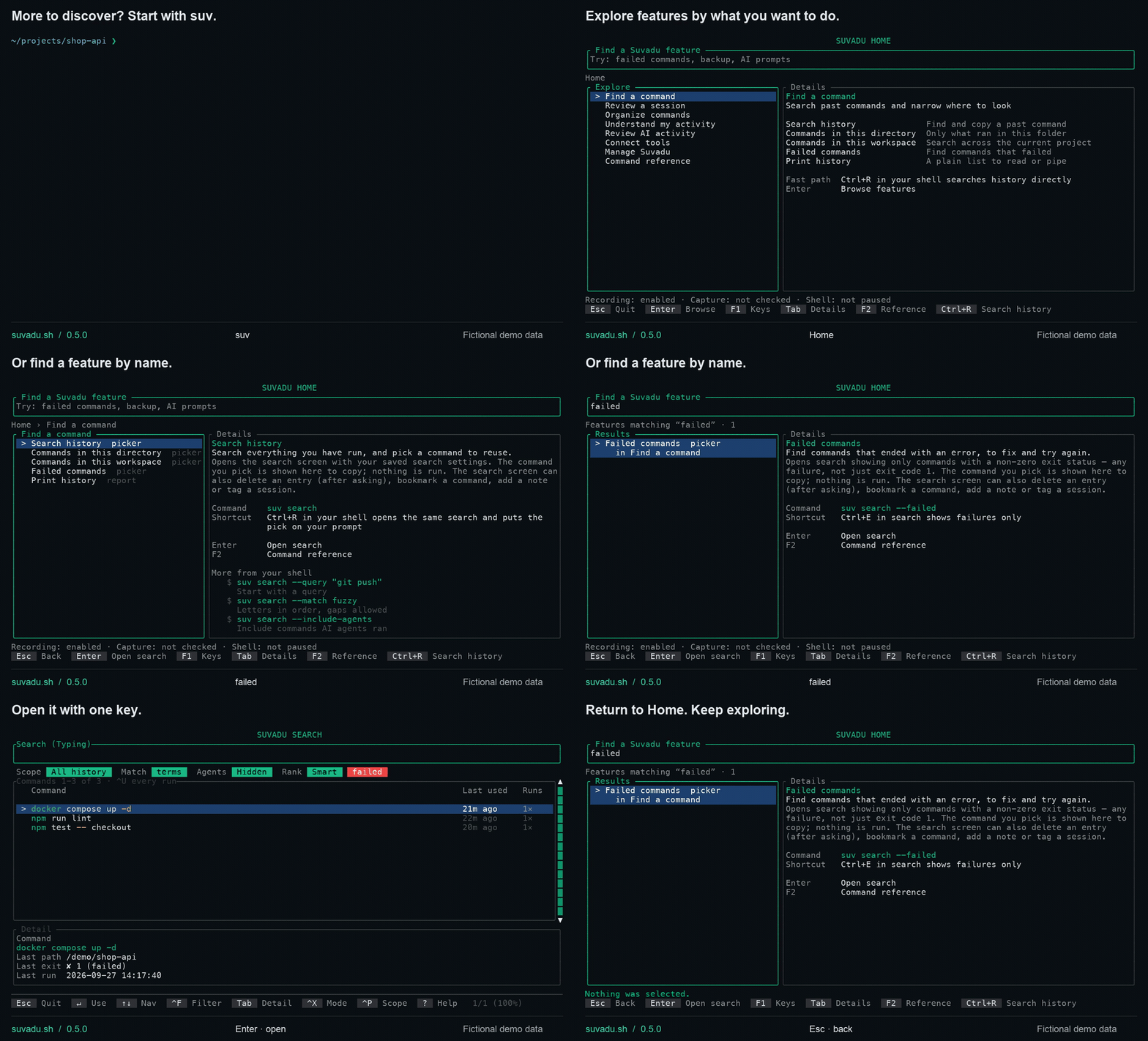
Suvadu 0.5.0 — Ctrl+R search with fictional command history

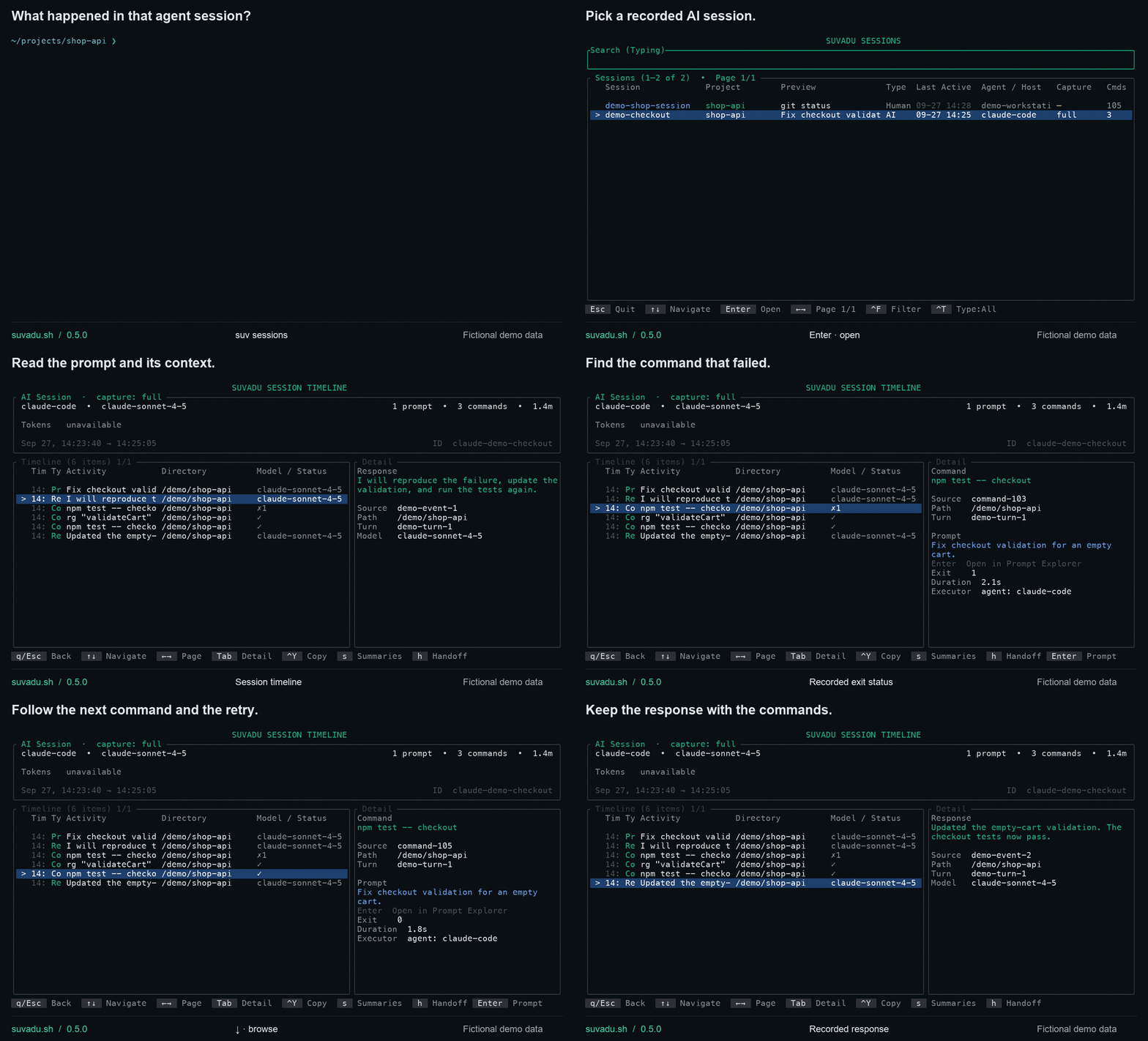
**Suvadu** replaces your shell history with a SQLite-backed store. Every command gets structured context — exit code, duration, directory, executor, session. AI agents can query it via MCP. 100% local. - **Measured, not asserted** — at 100,000 entries on one M4 Max: **207 µs** p95 to record a command, **0.05–15 ms** p95 for a judged search over the whole history. One machine, one run — the harness, the corpus and what is still unmeasured are in [BENCHMARKS.md](BENCHMARKS.md) - **AI agent tracking** — full session capture for Claude Code, Codex, OpenCode and Cursor (Cursor without token usage); commands and prompts for pi.dev; commands for Antigravity's agent; command tagging alone for Windsurf, Aider, Continue and Copilot ([what each tier means](#what-each-agent-actually-gives-you)) - **Prompt Explorer** — trace every recorded command back to the prompt that triggered it - **MCP Server** — **22 read-only tools, 8 resources and 6 prompts, all read-only by default.** The two write tools stay off until you turn their opt-in on. Agent session discovery, project context, failure learning, risk assessment, a shared skills library, your bookmarked command templates. Configurable via `suv settings` - **100% local** — no cloud, no telemetry, no account. The only request Suvadu makes on its own is a once-a-day check for a newer release, which you can turn off. MIT licensed. > **Website & Docs:** [suvadu.sh](https://suvadu.sh) · **CLI Reference:** [suvadu.sh/cli](https://suvadu.sh/cli/) · **Blog:** [suvadu.sh/blog](https://suvadu.sh/blog/) · **What's new:** [CHANGELOG](CHANGELOG.md) --- ## Install ```bash # Homebrew (macOS & Linux) brew tap AppachiTech/suvadu && brew install suvadu # Install script (macOS & Linux) curl -fsSL https://downloads.appachi.tech/suvadu/install.sh | bash # Install script, into ~/.local/bin without sudo curl -fsSL https://downloads.appachi.tech/suvadu/install.sh | bash -s -- --user # Cargo (Rust 1.95 or newer) cargo install suvadu ``` The install script puts `suv` in `/usr/local/bin`, using sudo only when that directory is not writable; `--user` or `--dir DIR` (or `SUVADU_INSTALL_DIR`) choose another place. Re-running it updates a script-installed `suv` where it already is — recognised by the `suvadu` link the script puts beside it — and when nothing has changed it downloads nothing but still repairs that link. If the `suv` on your PATH came from Homebrew or Cargo, it stops and names that package manager's update command; any other `suv` it did not install is left alone, and `--user` or `--dir` installs a separate copy on purpose. Run at a terminal, it offers to add the shell hook below to `~/.zshrc` (or `~/.bashrc` on Linux): it shows the line first, writes nothing unless you type `y`, keeps a copy of the file as `.suvadu-backup`, and never adds the hook twice. `--no-modify-rc` turns the offer off. Then add shell hooks: ```bash # Zsh echo 'eval "$(suv init zsh)"' >> ~/.zshrc && source ~/.zshrc # Bash echo 'eval "$(suv init bash)"' >> ~/.bashrc && source ~/.bashrc ``` Verify: `suv status` Each command is recorded with its directory and, inside a git repository, the branch it started on (the short commit hash for a detached HEAD). The branch is read from the repository's files — no `git` runs at your prompt — and shows in recall's detail pane. A command that changes directory, like `cd ../other`, is filed under the branch it was typed on; one that switches branches, under the branch it switched to. Turn it off with *Record Git Branch* in `suv settings` or `[shell] capture_git_branch = false`. **Staying up to date.** Once a day, in the background, Suvadu looks up the newest release number (the same `version.txt` that `suv update` reads) and, when there is a newer one, says so in one line before a command you run at a terminal — at most once a day, with the update command for how you installed it (`brew upgrade suvadu`, `cargo install suvadu` or `suv update`). Nothing about you or your history is sent. It never runs in shell hooks, recall, scripts, pipes or CI. Turn it off with *Check for Updates* in `suv settings`, `[update] check = false` in `config.toml`, or `SUVADU_NO_UPDATE_CHECK=1`. ### Up-arrow recall In zsh, Up and Down recall from Suvadu as soon as the hook is loaded; there is nothing else to set up. Up brings back the newest command that starts with what you have typed, then older ones, newest first — the current directory only breaks ties between commands recorded at the same millisecond — and Down walks back towards what you typed. Only commands you typed are recalled: `Alt+A` shows AI-agent commands too, for that shell. - **Turn it off** with *Enable Arrow Key Navigation* on the Shell tab of `suv settings`, or `[shell] enable_arrow_navigation = false` in `config.toml`. It takes effect in new shells (or `exec zsh`), which keep zsh's own Up/Down and leave `Alt+A` alone. - **Bash is not covered yet.** The Bash hook binds only `Ctrl+R`; Up and Down keep Bash's own history. - **Check it:** `bindkey '^[[A'` should print `"^[[A" suvadu-up-arrow`, and `bindkey '^[OA'` (the sequence many terminals send) `"^[OA" suvadu-up-arrow`. - **If something else answers Up**, a plugin loaded after `eval "$(suv init zsh)"` rebound it — oh-my-zsh's key bindings, zsh-history-substring-search, zsh-vi-mode, fzf's key bindings, atuin and mcfly all bind Up. Put the `eval "$(suv init zsh)"` line last in `~/.zshrc`, after your plugin manager and plugins, then `exec zsh`; a plain setting such as `ZSH_AUTOSUGGEST_STRATEGY` can still follow it. zsh-vi-mode binds its keys at the first prompt instead, so also set `ZVM_INIT_MODE=sourcing` before it loads. - **`suv doctor` reports it.** Once per zsh, at its first prompt — when all of `~/.zshrc` has run — the hook checks whether Up is still Suvadu's and notes what took it over; doctor's *Up-arrow* line names that widget and the fix, and the note is removed when a later zsh finds Up is Suvadu's again. The check prints nothing, costs about 0.8 ms per shell start (BENCHMARKS.md), and is skipped when arrow navigation is off. **zsh-autosuggestions.** The zsh hook ships a strategy for [zsh-autosuggestions](https://github.com/zsh-users/zsh-autosuggestions) that suggests what [Up-arrow would recall](#up-arrow-recall) — the newest command starting with what you typed, with AI-agent commands hidden unless `Alt+A` revealed them. Enable it in `~/.zshrc`, falling back to zsh's own history when Suvadu has nothing: ```zsh ZSH_AUTOSUGGEST_STRATEGY=(suvadu history) ``` Each suggestion is one `suv get` lookup, the same one Up-arrow makes (its cost is in BENCHMARKS.md). zsh-autosuggestions 0.7 fetches suggestions asynchronously by default, so typing does not wait for it. --- ## Troubleshooting **`no such file or directory` pointing at an old path** (e.g. `suv:8: no such file or directory: /opt/homebrew/bin/suv`) — The shell hook records the absolute path of the `suv` binary when your session starts. If you move the binary — switching package managers (e.g. Homebrew → Cargo), running `brew unlink suvadu`, or uninstalling and reinstalling elsewhere — already-open shells keep pointing at the old, now-deleted path. Reload the shell to pick up the new location: ```bash exec zsh # or: exec bash ``` (or just open a new terminal). Also make sure the new location, such as `~/.cargo/bin`, is on your `PATH`. **Up-arrow shows zsh's own history, not Suvadu's** — Check: `bindkey '^[[A'` or `bindkey '^[OA'` prints a widget other than `suvadu-up-arrow` (such as `up-line-or-beginning-search` or `history-substring-search-up`), and `suv doctor`'s *Up-arrow* line says what took it over. Cause: a plugin loaded after the hook rebound the key, arrow navigation is off (*Enable Arrow Key Navigation* in `suv settings`), or the shell is Bash, whose Up keeps Bash's own history. Repair: move `eval "$(suv init zsh)"` to the end of `~/.zshrc` and run `exec zsh`, or turn the setting back on. See [Up-arrow recall](#up-arrow-recall). More at [suvadu.sh/cli/shell-integration](https://suvadu.sh/cli/shell-integration/). --- ## Quick Start ```bash suv # Home: find any feature by what you want to do (also suv home) suv search # Interactive search TUI (also Ctrl+R) suv history # Print last 25 commands (pipeable) suv history --json -n 100 # Last 100 commands as JSONL suv stats # Stats dashboard with heatmap suv replay --after today # Timeline of today's commands suv sessions # Browse shell and AI sessions together suv doctor # Check installation health suv agent dashboard # Monitor AI agent activity suv agent prompts # Browse prompts and their commands suv agent sessions # List captured Codex/Claude sessions and reported tokens suv skills # Interactive skills management (browse, add, edit, sync, review) suv skills add my-skill # Add a skill any MCP-capable agent can read suv skills sync # Materialize skills into Claude Code/Cursor/Codex suv skills trust # Trust this repo's .suvadu/skills/*.md so sync writes them suv bookmarks get box --set host=db1 # Print a bookmark with its {{placeholders}} filled ``` ### Team skills in the repository Commit skills next to the code, one Markdown file each, in `.suvadu/skills/`: ```markdown --- name: release # optional; defaults to the file name (release.md) description: How we cut a release triggers: [release, tag] targets: [claude-code, codex] # optional; default: every agent --- 1. Bump the version in Cargo.toml. 2. Tag, then push the tag. ``` Everyone who clones the repository gets them, so Suvadu treats them as **untrusted** until you have read them: ```bash suv skills list # repo skills show origin 'repo' and 'untrusted' suv skills show release # read one (its file path, trust, body) suv skills trust --dry-run # list this repository's skills and their state suv skills trust # trust them (or: suv skills trust release) suv skills sync # from the repository root: writes them like project skills ``` - The project is the nearest directory with a `.suvadu/skills/` folder, looking up from where you are but never above the git repository's root. Repo skills sync from that directory, into its `.claude/skills/`, `.cursor/rules/` and `AGENTS.md`, exactly where a project skill would go. - Trust is recorded per file with a hash of its content (`suv skills trust --repo PATH` for another checkout). When the file changes — after a pull, say — it is *changed since trusted*: the next sync stops writing it and removes the copy it wrote, until you trust it again. `suv skills untrust` takes trust back, and the next sync removes the copies. - Suvadu never edits, moves or deletes a repo skill file: edit the file. In `suv skills` they are read-only and show their path; `edit`, `rm` and `disable` refuse them and say which file to change. - A trusted repo skill takes the place of a library skill scoped to the same project with the same name (and shadows a global one there), and the sync says so. An untrusted one changes nothing. - Deleting the file removes its synced copies on the next sync — only copies Suvadu wrote and nobody edited since. - Over MCP, `list_skills`, `get_skill` and `search_skills` include the repo skills of the project the agent names (`scope`) or the server runs in, with `source repo`, the file path and the trust state. An untrusted or changed one is listed by name and path only: its description and body are not served until you trust it. - A file is skipped, with a warning naming it, when its name is not letters, digits, `-` and `_`, it is a symlink, it is over 256 KB or not UTF-8, it has no body, or its `targets` names an unknown agent. ### Bookmarks with placeholders A bookmark can be a template: ```bash suv bookmarks add "ssh {{user:root}}@{{host}} -p {{port:22}}" -l box suv bookmarks # pick it: a popup asks for user, host, port suv bookmarks get box --set host=db1 # prints: ssh root@db1 -p 22 ``` - `{{name}}` is a placeholder; `{{name:default}}` gives it a default (everything after the first `:`, verbatim). Names start with a letter or `_` and continue with letters, digits, `_` or `-`; `{{ name }}` is fine. - A placeholder used more than once is asked for once and filled everywhere. - `\{{` is a literal `{{`. Anything else in double braces that is not a placeholder — `{{.State.Status}}` in a `docker inspect -f`, a `{{` with no `}}` — is left exactly as typed. - Values are inserted **verbatim**: you are typing shell syntax, so quote a value with spaces or `$` the way the shell needs. - In the picker's popup, `Tab`/`Enter` moves to the next value, `Enter` on the last puts the filled command on your prompt (it is never run), and `Esc` goes back to the list. `suv bookmarks get` fails with the names of any placeholders left without a value or default. - Filled values are never stored. - The MCP `list_snippets` tool lists your bookmarks with each one's placeholders and defaults (read-only), so an agent can fill one with `suv bookmarks get … --set …` rather than retyping it. --- ## Find a feature: `suv` Run `suv` on its own (or `suv home`) to open Home: a searchable map of what Suvadu can do, grouped by task: find a command, review a session, organize commands, understand your activity, review AI activity, connect tools, and manage Suvadu. Type to search the features — not your history — with words like *failed*, *backup*, *prompts* or *atuin*; each feature shows what it does and the real command behind it. Enter opens what is selected, and never runs anything in your shell: - **Screens** (settings, sessions, stats, the agent dashboard, …) open as they would from the shell; Esc brings you back to the same place. - **Pickers** (search, bookmarks) show the command you chose, with a *Copy command* button. It has not been run — `Ctrl+R` from your shell is still the way to put a command on your prompt. - **Reports** (status, doctor, version, history, tags, the agent report) are shown inside Home. - Anything that changes data or your shell — imports, deletion, updates, pausing, shell setup — opens **instructions** with copyable examples. `F1` lists the keys and `F2` opens the command reference: the overview `suv --help` prints and every command's own help. To have a bare `suv` print the classic command overview instead, set the *Startup Screen* to `help` in `suv settings`, or in your `config.toml`: ```toml [home] startup = "help" # or "home" (the default) icons = "ascii" # or "unicode" for the category markers ``` This is read from your own config only — a project's `.suvadu.toml` cannot change it. Scripts, pipes and `TERM=dumb` always get the overview, on stderr with exit status 2 as before, so nothing that runs a bare `suv` non-interactively changes. `suv home` opens Home whatever the setting says, and `suv --help` always prints the overview. --- ## How recall matches and ranks Matching decides **which** commands are eligible, scope decides **where** to look, and ranking decides only the **order**. They are three separate controls, and changing one never changes what another does. **Matching** — `--match`, or `^X` in the search UI: | Mode | Rule | |---|---| | `terms` (default) | every whitespace-separated word must appear as a substring, in any order — and if nothing does, the same words with separators ignored (below) | | `literal` | the whole query must appear exactly as typed, spaces and punctuation included | | `prefix` | the command must start with the query | | `fuzzy` | the query's letters must appear in order, gaps allowed (`gco` finds `git checkout`) | Words are ANDed, never ORed. There is no quoting syntax and punctuation is never stripped, so `git-push` is one word. Matching is case-insensitive. `terms` and `fuzzy` fold Unicode case too: `ÉCHO` finds `écho`, `σ` finds `ΟΔΟΣ` and `straße` finds `STRASSE`. In `terms` that applies to a word with a non-ASCII letter in it; a word typed in plain ASCII is looked up in the search index, which folds ASCII case only, so `STRASSE` does not find `straße`. `fuzzy` folds every query. `literal` and `prefix` are answered by SQLite's `LIKE`, which folds ASCII only. There are no language-specific rules: Turkish `İ` folds to `i` plus a combining dot, and dotless `ı` stays its own letter. **Every mode narrows in the database, so how old a match is never decides whether it is found.** **Separators — the one fallback.** When a `terms` query matches *nothing* in the current scope and filters, it is asked again with separators ignored — whitespace, `-`, `_`, `.`, `/` and `:` are dropped from both your words and the commands. `hiveagent` then finds `hive-agent`, `hive_agent`, `hive.agent`, `hive/agent` and `hive:agent`, and `hive-agent` finds `hiveagent`. Every word must still appear. The results title says `ignoring punctuation (-_./:)`, the status row says `Match terms (loose)`, and the matched text — separators inside it included — is marked as usual. It never mixes with exact matches: if anything matches as typed, only that is shown, so the count and every page come from one rule. `literal`, `prefix` and `fuzzy` have no fallback. The MCP `search_commands` tool falls back the same way for its whole query, and its response notes `no exact matches; showing matches ignoring punctuation (-_./:)`. **Scope** — `--scope`, `^P` to cycle, `^R` to reset: | Scope | Looks at | |---|---| | `all` (default) | everything recorded | | `directory` | commands run in **exactly** the current directory — not its subdirectories. `--here` is the same thing | | `workspace` | commands run anywhere under the nearest enclosing Git repository. A linked worktree is its own workspace, and a nested repository wins over its parent | | `session` | commands from the current shell session | A scope that cannot apply here (no repository, no session) says so on stderr and falls back explicitly; it never silently widens. **Ranking** — `terms` and `fuzzy` order matches by how well they match: whole-query prefix first, then a contiguous substring, then your words in query order, then in any order. **That tier always comes first: nothing below lifts a command over a closer textual match.** Within a tier, one score decides. It is a fuzzy score, adjusted for command length and for having been typed by you rather than by an agent, and — in Smart rank (`^S`, `search.context_boost`, on by default) — multiplied by: - **this directory**: having run in *exactly* this directory (`search.cwd_boost_percent`); - **frecency**: how often *and* how recently you have run that exact command. Each run counts 16 in its first hour, 8 that day, 4 for three days, 1 for a week, 0.5 for a month and 0.25 after that; the boost is the fourth root of one plus the sum, so twenty runs a day or two ago (×3.0) beat one run five minutes ago (×2.0) without burying it. It is the same definition the MCP `suggest_next` tool ranks by; - **outcome**: a command that usually fails — more than half of at least three runs with a known exit status — is scaled down, to a quarter when it has never succeeded. One failure among many successes changes nothing, and a run stopped with Ctrl+C (exit 130) is not a failure; - **sequence**: what you usually run next after the command you just ran in this shell. Recall looks at the newest 500 runs of that command in your history and, for each, at the next command recorded in the same session within 10 minutes. A command seen there at least twice is boosted by up to ×3, in proportion to how often it was the one that came next — so after `git add -A`, `git commit` comes before the `git status` you run far more often. It needs the shell session (`$SUVADU_SESSION_ID`, set by the shell hook), and `search.sequence_boost = false` (*Sequence Boost* in `suv settings`) turns off this boost alone. Frecency, outcomes and sequences count every run of that exact text in your history, not only the matching ones; agent runs count only while agent commands are shown. Ties go to interactively typed commands, then to the newest (Executions) or the most-run (Commands). **Recent rank** (`^S` again) leaves those four boosts out: within a tier, the fuzzy score and the human boost alone, then the same ties. `literal`, `prefix` and an empty query are not re-ranked at all: those come back newest first. At most 5,000 matches are ordered. That caps the ranking work, not how much history was searched, and not how much of it you can reach: matching and counting finish in the database, so the result count is the real number of matches and every page of it can be opened. Pages past the ranked window come back newest first — a relevance order computed from only part of the result set would be arbitrary there. **Typing never waits for a search.** Each query runs on a background thread with its own read-only connection. A keystroke that changes the query abandons the search still running — SQLite stops it mid-scan — and results that arrive for an older query are discarded. Enter, the arrow keys and every other key that acts on the results first waits for the results of what is typed now, so what you accept always matches the query on screen; until they arrive the results title says `searching…`. **Reading the list.** The characters your query matched are underlined and emphasised in every row, over the usual syntax colours, so it is clear why a command matched. Recall opens in **Commands**, where identical commands share one row showing when the command last ran and how many runs matched, so a command you ran fifty times does not push every other candidate off the screen. `^U` switches to **Executions** — every recorded run, with its time, directory and outcome — and back; the results title says which you are looking at and counts in those units, and the command you had selected stays selected across the switch. To start in Executions instead, set `search.show_unique_by_default = false` (or turn off *Start in Commands View* in `suv settings`). A row too long for the list ends in `…`; the selected row wraps so all of it is visible. A command is grouped only with *exactly* the same text, so whitespace that would otherwise be invisible is drawn: `·` for a leading or trailing space, `↵` and `⇥` for line breaks and tabs. When a command holds something that cannot be read off the screen — a tab, a zero-width space, a direction override — the detail pane adds its escaped *Raw* form. `^V` opens that raw view for any command, scrollable however long it is: every space drawn as `·`, every hidden character escaped, a line per line break, with its exact length. **Enter puts the command on your prompt** (or prints it, from `suv search`) — it never runs anything. The footer keeps to the core keys; `?` lists every shortcut. Up/Down arrow recall is a different, simpler path: prefix match, newest first, no deduplication, with the current directory used only to break ties between commands recorded at the same millisecond — see [Up-arrow recall](#up-arrow-recall). `suv search --compact` draws the same UI inline under your prompt instead of taking over the screen, so the output you were reading stays visible. **Making a choice stick.** `search.match_mode`, `search.scope` and `search.compact` set the default for every recall. Set them on the Search tab of `suv settings` (*Default Match Mode*, *Starting Scope*, *Compact Recall*), or in the `[search]` section of `config.toml`, in the config directory listed under [Data Storage](SECURITY.md#data-storage). Saving from `suv settings` keeps every other key in that file, including ones it does not recognise. All three default to the behaviour of earlier releases. --- ## Bring your existing history ```bash suv import --from bash-history --dry-run ~/.bash_history # preview counts, writes nothing suv import --from bash-history ~/.bash_history # import suv import --from zsh-history ~/.zsh_history # zsh equivalent ``` The input file is only read, never modified, and re-running the same import adds nothing while genuinely repeated executions in the file are all kept. Both importers apply your redaction and exclusion patterns exactly as live recording does, and report excluded/redacted counts without echoing any command text. Neither takes a backup of your Suvadu database first — only the Atuin importer does that; run `suv backup` yourself if you want one. What a Bash history file can and cannot give you: | Field | Imported | |-------|----------| | Command text | Yes — redaction and your exclusion patterns apply, exactly as for live recording | | Timestamp | Only if `HISTTIMEFORMAT` was set when the command ran (`#` lines). Otherwise an explicitly synthetic 1970-01-01 placeholder — never an invented time | | Multi-line commands | Reconstructed in timestamped files (the `#` line is the record boundary). A plain file has no boundaries, so each line is imported as its own command | | Directory, exit code, duration, executor | Not in the file — stored as unknown, never guessed, and never recorded as a successful exit | ### Coming from Atuin ```bash suv import --from atuin-db --dry-run ~/.local/share/atuin/history.db # preview, writes nothing suv import --from atuin-db ~/.local/share/atuin/history.db # import ``` The Atuin database is opened **read-only** — Suvadu never writes to it, never copies the file behind SQLite's back, and reads the whole history inside one transaction so a running Atuin can keep recording. Before writing, Suvadu takes a consistent backup of *its own* database and prints the `cp` command that restores it, then verifies afterwards that the Atuin file is byte-identical and that the entries it claims to have written are really there. Re-running the import adds nothing. Tested against Atuin 18.0.0 – 18.23.0 (history schema `20210422143411` – `20260818000000`); 18.23.0 by importing a database the real Atuin 18.23.0 binary wrote, with [`scripts/test-atuin-import.sh`](scripts/test-atuin-import.sh). A database carrying a migration this release has not been tested against is rejected with the migration id rather than guessed at — run `suv update` and try again. | Atuin field | Imported as | |-------------|-------------| | `command` | Command text, verbatim (multi-line and Unicode preserved). Redaction and your exclusion patterns apply, exactly as for live recording — resolved from the directory Atuin recorded the row in, so a project `.suvadu.toml` governs imported history too | | `timestamp` (nanoseconds) | `started_at`, truncated to milliseconds, and nothing else. Two runs inside one millisecond keep the same `started_at` and stay separate entries: a row is identified by its Atuin `id`, never by its time | | `duration` (nanoseconds) | `duration_ms` / `ended_at`, truncated to milliseconds. Atuin's `-1` ("never finished") is stored as unknown, not as zero work | | `exit` | `exit_code`. Atuin's `-1` becomes `NULL` — never a fabricated success | | `cwd` | Directory. Empty or Atuin's literal `"unknown"` becomes unknown | | `session` | A Suvadu session per Atuin session, id `atuin-` | | `hostname` (`host:user`) | Session hostname, plus `atuin_user` in the entry's context | | `author`, `author_kind` | `executor` and `executor_type` (`1`→human, `2`→agent). An unstated kind stays `unknown`: Atuin guesses "agent" from known author names, Suvadu records only what was stated | | `id`, `intent`, `shell` | Kept in the entry's `context` (`atuin_id`, `atuin_intent`, `atuin_shell`) — Suvadu has no columns for them. `atuin_id` is also what makes a re-import a no-op. The free-text ones go through the same redaction and exclusions as the command; a field an exclusion matched is withheld and named in `context.withheld_fields` | | `deleted_at` | Rows you deleted in Atuin are skipped and counted, never resurrected | | — | Sub-millisecond precision is lost (the rows are kept; only their ordering inside a millisecond is). Atuin has no tags, notes or command output to carry over, and Suvadu keeps no Atuin sync/record-store state | --- ## AI Agent Setup ```bash suv init claude-code # Claude Code — commands, sessions, tokens + MCP suv init codex # Codex — commands, sessions, tokens + MCP suv init cursor # Cursor — commands, sessions (no tokens) + MCP suv init opencode # OpenCode — plugin + full session capture (commands, sessions, tokens) suv init pi # pi.dev — extension + prompt capture suv init antigravity # Antigravity — agent commands (via ~/.zshenv) ``` After setup, relaunch the configured agent. For either VS Code extension, fully quit and reopen VS Code. Codex also requires reviewing/trusting the Suvadu hooks when prompted (or through `/hooks`). Both installers preserve unrelated hooks and configure the Suvadu MCP server; Codex backs up an existing `hooks.json` before changing it and uses `CODEX_HOME` when set. ### What each agent actually gives you Three different things get called "AI agent support". Here is which one you get: | Agent | `suv init` | Commands | Prompts | Native session timeline | Tested against | |---|---|---|---|---|---| | Claude Code | `claude-code` | yes (hooks) | yes | **yes** | not pinned to a version — see the caveat below | | Codex | `codex` | yes (hooks) | yes | **yes** | CLI 0.153.4 | | OpenCode | `opencode` | yes (plugin) | yes | **yes** | CLI 1.18.30 | | Cursor | `cursor` | yes (hooks) | yes | **yes** — prompts, final responses and turn ends; no token usage | not pinned | | pi.dev | `pi` | yes (extension) | yes (capped at 500 characters by the extension) | no | not pinned | | Antigravity | `antigravity` | yes (`~/.zshenv` capture script) | no | no | Antigravity IDE 2.5.5 with zsh 5.9 | | Windsurf, Aider, Continue, Copilot | — | via the shell hook | no | no | — | The last row is **command tagging, not an integration**: the shell hook recognises the environment variable those tools set and labels commands with the right executor. There is nothing to install and no prompt is captured. Antigravity's agent runs each command as `zsh -c ''` from its language server, a shell that never reads `~/.zshrc`, so the shell hook cannot see it. `suv init antigravity` writes a capture script to `~/.config/suvadu/hooks/antigravity-zsh.sh` and adds a marked block to `~/.zshenv` (`$ZDOTDIR/.zshenv` when set), backing up the previous file as `.zshenv.suvadu-backup-`. The block sources the script only when `$ANTIGRAVITY_AGENT` is set in a non-interactive zsh running a `-c` command; every other shell skips it. Each agent command is recorded when its shell exits, with exit code, duration and directory, in a session per Antigravity run (`antigravity-`). Only zsh is covered. A command Antigravity starts with `exec`, or one killed by a signal, is not recorded. To make the shell wait for the command so it can record it, the script sets a no-op `EXIT` trap, which replaces an `EXIT` trap set earlier in `~/.zshenv` in those shells only. `suv uninstall` removes the block. Only the Codex and OpenCode figures above are versions Suvadu has actually been exercised against; nothing enforces them at runtime except for Atuin imports, where the schema really is checked. If an agent changes its hook or plugin contract, capture can degrade silently — `suv doctor` reports per agent whether its process was detected, its integration is installed, and commands, native sessions and MCP registration have been seen. ### Why it failed: failure output (opt-in) With `[capture] failure_output = true` (*Keep Failure Output* in `suv settings`; off by default), a command that fails keeps the last 4 KB it printed — where Suvadu already has that output: | Path | Output kept | |---|---| | Claude Code | the `PostToolUseFailure` error text, without its `Exit code N` line | | Cursor | `afterShellExecution`'s `output` | | Codex | the `PostToolUse` response's `output`, `aggregated_output` or `stdout`/`stderr` text, when it also carries an exit code | | OpenCode | the bash tool's output, sent by the plugin (rerun `suv init opencode`) | | `suv wrap -- cmd` | the command's stderr, passed through to your terminal unchanged as it runs | | zsh and Bash hooks | **nothing** — capturing a terminal's output means standing between the program and the terminal, which breaks interactive programs | Recall's detail pane shows it under a failed command (`Shift+Tab` scrolls a long one), and the MCP `what_failed`, `command_status` and `learn_from_failures` tools and the `failures/recent` resource show its last three lines (all of it with `detail=true`), marked as the command's own text rather than instructions; without it they say plainly that why a command failed is not known. Escape codes and progress redraws are stripped, secrets are redacted with the same rules and per-directory policy as the command (before the text is cut), an excluded command keeps nothing, and a project's `.suvadu.toml` can turn it off but not on. Under `suv wrap` the command's stderr is a pipe, so a program that colours or animates only on a terminal prints plainly there, and a background process it leaves running loses its stderr once `suv wrap` exits. The output goes with its command on `suv delete`, travels in JSON and JSONL exports, and `suv gc --failure-output` deletes all of it while keeping the commands. ### "Last time this failed, you fixed it with …" For a failed command, recall's detail pane says what fixed it before — `Last time this failed, you fixed it with: git status (3×)` — and the MCP `what_failed` and `learn_from_failures` tools add a `fixed before (inferred)` line. Nothing new is recorded for it: it is worked out from your history when asked, from the newest 50 failures of exactly that command (exit status other than 0 and Ctrl+C's 130). After each one, Suvadu looks at the next 20 commands of the same session, started within 15 minutes, in the same directory, skipping other failures: - a successful command **similar** to the failed one is its fix — the same program with the same first non-flag argument (`cargo build` → `cargo build --release`), or a small edit of the line (`gti status` → `git status`, at most one change per eight characters); - if that is the failed command again, unchanged, then a **setup step** that passed before it — the same program (`npm install` before `npm test`) or a package install — is the fix (`you fixed it with: npm install, then reran it`); with no setup step it *passed when you reran it unchanged*; - looking around in between (`cd`, `ls`, `cat`, `git status`/`diff`/`log`/ `show`, an editor) is skipped, and any other successful command ends the search without a fix. Fixes are counted across those failures and the most common is shown. It is an inference from what ran next, never an observed cause. Each lookup takes under a millisecond on a 100,000-command history (BENCHMARKS.md), and recall makes it once per selected failed command. ### What changed: agent git snapshots When a Claude Code, Codex, OpenCode or Cursor session works in a git repository, Suvadu takes a **git snapshot** of it at the session's first prompt and again at each turn end (Claude Code and Codex `UserPromptSubmit` and `Stop`/`SessionEnd`; OpenCode's prompt and `session.idle`): the commit and branch checked out, and which paths `git status` reports as staged, unstaged, untracked, renamed, deleted or conflicted. **Paths only — never file contents, never diffs.** The first snapshot is kept; each turn end replaces the last one, so a session holds at most two. - `git` runs only at those moments, never per command, as `git --no-optional-locks status --porcelain=v2 --branch -z` with `core.fsmonitor` off, so it never takes the index lock from under the agent and a repository's own config cannot make it run a program. It gets 2 seconds; if it is slower, missing from `PATH` or the directory is not in a repository, nothing is recorded and the agent's hook carries on. Outside a repository no `git` process starts. In a 10,000-file repository a snapshot adds about 30–35 ms to the hook that takes it, nearly all of it `git status` (Apple M4 Max; see BENCHMARKS.md); later prompts add under 1 ms. - Paths matching your `exclusions` are left out (and counted), the rest and the branch name are redacted like command text, and at most 500 paths are kept — a snapshot says when more changed. - Turn it off with *Record Agent Git Snapshots* in `suv settings` or `[agent] record_git_snapshots = false`; a project's `.suvadu.toml` can turn it off but not back on. Paused capture records none. - Snapshots go with their session on `suv agent delete-session`; `suv gc` removes those a day old whose session left no other record. They are not exported, like the agent sessions they belong to. Cursor sessions get them too, at `beforeSubmitPrompt` and `stop`. The MCP `what_changed` tool reads them. Given a `session_id`, it compares the session's two snapshots and reports, with `provenance: observed`, the paths whose git status changed in between and the commits made between the two HEADs, which it asks the repository for at that moment (`git rev-list`, `git log`, `git diff --name-only`, under the same 2-second limit) — so a commit made during the session is listed with its subject and the files it touched. Those subjects and paths are never stored, and get the repository's own exclusions and redaction before they are shown; if the repository or the commits are gone, it gives just the two HEADs. A path changed in the repository, **not necessarily by the agent**, and a path that already showed a change at the start and shows the same one at the end is not listed even if it changed again. Without both snapshots it falls back to reading the session's commands for their likely effect, marked inferred, and says why. Asked about a directory and a time window instead, it lists the sessions there that have snapshots before its usual command-text breakdown. In `suv sessions`, an AI session's timeline header says what its snapshots saw — `Changed: 3 files, 1 commit` — on terminals at least 100 columns wide, and the handoff scaffold (`h`) lists the commits and changed paths under *Changed-file evidence*, citing the two snapshots. ### What is never captured - **Command output and file contents.** Suvadu records that a command ran, how it exited, how long it took and where — never what it printed or what it changed — except the opt-in failure output above, the end of what a failed agent or `suv wrap` command printed. Agent git snapshots name the paths that changed, never their contents. - **From native transcripts:** thinking blocks, attachments, images, file contents and raw tool results. Codex commentary and reasoning, injected AGENTS/environment context and developer instructions are excluded too. - **Non-shell tool calls and file edits**, and child sessions started from a session — stated on every session header as `capture.unverifiable`. - **Size limits:** hook input is read up to 16 MiB, keeping only the fields Suvadu records, so a large tool output never costs the command; past 16 MiB the command is still recorded when it arrived before the cut, and the hook fails with a named error otherwise. A single native transcript record is capped at 16 MiB; an oversize record is rejected with a named error rather than silently truncated. Prompt text is capped at `agent.prompt_capture_max_chars` (default 4000). - **Timing and exit codes are not equally trustworthy per agent.** Codex and Claude Code hook timestamps are *receipt* time, not execution time (Codex records `timing_source = hook_received`). Codex leaves the exit code unknown when it does not supply a structured one; Claude Code and Cursor infer 0 from a success hook; pi.dev's bash tool does not expose one, so its extension guesses. A session header therefore reports what Suvadu *knows* it missed (`known_missing`: a paused window, a directory where capture was switched off, token counters it could not follow) separately from what it never observes at all. `complete` means no gap was recorded — never that everything the agent did is here. ```bash suv history --executor openai-codex suv agent prompts --executor openai-codex ``` Codex shell commands link to the prompt from the same turn. Prompts without recorded commands do not appear in the prompt explorer. Capture respects Suvadu's recording and redaction settings. Hook timestamps reflect receipt time; exit status stays unknown when Codex does not provide a structured exit code. This requires a Codex version supporting `UserPromptSubmit` and `PostToolUse` hooks (tested with CLI 0.153.4). Stop and SessionEnd hooks also incrementally import Codex's native transcript for prompts, final assistant answers, and provider-reported token usage, independent of shell commands (bounded to 16 MiB per record) — this part requires a Codex version supporting `Stop`/`SessionEnd` hooks too. Claude Code commands link to their native prompt turn after transcript reconciliation. Stop and SessionEnd hooks incrementally import local transcript records for prompts, assistant text, models, and provider-reported token usage. Thinking blocks, attachments, images, file contents, and raw tool results are not stored in Suvadu. `suv init opencode` installs a plugin at `~/.opencode/plugins/suvadu.js` and also registers that directory in `~/.config/opencode/opencode.jsonc`'s `plugin` array — OpenCode does not reliably auto-load plugins from the directory alone. If your `opencode.jsonc` already has JSONC-style comments (which this step can't safely parse and rewrite without risking the rest of your config), it prints the exact line to add yourself instead. Bash commands OpenCode executes are recorded immediately; prompts, assistant responses, model, and token usage are captured when a session goes idle, via OpenCode's own `session.messages` API. The plugin hands Suvadu only what it stores — each message's text, model and token counts, never tool output or reasoning — and only the messages it has not already imported, so a long session costs each idle only its new messages. Rerun `suv init opencode` after upgrading Suvadu or OpenCode, then fully quit and relaunch OpenCode so the updated plugin and config take effect. Tested against OpenCode CLI 1.18.30; if OpenCode reports a plugin load error after an OpenCode upgrade, its plugin contract may have changed again and `suv init opencode` will need a matching update. `suv init cursor` registers four hooks in `~/.cursor/hooks.json`, beside any you already have there: `afterShellExecution` (commands), `beforeSubmitPrompt` (prompts), and `afterAgentResponse` and `stop` (the final response of each turn and how it ended). Each Cursor conversation becomes one session, `cursor-`, with the conversation's commands linked to the turn (Cursor's generation id) they ran in. The caveats are Cursor's: its hooks report **no token usage**, so a Cursor session's tokens are *unavailable* — never zero — and its capture status says so; they carry no timestamps, so events are timed when the hook receives them; Cursor sends only the final response text of a turn, so intermediate assistant messages, thinking (`afterAgentThought`, not installed) and tool calls other than shell commands are not captured; and an event is captured only when Cursor names a workspace, whose `.suvadu.toml` decides its redaction and exclusions. Rerun `suv init cursor` and restart Cursor after upgrading Suvadu. For agents configured with MCP, ask: *"What commands failed in this project recently?"* ### Prompt Explorer or session timeline? Both show "what the agent did", from two different stores, and neither subsumes the other. - **Prompt Explorer** (`suv agent prompts`) is built from **recorded shell commands**. It groups them by the prompt that was live when they ran and reports that turn's command count, successes, failures and total time. A prompt that produced no recorded command never appears — there is nothing to group. It works for every agent whose prompt is captured, including pi.dev, which has no session timeline, and it browses across sessions with a time window and an executor filter. - **Session timelines** (`suv sessions`, and `suv agent sessions` for the non-interactive view) are built from the agent's **own transcript**, imported incrementally. They show prompts, assistant responses, interrupted turns, every observed model and provider-reported token totals — including sessions with no commands at all — plus capture completeness, saved summaries (`s`) and the handoff scaffold (`h`). Only Claude Code, Codex, OpenCode and Cursor have one. ### MCP: read-only by default The server advertises **22 read-only tools, 8 resources and 6 prompts**. Every one of them reads. There are exactly two write tools, and both are off until you turn their opt-in on: | Write tool | Opt-in | What it can do | |---|---|---| | `save_session_summary` | `mcp.allow_session_summaries` | store a summary the calling agent generated, when you ask it to | | `propose_skill` | `mcp.allow_skill_proposals` | propose a skill, always as **pending review**, never active until you approve it in `suv skills` (`Ctrl+P`) | To turn one on: run `suv settings`, go to the **MCP** tab (`Tab` to cycle), and under **Writes** press `Enter` on the row. Save with `Ctrl+S`, **then restart your MCP client** — the server reads its configuration once at startup, so a running client keeps the old settings until it reconnects. Then ask: *"Summarize and save current session."* The same tab lists every tool and resource with its *effective* state. A write tool shows **why** it is off — because its opt-in is off, because you turned that tool off, or both — instead of two switches that can disagree. Turning an opt-in back off stops new writes; summaries already saved are kept. **Which config the server reads.** Tool and resource availability, the two write opt-ins, `mcp.exclude_dirs` and the MCP defaults come from the **global `config.toml` only** — a project `.suvadu.toml` overlay does not change which MCP capabilities are on. Redaction, exclusions and your custom risk rules *are* resolved through the overlay, but from the directory the MCP server process was started in, once, at startup. Both are another reason a change needs a client restart. Every response follows one convention, so a caller can calibrate its trust: RFC 3339 timestamps, `unknown` as the only missing-value token, percentages that always carry their fraction, `limit`/`offset` with `next_offset`, visible truncation, a stable `command-` on every row, and a `provenance:` line saying **observed** (records Suvadu stored), **inferred** (anything derived from them) or **caller-reported** (text an agent wrote). Anything inferred also repeats that Suvadu records commands, exit codes and timings — never file contents, and command output only as the opt-in end of a failed agent or `suv wrap` command. A saved summary is the agent's own text, stored back. Suvadu invokes no model and generates no prose. The writing agent and model are recorded as **caller-declared metadata, not verified identity**, and the summary's cited evidence IDs are checked to exist in that session. Suvadu resolves the current Codex, Claude Code or OpenCode session without guessing: no working directory means no resolution, and more than one match is always your choice. A later request extends an append-only checkpoint from its saved event and command offsets; if the evidence it was written from changed, the agent rebuilds from the full session. See the [full integration guide](https://suvadu.sh/blog/track-ai-agent-commands-with-suvadu/) and [MCP server docs](https://suvadu.sh/cli/mcp-server/). To add the MCP server to any other client by hand, run `suvadu mcp-serve` (or `suv mcp-serve`) as a stdio server. - MCP Registry name: `mcp-name: io.github.AppachiTech/suvadu` --- ## Key Features | Feature | Details | |---------|---------| | **Home** | A bare `suv` (or `suv home`) — search Suvadu's features by task, see the real command behind each, open screens, pickers and reports, or read copyable instructions for anything that changes data; *Startup Screen* in `suv settings` brings back the classic overview | | **Search** | Full-history search TUI with four [matching modes](#how-recall-matches-and-ranks) (`^X`) and four scopes (`^P`), matches highlighted in each row, every run or identical commands grouped with last-used and run counts (`^U`), your own commands by default (`Ctrl+A` shows agents, `Ctrl+E` failures only), filters, Smart rank, detail pane, a raw inspector for exact text (`^V`), bookmarks, and `--compact` inline recall | | **History** | Non-interactive `suv history` with filters, `--json`, pipeable to other tools | | **Agent Dashboard** | Timeline, risk assessment, per-agent analytics, exportable reports; `suv agent report --fail-on ` for local CI / git-hook gating | | **MCP Server** | 22 read-only tools, 8 resources and 6 prompts, plus two opt-in write tools that are off by default — agent session replay and incremental cross-agent summary checkpoints, project context, failure learning; one response convention with explicit provenance | | **Skills Library** | `suv skills` — interactive TUI to browse, add, edit, delete, sync, and review shared skills any MCP-capable agent can read instead of each tool keeping its own copy. `sync --dry-run` diffs the managed region of each generated file; a region edited outside Suvadu is reported as a conflict and skipped, not overwritten (`--force` overrides), and the files of skills since removed or disabled are removed. Team skills committed in `.suvadu/skills/*.md` sync once you trust them — see [Team skills in the repository](#team-skills-in-the-repository). `add/list/show/edit/rm/disable/enable/sync/cleanup/trust/untrust` also work as scriptable subcommands | | **Prompt Explorer** | `suv agent prompts` groups **recorded commands** by the prompt that triggered them, with that turn's successes, failures and duration. A prompt that ran no recorded command does not appear — for the agent's own transcript, use a session timeline | | **Unified Sessions** | `suv sessions` browses human and AI sessions together, with a **Capture** column that reports `full` or `gaps: N` from recorded gaps alone — never inferred from exit codes. Native Codex, Claude Code and OpenCode sessions show prompts, responses, commands, every observed model and provider-reported token totals; `s` opens saved summaries (badged CURRENT / NEW ACTIVITY / EVIDENCE CHANGED; `Tab` toggles rendered/raw, `Ctrl+Y` copies) and `h` builds a handoff scaffold from captured records only | | **Stats** | Heatmap, hourly distribution, top commands, executor breakdown; `--human` (or `Ctrl+H` in the TUI) excludes AI-agent activity | | **Doctor** | `suv doctor` separates what blocks shell-history capture from optional integrations, gives each check its own repair, reports what the stored data actually proves, and lists storage by category next to the retention rule that changes it | | **Organization** | Tags, bookmarks (`suv bookmarks` opens an interactive picker that recalls one into your prompt; a bookmark with `{{name}}`/`{{name:default}}` placeholders asks for each value first, and `suv bookmarks get