# ReTiSAR
Implementation of the Real-Time Spherical Array Renderer for binaural reproduction in Python [[1]](#references)[[2]](#references).
[](https://github.com/faroit/awesome-python-scientific-audio)

[][Python]
[](https://github.com/AppliedAcousticsChalmers/ReTiSAR/releases)
[](https://github.com/AppliedAcousticsChalmers/ReTiSAR/commit/master)
[](https://github.com/AppliedAcousticsChalmers/ReTiSAR/commits/master)


[](https://github.com/psf/black)
[][Conda]
[][FFTW]
[][JACK]
[][SOFA]
[][OSC]
---
Contents:
| [__Requirements__](#requirements) |
[__Setup__](#setup) |
[__Quickstart__](#quickstart) |
[__Execution parameters__](#execution-parameters) |
[__Execution modes__](#execution-modes) |
[__Remote Control__](#remote-control) |
[__Validation - Setup and Execution__](#validation---setup-and-execution) |
[__Benchmark - Setup and Execution__](#benchmark---setup-and-execution) |
[__References__](#references) |
[__Change Log__](#change-log) |
[__Contributing__](#contributing) |
[__Credits__](#credits) |
[__License__](#license) |
---
## Requirements
* _macOS_ (tested on `10.14 Mojave` and `10.15 Catalina`) or _Linux_ (tested on `5.9.1-1-rt19-MANJARO`)
(_Windows_ is not supported due to an incompatibility with the current `multiprocessing` implementation)
* [_JACK_ library][JACK] (`brew install qjackctl` or alternatively [prebuilt installers][JACK] are available)
(_macOS_ `11 Big Sur` and following versions require `jack >= 1.9.21` to work correctly!)
* [_Conda_ installation][Conda] (`miniconda` is sufficient; provides an easy way to get [Intel _MKL_](https://software.intel.com/en-us/articles/using-intel-distribution-for-python-with-anaconda) or alternatively [_OpenBLAS_](https://github.com/conda-forge/openblas-feedstock) optimized `numpy` versions which is highly recommended)
* [_Python_ installation][Python] (tested with `3.7` to `3.11`; recommended way to get _Python_ is to use _Conda_ as described in the [setup section](#setup))
* Installation of the required _Python_ packages (recommended way is to use _Conda_ as described in the [setup section](#setup))
* __Optional:__ Download of publicly available measurement data for alternative [execution modes](#execution-modes) __(always check the command line output or log files in case the rendering pipeline does not initialize successfully!)__
* __Optional:__ Install an [_OSC_ client][OSC] for real-time feedback and [remote control](#remote-control) options during runtime
## Setup
* Clone repository with command line or any other _git_ client:
`git clone https://github.com/AppliedAcousticsChalmers/ReTiSAR.git`
* __Alternative:__ Download and extract snapshot manually from provided URL (not recommended due to not being able to pull updates)
* __Alternative:__ Update your local copy with changes from the repository (if you have cloned it in the past):
`git pull`
* Navigate into the repository (the directory containing _setup.py_):
`cd ReTiSAR/`
* Install required _Python_ packages i.e., _Conda_ is recommended:
* Make sure that _Conda_ is up-to-date:
`conda update conda`
* Create new _Conda_ environment from the specified requirements (`--force` to overwrite potentially existing outdated environment):
`conda env create --file environment.yml --force`
* Activate created _Conda_ environment:
`conda activate ReTiSAR`
## Quickstart
* Follow [requirements](#requirements) and [setup](#setup) instructions
* During first execution, some small amount of additional mandatory external measurement data will be downloaded automatically, see remark in [execution modes](#execution-modes) __(requires Internet connection)__
* Start _JACK_ server with desired sampling rate (all demo configurations are in 48 kHz) preferably with the _QjackCtl_ application or terminal:
`jackd -d coreaudio -r 48000` __[macOS]__
`jackd -d alsa -r 48000` __[Linux]__
__Remark:__ Select the correct audio interface that should be used in _QjackCtl_ or terminal with the help of e.g.
`jackd -d coreaudio -d -l` !
* Run package with __[default]__ parameters to hear a binaural rendering of a raw Eigenmike recording:
`python -m ReTiSAR`
* __Option 1:__ Modify the configuration by changing the default parameters in [config.py](ReTiSAR/config.py) (prepared block comments for the specific execution modes below exist).
* __Option 2:__ Modify the configuration by command line arguments (like in the following examples showing different execution [parameters](#execution-parameters) and [modes](#execution-modes), see `--help`).
__JACK initialization —__ In case you have never started the _JACK_ audio server on your system or want to make sure it initializes with appropriate values. Open the _QjackCtl_ application to set your system specific default settings.
At this point the only relevant _JACK_ audio server setting is the sampling frequency, which has to match the sampling frequency of your rendered audio source file or stream (no resampling will be applied for that specific file).
__FFTW optimization —__ In case the rendering takes very long to start (after the message _"initializing FFTW DFT optimization ..."_), you might want to endure this long computation time once (per rendering configuration) or lower your [FFTW] planner effort (see `--help`).
__Rendering performance —__ Follow these remarks to expect continuous and artifact free rendering:
* Optional components like array pre-rendering, headphone equalization, noise generation, etc. will save performance in case they are not deployed.
* Extended IR lengths (particularly for modes with an array IR pre-rendering) will massively increase the computational load depending on the chosen block size (partitioned convolution).
* Currently, there is no partitioned convolution for the main binaural renderer with SH based processing, hence the FIR taps of the applied HRIR, Modal Radial Filters and further compensations (e.g. Spherical Head Filter) need to cumulatively fit inside the chosen block size.
* Higher block size means lower computational load in real-time rendering but also increased system latency, most relevant for modes with array live-stream rendering, but also all other modes in terms of a slightly "smeared" head-tracking experience (noticeable at 4096 samples).
* Adjust output levels of all rendering components (default parameters chosen accordingly) to prevent signal clipping (indicated by warning messages during execution).
* Check _JACK_ system load (e.g. _QjackCtl_ or [OSC_Remote_Demo.pd](#remote-control)) to be below approx. 95% load, in order to prevent dropouts (i.e. the OS reported overall system load is not a good indicator).
* Check _JACK_ detected dropouts ("xruns" indicated during execution).
* Most of all, use your ears! If something sounds strange, there is probably something going wrong... ;)
__Always check the command line output or generated log files in case the rendering pipeline does not initialize successfully!__
## Execution parameters
The following parameters are all optional and available in combinations with the named execution modes subsequently:
* Run with a specific processing block size (_choose the value according to the individual rendering configuration and performance of your system_)
* The largest block size (the best performance but noticeable input latency):
`python -m ReTiSAR -b=4096` __[default]__
* Try smaller block sizes __according to the specific rendering configuration and individual system performance__:
`python -m ReTiSAR -b=1024`
`python -m ReTiSAR -b=256`
* Run with a specific processing word length
* Single precision _32 bit_ (better performance):
`python -m ReTiSAR -SP=TRUE` __[default]__
* Double precision _64 bit_ (no configuration with an actual benefit is known):
`python -m ReTiSAR -SP=FALSE`
* Run with a specific IR truncation cutoff level (applied to all IRs)
* Cutoff _-60 dB_ under peak (better performance and perceptually irrelevant in most cases):
`python -m ReTiSAR -irt=-60` __[default]__
* No cutoff to render the entire IR (this constitutes tough performance requirements in the case of rendering array IRs with long reverberation):
`python -m ReTiSAR -irt=0` __[applied in all scientific evaluations]__
* Run with a specific head-tracking device (paths are system dependent!)
* No tracking (head movement can be [remote controlled](#remote-control)):
`python -m ReTiSAR -tt=NONE` __[default]__
* Automatic rotation:
`python -m ReTiSAR -tt=AUTO_ROTATE`
* Tracker _Razor AHRS_:
`python -m ReTiSAR -tt=RAZOR_AHRS -t=/dev/tty.usbserial-AH03F9XC`
* Tracker _Polhemus Patriot_:
`python -m ReTiSAR -tt=POLHEMUS_PATRIOT -t=/dev/tty.UC-232AC`
* Tracker _Polhemus Fastrack_:
`python -m ReTiSAR -tt=POLHEMUS_FASTRACK -t=/dev/tty.UC-232AC`
* Run with a specific HRTF dataset as _MIRO_ [[6]](#references) or _SOFA_ [[7]](#references) files
* _Neumann KU100_ artificial head from [[6]](#references) as _SOFA_:
`python -m ReTiSAR -hr=res/HRIR/KU100_THK/48k_32bit_128tap_2702dir.sofa -hrt=HRIR_SOFA` __[default]__
* _Neumann KU100_ artificial head from [[6]](#references) as _MIRO_:
`python -m ReTiSAR -hr=res/HRIR/KU100_THK/48k_32bit_128tap_2702dir_struct.mat -hrt=HRIR_MIRO`
* _Neumann KU100_ artificial head from [[8]](#references) as _SOFA_:
`python -m ReTiSAR -hr=res/HRIR/KU100_SADIE2/48k_24bit_256tap_8802dir.sofa -hrt=HRIR_SOFA`
* _GRAS KEMAR_ artificial head from [[8]](#references) as _SOFA_:
`python -m ReTiSAR -hr=res/HRIR/KEMAR_SADIE2/48k_24bit_256tap_8802dir.sofa -hrt=HRIR_SOFA`
* _FABIAN_ artificial head from [[9]](#references) as _SOFA_:
`python -m ReTiSAR -hr=res/HRIR/FABIAN_TUB/44k_32bit_256tap_11950dir_HATO_0.sofa -hrt=HRIR_SOFA`
* Employ an _arbitrary (artificial or individual) dataset_ by providing a relative / absolute path!
* The length of the employed HRIR dataset constrains the minimum usable rendering block size!
* Mismatched IRs with a sampling frequency different to the source material will be resampled!
* Run with a specific headphone equalization / compensation filters (arbitrary filter length). The compensation filter should match the used headphone model or even the individual headphone. In the best case scenario, the filter was also gathered on the identical utilized HRIR (artificial or individual head).
* No individual headphone compensation:
`python -m ReTiSAR -hp=NONE` __[default]__
* _Beyerdynamic DT990_ headphone on _Neumann KU100_ artificial head from [[8]](#references):
`python -m ReTiSAR -hp=res/HPCF/KU100_SADIE2/48k_24bit_1024tap_Beyerdynamic_DT990.wav`
* _Beyerdynamic DT990_ headphone on _GRAS KEMAR_ artificial head from [[8]](#references):
`python -m ReTiSAR -hp=res/HPCF/KEMAR_SADIE2/48k_24bit_1024tap_Beyerdynamic_DT990.wav`
* _AKG K701_ headphone on _FABIAN_ artificial head from [[9]](#references):
`python -m ReTiSAR -hp=res/HPCF/FABIAN_TUB/44k_32bit_4096tap_AKG_K701.wav`
* _Sennheiser HD800_ headphone on _FABIAN_ artificial head from [[9]](#references):
`python -m ReTiSAR -hp=res/HPCF/FABIAN_TUB/44k_32bit_4096tap_Sennheiser_HD800.wav`
* _Sennheiser HD600_ headphone on _GRAS KEMAR_ artificial head from TU Rostock:
`python -m ReTiSAR -hp=res/HPCF/KEMAR_TUR/44k_24bit_2048tap_Sennheiser_HD600.wav`
* Check the [res/HPCF/.](res/HPCF/.) directory for numerous other headphone models or employ _arbitrary (artificial or individual) compensation filters_ by providing a relative / absolute path!
* Mismatched IRs with a sampling frequency different to the source material will be resampled!
* Run with a specific SH processing compensation techniques (relevant for rendering modes utilizing spherical harmonics)
* __Modal Radial Filters__ __[always applied]__ with an individual amplification soft-limiting in dB according to [[3]](#references):
`python -m ReTiSAR -arr=18` __[default]__
* __Spherical Head Filter__ according to [[4]](#references):
`python -m ReTiSAR -sht=SHF`
* __Spherical Harmonics Tapering__ in combination with the __Spherical Head Filter__ according to [[5]](#references):
`python -m ReTiSAR -sht=SHT+SHF` __[default]__
* Run with some specific emulated self-noise as additive component to each microphone array sensor (the performance requirements increase according to channel count)
* No noise (yielding the best performance):
`python -m ReTiSAR -gt=NONE` __[default]__
* White noise (also setting the initial output level and mute state of the rendering component):
`python -m ReTiSAR -gt=NOISE_WHITE -gl=-30 -gm=FALSE`
* Pink noise by IIR filtering (higher performance requirements):
`python -m ReTiSAR -gt=NOISE_IIR_PINK -gl=-30 -gm=FALSE`
* Eigenmike noise coloration by IIR filtering from [[10]](#references):
`python -m ReTiSAR -gt=NOISE_IIR_EIGENMIKE -gl=-30 -gm=FALSE`
* For further [configuration parameters](#execution-parameters), check __Alternative 1__ and __Alternative 2__ above!
## Execution modes
This section list all the conceptually different rendering modes of the pipeline. Most of the other beforehand introduced [execution parameters](#execution-parameters) can be combined with the mode-specific parameters. In case no manual value for all specific rendering parameters is provided (as in the following examples), their respective default values will be used.
__Most execution modes require additional external measurement data, which cannot be republished here.__ However, all provided examples are based on publicly available research data. Respective files are represented here by provided source reference files (see [res/](res/.)), containing a source URL and potentially further instructions. In case the respective resource data file is not yet available on your system, download instructions will be shown in the command line output and generated log files.
* Run as array recording renderer
* _Eigenmike_ at Chalmers lab space with __speaker moving horizontally around the array:__
`python -m ReTiSAR -sh=4 -tt=NONE -s=res/record/EM32ch_lab_voice_around.wav -ar=res/ARIR/RT_calib_EM32ch_struct.mat -art=AS_MIRO -arl=0 -hr=res/HRIR/KU100_THK/48k_32bit_128tap_2702dir.sofa -hrt=HRIR_SOFA` __[default]__
* _Eigenmike_ at Chalmers lab space with speaker moving vertically in front of the array:
`python -m ReTiSAR -sh=4 -tt=NONE -s=res/record/EM32ch_lab_voice_updown.wav -ar=res/ARIR/RT_calib_EM32ch_struct.mat -art=AS_MIRO -arl=0 -hr=res/HRIR/KU100_THK/48k_32bit_128tap_2702dir.sofa -hrt=HRIR_SOFA`
* Zylia _ZM-1_ at TH Cologne office __(recording file not provided!)__:
`python -m ReTiSAR -b=512 -sh=3 -tt=NONE -s=res/record/ZY19_off_around.wav -sl=9 -ar=res/ARIR/RT_calib_ZY19_struct.mat -art=AS_MIRO -arl=0 -hr=res/HRIR/KU100_THK/48k_32bit_128tap_2702dir.sofa -hrt=HRIR_SOFA`
* _HØSMA-7N_ at TH Cologne lecture hall __(recording file not provided!)__:
`python -m ReTiSAR -b=2048 -sh=7 -tt=NONE -s=res/record/HOS64_hall_lecture.wav -sp="[(90,0)]" -sl=9 -ar=res/ARIR/RT_calib_HOS64_struct.mat -art=AS_MIRO -arl=0 -hr=res/HRIR/KU100_THK/48k_32bit_128tap_2702dir.sofa -hrt=HRIR_SOFA`
* Run as array live-stream renderer with minimum latency (e.g. _Eigenmike_ with the respective channel calibration provided by the manufacturer)
* _Eigenmike_ Chalmers _EM32 (SN 28)_:
`python -m ReTiSAR -b=512 -sh=4 -tt=NONE -s=None -ar=res/ARIR/RT_calib_EM32ch_struct.mat -art=AS_MIRO -arl=0 -hr=res/HRIR/KU100_THK/48k_32bit_128tap_2702dir.sofa -hrt=HRIR_SOFA`
* _Eigenmike_ Facebook Reality Labs _EM32 (SN ??)_:
`python -m ReTiSAR -b=512 -sh=4 -tt=NONE -s=None -ar=res/ARIR/RT_calib_EM32frl_struct.mat -art=AS_MIRO -arl=0 -hr=res/HRIR/KU100_THK/48k_32bit_128tap_2702dir.sofa -hrt=HRIR_SOFA`
* Zylia _ZM-1_:
`python -m ReTiSAR -b=512 -sh=3 -tt=NONE -s=None -ar=res/ARIR/RT_calib_ZY19_struct.mat -art=AS_MIRO -arl=0 -hr=res/HRIR/KU100_THK/48k_32bit_128tap_2702dir.sofa -hrt=HRIR_SOFA`
* TH Cologne _HØSMA-7N_:
`python -m ReTiSAR -b=2048 -sh=7 -tt=NONE -s=None -ar=res/ARIR/RT_calib_HOS64_struct.mat -art=AS_MIRO -arl=0 -hr=res/HRIR/KU100_THK/48k_32bit_128tap_2702dir.sofa -hrt=HRIR_SOFA`
* Run as array IR renderer, e.g. _Eigenmike_
* Simulated plane wave:
`python -m ReTiSAR -sh=4 -tt=AUTO_ROTATE -s=res/source/Drums_48.wav -ar=res/ARIR/DRIR_sim_EM32_PW_struct.mat -art=ARIR_MIRO -arl=-6 -hr=res/HRIR/KU100_THK/48k_32bit_128tap_2702dir.sofa -hrt=HRIR_SOFA`
* Anechoic measurement:
`python -m ReTiSAR -sh=4 -tt=AUTO_ROTATE -s=res/source/Drums_48.wav -ar=res/ARIR/DRIR_anec_EM32ch_S_struct.mat -art=ARIR_MIRO -arl=0 -hr=res/HRIR/KU100_THK/48k_32bit_128tap_2702dir.sofa -hrt=HRIR_SOFA`
* Run as array IR renderer, e.g. sequential VSA measurements from [[11]](#references) at the maximum respective SH order (different room, source positions and array configurations are available in [res/ARIR/](res/ARIR/.))
* 50ch (sh5), LBS center:
`python -m ReTiSAR -sh=5 -tt=AUTO_ROTATE -s=res/source/Drums_48.wav -ar=res/ARIR/DRIR_LBS_VSA_50RS_PAC.sofa -art=ARIR_SOFA -arl=-12 -hr=res/HRIR/KU100_THK/48k_32bit_128tap_2702dir.sofa -hrt=HRIR_SOFA`
* 86ch (sh7), SBS center:
`python -m ReTiSAR -sh=7 -tt=AUTO_ROTATE -s=res/source/Drums_48.wav -ar=res/ARIR/DRIR_SBS_VSA_86RS_PAC.sofa -art=ARIR_SOFA -arl=-12 -hr=res/HRIR/KU100_THK/48k_32bit_128tap_2702dir.sofa -hrt=HRIR_SOFA`
* 110ch (sh8), CR1 left:
`python -m ReTiSAR -sh=8 -tt=AUTO_ROTATE -s=res/source/Drums_48.wav -sp="[(37,0)]" -ar=res/ARIR/DRIR_CR1_VSA_110RS_L.sofa -art=ARIR_SOFA -arl=-12 -hr=res/HRIR/KU100_THK/48k_32bit_128tap_2702dir.sofa -hrt=HRIR_SOFA`
* 194ch (sh11, open sphere, cardioid microphones), LBS center:
`python -m ReTiSAR -sh=11 -tt=AUTO_ROTATE -s=res/source/Drums_48.wav -ar=res/ARIR/DRIR_LBS_VSA_194OSC_PAC.sofa -art=ARIR_SOFA -arl=-12 -hr=res/HRIR/KU100_THK/48k_32bit_128tap_2702dir.sofa -hrt=HRIR_SOFA`
* 1202ch (truncated sh12), CR7 left:
`python -m ReTiSAR -sh=12 -tt=AUTO_ROTATE -s=res/source/Drums_48.wav -sp="[(37,0)]" -ar=res/ARIR/DRIR_CR7_VSA_1202RS_L.sofa -art=ARIR_SOFA -arl=-12 -hr=res/HRIR/KU100_THK/48k_32bit_128tap_2702dir.sofa -hrt=HRIR_SOFA`
Note that the [rendering performance](#quickstart) is mostly determined by the chosen combination of the following parameters: __number of microphones (ARIR channels)__, __room reverberation time (ARIR length)__, __IR truncation cutoff level__ and __rendering block size__.
* Run as BRIR renderer (partitioned convolution in frequency domain) for any BRIR compatible to the _SoundScape Renderer_, e.g. pre-processed array IRs by [[12]](#references):
`python -m ReTiSAR -tt=AUTO_ROTATE -s=res/source/Drums_48.wav -art=NONE -hr=res/HRIR/KU100_THK/BRIR_CR1_VSA_110RS_L_SSR_SFA_-37_SOFA_RFI.wav -hrt=BRIR_SSR -hrl=-12`
* Run as "binauralizer" for an arbitrary number of virtual sound sources via HRTF (partitioned convolution in frequency domain) for any HRIR compatible to the _SoundScape Renderer_:
`python -m ReTiSAR -tt=AUTO_ROTATE -s=res/source/PinkMartini_Lilly_44.wav -sp="[(30, 0),(-30, 0)]" -art=NONE -hr=res/HRIR/FABIAN_TUB/hrirs_fabian.wav -hrt=HRIR_SSR` __(provide respective source file and source positions!)__
## Remote Control
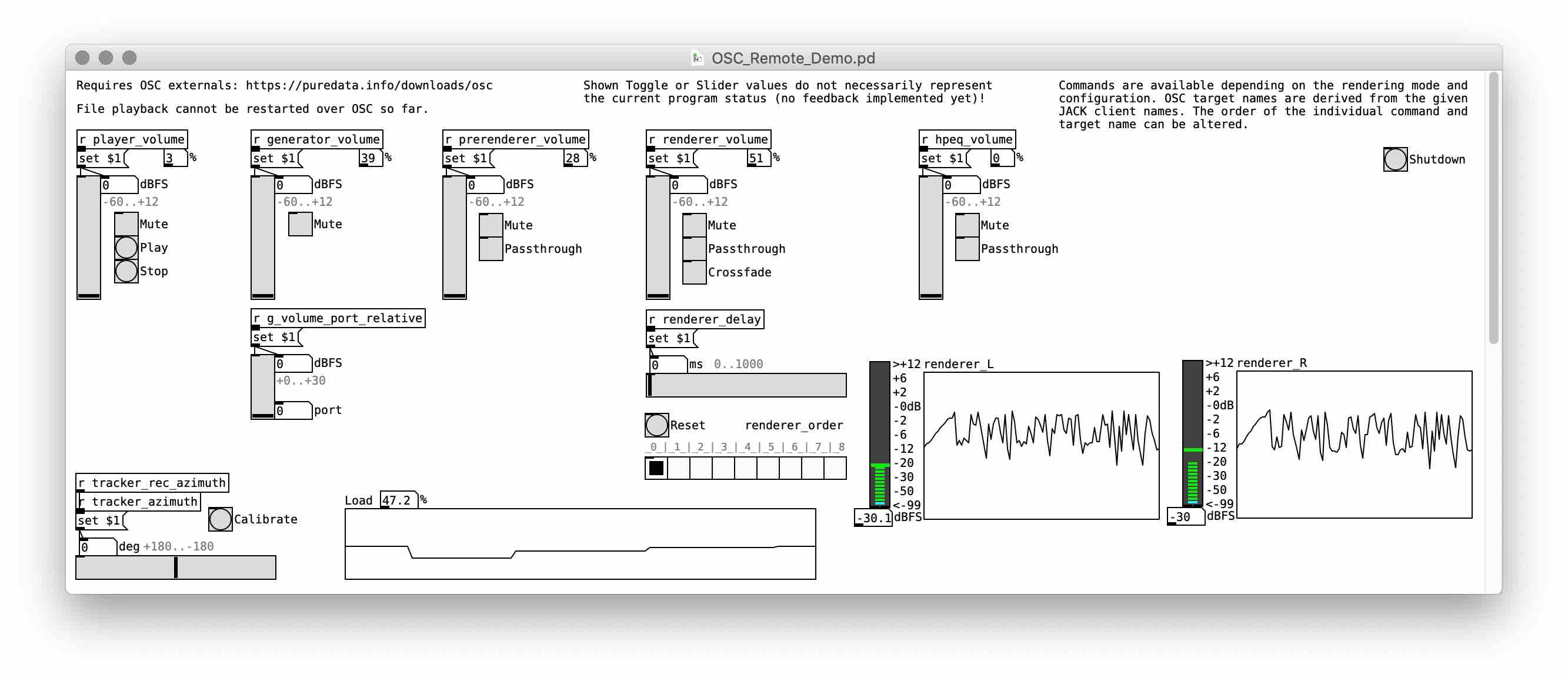
* __During runtime__, certain parameters of the application can be remote controlled via _Open Sound Control_. Individual clients can be accessed by targeting them with specific _OSC_ commands on port `5005` __[default]__.
Depending on the current configuration and rendering mode different commands are available i.e., arbitrary combinations of the following targets and values:
`/generator/volume 0`, `/generator/volume -12` (set any client output volume in dBFS),
`/prerenderer/mute 1`, `/prerenderer/mute 0`, `/prerenderer/mute -1`, `/prerenderer/mute` (set/toggle any client mute state),
`/hpeq/passthrough true`, `/hpeq/passthrough false`, `/hpeq/passthrough toggle` (set/toggle any client passthrough state)
* The target name is derived from the individual _JACK_ client name for all commands, while the order of target client and command can be altered, while further commands might be available:
`/renderer/crossfade`, `/crossfade/renderer` (set/toggle the crossfade state),
`/renderer/delay 350.0` (set an additional input delay in ms),
`/renderer/order 0`, `/renderer/order 4` (set the SH rendering order),
`/tracker/zero` (calibrate the tracker), `/tracker/azimuth 45` (set the tracker orientation),
`/player/stop`, `/player/play`, `/quit` (quit all rendering components)
* __During runtime__, individual _JACK_ clients with their respective "target" name also report real-time feedback or analysis data on port `5006` __[default]__ in the specified exemplary data format (number of values depends on output ports) i.e., arbitrary combinations of the name and parameters:
`/player/rms 0.0`, `/generator/peak 0.0 0.0 0.0 0.0` (the current audio output metrics),
`/renderer/load 100` (the current client load),
`/tracker/AzimElevTilt 0.0 0.0 0.0` (the current head orientation),
`/load 100` (the current JACK system load)
* In the package included is an example remote control client implemented for [_"vanilla" PD_](http://puredata.info/), see further instructions in [OSC_Remote_Demo.pd](res/OSC_Remote_Demo.pd).
## Validation - Setup and Execution
* Install [_ecasound_ library](https://ecasound.seul.org/ecasound/download.php) for signal playback and capture __with _JACK_ support__:
`brew install ecasound`
* __Optional:__ Install [_sendosc_](https://github.com/yoggy/sendosc) tool to be used for automation in shell scripts:
`brew install yoggy/tap/sendosc`
* __Remark:__ Make sure all subsequent rendering configurations are able to start up properly before recording starts (particularly FFTW optimization might take a long time, see above)
* Validate impulse responses by __comparing against a reference implementation__, in this case the output of [_sound_field_analysis-py_](https://nbviewer.jupyter.org/github/AppliedAcousticsChalmers/sound_field_analysis-py/blob/master/examples/Exp4_BinauralRendering.ipynb) [[11]](#references)
* Execute recording script, consecutively starting the package and capturing impulse responses in different rendering configurations:
`./res/research/validation/record_ir.sh`
__Remark:__ Both implementations compensate the source being at an incidence angle of -37 degrees in the measurement IR set
* Run package in validation mode, executing a comparison of all beforehand captured IRs in `res/research/validation/` against the provided reference IRs:
`python -m ReTiSAR --VALIDATION_MODE=res/HRIR/KU100_THK/BRIR_CR1_VSA_110RS_L_SSR_SFA_-37_SOFA_RFI.wav`
* Validate signal-to-noise-ratio by __comparing input and output signals of the main binaural renderer for wanted target signals and emulated sensor self-noise__ respectively
* Execute recording script consecutively starting the package and capturing target-noise as well as self-noise input and output signals in different rendering configurations:
`./res/research/validation/record_snr.sh`
* Open (and run) _MATLAB_ analysis script to execute an SNR comparison of beforehand captured signals:
`open ./res/research/validation/calculate_snr.m`
## Benchmark - Setup and Execution
* Install additionally required _Python_ packages into _Conda_ environment:
`conda env update --file environment_dev.yml`
* Run the _JACK_ server with arbitrary sampling rate via _QjackCtl_ or in a new command line window (`[CMD]+[T]`):
`jackd -d coreaudio`
* Run in benchmark mode, instantiating one rendering _JACK_ client with as many convolver instances as possible (40-60 minutes):
`python -m ReTiSAR --BENCHMARK_MODE=PARALLEL_CONVOLVERS`
* Run in benchmark mode, instantiating as many rendering _JACK_ clients as possible with one convolver instance (10-15 minutes):
`python -m ReTiSAR --BENCHMARK_MODE=PARALLEL_CLIENTS`
* Find generated results in the specified files at the end of the script.
## References
[[1]](https://research.chalmers.se/en/publication/509494) H. Helmholz, C. Andersson, and J. Ahrens, “Real-Time Implementation of Binaural Rendering of High-Order Spherical Microphone Array Signals,” in Fortschritte der Akustik -- DAGA 2019, 2019, pp. 1462–1465.
[[2]](https://research.chalmers.se/en/publication/516281) H. Helmholz, T. Lübeck, J. Ahrens, S. V. Amengual Garí, D. Lou Alon, and R. Mehra, “Updates on the Real-Time Spherical Array Renderer (ReTiSAR),” in Fortschritte der Akustik -- DAGA 2020, 2020, pp. 1169–1172.
[[3]](http://audiogroup.web.th-koeln.de/FILES/ICSA2011_SOFiA_PAPER.pdf) B. Bernschütz, C. Pörschmann, S. Spors, and S. Weinzierl, “SOFiA Sound Field Analysis Toolbox,” in International Conference on Spatial Audio, 2011, pp. 7–15.
[[4]](https://ieeexplore.ieee.org/stamp/stamp.jsp?tp=&arnumber=8683751&tag=1) C. Hold, H. Gamper, V. Pulkki, N. Raghuvanshi, and I. J. Tashev, “Improving Binaural Ambisonics Decoding by Spherical Harmonics Domain Tapering and Coloration Compensation,” in International Conference on Acoustics, Speech and Signal Processing, 2019, pp. 261–265, doi: 10.1109/ICASSP.2019.8683751.
[[5]](http://asa.scitation.org/doi/10.1121/1.4983652) Z. Ben-Hur, F. Brinkmann, J. Sheaffer, S. Weinzierl, and B. Rafaely, “Spectral Equalization in Binaural Signals Represented by Order-Truncated Spherical Harmonics,” J. Acoust. Soc. Am., vol. 141, no. 6, pp. 4087–4096, 2017, doi: 10.1121/1.4983652.
[[6]](http://www.audiogroup.web.fh-koeln.de/FILES/AIA-DAGA2013_HRIRs.pdf) B. Bernschütz, “A Spherical Far Field HRIR/HRTF Compilation of the Neumann KU 100,” in Fortschritte der Akustik -- AIA/DAGA 2013, 2013, pp. 592–595, doi: 10.5281/zenodo.3928296.
[[7]](http://www.aes.org/e-lib/browse.cfm?elib=16781) P. Majdak et al., “Spatially Oriented Format for Acoustics: A Data Exchange Format Representing Head-Related Transfer Functions,” in AES Convention 134, 2013, pp. 262–272.
[[8]](https://www.york.ac.uk/sadie-project/database.html) C. Armstrong, L. Thresh, D. Murphy, and G. Kearney, “A Perceptual Evaluation of Individual and Non-Individual HRTFs: A Case Study of the SADIE II Database,” Appl. Sci., vol. 8, no. 11, pp. 1–21, 2018, doi: 10.3390/app8112029.
[[9]](https://depositonce.tu-berlin.de/handle/11303/6153.5) F. Brinkmann et al., “The FABIAN Head-Related Transfer Function Data Base.” Technische Universität Berlin, Berlin, Germany, 2017, doi: 10.14279/depositonce-5718.5.
[[10]](https://hal.archives-ouvertes.fr/hal-03235341) H. Helmholz, D. Lou Alon, S. V. Amengual Garí, and J. Ahrens, “Instrumental Evaluation of Sensor Self-Noise in Binaural Rendering of Spherical Microphone Array Signals,” in Forum Acusticum, 2020, pp. 1349–1356, doi: 10.48465/fa.2020.0074.
[[11]](http://www.audiogroup.web.fh-koeln.de/FILES/VDT2012_WDRIRC.pdf) P. Stade, B. Bernschütz, and M. Rühl, “A Spatial Audio Impulse Response Compilation Captured at the WDR Broadcast Studios,” in 27th Tonmeistertagung -- VDT International Convention, 2012, pp. 551–567.
[[12]](https://pdfs.semanticscholar.org/3c9a/ed0153b9eb94947953ddb326c3de29ae5f75.pdf) C. Hohnerlein and J. Ahrens, “Spherical Microphone Array Processing in Python with the sound_field_analysis-py Toolbox,” in Fortschritte der Akustik -- DAGA 2017, 2017, pp. 1033–1036.
[[13]](https://ieeexplore.ieee.org/document/9054434/) H. Helmholz, J. Ahrens, D. Lou Alon, S. V. Amengual Garí, and R. Mehra, “Evaluation of Sensor Self-Noise In Binaural Rendering of Spherical Microphone Array Signals,” in International Conference on Acoustics, Speech and Signal Processing (ICASSP), 2020, pp. 161–165, doi: 10.1109/ICASSP40776.2020.9054434.
[[14]](https://ieeexplore.ieee.org/document/9622151/) H. Helmholz, D. Lou Alon, S. V. Amengual Garí, and J. Ahrens, “Effects of Additive Noise in Binaural Rendering of Spherical Microphone Array Signals,” IEEE/ACM Trans. Audio, Speech, Lang. Process., vol. 29, pp. 3642–3653, 2021, doi: 10.1109/TASLP.2021.3129359.
## Change Log
See [CHANGE_LOG](CHANGE_LOG.md) for full details.
## Contributing
See [CONTRIBUTING](CONTRIBUTING.md) for full details.
## Credits
Written by [Hannes Helmholz](http://www.ta.chalmers.se/people/hannes-helmholz/).
Scientific supervision by [Jens Ahrens](http://www.ta.chalmers.se/people/jens-ahrens/).
Contributions by [Carl Andersson](http://www.ta.chalmers.se/people/carl-andersson/) and [Tim Lübeck](https://www.th-koeln.de/personen/tim.luebeck/).
This work was funded by [Facebook Reality Labs](https://research.fb.com/category/augmented-reality-virtual-reality/).
## License
This software is licensed under a Non-Commercial Software License (see [LICENSE](LICENSE) for full details).
Copyright (c) 2018
Division of Applied Acoustics
Chalmers University of Technology
[JACK]: https://github.com/jackaudio/jack2-releases/releases
[Conda]: https://conda.io/en/master/miniconda.html
[Python]: https://www.python.org/downloads/
[OSC]: http://opensoundcontrol.org/implementations
[SOFA]: https://www.sofaconventions.org/mediawiki/index.php/SOFA_(Spatially_Oriented_Format_for_Acoustics
[FFTW]: http://www.fftw.org/fftw3_doc/Planner-Flags.html