Codeman

Mission control for AI coding agents

Claude Code • OpenCode • Codex • Gemini • Terminal - One Dashboard • Any Device


License: MIT Node.js 22+ TypeScript 5.9 Fastify npm version GitHub stars Contributors Total commits

English简体中文

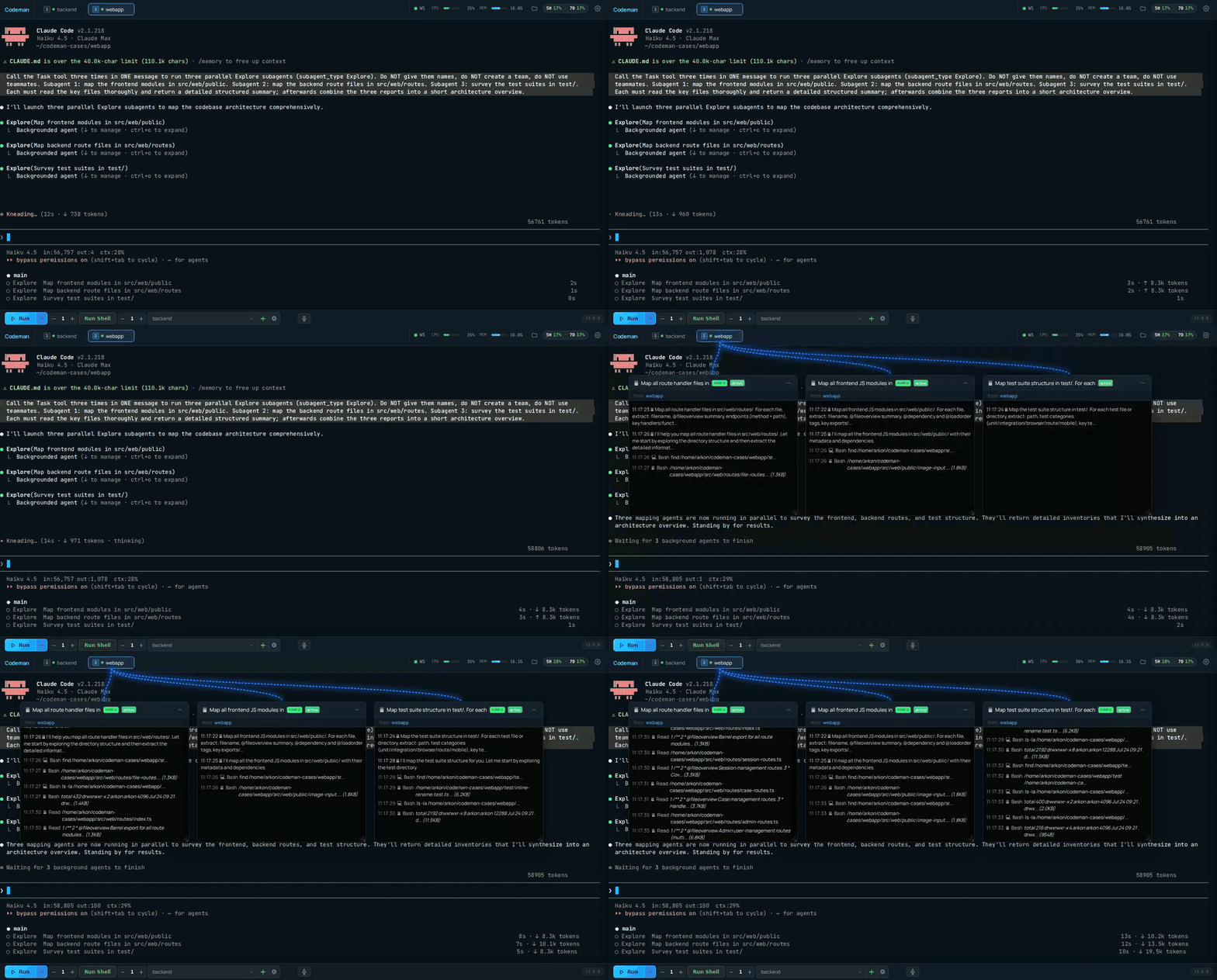
Codeman — parallel subagent visualization

**Codeman** is a self-hosted mission control for AI coding agents. It spawns Claude Code, OpenCode, Codex, or Gemini CLI inside persistent tmux sessions, streams the real terminal to any browser, and keeps agents productive after you walk away: it re-prompts on idle, resumes when a usage limit resets, runs scheduled jobs, and shows every background agent working in real time. Get started in one line (macOS & Linux, Windows via WSL): ```bash curl -fsSL https://getcodeman.com/install | bash ``` ```bash codeman web # Open http://localhost:3000 and start your first session ``` The installer asks before every system change, and re-running the same line updates in place. Full details: [Quick Start - Installation](#quick-start---installation). - **One dashboard, four CLIs** - run [Claude Code, OpenCode, Codex, or Gemini](#more-features) per session (plus plain shell), locally, [in Docker](#isolated-docker-sessions), or [over SSH](#remote-ssh-sessions) - **Truly phone-friendly** - a [touch-optimized terminal](#mobile-optimized-web-ui) with instant local echo, QR login, swipe navigation, and push notifications - **Runs while you sleep** - [idle detection + respawn cycling](#respawn-controller) and auto-resume when a subscription limit resets, for 24+ hour unattended runs - **See your agents think** - [live floating windows](#live-agent-visualization) for every subagent and teammate, with real-time transcripts - **Nothing gets lost** - tmux persistence across restarts and network drops, exactly-once input delivery, full-scrollback replay - **Self-hosted and private** - loopback-only by default, MIT licensed, no telemetry, runs entirely on your machine

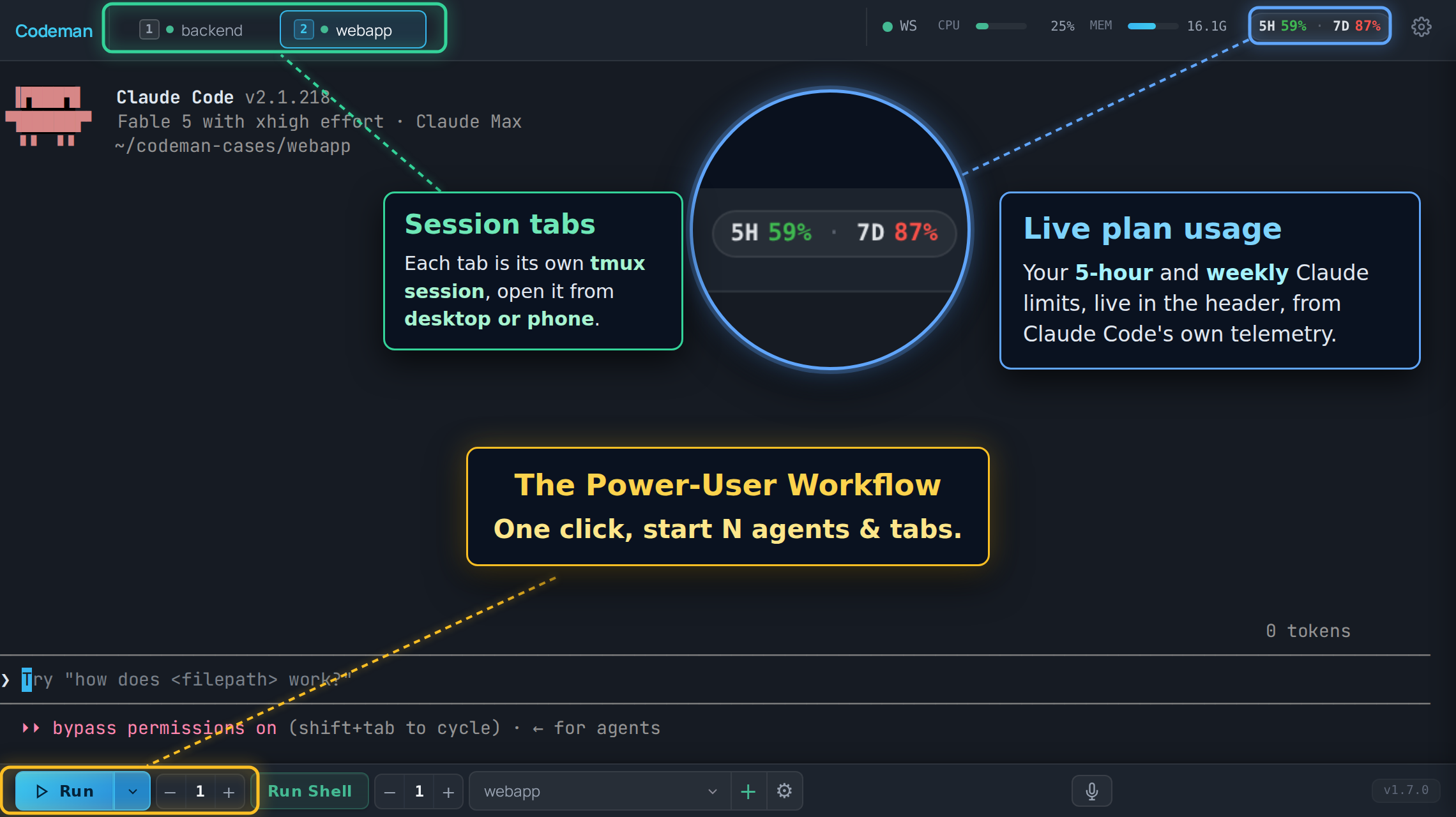
Codeman dashboard tour: session tabs per case, one-click Run for new agents, live plan usage in the header

--- ## Quick Start - Installation ```bash curl -fsSL https://getcodeman.com/install | bash ``` This installs Node.js and tmux if missing, clones Codeman to `~/.codeman/app`, and builds it. A few things worth knowing: - **It asks first.** Every system change (package installs, AI CLI download) is prompted, and a menu at the end lets you choose: run Codeman in this terminal, install it as a background service (systemd/launchd, auto-start on boot), or don't start yet. Nothing runs in the background unless you pick it. - **Network or local-only, your choice.** The installer asks whether the dashboard should be reachable from other devices on your network (`0.0.0.0`, the default, with a strongly recommended password prompt) or from this machine only (`127.0.0.1`, safest). Skipping the password on a network bind requires an explicit confirmation and ends with a loud warning. A bare `codeman web` started by hand still defaults to loopback. - **Re-run to update.** The same one-liner updates a finished install in place: local changes in `~/.codeman/app` are stashed (never discarded), and a running service is restarted and verified. If a first install was interrupted, re-running resumes the full setup instead. `install.sh update` and `install.sh uninstall` also exist. - **CI / headless:** without a terminal attached, steps that would change your system abort with instructions instead of running silently. Set `CODEMAN_NONINTERACTIVE=1` to approve them for automation. You'll need at least one AI coding CLI installed — [Claude Code](https://docs.anthropic.com/en/docs/claude-code), [OpenCode](https://opencode.ai), [Codex](https://developers.openai.com/codex/cli), or [Gemini CLI](https://github.com/google-gemini/gemini-cli) (any combination works). The installer detects whichever of the four is present; if none is found, it offers to install Claude Code or OpenCode, or you can skip and install one yourself later. After install: ```bash codeman web # Open http://localhost:3000 and start your first session ``` **Sharing with a small team?** Start it in multi-user mode instead: each person gets their own login and workspace. ```bash codeman users add alice --admin # create the first admin account codeman web --multiuser # named logins + per-user case spaces ``` Details in [Multi-User Mode](#multi-user-mode-opt-in) below.
Run as a background service The installer's final menu sets this up for you (option 2) and verifies the service actually comes up before claiming success. To configure it manually instead: **Linux (systemd):** ```bash mkdir -p ~/.config/systemd/user cat > ~/.config/systemd/user/codeman-web.service << EOF [Unit] Description=Codeman Web Server After=network.target [Service] Type=simple ExecStart=$(which node) $HOME/.codeman/app/dist/index.js web Restart=always RestartSec=10 [Install] WantedBy=default.target EOF systemctl --user daemon-reload systemctl --user enable --now codeman-web loginctl enable-linger $USER ``` **macOS (launchd):** ```bash mkdir -p ~/Library/LaunchAgents cat > ~/Library/LaunchAgents/com.codeman.web.plist << EOF Label com.codeman.web ProgramArguments $(which node) $HOME/.codeman/app/dist/index.js web RunAtLoad KeepAlive StandardOutPath /tmp/codeman.log StandardErrorPath /tmp/codeman.log EOF launchctl bootstrap gui/$(id -u) ~/Library/LaunchAgents/com.codeman.web.plist ```
Windows (WSL) ```powershell wsl bash -c "curl -fsSL https://getcodeman.com/install | bash" ``` Codeman requires tmux, so Windows users need [WSL](https://learn.microsoft.com/en-us/windows/wsl/install). If you don't have WSL yet: run `wsl --install` in an admin PowerShell, reboot, open Ubuntu, then install your preferred AI coding CLI inside WSL ([Claude Code](https://docs.anthropic.com/en/docs/claude-code), [OpenCode](https://opencode.ai), [Codex](https://developers.openai.com/codex/cli), or [Gemini CLI](https://github.com/google-gemini/gemini-cli)). After installing, `http://localhost:3000` is accessible from your Windows browser.
--- ## Mobile-Optimized Web UI The most responsive AI coding agent experience on any phone. Full xterm.js terminal with local echo, swipe navigation, and a touch-optimized interface designed for real remote work — not a desktop UI crammed onto a small screen.
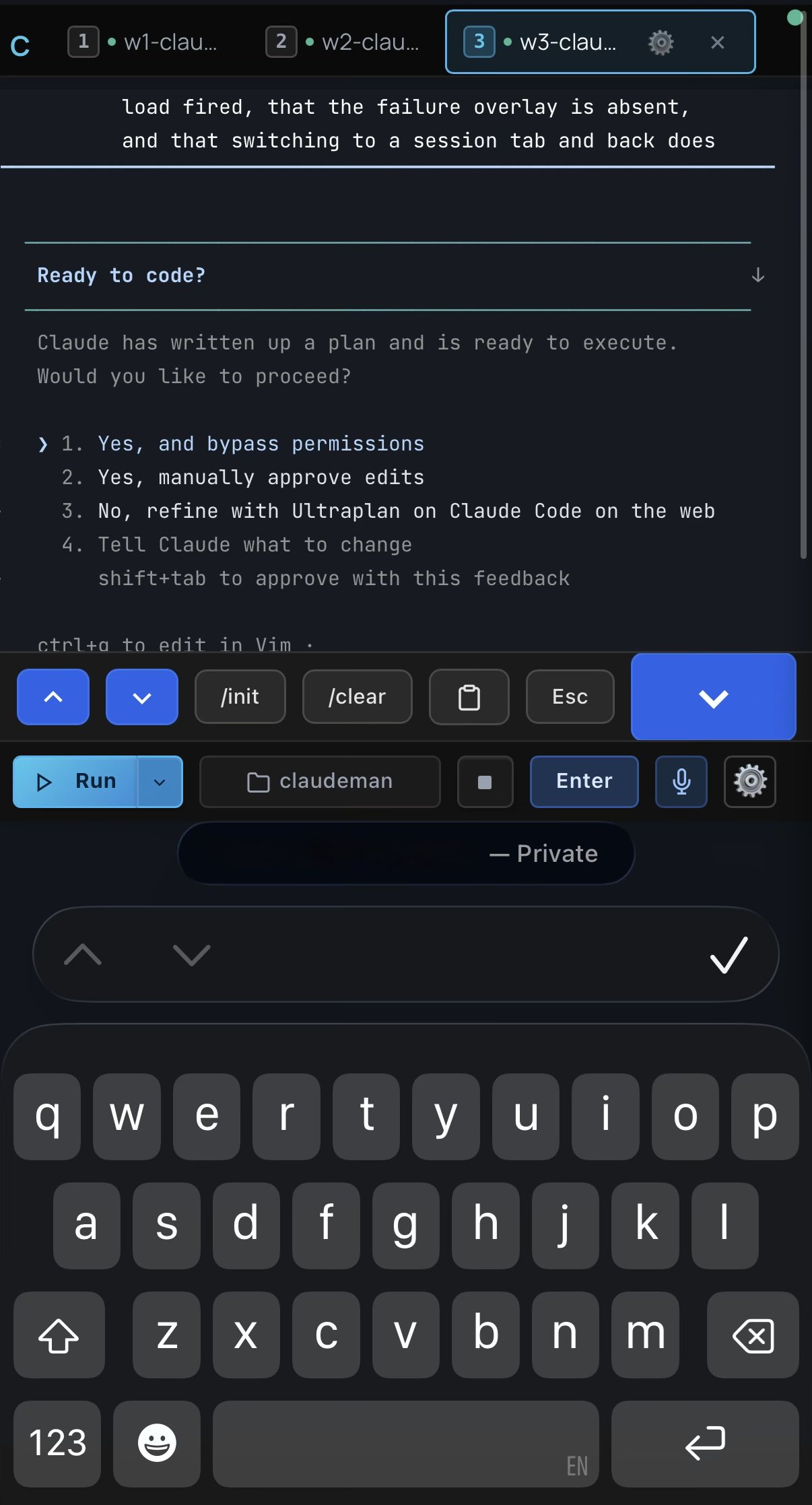
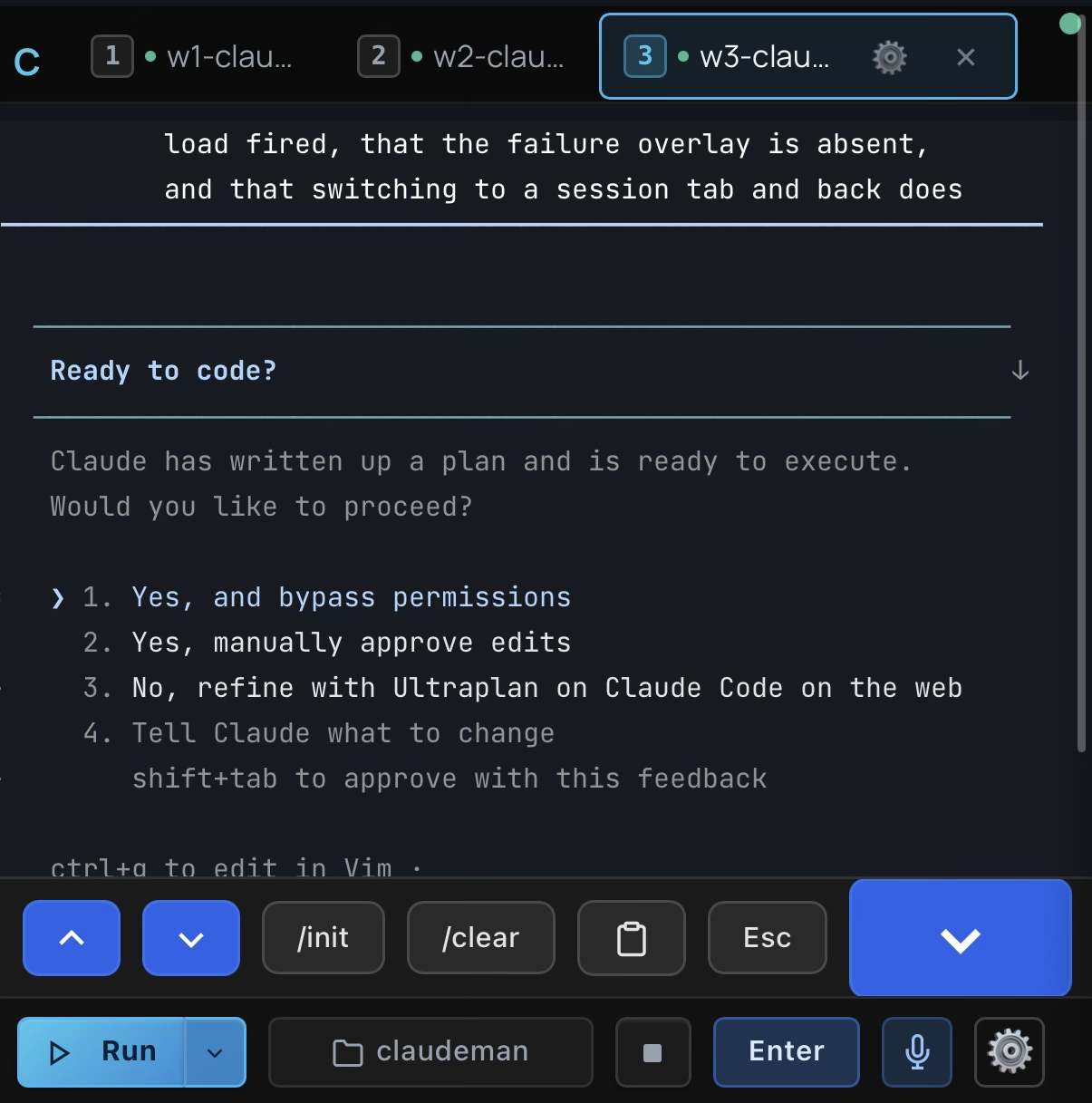
Mobile — answering an agent's plan prompt with the keyboard accessory bar and Enter button Mobile toolbar: accessory bar with /init, /clear, clipboard and Esc above the Run, case, stop, Enter, voice and settings controls
Answering prompts by touch Accessory bar + dedicated Enter button
Terminal Apps Codeman Mobile
200-300ms input lag over remoteLocal echo — instant feedback
Tiny text, no contextFull xterm.js terminal
No session managementSwipe between sessions
No notificationsPush alerts for approvals and idle
Manual reconnecttmux persistence
No agent visibilityBackground agents in real-time
Copy-paste slash commandsOne-tap /init, /clear, /compact
Password typing on phoneQR code scan — instant auth
- **Keyboard accessory bar** — `/init`, `/clear`, `/compact` quick-action buttons above the virtual keyboard; destructive commands require a double-press to confirm, so you never fire one by accident - **Dedicated Enter button** — replays the keypress through the terminal, so text buffered by local echo is flushed first rather than stranded - **Swipe navigation & smart keyboard handling** — swipe left/right to switch sessions; toolbar and terminal shift up when the keyboard opens (`visualViewport` API) - **Built for phones** — safe-area insets for notch and home indicator, 44px touch targets, bottom-sheet case picker, native momentum scrolling ```bash codeman web --https # Open on your phone: https://:3000 ``` > `localhost` works over plain HTTP. Use `--https` when accessing from another device, or use [Tailscale](https://tailscale.com/) (recommended) — it provides a private network so you can access `http://:3000` from your phone without TLS certificates. ### Secure QR Code Authentication Typing passwords on a phone keyboard is miserable. Codeman replaces it with **cryptographically secure single-use QR tokens** — scan the code displayed on your desktop and your phone is authenticated instantly. Each QR encodes a URL containing a 6-character short code that maps to a 256-bit secret (`crypto.randomBytes(32)`) on the server. Tokens auto-rotate every **60 seconds**, are **atomically consumed on first scan** (replays always fail), and use **hash-based `Map.get()` lookup** that leaks nothing through response timing. The short code is an opaque pointer — the real secret never appears in browser history, `Referer` headers, or Cloudflare edge logs. The security design addresses all 6 critical QR auth flaws identified in ["Demystifying the (In)Security of QR Code-based Login"](https://www.usenix.org/conference/usenixsecurity25/presentation/zhang-xin) (USENIX Security 2025, which found 47 of the top-100 websites vulnerable): single-use enforcement, short TTL, cryptographic randomness, server-side generation, real-time desktop notification on scan (QRLjacking detection), and IP + User-Agent session binding with manual revocation. Dual-layer rate limiting (per-IP + global) makes brute force infeasible across 62^6 = 56.8 billion possible codes. Full security analysis: [`docs/qr-auth-plan.md`](docs/qr-auth-plan.md) --- ## Using Codeman — A Human's Guide A start-to-finish walkthrough for driving Codeman from the browser. If you just installed, this is where to begin. ### 1. Launch the server ```bash codeman web # localhost:3000 (loopback only — safe default) codeman web --port 8080 # custom port (or set CODEMAN_PORT) codeman web --https # self-signed TLS (only needed for remote access) codeman web -H 0.0.0.0 # bind LAN — REQUIRES CODEMAN_PASSWORD (see Security) ``` Open the printed URL. The page is a single dashboard; everything below happens there. ### 2. Create your first session Click **+ New Session** (or **Quick Start**). A session is one AI CLI running in its own tmux-backed terminal. You choose: | Field | What it does | | ---------------------------- | ------------------------------------------------------------------------------------------------------------------- | | **Working directory / case** | The folder the agent operates in. A "case" is just a named working dir Codeman remembers. | | **CLI / run mode** | `Claude` (default), `OpenCode`, `Codex`, `Gemini`, or `Terminal` (plain shell). | | **Model** | Per-session model (App Settings → Claude Model). A soft default — `/model` still works in-session. | | **Effort / Ultracode** | Reasoning effort (`low`–`max`) or `ultracode` for dynamic multi-agent workflows. Switchable anytime with `/effort`. | Hit start — Codeman spawns the CLI via a real PTY and streams it to your browser over SSE. ### 3. Read the dashboard - **Tabs (top)** — one per session. `Alt+1`-`9` to jump, `Ctrl+Tab` for next, drag to reorder (tab order syncs across your devices). - **Terminal (center)** — a real `xterm.js` terminal; full TUIs render correctly. Type directly and press **Enter** to send. `Shift+Enter` inserts a newline. - **Side panels** — Respawn, Orchestrator, Cron, Subagents, Settings (toggled from the toolbar). ### 4. Talk to the agent - **Type prompts** straight into the terminal — input is delivered exactly-once even across reconnects (a dropped link never loses or double-sends a prompt). - **Paste or drag-and-drop images** directly into the session. - **Voice input** — `Ctrl+Shift+V` (Deepgram Nova-3, with auto-silence stop). - **Attachments** — register external files/docs and preview Office/PDF inline. ### 5. Make it autonomous | Mode | Use it for | Where | | ---------------- | --------------------------------------------------------------------------------------------------------------------------------- | ------------------------------------------------------------------- | | **Respawn** | Long unattended runs — auto-restarts the CLI on idle/limit, with adaptive timing. Presets: `solo-work`, `overnight-autonomous`, … | Respawn tab | | **Orchestrator** | Turn one goal into a phased plan and drive it to completion across agents. | Orchestrator panel | | **Cron** | Saved, named jobs on a schedule (`once`/`interval`/`daily`/`weekly`) that spawn a session and send a prompt when due. | ⏰ Cron button _(opt-in: App Settings → Display → Header Displays)_ | | **Auto-resume** | Automatically continue after a subscription rate-limit resets. | Respawn tab (top) | ### 6. Reach it from anywhere - **Phone/tablet** — the UI is fully touch-optimized; scan the desktop **QR code** to log in without typing a password. - **Outside your network** — `./scripts/tunnel.sh start` opens a Cloudflare tunnel (set `CODEMAN_PASSWORD` first). - **SSH** — the `sc` chooser attaches to any session from a terminal (`sc` interactive, `sc 2` quick-attach, `sc -l` list). ### 7. Operate & maintain - **App Settings** — model, effort, permission startup mode, theme/skin, notifications, display toggles, per-CLI options, a synced custom display name, and per-device English/Simplified Chinese UI language. - **Self-update** — git-clone installs update in place from **Settings → Updates**. - **Deploy your own changes** — see [Development](#development). > ⚠️ **Safety:** if you're working _inside_ a Codeman-managed session (`echo $CODEMAN_MUX` → `1`), never run `tmux kill-session` / `pkill claude` directly — use the web UI or `./scripts/tmux-manager.sh`. --- ## Zero-Lag Input Overlay

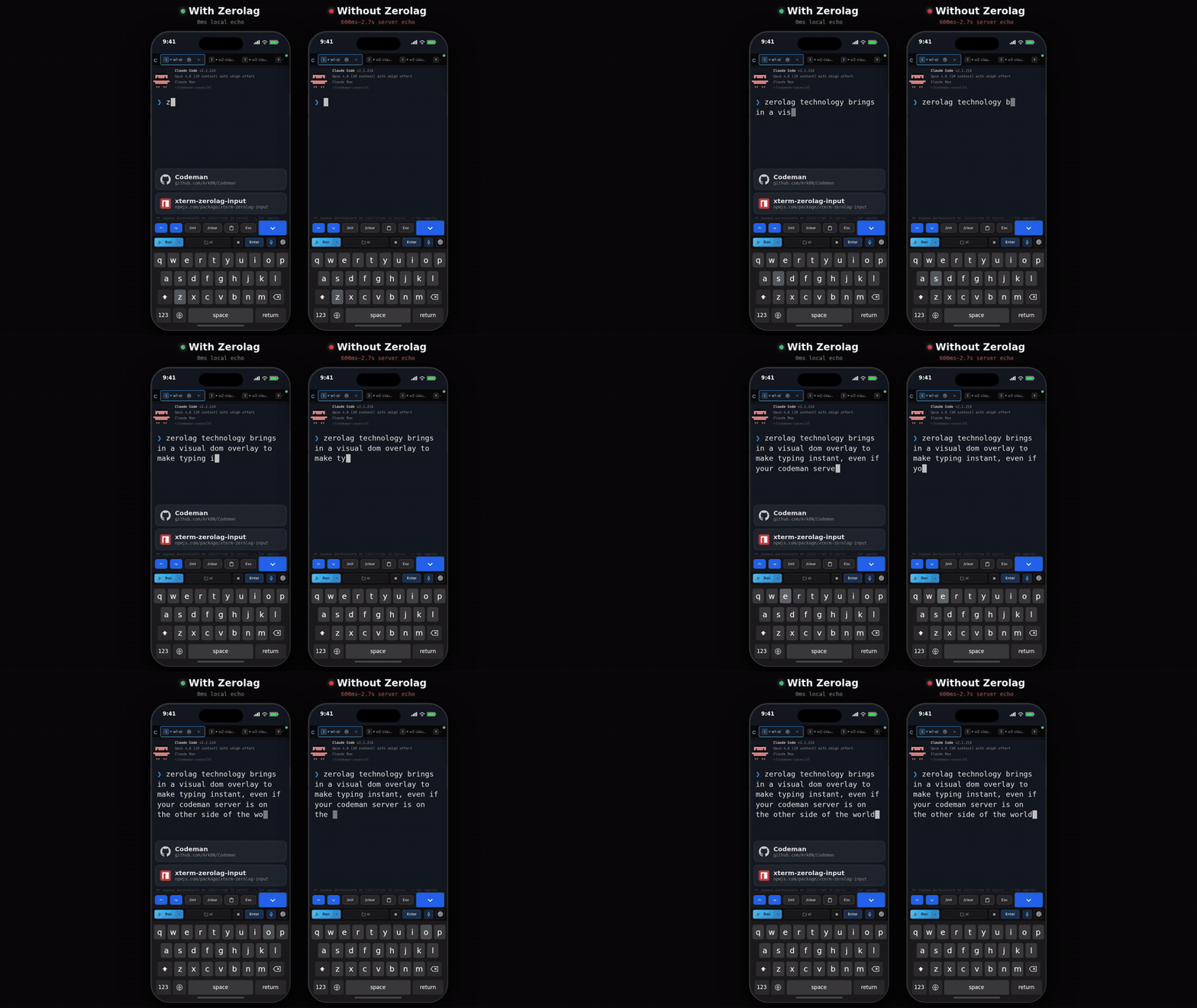
Zerolag demo: instant local echo next to 600ms-2.7s server echo, side by side on two phones

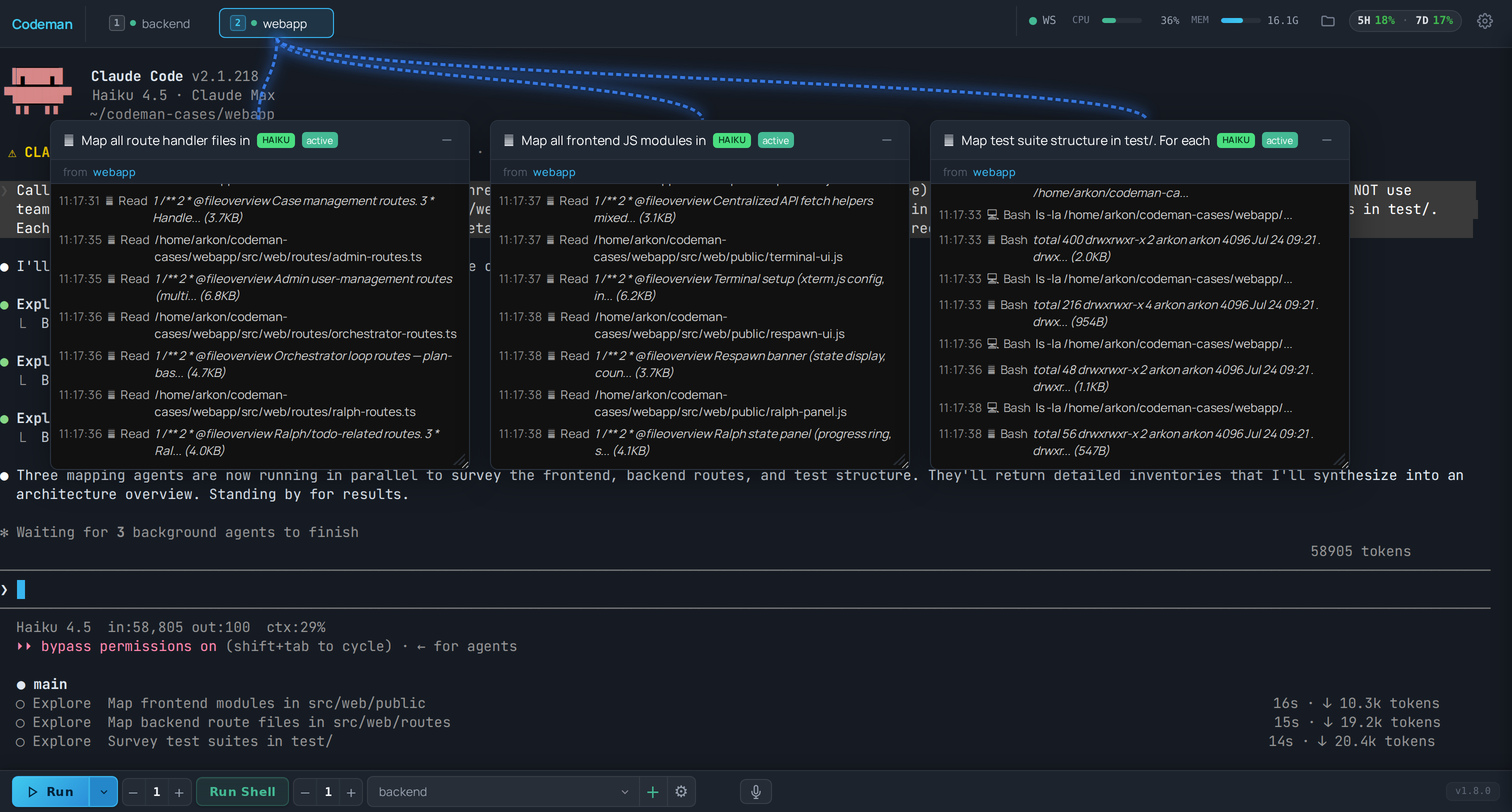
When accessing your coding agent remotely (VPN, Tailscale, SSH tunnel), every keystroke normally takes 200-300ms to round-trip. Codeman implements a **Mosh-inspired local echo system** that makes typing feel instant regardless of latency. A pixel-perfect DOM overlay inside xterm.js renders keystrokes at 0ms. Background forwarding silently sends every character to the PTY in 50ms debounced batches, so Tab completion, `Ctrl+R` history search, and all shell features work normally. When the server echo arrives 200-300ms later, the overlay seamlessly disappears and the real terminal text takes over — the transition is invisible. - **Ink-proof architecture** — lives as a `` at z-index 7 inside `.xterm-screen`, completely immune to Ink's constant screen redraws (two previous attempts using `terminal.write()` failed because Ink corrupts injected buffer content) - **Font-matched rendering** — reads `fontFamily`, `fontSize`, `fontWeight`, and `letterSpacing` from xterm.js computed styles so overlay text is visually indistinguishable from real terminal output - **Full editing** — backspace, retype, paste (multi-char), cursor tracking, multi-line wrap when input exceeds terminal width - **Persistent across reconnects** — unsent input survives page reloads via localStorage - **Enabled by default** — works on both desktop and mobile, during idle and busy sessions > Extracted as a standalone library: [`xterm-zerolag-input`](https://www.npmjs.com/package/xterm-zerolag-input) — see [Published Packages](#published-packages). --- ## Live Agent Visualization Watch background agents work in real-time. Codeman monitors agent activity and displays each agent in a draggable floating window with animated Matrix-style connection lines back to the parent session.

Subagent Visualization: three parallel Explore agents as floating windows with live tool-call feeds

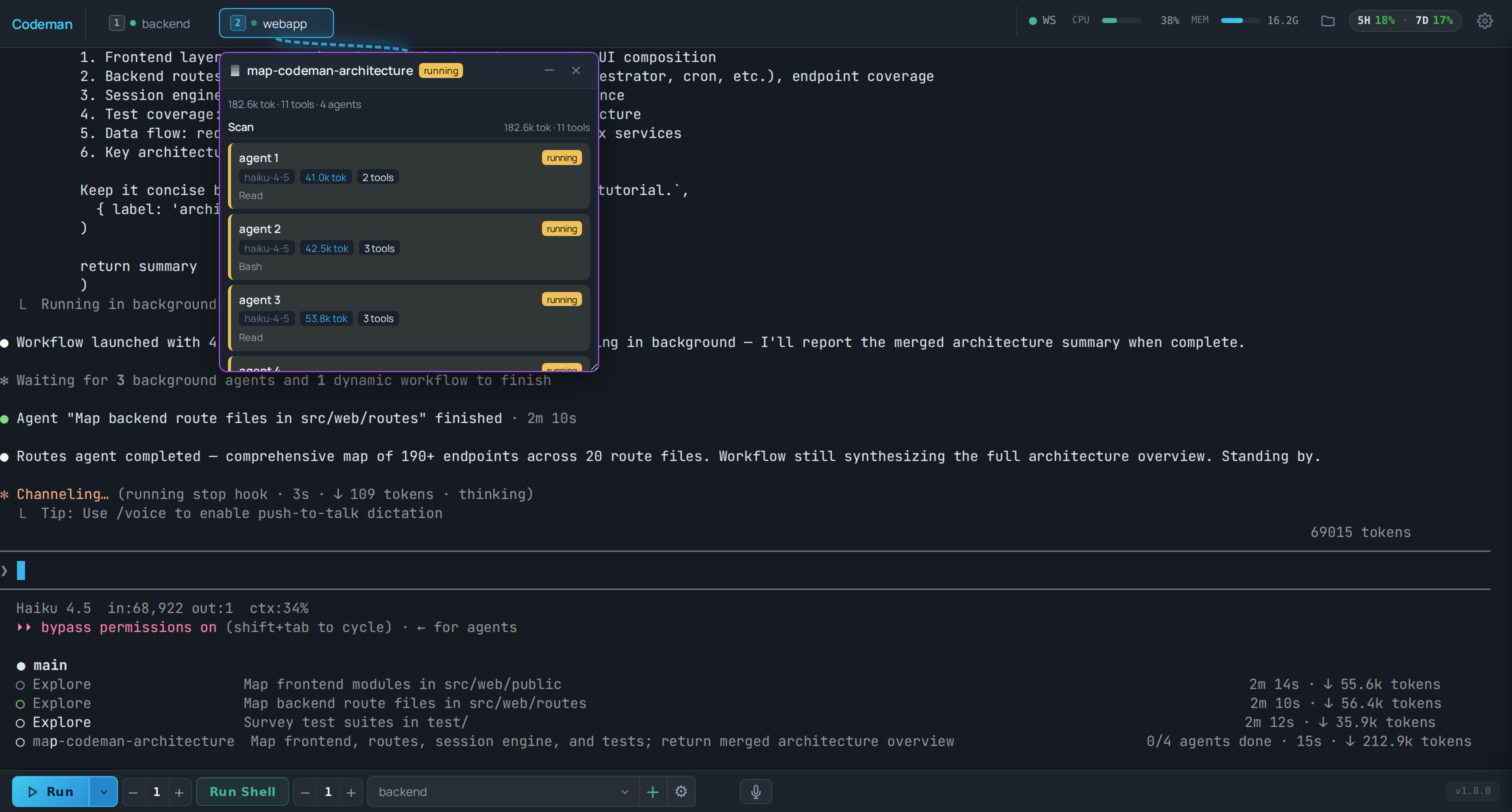
- **Floating terminal windows** — draggable, resizable panels for each agent with a live activity log showing every tool call, file read, and progress update as it happens - **Connection lines** — animated green lines linking parent sessions to their child agents, updating in real-time as agents spawn and complete - **Status & model badges** — green (active), yellow (idle), blue (completed) indicators with Haiku/Sonnet/Opus model color coding - **Auto-behavior** — windows auto-open on spawn, auto-minimize on completion, tab badge shows "AGENT" or "AGENTS (n)" count - **Nested agents** — supports 3-level hierarchies (lead session -> teammate agents -> sub-subagents) Multi-agent Workflow runs ("ultracode") get the same treatment: a floating run window tracks the whole workflow live, with phases, per-agent token counts, and the current tool of every agent:

Ultracode workflow visualization: a live run window with per-agent tokens and phases

**Agent Teams** — first-class support for Claude Code's native multi-agent teams (`CLAUDE_CODE_EXPERIMENTAL_AGENT_TEAMS=1`). `TeamWatcher` polls `~/.claude/teams/`, matches teammates to their lead session, and surfaces them as live subagent windows with **team-aware idle detection** — so the Respawn Controller won't fire while teammates are still working. See [`docs/agent-teams/`](docs/agent-teams/). --- ## Respawn Controller The core of autonomous work. When the agent goes idle, the Respawn Controller detects it, sends a continue prompt, cycles context management commands for fresh context, and resumes — running **24+ hours** completely unattended. ``` WATCHING → IDLE DETECTED → SEND UPDATE → /clear → /init → CONTINUE → WATCHING ``` - **Multi-layer idle detection** — completion messages, AI-powered idle check, output silence, token stability - **Auto-resume on usage limit** _(opt-in, off by default)_ — when Claude halts on a subscription limit ("You've hit your limit · resets 3pm"), Codeman parses the reset time, waits it out plus a 2-minute safety buffer, then dismisses the rate-limit dialog and sends `continue` — so an overnight run survives the 5-hour window instead of stalling until morning. Recognizes every Claude Code limit-message format, retries if still limited, survives Codeman restarts, and holds respawn cycles while paused so `/clear` can't wipe the waiting conversation. Enable per session at the top of the Respawn tab - **Circuit breaker** — prevents respawn thrashing when Claude is stuck (CLOSED -> HALF_OPEN -> OPEN states, tracks consecutive no-progress and repeated errors) - **Health scoring** — 0-100 health score with component scores for cycle success, circuit breaker state, iteration progress, and stuck recovery - **Built-in presets** — `solo-work` (3s idle, 60min), `subagent-workflow` (45s, 240min), `team-lead` (90s, 480min), `ralph-todo` (8s, 480min), `overnight-autonomous` (10s, 480min) --- ## Orchestrator Loop Beyond single-session respawn, the **Orchestrator** turns a high-level goal into a phased plan and drives it to completion across multiple agents — a state machine that runs `idle → planning → approval → executing → verifying → (replanning) → completed`. - **Plan, then execute** — generates a phased plan from your goal and pauses for approval before touching anything; reject with feedback to regenerate - **Per-phase verification gates** — each phase is verified before the next begins; on failure the orchestrator replans instead of barreling ahead - **Multi-agent execution** — fans phases out to team agents / a task queue, coordinating work too big for one session - **Crash-safe** — full state persists under the `orchestrator` key in `state.json`, so it survives restarts - **Driven from the UI or API** — the Orchestrator panel, or `POST /api/orchestrator/start` → `/approve` → `/status` (10 endpoints) > Full design: [`docs/orchestrator-loop-architecture.md`](docs/orchestrator-loop-architecture.md). --- ## Multi-Session Dashboard Run **20 parallel sessions** with full visibility — real-time xterm.js terminals at 60fps, per-session token and cost tracking, tab-based navigation, and one-click management. ### Persistent Sessions Every session runs inside **tmux** — sessions survive server restarts, network drops, and machine sleep. Auto-recovery on startup with dual redundancy. Ghost session discovery finds orphaned tmux sessions. Managed sessions are environment-tagged so the agent won't kill its own session. ### Session Manager & Command Palette `Ctrl/Cmd/Alt+K` opens a fuzzy session palette; **Browse all sessions** opens the Session Manager: one deduped list of everything Codeman knows about (live sessions, past sessions from state and lifecycle history, and Claude transcripts), each row showing its first and most recent prompt. - **Pinning**: pin a session to float it to the top of the list. Pinned sessions even survive kill (they demote to a lightweight stopped entry that stays visible and resumable). - **Name retention**: resuming a past session keeps its original name instead of minting a new one. - **Cross-device tab order**: drag-reordered tabs persist server-side, so your ordering follows you from desktop to phone. ### Hostname-Aware Window Title Running Codeman on multiple hosts (laptop, dev box, NAS)? The browser tab title is `codeman:` so you can tell which backend each tab points at without clicking in: ```bash codeman web # codeman: codeman web --title-hostname dev-box # codeman:dev-box (manual override for noisy hostnames) ``` The title is templated into the served HTML on first byte, so it's correct from the very first paint and works without JavaScript. The same hostname prefix is applied to the tab-flash format (`⚠️ (N) codeman:`) and to OS-level desktop notifications (`codeman:: `), so cross-host alerts in the system notification center are also unambiguous. ### Smart Token Management | Threshold | Action | Result | | --------------- | --------------- | ---------------------------------- | | **110k tokens** | Auto `/compact` | Context summarized, work continues | | **140k tokens** | Auto `/clear` | Fresh start with `/init` | ### Notifications Real-time desktop alerts when sessions need attention — `permission_prompt` and `elicitation_dialog` trigger critical red tab blinks, `idle_prompt` triggers yellow blinks. Click any notification to jump directly to the affected session. Hooks auto-configured per case directory. ### Run Summary Click the chart icon on any session tab to see a timeline of everything that happened — respawn cycles, token milestones, auto-compact triggers, idle/working transitions, hook events, errors, and more. ### Zero-Flicker Terminal Terminal-based AI agents (Claude Code's Ink, OpenCode's Bubble Tea) redraw the screen on every state change. Codeman implements a 6-layer anti-flicker pipeline for smooth 60fps output across all sessions: ``` PTY Output → 16ms Server Batch → DEC 2026 Wrap → SSE → Client rAF → xterm.js (60fps) ``` --- ## More Features - **Self-update** — git-clone installs under systemd/launchd update in place from **App Settings → Updates**: it detects the latest release, auto-stashes a dirty tree, and streams build progress across the service restart (npm installs report as non-updatable) - **Multi-CLI** — run **Claude Code**, **OpenCode**, **Codex**, or **Gemini** per session; env-var prefixes auto-gate (`CLAUDE_CODE_*` vs `OPENCODE_*` vs `CODEX_*` vs `GEMINI_*`/`GOOGLE_*`). See [`docs/opencode-integration.md`](docs/opencode-integration.md) - **Docker sessions** — run a case inside an isolated, hardened container. One checkbox on **Create New** spins up a container with sensible defaults and starts the agent inside it; multiple sessions share one per-case container; export a container + its workspace to a portable `.tar.gz` to move it to another machine. See [`docs/docker-cases.md`](docs/docker-cases.md) - **Remote SSH sessions** — point a case at another machine and run the agent there inside a durable remote tmux: survives SSH drops, auto-reconnects, and can discover + attach sessions already running on the host. See [`docs/remote-sessions.md`](docs/remote-sessions.md) - **Effort & Ultracode** — set a per-session default effort (`low`–`max`) or enable **ultracode** (dynamic multi-agent workflows). Soft defaults only — switchable anytime with `/effort` in-session. Extended-thinking budget is configurable too - **Voice input** — dictate prompts with Deepgram Nova-3 (Web Speech API fallback): toggle recording, auto-silence stop, live level meter (`Ctrl+Shift+V`) - **Image input** — paste or drag-and-drop images straight into a session - **Gesture control** _(opt-in)_ — a MediaPipe hand-tracking overlay to grab/drag session windows and pinch buttons, hands-free. Enable with `CODEMAN_GESTURE=1` + App Settings → Display - **Multi-monitor span** _(macOS)_ — one click opens a browser window maximized across all displays, so floating agent/gesture panels can cross the physical seam - **File Viewer button** _(opt-in)_ — a header button that toggles the built-in file browser panel with one tap; enable under App Settings → Display → Header Displays - **CJK / IME input** — full composition support for Chinese / Japanese / Korean - **OS notifications & hostname-aware titles** — desktop alerts and tab titles are prefixed `codeman:` so multi-host setups stay unambiguous --- ## Isolated Docker Sessions Run a case inside its own hardened Docker container instead of directly on your host — for security isolation, reproducible toolchains, and one-click portability. - **One click** — on **New Case → Create New**, tick **🐳 Run in an isolated Docker container**. Codeman creates the case folder, spins up a container with default settings, and starts the agent inside it. No host/image/network fields to fill in. - **Resource templates** — expand the checkbox for a **Small / Medium / Large / GPU** preset (memory, CPUs, GPU), or set your own. **Disk is elastic** — storage grows as data flows in, no fixed cap. - **Shared per-case container** — many sessions can `docker exec` into the same container; killing one session never tears the container out from under the others. - **Hardened by default** — non-root, `--cap-drop ALL`, `no-new-privileges`, PID/memory caps, never `--privileged` or the docker socket; a **sealed** profile (no host credentials, network off) is one toggle away. - **Seamless auth, isolated credentials** — your host Claude / Codex / Gemini / OpenCode logins work inside the container out of the box: credentials are seeded (copied) in at launch and onboarding/trust prompts are pre-answered, so no login wizard appears. The container keeps its own copies and never writes back to your host credential stores; only conversation transcripts are shared, and exports never capture secrets. - **Move it to another machine** — export a container's whole environment (toolchain + workspace) to a portable `.tar.gz`, `docker load` it on the other side, and import it into a fresh case. - **Durable** — reconnect after a restart lands back in the same live agent; a container stop/reboot resumes the conversation from the bind-mounted transcript. Prerequisite: just Docker (or Podman). The agent base image builds itself automatically on first use, with progress streamed to the UI (or pre-build it with `node scripts/build-agent-image.mjs`). Full guide: [`docs/docker-cases.md`](docs/docker-cases.md). --- ## Remote SSH Sessions Point a case at another machine and run the agent **there**, over SSH, with the same dashboard, mobile UI, and autonomy features. Your laptop is just a window onto a session that lives on the remote host. - **Durable by design**: the agent runs inside a dedicated tmux session on the remote host, so a dropped SSH connection, network change, or laptop sleep never kills the run. Reconnecting lands back in the same live conversation. - **Auto-reconnect**: a bounded-backoff watcher notices a dead SSH pane and silently reattaches to the still-running remote session (kill-switch in settings; intentional kills are never revived). - **Discover & attach**: list the `codeman-*` sessions already running on a host (started by that machine's own Codeman, or by another operator) and attach to one. Attached sessions you don't own **detach on tab close, never kill**. - **Shared sessions**: several clients can attach the same remote session at different window sizes without clamping each other; discovery shows a "shared" badge with the client count. - **Injection-safe**: every ssh command line flows through a single shell-escaping builder, and host/path/identity fields are schema-guarded. Set it up under **New Case → Remote** (host, user, identity file, optional jump host). Full design: [`docs/remote-sessions.md`](docs/remote-sessions.md). --- ## Multi-User Mode (opt-in) Share one Codeman with a small trusted team, each person getting their own login and workspace. **Off by default** — without the flag, nothing changes. Enable with `codeman web --multiuser` (or `CODEMAN_MULTIUSER=1`). Create the first admin, then manage users from the CLI or the **Users** tab in App Settings: ```bash codeman users add alice --admin # prompts for a password (or --password-stdin) codeman users add bob # a regular user codeman users list ``` - **Per-user spaces** — each user's cases live under `~/codeman-users//cases`; sessions, cases, search, and real-time events are scoped to their owner. Admins see everything. - **Individually revocable logins** — named users with scrypt-hashed passwords in `~/.codeman/users.json`; disable, reset (one-time password), or delete an account at any time. Admin actions are audited to `~/.codeman/admin-audit.jsonl`. - **Safer defaults for regular users** — non-admins run Claude in `--permission-mode auto` (Anthropic's classifier-guarded mode); raw shell sessions, cron `launchCommand`, and skip-permissions require an explicit per-user grant. > ⚠️ **This separates workspaces; it does not sandbox users from each other.** Every session runs as the same OS account, so a determined user's agent can still reach another user's files. For real isolation, pair users with **Docker cases** or run separate instances under separate OS accounts. See [`docs/multi-user-plan.md`](docs/multi-user-plan.md) and the multi-user section of [`docs/security-architecture.md`](docs/security-architecture.md). --- ## Remote Access — Cloudflare Tunnel Access Codeman from your phone or any device outside your local network using a free [Cloudflare quick tunnel](https://developers.cloudflare.com/cloudflare-one/connections/connect-networks/do-more-with-tunnels/trycloudflare/) — no port forwarding, no DNS, no static IP required. ``` Browser (phone/tablet) → Cloudflare Edge (HTTPS) → cloudflared → localhost:3000 ``` **Prerequisites:** Install [`cloudflared`](https://developers.cloudflare.com/cloudflare-one/connections/connect-networks/downloads/) and set `CODEMAN_PASSWORD` in your environment. ```bash # Quick start ./scripts/tunnel.sh start # Start tunnel, prints public URL ./scripts/tunnel.sh url # Show current URL ./scripts/tunnel.sh stop # Stop tunnel ./scripts/tunnel.sh status # Service status + URL ``` The script auto-installs a systemd user service on first run. The tunnel URL is a randomly generated `*.trycloudflare.com` address that changes each time the tunnel restarts.
Persistent tunnel (survives reboots) ```bash # Enable as a persistent service systemctl --user enable codeman-tunnel loginctl enable-linger $USER # Or via the Codeman web UI: Settings → Tunnel → Toggle On ```
Authentication 1. First request → browser shows Basic Auth prompt (username: `admin` or `CODEMAN_USERNAME`) 2. On success → server issues a `codeman_session` cookie (24h TTL, auto-extends on activity) 3. Subsequent requests authenticate silently via cookie 4. 10 failed attempts per IP → 429 rate limit (15-minute decay) **Always set `CODEMAN_PASSWORD`** before exposing via tunnel — without it, anyone with the URL has full access to your sessions.
### QR Code Authentication Typing a password on a phone keyboard is terrible. Codeman solves this with **ephemeral single-use QR tokens** — scan the code on your desktop, and your phone is instantly authenticated. No password prompt, no typing, no clipboard. ``` Desktop displays QR → Phone scans → GET /q/Xk9mQ3 → Server validates → Token atomically consumed (single-use) → Session cookie issued → 302 to / → Desktop notified: "Device authenticated via QR" → New QR auto-generated ``` Someone who only has the bare tunnel URL (without the QR) still hits the standard password prompt. The QR is the fast path; the password is the fallback. #### How It Works The server maintains a rotating pool of short-lived, single-use tokens. Each token consists of a 256-bit secret (`crypto.randomBytes(32)`) paired with a 6-character base62 short code used as an opaque lookup key in the URL path. The QR code encodes a URL like `https://abc-xyz.trycloudflare.com/q/Xk9mQ3` — the short code is a pointer, not the secret itself, so it never leaks through browser history, `Referer` headers, or Cloudflare edge logs. Every **60 seconds**, the server automatically rotates to a fresh token. The previous token remains valid for a **90-second grace period** to handle the race where you scan right as rotation happens — after that, it's dead. Each token is **single-use**: the moment a phone successfully scans it, the token is atomically consumed and a new one is immediately generated for the desktop display. #### Security Design The design is informed by ["Demystifying the (In)Security of QR Code-based Login"](https://www.usenix.org/conference/usenixsecurity25/presentation/zhang-xin) (USENIX Security 2025), which found 47 of the top-100 websites vulnerable to QR auth attacks due to 6 critical design flaws across 42 CVEs. Codeman addresses all six: | USENIX Flaw | Mitigation | | ------------------------------------------ | ---------------------------------------------------------------------------------------------------------------- | | **Flaw-1**: Missing single-use enforcement | Token atomically consumed on first scan — replays always fail | | **Flaw-2**: Long-lived tokens | 60s TTL with 90s grace, auto-rotation via timer | | **Flaw-3**: Predictable token generation | `crypto.randomBytes(32)` — 256-bit entropy. Short codes use rejection sampling to eliminate modulo bias | | **Flaw-4**: Client-side token generation | Server-side only — tokens never leave the server until embedded in the QR | | **Flaw-5**: Missing status notification | Desktop toast: _"Device [IP] authenticated via QR (Safari). Not you? [Revoke]"_ — real-time QRLjacking detection | | **Flaw-6**: Inadequate session binding | IP + User-Agent stored for audit. Manual session revocation via API. HttpOnly + Secure + SameSite=lax cookies | #### Timing-Safe Lookup Short codes are stored in a `Map`. Validation uses `Map.get()` — a hash-based O(1) lookup that reveals nothing about the target string through response timing. There is no character-by-character string comparison anywhere in the hot path, eliminating timing side-channel attacks entirely. #### Rate Limiting (Dual Layer) QR auth has its own rate limiting, completely independent from password auth: - **Per-IP**: 10 failed QR attempts per IP trigger a 429 block (15-minute decay window) — separate counter from Basic Auth failures, so a fat-fingered password doesn't burn your QR budget - **Global**: 30 QR attempts per minute across all IPs combined — defends against distributed brute force. With 62^6 = 56.8 billion possible short codes and only ~2 valid at any time, brute force is computationally infeasible regardless #### QR Code Size Optimization The URL is kept deliberately short (`/q/` path + 6-char code = ~53-56 total characters) to target **QR Version 4** (33x33 modules) instead of Version 5 (37x37). Smaller QR codes scan faster on budget phones — modern devices read Version 4 in 100-300ms. The `/q/` prefix saves 7 bytes compared to `/qr-auth/`, which alone is the difference between QR versions. #### Desktop Experience The QR display auto-refreshes every 60 seconds via SSE with the SVG embedded directly in the event payload (~2-5KB) — no extra HTTP fetch, sub-50ms refresh. A countdown timer shows time remaining. A "Regenerate" button instantly invalidates all existing tokens and creates a fresh one (useful if you suspect the QR was photographed). When someone authenticates via QR, the desktop shows a notification toast with the device's IP and browser — if it wasn't you, one click revokes all sessions. #### Threat Coverage | Threat | Why it doesn't work | | ------------------------ | ------------------------------------------------------------------------------------------------------------------------------------------ | | **QR screenshot shared** | Single-use: consumed on first scan. 60s TTL: expired before the attacker can act. Desktop notification alerts you immediately. | | **Replay attack** | Atomic single-use consumption + 60s TTL. Old URLs always return 401. | | **Cloudflare edge logs** | Short code is an opaque 6-char lookup key, not the real 256-bit token. Single-use means replaying from logs always fails. | | **Brute force** | 56.8 billion combinations, ~2 valid at any time, dual-layer rate limiting blocks well before statistical feasibility. | | **QRLjacking** | 60s rotation forces real-time relay. Desktop toast provides instant detection. Self-hosted single-user context makes phishing implausible. | | **Timing attack** | Hash-based Map lookup — no string comparison timing leak. | | **Session cookie theft** | HttpOnly + Secure + SameSite=lax + 24h TTL. Manual revocation at `POST /api/auth/revoke`. | #### How It Compares | Platform | Model | Comparison | | ---------------- | ------------------------------------------------------------------------------------------------------------- | ---------------------------------------------------------------------------------------------------------------------------------------------------------------------------------------------- | | **Discord** | Long-lived token, no confirmation, [repeatedly exploited](https://owasp.org/www-community/attacks/Qrljacking) | Codeman: single-use + TTL + notification | | **WhatsApp Web** | Phone confirms "Link device?", ~60s rotation | Comparable rotation; WhatsApp adds explicit confirmation (acceptable tradeoff for single-user) | | **Signal** | Ephemeral public key, E2E encrypted channel | Stronger crypto, but [exploited by Russian state actors in 2025](https://cloud.google.com/blog/topics/threat-intelligence/russia-targeting-signal-messenger) via social engineering despite it | > Full design rationale, security analysis, and implementation details: [`docs/qr-auth-plan.md`](docs/qr-auth-plan.md) --- ## Security By default Codeman launches sessions with `--dangerously-skip-permissions`, so the web UI is by design a remote-code-execution surface for whoever can reach it — the whole security model exists to control _who_ that is. (The startup permission mode is configurable; see below.) Recent hardening (v0.9.0 + v0.9.5) closes the browser-driven attack paths that bite self-hosted dev tools. Full model: [`docs/security-architecture.md`](docs/security-architecture.md). **Found a vulnerability?** See [`SECURITY.md`](.github/SECURITY.md) for private disclosure and the list of known limitations. ### Network & access - **Loopback by default** — the server binary binds `127.0.0.1`, reachable only from the same machine, so the no-password default is safe out of the box (the guided installer asks about network access and configures the binding + password for you). Binding a non-loopback host without `CODEMAN_PASSWORD` _starts but prints a loud warning_ with three concrete fixes (set a password, loopback + an authenticated tunnel, or explicitly acknowledge with `--allow-unauthenticated-network`) - **Optional auth, real sessions** — HTTP Basic via `CODEMAN_USERNAME` (default `admin`) / `CODEMAN_PASSWORD`. Success issues an opaque 256-bit `codeman_session` cookie (`randomBytes(32)`) — validated server-side, not client-signed, so it can't be forged offline (24h TTL, auto-extend, device-context audit log) - **Per-IP rate limiting** — 10 failed attempts → `429` with `Retry-After` (15-min decay). A valid cookie or correct password recovers _immediately_ even while an attacker hammers the same IP — important because all tunnel traffic shares one loopback IP. QR auth has its own separate limiter - **Configurable permission mode** - `--dangerously-skip-permissions` is only the default. **App Settings → Claude CLI → Startup Mode** can switch new sessions to Anthropic's classifier-guarded `auto` mode (low-prompt, needs Claude Code 2.1.207+), `normal` prompting, or an explicit allowed-tools list. In multi-user mode, non-granted users are forced to `auto`, and shell sessions / skip-permissions require an explicit per-user grant ### Always-on browser hardening (v0.9.5) These run for **every** request — before auth, even on the default no-password loopback install: - **Host-header allowlist → blocks DNS rebinding.** A custom domain rebound to `127.0.0.1` is rejected with `403 host not allowed` before any handler runs. Allowed: `localhost`, any IP literal, the bind host, `.ts.net` / `.trycloudflare.com` / `.cfargotunnel.com`, the active managed tunnel, and `CODEMAN_ALLOWED_HOSTS` (add custom reverse-proxy domains here — comma-separated; exact host or leading-dot `.suffix` for subdomains) - **Cross-site Origin / CSRF guard.** On state-changing methods (`POST`/`PUT`/`PATCH`/`DELETE`) the `Origin` must pass the same allowlist, else `403 cross-site request blocked`. A _missing_ Origin is allowed (so `curl`, the CLI, and Claude Code hooks keep working); only a present-but-foreign or opaque `null` origin is rejected - **Raw `text/plain` bodies.** The global parser no longer JSON-parses `text/plain`, closing the CORS "simple request" CSRF vector where a cross-site `fetch` could smuggle JSON into a write route with no preflight - **WebSocket origin validation.** The terminal WS upgrade runs the same Host + Origin check and closes with code `4003` on failure (anti-CSWSH) - **XSS-escaped agent output.** AI-derived strings (tool names, command arguments, subagent descriptions) are HTML-escaped at every injection site before rendering in the subagent / activity panels ### Input, files & headers - **Schema-validated inputs** — every API body is checked with Zod v4 schemas; a `CLAUDE_CODE_*` / `OPENCODE_*` / `CODEX_*` / `GEMINI_*` / `GOOGLE_*` env-prefix allowlist gates which settings each CLI can receive - **Path containment** — file routes `realpath` before boundary checks (no TOCTOU); `..`, absolute paths, and symlinks resolving outside the working dir are rejected. Caps: 10 MB text preview / 50 MB raw & download; `/api/download` blocklists sensitive paths (`.env`, `*credentials*`, `~/.ssh/`, `.aws/credentials`). SVG/HTML is served `octet-stream` + `nosniff` + attachment so it downloads rather than executes - **Security headers** — `Content-Security-Policy` (`default-src 'self'`, every exception enumerated), `X-Content-Type-Options: nosniff`, `X-Frame-Options: SAMEORIGIN`, HSTS over HTTPS, and CORS reflected **only** for `localhost` / `127.0.0.1` / `::1` ### Supply chain & isolation - **Pinned & verified deps** — security-sensitive transitive deps are forced to patched versions via npm `overrides`; lockfile integrity is checked on every commit/PR (all entries resolve to `registry.npmjs.org` with `sha512` hashes). Public assets are NUL-byte-scanned and `node --check`-validated in CI - **Multi-instance isolation** — `CODEMAN_INSTANCE` scopes both the tmux socket (`-L codeman-`) and data dir (`~/.codeman-`) so two instances never attach each other's live sessions > Mobile login uses single-use, 60-second QR tokens — see [QR Code Authentication](#qr-code-authentication) above for the full design (it addresses all 6 flaws from USENIX Security 2025's QR-login study). --- ## SSH Alternative (`sc`) If you prefer SSH (Termius, Blink, etc.), the `sc` command is a thumb-friendly session chooser: ```bash sc # Interactive chooser sc 2 # Quick attach to session 2 sc -l # List sessions ``` Single-digit selection (1-9), color-coded status, token counts, auto-refresh. Detach with `Ctrl+A D`. --- ## Keyboard Shortcuts > Ctrl bindings also accept Cmd on macOS. | Shortcut | Action | | ------------------------------- | ------------------------------------------------------------- | | `Ctrl/Cmd+W` | Kill active session | | `Ctrl/Cmd/Option+K` | Find open session or start a new one | | `Ctrl/Cmd+Tab` | Next session | | `Alt/Option+[` / `Alt/Option+]` | Previous / next session | | `Alt/Option+1`-`Alt/Option+9` | Switch to tab N (physical keys, so macOS Option layouts work) | | `Ctrl+Shift+{` / `Ctrl+Shift+}` | Move active tab left / right | | `Ctrl/Cmd+L` | Clear terminal | | `Ctrl+Shift+R` | Restore terminal size | | `Ctrl+Shift+V` | Toggle voice input | | `Ctrl/Cmd +` / `-` | Font size | | `Ctrl/Cmd+?` | Keyboard help | | `Shift+Enter` | Insert newline (sent to terminal) | | `Escape` | Close panels & modals | --- ## Driving Codeman from an Agent — Programmatic Guide For AI agents and automation that control Codeman without a browser: an agent that spins up worker sessions, a CI bot, or **Claude Code running _inside_ a Codeman session orchestrating other sessions**. Everything the UI does is HTTP + a CLI, so an agent can do it too. ### Detect that you're inside Codeman When a CLI runs in a Codeman-managed session, these environment variables are set — read them instead of hardcoding anything: | Variable | Meaning | | -------------------------- | ------------------------------------------------------------------------------------------------------------------------------------ | | `CODEMAN_MUX=1` | You're in a managed tmux session. **Never** `tmux kill-session` / `pkill claude` / `pkill tmux` — you'll kill yourself or a sibling. | | `CODEMAN_API_URL` | Base URL of the API (e.g. `https://127.0.0.1:3000`). Use it for every call below. | | `CODEMAN_SESSION_ID` | _Your own_ session id. Use it to avoid acting on yourself. | | `CODEMAN_HOOK_SECRET_FILE` | Path to the hook secret (required on `/api/hook-event` while a managed tunnel is up). | ### Rules of the road (read before you POST) 1. **Single-line input only.** Programmatic input is sent as literal text **+ Enter** in one shot. Multi-line strings break the agent TUI (Ink) — send one line, or split into multiple calls. 2. **Make input idempotent.** Include a stable `clientId` and a monotonic per-session `seq` on `POST …/input`. The server de-duplicates, so a retry after a dropped connection can't double-deliver a prompt. 3. **Auth.** If `CODEMAN_PASSWORD` is set, send HTTP Basic auth (user `admin` or `CODEMAN_USERNAME`) or a `codeman_session` cookie. The default loopback install is passwordless. A missing `Origin` header is allowed, so plain `curl` works; cross-site browser origins are rejected (CSRF guard). 4. **Response envelope.** Most endpoints return `{ "success": true, "data": … }` (errors: `{ "success": false, "error", "errorCode" }`). A few legacy GETs return bare bodies — **handle both** (`body.data ?? body`). 5. **`/api/v1/*`** is a stable alias of `/api/*`. ### Recipes ```bash API="${CODEMAN_API_URL:-http://127.0.0.1:3000}" # (add -u admin:"$CODEMAN_PASSWORD" to each call if a password is set) # 1. See what's running curl -s "$API/api/sessions" | jq '.data // .' # 2. Spin up a worker session (a "case" = named working dir) curl -s -X POST "$API/api/quick-start" \ -H 'Content-Type: application/json' \ -d '{"caseName":"refactor-auth","mode":"claude","effort":"high"}' | jq # 3. Send a prompt into a session (exactly-once: clientId + seq) curl -s -X POST "$API/api/sessions/$SID/input" \ -H 'Content-Type: application/json' \ -d '{"input":"Run the test suite and summarize failures","useMux":true,"clientId":"agent-1","seq":1}' # 4. Read the terminal back curl -s "$API/api/sessions/$SID/output" | jq -r '.data // .' # 5. Stream live events (session output, agent activity, status) curl -sN "$API/api/events" # Server-Sent Events # 6. Schedule recurring work (cron-style job) curl -s -X POST "$API/api/cron/jobs" \ -H 'Content-Type: application/json' \ -d '{"name":"nightly-deps","agentType":"claude","workingDir":"/home/me/proj", "promptMode":"inline_text","promptText":"Update dependencies and open a PR", "inputMode":"typed","scheduleType":"daily","dailyTime":"03:00", "enabled":true,"concurrencyPolicy":"warn_only"}' | jq # 7. Inspect background sub-agents and their transcripts curl -s "$API/api/subagents" | jq '.data // .' curl -s "$API/api/subagents/$AID/transcript" | jq -r '.data // .' # 8. Whole-system snapshot (sessions, settings, respawn, stats) curl -s "$API/api/status" | jq ``` ### Or use the bundled CLI The same operations are available as commands (`codeman `, aliases in parentheses) — handy from a shell tool inside a session: ```bash codeman session start -d /path/to/repo # (s) start a session codeman session list # list sessions codeman session logs # tail output codeman task add "fix the failing test" # (t) queue a task codeman attach # attach a Claude hook context ``` ### Hooks (events flowing _back_ to Codeman) Codeman registers Claude Code hooks that `POST /api/hook-event` (`permission_prompt`, `idle_prompt`, `stop`, `task_completed`, …) so the dashboard reacts in real time. This endpoint is auth-exempt on loopback but, under a managed tunnel, requires the `X-Codeman-Hook-Secret` header (read it from `$CODEMAN_HOOK_SECRET_FILE`). You normally don't call this by hand — Codeman wires it up — but it's how the autonomy layers "see" what the agent is doing. > Full endpoint list and request/response shapes follow. --- ## API REST over Fastify — **~190 handlers across 20 route modules**, plus an SSE stream and a WebSocket terminal channel. All responses use the `ApiResponse` envelope (`{success, data}` / `{success, error, errorCode}`); `/api/v1/*` is a stable alias. A representative subset: ### Sessions | Method | Endpoint | Description | | -------- | -------------------------- | ---------------------------------------------------------------------------------- | | `GET` | `/api/sessions` | List all | | `POST` | `/api/quick-start` | Create case + start session (`{caseName?, mode?, effort?, envOverrides?}`) | | `POST` | `/api/sessions/:id/input` | Send input (`{input, useMux?, clientId?, seq?}` — `clientId`+`seq` = exactly-once) | | `GET` | `/api/sessions/:id/output` | Read terminal output | | `GET` | `/api/sessions/unified` | Unified live + history list (Session Manager) — `?q=&limit=` | | `POST` | `/api/sessions/:id/pin` | Pin/unpin in the Session Manager (`{pinned}`) | | `PUT` | `/api/session-order` | Sync tab order across devices (`{order: [ids]}`) | | `DELETE` | `/api/sessions/:id` | Delete session | ### Respawn | Method | Endpoint | Description | | ------ | ---------------------------------- | -------------------------- | | `POST` | `/api/sessions/:id/respawn/enable` | Enable with config + timer | | `POST` | `/api/sessions/:id/respawn/stop` | Stop controller | | `PUT` | `/api/sessions/:id/respawn/config` | Update config | ### Orchestrator | Method | Endpoint | Description | | ------ | --------------------------- | ------------------------------- | | `POST` | `/api/orchestrator/start` | Start orchestration from a goal | | `POST` | `/api/orchestrator/approve` | Approve the generated plan | | `GET` | `/api/orchestrator/status` | Current phase + progress | | `POST` | `/api/orchestrator/stop` | Stop and clean up | ### Cron (scheduled jobs) | Method | Endpoint | Description | | ---------------- | ---------------------------- | ----------------------- | | `GET` / `POST` | `/api/cron/jobs` | List / create cron jobs | | `PUT` / `DELETE` | `/api/cron/jobs/:id` | Update / delete a job | | `PUT` | `/api/cron/jobs/:id/enabled` | Enable / disable | | `POST` | `/api/cron/jobs/:id/run` | Run now | | `GET` | `/api/cron/jobs/:id/runs` | Run history | ### Subagents | Method | Endpoint | Description | | -------- | ------------------------------- | -------------------------- | | `GET` | `/api/subagents` | List all background agents | | `GET` | `/api/subagents/:id` | Agent info and status | | `GET` | `/api/subagents/:id/transcript` | Full activity transcript | | `DELETE` | `/api/subagents/:id` | Kill agent process | ### System | Method | Endpoint | Description | | ------ | ------------------------------- | ---------------------------------------------- | | `GET` | `/api/events` | SSE stream | | `GET` | `/api/status` | Full app state | | `POST` | `/api/hook-event` | Hook callbacks | | `GET` | `/api/system/update/check` | Check for a new release | | `POST` | `/api/system/update` | Self-update (git-clone installs) | | `POST` | `/api/clipboard` | Push text to all connected browsers (`{text}`) | | `GET` | `/api/sessions/:id/run-summary` | Timeline + stats | --- ## Architecture ```mermaid flowchart TB subgraph Codeman["CODEMAN"] subgraph Frontend["Frontend Layer"] UI["Web UI
xterm.js + Agent Windows"] API["REST API
Fastify"] SSE["SSE Events
/api/events"] end subgraph Core["Core Layer"] SM["Session Manager"] S1["Session (PTY)"] S2["Session (PTY)"] RC["Respawn Controller"] ORC["Orchestrator Loop"] end subgraph Detection["Detection Layer"] SW["Subagent Watcher
~/.claude/projects/*/subagents"] TW["Team Watcher
~/.claude/teams/*"] end subgraph Persistence["Persistence Layer"] SCR["Mux Manager
(tmux)"] SS["State Store
state.json"] end subgraph External["External"] CLI["AI CLI
Claude Code / OpenCode / Codex / Gemini"] BG["Background Agents
(Task tool)"] end end UI <--> API API <--> SSE API --> SM SM --> S1 SM --> S2 SM --> RC SM --> ORC SM --> SS S1 --> SCR S2 --> SCR RC --> SCR ORC --> SCR SCR --> CLI SW --> BG SW --> SSE TW --> SSE ``` --- ## Development ```bash npm install npx tsx src/index.ts web # Dev mode npm run build # Production build npm run test:ci # Run tests (the CI suite; browser suites need extra setup) ``` See [CLAUDE.md](./CLAUDE.md) for full documentation. --- ## Codebase Quality The codebase went through a comprehensive 7-phase refactoring that eliminated god objects, centralized configuration, and established modular architecture: | Phase | What changed | Impact | | ------------------------ | ------------------------------------------------------------------------------------------------------------ | ------------------------------------------ | | **Performance** | Cached endpoints, SSE adaptive batching, buffer chunking | Sub-16ms terminal latency | | **Route extraction** | `server.ts` split into 15 domain route modules + auth middleware + port interfaces | **−67%** server.ts LOC (6,736 → 2,254) | | **Domain splitting** | `types.ts` → 16 domain files, `ralph-tracker` → 7 files, `respawn-controller` → 5 files, `session` → 6 files | No more god files | | **Frontend modules** | `app.js` → 18 extracted modules across infra, domain & feature layers | app.js core down to **~3.4K LOC** | | **Config consolidation** | ~70 scattered magic numbers → 10 domain-focused config files | Zero cross-file duplicates | | **Test infrastructure** | Shared mock library, 12 route test files, consolidated MockSession | Testable route handlers via `app.inject()` | Full details: [`docs/archive/code-structure-findings.md`](docs/archive/code-structure-findings.md) --- ## Published Packages ### [`xterm-zerolag-input`](https://www.npmjs.com/package/xterm-zerolag-input) [![npm](https://img.shields.io/npm/v/xterm-zerolag-input?style=flat-square&color=22c55e)](https://www.npmjs.com/package/xterm-zerolag-input) Instant keystroke feedback overlay for xterm.js. Eliminates perceived input latency over high-RTT connections by rendering typed characters immediately as a pixel-perfect DOM overlay. Zero dependencies, 6.1 kB gzipped, configurable prompt detection, CJK/emoji wide-character support, full state machine with 175 tests. ```bash npm install xterm-zerolag-input ``` [Full documentation](packages/xterm-zerolag-input/README.md) --- ## Versioning Codeman follows [SemVer](https://semver.org/). What the version number actually commits to — and what counts as internal (the HTTP/SSE API, on-disk state, experimental features) — is spelled out in [`docs/versioning-policy.md`](docs/versioning-policy.md). If you script against the HTTP API, pin to an exact version. ## License MIT — see [LICENSE](LICENSE) ---

Track sessions. Visualize agents. Control respawn. Let it run while you sleep.

If Codeman saves you time, a star helps other people find it.
Bug reports and feature ideas are welcome in Issues.