Getting Started | Download | Known Issues | Bugs/Feature Requests | Plugin Development | Contributing
 # Cloud Foundry CLI
[](https://github.com/cloudfoundry/cli/releases/latest)
[](https://docs.cloudfoundry.org/cf-cli)
[](https://cli.cloudfoundry.org)
[](https://slack.cloudfoundry.org)
[](https://github.com/cloudfoundry/cli/blob/master/LICENSE)
***Cloud Foundry CLI*** is the official command line client for [Cloud Foundry](https://cloudfoundry.org).
Latest help of each command is [here](https://cli.cloudfoundry.org) (or run `cf help`);
Further documentation is at the [docs page for the
CLI](https://docs.cloudfoundry.org/cf-cli).
**Important Note**: CF CLI supports as far back as CF Release v284/CF Deployment v1.7.0 (CAPI Release: 1.46.0 (APIs 2.100.0 and 3.35.0). See our [wiki](https://github.com/cloudfoundry/cli/wiki/Versioning-Policy#cf-cli-minimum-supported-version) for more information. If you are on an older version of CF Release, we recommend you upgrade to a supported version.
If you have any questions, ask away on the #cli channel in [our Slack
community](https://slack.cloudfoundry.org/) and the
[cf-dev](https://lists.cloudfoundry.org/archives/list/cf-dev@lists.cloudfoundry.org/)
mailing list, or [open a GitHub issue](https://github.com/cloudfoundry/cli/issues/new). You can follow our development progress
on [Pivotal Tracker](https://www.pivotaltracker.com/n/projects/892938).
## Getting Started
Download and install the cf CLI from the [Downloads Section](#downloads).
Once installed, you can log in and push an app.
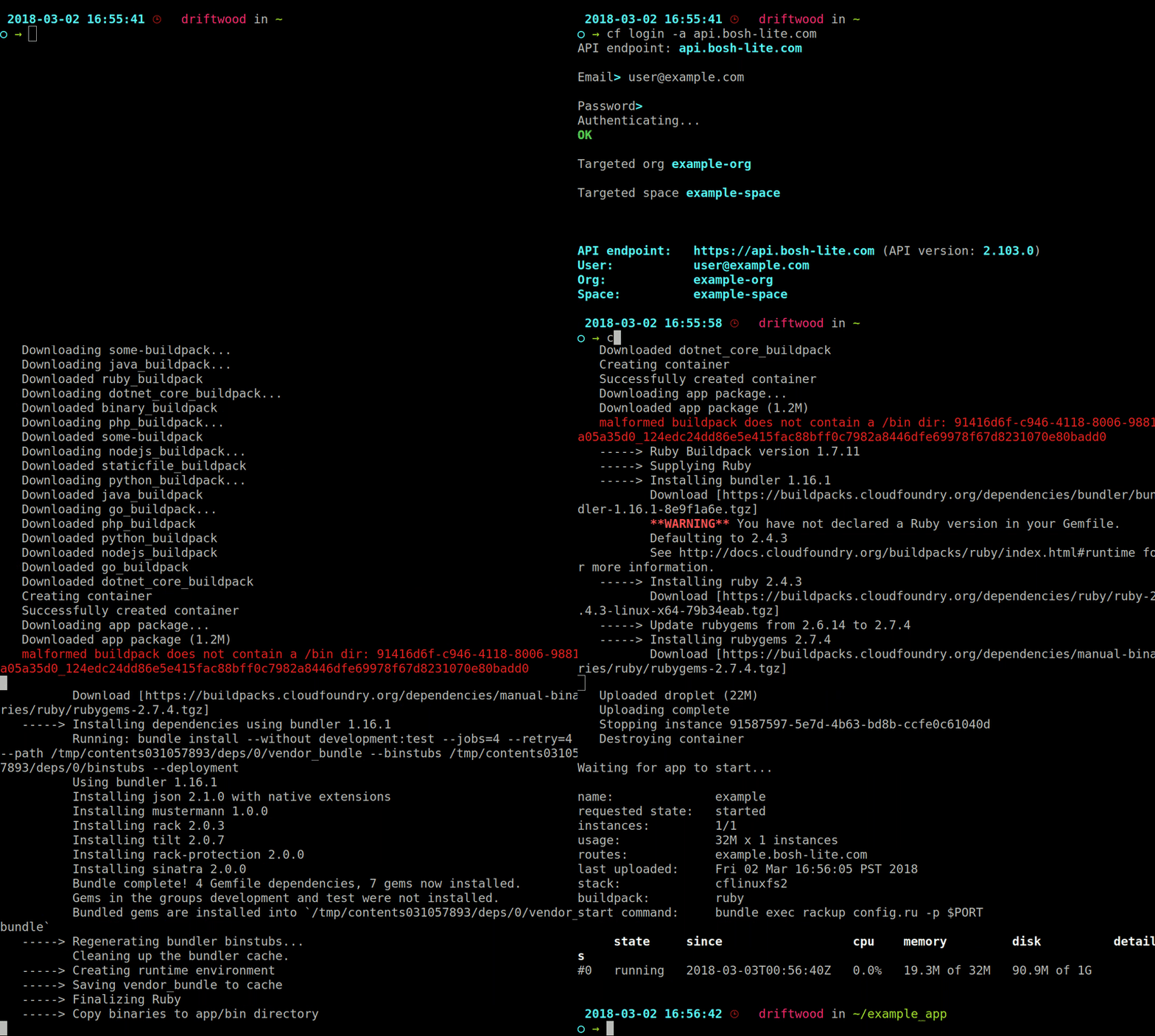
Check out our [community contributed CLI plugins](https://plugins.cloudfoundry.org) to further enhance your CLI experience.
## Downloads
### Installing using a package manager
**Mac OS X** and **Linux** using [Homebrew](https://brew.sh/) via the [cloudfoundry tap](https://github.com/cloudfoundry/homebrew-tap):
```sh
brew install cloudfoundry/tap/cf-cli
```
**Note:** `cf` tab completion requires `bash-completion` to be installed properly in order to work.
**Debian** and **Ubuntu** based Linux distributions:
```sh
# ...first add the Cloud Foundry Foundation public key and package repository to your system
wget -q -O - https://packages.cloudfoundry.org/debian/cli.cloudfoundry.org.key | sudo apt-key add -
echo "deb https://packages.cloudfoundry.org/debian stable main" | sudo tee /etc/apt/sources.list.d/cloudfoundry-cli.list
# ...then, update your local package index, then finally install the cf CLI
sudo apt-get update
sudo apt-get install cf-cli
```
**Enterprise Linux** and **Fedora** systems (RHEL6/CentOS6 and up):
```sh
# ...first configure the Cloud Foundry Foundation package repository
sudo wget -O /etc/yum.repos.d/cloudfoundry-cli.repo https://packages.cloudfoundry.org/fedora/cloudfoundry-cli.repo
# ...then, install the cf CLI (which will also download and add the public key to your system)
sudo yum install cf-cli
```
### Installers and compressed binaries
| | Mac OS X 64 bit | Windows 64 bit | Linux 64 bit |
| :---------------: | :---------------: |:---------------:| :------------:|
| Installers | [pkg](https://packages.cloudfoundry.org/stable?release=macosx64&source=github) | [zip](https://packages.cloudfoundry.org/stable?release=windows64&source=github) | [rpm](https://packages.cloudfoundry.org/stable?release=redhat64&source=github) / [deb](https://packages.cloudfoundry.org/stable?release=debian64&source=github) |
| Binaries | [tgz](https://packages.cloudfoundry.org/stable?release=macosx64-binary&source=github) | [zip](https://packages.cloudfoundry.org/stable?release=windows64-exe&source=github) | [tgz](https://packages.cloudfoundry.org/stable?release=linux64-binary&source=github) |
Release notes, and 32 bit releases can be found [here](https://github.com/cloudfoundry/cli/releases).
**Download examples** with curl for Mac OS X and Linux binaries
```sh
# ...download & extract Mac OS X binary
curl -L "https://packages.cloudfoundry.org/stable?release=macosx64-binary&source=github" | tar -zx
# ...or Linux 64-bit binary
curl -L "https://packages.cloudfoundry.org/stable?release=linux64-binary&source=github" | tar -zx
# ...move it to /usr/local/bin or a location you know is in your $PATH
mv cf /usr/local/bin
# ...copy tab completion file on Ubuntu (takes affect after re-opening your shell)
sudo curl -o /usr/share/bash-completion/completions/cf https://raw.githubusercontent.com/cloudfoundry/cli/master/ci/installers/completion/cf
# ...and to confirm your cf CLI version
cf --version
```
#### Edge binaries
Edge binaries are *not intended for wider use*; they're for developers to test new features and fixes as they are 'pushed' and passed through the CI.
Follow these download links for [Mac OS X 64 bit](https://packages.cloudfoundry.org/edge?arch=macosx64&source=github), [Windows 64 bit](https://packages.cloudfoundry.org/edge?arch=windows64&source=github) and [Linux 64 bit](https://packages.cloudfoundry.org/edge?arch=linux64&source=github).
## Known Issues
* In Cygwin and Git Bash on Windows, interactive password prompts (in `cf login`) do not work ([issue #171](https://github.com/cloudfoundry/cli/issues/171)). Please use alternative commands (`cf api` and `cf auth` to `cf login`) to work around this.
* On Windows, `cf ssh` may not display correctly if the `TERM` is not set. We've found that setting `TERM` to `msys` fixes some of these issues.
* On Windows, `cf ssh` will hang when run from the MINGW32 or MINGW64 shell. A workaround is to use PowerShell instead.
* CF CLI/GoLang do not use OpenSSL. Custom/Self Signed Certificates need to be [installed in specific locations](https://docs.cloudfoundry.org/cf-cli/self-signed.html) in order to `login`/`auth` without `--skip-ssl-validation`.
* API tracing to terminal (using `CF_TRACE=true`, `-v` option or `cf config --trace`) doesn't work well with some CLI plugin commands. Trace to file works fine. On Linux, `CF_TRACE=/dev/stdout` works too. See [this Diego-Enabler plugin issue](https://github.com/cloudfoundry-attic/Diego-Enabler/issues/6) for more information.
* .cfignore used in `cf push` must be in UTF-8 encoding for CLI to interpret correctly.
* On Linux, when encountering message "bash: .cf: No such file or directory", ensure that you're using the [correct binary or installer for your architecture](https://askubuntu.com/questions/133389/no-such-file-or-directory-but-the-file-exists).
* Using non-refactored commands with verbose mode turned on will display the refresh token in the terminal.
## Filing Issues & Feature Requests
First, update to the [latest cli](https://github.com/cloudfoundry/cli/releases)
and try the command again.
If the error remains or feature still missing, check the [open issues](https://github.com/cloudfoundry/cli/issues) and if not already raised please file a new issue with the requested details.
## Plugin Development
The CF CLI supports external code execution via the plugins API. For more
information follow:
* [The CF CLI plugin development guide](https://github.com/cloudfoundry/cli/tree/master/plugin/plugin_examples)
* [The official plugins repository](https://plugins.cloudfoundry.org/)
When importing the plugin code use `import "code.cloudfoundry.org/cli/plugin"`.
Older plugins that import `github.com/cloudfoundry/cli/plugin` will still work
as long they vendor the plugins directory.
## Contributing & Build Instructions
Please read the [contributors' guide](.github/CONTRIBUTING.md)
If you'd like to submit updated translations, please see the [i18n README](https://github.com/cloudfoundry/cli/blob/master/cf/i18n/README-i18n.md) for instructions on how to submit an update.
# Cloud Foundry CLI
[](https://github.com/cloudfoundry/cli/releases/latest)
[](https://docs.cloudfoundry.org/cf-cli)
[](https://cli.cloudfoundry.org)
[](https://slack.cloudfoundry.org)
[](https://github.com/cloudfoundry/cli/blob/master/LICENSE)
***Cloud Foundry CLI*** is the official command line client for [Cloud Foundry](https://cloudfoundry.org).
Latest help of each command is [here](https://cli.cloudfoundry.org) (or run `cf help`);
Further documentation is at the [docs page for the
CLI](https://docs.cloudfoundry.org/cf-cli).
**Important Note**: CF CLI supports as far back as CF Release v284/CF Deployment v1.7.0 (CAPI Release: 1.46.0 (APIs 2.100.0 and 3.35.0). See our [wiki](https://github.com/cloudfoundry/cli/wiki/Versioning-Policy#cf-cli-minimum-supported-version) for more information. If you are on an older version of CF Release, we recommend you upgrade to a supported version.
If you have any questions, ask away on the #cli channel in [our Slack
community](https://slack.cloudfoundry.org/) and the
[cf-dev](https://lists.cloudfoundry.org/archives/list/cf-dev@lists.cloudfoundry.org/)
mailing list, or [open a GitHub issue](https://github.com/cloudfoundry/cli/issues/new). You can follow our development progress
on [Pivotal Tracker](https://www.pivotaltracker.com/n/projects/892938).
## Getting Started
Download and install the cf CLI from the [Downloads Section](#downloads).
Once installed, you can log in and push an app.

Check out our [community contributed CLI plugins](https://plugins.cloudfoundry.org) to further enhance your CLI experience.
## Downloads
### Installing using a package manager
**Mac OS X** and **Linux** using [Homebrew](https://brew.sh/) via the [cloudfoundry tap](https://github.com/cloudfoundry/homebrew-tap):
```sh
brew install cloudfoundry/tap/cf-cli
```
**Note:** `cf` tab completion requires `bash-completion` to be installed properly in order to work.
**Debian** and **Ubuntu** based Linux distributions:
```sh
# ...first add the Cloud Foundry Foundation public key and package repository to your system
wget -q -O - https://packages.cloudfoundry.org/debian/cli.cloudfoundry.org.key | sudo apt-key add -
echo "deb https://packages.cloudfoundry.org/debian stable main" | sudo tee /etc/apt/sources.list.d/cloudfoundry-cli.list
# ...then, update your local package index, then finally install the cf CLI
sudo apt-get update
sudo apt-get install cf-cli
```
**Enterprise Linux** and **Fedora** systems (RHEL6/CentOS6 and up):
```sh
# ...first configure the Cloud Foundry Foundation package repository
sudo wget -O /etc/yum.repos.d/cloudfoundry-cli.repo https://packages.cloudfoundry.org/fedora/cloudfoundry-cli.repo
# ...then, install the cf CLI (which will also download and add the public key to your system)
sudo yum install cf-cli
```
### Installers and compressed binaries
| | Mac OS X 64 bit | Windows 64 bit | Linux 64 bit |
| :---------------: | :---------------: |:---------------:| :------------:|
| Installers | [pkg](https://packages.cloudfoundry.org/stable?release=macosx64&source=github) | [zip](https://packages.cloudfoundry.org/stable?release=windows64&source=github) | [rpm](https://packages.cloudfoundry.org/stable?release=redhat64&source=github) / [deb](https://packages.cloudfoundry.org/stable?release=debian64&source=github) |
| Binaries | [tgz](https://packages.cloudfoundry.org/stable?release=macosx64-binary&source=github) | [zip](https://packages.cloudfoundry.org/stable?release=windows64-exe&source=github) | [tgz](https://packages.cloudfoundry.org/stable?release=linux64-binary&source=github) |
Release notes, and 32 bit releases can be found [here](https://github.com/cloudfoundry/cli/releases).
**Download examples** with curl for Mac OS X and Linux binaries
```sh
# ...download & extract Mac OS X binary
curl -L "https://packages.cloudfoundry.org/stable?release=macosx64-binary&source=github" | tar -zx
# ...or Linux 64-bit binary
curl -L "https://packages.cloudfoundry.org/stable?release=linux64-binary&source=github" | tar -zx
# ...move it to /usr/local/bin or a location you know is in your $PATH
mv cf /usr/local/bin
# ...copy tab completion file on Ubuntu (takes affect after re-opening your shell)
sudo curl -o /usr/share/bash-completion/completions/cf https://raw.githubusercontent.com/cloudfoundry/cli/master/ci/installers/completion/cf
# ...and to confirm your cf CLI version
cf --version
```
#### Edge binaries
Edge binaries are *not intended for wider use*; they're for developers to test new features and fixes as they are 'pushed' and passed through the CI.
Follow these download links for [Mac OS X 64 bit](https://packages.cloudfoundry.org/edge?arch=macosx64&source=github), [Windows 64 bit](https://packages.cloudfoundry.org/edge?arch=windows64&source=github) and [Linux 64 bit](https://packages.cloudfoundry.org/edge?arch=linux64&source=github).
## Known Issues
* In Cygwin and Git Bash on Windows, interactive password prompts (in `cf login`) do not work ([issue #171](https://github.com/cloudfoundry/cli/issues/171)). Please use alternative commands (`cf api` and `cf auth` to `cf login`) to work around this.
* On Windows, `cf ssh` may not display correctly if the `TERM` is not set. We've found that setting `TERM` to `msys` fixes some of these issues.
* On Windows, `cf ssh` will hang when run from the MINGW32 or MINGW64 shell. A workaround is to use PowerShell instead.
* CF CLI/GoLang do not use OpenSSL. Custom/Self Signed Certificates need to be [installed in specific locations](https://docs.cloudfoundry.org/cf-cli/self-signed.html) in order to `login`/`auth` without `--skip-ssl-validation`.
* API tracing to terminal (using `CF_TRACE=true`, `-v` option or `cf config --trace`) doesn't work well with some CLI plugin commands. Trace to file works fine. On Linux, `CF_TRACE=/dev/stdout` works too. See [this Diego-Enabler plugin issue](https://github.com/cloudfoundry-attic/Diego-Enabler/issues/6) for more information.
* .cfignore used in `cf push` must be in UTF-8 encoding for CLI to interpret correctly.
* On Linux, when encountering message "bash: .cf: No such file or directory", ensure that you're using the [correct binary or installer for your architecture](https://askubuntu.com/questions/133389/no-such-file-or-directory-but-the-file-exists).
* Using non-refactored commands with verbose mode turned on will display the refresh token in the terminal.
## Filing Issues & Feature Requests
First, update to the [latest cli](https://github.com/cloudfoundry/cli/releases)
and try the command again.
If the error remains or feature still missing, check the [open issues](https://github.com/cloudfoundry/cli/issues) and if not already raised please file a new issue with the requested details.
## Plugin Development
The CF CLI supports external code execution via the plugins API. For more
information follow:
* [The CF CLI plugin development guide](https://github.com/cloudfoundry/cli/tree/master/plugin/plugin_examples)
* [The official plugins repository](https://plugins.cloudfoundry.org/)
When importing the plugin code use `import "code.cloudfoundry.org/cli/plugin"`.
Older plugins that import `github.com/cloudfoundry/cli/plugin` will still work
as long they vendor the plugins directory.
## Contributing & Build Instructions
Please read the [contributors' guide](.github/CONTRIBUTING.md)
If you'd like to submit updated translations, please see the [i18n README](https://github.com/cloudfoundry/cli/blob/master/cf/i18n/README-i18n.md) for instructions on how to submit an update.