# Astribot Simulation
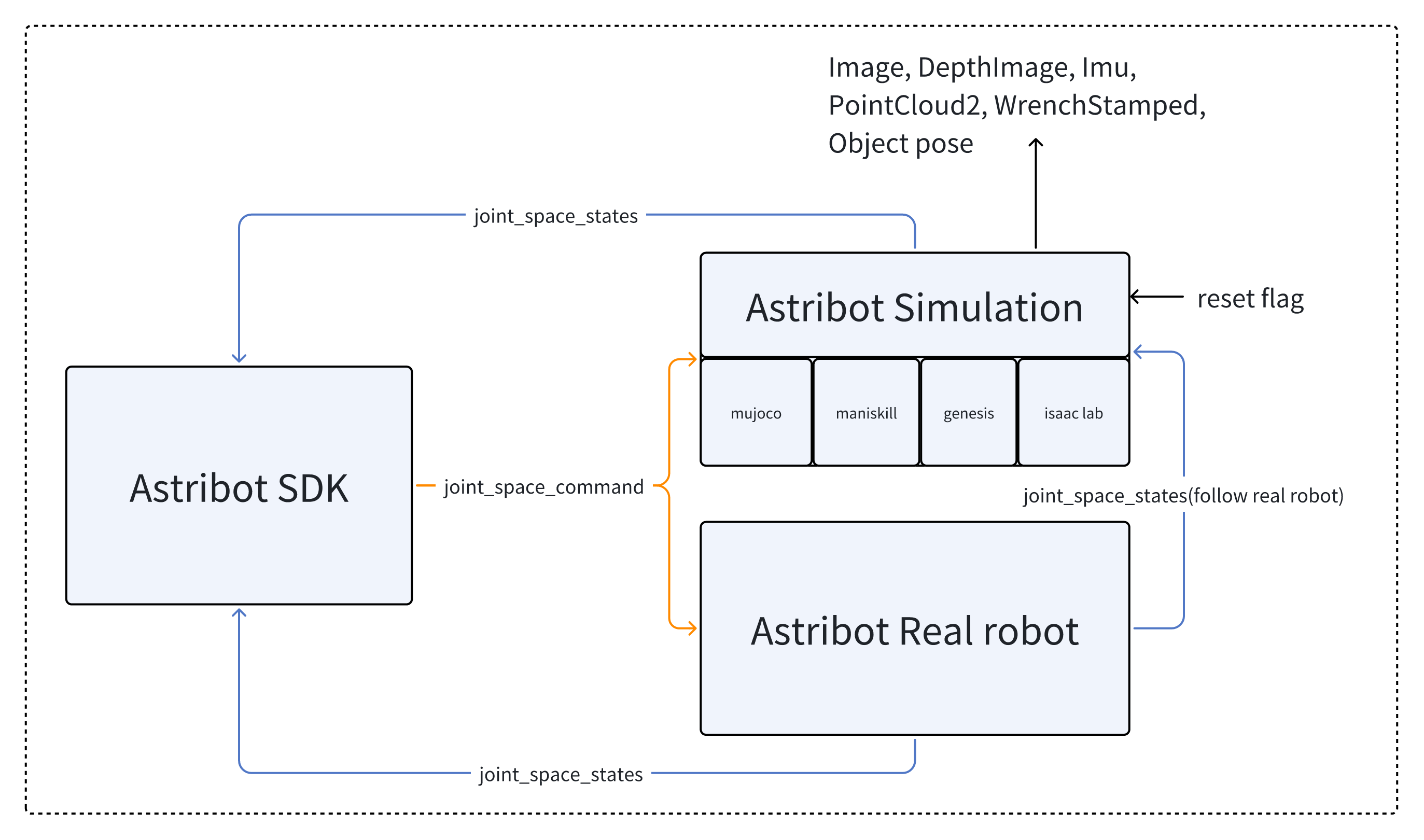
**A unified robot simulation platform** built on top of **MuJoCo**, **Genesis**, **ManiSkill** and **Isaac Lab**.
This project provides a common abstraction layer so that you can run your robot across different simulators with a consistent API.
It is designed as a **research tool** for users of Astribot.
---
## Demo
|
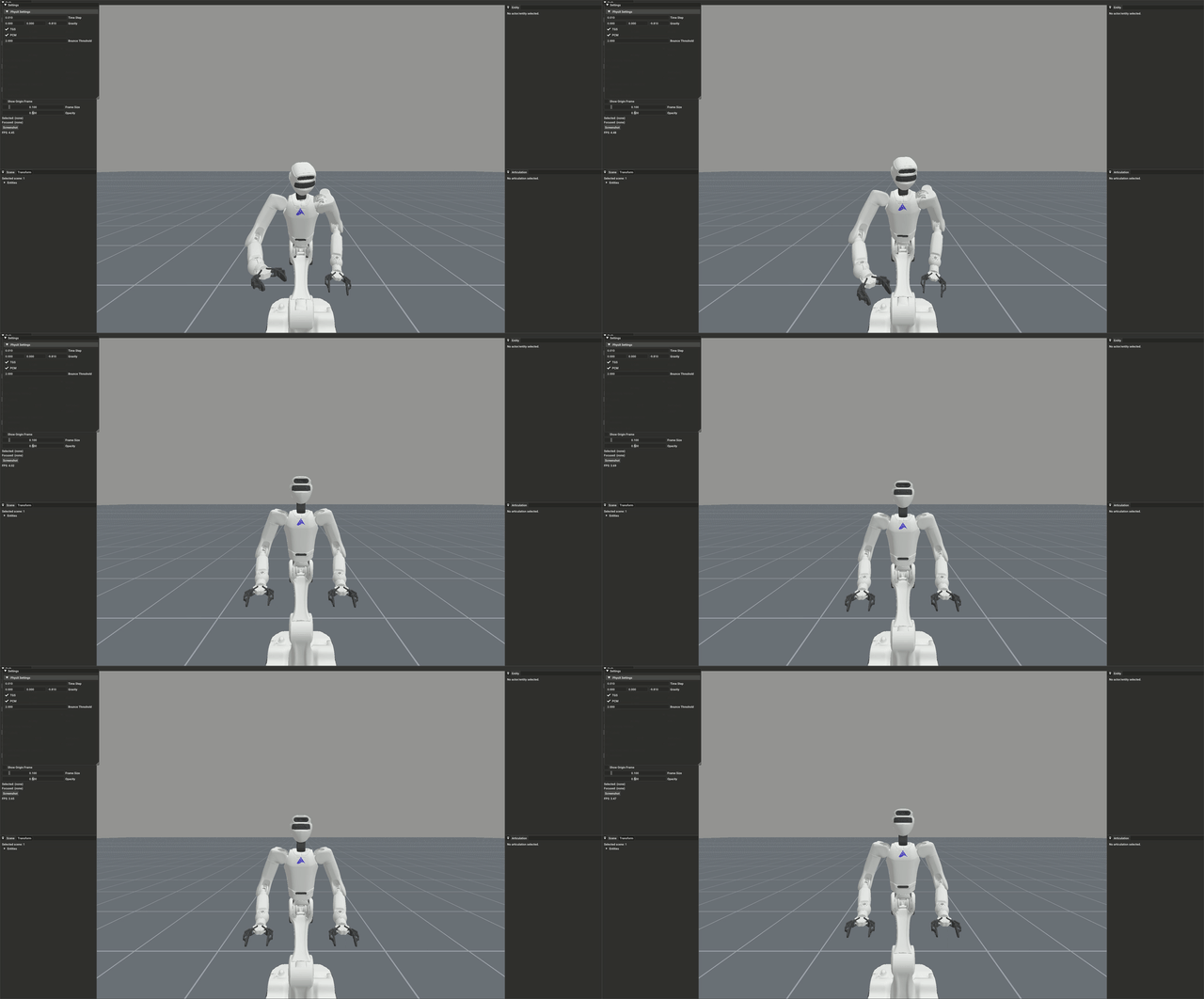
ManiSkill Environment
|
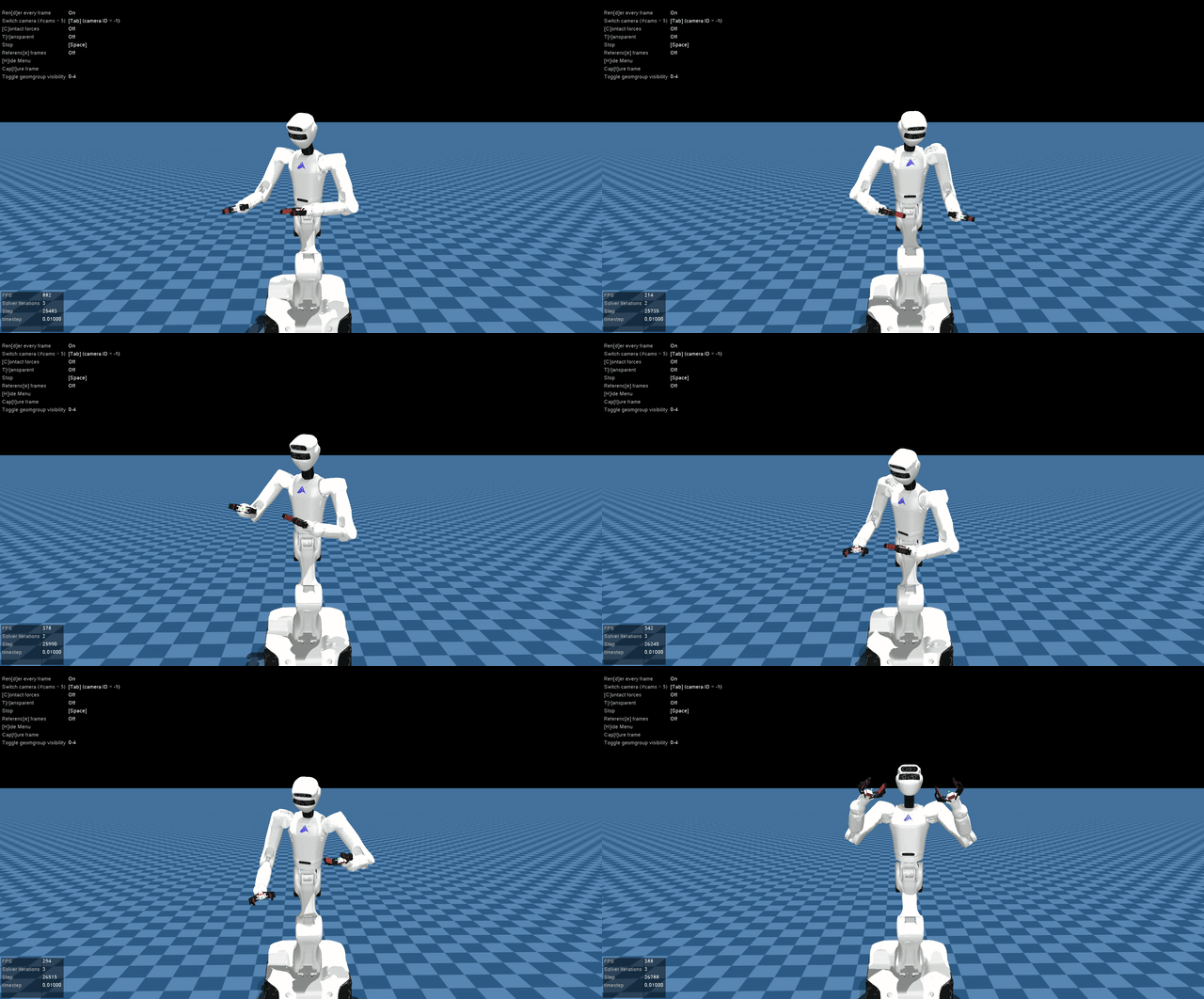
MuJoCo Simulation
|
---
## Features
- **Multi-backend environments**: Switch between **MuJoCo**, **Genesis**, **ManiSkill**, and **NVIDIA Isaac Lab** with one line of code.
- **ROS & ROS2 Integration**: Comprehensive support for both ROS1 and ROS2 interfaces to bridge simulation and real robots.
- **Plug-and-play robot models**: Full support for **URDF**, **MJCF** and **USD** formats.
- **Config-driven setup**: Easily manage each simulator and robot variant via structured **YAML** configurations.
- **Research-friendly utilities**: Includes logging, common analysis tools, and a unified environment factory.
---
## Project Structure
```
astribot_simulation/
├── astribot_simulation.py # Main entry point
├── env.sh # Environment setup (sources ROS, sets ASTRIBOT_SIMU_ROOT)
├── pyproject.toml # Project metadata & version
├── requirements.txt # Python dependencies
│
├── src/ # Source code (src layout)
│ ├── version.py # Version string
│ ├── exceptions.py # Custom exceptions
│ │
│ ├── astribot_envs/ # Environment wrappers for each simulator
│ │ ├── astribot_base_env.py # Abstract base (extends gym.Env)
│ │ ├── astribot_mujoco_env.py # MuJoCo backend
│ │ ├── astribot_genesis_env.py # Genesis backend
│ │ ├── astribot_maniskill_env.py # ManiSkill backend
│ │ ├── astribot_isaaclab_env.py # Isaac Lab backend
│ │ └── astribot_envs_factory.py # Factory: loads YAML, creates gym env
│ │
│ ├── simu_utils/ # Utility modules
│ │ ├── simu_common_tools.py # Pose math, point cloud, logging
│ │ ├── robot_ros_interface.py # ROS1/ROS2 publishers & subscribers
│ │ └── chassis_kinematics.py # Omni-wheel kinematics
│ │
│ └── sim_assets_tools/ # Mesh & texture processing tools
│ ├── stl_to_dae.py, obj_to_dae.py, glb_to_dae.py
│ ├── add_logo_to_texture.py, add_logo_to_dae.py
│ ├── process_mujoco_xml.py, reduce_faces.py
│ └── lib/ # Shared helpers for asset tools
│
├── config/ # YAML configs for different robots & simulators
│ ├── astribot_s0/
│ ├── astribot_s1/
│ └── astribot_t1/
│
├── astribot_descriptions/ # Robot model files
│ ├── mjcf/ # MuJoCo XML models (s0, s1, t1, worldbody)
│ ├── urdf/ # URDF/SDF models (s0, s1, t1)
│ └── usd/ # USD models (s1, for Isaac Lab)
│
├── astribot_msgs/ # Custom ROS message/service/action definitions
│ ├── msg/ # 22 message types
│ ├── srv/ # 6 service types
│ ├── action/ # 1 action type
│ ├── CMakeLists_ros1.txt / CMakeLists_ros2.txt
│ └── package_ros1.xml / package_ros2.xml
│
├── scripts/ # Setup & build scripts
│ ├── install.sh # Full environment setup
│ ├── build.sh # Build astribot_msgs
│ ├── depends/ # Miniconda installer
│ ├── lite_install/ # MuJoCo-only installers
│ └── bugfix/ # GLIBCXX / LIBFFI patches
│
├── tests/ # Test suite
│ ├── unit/
│ └── integration/
│
└── docs/ # Images and diagrams
```
---
## Installation
You can install the simulation either inside a Docker container or directly on your host machine.
### Option 1: Docker Installation
```bash
# Enter the Ubuntu 22.04 Docker container
docker exec -it /bin/bash
# Clone the repository
git clone https://github.com/Astribot-Dev/astribot_simulation.git
# Navigate to the project directory
cd astribot_simulation
# Initialize and update all submodules recursively
git submodule update --init --recursive
# Batch pull LFS objects for all submodules
git submodule foreach git lfs pull
# Install all simulators (MuJoCo, Genesis, ManiSkill, IsaacLab)
bash scripts/install.sh
```
### Option 2: Host Machine Installation
```bash
# Clone the repository
git clone https://github.com/Astribot-Dev/astribot_simulation.git
# Navigate to the project directory
cd astribot_simulation
# Initialize and update all submodules recursively
git submodule update --init --recursive
# Batch pull LFS objects for all submodules
git submodule foreach git lfs pull
# (ROS1 only) Install Miniconda (Ubuntu 20.04)
bash scripts/depends/Miniconda3-py38_4.9.2-Linux-x86_64.sh
# Install dependencies
# Choose one of the following:
# Install only MuJoCo simulator
bash scripts/lite_install/install_mujoco.sh
# OR install all simulators (MuJoCo, Genesis, ManiSkill, IsaacLab)
bash scripts/install.sh
```
---
## Quick Start
### Launch Astribot Simulation:
```bash
# (ROS1 only) activate conda env
conda activate astribot_simu
# run simulation
source env.sh && python3 astribot_simulation.py
```
If you want to reset the robot state, press Backspace while the simulation is running.
### Switch to Other Simulators
To switch simulators or robot setups, modify the YAML file path in `astribot_simulation.py` (line 16):
```python
from src.astribot_envs.astribot_envs_factory import AstribotEnvsFactory
def main(robot_type):
# Load param from yaml, create a simulation env using the Factory Pattern
astribot_yaml_file = f'config/astribot_s1/simulation_mujoco_param.yaml'
astribot_envs_factory = AstribotEnvsFactory()
astribot_data = AstribotEnvsFactory.load_yaml_file(astribot_yaml_file)
astribot_simulation_thread = astribot_envs_factory.create_simulation_env(astribot_data)
```
---
## Architecture
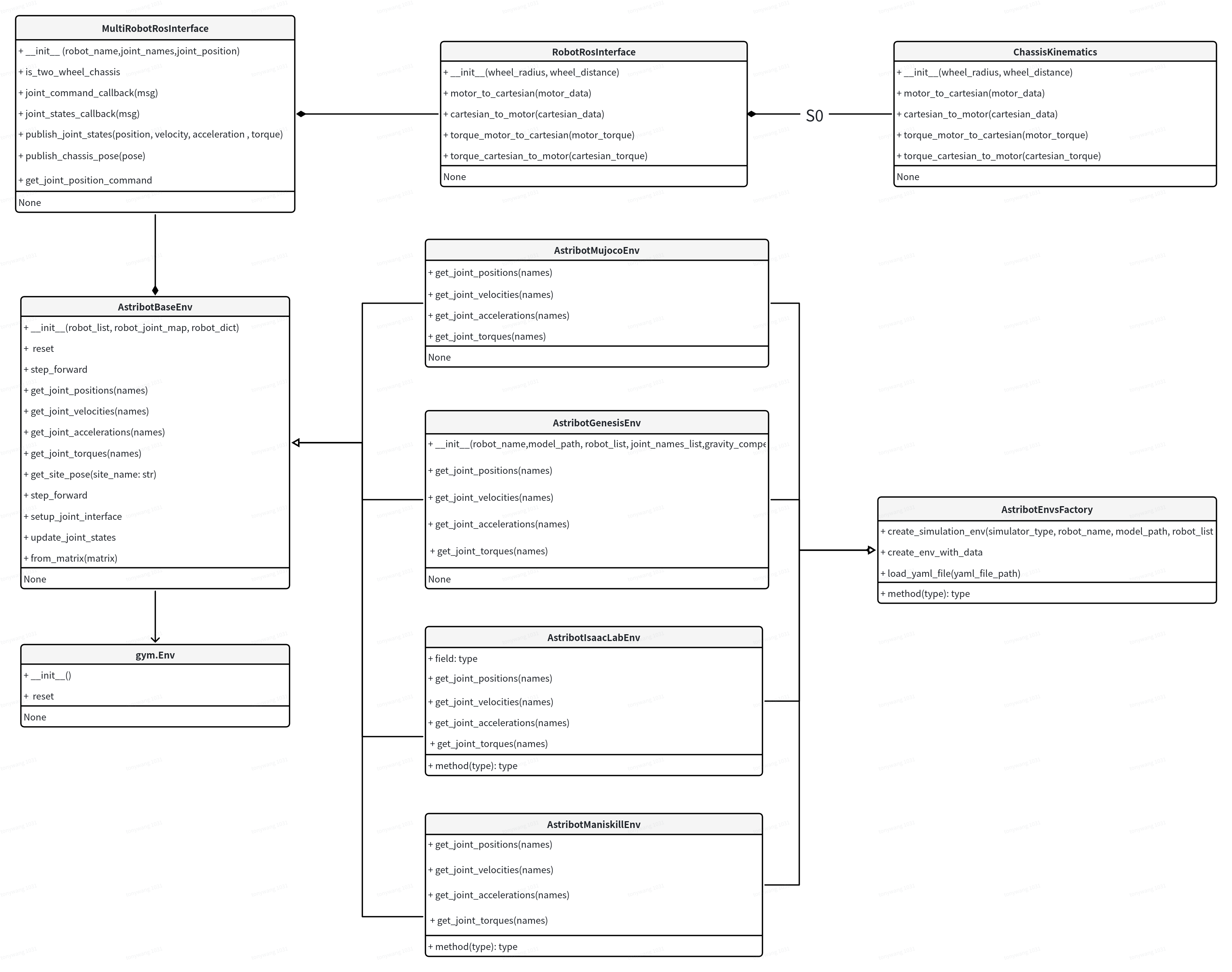
To achieve high modularity and support multiple simulation backends, `astribot_simulation` is designed with a factory-pattern architecture.
### Class Diagram
### Design Highlights
* **Unified API**: All simulation environments (MuJoCo, Genesis, Isaac Lab, ManiSkill) inherit from `AstribotBaseEnv`, which is compatible with `gym.Env`.
* **Factory Pattern**: Users can switch between different simulators by simply changing the `simulator_type` in the configuration via `AstribotEnvsFactory`.
* **Sim-to-Real Bridge**: The `MultiRobotRosInterface` ensures that the internal simulation states are perfectly aligned with ROS messages, facilitating seamless deployment to real hardware.
---
## YAML Configuration Files
The `config/` folder contains YAML files for each robot variant (`astribot_s0`, `astribot_s1`, `astribot_t1`). Each file defines a combination of **simulator backend**, **robot variant**, and **hardware configuration**:
| YAML File (under `config/astribot_s1/`) | Description |
|-----------|-------------|
| `simulation_mujoco_param.yaml` | MuJoCo backend with default configuration. |
| `simulation_mujoco_param_chassis_fixed.yaml` | MuJoCo backend with fixed chassis. |
| `simulation_mujoco_param_with_camera.yaml` | MuJoCo backend with three-camera setup. |
| `simulation_mujoco_param_with_hand.yaml` | MuJoCo backend with BrainCo hand. |
| `simulation_genesis_param_chassis_fixed.yaml` | Genesis backend with fixed chassis. |
| `simulation_maniskill_param_chassis_fixed.yaml` | ManiSkill backend with fixed chassis. |
| `simulation_isaaclab_param.yaml` | Isaac Lab backend. |
**Tip:**
To switch simulators or robot setups, modify the `astribot_yaml_file` variable in `astribot_simulation.py` to point to the desired YAML file. No code change is needed beyond this.
---
## System Requirements
- **Operating System:** Ubuntu 20.04 LTS / Ubuntu 22.04 LTS
- **Middleware:** ROS Noetic (for 20.04) / ROS2 Humble (for 22.04)
- **Python Version:** Python == 3.10 (use Conda environment)
| Hardware / Software | Recommended Specifications |
| ------------------ | ----------------------------------- |
| CPU | Intel i5-14600F or higher |
| GPU | NVIDIA RTX 2080 Ti or higher |
| GPU Driver | NVIDIA driver >= 535 |
| CUDA | CUDA >= 12.0 |
| Python | Python == 3.10 (Conda recommended) |
> **Note:** For GPU-accelerated simulation, ensure the above hardware and driver requirements are met.
---
## Joint Space Command
If you want to directly control the joints, note: The robot exposes joint-space command topic (e.g., `/astribot_arm_left/joint_space_command`) for controlling the arm. The interpretation of the command depends on the control mode:
| Control Mode | Command Dimension | Meaning | Notes |
|--------------|-----------------|--------|-------|
| Position / Velocity Control | 7-14 | Values 7-14:
**First 7 values**: target joint **positions**
**Last 7 values**: target joint **velocities** | Includes **velocity compensation** and **gravity compensation** for smoother motion |
| Force Control | 7 | Each value represents the **torque/force** applied to the corresponding joint | Note: This mode does **not guarantee sim-to-real accuracy**, mainly for simulation purposes |
**Tip:**
If using **Astribot SDK**, you generally do **not** need to worry about these details — refer to the Astribot SDK documentation for more information. When using joint-space commands, ensure the control mode matches the command dimension to avoid unexpected behavior.
---
## Sensors
The robot supports cameras on hands and head. After loading the correct YAML configuration, you can receive image data on the corresponding ROS topics:
- **Raw color image**: `//camera//image_raw`
- **Depth image**: `//camera//depth`
- **Point cloud (in camera frame)**: `//camera//point_cloud`
| Backend | RGB | Depth | Point Cloud | Force/Torque | IMU |
|-------------|-----|-------|-------------|--------------|-----|
| **MuJoCo** | Yes | Yes | Yes | Yes | Yes |
| **ManiSkill** | Yes | No | No | No | No |
| **Genesis** | No | No | No | No | No |
**Tip:**
- To enable sensors in **MuJoCo**, use: `simulation_mujoco_param_with_camera.yaml`
- To enable sensors in **ManiSkill**, use: `simulation_maniskill_param_chassis_fixed.yaml`
---
## Scripts
| Script | Purpose |
|--------|---------|
| `scripts/install.sh` | Full environment setup |
| `scripts/build.sh` | Build `astribot_msgs` for ROS1 or ROS2 |
| `scripts/depends/Miniconda3-py38_4.9.2-Linux-x86_64.sh` | Install Miniconda |
| `scripts/lite_install/install_mujoco.sh` | MuJoCo-only install |
| `scripts/bugfix/fix_GLIBCXX_3.4.30_bug.sh` | Patch for GLIBCXX bug |
| `scripts/bugfix/fix_LIBFFI_BASE_7.0_bug.sh` | Patch for libffi bug |
---
## Documentation
- Environment wrappers: [`src/astribot_envs/`](src/astribot_envs/)
- Config examples: [`config/astribot_s1/`](config/astribot_s1/)
- Utilities: [`src/simu_utils/`](src/simu_utils/)
---
## Contributing
Contributions are welcome!
If you'd like to add support for new simulators or robots, please contact me at [tonywang@astribot.com].
---
## License
[BSD 3-Clause License](LICENSE)
---
## Acknowledgements
Built on top of:
- [MuJoCo](https://mujoco.org/)
- [Genesis](https://genesis-world.readthedocs.io/en/latest/)
- [ManiSkill](https://maniskill.ai/)
- [Isaac Lab](https://developer.nvidia.com/isaac/lab)