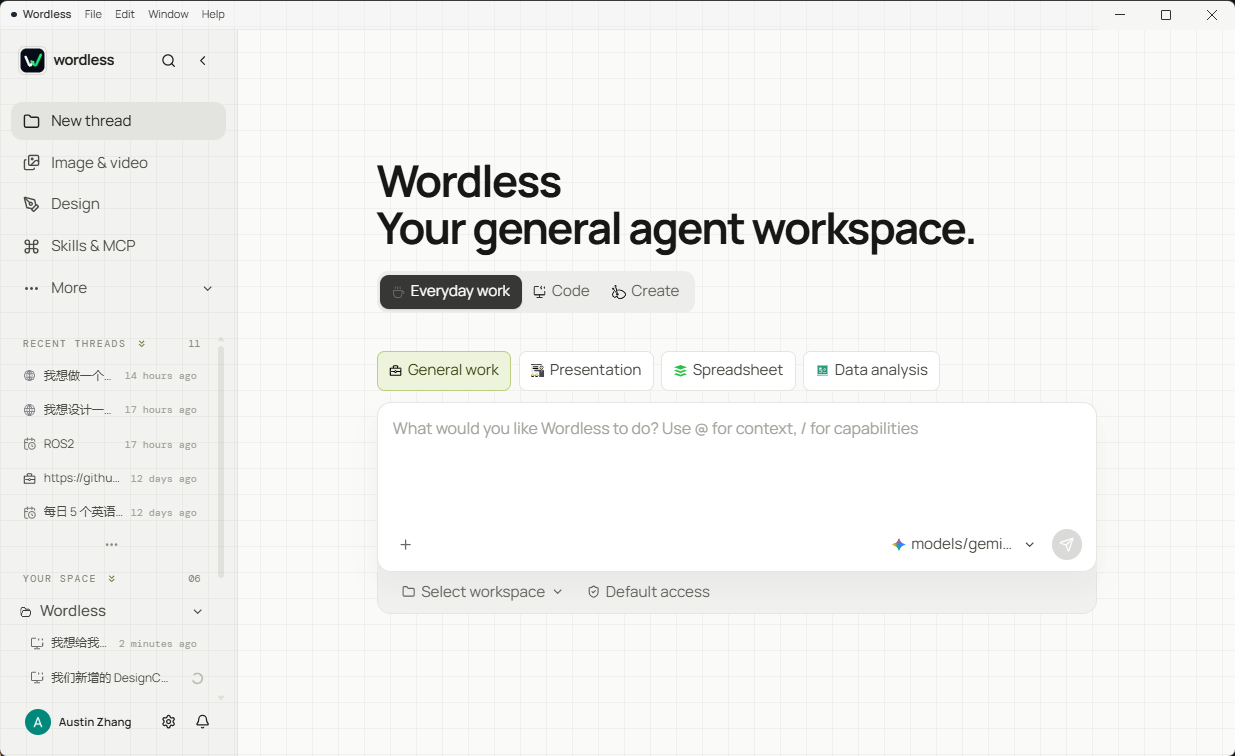
## What is Wordless?
Wordless is not another chat window that only returns text. It is an Agent workbench for macOS and Windows: select a workspace, model, and work mode, then let the Agent read context and invoke tools within explicit permission boundaries. Presentations, spreadsheets, research results, UI designs, generated images, and code changes stay visible in the same interface where the work happens.
Wordless is local-first. Workspaces, conversations, and artifacts remain on your device. Google sign-in and cloud sync are optional, so local work continues when you are signed out or offline. The interface ships in Chinese and English.
## Why we built Wordless
Most AI products are optimized to produce an answer. Real work needs something stricter: understand only the relevant context, take the right action, leave a usable artifact, and verify what happened. Wordless is built around that outcome rather than around a longer conversation.
- **Output before narration**: execution status belongs in the interface. The model should spend its response on decisions, results, and exceptions instead of repeatedly describing progress.
- **Scoped context before bulk ingestion**: `@` references, workbook selections, presentation elements, and work-mode Profiles narrow the input to what the task actually needs.
- **Tokens spent on useful work**: task-specific tools, context compaction, and provider cache accounting are designed to reduce repeated or irrelevant context.
- **End-to-end delivery**: planning, tool execution, artifact creation, inspection, and correction remain in one task instead of stopping at advice.
- **Verification before confidence**: tests, quality scans, sources, diffs, tool results, and interactive previews make the result inspectable.
> [!NOTE]
> "Fewer tokens" is a design objective, not a fixed savings guarantee. Actual usage depends on the model, provider, task, selected context, and number of correction rounds. "Finish the work" means minimizing avoidable handoffs and round trips, not pretending every complex task can be completed correctly in one model turn.
## Why Pi Agent Harness
Wordless uses the MIT-licensed [Pi Agent Harness](https://github.com/earendil-works/pi) as its agent foundation instead of rebuilding a generic model and tool loop. Pi provides the portable primitives; Wordless turns them into scenario-specific desktop workflows.
| Product need | Pi foundation | Wordless adaptation |
| --- | --- | --- |
| Multiple model providers | Unified streaming API and model capability data | Visual provider configuration, reasoning depth, credential storage, and usage display |
| Multi-step execution | Agent loop, structured tool calls, events, and state | Approval checkpoints, risk handling, visible tool states, persistence, and recovery |
| Different kinds of work | Composable tools and a UI-independent core | Profiles, Drivers, Extensions, specialized capabilities, and artifact workbenches |
| Long-running context | Continuable message and Agent state | Session journal, search, context compaction, steering, and follow-up handling |
```text
Task intent
-> Profile
-> Driver + Extensions
-> Pi-derived agent loop
-> Capabilities and workspace policy
-> Interactive artifact surface
```
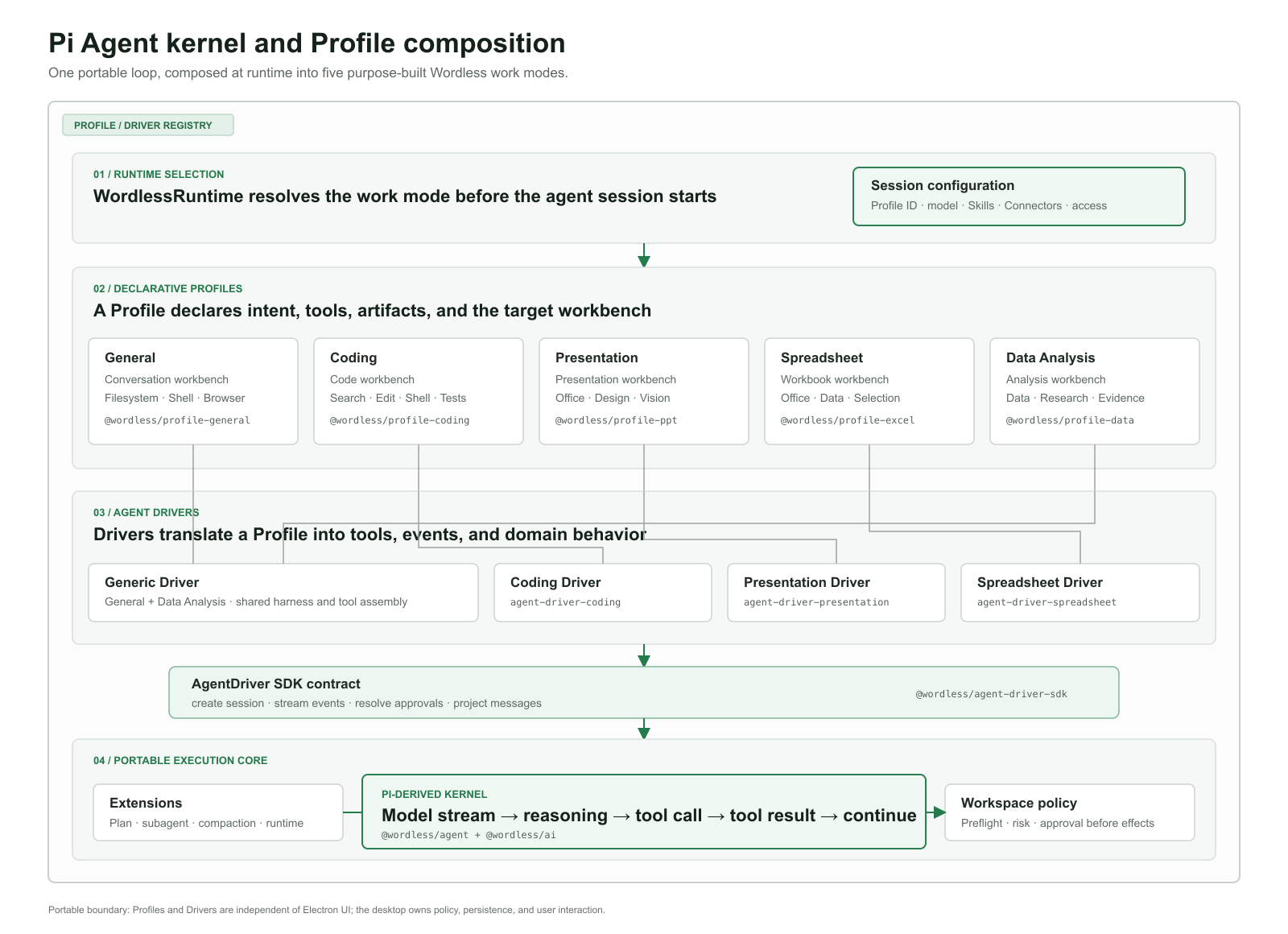
One loop does not mean one generic Agent. Each Profile deliberately changes the context, tools, permission declarations, execution guidance, artifact type, and verification surface:
| Profile | Scenario adaptation |
| --- | --- |
| General | Everyday work, Skills, MCP, and optional workspace tools |
| Coding | Indexed search, file edits, Shell, tests, diffs, and coding policy |
| Presentation | OfficeCLI-backed slide tools, quality scans, and interactive PPTX preview |
| Spreadsheet | Workbook selections, formulas, charts, quality checks, and publishing |
| Data Analysis | Data inspection, confirmed research plans, delegated dimensions, sources, and reports |
This separation keeps Pi replaceable. Provider protocols live behind `@wordless/ai`, the loop and events behind `@wordless/agent`, and concrete runtime integration behind the Driver SDK. Upgrading Pi or introducing another Driver should change adapters and event mapping rather than every Composer, approval, storage, and artifact UI.
## Wordless and Tencent WorkBuddy
Wordless and Tencent WorkBuddy both aim to move beyond chat and deliver real work. They take different product routes. The comparison below is based on Tencent's public [WorkBuddy product page](https://cloud.tencent.com/product/workbuddy) and [official overview](https://www.workbuddy.cn/docs/workbuddy/Overview) available in September 2026; capabilities and commercial plans may change.
| Dimension | Wordless | Tencent WorkBuddy |
| --- | --- | --- |
| Product route | Local-first, source-available Agent platform for users who want to control models, tools, permissions, and extensions | Turnkey commercial workplace Agent for broad business roles and managed adoption |
| Scenario composition | Repository-visible Profiles, Drivers, Extensions, Skills, and MCP integrations, covering documents, data, code, UI design, and images | Domain experts, Skills, project spaces, and multi-Agent collaboration |
| Models and cost | Bring your own provider and API key; usage is billed by the selected provider | Tencent-operated product and quota plans, with model configuration exposed through its product experience |
| Data and execution | Conversations and artifacts stay local by default; workspace policy and explicit approvals gate tool execution | Can operate authorized local folders while account, service, and team boundaries follow the Tencent product |
| Artifact experience | Dedicated in-app surfaces for PPT, spreadsheets, data, code, UI design, and images support selecting an object, range, or frame and continuing from that exact context | Covers broad document, spreadsheet, PPT, research, coding, and creative delivery workflows |
| Collaboration and ecosystem | Currently optimized for individual, local workflows with optional settings sync and developer-controlled extensions | Project spaces, shared experts, Skills, connectors, team reuse, and the Tencent ecosystem |
| Transparency and customization | Source-visible architecture, BYOK models, explicit event and permission boundaries, replaceable adapters | Managed product with a larger ready-made expert and service ecosystem |
Choose WorkBuddy when you want a mature, ready-made office and team ecosystem with managed experts. Choose Wordless when local-first data, BYOK models, explicit approvals, source-visible architecture, and deep workflow customization matter more. This is a difference in product priorities, not a claim that one tool is universally better.
## Core capabilities
- **Workspace context**: use `@` to reference workspace files and folders, `$` to select Skills, and `!` to point at an open task. File indexing respects `.gitignore`.
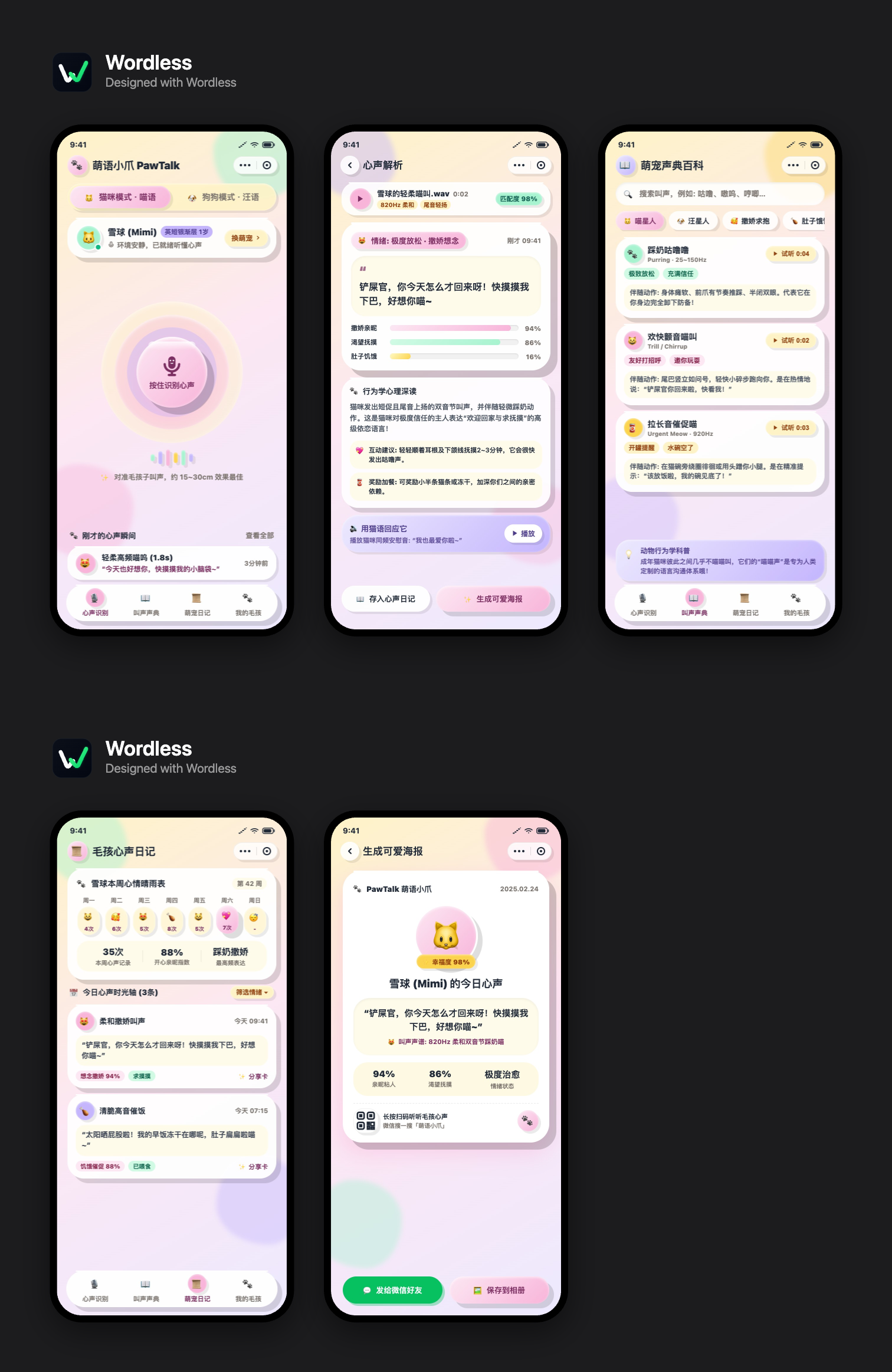
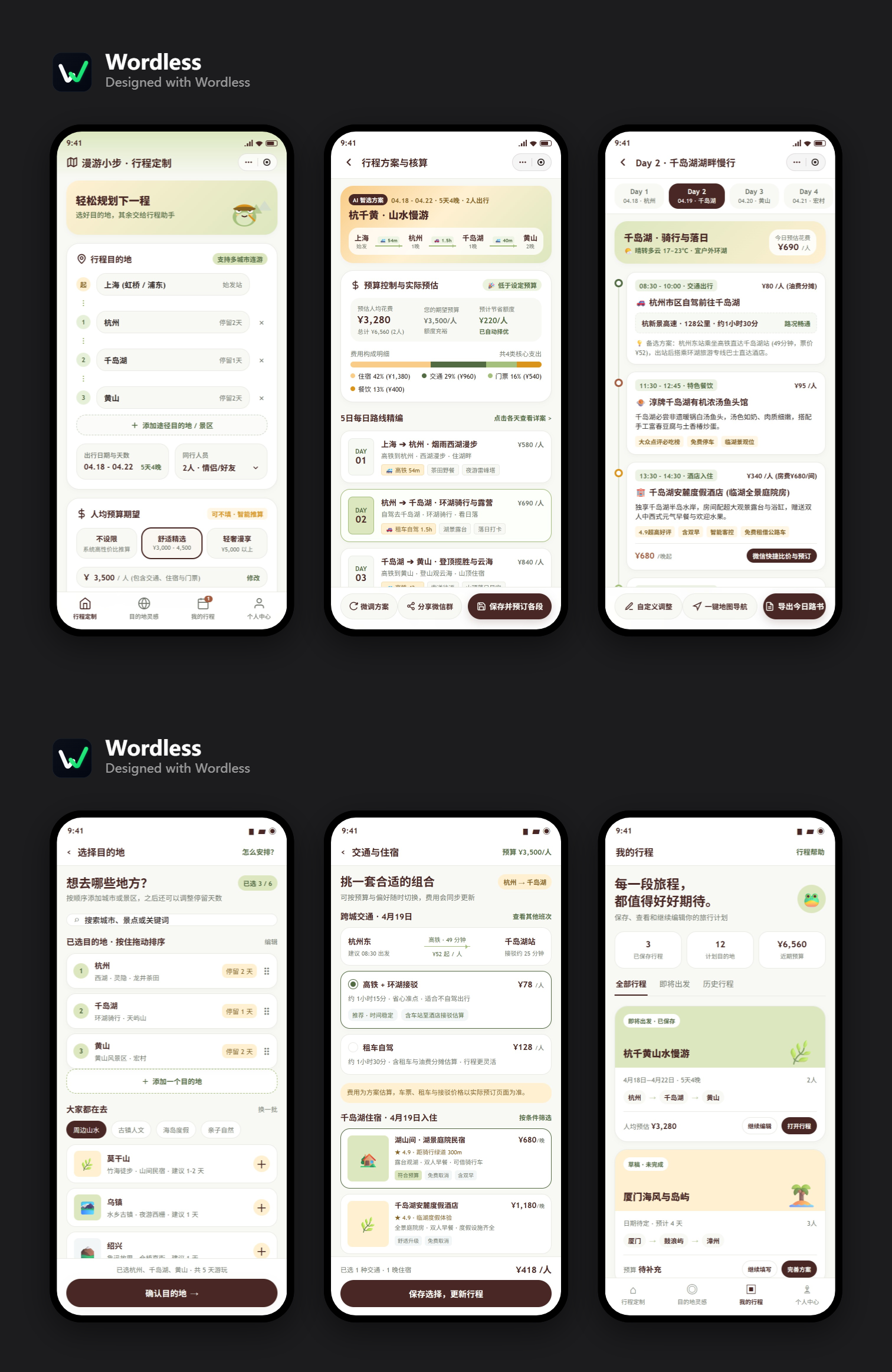
- **UI design**: pick a built-in style or describe the interface from scratch. The Agent writes real HTML frames into an `x.wdesign` package, on a canvas you can zoom, select, align, recolour, and export from.
- **Image generation and editing**: generate images on a canvas, then iterate with variations, cropping, local edits, background removal, and object removal.
- **Text recognition (OCR)**: bundled and offline. When the model cannot see images itself, it can read **printed text** out of a screenshot, a scanned page, or a photo of a document. It is **not a replacement for vision**: layout, colour, chart trends, stamps, and handwriting are out of reach, and the result carries a note saying the text was machine-recognised.
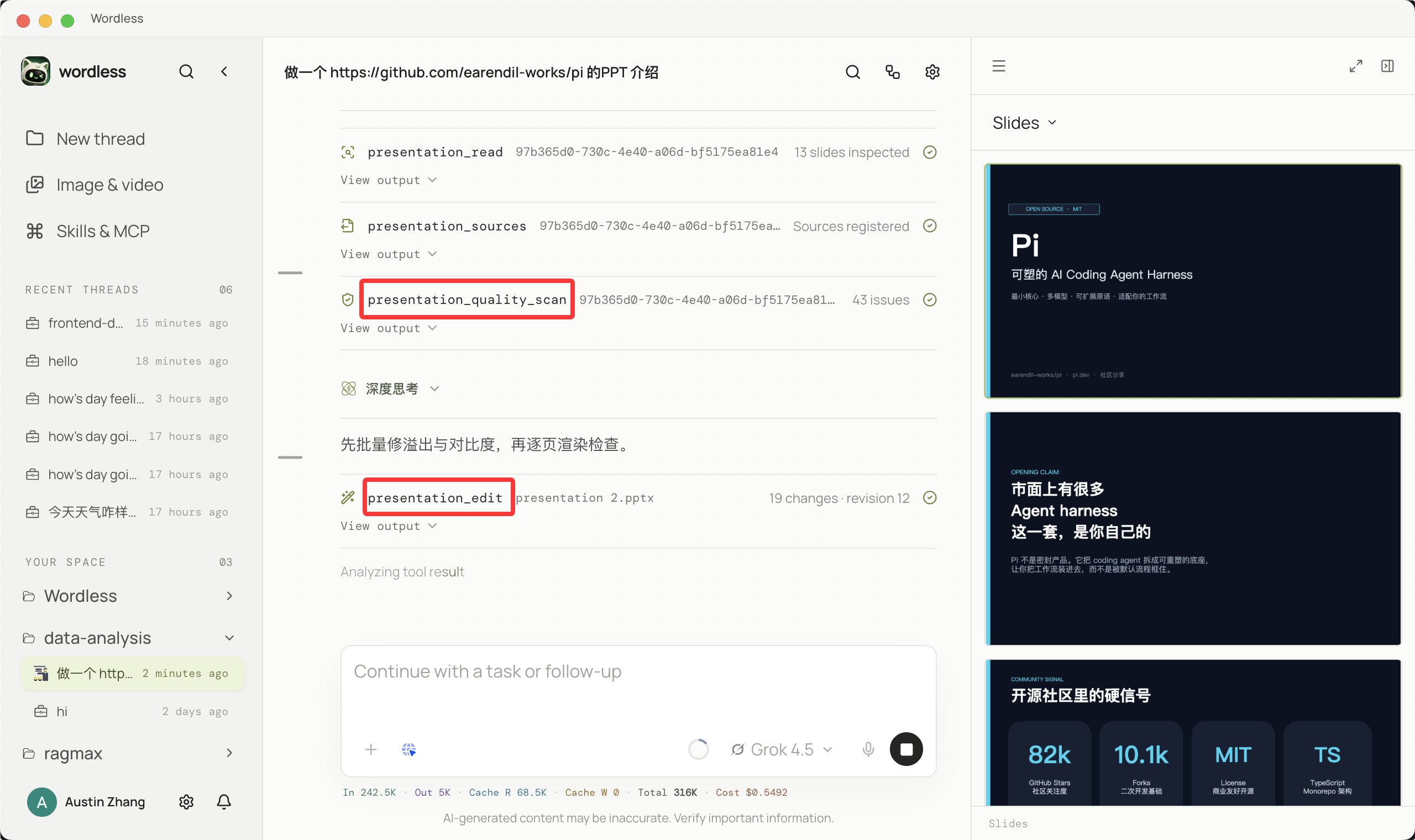
- **Interactive Presentation**: after the Agent creates or edits slides, inspect pages, select elements, and continue iterating in the right workspace instead of downloading a one-off file.
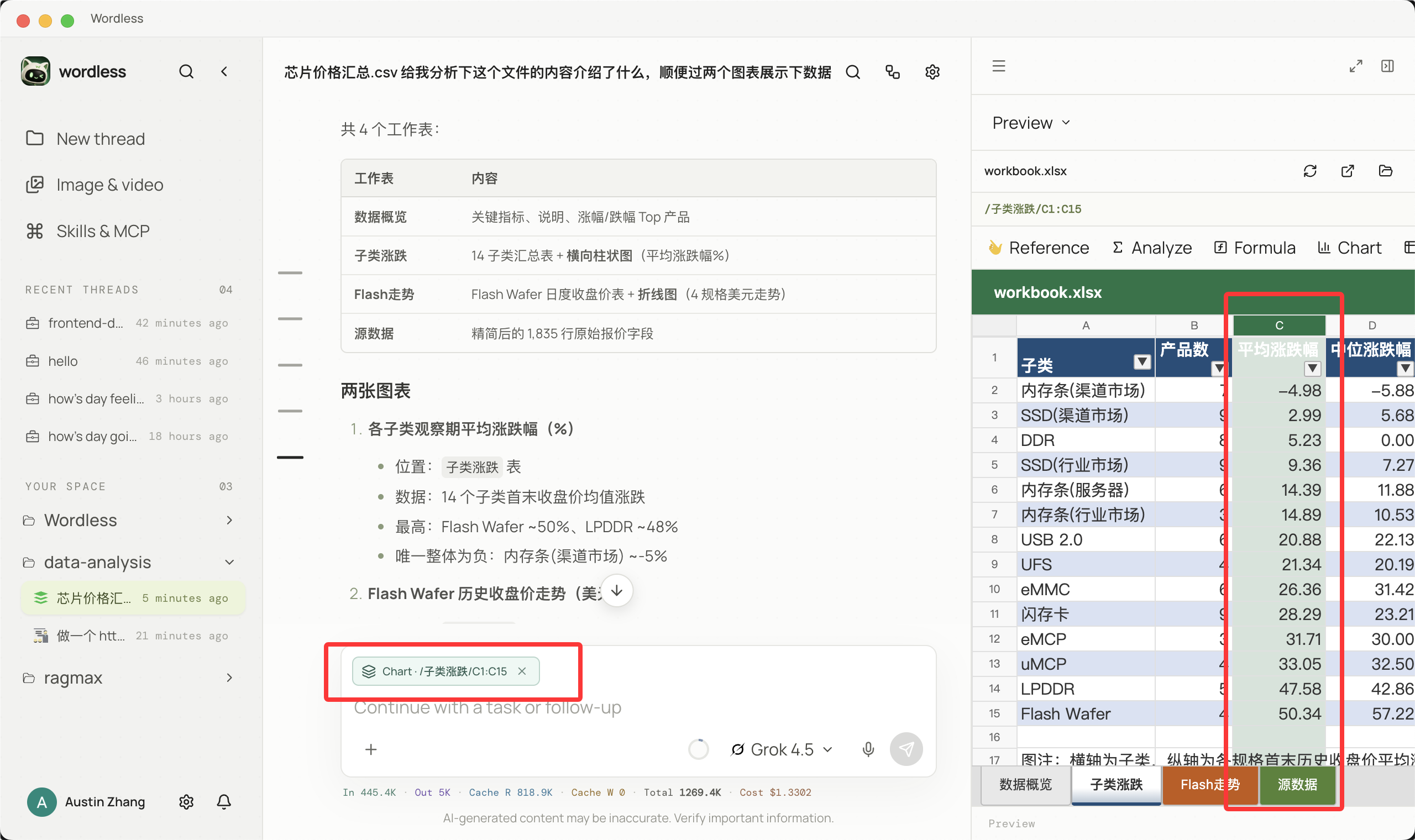
- **Interactive Spreadsheet**: inspect cells, charts, and changes directly. Continue from the current selection and verify updates immediately.
- **Data Analysis and deep research**: divide research into dimensions, delegate work in parallel, follow progress, and return reports and charts to the workspace.
- **Coding workflow**: combine planning, file search, Shell, diffs, and test results into reviewable code changes.
- **Tasks and automation**: keep work as trackable tasks with owners, status, and a timeline, and schedule prompts to run on a recurring trigger.
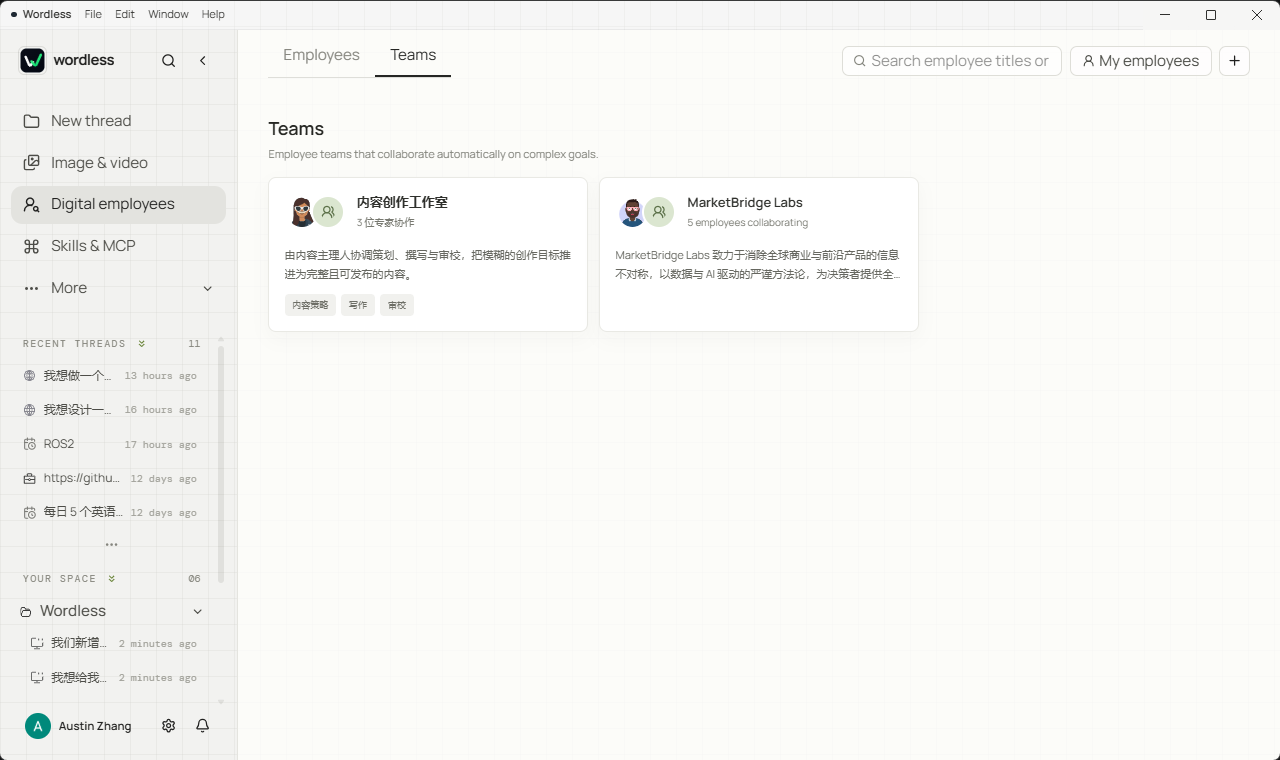
- **Digital employees**: turn a working method into a reusable role, group roles into a team, and delegate parts of a task to them.
- **Controlled tool execution**: tool calls require manual approval by default. Session auto-approval is available, a documented bypass mode exists for work you have already sandboxed, and high-risk actions return to explicit review. One-time access outside the workspace is also supported.
- **Models and reasoning depth**: configure built-in and OpenAI-compatible providers, including sign-in with a supported subscription where the provider offers one, plus Base URLs, model capabilities, context limits, and reasoning levels.
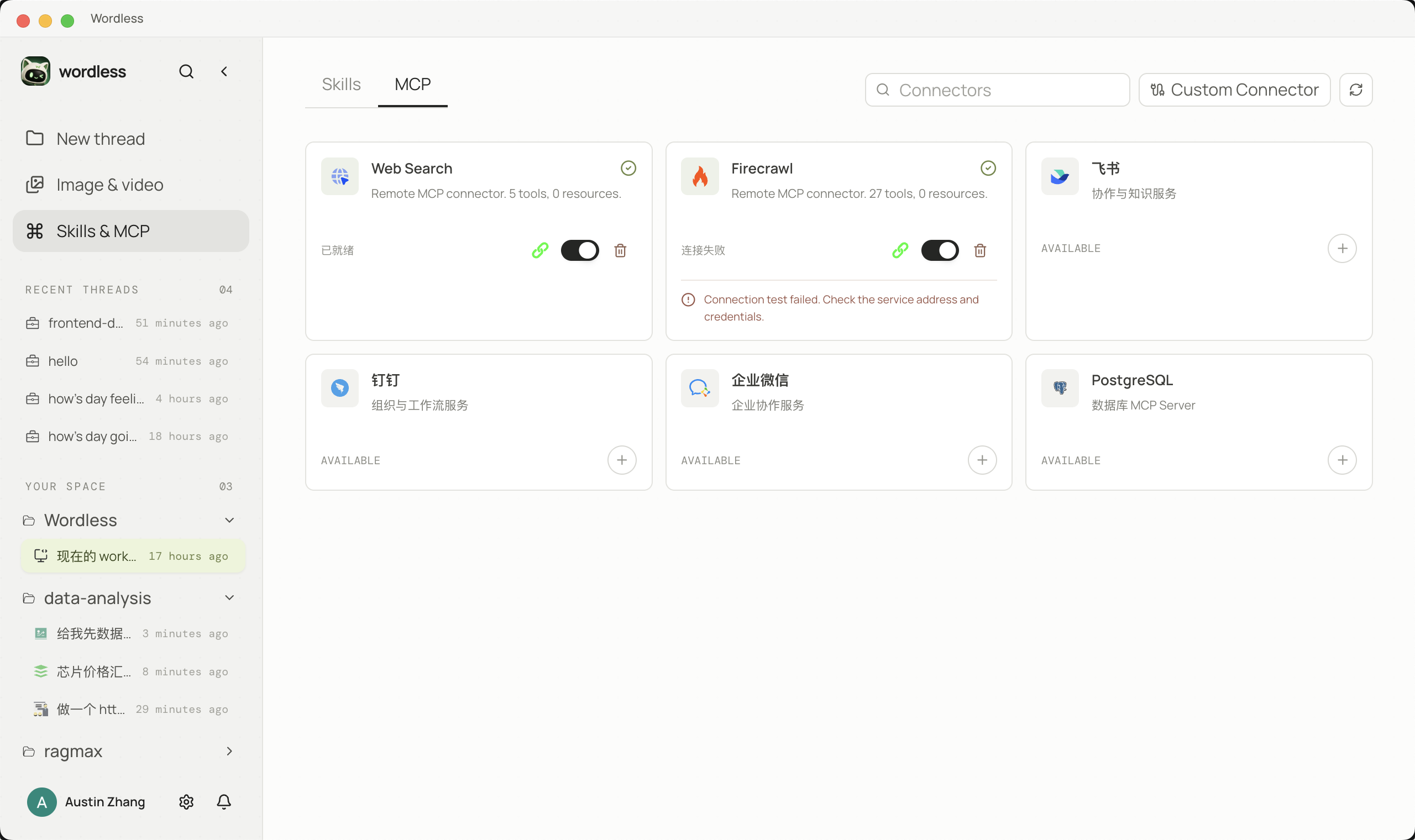
- **Skills & MCP**: import reusable Skills, discover and install connectors from the official MCP Registry, and connect custom stdio or HTTP servers.
- **Built-in browser**: let the Agent open a page in the right-hand panel, read it, and act on it under the same approval rules.
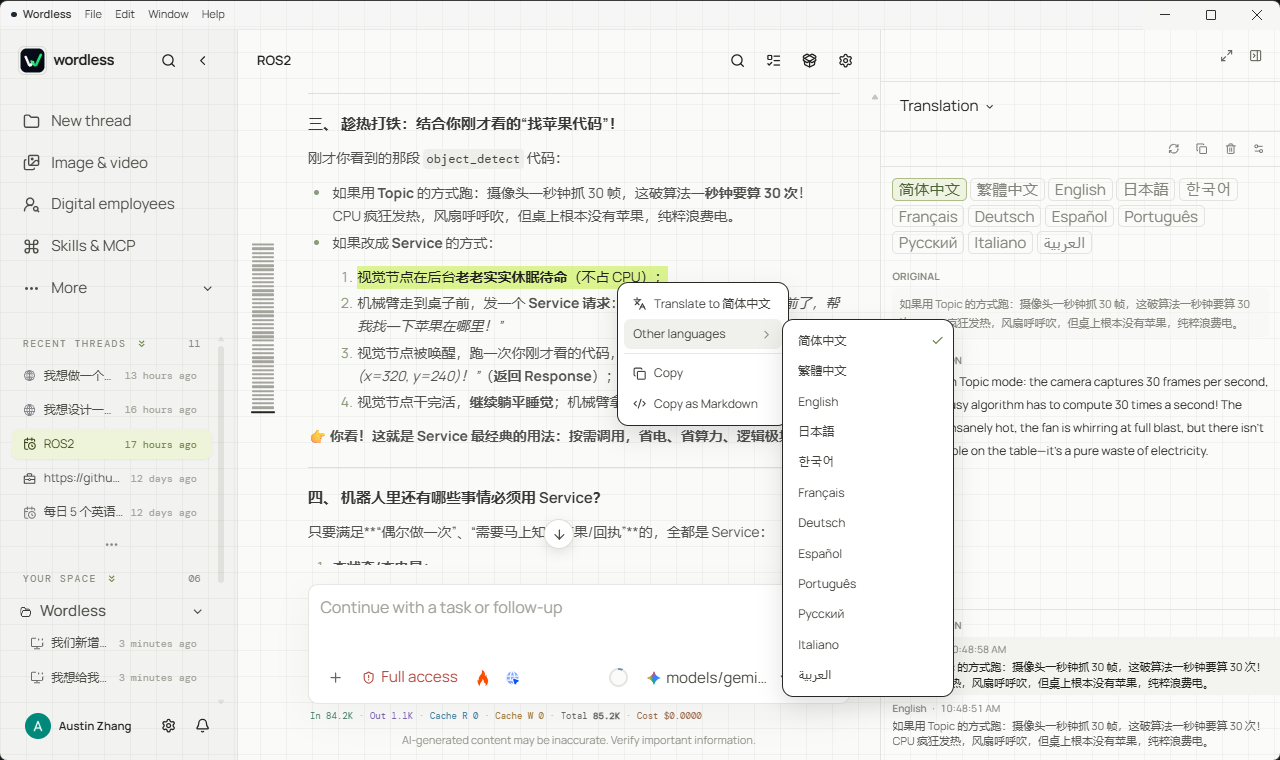
- **Conversation experience**: message search and navigation, context compaction, Markdown/GFM, syntax highlighting, Mermaid, KaTeX math rendering, and in-place translation.
- **Interface language**: Chinese (default) and English, switchable from Settings, the sidebar, or first-run setup.
## Built for real artifacts
### UI design
Pick a built-in style and describe the interface, or ask for one from scratch. Frames are real HTML files in an `x.wdesign` package inside your workspace, so the Agent can check the structure, re-check it against the style's tokens, and look at the rendered pixels instead of guessing at them. You arrange, align, and recolour on the canvas; when a screen is ready, export it as a render — PNG, long image, or PDF, with an optional device shell — or download the design's materials.
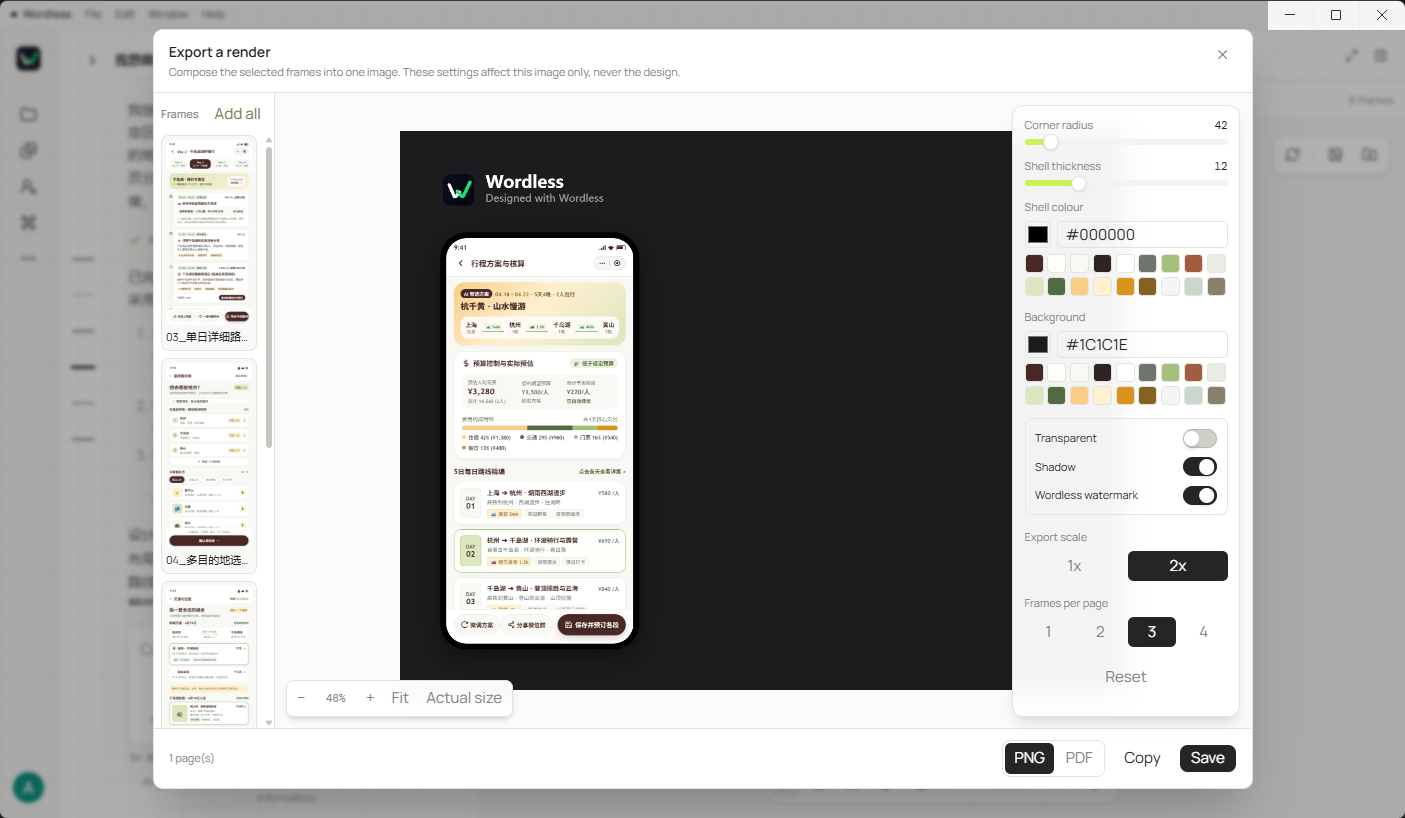
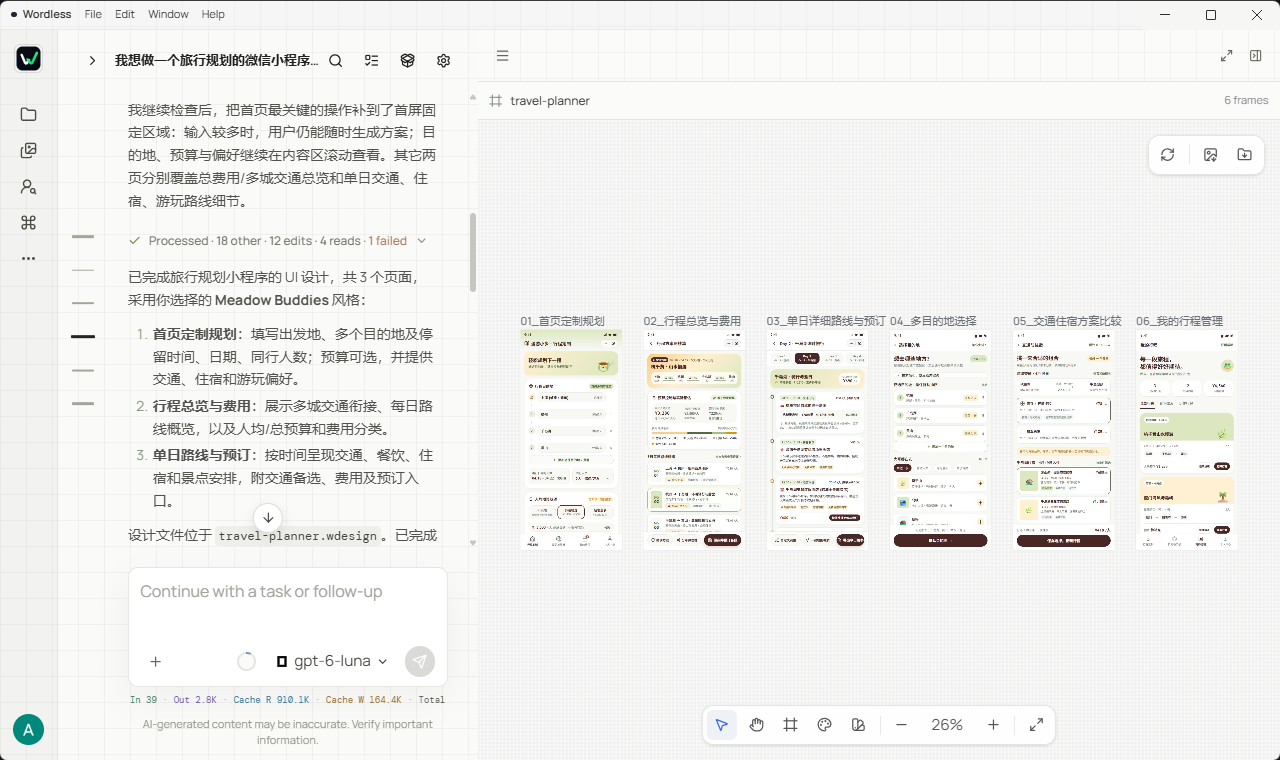
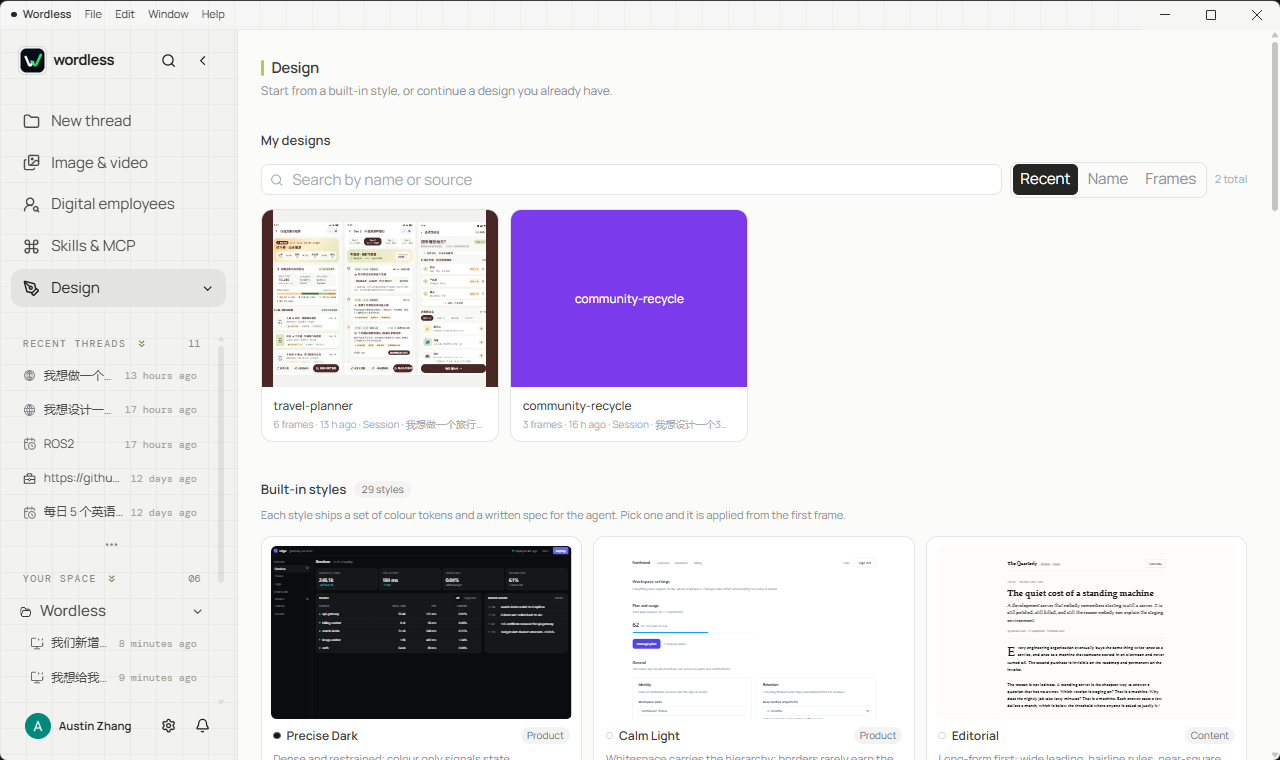
Two interfaces generated from a brief — each one is still an `x.wdesign` package you can reopen and keep editing, not an exported picture:
| A generated interface | Another generated interface |
| --- | --- |
|  |  |
### Presentation
Generation progress, tool states, and slide previews remain in one task context. Select a page or an individual object and ask the Agent to continue refining its layout, content, or visual treatment.
### Spreadsheet
Select a data region in the workbook preview and use that selection as precise context for the next action. Agent changes appear in the workbook immediately instead of remaining as text suggestions.
### Data Analysis
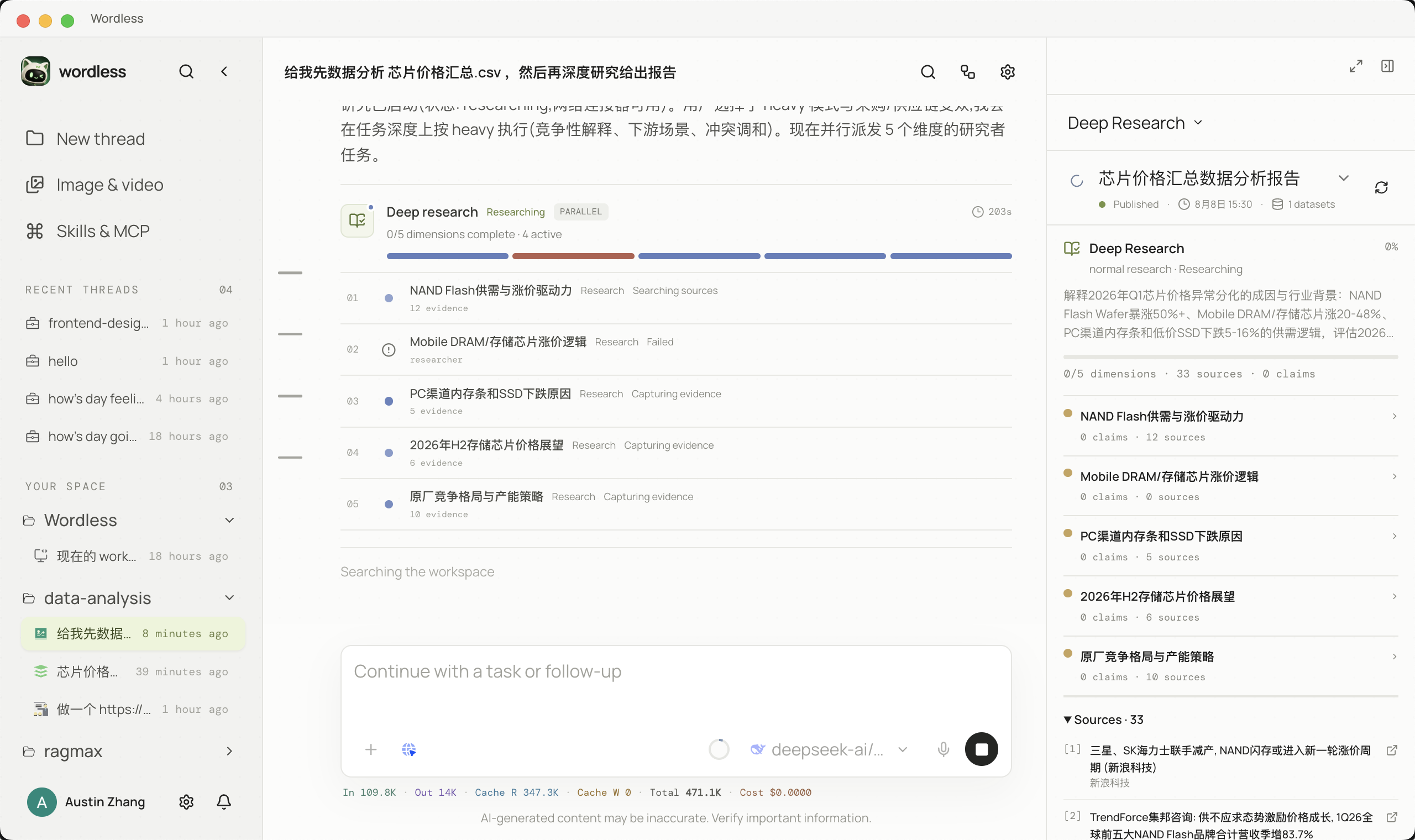
Delegate complex research by dimension and distinguish queued, running, completed, and failed work in the timeline, making every researcher's current activity visible.
### Coding
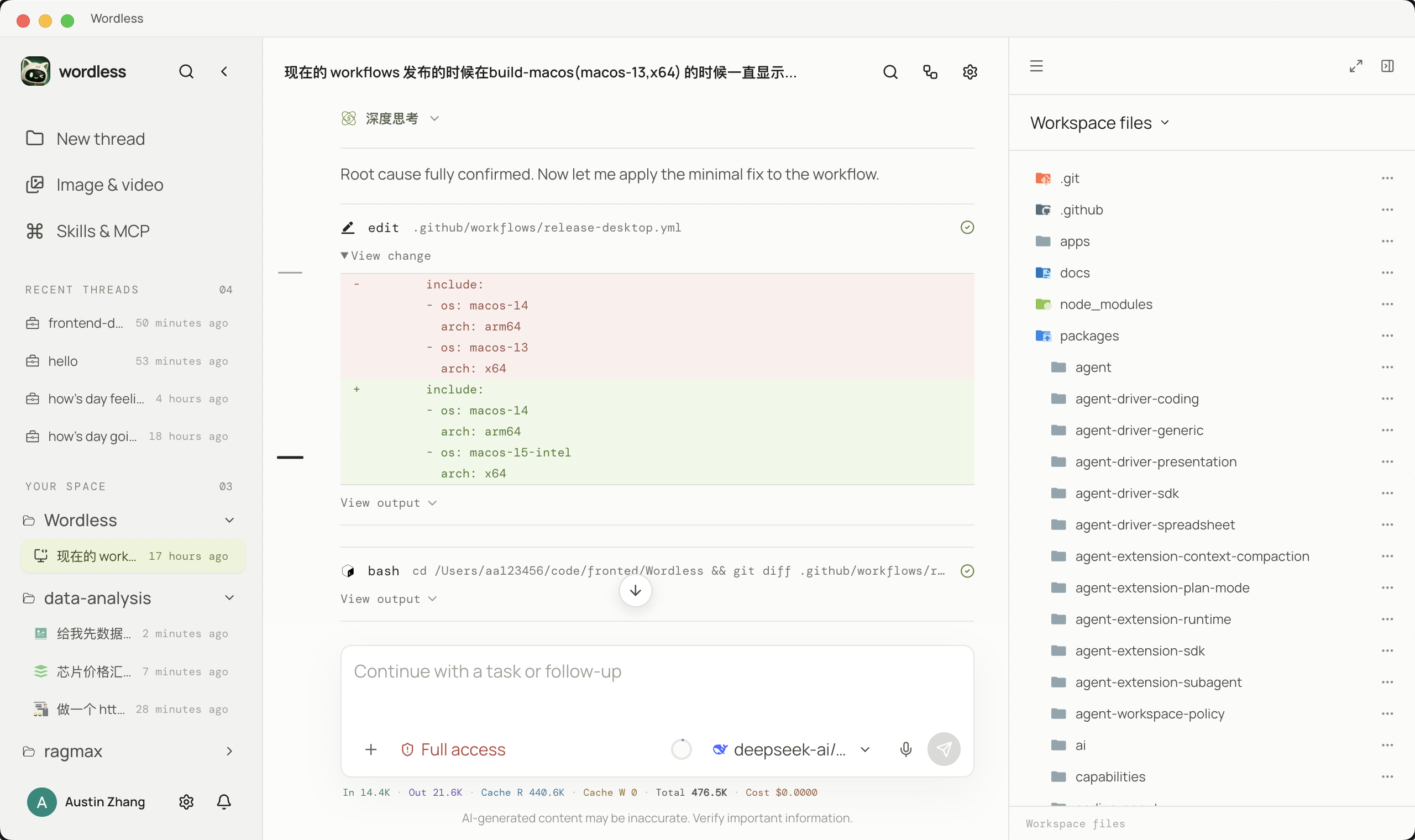
Plans, file edits, diffs, and test results remain traceable. Workspace policy governs tool execution, and critical actions enter the approval flow before they occur.
### Image generation
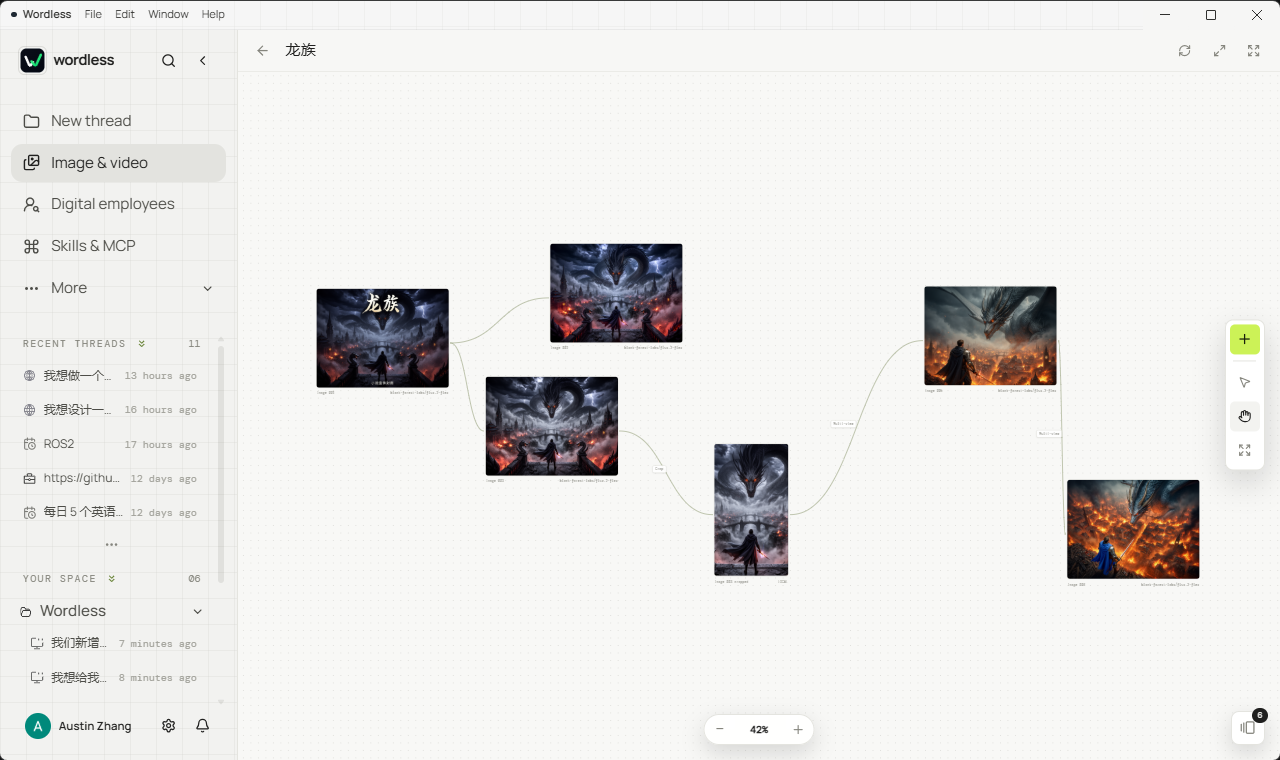
Generated images stay on the canvas as nodes, so the next instruction can refer to a result instead of re-describing it. Eight operations cover generating, variations, cropping, local edits, background removal, object removal, and multi-view.
## Beyond a single conversation
A session is where work happens; these are the surfaces that keep it visible after the model stops typing. Each one is a row in the sidebar.
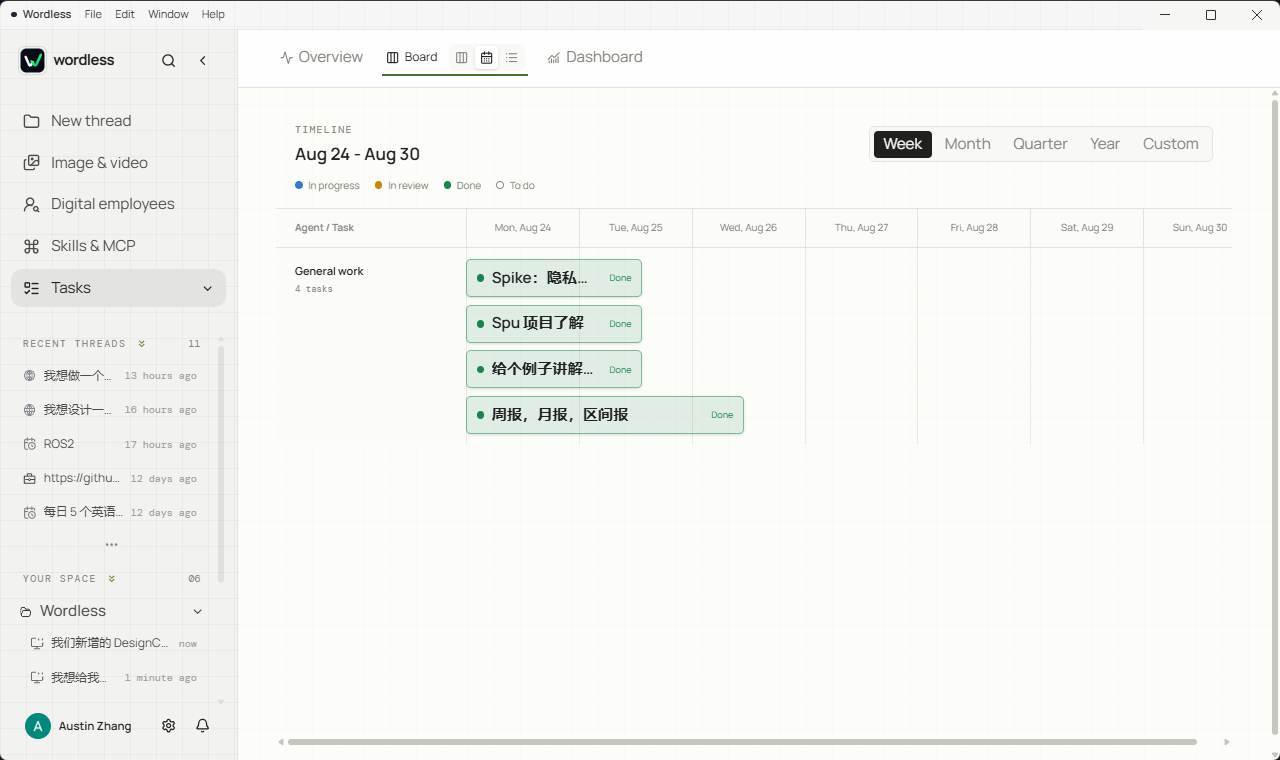
- **Tasks**: work becomes a task with an owner, a status, and a timeline. Move between overview, board, timeline, list, and dashboard views, and drop a task into the conversation with `!` when it is time to work on it.
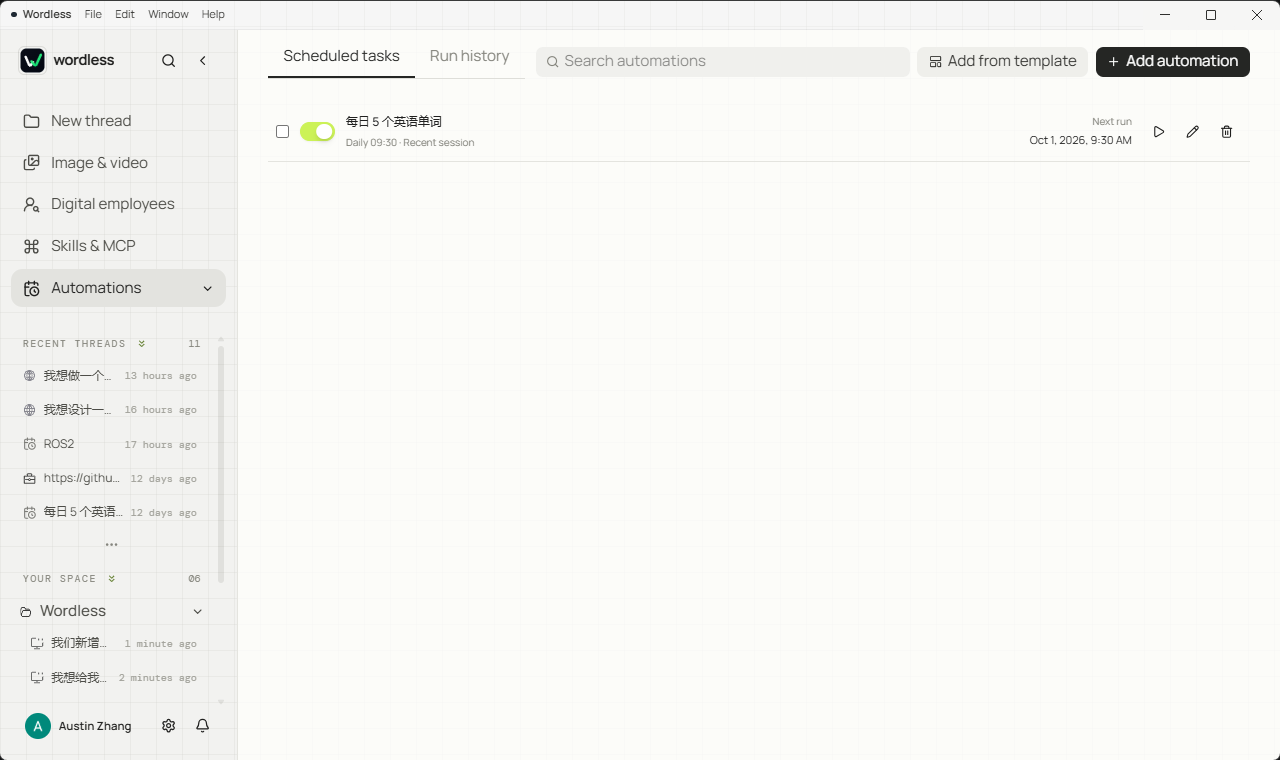
- **Automations**: run a prompt on a schedule, keep the run history, and start from a template.
- **Digital employees**: save reusable roles, group them into a team, and delegate from the conversation.
- **Translation**: select text in a message to translate it in place, or keep the translation panel open beside the conversation.
Two more things reach you after the work stops, without you watching the window:
- **Desktop notifications** (**Settings → General**): when Wordless is not in the foreground, the Agent waiting for an approval or an answer, a completed run, and a failed run each raise a system notification. A session you are already looking at is left alone.
- **Message push** (**Settings → Message push**): automations and scheduled runs can deliver their result to a DingTalk, Feishu, or WeCom group robot. The body is a template with a fixed set of variables, each automation can override the defaults, and the credential stays on this machine.
## Remote access
Continue this computer's sessions from your phone. Everything is end-to-end encrypted, and both the session and the execution stay on this machine. **Settings → Remote access** offers two ways in:
- **Local network**: the phone and this computer on the same WiFi is enough. Turn the switch on and Wordless runs the relay and the web client here, fills in the address, and shows a QR code — scan it and you are in. No server, no configuration.
- **Remote**: works on any network the phone happens to be on, including mobile data. It needs a relay server **you deploy yourself**, and Wordless gives you two routes: a tutorial to type out, or SSH details so it deploys for you — after probing the server it tells you what it found wrong (a port already taken, the wrong distribution, an earlier deployment), leaves a version stamp on the server (a desktop upgrade means deploying again), and can be taken down again in one action.
Pairing is a QR scan, or typing a connection code plus a password. **The first phone to present a key pins the identity public key**, an unclaimed connection code expires after ten minutes, every phone that connects raises a system notification, and each phone can be unpaired on its own.
What the phone can do is **continue the conversation**: list and read sessions, send messages, abort, switch models, attach files, answer approvals and questions, and search workspace files read-only. It is **not remote desktop** — no screen streaming, no settings, no picking files on this machine, no operating the desktop. The Agent keeps running on this computer.
## Extension and control
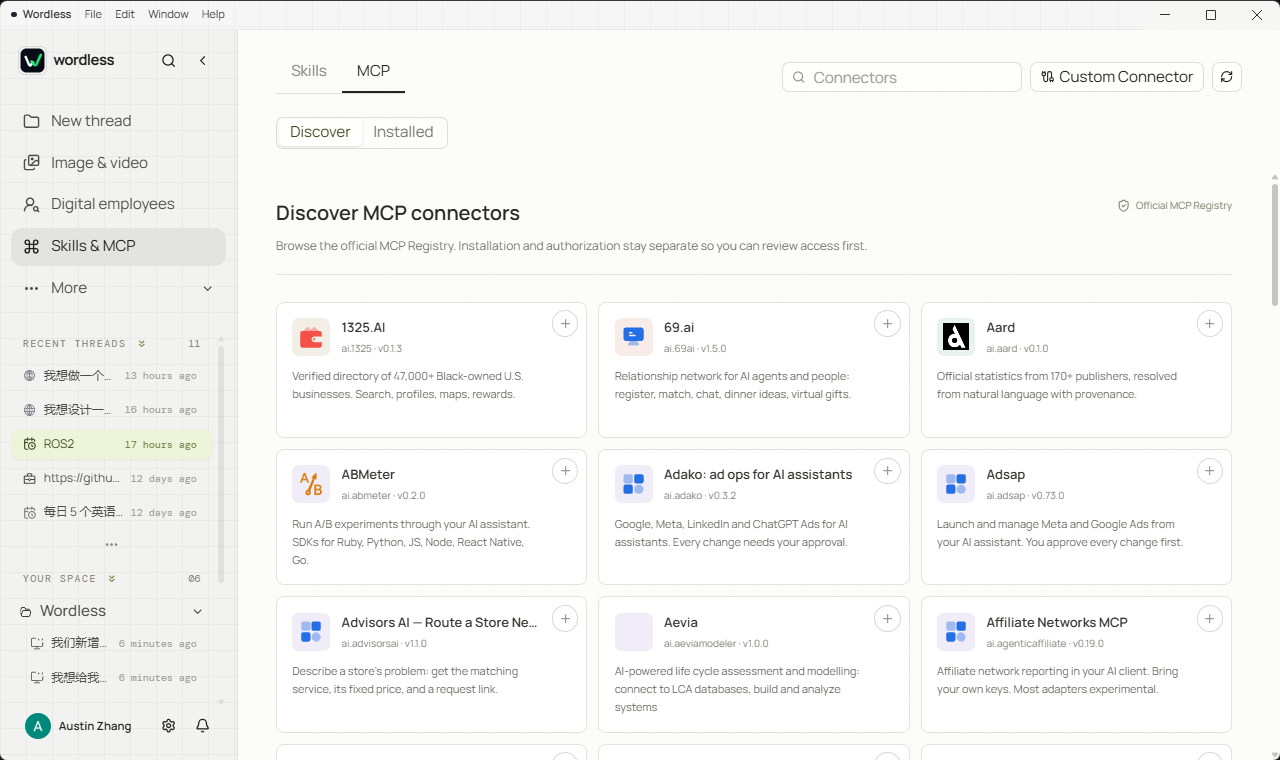
Skills capture reusable working methods, while MCP connects external capabilities. Skills can be imported from a file or discovered on SkillsMP; the MCP tab discovers connectors from the official MCP Registry, showing transport, capabilities, publisher, and source repository before anything is installed, and surfacing updates for installed connectors the same way. Model capability and tool permission remain separate: a model can request an action without automatically receiving permission to execute it.
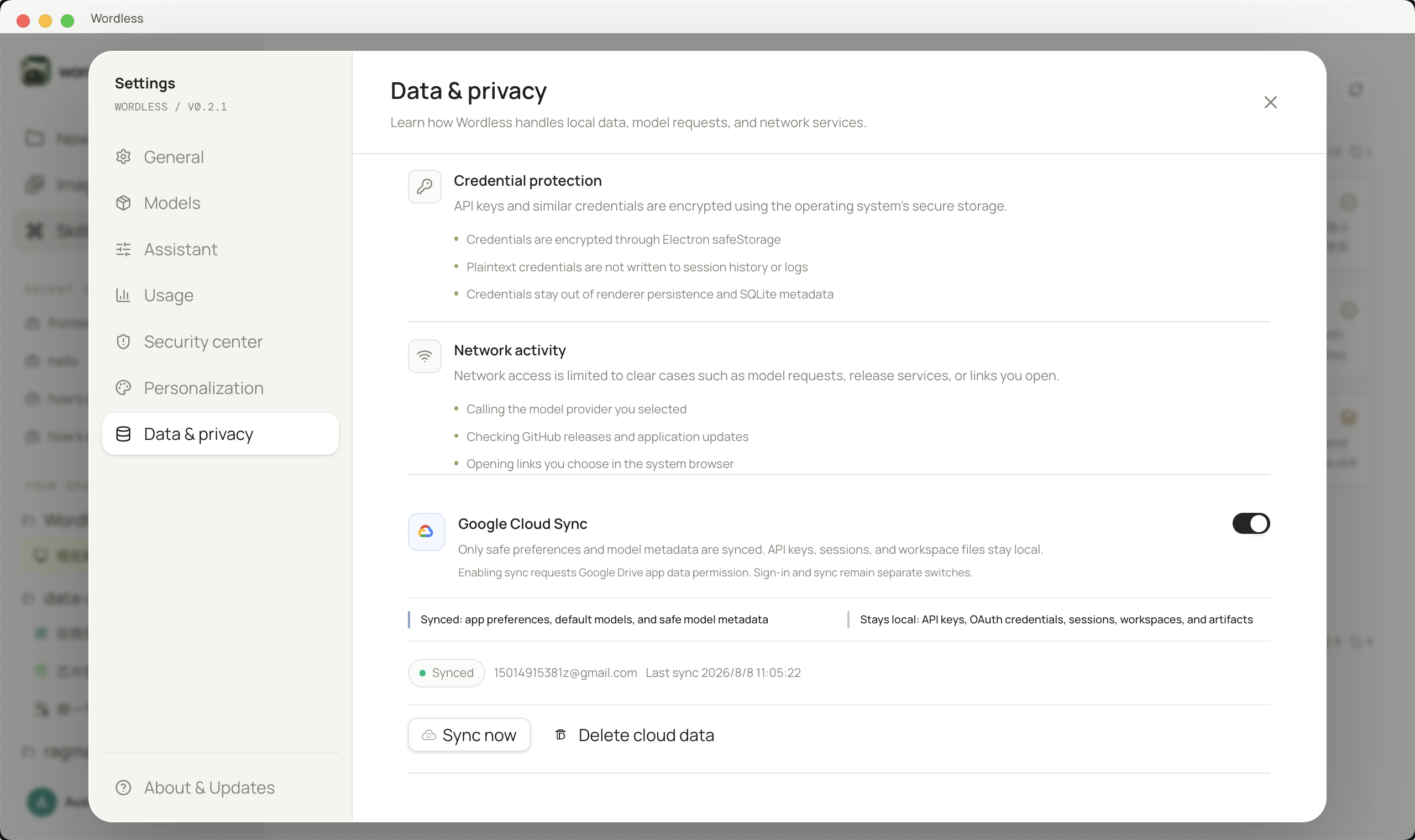
Sensitive credentials such as API keys and OAuth tokens are stored in the operating system's secure credential storage when available. Google cloud sync is disabled by default. When enabled, it only syncs the data types declared in Settings, excluding API keys, workspace files, generated artifacts, and conversation content.
## Architecture
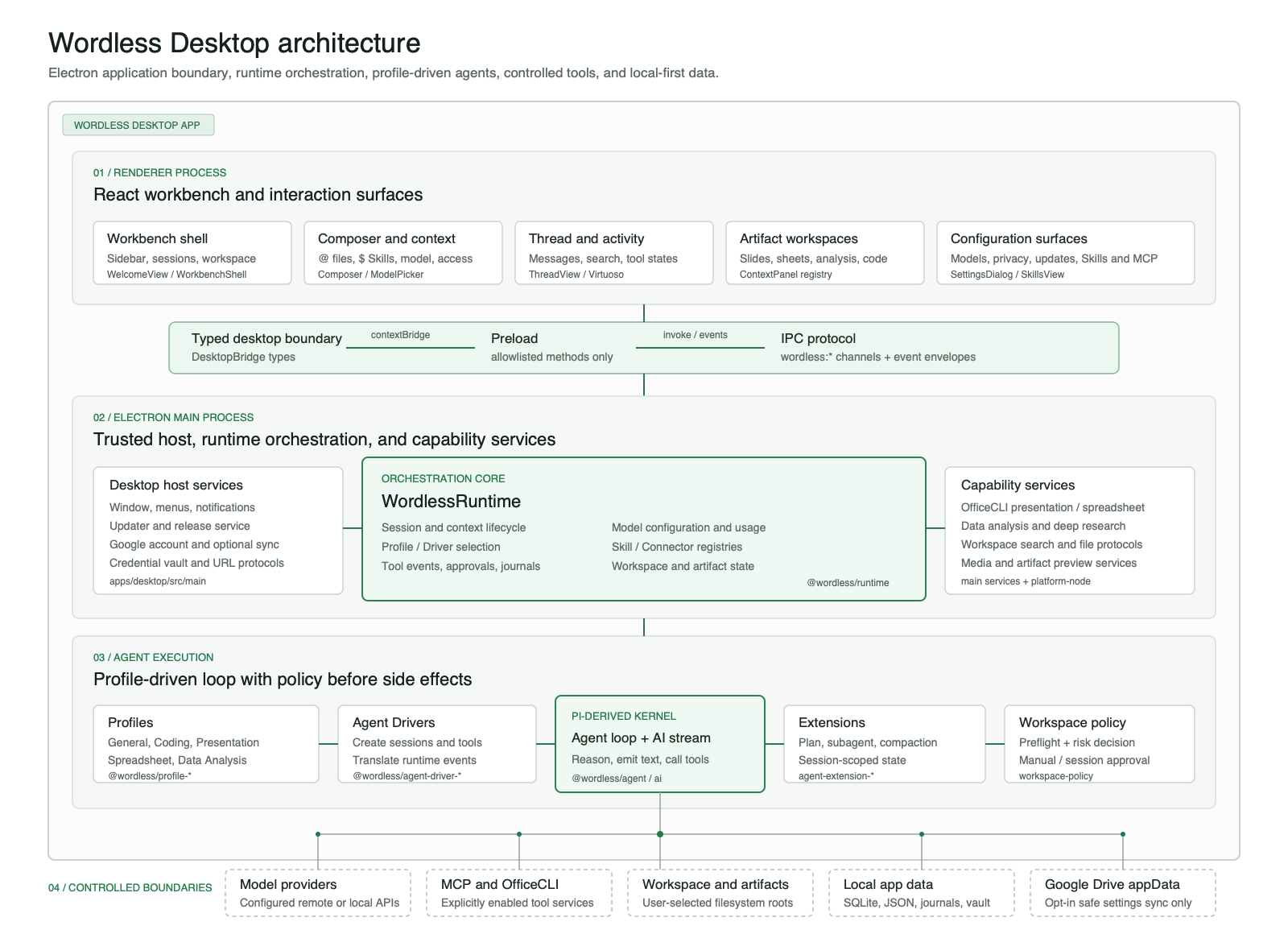
Wordless is a modular monolithic desktop application and does not require a separate local HTTP backend. The React Renderer communicates with Electron Main through a restricted Preload Bridge. The main process composes the Runtime, Agent Profiles, Capabilities, persistence, and platform adapters.
```text
React Renderer
| validated commands and ordered events
Preload Bridge
|
Electron Main
|-- Wordless Runtime
| |-- Agent Harness -> AI Provider
| |-- Profile Registry -> Profile -> Capabilities
| `-- Workspace policy and persistence ports
|-- JSONL / SQLite adapters
|-- Node and Office execution adapters
`-- Credential, window, browser, and notification adapters
```
Work modes are not separate copies of the Agent. Profiles assemble prompts, tools, drivers, and extensions, while the shared Runtime owns sessions, events, approvals, and persistence. Each work mode can evolve independently, and underlying dependencies remain replaceable.
### Kernel boundaries and portability
The product-level Profile mapping above is implemented through explicit dependency boundaries. `@wordless/ai` isolates provider protocols and model capabilities, `@wordless/agent` isolates the loop and event types, and `agent-driver-sdk` defines the contract between Runtime and a concrete kernel. Profiles do not depend directly on Electron, while session journals and domain messages remain owned by Wordless.
| Profile assembly and driver registry | Tool boundaries across work modes |
| --- | --- |
|  | 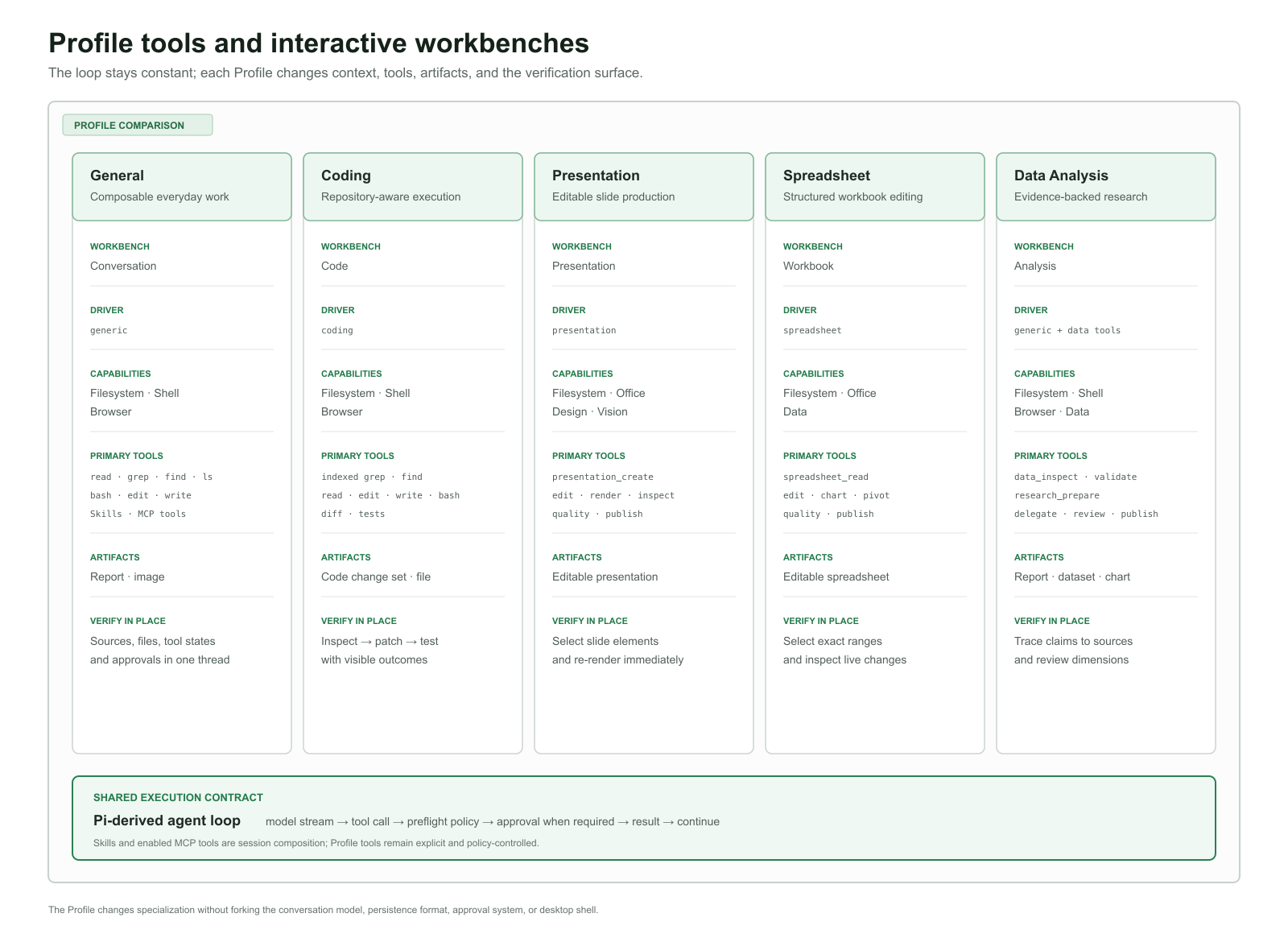 |
Upstream Pi remains credited under its original MIT license. See [Architecture Overview](docs/architecture/overview.md), [Dependency Rules](docs/architecture/dependencies.md), and [Upstream Source Record](UPSTREAM.md) for the detailed boundaries.
## Installation
Download the package for your device from [GitHub Releases](https://github.com/Austin-Patrician/Wordless/releases/latest):
| Device | Installer | Requirement |
| --- | --- | --- |
| Apple Silicon Mac (M1/M2/M3/M4 and later) | `Wordless-