## GitComet
[](https://github.com/Auto-Explore/GitComet/actions/workflows/rust.yml)
[](https://discord.gg/2ufDGP8RnA)
[](https://gitcomet.dev)
[](https://autoexplore.ai)
[](LICENSE)
[](https://github.com/Auto-Explore/gitcomet/releases/latest)
[](https://github.com/Auto-Explore/gitcomet/releases)
**Fastest Open Source Git GUI**
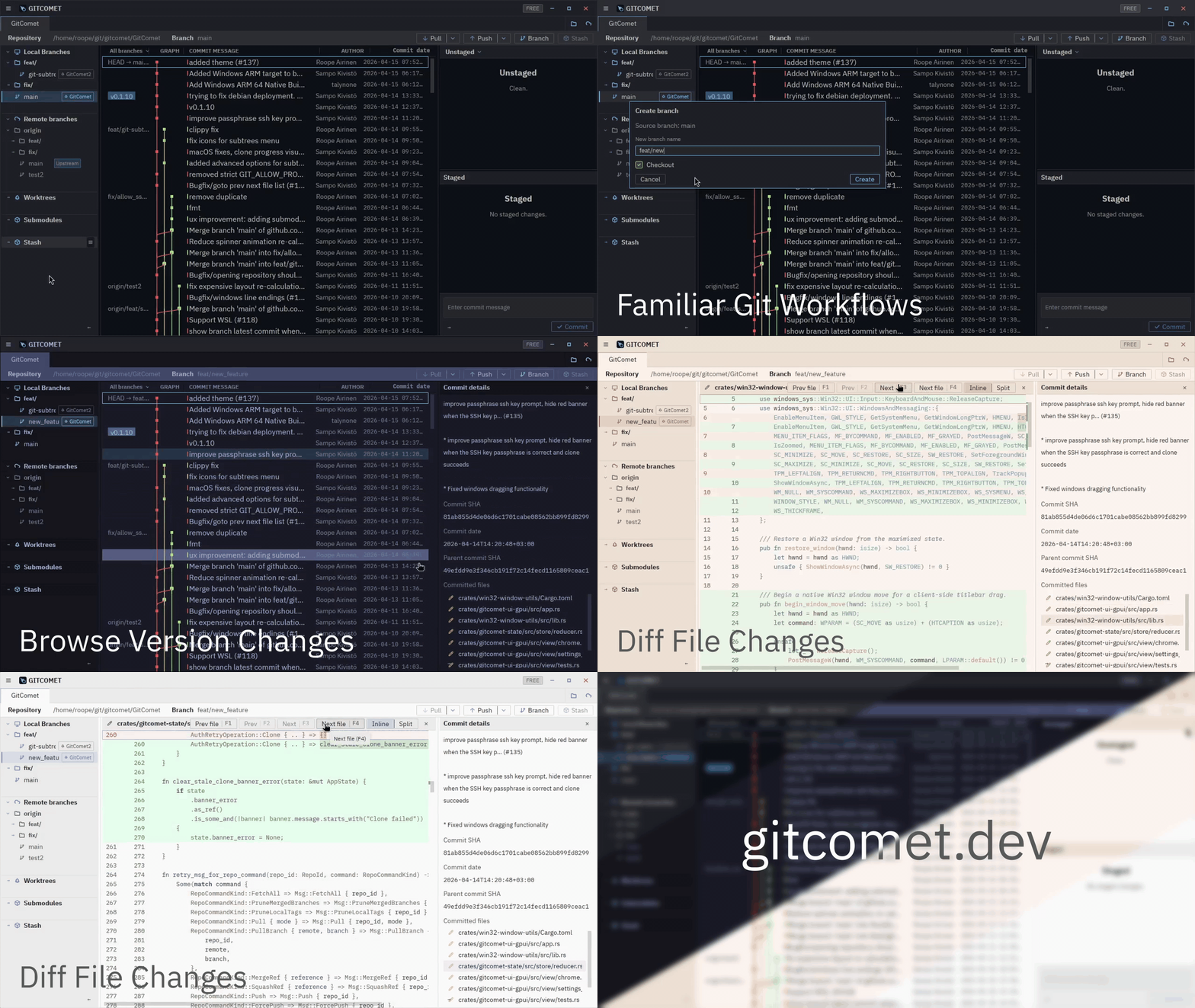
GitComet is built for teams that want fast Git operations with local-first privacy, familiar workflows, and open source freedom.
Available for Linux, Windows, and macOS.
### Download
Download the latest prebuilt binaries/installers from [GitHub Releases](https://github.com/Auto-Explore/GitComet/releases).
Windows
Download the latest Windows installer or portable binary from [GitHub Releases](https://github.com/Auto-Explore/GitComet/releases).
Install from the Microsoft Store:
Homebrew (macOS / Linux)
App and `gitcomet` command from tap:
```bash
brew tap auto-explore/gitcomet
brew install --cask gitcomet
```
On Linux, the cask installs the AppImage build. If your system cannot launch AppImages, use the APT repo, AUR package, release tarball, or `.deb` instead.
AUR (Arch Linux)
```bash
git clone https://aur.archlinux.org/gitcomet.git
cd gitcomet && makepkg -si
```
GURU (Gentoo Linux)
```bash
emerge --ask dev-vcs/gitcomet
```
apt (Debian/Ubuntu)
```bash
curl -fsSL https://apt.gitcomet.dev/gitcomet-archive-keyring.gpg | sudo tee /usr/share/keyrings/gitcomet-archive-keyring.gpg >/dev/null
curl -fsSL https://apt.gitcomet.dev/gitcomet.sources | sudo tee /etc/apt/sources.list.d/gitcomet.sources >/dev/null
sudo apt update
sudo apt install gitcomet
```
If you install a Linux tarball or Homebrew binary on Debian, Ubuntu, or WSLg instead of the official `apt` package, install the GUI runtime libraries separately:
```bash
sudo apt install libxcb1 libxkbcommon0 libxkbcommon-x11-0
```
### Requirements
GitComet requires a local Git installation of `2.50` or newer.
### GitComet User Survey
We’re running this short survey to better understand how people use our Git GUI client in their daily work. Your feedback will help us improve the product and prioritize the features that matter most.
https://docs.google.com/forms/d/e/1FAIpQLSd8DKIl222UomSXrpv1q9rWodRlBSQo9pJDD62GbZEANTgD1A/viewform?usp=dialog
### Why GitComet
GitComet started from frustration with existing tools on huge codebases like Chromium. We could not find a product that stays responsive and functional when browsing large repositories and file diffs.
### Editions (planned)
#### Open Source
- **Price**: €0 forever
- **Usage**: Free for personal and commercial use
- **Includes**:
- Full local-first desktop workflow
- Git remotes, pull/push, staging, commits
- Worktrees, branching, and full history
- Multi-repository browsing
- Inline and side-by-side diffs
- 2-way and 3-way merge tools
#### Professional
- **Price**: €20 lifetime access (limited-time early adopter offer)
- **Includes everything in Open Source, plus**:
- Claude Code, Codex, and GitHub CLI integrations
- Code test coverage workflows
- GitHub and Azure DevOps integrations
- Priority improvements during early access
- Join waitlist: [gitcomet.dev/#editions](https://gitcomet.dev/#editions)
### Build from source
```bash
cargo build -p gitcomet --features ui-gpui,gix
cargo run -p gitcomet --features ui-gpui,gix -- /path/to/repo
```
### Contributing
Developer setup, workspace layout, testing, and coverage docs live in `CONTRIBUTING.md`.
### Using as a Git difftool / mergetool
GitComet can be used as a standalone diff and merge tool invoked by `git difftool` and `git mergetool`. It supports both headless (algorithm-only) and GUI (interactive GPUI window) modes.
#### Setup / uninstall (recommended)
```bash
# Configure Git globally to use GitComet for both difftool + mergetool
gitcomet setup
# Remove GitComet integration safely
gitcomet uninstall
```
- Use `--local` to target only the current repository instead of global config.
- Use `--dry-run` to print the commands before applying changes.
This setup registers both headless and GUI variants with `guiDefault=auto`, so Git chooses GUI when display is available and falls back to headless otherwise.
`setup`/`uninstall` are designed to be idempotent.
Show detailed setup/uninstall behavior and manual commands
Built-in `setup` writes these Git config entries:
```bash
GITCOMET_BIN="/absolute/path/to/gitcomet"
# Headless tool: algorithm-only merge/diff for CI, scripts, and no-display environments
git config --global merge.tool gitcomet
git config --global mergetool.gitcomet.cmd \
"'$GITCOMET_BIN' mergetool --base \"\$BASE\" --local \"\$LOCAL\" --remote \"\$REMOTE\" --merged \"\$MERGED\""
git config --global mergetool.trustExitCode true
git config --global mergetool.gitcomet.trustExitCode true
git config --global mergetool.prompt false
git config --global diff.tool gitcomet
git config --global difftool.gitcomet.cmd \
"'$GITCOMET_BIN' difftool --local \"\$LOCAL\" --remote \"\$REMOTE\" --path \"\$MERGED\""
git config --global difftool.trustExitCode true
git config --global difftool.gitcomet.trustExitCode true
git config --global difftool.prompt false
# GUI tool: opens focused GPUI windows for interactive diff/merge
git config --global merge.guitool gitcomet-gui
git config --global mergetool.gitcomet-gui.cmd \
"'$GITCOMET_BIN' mergetool --gui --base \"\$BASE\" --local \"\$LOCAL\" --remote \"\$REMOTE\" --merged \"\$MERGED\""
git config --global mergetool.gitcomet-gui.trustExitCode true
git config --global diff.guitool gitcomet-gui
git config --global difftool.gitcomet-gui.cmd \
"'$GITCOMET_BIN' difftool --gui --local \"\$LOCAL\" --remote \"\$REMOTE\" --path \"\$MERGED\""
git config --global difftool.gitcomet-gui.trustExitCode true
# Auto-select GUI tool when DISPLAY is available, headless otherwise
git config --global mergetool.guiDefault auto
git config --global difftool.guiDefault auto
```
Built-in `setup` stores previous user values for shared generic keys under `gitcomet.backup.*` (when needed).
Built-in `uninstall` restores those backups only when the key still has the setup-managed value. If the user changed a setting after setup, uninstall preserves that user-edited value and then removes GitComet-specific keys.
#### CLI modes
**Difftool:**
```bash
gitcomet difftool --local --remote [--path ] [--label-left

 GitComet
[](https://github.com/Auto-Explore/GitComet/actions/workflows/rust.yml)
[](https://discord.gg/2ufDGP8RnA)
[](https://gitcomet.dev)
[](https://autoexplore.ai)
[](LICENSE)
[](https://github.com/Auto-Explore/gitcomet/releases/latest)
[](https://github.com/Auto-Explore/gitcomet/releases)
**Fastest Open Source Git GUI**
GitComet is built for teams that want fast Git operations with local-first privacy, familiar workflows, and open source freedom.
Available for Linux, Windows, and macOS.
GitComet
[](https://github.com/Auto-Explore/GitComet/actions/workflows/rust.yml)
[](https://discord.gg/2ufDGP8RnA)
[](https://gitcomet.dev)
[](https://autoexplore.ai)
[](LICENSE)
[](https://github.com/Auto-Explore/gitcomet/releases/latest)
[](https://github.com/Auto-Explore/gitcomet/releases)
**Fastest Open Source Git GUI**
GitComet is built for teams that want fast Git operations with local-first privacy, familiar workflows, and open source freedom.
Available for Linux, Windows, and macOS.
 ### Download
Download the latest prebuilt binaries/installers from [GitHub Releases](https://github.com/Auto-Explore/GitComet/releases).
### Download
Download the latest prebuilt binaries/installers from [GitHub Releases](https://github.com/Auto-Explore/GitComet/releases).