# Automatos AI
### The open-source AI Operating System
**Run a workforce of AI agents on your own machine — any model, 1,000+ tools, one Knowledge Graph, and Auto to run it all.**
[](https://github.com/AutomatosAI/automatos-ai/stargazers)
[](LICENSE)
[](https://github.com/AutomatosAI/automatos-ai/discussions)
[](https://deepwiki.com/AutomatosAI/automatos-ai)
[Quick start](#quick-start-local-edition) · [Self-hosting guide](docs/getting-started/self-hosting.md) · [Docs](docs/README.md) · [Discussions](https://github.com/AutomatosAI/automatos-ai/discussions) · [Hosted beta](https://studio.automatos.app)
https://github.com/user-attachments/assets/8e02444e-f05e-439c-a718-b4032ba7790e
---
Automatos is an operating system for AI work. You command a workforce of specialised agents — equipped with skills, tools and knowledge — through one voice, **Auto**, and they produce real **Deliverables**: reports, code, content, analysis. Self-host it with `docker compose up`, bring any model (paid APIs, free hosted open models, or your own Claude Code subscription), and keep your agents, data and Deliverables on infrastructure you control.
```bash
git clone --depth 1 https://github.com/AutomatosAI/automatos-ai.git && cd automatos-ai
make up # writes .env with three random secrets, then → http://localhost:3000, no login
```
## Why an operating system?
Most agent frameworks give you a library. Automatos gives you the whole machine:
| An OS has… | Automatos has… |
|---|---|
| A shell | **Auto** — one chat that routes your request to the right agent, tool or Playbook |
| Processes | **Agents** — each with its own model route, persona, skills and metrics |
| Programs | **Playbooks** — reusable multi-step automations; **Missions** coordinate agents on a goal |
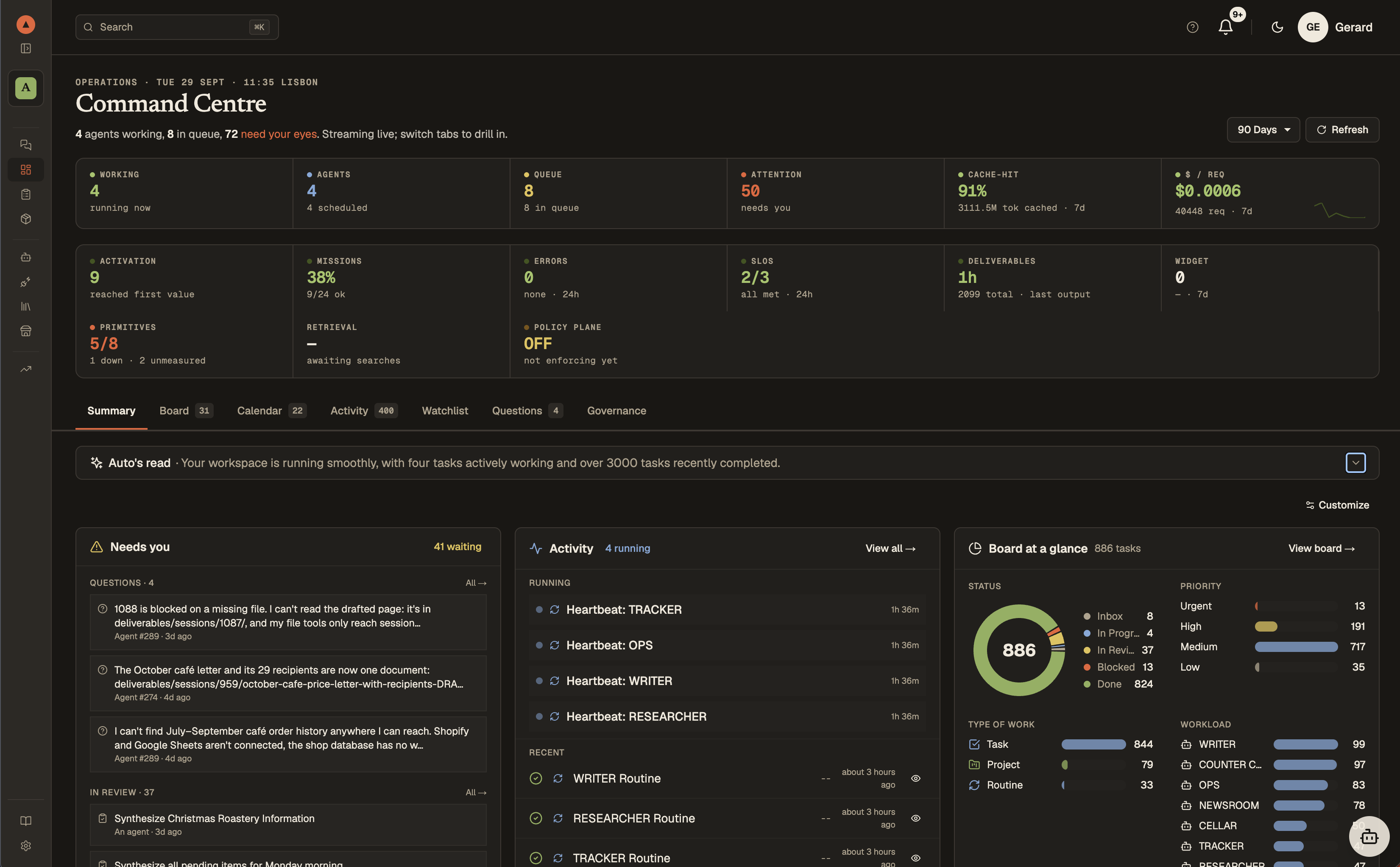
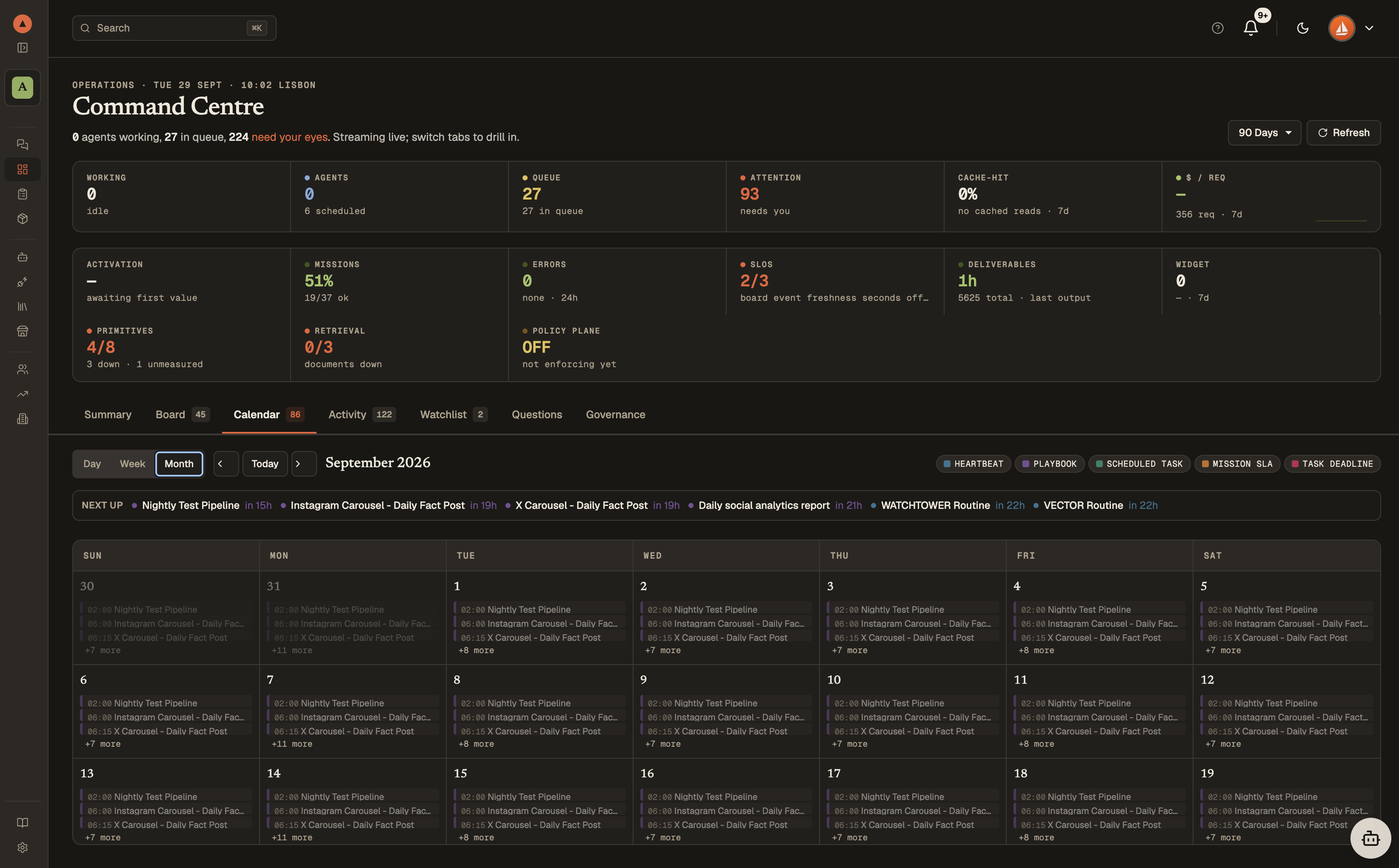
| A task manager | **Command Center** — the board, the calendar, live agent status and reports |
| A file system | **Deliverables** and **Knowledge** — RAG over your documents plus a Knowledge Graph |
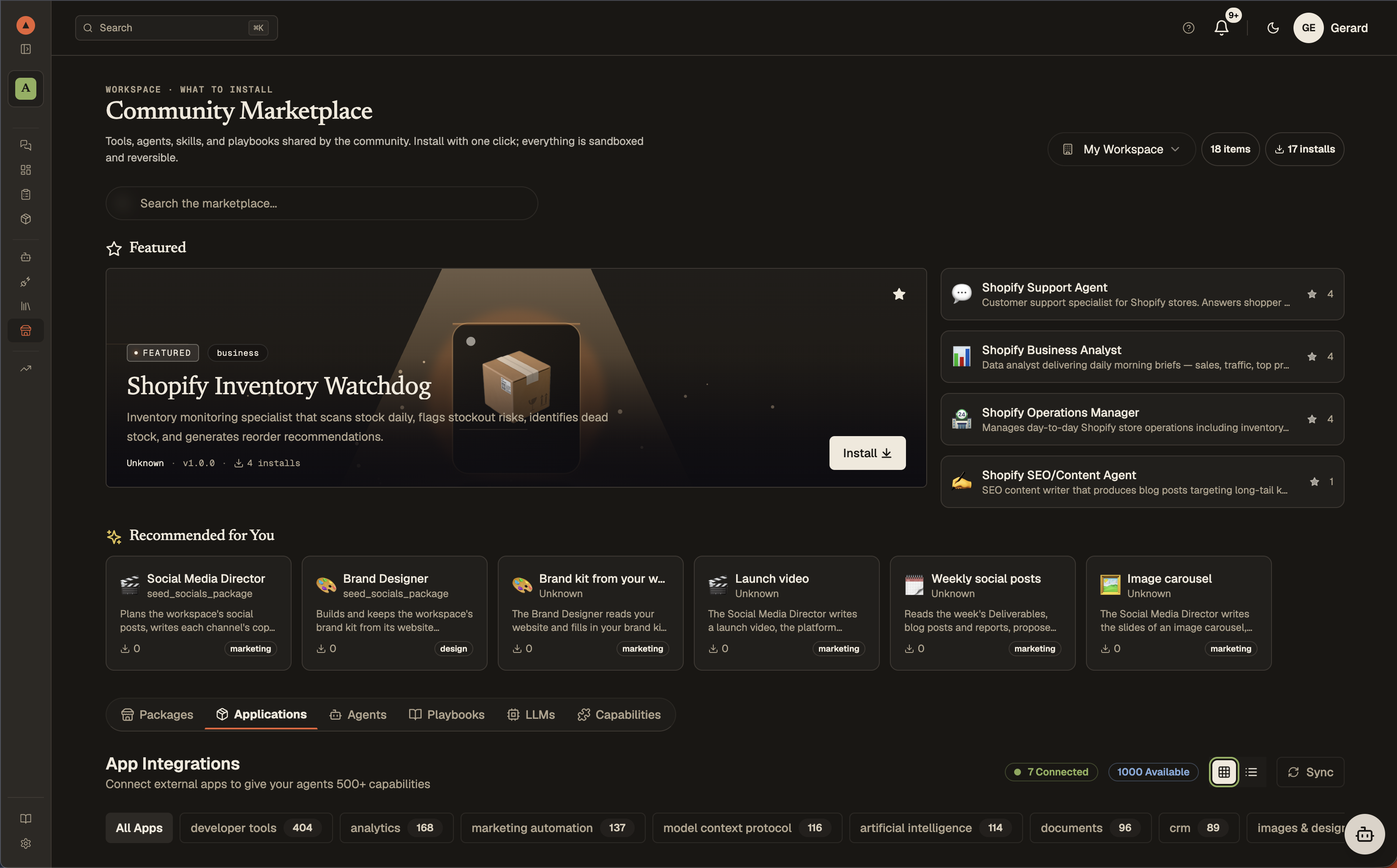
| Drivers | **1,000+ tool integrations** through Composio and **400+ models** through one provider registry |
| An app store | **Marketplace** — ready-made agents, Playbooks, packages, skills and plugins: 100+ agents, 20+ Playbooks, 400+ skills and 70+ plugins in the hosted Studio marketplace; 14 agent templates, 5 Playbooks and 3 packages in a fresh local install, plus the open library of 140+ skills to import |
## One codebase, two editions
| Edition | What it is |
|---|---|
| **Local edition** | Clone the repo, set three secrets, `docker compose up`. No login, one workspace, one operator; Postgres + pgvector, Redis and MinIO in the stack; agents can act on files on your own machine through the workspace-worker, and your own Claude Code sessions can be agents. Bring your own keys — paid (OpenRouter, OpenAI, Anthropic, DeepSeek, …), free (NVIDIA's hosted open models) — and, optionally, your own Composio key. [QUICKSTART.md](QUICKSTART.md) · [self-hosting guide](docs/getting-started/self-hosting.md) |
| **Hosted edition** | Automatos Studio — the same code run as a service, opening as a beta in November 2026 ([join the waitlist](https://studio.automatos.app/#waitlist)): accounts, workspaces, teams and plans on top of it. |
The edition is a runtime flag (`AUTH_EDITION=local|saas`). Product capability is not gated: every agent, tool, Playbook, Mission and Deliverable feature in the code runs in the local edition. Session mode (your own Claude Code as an agent runtime) is local-only by design.
Marketplace agents · Composio tool integrations (bring your own key) · 400+ LLMs through OpenRouter, direct keys, or NVIDIA for free · Your own Claude Code as an agent · Reusable skills
## Talk to your agents
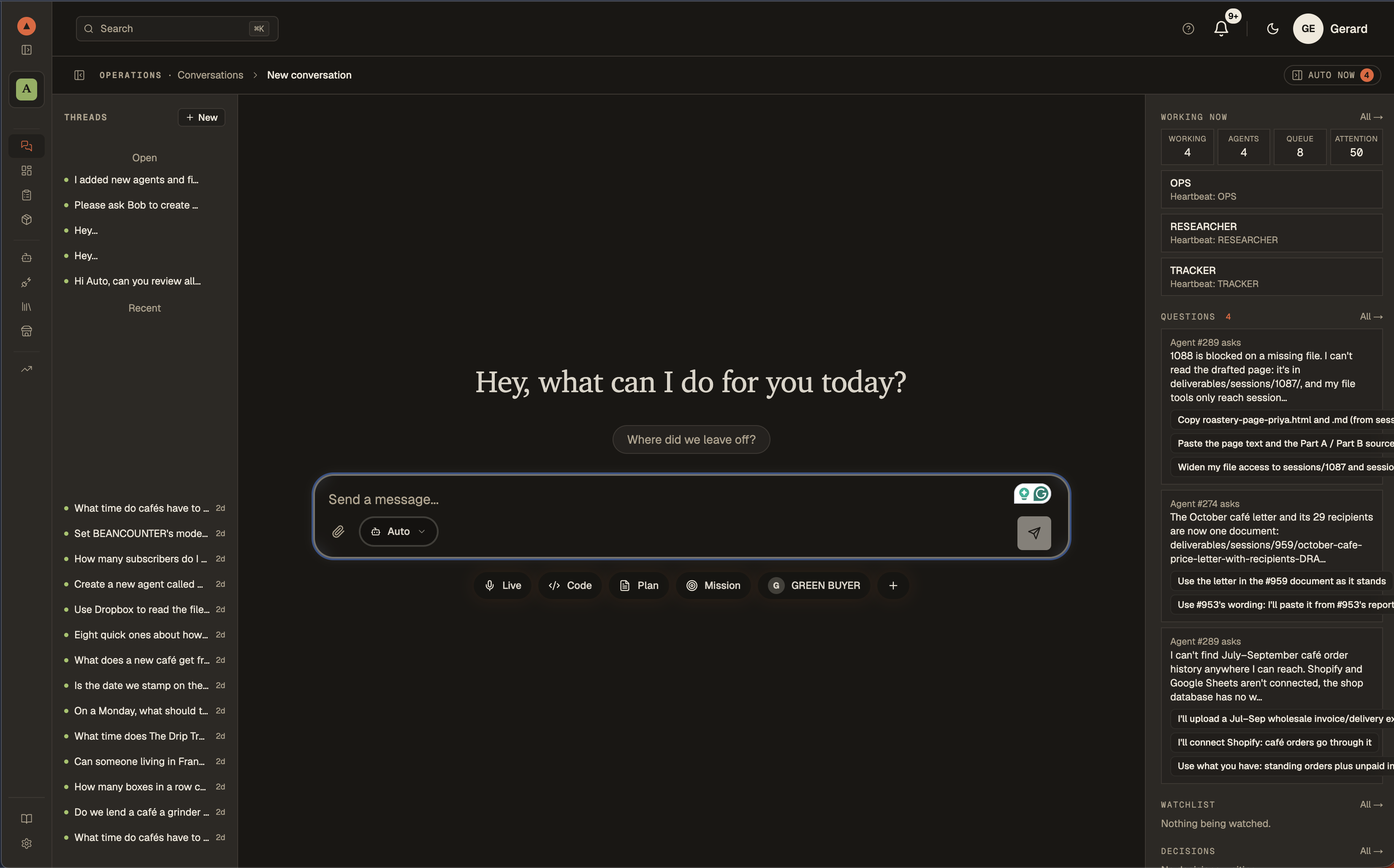
One chat, routed to the right agent. The conversation stays where you left it across pages and reloads, opens several conversations as tabs, and a reply finishes even if the browser leaves mid-answer. Auto works in the open: its thinking streams into a collapsible block that gives way to the answer, every tool call stays visible as a line in the activity trail, and when it files a ticket for another agent it can wait, re-check, and report back in the same thread. Quick actions jump straight into coding, creating agents, managing knowledge, or building Playbooks.
## Manage your AI workforce
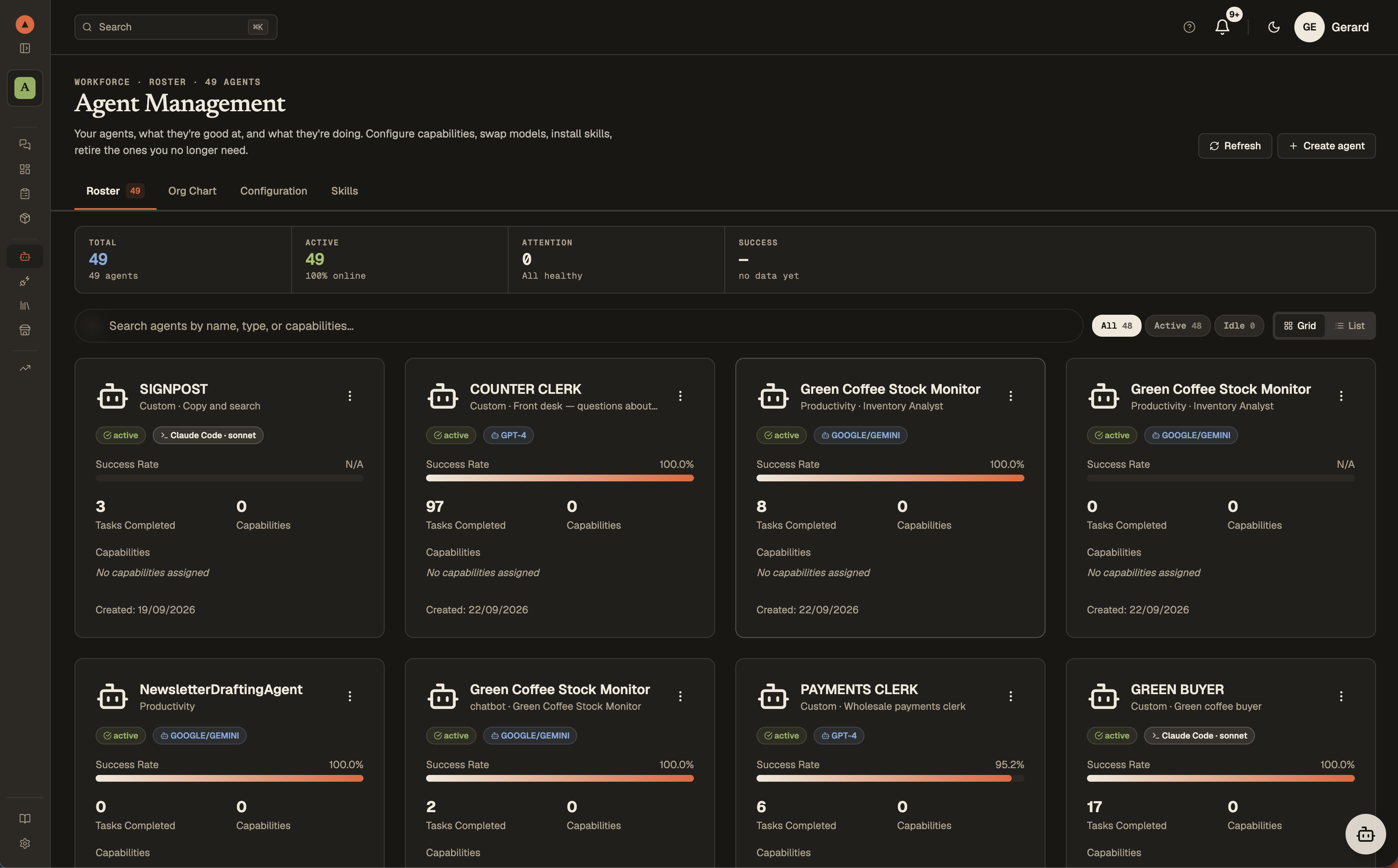
A fresh local install starts with five agents: Auto, a Brand Designer and a starter team of Researcher, Writer and Analyst. A new hosted workspace starts with Auto and a Brand Designer; Auto builds the rest of your team during onboarding, from a package or from scratch. More ready-made agents wait in the built-in marketplace — install what you need, when you need it: a fresh local install seeds 14 agent templates (12 Shopify specialists, a Social Media Director and a Brand Designer), and the hosted Studio marketplace holds 100+. Each agent has its own model route, capabilities, persona, and performance metrics. An agent is either an **API agent** (a model route you installed) or a **session agent** (your own Claude Code, Codex or GitHub Copilot CLI on your machine, below); you mix them freely on the same board.
## Your own Claude Code, managed
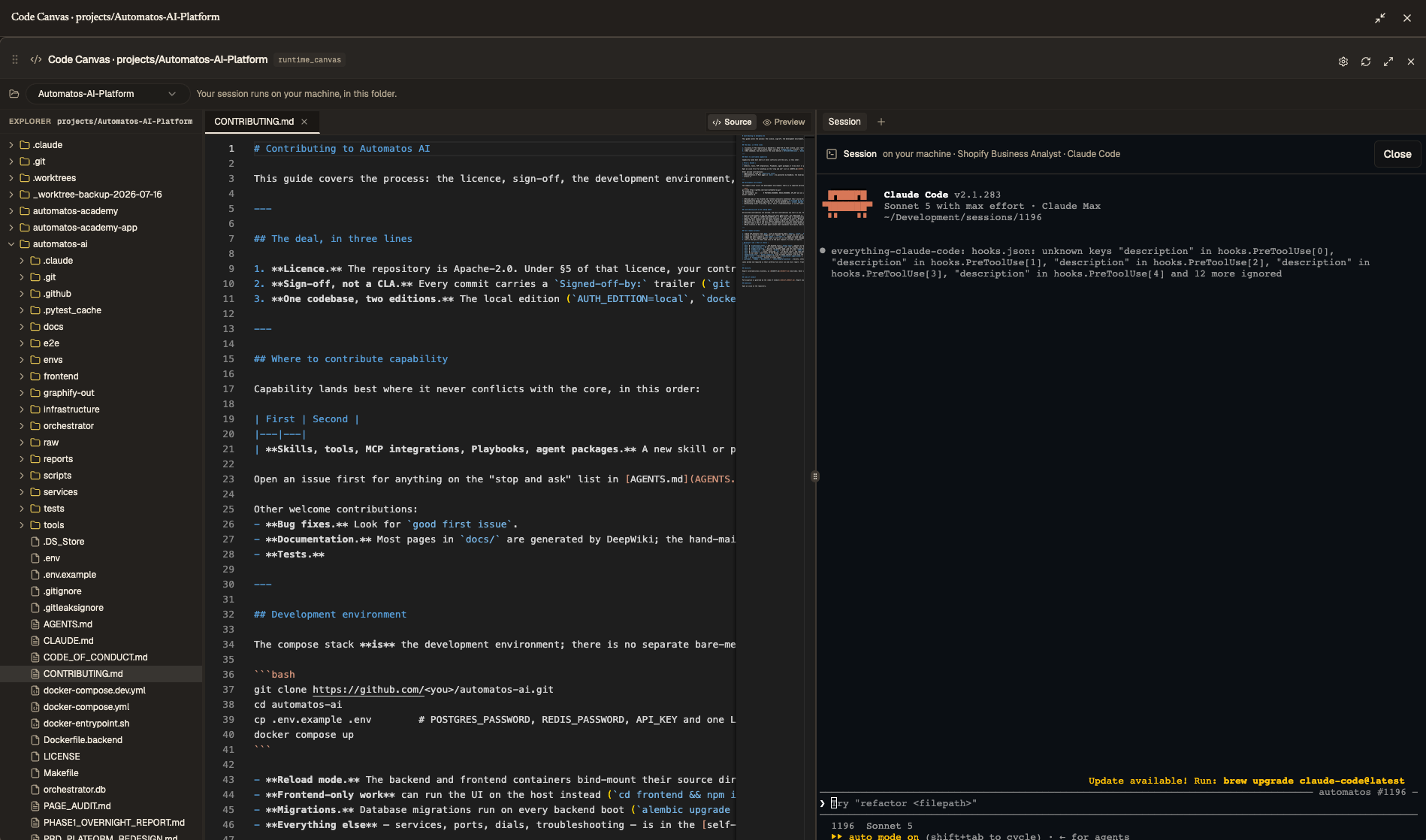
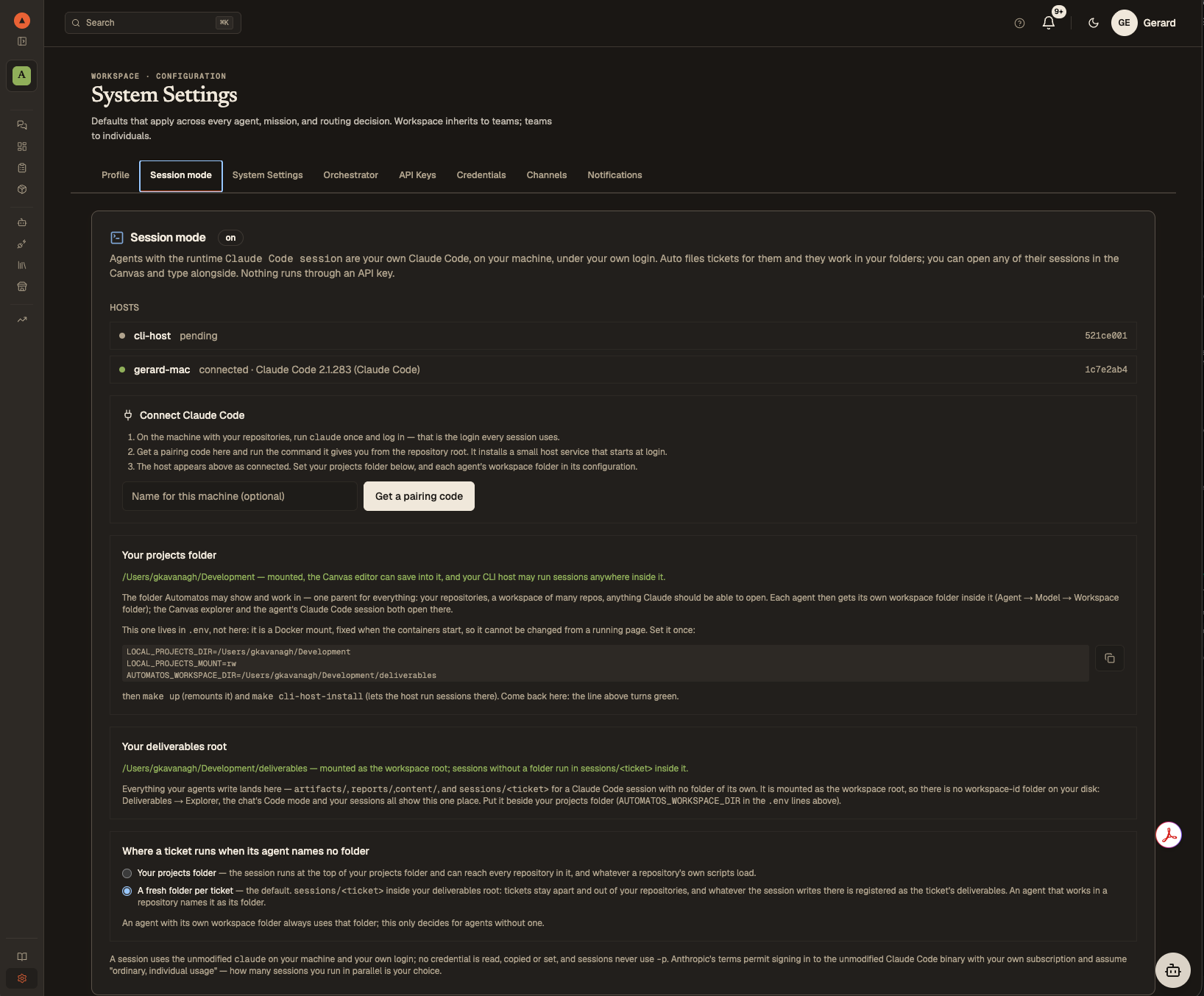
Session mode turns your Claude Code subscription into an agent runtime — without an API key and inside Anthropic's terms. Pair a small host process on the machine that holds your repositories, give an agent the runtime *Claude Code session*, and Automatos becomes the manager above it:
- **Auto files the tickets; the board tracks them.** A ticket for a session agent is claimed by your host, runs as a real interactive Claude Code session under your own login, and lands like any other agent's work: files become Deliverables, the session log becomes the task report, and a permission question the session asks surfaces as an approval card.
- **The agent's persona and skills ride into the session.** What you configured on the agent is what the session is told; playbook steps and mission tasks reach session agents through the same ticket lane.
- **The Runtime Canvas.** Pick a session agent in the chat and the Canvas opens full-screen: a file explorer on the agent's workspace folder on the left, and on the right a terminal in which the host has already launched that agent's own Claude Code session — resumed if it exists. You type alongside it.
- **Your folders, your rules.** The host only runs sessions inside directories you registered; a git repository gets a worktree per ticket; sessions never push. The Claude Code binary is never modified, no token is ever touched or stored, and `-p` and `--bare` are never used.
## 1,000+ tool integrations
Connect your agents to GitHub, Slack, Jira, Stripe, Shopify, Datadog, Notion, HubSpot, and a thousand more through the Composio catalogue. Browse, install, and assign integrations to specific agents from a single dashboard — no glue code, no per-tool SDKs. In the local edition this needs your own `COMPOSIO_API_KEY`; without one the Tools page says so and the native platform tools keep working.
## Tools chosen by meaning, not by menu
An agent with 200+ built-in platform actions cannot be handed all of them on every turn. Before the prompt is assembled, the platform embeds your message and ranks the action catalogue by semantic similarity, so the model is offered the handful of tools that fit what you asked — one ranking per turn, shared by every surface that needs it, cached, and never replaced by the full list when the embedding is slow. Selections and outcomes feed the Intent Graph, the learned layer that ranks by what worked for phrasings like yours; it is seeded from example utterances so it is useful on day one, and a measured uplift gate decides whether it is allowed to route.
## Packages — a ready-made team in one install
A package installs a team in a single step: its agents, each with its skills, tools and model, plus the Playbooks and report templates it needs. Three ship in every edition: **Socials** (a Social Media Director and a Brand Designer with five Playbooks), and two Shopify packages, **Shopify Management** (4 agents) and **Shopify Development** (3), drawn from 12 Shopify agent templates. The open skills library adds 21 Shopify skills.
## Reusable skills
Skills are portable, versioned capability packs — a system prompt, a set of tools, and an output contract. The open [automatos-skills](https://github.com/AutomatosAI/automatos-skills) library holds 140+ of them, ready to import, and 12 ship built in; the hosted Studio marketplace has 400+. Drop *Sentinel* onto a security agent, *Scout* onto a research agent, or write your own. One skill, any agent, instantly productive. For a session agent the same skills are rendered into its Claude Code session.
## Paid, free, or on your subscription — one router
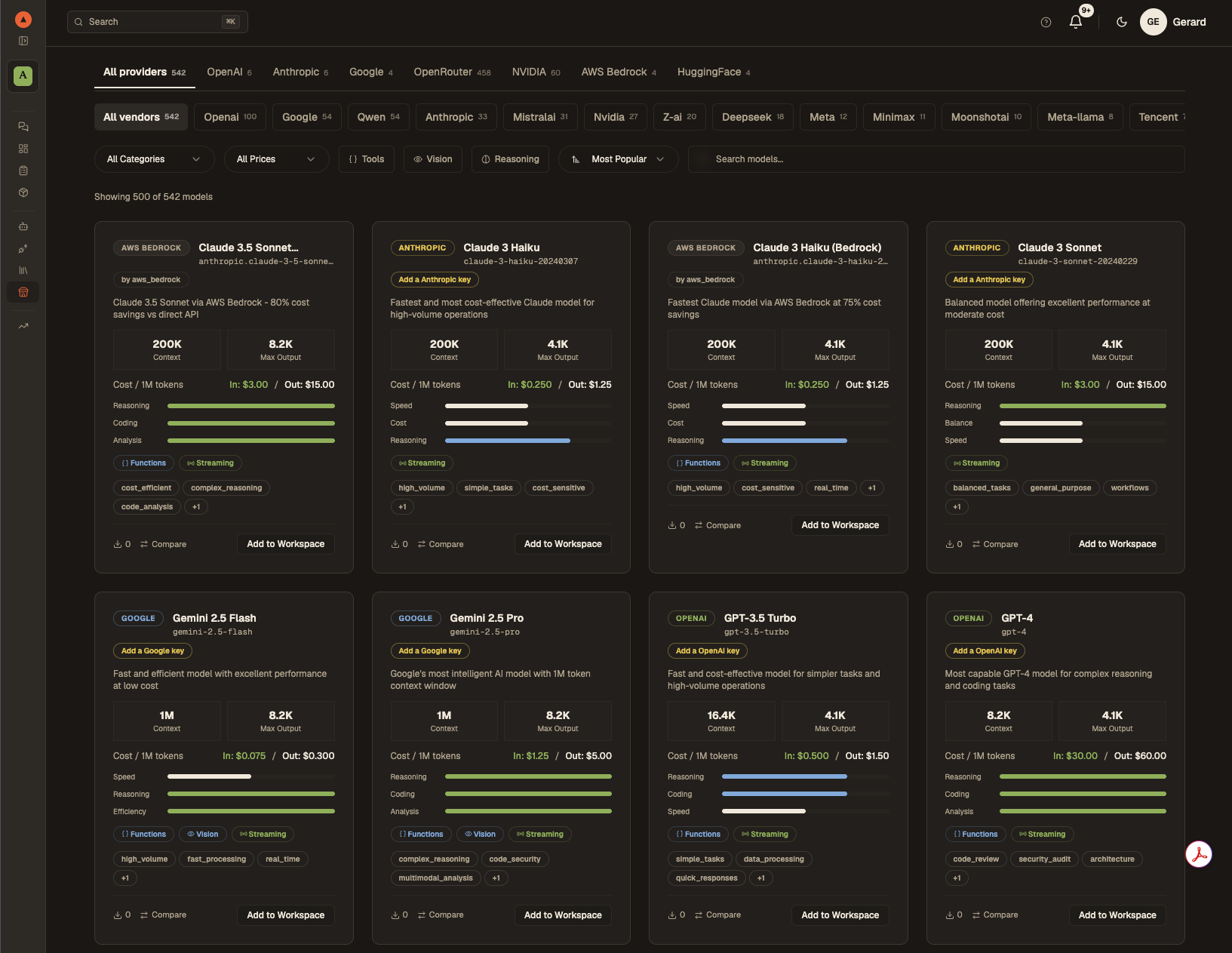
Every model provider is a route in one registry, and a model is installed *per route*. **Marketplace → LLMs** has a tab per provider and shows one card per route with that route's own price: *Kimi K3 · NVIDIA* is free, *Kimi K3 · OpenRouter* is $3 / $15 per million tokens, and installing one tags your workspace with that provider. The runtime routes to the tag — a free route is never silently rerouted to a paid one when it is busy.
- **OpenRouter** — one key, 400+ models, priced per call — and web search for every model your agents run on ([web access](QUICKSTART.md#what-you-get-in-the-local-edition): reading pages needs no key at all).
- **Direct keys** — OpenAI, Anthropic, Google, DeepSeek, Azure OpenAI, AWS Bedrock, Grok / xAI.
- **NVIDIA** — the hosted open models on build.nvidia.com (Kimi, DeepSeek, Nemotron, Llama, Mistral, …) at no charge, under NVIDIA's trial terms and rate limit; the key is your own agreement with NVIDIA.
- **Your Claude Code subscription** — as a session agent, not as an API.
Mix cheap models for heartbeat work with frontier models for reasoning, and see what each route did and cost per request.
## Command Center
See your entire AI workforce at a glance: live agent status, the board as a queue (Inbox → Assigned → In Progress → Review → Done), scheduled routines, and agent reports. Dragging a ticket to In Progress or pressing Run Now is the approval. The calendar shows heartbeats and schedules, board deadlines on the grid, and lets you or Auto schedule a board task for later — it is filed on the board when it fires.
## Full cost visibility
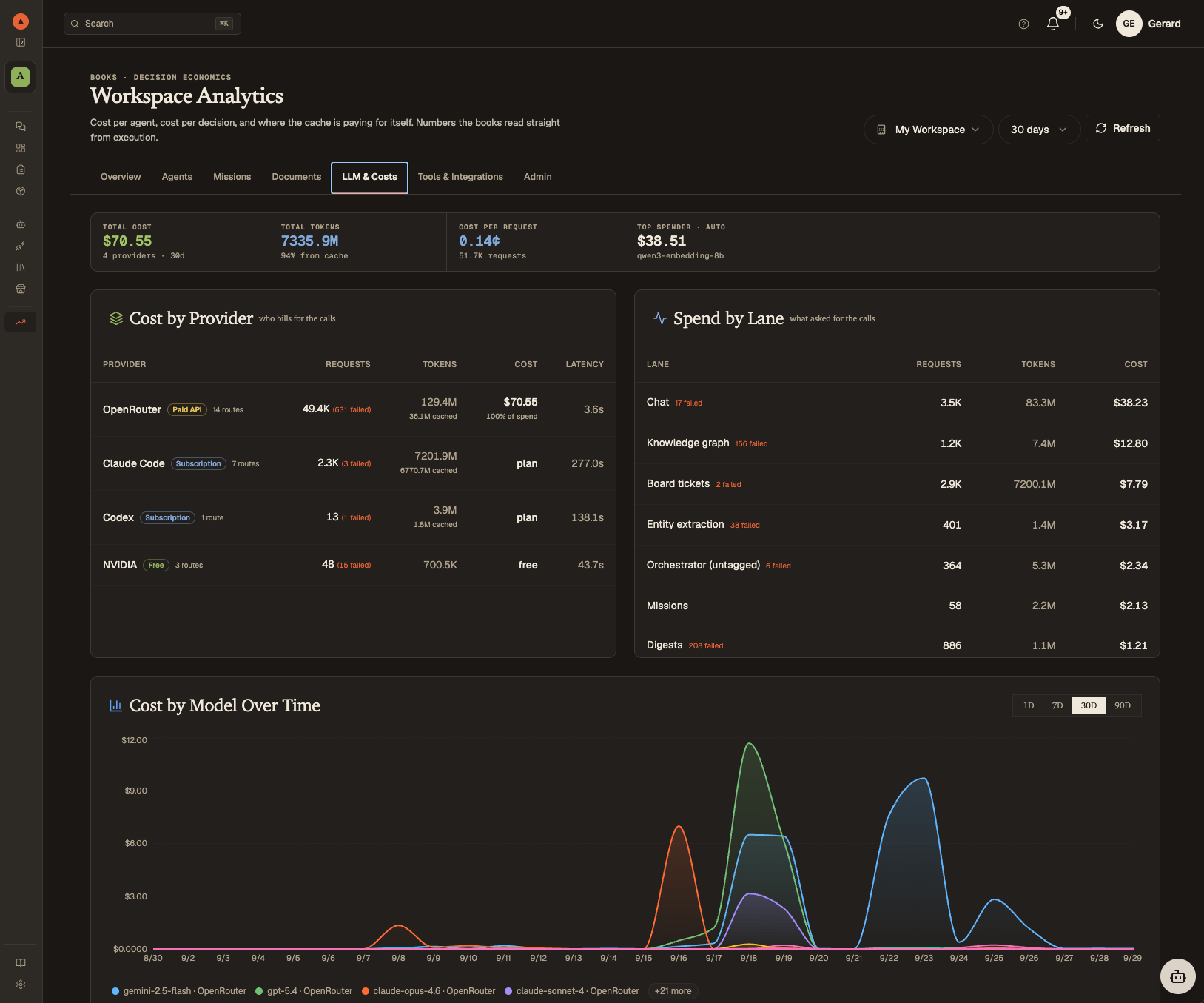
Every call is recorded with the provider that served it and how it bills — a paid API route, a free NVIDIA route, a Claude Code subscription session, an embedding, a rerank. Analytics shows cost by provider, spend by lane (chat, board tickets, missions, heartbeats, retrieval), cost by agent for the selected period, cost by route over time, cache reads, failed calls, and a monthly projection. A session agent shows the tokens it used and "plan" instead of a dollar figure it never spent.
## Knowledge bases with a graph
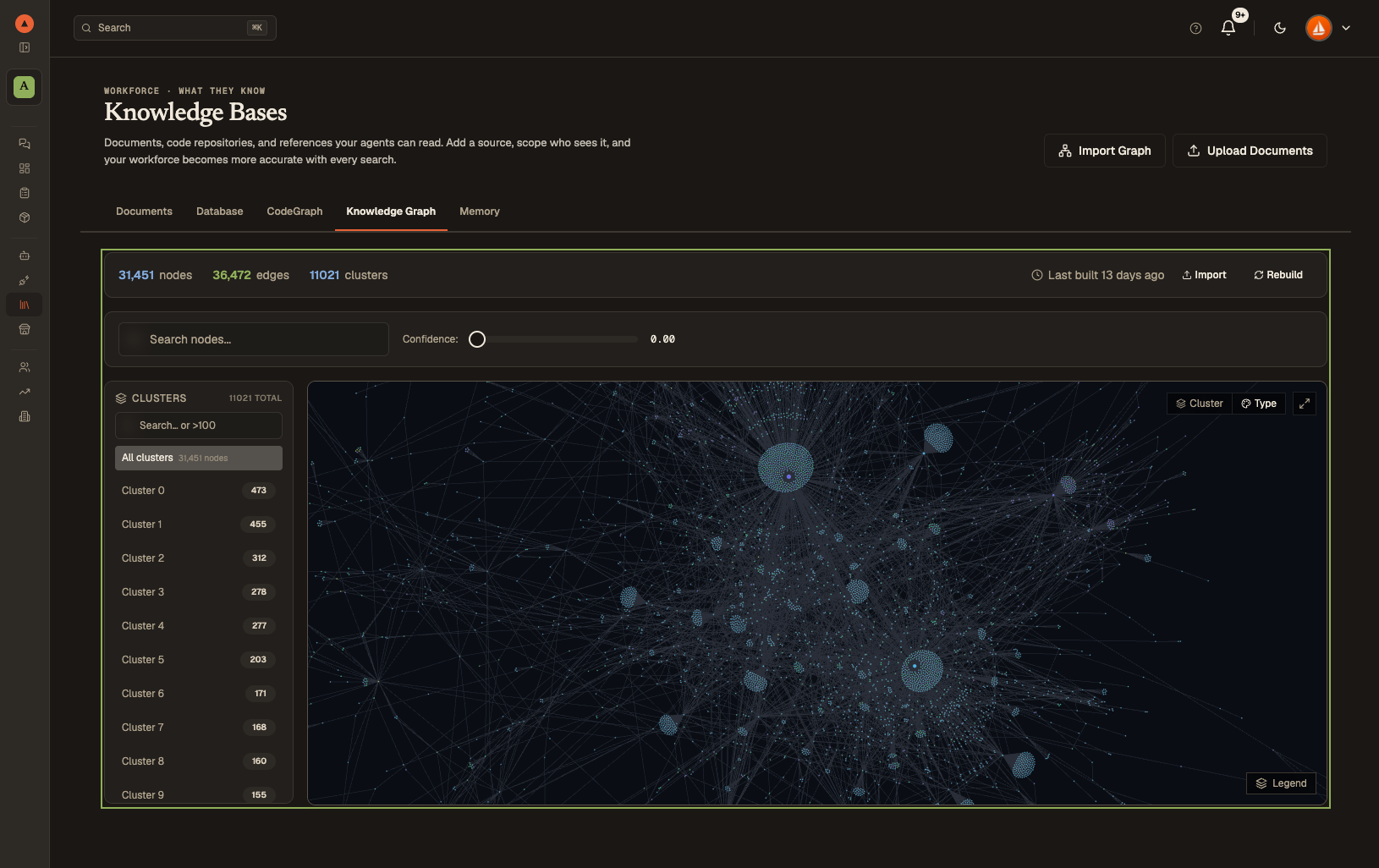
Upload documents, sync folders from Dropbox and cloud storage (the cloud connectors run through Composio), and let the platform chunk, embed, and index everything automatically. Your agents get RAG-powered access to your knowledge base — on pgvector in the local edition, on S3 Vectors in the hosted one — plus the Knowledge Graph built from it (entities, relationships, clusters), a CodeGraph of your repositories, and the memory layer, each with its own tab.
---
## Core capabilities
| Capability | What it does |
|---|---|
| **Universal Router** | Five-tier routing (your override, cache, rules, semantic similarity, LLM) sends each message to the best-matching agent or workflow |
| **Semantic tool selection** | Ranks the action catalogue against each message before the prompt is built; the Intent Graph learns from outcomes |
| **Session mode** | Your own Claude Code sessions as agents — tickets, persona, skills, Deliverables, approvals, and a Canvas terminal (local edition) |
| **Provider registry** | One registry of model providers; models installed per route with per-route prices; paid, free and subscription side by side |
| **Playbooks & Missions** | Multi-step automation with scheduling, triggers, and inter-agent coordination |
| **Calendar & board** | The board is the work queue; the calendar shows routines, deadlines and scheduled tickets |
| **Prompt Optimisation** | Score system prompt versions against live traffic, generate an optimised candidate, and activate or roll back a version yourself (hosted edition) |
| **Workspace Execution** | Sandboxed environments where agents run code, manage files, and interact with Git repos |
| **Cost analytics** | Every call tagged with provider and billing; cost by provider, lane, agent and route |
| **Multi-Tenancy** | Full workspace isolation in the hosted edition — each team gets their own agents, data, and configuration |
| **Plugin System** | Extend agents with skills, plugins, and custom tools from the marketplace or your own repos |
---
## Quick start (local edition)
> **New to Docker, or on Windows?** [SETUP.md](SETUP.md) walks through every step for macOS, Linux and Windows (WSL2), and an AI coding agent can follow it for you: *"Install Automatos by following SETUP.md"*. Prefer nothing to install? The hosted edition opens as a beta in November — [join the waitlist](https://studio.automatos.app/#waitlist).
```bash
git clone --depth 1 https://github.com/AutomatosAI/automatos-ai.git
cd automatos-ai
make up # writes .env with POSTGRES_PASSWORD, REDIS_PASSWORD and API_KEY generated, pulls the images
# CI published for this commit (about 1.3 GB), then starts the stack
```
`make up` needs Docker Engine 25 or later with Docker Compose 2.24.4 or later, and checks both first.
Then open http://localhost:3000 (API reference at http://localhost:8000/docs).
`make up` pulls instead of building: the first run downloads about 1.3 GB, about a
minute at 200 Mbit/s or three to four at 50 Mbit/s, and builds the database schema.
To update later: `git pull && make up`, which also brings the weekly rebuild with
fresh OS packages ([Updating](docs/getting-started/self-hosting.md#10-updating)).
No login. Add one model key and run the seeded *Two-minute brief* Playbook:
- `OPENROUTER_API_KEY` (400+ models), or `OPENAI_API_KEY` / `ANTHROPIC_API_KEY` / `DEEPSEEK_API_KEY`;
- `NVIDIA_API_KEY` from build.nvidia.com runs the hosted open models for free — in Marketplace → LLMs open the NVIDIA tab, sync once, add a model;
- keys can also be added later under Settings → API Keys.
To run your own Claude Code as an agent: set `CLI_RUNTIME_ENABLED=true` and `LOCAL_PROJECTS_DIR=/path/to/your/projects` in `.env`, `make up`, then Settings → Session mode → *Get a pairing code* and run the command it shows. Everything your agents write lands in one folder on your machine — `AUTOMATOS_WORKSPACE_DIR`, e.g. `/path/to/your/projects/deliverables` — which Deliverables → Explorer, the chat's Code mode and your sessions share. [QUICKSTART.md](QUICKSTART.md) is the short walkthrough; [docs/getting-started/self-hosting.md](docs/getting-started/self-hosting.md) covers every service, dial, session mode in depth, and what the local edition does not include.
---
## Tech stack
| Layer | Technology |
|---|---|
| Frontend | Next.js 15, React, TypeScript, Tailwind CSS, shadcn/ui |
| Backend | Python 3.11, FastAPI, SQLAlchemy, Alembic |
| Data | PostgreSQL 16 with pgvector, Redis 7 |
| AI | One provider registry: OpenRouter, OpenAI, Anthropic, Google, DeepSeek, NVIDIA (free, trial), Azure OpenAI, AWS Bedrock, Grok; bring your own keys |
| Session runtime | A CLI host on your machine runs your own unmodified Claude Code sessions (local edition) |
| Object storage | S3 API — MinIO in the local stack, AWS S3 (+ S3 Vectors for RAG) in the hosted edition |
| Auth | None in the local edition (`AUTH_EDITION=local`); Clerk in the hosted edition |
| Runtime | Docker Compose (local); Railway (hosted) |
---
## Documentation
Platform documentation lives in [`/docs`](docs/README.md) — architecture, APIs, agents, Playbooks, deployment. Most pages are generated from [DeepWiki](https://deepwiki.com/AutomatosAI/automatos-ai); the self-hosting guide, the analytics cost-tracking note and the contributing guide are maintained by hand.
---
## Community
- **Questions, ideas and show-and-tell:** [GitHub Discussions](https://github.com/AutomatosAI/automatos-ai/discussions)
- **Bugs:** [open an issue](https://github.com/AutomatosAI/automatos-ai/issues/new/choose) — include your edition and what `make up` printed
- **Security reports:** privately, as [SECURITY.md](SECURITY.md) describes — never in a public issue
If Automatos is useful to you, a ⭐ helps other people find it.
## Contributing
New here? Look for issues labelled [`good first issue`](https://github.com/AutomatosAI/automatos-ai/labels/good%20first%20issue). See [CONTRIBUTING.md](CONTRIBUTING.md). Two things to know before the first PR:
- **Sign off every commit** (`git commit -s`). The `Signed-off-by:` trailer is your [Developer Certificate of Origin](https://developercertificate.org) attestation and the `dco` check verifies it on each pull request. There is no CLA; contributions are Apache-2.0 and ship in every edition.
- **Capability first, core second.** Skills, tools, MCP integrations, Playbooks and agent packages reach both editions unchanged and never conflict with core. Open an issue first for anything touching auth, storage, the tool router or a migration.
### Contributors
Thank you to everyone who has contributed to Automatos.
 ---
---
**[Star on GitHub](https://github.com/AutomatosAI/automatos-ai)** · **[Read the Docs](docs/README.md)** · **[Discussions](https://github.com/AutomatosAI/automatos-ai/discussions)** · **[DeepWiki](https://deepwiki.com/AutomatosAI/automatos-ai)**
*Apache 2.0 · Built by the Automatos AI team*