
Awal Terminal
ⴰⵡⴰⵍ — "word" in Amazigh






The LLM-native terminal emulator for macOS.
Built for developers who work with AI coding agents.
Website ·
Download
---
## What is Awal Terminal?
A native macOS terminal built from scratch with Swift and Rust, designed specifically for working with AI coding agents like Claude Code, Gemini CLI, and Codex CLI.
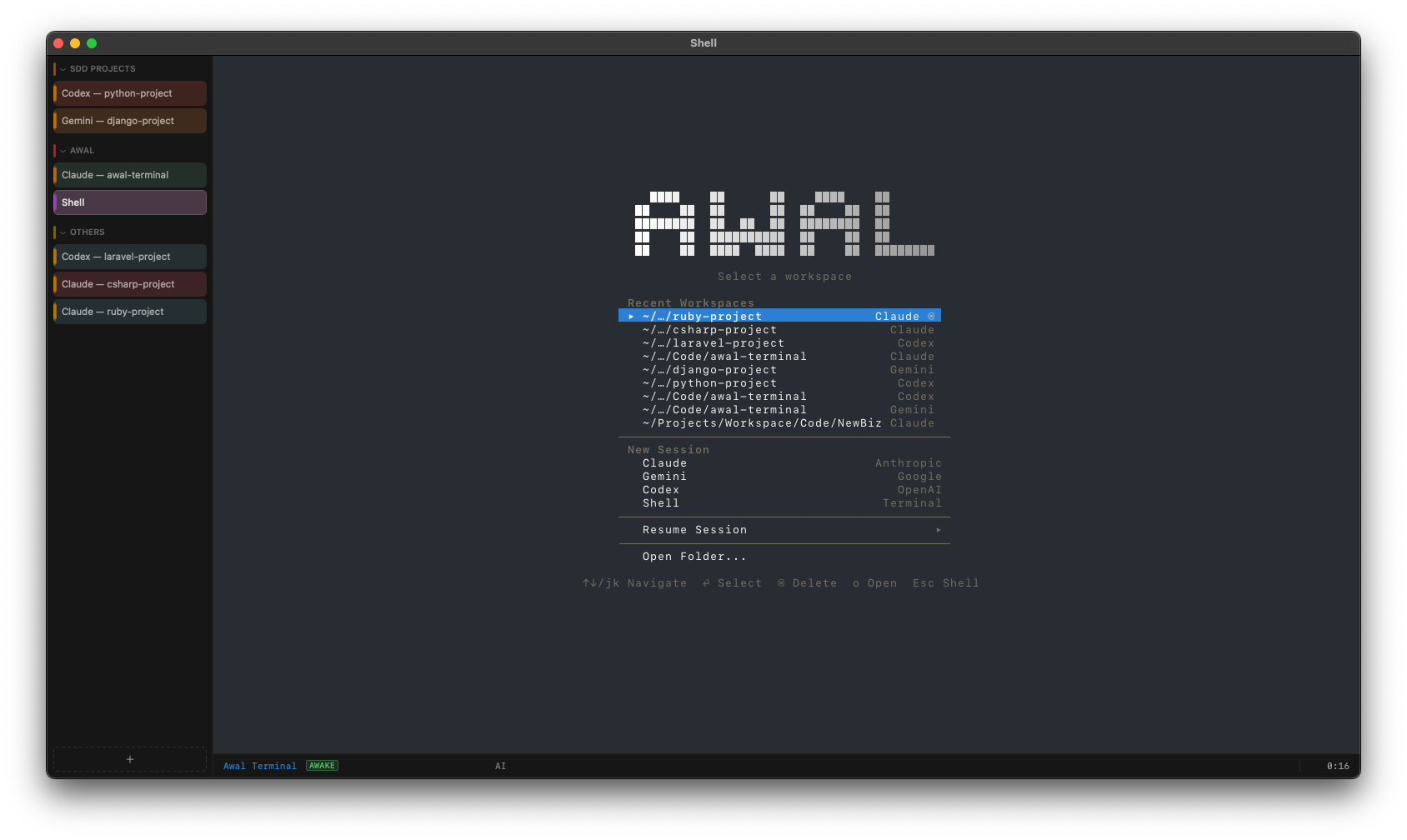
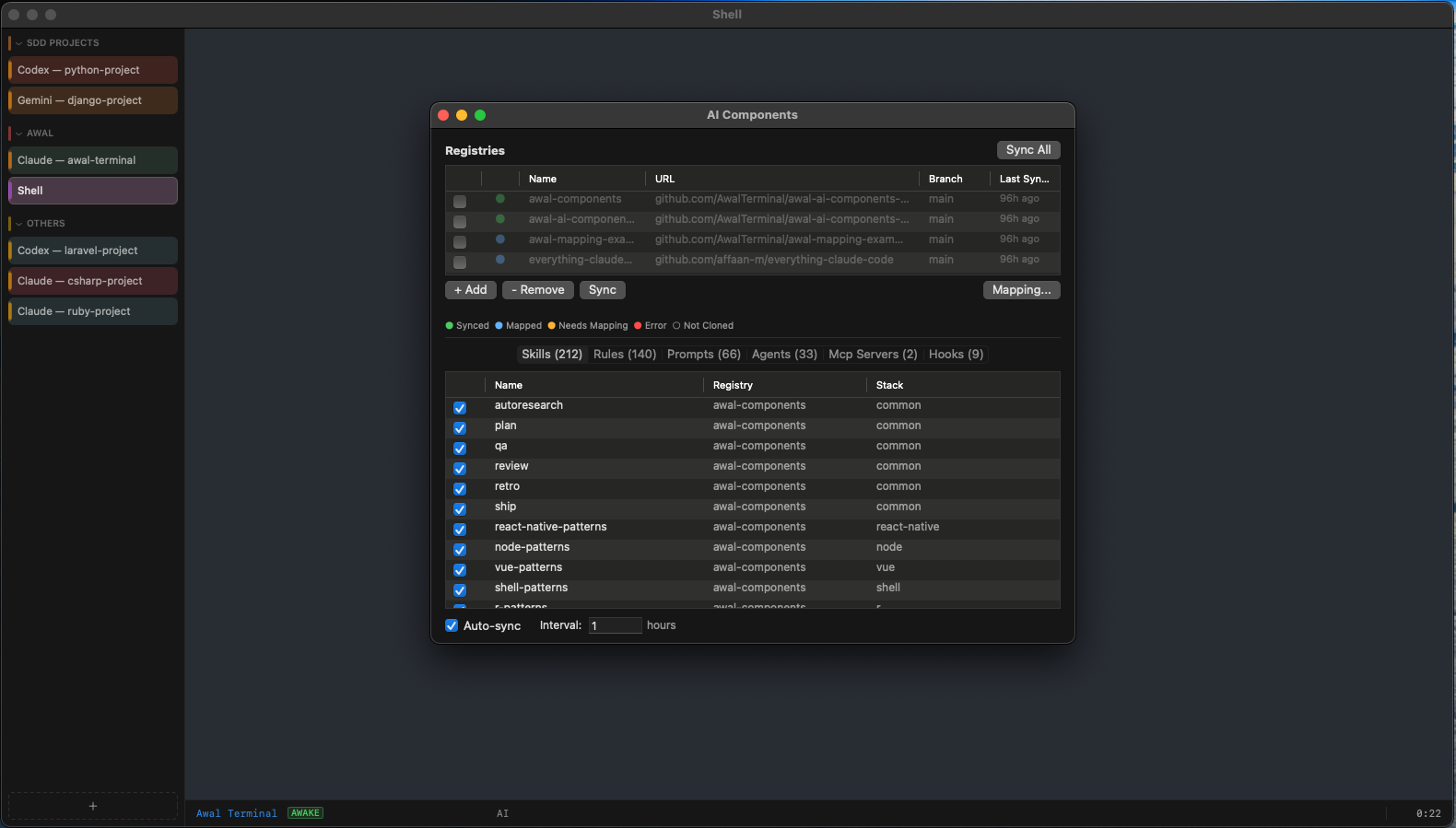
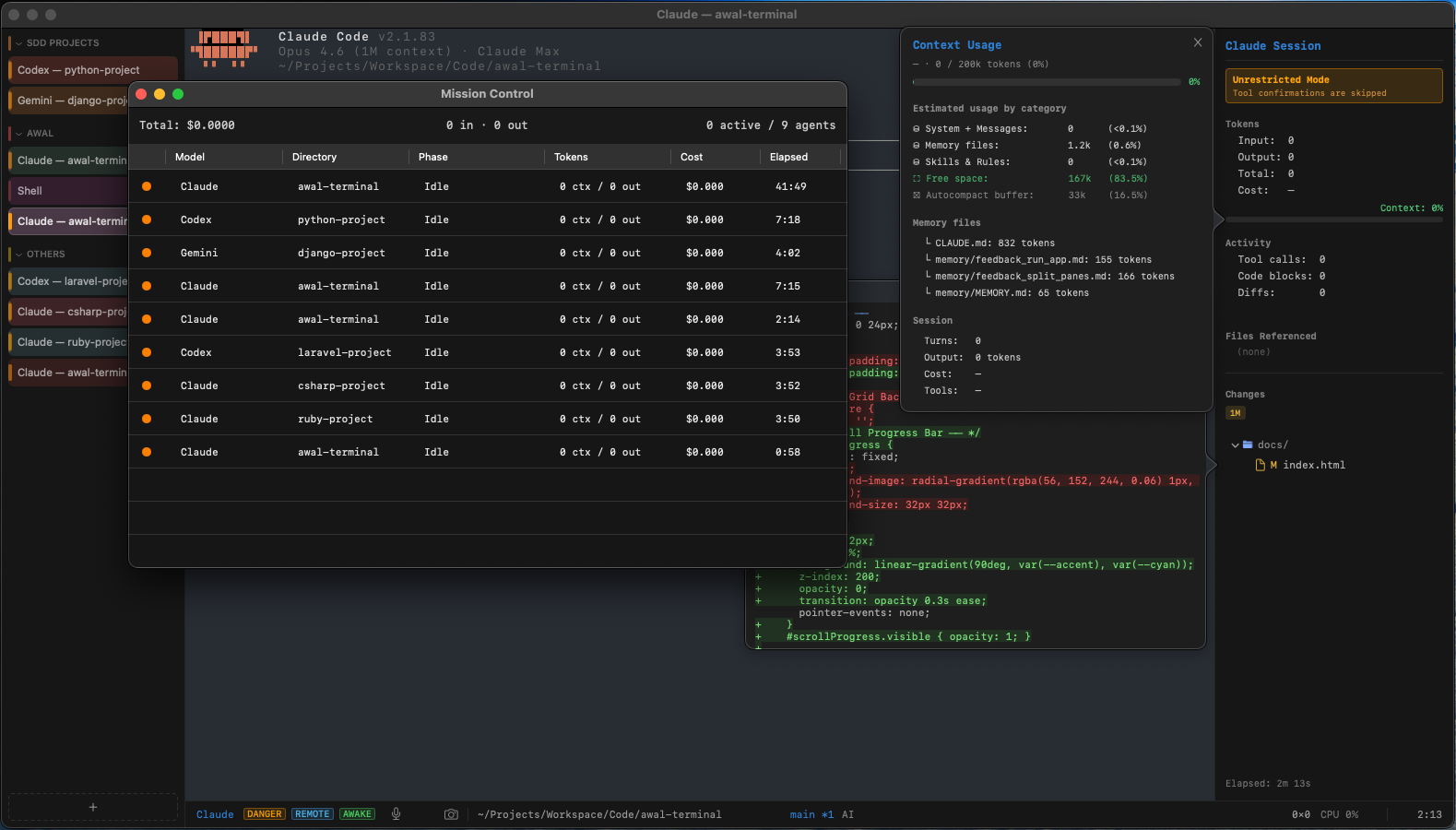
## Features
| Feature | Description |
|---|---|
| GPU-Accelerated Rendering | Metal-powered rendering at 120fps with a glyph atlas and triple buffering. 10,000-line scrollback buffer |
| LLM Profiles | Switch between Claude, Gemini, Codex, or plain shell in one click. Save per-model configurations |
| AI Side Panel | Track token usage, costs, context window, file references, and git changes in real time |
| Smart Output Folding | AI tool calls, code blocks, and diffs auto-collapse into foldable regions. Click to expand |
| Screenshot to Session | Press `Cmd+Shift+S` or click the camera icon to capture a screen region and paste its file path into the terminal. Perfect for sharing screenshots with AI agents |
| Voice Input | Push-to-talk voice input powered by on-device speech recognition |
| AI Components | Auto-detect your project stack and inject skills, rules, prompts, agents, MCP servers, and hooks into AI sessions from shared registries. Supports git, [localskills](https://localskills.dev), and local directory sources. Visual mapping editor for non-standard registry structures. Per-component enable/disable, security scanning with rules toggle, hook approval gate with audit trail, and import/export |
| Sub-Stack Detection | Automatically detects frameworks like Next.js, Django, Flask, Vapor, NestJS, and more on top of base stack detection for more targeted component injection |
| Resume Sessions | Browse and resume past AI sessions from the startup menu. Claude sessions show turn count and time ago; Codex and Gemini launch their built-in session pickers |
| Plan-Aware Tab Naming | Automatically detects AI plan headers and offers to rename the tab to match the plan title |
| Smart Notifications | Desktop alerts when long-running AI tasks complete |
| Tabs & Windows | Multiple windows (`Cmd+N`), native tabs with drag-to-reorder, tab tearoff to new window, custom tab colors, per-tab titles, tab groups with collapse/expand, and vertical sidebar tab bar |
| Quick Terminal | Quake-style dropdown terminal with a global hotkey (`Ctrl+``) |
| Find in Terminal | Search through scrollback with match highlighting and keyboard navigation. OSC 8 hyperlinks and drag-and-drop file pasting |
| Syntax Highlighting | Language-aware coloring for code blocks and diffs inside AI output |
| Git Integration | Live branch, status, and changed files displayed in the status bar and side panel. Click any changed file to view its diff inline. Per-tab worktree isolation for parallel workstreams |
| Large Paste Protection | Confirmation dialog for large pastes with options to save to file, truncate, or paste all. Configurable threshold |
| Mission Control | Dashboard window (`Cmd+Shift+D`) showing all active AI agents across tabs and windows with real-time status, total cost, tokens, elapsed time, and per-agent kill switches |
| Session Recording | Record AI coding sessions (`Cmd+Option+Shift+R` to start/stop) and export as GIF. Idle time compression for compact output |
| Per-Tab Token Tracking | Each tab independently tracks its own token usage and cost, visible in the AI side panel and Mission Control |
| Danger Mode | Skip all AI tool confirmation prompts for unrestricted sessions. Toggle from the View menu; always resets on app launch |
| Automatic Updates | Checks GitHub Releases for new versions and shows an indicator in the status bar. Supports Homebrew and direct download updates |
| Command Palette | Quick-access to all actions via `Cmd+Shift+P` with fuzzy search |
| Copy as Markdown | Right-click or `Cmd+Shift+C` to copy terminal output with code fences, blockquotes, and formatting preserved |
| Smart Autocomplete | File path and command history completions as you type |
| Remote Control | Detect Claude Code's remote control mode, show a REMOTE badge in the status bar, and display a QR code popover to connect from your phone. Enable from the View menu |
| Prevent Sleep | Prevent macOS from sleeping during active terminal sessions. Auto-activates during remote control sessions |
| Stealth Mode | Full-screen black overlay that hides all terminal content while your session continues safely in the background. Press any key to return |
| Fully Configurable | Theme colors, fonts, keybindings, and voice settings in a single config file |
## Getting Started
### Install with Homebrew (recommended)
```bash
brew tap AwalTerminal/tap
brew install --cask awal-terminal
```
No quarantine workarounds needed — Homebrew handles it automatically.
### Download manually
Grab the latest build from [GitHub Releases](https://github.com/AwalTerminal/awal-terminal/releases/latest).
Since the app is not yet notarized with Apple, macOS will block it on first launch. To bypass this:
1. **Right-click** (or Control-click) the app and choose **Open**, then click **Open** in the dialog.
If that doesn't work, run this in Terminal:
```bash
xattr -cr AwalTerminal.app
```
Then open the app normally.
### Build from Source
Requires Rust and Swift toolchains on macOS.
```bash
# Install just (task runner)
brew install just
# Build and run
just run
# Build release .app bundle
just bundle
# Create a new release
scripts/release.sh v0.15.0
```
### Configuration
All settings live in `~/.config/awal/config.toml`:
```toml
[font]
family = "JetBrains Mono"
size = 13.0
[theme]
bg = "#1e1e1e"
fg = "#e5e5e5"
accent = "#636efa"
cursor = "#ccccccb3"
selection = "#2d7fd44d"
tab_bar_bg = "#161616"
tab_active_bg = "#232323"
status_bar_bg = "#161616"
[voice]
enabled = true
language = "en"
vad_threshold = 0.02
dictation_auto_enter = false
dictation_auto_space = true
# command_prefix = ""
[recording]
max_duration = 300
[paste]
warning_threshold = 100000
truncate_length = 10000
[tabs]
random_colors = true
# random_color_palette = "#E55353, #3498DB, #27AE60"
confirm_close = true
loading_indicator = true
worktree_isolation = false
# worktree_branch_prefix = "awal/tab"
[quit]
confirm_close = true
[system]
prevent_sleep = false
[ai_components]
enabled = true
auto_detect = true
auto_sync = true
security_scan = true
require_hook_approval = true
remote_control = false
[ai_components.registry.awal-components]
url = "https://github.com/AwalTerminal/awal-ai-components-registry.git"
branch = "main"
[ai_components.registry.my-skill]
type = "localskills"
slugs = "ZpDEwZj1Yq"
[ai_components.registry.my-local]
type = "local"
path = "/path/to/local/registry"
```
## Architecture
```
core/ Rust — terminal emulation, ANSI parsing, AI output analysis
app/ Swift — macOS UI, Metal rendering, voice input, AI side panel
scripts/ Build and release scripts
build/ Release artifacts
docs/ Promotional website (GitHub Pages)
```
## Keybindings
| Action | Shortcut |
|---|---|
| New window | `Cmd+N` |
| New tab | `Cmd+T` |
| Close tab | `Cmd+W` |
| Rename tab | `Cmd+Shift+R` |
| Next tab | `Cmd+Shift+]` |
| Previous tab | `Cmd+Shift+[` |
| New tab group | `Cmd+Shift+G` |
| Toggle group collapse | `Cmd+Shift+.` |
| Mission Control | `Cmd+Shift+D` |
| Command Palette | `Cmd+Shift+P` |
| Copy as Markdown | `Cmd+Shift+C` |
| Find | `Cmd+F` |
| AI side panel | `Cmd+Shift+I` |
| Quick terminal | `` Ctrl+` `` |
| Sync AI components | `Cmd+Shift+Y` |
| Screenshot to session | `Cmd+Shift+S` |
| Voice input (PTT) | `Ctrl+Shift+Space` |
| Preferences | `Cmd+,` |
| Session recording | `Cmd+Option+Shift+R` |
| Zoom in | `Cmd+=` |
| Zoom out | `Cmd+-` |
| Actual size (reset zoom) | `Cmd+0` |
## License
MIT