# 🐼 Panda: Your Personal AI Phone Operator
**You touch grass. I'll touch your glass.**
[](https://discord.gg/b2hxFNXvWk)
 [](https://deepwiki.com/Ayush0Chaudhary/blurr)
---
# Demos:
#### Explaining all the triggers of Panda
[](https://www.youtube.com/embed/IDvuqmPyKZs)
#### Sending Welcome message to all the new Connections on Linkedin
[](https://www.youtube.com/embed/JO_EWFYJJjA)
#### 5 task demo:
https://github.com/user-attachments/assets/cf76bb00-2bf4-4274-acad-d9f4c0d47188
**Panda** is a proactive, on-device AI agent for Android that autonomously understands natural language commands and operates your phone's UI to achieve them. Inspired by the need to make modern technology more accessible, Panda acts as your personal operator, capable of handling complex, multi-step tasks across different applications.
[](https://wip.vost.pt/)
[](./LICENSE)
[](https://kotlinlang.org)
## Core Capabilities
* 🧠 **Intelligent UI Automation:** Panda sees the screen, understands the context of UI elements, and performs actions like tapping, swiping, and typing to navigate apps and complete tasks.
* 📢 **High Qaulity voice:** Panda have high quality voice by GCS's Chirp
* 💾 **Persistent & Personalized local Memory:** ⚠️ **Temporarily Disabled** - Panda memory is turned off as of yet. Memory functionality will be restored in a future update.
## Architecture Overview
Panda is built on a sophisticated multi-agent system written entirely in Kotlin. This architecture separates responsibilities, allowing for more complex and reliable reasoning.
* **Eyes & Hands (The Actuator):** The **Android Accessibility Service** serves as the agent's physical connection to the device, providing the low-level ability to read the screen element hierarchy and programmatically perform touch gestures.
* **The Brain (The LLM):** All high-level reasoning, planning, and analysis are powered by **LLM** models. This is where decisions are made.
* **The Agent:**
* **Operator:** This is executor with Notepad.
[](https://deepwiki.com/Ayush0Chaudhary/blurr)
---
# Demos:
#### Explaining all the triggers of Panda
[](https://www.youtube.com/embed/IDvuqmPyKZs)
#### Sending Welcome message to all the new Connections on Linkedin
[](https://www.youtube.com/embed/JO_EWFYJJjA)
#### 5 task demo:
https://github.com/user-attachments/assets/cf76bb00-2bf4-4274-acad-d9f4c0d47188
**Panda** is a proactive, on-device AI agent for Android that autonomously understands natural language commands and operates your phone's UI to achieve them. Inspired by the need to make modern technology more accessible, Panda acts as your personal operator, capable of handling complex, multi-step tasks across different applications.
[](https://wip.vost.pt/)
[](./LICENSE)
[](https://kotlinlang.org)
## Core Capabilities
* 🧠 **Intelligent UI Automation:** Panda sees the screen, understands the context of UI elements, and performs actions like tapping, swiping, and typing to navigate apps and complete tasks.
* 📢 **High Qaulity voice:** Panda have high quality voice by GCS's Chirp
* 💾 **Persistent & Personalized local Memory:** ⚠️ **Temporarily Disabled** - Panda memory is turned off as of yet. Memory functionality will be restored in a future update.
## Architecture Overview
Panda is built on a sophisticated multi-agent system written entirely in Kotlin. This architecture separates responsibilities, allowing for more complex and reliable reasoning.
* **Eyes & Hands (The Actuator):** The **Android Accessibility Service** serves as the agent's physical connection to the device, providing the low-level ability to read the screen element hierarchy and programmatically perform touch gestures.
* **The Brain (The LLM):** All high-level reasoning, planning, and analysis are powered by **LLM** models. This is where decisions are made.
* **The Agent:**
* **Operator:** This is executor with Notepad.
 ## 🚀 Getting Started
### Prerequisites
* Android Studio (latest version recommended)
* An Android device or emulator with API level 26+
* Some Gemini keys, sample ENV
```python
# the name of these keys donot mean you need google cloud, you can use any servers that can accept requests, i will improve the developer experience in the future by making openapi compatible
GCLOUD_PROXY_URL=
GCLOUD_PROXY_URL_KEY=
```
`payload`
```
{
"modelName": "model-name",
"messages": [
{
"role": "user",
"parts": [
{
"text": "Hello, what can you do?"
}
]
},
{
"role": "model",
"parts": [
{
"text": "I can help you with a variety of tasks. What do you need assistance with today?"
}
]
}
]
}
```
or
```
//you can also add gemini keys to play around
GEMINI_API_KEYS=
```
### Installation
1. **Clone the repository:**
```bash
git clone [https://github.com/ayush0chaudhary/blurr.git](https://github.com/ayush0chaudhary/blurr.git)
cd blurr
```
2. **Build & Run:**
* Open the project in Android Studio.
* Let Gradle sync all the dependencies.
* Run the app on your selected device or emulator.
3. **Enable Accessibility Service:**
* On the first run, the app will prompt you to grant Accessibility permission.
* Click "Grant Access" and enable the "Panda" service in your phone's settings. This is required for the agent to see and control the screen.
## 🗺️ What's Next for Panda (Roadmap)
Panda is currently a powerful proof-of-concept, and the roadmap is focused on making it a truly indispensable assistant.
* [ ] **NOT UPDATED:** List not updated
## 🤝 Contributing
Contributions are welcome! If you have ideas for new features or improvements, feel free to open an issue or submit a pull request.
## 📜 License
This project is licensed under a Personal Use License - see the [LICENSE](LICENSE) file for details.
**Personal & Educational Use:** Free to use, modify, and distribute for personal, educational, and non-commercial purposes.
**Commercial Use:** Requires a separate commercial license. Please contact Panda AI for commercial licensing terms.
### A small video to help you understand what the project is about.
https://github.com/user-attachments/assets/b577072e-2f7f-42d2-9054-3a11160cf87d
Write you api key in in local.properties, more keys you use, better is the speed 😉
# View logs in real-time
adb logcat | grep GeminiApi
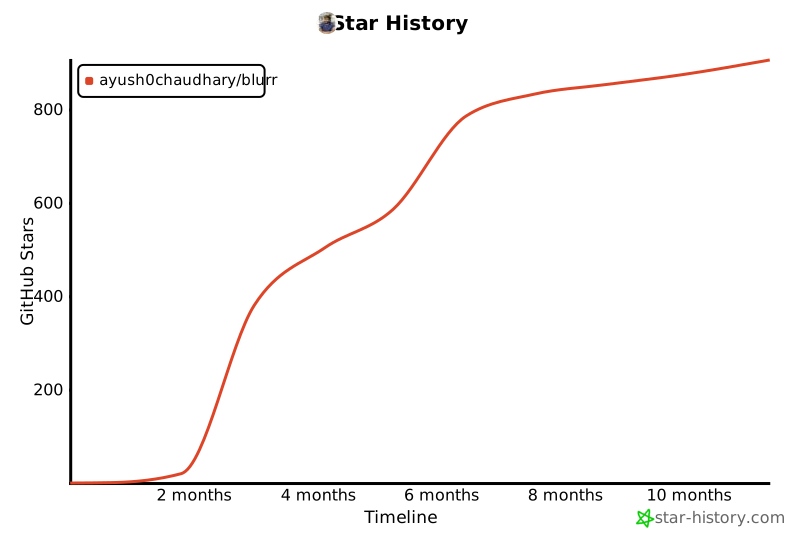
## Star History
[](https://www.star-history.com/#Ayush0Chaudhary/blurr&Timeline)
## 🚀 Getting Started
### Prerequisites
* Android Studio (latest version recommended)
* An Android device or emulator with API level 26+
* Some Gemini keys, sample ENV
```python
# the name of these keys donot mean you need google cloud, you can use any servers that can accept requests, i will improve the developer experience in the future by making openapi compatible
GCLOUD_PROXY_URL=
GCLOUD_PROXY_URL_KEY=
```
`payload`
```
{
"modelName": "model-name",
"messages": [
{
"role": "user",
"parts": [
{
"text": "Hello, what can you do?"
}
]
},
{
"role": "model",
"parts": [
{
"text": "I can help you with a variety of tasks. What do you need assistance with today?"
}
]
}
]
}
```
or
```
//you can also add gemini keys to play around
GEMINI_API_KEYS=
```
### Installation
1. **Clone the repository:**
```bash
git clone [https://github.com/ayush0chaudhary/blurr.git](https://github.com/ayush0chaudhary/blurr.git)
cd blurr
```
2. **Build & Run:**
* Open the project in Android Studio.
* Let Gradle sync all the dependencies.
* Run the app on your selected device or emulator.
3. **Enable Accessibility Service:**
* On the first run, the app will prompt you to grant Accessibility permission.
* Click "Grant Access" and enable the "Panda" service in your phone's settings. This is required for the agent to see and control the screen.
## 🗺️ What's Next for Panda (Roadmap)
Panda is currently a powerful proof-of-concept, and the roadmap is focused on making it a truly indispensable assistant.
* [ ] **NOT UPDATED:** List not updated
## 🤝 Contributing
Contributions are welcome! If you have ideas for new features or improvements, feel free to open an issue or submit a pull request.
## 📜 License
This project is licensed under a Personal Use License - see the [LICENSE](LICENSE) file for details.
**Personal & Educational Use:** Free to use, modify, and distribute for personal, educational, and non-commercial purposes.
**Commercial Use:** Requires a separate commercial license. Please contact Panda AI for commercial licensing terms.
### A small video to help you understand what the project is about.
https://github.com/user-attachments/assets/b577072e-2f7f-42d2-9054-3a11160cf87d
Write you api key in in local.properties, more keys you use, better is the speed 😉
# View logs in real-time
adb logcat | grep GeminiApi
## Star History
[](https://www.star-history.com/#Ayush0Chaudhary/blurr&Timeline)