# PhoneSploit Pro
The Swiss Army knife for Android.
An all-in-one hacking tool written in `Python` to remotely take over Android devices using `ADB`, `scrcpy`, `Nmap`, and `Metasploit-Framework`.




## Table of contents
- [Overview](#overview)
- [Screenshots](#screenshots)
- [Features](#features)
- [Requirements](#requirements)
- [Getting started](#getting-started)
- [Installing dependencies](#installing-dependencies)
- [Device setup tutorial](#device-setup-tutorial)
- [Compatibility](#compatibility)
- [Installing tools manually](#installing-tools-manually)
- [Disclaimer](#disclaimer)
- [Developer](#developer)
- [Support](#support)
- [Attribution](#attribution)
---
## Overview
#### Own the device. Every way that matters.
Connect over USB or Wi‑Fi, then control the device, extract data, stream camera and microphone, manage apps, and automate a full **Metasploit** compromise, all from one menu.
You no longer need to memorize commands and arguments, PhoneSploit Pro does it for you. Pick a number and run.
---
## Screenshots
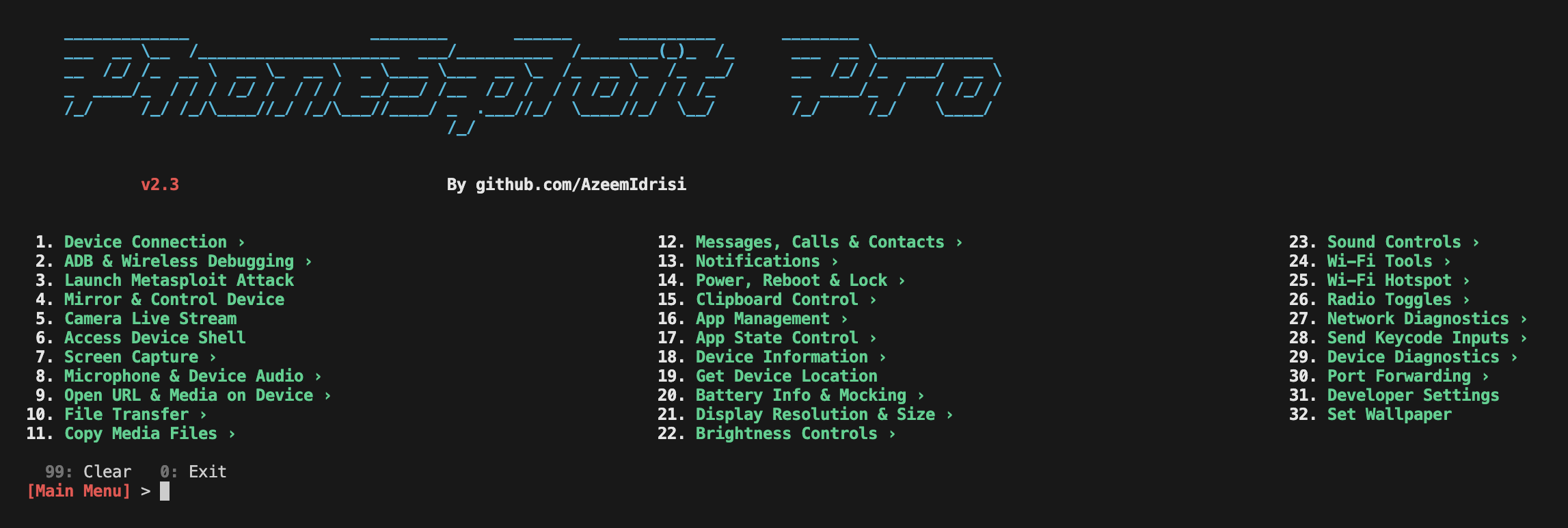
---
## Features
| Feature | Description |
| ---------------------------------------- | ----------------------------------------------------------------------------------------------------------------------------------------------------------------------------------------------------------------------------------------------------------------------------------------------------------------------------------------------------------------------------------------------------------------- |
| **Connect a device** | Connect to a device remotely using ADB. |
| **List connected devices** | Show all devices currently attached to ADB. |
| **Disconnect all devices** | Disconnect every ADB session. |
| **Multi-device selection** | If several ADB devices are connected (USB or network), choose which device to use for the session (`ANDROID_SERIAL`). |
| **Stop ADB server** | Stop the ADB server process. |
| **Restart ADB server** | Restart the ADB server process. |
| **Access device shell** | Open an interactive shell on the connected device. |
| **Keycodes** | Send keycodes to control the device remotely. |
| **Unlock device** | Turn the screen on, swipe up, and enter a password when needed. |
| **Lock device** | Lock the device. |
| **Restart / reboot** | Restart or reboot the device to `System`, `Recovery`, `Bootloader`, or `Fastboot`. |
| **Power off** | Power off the target device. |
| **Screenshot** | Take a screenshot and pull it to the computer automatically. |
| **Screen recording** | Record the target device’s screen for a specified time and pull the recording to the computer automatically. |
| **Anonymous screenshot / screen record** | Take screenshots or screen recordings and remove the file from the target device afterward. |
| **Mirror and control** | Mirror the screen and control the target device. |
| **List files and folders** | List all files and folders on the target device. |
| **Download from device** | Download a file or folder from the target device. |
| **Send to device** | Send a file or folder from the computer to the target device. |
| **Copy WhatsApp data** | Copy all WhatsApp data to the computer. |
| **Copy screenshots** | Copy all screenshots to the computer. |
| **Copy camera photos** | Copy all camera photos to the computer. |
| **Camera live** | Stream live video from the front or back camera on the target device. |
| **Dump SMS** | Export all SMS from the device to the computer. |
| **Dump contacts** | Export all contacts from the device to the computer. |
| **Dump call logs** | Export all call logs from the device to the computer. |
| **Run an app** | Launch an application on the device. |
| **Install APK** | Install an APK from the computer to the target device. |
| **Install split APKs** | Install apps shipped as multiple APK splits (e.g. split bundles). |
| **Uninstall an app** | Remove an installed application. |
| **List installed apps** | List all apps installed on the target device. |
| **Extract APK** | Extract the APK from an installed app. |
| **Force-stop app** | Force-stop a running application. |
| **Clear app data** | Clear storage/data for a chosen app (factory reset for that app). |
| **Restart app** | Restart an application (force-stop then relaunch). |
| **Grant / revoke permission** | Grant or revoke a runtime permission for an app. |
| **Open a link** | Open a URL on the target device. |
| **Display a photo** | Show an image or photo on the target device. |
| **Play audio** | Play an audio file on the target device. |
| **Play video** | Play a video on the target device. |
| **Send SMS** | Send SMS messages through the target device. |
| **Device information** | Read build, model, chipset, patch level, encryption, and identifiers (IMEI when accessible, serial, boot serial, Android ID). |
| **Accounts on device** | List account types and names from `dumpsys account` (no tokens). |
| **SIM / operator info** | SIM and registered network operator properties with offline MCC-MNC lookup when available. |
| **Bluetooth devices** | Parse Bluetooth dump for paired/recent devices with offline MAC vendor (OUI) lookup. |
| **Battery information** | Read battery status and related details. |
| **Record microphone audio** | Record audio from the microphone. |
| **Stream microphone audio** | Stream live microphone audio. |
| **Record device audio** | Record internal device audio. |
| **Stream device audio** | Stream live device audio. |
| **Hack device completely** | Guided Metasploit flow with pre-flight checks (device, Metasploit, payload status, LPORT); pick **LHOST** from local interfaces or enter a custom IP; optionally **reuse** an installed payload or rebuild; step-by-step progress while `msfvenom` builds the APK, ADB installs and launches it, and **Metasploit-Framework** opens a `meterpreter` handler; optional **uninstall** of the payload when finished. |
| **LAN network scan** | Discover hosts on the local network to help find a target IP address; probe TCP ports `5555` and `5554` with service detection and show ADB-related fingerprints and hints for likely Android/ADB targets. |
| **TCP port forwarding** | Forward, reverse, list, remove, or remove all TCP port forwarding rules over ADB. |
| **Save logcat snippet** | Capture a slice of `logcat` output and save it to a file on the computer. |
| **Live logcat stream** | Stream `logcat` live from the device. |
| **Network snapshot** | Show a snapshot of network interfaces and connectivity on the device. |
| **Developer settings** | Open the system **Developer options** screen on the device. |
| **Read locale** | Read locale and language settings from the device. |
| **Screen stay-on** | Set `svc power stayon` (stay on over USB, stay on always, or turn stay-on off). |
| **Wi‑Fi status dump** | Dump detailed Wi‑Fi status from the device; summary lines annotate MAC/BSSID with offline vendor (OUI). |
| **WLAN IP info** | Show WLAN IP addressing information and annotate interface MAC with offline vendor (OUI). |
| **Wi‑Fi radio toggle** | Turn the Wi‑Fi radio on or off. |
| **Ping connectivity** | Run ping checks against a host to test connectivity. |
| **Saved Wi‑Fi networks** | List saved Wi‑Fi networks known to the device. |
| **Root heuristics** | Heuristic checks for common signs of root access. |
| **Vulnerability analysis (HARDAX)** | Read-only device audit over ADB via [HARDAX](https://github.com/V33RU/hardax): full scan, CVE/patch indicators, hardening (CIS/SELinux/boot/ADB/USB), app surface; Rich summary plus HTML/JSON/XLSX reports under `Downloaded-Files/vuln-reports/`. Installed with `pip install -r requirements.txt`. |
| **Set resolution & display size** | View current display settings; set screen resolution (`wm size`) from 720p/1080p/2K/4K presets in portrait or landscape, or a custom `WxH`; set display density (`wm density`) from common DPI presets or a custom value; toggle display scaling (`wm scaling`); and reset everything to device defaults. |
| **Clipboard management** | Read, set, or clear the device clipboard. |
| **GPS / location** | Retrieve the device's last-known GPS location (latitude, longitude, provider). |
| **App usage statistics** | Show foreground app usage stats over 1 day / 7 days / all time. |
| **Radio toggles** | Toggle mobile data, Bluetooth, NFC, and airplane mode. |
| **Mock battery** | Fake a battery level, simulate plugged or unplugged, or reset readings. |
| **Sound & display settings** | Set media volume, screen brightness, screen timeout, and Do Not Disturb mode. |
| **Notifications** | Post a notification, expand or collapse the notification panel and quick settings. |
| **Set wallpaper** | Push an image to the device and open the system wallpaper picker. |
| **Nearby Wi‑Fi scan** | Scan and list nearby Wi‑Fi networks with SSID, BSSID, offline MAC vendor (OUI), frequency, and signal. |
| **Local hotspot** | Start or stop a local-only Wi‑Fi hotspot directly from the device. |
| **Wireless ADB setup** | Pair, connect, switch to TCP/IP, or switch back to USB — all wireless ADB commands. |
| **Enable / disable app** | Disable a system or user app, or re-enable it later. |
| **Suspend / unsuspend app** | Suspend an app (icon greyed out, no data usage) or unsuspend it. |
| **Ignore battery optimization** | Whitelist an app from Doze battery optimization, un-whitelist it, or show the battery whitelist. |
| **Set default home app** | Change the default launcher/home app to any installed launcher package, or show the current home app. |
---
## Requirements
- [`python3`](https://www.python.org/) — Python 3.10 or newer
- [`pip`](https://pip.pypa.io/en/stable/installation/) — Package installer for Python
- [`adb`](https://developer.android.com/studio/command-line/adb) — Android Debug Bridge (ADB) from Android SDK Platform Tools
- [`metasploit-framework`](https://www.metasploit.com/) — Metasploit-Framework (`msfvenom` and `msfconsole`)
- [`scrcpy`](https://github.com/Genymobile/scrcpy) — scrcpy
- [`nmap`](https://nmap.org/) — Nmap
- [`hardax`](https://github.com/V33RU/hardax) — HARDAX (**Vulnerability Analysis** hub; listed in `requirements.txt`)
---
## Getting started
> [!IMPORTANT]
> **PhoneSploit Pro** requires Python version **3.10 or higher**. Please update Python before running the program.
### Navigation
From the main menu and submenus you can use:
| Input | Action |
| ------------- | ---------------------------------------------------------------- |
| **Number** | Run a feature or open a submenu |
| **0** | Exit (main menu) or go back (submenu) |
| **99** | Clear the screen and redraw the menu |
| **ESC** | Go back in submenus; cancel a text prompt |
| **Ctrl+L** | Clear the screen (same as **99**) |
| **/** _query_ | Search all features from the **main menu** only (e.g. `/logcat`) |
| **Ctrl+C** | Cancel input or return to the menu (does not exit the app) |
| **Ctrl+D** | Exit the app (empty prompt on main menu or submenu) |
On **Termux**, the main menu footer lists **0**, **99**, and **`/` search**; submenus show **0** and **99** only. On desktop, the main menu footer lists shortcuts with **`/` search last**; hub footers omit search. **0** and **99** still work on desktop but are not shown in the footer. The active ADB device serial is shown in the menu prompt when a device is selected.
### Linux and macOS
Make sure all [required](#requirements) software is installed.
```
git clone https://github.com/AzeemIdrisi/PhoneSploit-Pro.git
cd PhoneSploit-Pro/
```
```
python3 -m venv .venv
source .venv/bin/activate
pip install -r requirements.txt
```
```
python3 phonesploitpro.py
```
> [!TIP]
> You only need to activate the virtual environment (`source .venv/bin/activate`) each time you open a new terminal before running the program.
### Windows
Make sure all [required](#requirements) software is installed.
```
git clone https://github.com/AzeemIdrisi/PhoneSploit-Pro.git
cd PhoneSploit-Pro/
```
```
python -m venv .venv
.\.venv\Scripts\activate
pip install -r requirements.txt
```
1. Download and extract the latest `platform-tools` from [here](https://developer.android.com/studio/releases/platform-tools.html#downloads).
2. Copy all files from the extracted `platform-tools` or `adb` directory into the **PhoneSploit-Pro** directory, then run:
```
python phonesploitpro.py
```
---
## Installing dependencies
Use the bundled installer to set up all dependencies automatically. It detects your OS and uses the appropriate package manager.
### Linux / macOS / Termux
```
chmod +x install.sh
./install.sh
```
To install specific tools only: `./install.sh --components adb,nmap,pip`
For per-component prompts: `./install.sh --interactive`
### Windows
Run PowerShell **as Administrator**, then:
```
Set-ExecutionPolicy -Scope Process Bypass
.\install.ps1
```
To install specific tools only: `.\install.ps1 -Components adb,nmap,pip`
For per-component prompts: `.\install.ps1 -Interactive`
### From PhoneSploit Pro
If a dependency is missing, the program shows a **Missing Dependencies** warning. Press **`I`** to run the installer, **`Y`** to continue anyway, or **`N`** to exit.
---
## Device setup tutorial
### Setting up an Android phone for the first time
- **Enabling Developer Options**
1. Open `Settings`.
2. Go to `About Phone`.
3. Find `Build Number`.
4. Tap `Build Number` seven times.
5. Enter your pattern, PIN, or password to enable the `Developer options` menu.
6. The `Developer options` menu will now appear in your Settings menu.
- **Enabling USB debugging**
1. Open `Settings`.
2. Go to `System` > `Developer options`.
3. Scroll down and enable `USB debugging`.
- **Connecting with a computer**
1. Connect your Android device and the `adb` host computer to the same Wi‑Fi network.
2. Connect the device to the host computer with a USB cable.
3. Open a terminal on the computer and run the following command:
```
adb devices
```
4. A pop-up will appear on the Android phone when you connect to a new PC for the first time: `Allow USB debugging?`.
5. Select `Always allow from this computer`, then tap `Allow`.
6. Then, in the terminal, run the following command:
```
adb tcpip 5555
```
7. You can now connect the Android phone to the computer over Wi‑Fi using `adb`.
8. Disconnect the USB cable.
9. Go to `Settings` > `About Phone` > `Status` > `IP address` and note the phone’s `IP address`.
10. Run **PhoneSploit Pro**, choose `Connect a device`, and enter the target’s `IP address` to connect over Wi‑Fi.
### Connecting the Android phone the next time
1. Connect your Android device and host computer to the same Wi‑Fi network.
2. Run **PhoneSploit Pro**, choose `Connect a device`, and enter the target’s `IP address` to connect over Wi‑Fi.
---
## Compatibility
This tool is tested on:
- ✅ Ubuntu
- ✅ Linux Mint
- ✅ Kali Linux
- ✅ Fedora
- ✅ Arch Linux
- ✅ Parrot Security OS
- ✅ Windows 11
- ✅ Termux (Android)
> [!NOTE]
> New features are primarily tested on **Linux**, so **Linux** is recommended for running PhoneSploit Pro.
> Some features might not work properly on Windows.
---
## Installing tools manually
If you prefer to install tools yourself, or the automatic installer is not available for your platform, use the sections below.
### ADB
#### Linux
Open a terminal and run the following commands:
- **Debian / Ubuntu**
```
sudo apt update
```
```
sudo apt install adb
```
- **Fedora**
```
sudo dnf install android-tools
```
- **Arch Linux / Manjaro**
```
sudo pacman -Sy android-tools
```
For other Linux distributions, see: [Android platform-tools downloads](https://developer.android.com/studio/releases/platform-tools#downloads)
#### macOS
Open a terminal and run the following command:
```
brew install android-platform-tools
```
Or download from: [Android platform-tools downloads](https://developer.android.com/studio/releases/platform-tools.html#downloads)
#### Windows
Download from: [Android platform-tools downloads](https://developer.android.com/studio/releases/platform-tools.html#downloads)
#### Termux
```
pkg update
```
```
pkg install android-tools
```
### Metasploit-Framework
#### Linux and macOS
```
curl https://raw.githubusercontent.com/rapid7/metasploit-omnibus/master/config/templates/metasploit-framework-wrappers/msfupdate.erb > msfinstall && \
chmod 755 msfinstall && \
./msfinstall
```
- **macOS (Homebrew)** — Metasploit is distributed as a [Homebrew Cask](https://formulae.brew.sh/cask/metasploit) (not `brew install` without `--cask`):
```
brew install --cask metasploit
```
Or follow: [Installing Metasploit on Linux / macOS](https://docs.metasploit.com/docs/using-metasploit/getting-started/nightly-installers.html#installing-metasploit-on-linux--macos)
Or visit: [Metasploit download](https://www.metasploit.com/download)
#### Windows
Visit: [Metasploit download](https://www.metasploit.com/download)
Or see: [Windows: antivirus and installers](https://docs.metasploit.com/docs/using-metasploit/getting-started/nightly-installers.html#windows-anti-virus-software-flags-the-contents-of-these-packages)
### scrcpy
Visit the `scrcpy` GitHub page for the latest installation instructions: [scrcpy — get the app](https://github.com/Genymobile/scrcpy#get-the-app)
**On Windows**: Copy all files from the extracted **scrcpy** folder into the **PhoneSploit-Pro** folder.
> [!IMPORTANT]
> If `scrcpy` is not available for your Linux distribution (for example **Kali Linux**), you can install it manually ([Linux guide](https://github.com/Genymobile/scrcpy/blob/master/doc/linux.md))
> or build it in a few steps ([Build guide](https://github.com/Genymobile/scrcpy/blob/master/doc/build.md#build-scrcpy)).
### HARDAX (vulnerability analysis)
Included in [`requirements.txt`](requirements.txt) (installed with `pip install -r requirements.txt`). Used by **Vulnerability Analysis** in the menu (configuration audit over ADB; no exploits).
To install or upgrade HARDAX alone:
```
pip install "hardax>=6.2.0"
```
Or with the project installer:
```
./install.sh --components hardax,pip
```
On Windows (PowerShell):
```
.\install.ps1 -Components hardax,pip
```
Upstream: [HARDAX on GitHub](https://github.com/V33RU/hardax) · [PyPI](https://pypi.org/project/hardax/)
### Nmap
#### Linux
Open a terminal and run the following commands:
- **Debian / Ubuntu**
```
sudo apt update
```
```
sudo apt install nmap
```
- **Fedora**
```
sudo dnf install nmap
```
- **Arch Linux / Manjaro**
```
sudo pacman -Sy nmap
```
For other Linux distributions, see: [Nmap download](https://nmap.org/download.html)
#### macOS
Open a terminal and run the following command:
```
brew install nmap
```
Or visit: [Nmap download](https://nmap.org/download.html)
#### Windows
Download and install the latest stable release: [Nmap for Windows](https://nmap.org/download.html#windows)
#### Termux
```
pkg update
```
```
pkg install nmap
```
---
## Disclaimer
- This project and its developer do not promote any illegal activity and are not responsible for any misuse or damage caused by this project.
- This project is for educational purposes only.
- Please do not use this tool on other people’s devices without their permission.
- Do not use this tool to harm others.
- Use this project responsibly and only on your own devices or with explicit authorization.
- It is the end user’s responsibility to obey all applicable local, state, federal, and international laws.
---
## Developer
 **Azeem Idrisi** - [@AzeemIdrisi](https://github.com/azeemidrisi/)
## Support
If you like my work, you can support me via:
**Azeem Idrisi** - [@AzeemIdrisi](https://github.com/azeemidrisi/)
## Support
If you like my work, you can support me via:

 ---
## Attribution
PhoneSploit Pro is built upon and gratefully acknowledges the contributions of the following open-source projects:
- [`adb`](https://developer.android.com/studio/command-line/adb) — Android Debug Bridge (ADB)
- [`metasploit-framework`](https://www.metasploit.com/) — Metasploit-Framework
- [`scrcpy`](https://github.com/Genymobile/scrcpy) — scrcpy
- [`nmap`](https://nmap.org/) — Nmap
- [`adb-clip`](https://github.com/polygraphene/adb-clip) — adb-clip
- [`rich`](https://github.com/Textualize/rich) — Rich
- [`python-nmap`](https://pypi.org/project/python-nmap/) — python-nmap
- [`mac-vendor-lookup`](https://github.com/bauerj/mac_vendor_lookup) — offline IEEE OUI vendor lookup (Bluetooth devices, nearby Wi‑Fi, Wi‑Fi status, WLAN MAC)
- [`mccmnc`](https://github.com/jbjulia/mcc-mnc) — MCC-MNC lookup API; PhoneSploit ships a bundled offline snapshot in `data/mccmnc.json` (no runtime download)
---
## Attribution
PhoneSploit Pro is built upon and gratefully acknowledges the contributions of the following open-source projects:
- [`adb`](https://developer.android.com/studio/command-line/adb) — Android Debug Bridge (ADB)
- [`metasploit-framework`](https://www.metasploit.com/) — Metasploit-Framework
- [`scrcpy`](https://github.com/Genymobile/scrcpy) — scrcpy
- [`nmap`](https://nmap.org/) — Nmap
- [`adb-clip`](https://github.com/polygraphene/adb-clip) — adb-clip
- [`rich`](https://github.com/Textualize/rich) — Rich
- [`python-nmap`](https://pypi.org/project/python-nmap/) — python-nmap
- [`mac-vendor-lookup`](https://github.com/bauerj/mac_vendor_lookup) — offline IEEE OUI vendor lookup (Bluetooth devices, nearby Wi‑Fi, Wi‑Fi status, WLAN MAC)
- [`mccmnc`](https://github.com/jbjulia/mcc-mnc) — MCC-MNC lookup API; PhoneSploit ships a bundled offline snapshot in `data/mccmnc.json` (no runtime download)
Copyright © 2026 Azeem Idrisi (github.com/AzeemIdrisi)